pm-job-search
Health Warn
- License — License: MIT
- Description — Repository has a description
- Active repo — Last push 0 days ago
- Low visibility — Only 5 GitHub stars
Code Pass
- Code scan — Scanned 12 files during light audit, no dangerous patterns found
Permissions Pass
- Permissions — No dangerous permissions requested
No AI report is available for this listing yet.
A Claude Code plugin for senior product leaders running a job search. Finds open roles, scores fit, tracks your pipeline, runs live interview practice, and gives you an honest career coach. Markdown by default — optional browser dashboard and MCP integrations on top.
pm-job-search
A Claude Code plugin for senior product leaders running a job search. Finds open roles, scores fit, tracks your pipeline, runs live interview practice, and gives you an honest career coach. Markdown by default — optional browser dashboard and MCP integrations on top.
Who it's for
If you're a senior PM, lead PM, or head of product — you're in the right place. Everything inside (scoring, pipeline, interview prep, reviewer agents) is shaped around how your search actually runs. A different role? You can fork the architecture, but the defaults will need rework.
What makes it different
- Lean and fast to set up. Pure markdown, zero dependencies. One 10-15 min
/setupand you're running. Everything lives in.mdfiles underuserdata/— gitignored by default, editable by hand. Optional MCP integrations (Granola / Calendar / Gmail) plug in via/pm-job-search:integrationswhen you want them. - Tailored to the senior-PM context. Reviewer agents play the four people who'll actually interview you (CPO, eng manager, design manager, interview coach), and a simulator runs mock rounds when you want to rehearse. When you're weighing an offer, it checks the role's stage against how you actually operate — builder, scaler, or operator — and flags things like hollow-HoP risk before you sign. And it pushes back when the search itself isn't working: eight weeks in with one thread,
career-coachtells you adjusting cadence won't fix it. - Visual dashboard for quick actions.
/pm-job-search:dashboardopens a browser view of your pipeline — accordion grouped by status, inline status changes, notes per company, latest daily brief inline. Useful for scanning, or bumping a status after a recruiter call without opening files.
How it works
Maps to the five phases of a senior-PM search.
Set up once.
/pm-job-search:setup— 11 questions, ~10-15 min. Writes your profile, strategy, and the rubric the rest of the plugin scores against. Drop a CV atuserdata/cv.mdfirst and setup pre-fills positioning.Discover & score.
/pm-job-search:job-searchdoes a weekly sweep — parallel subagents recheck your P0/P1 companies via ATS APIs and discover new roles via scoped search. Score one-off postings ad-hoc with/pm-job-search:evaluate-position <url>. Both write the same artefacts: a company folder, a tier score, and a 200-word research brief.Apply.
/pm-job-search:apply <Company>tailors your master CV for one role using the research brief — three-phase process (silent analyse → upfront Q&A capped at 5 → single-pass draft). Hard rule: every claim traces to your master CV, profile, or your own answers. Cover note + outreach are user-driven follow-ups.Interview.
/pm-job-search:interview-prep <Company>adapts 3-5 stories from your bank for a specific round —--stageshapes the prep, late rounds add founder-vetting questions. Rehearse withpm-job-search:interviewer-simulator(mock round, single-question deep-dive, or pressure-test). Debrief with/pm-job-search:interview-analysis— quotes the transcript, flags what landed, names deltas vs your prep.Decide on the offer.
/pm-job-search:evaluate-offersense-checks the offer (or compares two) against your profile, anti-goals, and the senior-PM archetype/anti-pattern references. Verdict, comp shape, archetype fit, named-anti-pattern scan, 3-5 negotiation moves. Always pairs with a "what would I regret in 2 years?" handoff to the coach.
Always running alongside:
/pm-job-search:today— morning brief; 2-phase (input phase captures fresh facts from Calendar/Gmail/Granola, then top-3 actions + pipeline + heads-up)pm-job-search:career-coach— anytime you're stuck, weighing something strategic, or your search itself isn't working/pm-job-search:dashboard— visual pipeline view in the browser; inline status changes + notes/pm-job-search:story-builder— the universal STAR-story bank that/interview-prepdraws from; build it up over time
Install
# inside Claude Code, in any workspace:
/plugin marketplace add https://github.com/archugunov/pm-job-search.git
/plugin install pm-job-search@pm-job-search

cd <your-workspace>
# inside Claude Code:
/pm-job-search:setup           # 10-15 min — identity, target role, salary, hard filters, target date
# you're done. run /pm-job-search:today every morning to see your daily brief.
# ask pm-job-search:career-coach anytime — stuck, got an offer, or want to sharpen your positioning / outreach.
# run /pm-job-search:help anytime for a one-page scannable map of every skill and agent (also saved to userdata/help.md).
The workflow — 13 skills
Reference:
| Skill | What it does |
|---|---|
/pm-job-search:help |
One-page scannable map: 5-phase workflow, all skills with use-when triggers, all agents grouped by purpose, first-week flow. Prints to chat and writes a copy to userdata/help.md so you can open the same reference anytime without re-invoking. |
One-time setup (~10-15 min):
| Skill | What it does |
|---|---|
/pm-job-search:setup |
11 questions including target offer date. Writes profile + strategy + workspace CLAUDE.md. Re-runnable. Pre-fills positioning from a CV if you drop one into userdata/cv.md. |
Daily / weekly:
| Skill | What it does |
|---|---|
/pm-job-search:today |
Two-phase daily ritual. Input phase first: scans Calendar/Gmail/Granola (when wired) for pipeline deltas, asks you to confirm or correct, plus an open catch-all prompt — writes confirmed facts to journal.md + relevant meta.md. Then the brief: top 3 actions, pipeline state, heads-up. Routes you to pm-job-search:career-coach when multi-week patterns suggest the strategy needs rework. First run of each ISO week: offers a 5-min weekly reflection. First run ever: offers to set up 9am daily auto-runs. |
/pm-job-search:dashboard |
Visual dashboard — pipeline view, inline status changes, quick notes per company. Reads the same md files all other skills use; writes status changes + notes back. React + Mantine, pre-built bundle, zero install. |
/pm-job-search:evaluate-position <url-or-paste> |
Score a posting against your tier rubric with company-shape adjustment. Hard-filter + anti-goal gates, posting-liveness check, user-override. Writes the company folder (meta + ~200-word research brief). |
/pm-job-search:job-search |
Weekly sweep. Parallel subagents recheck your P0/P1 companies via public ATS APIs (Ashby / Greenhouse / Lever) and discover new roles via site:-scoped search. Scores and files results via /evaluate-position. Optional --with-playwright for link verification. |
/pm-job-search:apply <Company> |
Tailor your master CV (userdata/cv.md) for one role at . Reads profile.md + the company's research brief, asks up to 5 clarifying questions upfront, then drafts companies//[/]cv-.md. CV-only — cover note + outreach are user-driven follow-ups. |
Interview cluster:
| Skill | What it does |
|---|---|
/pm-job-search:story-builder |
Maintain your universal STAR-story bank. Each story carries 3-5 pre-loaded angles for different question types. |
/pm-job-search:interview-prep <Company> |
Adapt 3-5 stories from the bank for a specific upcoming round. --stage shapes the prep (recruiter / hiring-manager / panel / cpo-round / final-loop / take-home). Late-stage rounds include three founder-vetting questions. Take-home variant produces a working-doc skeleton. |
/pm-job-search:case-practice [Company] |
Rapid-recognition case drill. Multiple-choice scenarios across the MC-able case types (product sense, metric movement, metric tree, prioritisation, behavioural-signal); each pick scored with the specific failure mode it demonstrates, tracked against an 80% readiness gate. Optional <Company> themes the products and weights the mix toward that company's likely rounds. |
/pm-job-search:interview-analysis |
Post-interview debrief from a pasted transcript or --from-file. Anchors findings to transcript quotes: what landed, what didn't, interviewer signals, deltas vs the prep, recommended updates. Auto-pulls from Granola when wired. |
/pm-job-search:evaluate-offer |
Sense-check an offer (or compare two) against your profile + anti-goals + the senior-PM archetype/anti-pattern references. Verdict, comp shape, role-shape re-check, archetype fit, named-anti-pattern scan, weighted decision factors, downside scenario, 3-5 specific negotiation moves to ask for. Always pairs with a "what would I regret in 2 years?" handoff to the coach. |
Optional — wire in external tools:
| Skill | What it does |
|---|---|
/pm-job-search:integrations |
Probes for Granola / Calendar / Gmail MCPs and wires the ones you have. Granola feeds /interview-analysis and /today's input phase, Calendar feeds /today's heads-up and input phase, Gmail feeds /today's input phase — every inferred delta is surfaced for you to confirm before it lands in journal.md / meta.md. Saves invocation patterns to userdata/integrations.md. Optional — the plugin works fine without any of them. See INTEGRATIONS.md for Notion, Playwright, Slack as manual-setup. |
Agents — 6 personas
Four reviewers, one strategic coach, one interview-practice simulator.
The four reviewers (cpo / eng-manager / design-manager / interview-coach) share the same four-section output — what works, what doesn't, where it sounds weak from that persona's lens, one rewrite suggestion. Run 2-4 of them in parallel and read them as a panel.
| Agent | Lens |
|---|---|
pm-job-search:cpo-reviewer |
Strategy, scale, business model, judgement under uncertainty |
pm-job-search:eng-manager-reviewer |
Technical feasibility, engineering trade-offs, collaboration with engineers |
pm-job-search:design-manager-reviewer |
UX judgement, craft, discovery rigour, how designers are treated |
pm-job-search:interview-coach |
Narrative, clarity, voice authenticity, how the candidate comes across |
pm-job-search:career-coach |
The strategic coach. Handles positioning, outreach, anti-goals, cadence rebalancing, offer evaluation, search-strategy resets, and "something feels off and I can't name it" diagnostics. Honest-calibration mode surfaces the brave assessments most tools dodge — with specific data, not generic motivation. Broader than the four reviewers; covers the whole career arc. |
pm-job-search:interviewer-simulator |
The practice agent. Plays the interviewer in three modes: full mock-round (6-10 questions, push back on each), single-question deep-dive (one question + three escalating follow-ups), or pressure-test (the most uncharitable version of a question targeting one story's weak angle). End-of-round debrief surfaces what landed, what didn't, and hand-wave moments. Optional --save <Company> writes the transcript + debrief. |
Each agent has its own project-scoped memory at .claude/agent-memory/<agent>/. Reviewer agents take --save <Company> to write the review to userdata/companies/<Co>/[<role-slug>/]review-<persona>-<date>.md.
pm-job-search:career-coach is the home for any deeper strategy work. /setup writes a basic strategy.md — target date, weekly cadences derived from your timeline, headline goal — and leaves everything else (anti-goals, checkpoints, target tuning, rubric calibration) for a conversation with career-coach when you want it. Invoke by natural language — "got an offer to weigh", "I'm stuck and don't know why", "help me think through what I won't do this search". The agent figures out what's actually wrong before proposing a fix, and routes to the right mechanic (rubric tuning, anti-goal, cadence change, positioning rework — whichever it is).
Visual dashboard
A browser view of your pipeline that reads the same markdown files as every other skill — useful when you want to scan, not act.
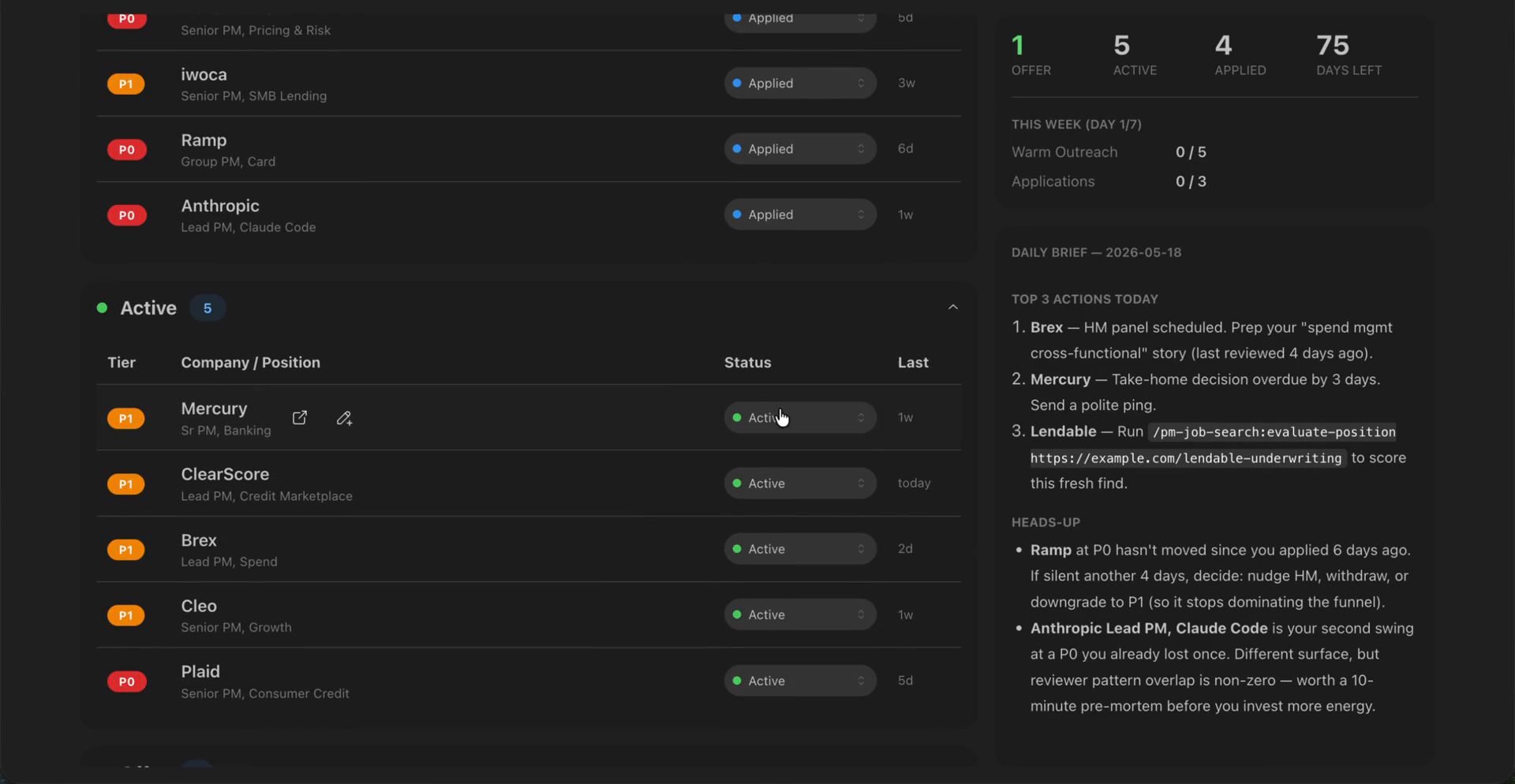
Video walkthrough: https://github.com/user-attachments/assets/e1b39e00-d600-4ef4-bd16-ccda8025c8c4
Three panels:
- Left — Applications. Accordion grouped by status in funnel order, each header showing the count for that status. Each row has tier badge (P0/P1/P2), company + position, status dropdown for inline change, and last-touched date. Click any row to open the company drawer.
- Right top — Pipeline & weekly stats. A 4-stat bar (
Offer / Active / Applied / Days Left until target offer date) plus a "This Week" panel tracking warm outreach + applications against yourstrategy.mdtargets. At-a-glance "am I tracking?" view. - Right bottom — Today. Renders the latest
userdata/outputs/daily-brief-*.mdinline — top 3 actions + heads-up section — so you don't have to flip files.
Company drawer (opens on row click) has four tabs:
- Research — the
research-brief.mdwritten by/evaluate-position - Notes —
notes.mdfor quick thoughts between meetings; add / edit / delete in place, with conflict detection if you edit the same note from CLI elsewhere - Prep — every
interview-prep-*.mdfor this role, newest first - Debriefs — every
interview-debrief-*.mdfor this role, newest first
When to use the dashboard vs the CLI
| Doing | Use |
|---|---|
| Scanning the whole pipeline, especially with many open roles | Dashboard |
| Bumping status after a recruiter call, or jotting a note between meetings | Dashboard |
| Reading a prep doc or debrief without opening files | Dashboard |
Anything that writes new artefacts — /evaluate-position, /apply, /interview-prep, /interview-analysis |
CLI |
Anything strategic — /today, /career-coach, offer evaluation |
CLI |
| Bulk imports, edits, file moves | CLI |
The dashboard is intentionally read-mostly. It writes back exactly two things: status changes (to each role's meta.md) and notes (to notes.md per company). Everything else is reading. New roles, evaluations, applications, prep docs — those come from CLI skills because the model needs to be in the loop.
Start / stop
/pm-job-search:dashboard         # opens browser tab at http://localhost:<port>
# ctrl-C in the terminal to stop
React + Mantine, pre-built bundle committed to the repo. Zero install, no Node required at runtime.
Already use Notion? Skip the dashboard.
If you already run the Notion MCP, you can sync your pipeline to a Notion database instead. The markdown in userdata/companies/ stays the source of truth; Notion becomes a derived view. One on-demand sync, no auto-sync, no bidirectional drift. See INTEGRATIONS.md §4 — Notion for the prompt pattern.
Extending the plugin
Markdown-only is the default, but you can wire in MCP servers you're already running to make specific skills more capable. See INTEGRATIONS.md for the prompt patterns, covering:
- Granola — pull meeting transcripts into
/interview-analysis+ surface interview recordings as input-phase confirms in/today - Gmail (or any inbox MCP) — surface recruiter replies, rejections, and offer language as input-phase confirms in
/today - Calendar (gcal / iCal) — surface upcoming interviews in
/today's heads-up + flag new / rescheduled / cancelled events as input-phase confirms - Notion — sync companies as Notion DB rows alongside the markdown source
- Playwright — link-liveness verification + interviewer research
- Slack / Telegram / Discord — pipe
/todaydigests to an accountability channel
Each one is a prompt pattern, not a plugin code change — nothing to install on the plugin side, nothing it auto-detects.
What's in userdata/examples/
Two fictional personas so you can see what a working install looks like before running /setup:
userdata/examples/maya/— Maya Patel, senior PM in London doing consumer credit / fintech. Full install: profile, strategy, journal, two companies (one interviewing, one rejected), two stories with adaptation angles, a generated applications.md index.userdata/examples/diego/— Diego Alvares, VP Product in Mexico City going after fully-remote US roles. Skeletal install (profile, strategy, one company, one story) — stress-tests the schema against USD compensation, no anchor city, US English, B2B SaaS.
Both personas are entirely fictional.
Privacy + contributing
Your userdata/ directory is gitignored except for the example installs. Anything you put there — profile, journal, company notes — stays on your machine unless you share it on purpose.
A CI workflow scans every push and PR for the plugin author's personal-data blocklist (via ripgrep). If you fork, swap the blocklist for your own terms or remove the workflow entirely — your fork, your call.
Contributions welcome. CONTRIBUTING.md covers scope, dev install, the privacy hard rule, testing conventions, and what's in scope for issues vs not.
Feedback & support
- Found a bug or have a feature request? Open an issue on GitHub — include the skill you ran, what you expected, and what happened. Repro steps help.
Licence
MIT. See LICENSE.
Reviews (0)
Sign in to leave a review.
Leave a reviewNo results found