cogiforge
Health Warn
- License — License: MIT
- Description — Repository has a description
- Active repo — Last push 0 days ago
- Low visibility — Only 7 GitHub stars
Code Pass
- Code scan — Scanned 12 files during light audit, no dangerous patterns found
Permissions Pass
- Permissions — No dangerous permissions requested
No AI report is available for this listing yet.
cogito ergo sum: a creative workbench second brain (Obsidian + Claude Code) that organizes your work and improves with you



cogiforge is a second brain on Obsidian + Claude Code that learns how you work, and writes nothing about you that you did not say. Cogito, ergo sum: a creative workbench for your head. It holds your work, your school and your personal life in one place, organizes your projects, ideas and tasks, helps you write and plan, and gets better with you as you use it.
Status: alpha (v0.x). Built from the author's own working vault and used, so far, only by the
author. Skills, docs and the vault template are in English. If you want to use it in Portuguese, see
docs/TRANSLATING.md (glossary and a checklist). Step by step for each part: TUTORIAL.md.
Quickstart
You need git, Python 3.10+, Obsidian and Claude Code. macOS and Linux are what the CI proves. Windows has an installer (install.ps1) and an informational CI job that is not guaranteed green; see docs/WINDOWS.md, where every unconfirmed claim is marked [VERIFY]. To run this
repo's own tests you also need pytest (python3 -m pip install pytest); nothing else in the repo uses it.
git clone https://github.com/Arthuro0103/cogiforge.git
cd cogiforge
sh install.sh      # turns the pre-commit hook on and proves it works
claude              # run Claude Code at the repo root
Then, inside Claude Code, type /cf-onboard. Open vault/ as a vault in Obsidian. When you have a
project, /cf-open-session <name> to start and /cf-close-session to end the day. The example projectvault/projects/example-my-first-project/ shows the shape. Tasks need the public TaskNotes plugin
(install it from Obsidian's community plugins), and the optional connection map needs graphify: both are
in the tutorial.
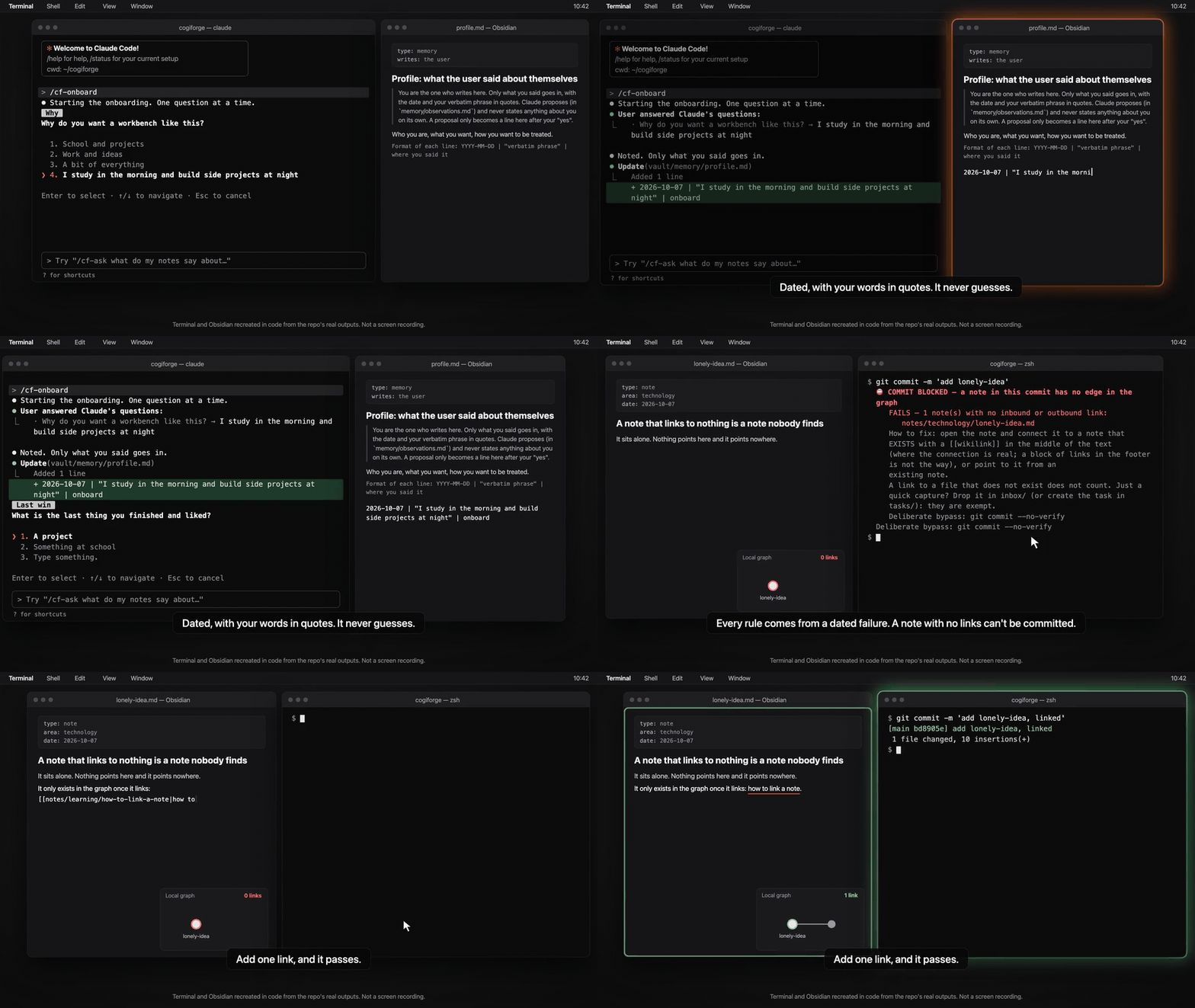
Onboarding and the commit gate, 14 s. Terminal and Obsidian recreated in code from the repo's real outputs; not a screen recording.
Who it is for
| You | Start here |
|---|---|
| Just you | /cf-onboard, then /cf-open-session <project> and /cf-close-session. |
| Studying | /cf-study <topic>: you choose how you learn, recall comes first, "mastered" needs a retest on another day. See docs/STUDENTS.md. |
| A team or a school | sh install.sh --team <handle>, one folder per person, admin and member roles. See Teams and schools below, docs/SYNC.md and docs/WINDOWS.md. |
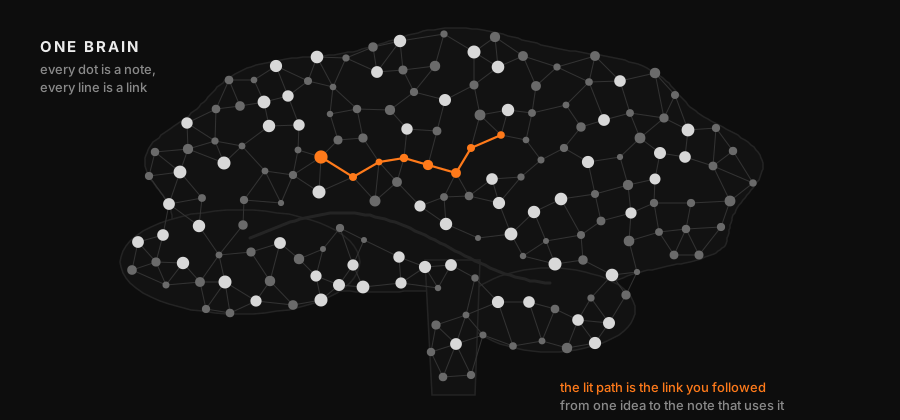
Why it exists
cogiforge came out of using Claude on a real vault. Three decisions shaped it:
- Claude does not decide who you are. Nothing about you is written unless you said it. A line only enters your profile with your "yes", the date and your literal quote.
- A rule stays only if a real failure justifies it. Every rule in this repo comes from a dated mistake, and has a test that goes red without it. Examples from WHY.md: a link checker that reported OK while 58 links were broken, a check that touched nothing and still said OK, a gate that was bypassed with
--no-verifythree times and then six. - It proposes, you decide. The skills write suggestions to files. Nothing changes behind your back.
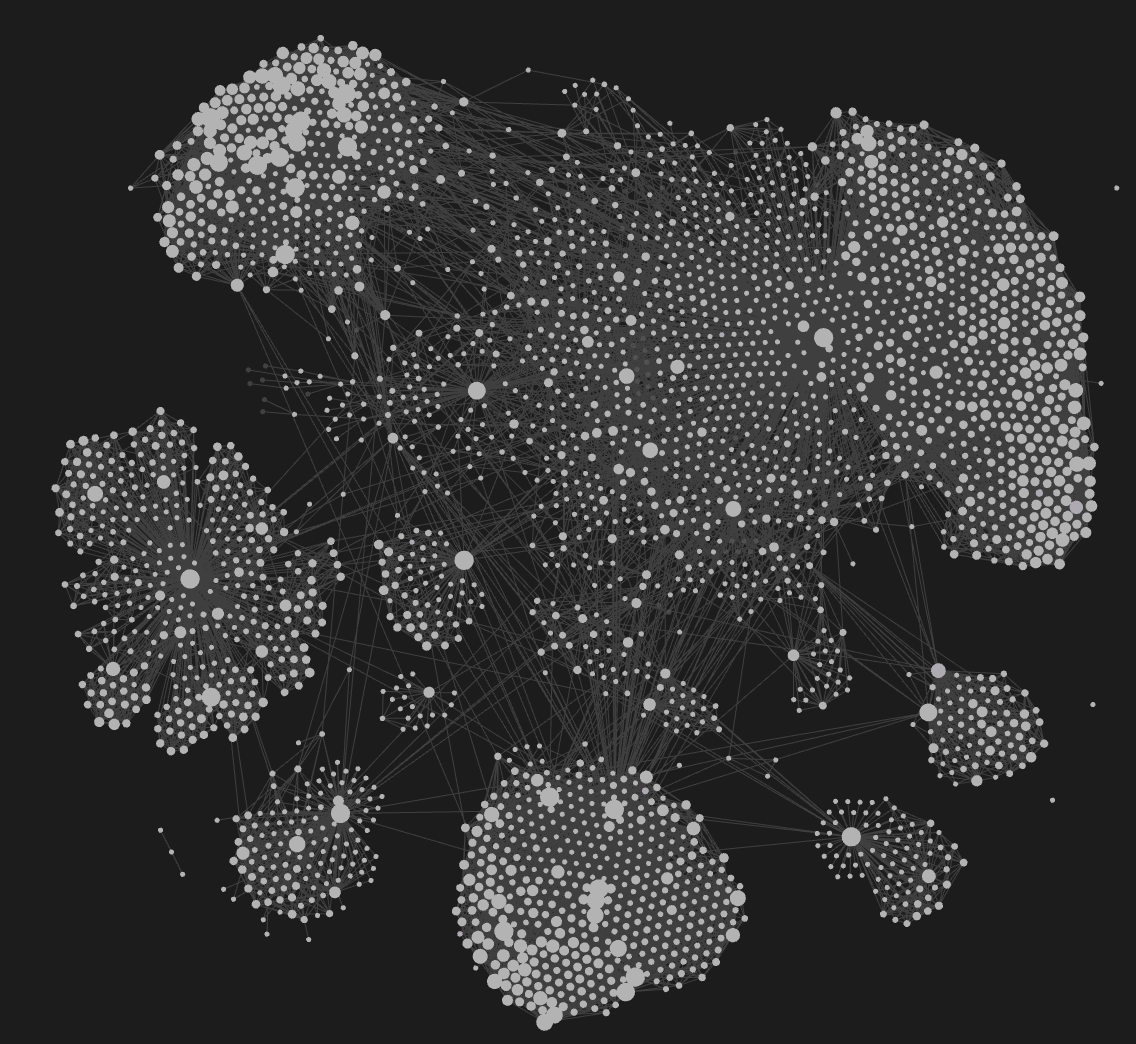
The author's own vault, drawn as a graph. Every dot is a note and every line is a link between two notes. File names are removed.
What you get
| Piece | What it does |
|---|---|
vault/ |
The workbench: inbox/ for quick capture, notes/ for processed notes, projects/ with one root file per project, memory/ for what you told it, tasks/ for tasks. Open this folder in Obsidian. |
/cf-onboard |
Onboarding. Asks one question at a time, each following your last answer, and writes what you said, dated and quoted. It never guesses. |
/cf-open-session <project> |
Starts work on a project: reads its root file, the last diary entries and the open tasks, and tells you where you stopped. |
/cf-close-session |
Ends the day: diary, a briefing per session, the pains you voiced collected in one file, tasks opened for what is pending. It commits only if you say so and never pushes. |
/cf-task-observer |
Watches how you work and only proposes improvements (a missing skill, a step you repeated three times, a correction you made twice). You decide. |
/cf-claude-corner |
When you say you are leaving, Claude uses that time to reread your notes, find real connections and test ideas in a throwaway place. It only proposes, in a file. |
| Tasks (TaskNotes) | Tasks are notes in vault/tasks/, managed by the public TaskNotes Obsidian plugin (MIT). Not bundled: you install it from Obsidian's community plugin store. cf-open-session and cf-close-session read and write the same format. |
| Connection map (graphify, optional) | The public graphify (Apache-2.0) maps your notes into a graph you can query. Install it yourself; its output folder is git-ignored. See the tutorial. |
/cf-brainstorm |
Brainstorming for any product, project, study, event or loose idea. Checks what the vault already says, proposes three genuinely different paths, compares them on criteria you choose, recommends one without choosing for you, and stops at a brief you approve. No code and no plan before your "yes". |
/cf-extract-routine |
Gets a real routine out of your head by interview, one question at a time. What you do not know stays [CONFIRM]; Claude never invents a step. It can reach ready-for-human-review; validated needs a second person who follows the order without guessing. |
/cf-whats-real |
Keeps, per project, what works (with proof), what is simulated or a demo, and what is unknown. An item moves to "works" only with proof run again. |
/cf-know-my-product |
Interviews you about your product and collects your pains with your literal words and the date, then proposes a ranking. You approve before anything is saved. |
/cf-import-knowledge |
Brings an existing base (another vault, a folder, documents, chat exports) into the inbox and walks you through the triage, target first. See Bringing an existing knowledge base. |
/cf-adapt-skill |
Helps you write your own skill from a worksheet in vault/skill-worksheets/. One question at a time; Claude never writes it for you, and "this is not for me" is a valid answer that gets recorded. |
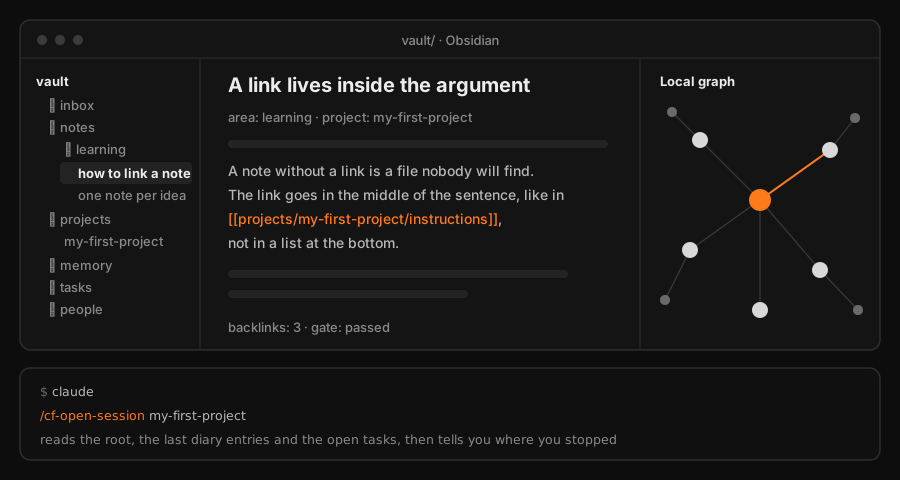
The workbench in use: Obsidian on vault/, Claude Code at the repo root.
How it improves with you
Three loops, and in all of them the decision stays with you:
- Pains. At the end of a session your own words about what hurt are saved, dated, in
vault/memory/ideas/_pains.md. - Proposals.
cf-task-observerandcf-claude-cornerwrite suggestions to files. Nothing is changed behind your back. - Your own skills. The worksheets teach how a skill is built, and
cf-adapt-skillwalks you through making yours. You are not handed a finished one.
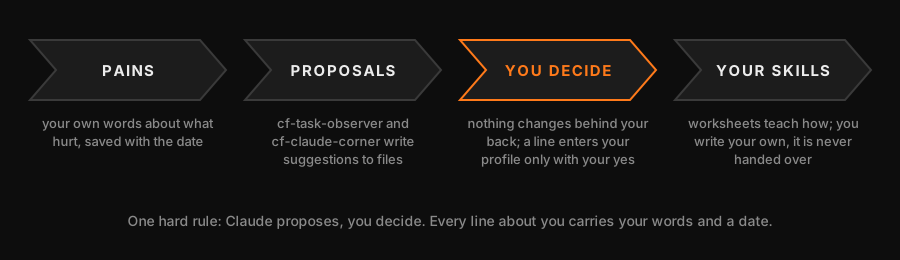
One hard rule runs through everything: Claude does not write anything about you that you did not say.
It proposes; a line only enters your profile with your "yes", with the date and your literal quote.
Teams and schools
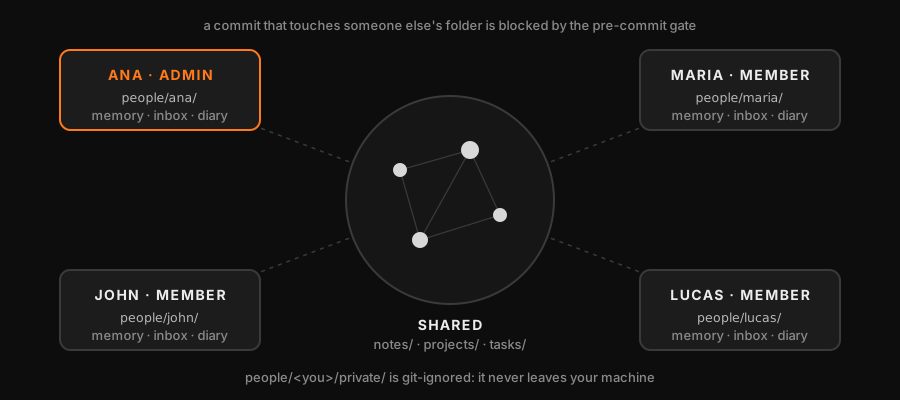
One vault for a group, one folder per person: vault/people/<handle>/ (memory, inbox, diary). Turn it on withsh install.sh --team <your-handle>: it writes vault/roles.txt with you as admin (your git config user.email)
and copies vault/people/_template/. Add people as lines handle admin|member email. Without roles.txt
nothing changes: solo mode is identical.
- admin passes everything. member works in their own folder, in
notes/, and in existing projects; the pre-commit hook blocks a member who touches another person's folder,roles.txt,areas.txt, or creates a project, and blocks an author who is not inroles.txt. - The honest limit: git has no permission per folder. The roles are a convention plus a local hook, and
git commit --no-verifyskips it. Real enforcement is the host: add aCODEOWNERSfile (for examplevault/roles.txt @your-org/adminsandvault/people/ana/ @ana) and turn on branch protection with required reviews. - Everyone who clones reads everything. What is intimate goes in
vault/people/<handle>/private/, which is gitignored and never leaves your machine. install.sh --teamlistsvault/roles.txtin.leakignore, because the e-mails there are deliberate.
Guides
- AGENTS.md: the operating rules in a form any coding agent reads (Codex, Cursor, Gemini CLI, Copilot, Claude Code).
- docs/EXPORTING-CHATS.md: export your chat history from claude.ai, ChatGPT or Gemini and bring it into the vault with
tools/import_chats.py. - docs/RESEARCH.md: research with the vault: your notes first, the internet second, every outside claim marked until checked.
- docs/PRIVATE.md: tell Claude Code not to read some folders (
vault/private.txt), and the limit of that: it is not a boundary against Bash, other agents or whoever clones the repo. - docs/WINDOWS.md: the native PowerShell path and the WSL path, with what is and is not verified.
- docs/USING-OTHER-MODELS.md: use the vault with agents other than Claude Code, and what you lose without its skills.
- docs/SYNC.md: keep the vault in sync without duplicates or conflicts, and what the commit guard catches.
- docs/STUDENTS.md: study what you want, the way you want, with
/cf-study <topic>: recall questions, a mastery log and retests on another day.
Context, worksheets and pains
Claude helps in proportion to the context it has, so the workbench teaches you to keep that context small,
specific and in your own words.
- docs/CONTEXT.md: what loads in every session, what loads only on demand, where each thing lives, signs of bad context, and tips for personal, team and school use.
- docs/PRODUCT-AND-PAINS.md: how the workbench learns your product and collects your pains, and how to ask "what do I build first?".
- Worksheets in
vault/worksheets/: product-brief, pains, audience, project-brief, decisions-log, weekly-review.painsanddecisions-logalso come as CSV invault/worksheets/csv/for Sheets or Excel. /cf-know-my-product <project>: interviews you one question at a time and fills the product brief with your words only.
What keeps it healthy
This is the foundation under the workbench. It is deliberately small and runs on Python's standard library only.
- Orphan gate. The pre-commit hook blocks a note that links to nothing and nothing links to.
inbox/is exempt: if quick capture gets blocked, people uninstall the thing. Only notes in that commit are blocked; others just get a warning.
Too strict for you? Putorphan: warninvault/gate.txtand the same report becomes a warning that lets the commit through. The default isblock, and agate.txtthe gate cannot understand blocks the commit instead of passing. The leak scanner never reads this file. - Link check (
core/gate.py). Dead links, broken links, a path that only matches by file name, a badarea:, unreadable files (reported as "could not read", never as OK). - Leak scanner (
core/leak.py). Blocks machine paths, e-mails, phone numbers, CPF and a private list of terms that lives outside the repo. Without that list it saysNOT_VERIFIED, never "clean". - No Portuguese by accident (
tests/test_no_portuguese.py). The repo moved to English in October 2026, and this test fails on accented letters, common Portuguese words and the old Portuguese folder and script names. The few deliberate exceptions are intests/pt_allowlist.txt, onepath: reasonper line, and a second test fails when an exception no longer exists or no longer needs to be one. - CI (
.github/workflows/prova.yml). Installs from a clean clone, runs the tests and the mutation check, and tries the orphan gate end to end. The step that proves the hook test goes red now insists on that exact failure: a renamed test once made it print "ok" without testing anything.
The hook can be bypassed on purpose with git commit --no-verify. Every rule here comes from a real,
dated failure, and each one has a test that fails without it: see WHY.md.
What is verified, and what is not
Measured on 2026-10-07, after team mode, the importers, the sync guard, /cf-adopt, /cf-study, private folders and the cf- skill names were merged, on one machine (macOS):
- Tests: after
sh install.shandpython3 -m pip install pytest,python3 -m pytest -qgave 543 passed, 2 skipped (commit79ecad2). Run beforesh install.sh, one test fails on purpose: it checks that the hook is active. - Mutation:
python3 tests/mutate.pybreaks every check one at a time and gave 236 of 236 mutants killed, 0 alive, 0 inapplicable (commit2d54a04; the later commit79ecad2changed onlytools/adopt.py, its tests and its skill, which the mutation check does not cover).python3 tests/mutate.py --dryonly checks, in seconds, that every mutant still applies (all 236 apply), so a rename that breaks one is caught before the long run. - CI: the run for commit
2d54a04(run 37642244068, 2026-10-07) had 8 of 8 jobs green, on ubuntu and macOS with Python 3.10, 3.11, 3.12 and 3.13. Each job starts from a clean checkout, runsinstall.sh, the tests, the mutation check and the leak scan, and proves the orphan gate end to end. - Windows: the first
windows-latestrun (same commit, informational job) installed fine withinstall.ps1(hook active, ring selftest passed), then 468 tests passed and 67 failed. The failures sit mostly in the tests of the leak scanner and ofadopt; they are not fixed yet, so Windows is not claimed as supported. - Two tests compare this link checker with the author's private vault, which is not in this repo. They are skipped (reported as skipped, not as passed).
- Nobody other than the author has used it yet. If you are the first, tell us where you got stuck: that is the most useful thing you can send.
Roadmap
artigo, conselho, product-idea and consult-notes as real skills (their worksheets are in vault/skill-worksheets/ today); a skill that turns one of your own failures into a rule plus a test.
Bringing an existing knowledge base
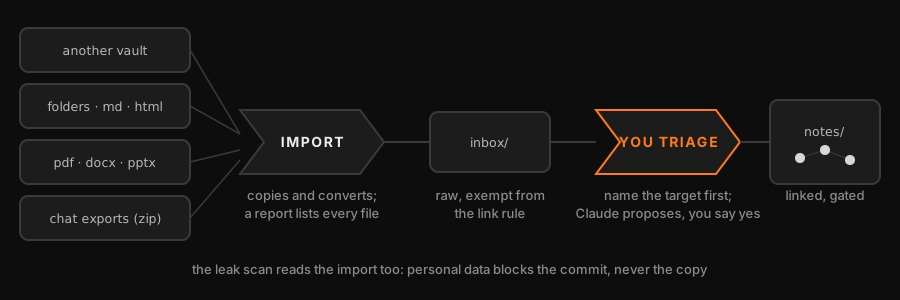
A team, a school or a person usually starts with notes that already exist. The import is a copy plus a
conversion: your originals are never touched, and nothing is dropped in silence.
python3 tools/import.py ~/old-wiki --dry-run          # plan: prints the report, writes nothing
python3 tools/import.py ~/old-wiki [--person HANDLE]  # into vault/inbox/imported/old-wiki
It writes _import-report.md next to the copy: every file of the source is listed as converted, copied,
unchanged, ignored or not converted, with the reason, and the count has to close. It then runs the leak
scanner on the result and lists file:line:type (never the data); a leak does not stop the copy, but the
commit is blocked until it is cleaned. Imported files land in an inbox, which the orphan gate exempts. Moving
one into notes/ takes a named target and a link in the body: the cf-import-knowledge skill walks you through it.
| Format | What happens |
|---|---|
.md, .txt, .html, .csv, .json, images (png jpg gif svg webp) |
Direct, standard library only: markdown is copied unchanged, .txt becomes .md, HTML becomes simple markdown, CSV becomes a table, JSON a code block, images are copied as they are |
.pdf, .docx, .pptx, .xlsx and similar |
With docling (python3 -m pip install docling): converted to markdown. Without it they are copied to _unconverted/ and listed with the install command |
| Anything else (archives, audio, video, ...) | Not supported: copied to _unconverted/ and listed, never discarded |
Ignored and listed: .git, .obsidian, .trash, node_modules, __pycache__ and hidden files. Skipped and
listed: iCloud files that are not downloaded yet, unreadable files and symlinks.
Adopting a vault you already have
If your notes already live in an Obsidian vault, you do not need to start from zero or copy them anywhere.tools/adopt.py works in place:
python3 tools/adopt.py ~/my-vault                  # dry run (the default): prints the plan, writes nothing
python3 tools/adopt.py ~/my-vault --apply --yes    # writes only what the plan listed
The plan lists the areas it infers from your top-level folders (a proposed areas.txt), what it would install
(a pre-commit hook that calls this repo's gate, ring and leak scan, plus a small config), and the debt you have
today: orphan notes, dead links and notes without area:, saved as .cogiforge/baseline.json. The hook only
judges the notes in each commit, so the old debt blocks nothing; it only stops new problems from entering.
The dry run prints the full text of the hook, which runs on every commit and finds this repo through your local git config (never through a file in the vault). Adopt asks git itself to list a private copy of .git/config (running nothing) and accepts only what git init or git clone write (plus its own two keys); anything else, such as a filter, an alias, an include or a pager, blocks it with the line cited, so a vault received from someone else cannot run anything through its git config. Text that comes from the vault is shown with control characters escaped, so it cannot rewrite your terminal. It also requires .git to be a plain repository (no commondir, config.worktree, alternates, extra hooks, attributes and so on), because git reads those too; it refuses symlinks on the paths it writes and a .githooks folder that holds anything but its own hook. The hook trusts the cogiforge checkout you point it at (cogiforge.home): it checks that the three scripts exist there, not who wrote them, so use a clone of your own. If the vault already has a different .githooks/pre-commit, adopt refuses to activate it and applies nothing until you have read it and decided. An existing file is never overwritten (it becomes a conflict in the report), no note is ever touched, and the tool
never runs git init for you. Notes that are iCloud placeholders not yet downloaded, or unreadable, are skipped
and listed, never counted as fine. The cf-adopt skill walks you through it.
License
MIT. See LICENSE.
Reviews (0)
Sign in to leave a review.
Leave a reviewNo results found