sfwiz
Health Warn
- License — License: Apache-2.0
- Description — Repository has a description
- Active repo — Last push 0 days ago
- Low visibility — Only 5 GitHub stars
Code Warn
- network request — Outbound network request in scripts/fetch-jsforce-docs.ts
- process.env — Environment variable access in scripts/probe-orgs.ts
Permissions Pass
- Permissions — No dangerous permissions requested
No AI report is available for this listing yet.
Claude-Code-style TUI harness for Salesforce. Orchestrator + 6 persona subagents, jsforce + sf CLI, qmd RAG. Powered by Claude Opus 4.7.

 ███████╗███████╗██╗    ██╗██╗███████╗
 ██╔════╝██╔════╝██║    ██║██║╚══███╔╝
 ███████╗█████╗  ██║ █╗ ██║██║  ███╔╝
 ╚════██║██╔══╝  ██║███╗██║██║ ███╔╝
 ███████║██║     ╚███╔███╔╝██║███████╗
 ╚══════╝╚═╝      ╚══╝╚══╝ ╚═╝╚══════╝
 Salesforce × Claude — terminal-native AI harness
sfwiz is a Claude-Code-style interactive TUI harness for the Salesforce ecosystem — built for Apex developers, LWC engineers, and Salesforce admins who want AI-assisted workflows without leaving the terminal.
Hackathon project — powered by Anthropic Claude.
Demo
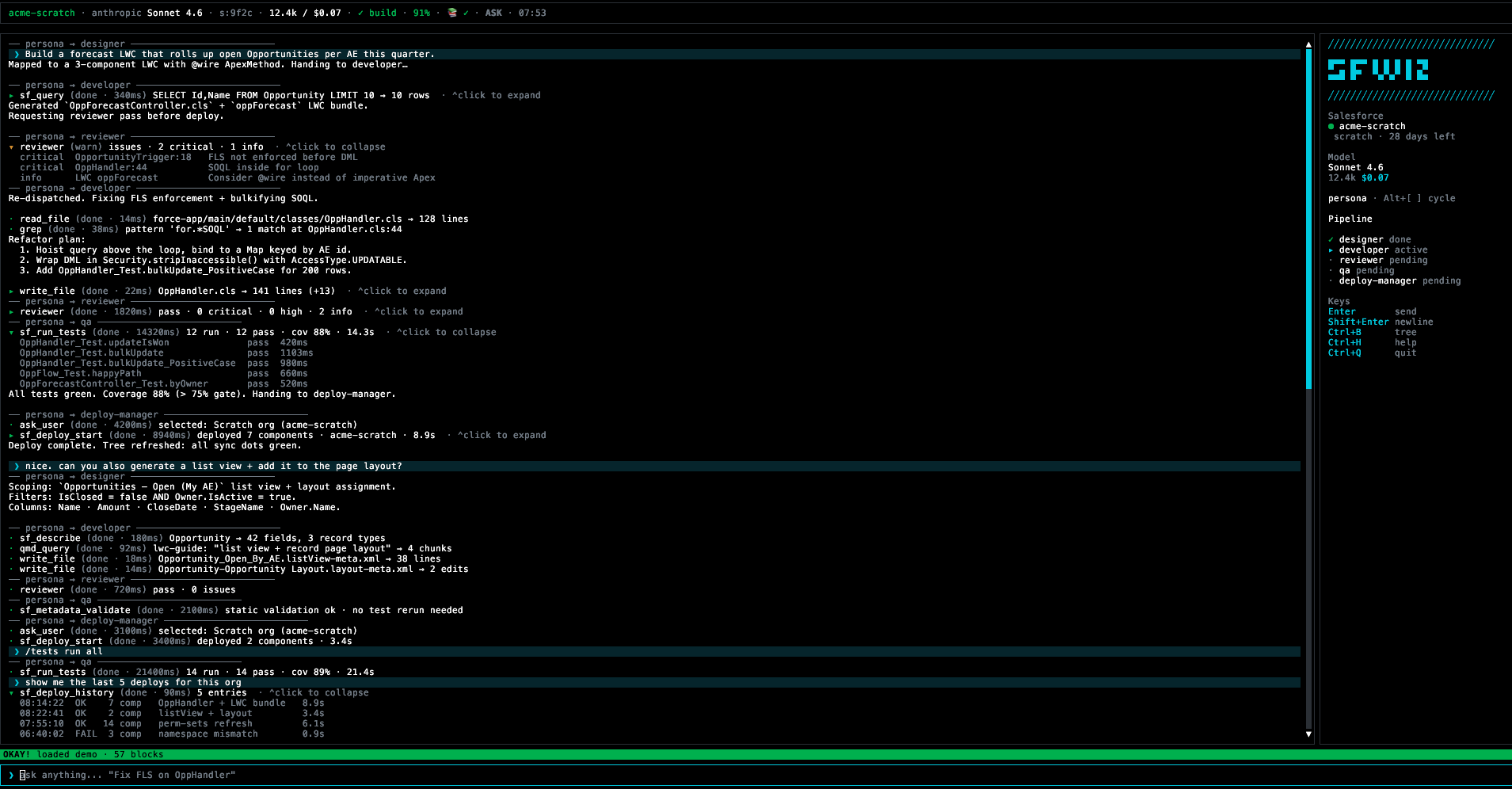
Architecture
- Orchestrator (
@anthropic-ai/sdkmessages.stream()): streaming tool-use with manual dispatch. - 6 persona subagents (
@anthropic-ai/claude-agent-sdkquery()): org-admin · designer · developer · deploy-manager · reviewer · qa. Each runs as an isolated subagent with its own tool-scope and model (Opus 4.7 for reviewer + designer; Sonnet 4.6 for the rest). Structured JSON returned via the finalresultmessage is injected back into the orchestrator as a tool-result. - Tools: filesystem (read/edit/write/grep), shell, jsforce (SOQL/describe),
sfCLI (deploy/scratch/permset/retrieve/tests/apex), andask_userfor confirmations. - Continuous-learn worker (Bun Worker, opt-in): daily scraper → qmd embed of Apex reference, LWC guide, and Salesforce release notes.
- Prompt caching: 4-breakpoint strategy — system block, last tool-def, stable history prefix, last assistant turn.
- Safety: destructive Salesforce ops (
sf_deploy_start/sf_scratch_create/sf_assign_permset) are runtime-gated behind a mandatoryask_userconfirmation regardless of permission mode.
Status: hackathon submission build (v0.1.0). Round-2 E2E PASS — see
E2E-Test-Result.MD.
Quickstart
Prerequisites
- Salesforce CLI (
sf) logged in (sf login web) - An Anthropic API key (set inside the TUI — see below)
- For source builds: Bun 1.1+
Run from release binary (macOS Apple Silicon)
# Download + verify checksum
curl -L -o sfwiz https://github.com/arufian/sfwiz/releases/download/v0.1.0/sfwiz-darwin-arm64
curl -L -O https://github.com/arufian/sfwiz/releases/download/v0.1.0/sfwiz-darwin-arm64.sha256
mv sfwiz sfwiz-darwin-arm64
shasum -a 256 -c sfwiz-darwin-arm64.sha256

# Make executable + launch
mv sfwiz-darwin-arm64 sfwiz
chmod +x sfwiz
./sfwiz --first-run
Optional — install globally:
sudo mv sfwiz /usr/local/bin/sfwiz
sfwiz --first-run
Only
darwin-arm64ships as a prebuilt binary (Bun cross-compile is blocked by@opentui/coredynamic-import resolution). Other platforms must build from source.
Run from source
git clone https://github.com/arufian/sfwiz.git
cd sfwiz
bun install
./run_sfwiz.sh           # builds dist/sfwiz on first run, then launches
# or, for live-reload dev:
bun scripts/dev.ts
Set the API key (inside the TUI)
On first launch sfwiz prompts for an Anthropic API key — paste it and press
Enter. The key is saved to ~/.sfwiz/config.json (chmod 600, owner-only).
No .env file, no shell variable to export.
To change the provider or rotate the key later:
- Open the command palette (
Ctrl+P) and run/provider(alias/api-key). - Pick Anthropic (more providers come in v2).
- Paste a new key starting with
sk-ant-…orsk-proj-….
The TUI rejects malformed keys and clears the saved value if it ever gets
corrupted, so a stale config can never silently boot the agent loop.
Features
| Area | Commands / UI |
|---|---|
| Orgs | /orgs — list authenticated Salesforce orgs |
| Login | /login — authenticate a new Salesforce org |
| Knowledge | /knowledge (alias /kb) — manage knowledge base (qmd) |
| Learn | /learn — control continuous learning worker |
| Permissions | /permissions — view or change permission mode (ask / auto-edit / yolo) |
| Sessions | /sessions — browse and resume prior sessions |
| Model | /model — switch active Claude model |
| Provider | /provider (alias /api-key) — choose LLM provider, paste API key inside TUI |
| Help | /help — show keybindings and commands |
| Quit | /quit (alias /exit) — exit sfwiz |
| Command palette | Ctrl+P — fuzzy-search commands + toggles |
| Tool surface (LLM-driven) | Apex anonymous, SOQL/describe, deploy/retrieve, scratch create, permset assign, run tests |
Keyboard shortcuts
| Key | Action |
|---|---|
Ctrl+P |
Command palette |
Ctrl+W |
Trust workspace |
Shift+Tab |
Cycle permission mode (ask → auto-edit → yolo) |
Ctrl+B |
Toggle directory tree |
Ctrl+Q |
Quit |
Build from source
# Current platform binary → dist/sfwiz
bun scripts/build.ts

# All platforms
bun scripts/build.ts --all

# JS bundle (for debugging)
bun scripts/build.ts --bundle
Project structure
src/
  cli.ts           Entry point (argv → TUI)
  agent/           Orchestrator loop + subagent dispatcher + cache hints
  config/          Config schema + first-run wizard + trust
  dispatcher/      Command registry + slash-command handlers
  knowledge/       qmd integration + collection bootstrap
  learn/           Background worker + scheduler + event bus
  personas/        Persona registry + gate
  scraper/         HTML→Markdown adapters + season detection
  sf/              @salesforce/core auth + jsforce connection
  tools/           All tool definitions (SF CLI + jsforce + system)
  tui/             OpenTUI/React views, overlays, layout
  util/            Fuzzy search + async utilities
resources/
  personas/        Persona prompt files (Markdown)
  references/      10 Salesforce reference guides
scripts/
  build.ts         bun build --compile wrapper
  dev.ts           Watch + restart for development
License
Apache-2.0 — see LICENSE.
Reviews (0)
Sign in to leave a review.
Leave a reviewNo results found