PeerHarness
Health Warn
- License — License: Apache-2.0
- Description — Repository has a description
- Active repo — Last push 0 days ago
- Low visibility — Only 9 GitHub stars
Code Fail
- rm -rf — Recursive force deletion command in .github/workflows/release.yml
Permissions Pass
- Permissions — No dangerous permissions requested
No AI report is available for this listing yet.
Your team votes on how its AI coding agents behave. Correct Claude Code once, and PeerHarness turns it into a one-sentence rule (an Agent Skill) that a majority of your team votes in for every member's agent. Peer-to-peer, no server.
PeerHarness
Your team votes on how its AI coding agents behave.
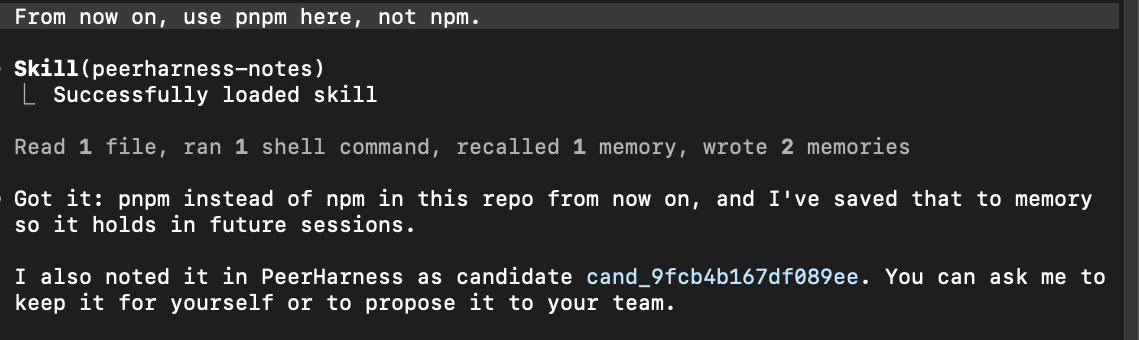
You correct your coding agent ("no, use pnpm, not npm"). PeerHarness turns the
correction into a one-sentence rule. Keep it for your own agent, or propose it to your
team: once a majority approves, every member's agent follows it. There is no server.
Each person runs their own node with their own keys, and every node checks every
signature and counts every vote for itself.
Agents suggest, people decide. Your agent can note a rule and open a window on your
screen that shows the exact text. It cannot answer the window: inside its session,
keeping a rule, sharing one, voting, inviting and joining take your click. That stops
an agent that is trying to help. It is not a sandbox (Limits).
Status: v0.4.0, early and not audited. For Claude Code on macOS. On Linux it
works from a terminal, without the windows. Windows is not supported. Read
Limits before you rely on it.
PeerHarness is also a command-line tool (CLI): every step here is a command too, and
you can run it yourself without an agent. See From a terminal.
Set it up
Paste this into Claude Code:
Set up PeerHarness for me: https://github.com/aryehlev/peerharness

1. Install it:
   curl -fsSL https://raw.githubusercontent.com/aryehlev/peerharness/main/install.sh | sh
2. The next step is mine. It is where I allow what you may start for me, so do not
   run it yourself: it would be refused. Ask me to run this in my own terminal:
   ~/.local/bin/peerharness setup

Then tell me to start a new Claude Code session, and what I can ask you there.
- Your agent installs it. The install line downloads the release binary for your
machine, checks it against the release'sSHA256SUMSand puts it in~/.local/bin.
Nosudo, and nothing else is changed. - You run
setup, once. It is where you allow what your agent may start for you,
so your agent is refused it. It creates your key and database and connects
PeerHarness to Claude Code: two hooks, one skill and its tools. It shows each change
before it makes it and asks you to confirm. - What it stores. One hook keeps a redacted copy of each prompt you type, so that
corrections can be noticed. The copies stay on your machine, for 14 days by default,
in a database that is not encrypted.
Then start a new Claude Code session and try it.
More: what setup adds and stores
and how to take it out again.
Try it in Claude Code
Start a new Claude Code session and say these, one at a time. You need no teammate
for it.
- "From now on, use pnpm here, not npm." Your agent notes the rule ("Use pnpm,
not npm, in this repository.") and tells you it did. It does the same when you
correct it in the middle of work. - "Keep it." A window shows the exact rule. Click Proceed: the rule is installed
for your own agent, which reads it from its next session. Nothing is shared. - "Create a PeerHarness team called acme." You are its only member for now.
- "Propose the pnpm rule to acme." A window shows the exact text that would leave
your machine. Click Proceed: the rule is put to your team's vote. - "Vote approve on it." A window shows your ballot. Click Proceed: one of one
members approved, so the rule passed and is now your team's.
Every window has the exact text and two buttons, Cancel and Proceed. Cancel is the
default, and your agent cannot answer the window. This is the one for the vote:
Your coding agent started this step. Nothing happens unless you choose Proceed.

You are about to sign a ballot in acme:
  approve on "Use pnpm, not npm, in this repository." (adopt rule use-pnpm-not-npm-repository)
An approval cannot be withdrawn. The rule, exactly as proposed:

---
name: use-pnpm-not-npm-repository
description: Use pnpm, not npm, in this repository.
---

# Rule

Use pnpm, not npm, in this repository.

If this conflicts with what the user asks for in the current session, follow the user and say that it conflicts with this rule.
After that, "What is in my PeerHarness inbox?" lists the rules your agent noted
and the proposals that wait for your vote, and "Anything new in PeerHarness?"
exchanges with the other members first.
A rule is never installed by itself: you keep it, or your team votes it in. A rule
your team passed is installed for every member's agent as an
Agent Skill when their node learns of it,
without a window. You can have your node ask you first, and you can opt out of any
single rule on your own machine.
Add a teammate
Dana wants to join acme. She sets PeerHarness up as above, and then:
- Dana: "What is my PeerHarness device key?" She sends you the key.
- You: "Invite Dana to acme. Her device key is ed25519:…" A window names Dana's
device. After Proceed your agent keeps your node reachable and tells you what Dana
needs: your node's peer id, by any channel, and the team's root fingerprint, by
phone or in person. - Dana: "Join the team. The peer id is 12D3…, the fingerprint is 8e8d-…" A window
shows the fingerprint and who is in the team. Proceed joins.
The fingerprint is how Dana knows the team is yours, so it travels apart from the
rest. From then on a rule needs both of your votes, and so does admitting a third
member, asked in the same kind of window. PeerHarness's own word for a team is a
circle.
A few steps are still done in a terminal: they are at the bottom.
How a vote works
A vote among three members, from the output of the built-in demo, abridged:
5. Alice puts it to the vote.
    alice approves.
    carol rejects: "Our CI images only ship npm."
    open: 1 of 3 approved (2 needed), 1 dissenting
    bob approves.
    Every node counts for itself and agrees: passed: 2 of 3 approved (2 needed), 1 dissenting
    No one held a veto, and carol's dissent stays on the record.

6. The charter is binding, so the rule is installed for every member's agent.

7. Carol opts out of this one rule. That is her right, and only her machine changes.

8. What cannot happen:
    Mallory signs a ballot. She is not on the roll: refused.
    The founder's root key signs a charter that adds Mallory without a vote.
    The signature is valid and every node still refuses it: the key is a notary, not a ruler.
- One person, one vote, however many devices they have.
- A majority of everyone entitled to vote. Not voting counts as not approving.
Nobody has a veto: arejectis recorded with its reason and does not block. - No deadlines and no coordinator. A member cannot withdraw an approval, and
counting reads no clock, so two nodes that hold the same records always agree. - Membership is voted too. Admitting or removing a member and changing the
thresholds need a vote. The founder's key signs the resulting charter, and nodes
refuse any charter that a passed vote does not justify. - A passed rule takes effect. It is installed for every member's agent, and any
member can opt out of a single rule on their own machine.
No vote and no charter can switch these off:
- Nothing leaves your machine without you seeing the exact text and confirming it.
- PeerHarness never executes a rule. A rule is one instruction-only
SKILL.md; tool
pre-approval and shell-injection syntax are refused outright. - No vote grants read access.
- A rule with high-risk content is never installed without asking you.
- You can refuse a rule and you can leave.
Why not a CLAUDE.md in git?
If the rule is about one repository and your team already reviews pull requests,
commit the file. You need nothing else. PeerHarness is for rules that follow people
across repositories, for groups with no shared repository or nobody who administers
one, and for members who want to see the exact text they vote on and to opt out of a
rule alone.
It is also more dynamic and more democratic. A rule starts as a correction in the
middle of work, with no file to edit and no pull request to open. And it passes by a
majority of everyone, not by the say of whoever can merge.
Limits
- The agent guard is not a sandbox. A session is recognized by an environment
variable, and only Claude Code's by default. A process running as you that hides it
can run the same commands with--yes. Your agent chooses when a window appears:
reading it before you click is your part. - A rule is text that your agent acts on, and your agent can run commands. The
risk scanner and the redaction are heuristics. Read a rule as you would a script. - Joining installs rules you have not read. The join window shows the charter and
how many rules it carries, not their text. You can opt out of any afterwards. - The founder can revoke a device without a vote, for a lost laptop. Its ballots
stop counting, so a result that needed one is undone. The founder's key also signs
every change of the roll: if it is lost, nobody can be admitted or removed. - No secret ballot, and at most 64 members. A member who never votes makes every
threshold harder to reach. - A node is reachable only while a daemon runs: yours, or the one your agent runs
while its session is open. There is no background service yet. - Internet mode shows your node's public key and IP address to servers run by
volunteers.
The full list is in docs/limits.md.
From a terminal
PeerHarness is one binary, peerharness, and a command-line tool by itself. Every
step above is also a command, and PeerHarness from a terminal has
each one. These are done there and not through your agent:
- A node that stays reachable. Your agent keeps yours reachable only while its
session is open. For one that stays up:peerharness daemon --internet --sync-every 60, and on macOS add--notify. - Being asked before a passed rule is installed
(peerharness circle mode ask --circle <team>), and opting out of one rule
(peerharness rule opt-out <name> --circle <team>). - Removing a member, leaving, changing the rules of the vote and repealing a rule.
- Editing or rejecting a noted rule, and anything about a rule that the scanner
calls high-risk. - Every decision on Linux, where no window can be shown.
Without the prompt, run the curl line from Set it up and then~/.local/bin/peerharness setup. To see the vote above run on your machine:peerharness demo. It needs only the binary, creates three members and one outsider
in a temporary folder, each with its own key and database, and reads or changes
nothing in your home or in ~/.claude.
Documentation
- docs/terminal.md: every step as a command, the other ways to exchange, and how to take it out again
- docs/limits.md: what it does not do, or not yet
- docs/checked.md: how each part was checked
- docs/security-model.md: threats, guarantees and limits
- docs/architecture.md: the internal contract every crate follows
- docs/protocol-v0.md: the wire format, for a second implementation
- docs/decisions.md: decisions and why they were made
- CHANGELOG.md: what each version added
Development
Written from 9 to 11 November 2026 with Claude Code, as the commit trailers say,
from the brief in docs/spec.md. To build and test, see
CONTRIBUTING.md. To report a vulnerability, see
SECURITY.md.
License
MIT or Apache-2.0, at your option.
Reviews (0)
Sign in to leave a review.
Leave a reviewNo results found