macvis
Health Warn
- License — License: MIT
- Description — Repository has a description
- Active repo — Last push 0 days ago
- Low visibility — Only 5 GitHub stars
Code Fail
- os.homedir — User home directory access in electron/core/agent/AgentLoop.ts
- network request — Outbound network request in electron/core/agent/ProviderValidator.ts
Permissions Pass
- Permissions — No dangerous permissions requested
No AI report is available for this listing yet.
MacVis — open-source local-first AI agent for macOS. Multi-provider (Claude, GPT, Gemini, Ollama). Full Mac access via MCP. BYOK, no backend, no telemetry. Download free.
MacVis — open-source local-first AI agent for macOS
A free desktop AI assistant for Mac with full system access, multi-provider model routing (Claude / GPT / Gemini / Ollama), and Model Context Protocol (MCP) integrations.
🌐 Website: asim266.github.io/macvis · 📦 Download: latest .dmg release
Bring-your-own-key. Multi-provider. No backend. No telemetry. Full Mac access.




Like Claude Desktop or ChatGPT for Mac — but you own the agent, your data, and the model choice.
Download
The app is not code-signed yet, so on first launch macOS will warn you. Right-click the app → Open → Open Anyway. (Or run xattr -d com.apple.quarantine /Applications/MacVis.app once.)
Prefer to build from source? See Quick Start below.
What is MacVis?
MacVis is a native macOS desktop assistant that runs the same kind of agentic loop you get from Claude or ChatGPT — only it lives entirely on your machine. The agent has full access to bash, your filesystem, web search, and your developer platforms via MCP. Every chat, every project, every API key stays on your Mac.
Built for developers who want a real agent to drive their environment, without sending their workspace to a third party.
Highlights
- 🧠 Multi-provider with fallback — pick a primary, secondary, and tertiary model. If the primary rate-limits or errors out, MacVis automatically falls back to the next.
- 🔑 6 providers, BYOK — Anthropic (Claude), OpenAI (GPT), OpenRouter (200+ models), Google Gemini, Groq (fast Llama/Mixtral), Ollama (local).
- ✅ Live key validation — every key has a one-click Test button that hits the provider's
/modelsendpoint and pulls in the actual model list you have access to. - 💾 Persistent memory — every chat is saved to
~/.macvis/sessions/. Reopen the app and your history is there. The agent remembers what it built in prior turns. - 📁 Projects view — every code project the agent creates goes to
~/.macvis/workspace/projects/and shows up in a dedicated Projects page with one-click Open in Browser / Editor / Finder plus Run for HTML/Node/Next/Python projects. - 🔌 MCP-ready — first-class config for GitHub, Supabase, Vercel, Railway, Slack, Cloudflare, Netlify, Stripe (Phase 4 wires up live connections).
- 📡 Telegram remote — single-user-gated bot for full agent access from your phone (Phase 7).
- 🚫 No database, no telemetry — everything is flat JSON in
~/.macvis/. Inspect, back up, sync — you own it. - 🎨 Distinctive UI — refined dark theme with warm-red accent, Geist typography, OKLCH-based design tokens. Inspired by Linear and Raycast.
Screenshots
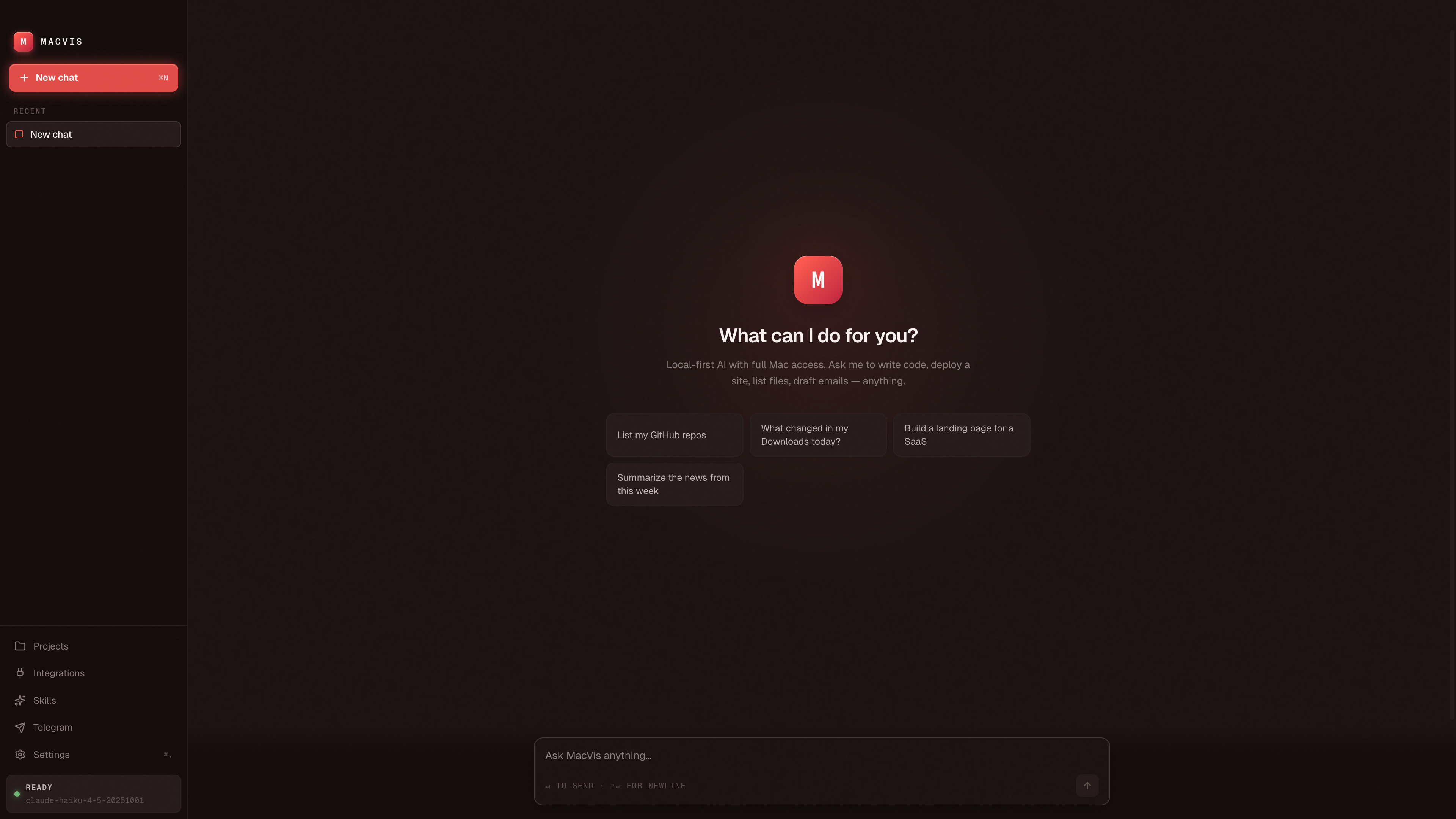
The empty chat — bold logomark, quick-prompt chips, and the agent ready to act.
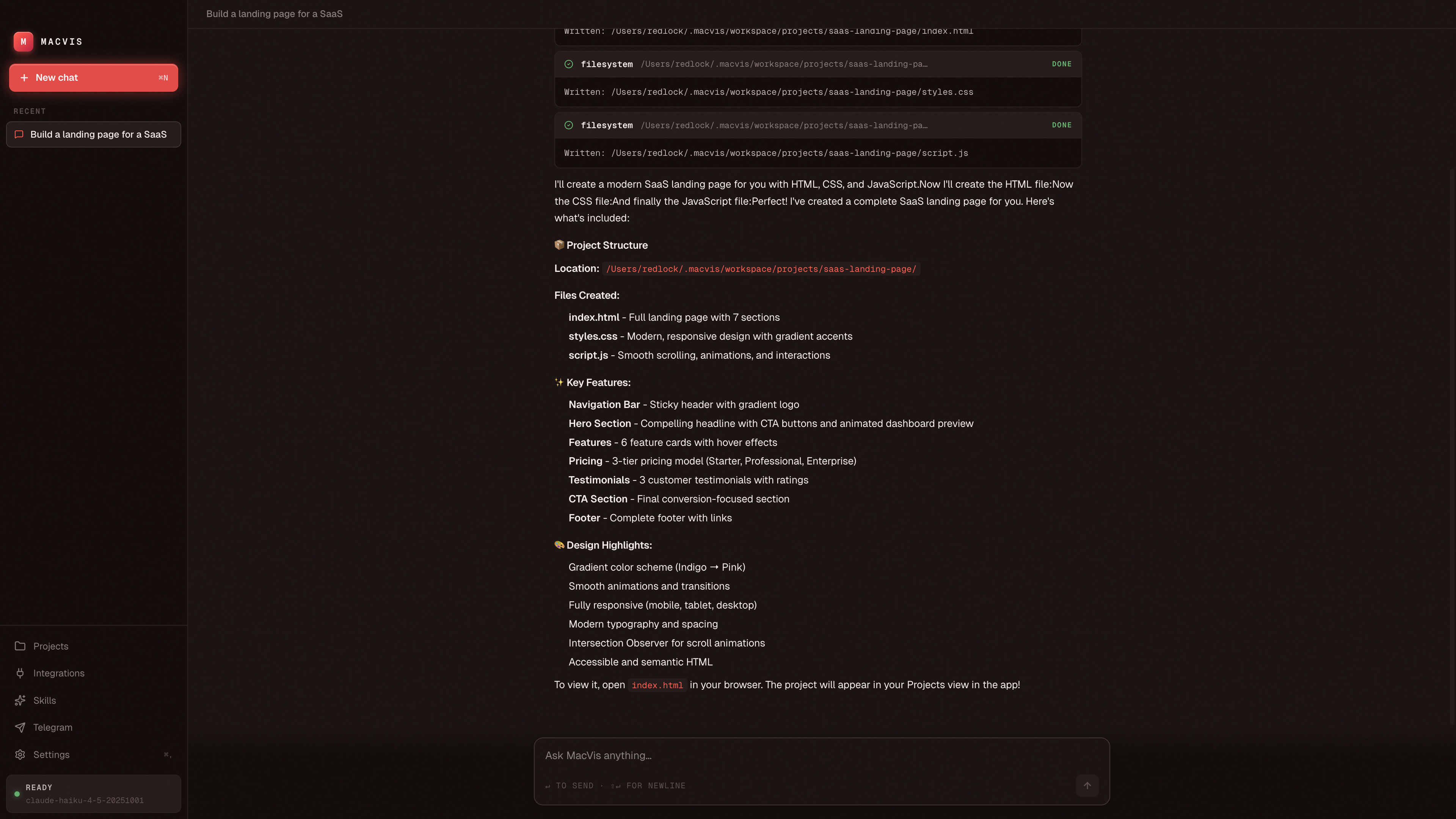
Tool calls render inline as terminal-style cards. Here the agent builds a SaaS landing page end-to-end, writing the HTML/CSS/JS itself.
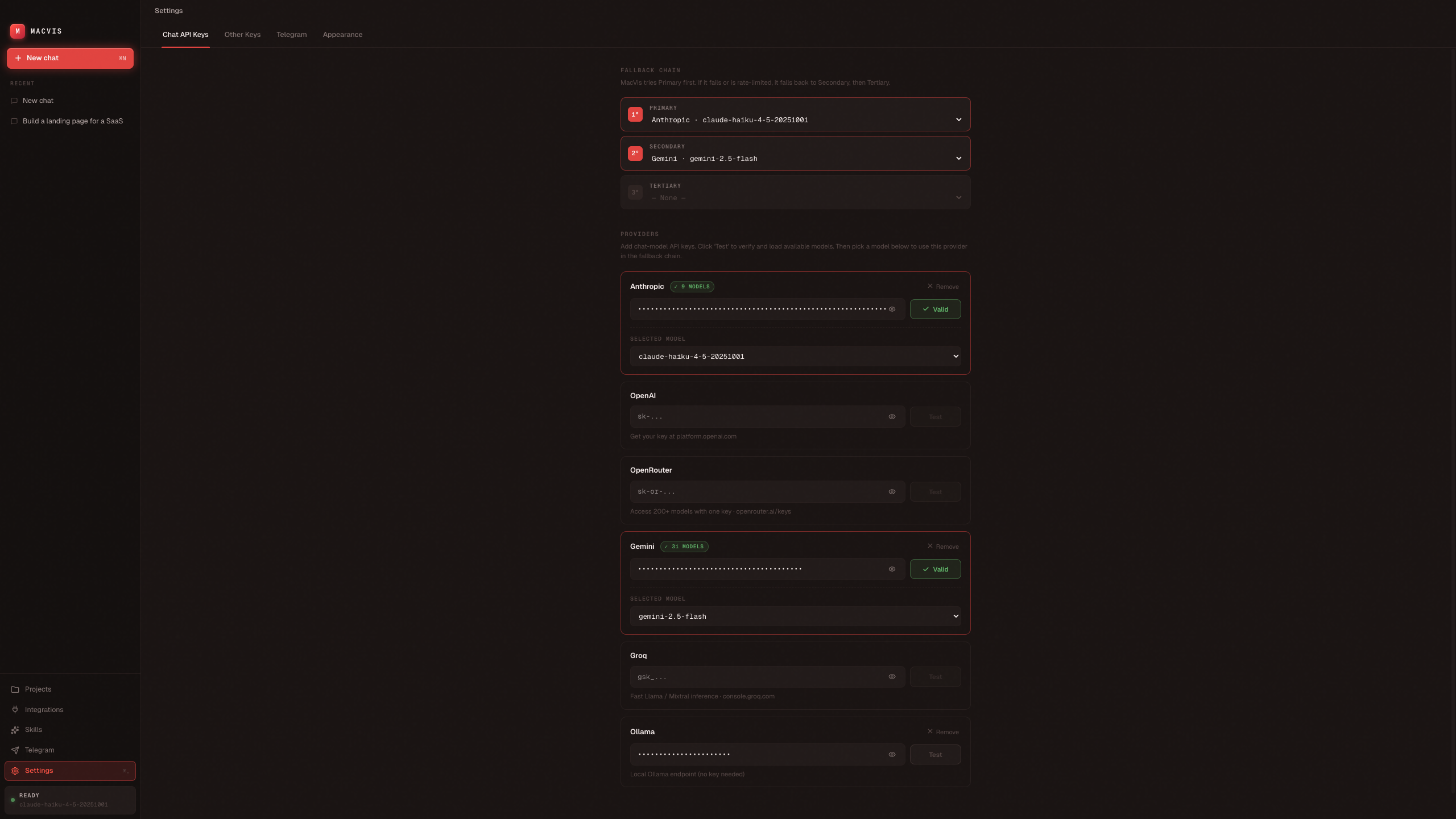
Chat API Keys — Anthropic primary + Gemini secondary fallback chain. Click Test and MacVis pulls the real model list from each provider.
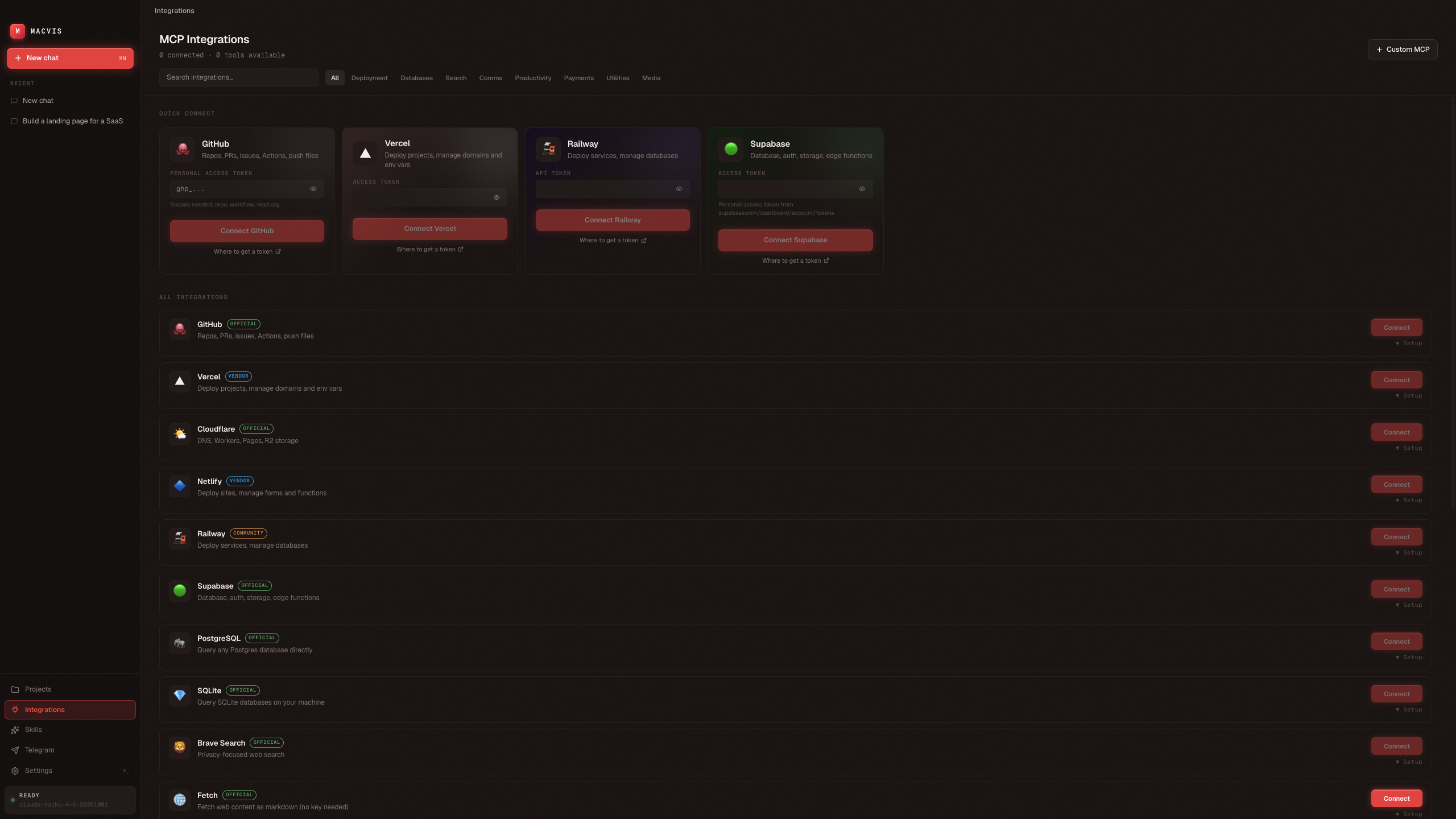
MCP Integrations — Quick Connect cards for GitHub / Vercel / Railway / Supabase, plus a catalog of 18 more (Cloudflare, Postgres, Slack, Linear, Notion, Stripe, …) and a Custom MCP option for anything else.
Multi-provider with fallback
MacVis routes every chat turn through a configurable fallback chain of up to 3 model providers:
┌──────────────┐    ┌──────────────┐    ┌──────────────┐
│  Primary     │ ─▶ │  Secondary   │ ─▶ │  Tertiary    │
│  (try first) │    │  (on fail)   │    │  (last resort)│
└──────────────┘    └──────────────┘    └──────────────┘
Set them in Settings → Chat API Keys → Fallback Chain. Examples:
| Use case | Chain |
|---|---|
| Highest quality with safety net | Anthropic Opus → OpenAI GPT-5 → OpenRouter Sonnet |
| Cheap + cheerful | Groq Llama → Gemini Flash → OpenAI Mini |
| Offline-friendly | Ollama → Anthropic Haiku → OpenRouter |
Supported providers:
| Provider | Models | Where to get a key |
|---|---|---|
| Anthropic | Claude 4.5 family (Opus, Sonnet, Haiku) | console.anthropic.com |
| OpenAI | GPT-5, GPT-4o, o-series | platform.openai.com |
| OpenRouter | 200+ models, one key | openrouter.ai/keys |
| Google Gemini | Gemini 2.5 Pro / Flash | aistudio.google.com/apikey |
| Groq | Llama 3.3, Mixtral (very fast) | console.groq.com |
| Ollama | Anything you've pulled locally | install Ollama, no key required |
Quick Start
Prerequisites
Run from source
git clone https://github.com/asim266/macvis.git
cd macvis
pnpm install
pnpm dev
The window opens, you go to Settings → Chat API Keys, paste at least one key (Anthropic recommended), click Test, pick a model, and you're live.
Your first session
- Settings → Chat API Keys → paste an API key → click Test → pick a model
- (Optional) Add a second provider for the Fallback Chain so retries are automatic
- Go to Chat and try one of:
- "Create a Next.js todo app called my-todo"
- "Build a landing page for a SaaS"
- "List my Downloads folder"
- "What's the disk space on this machine?"
- Check the Projects tab — anything code-shaped that the agent creates lands here automatically
Tech Stack
| Layer | Choice |
|---|---|
| Runtime | Electron 41 |
| Bundler | electron-vite 5 + Vite 8 |
| UI | React 18 + TypeScript |
| Styling | Tailwind v4 + OKLCH design tokens |
| Typography | Geist Sans + Geist Mono |
| State | Zustand |
| Config store | conf → ~/Library/Application Support/macvis/config.json |
| Model SDKs | @anthropic-ai/sdk, openai, @google/generative-ai |
| Package manager | pnpm |
Architecture
~/.macvis/                       ← user data (BYOK home)
├── sessions/                    ← persisted chat history (JSON per session)
│   └── <session-id>.json
├── workspace/projects/          ← code projects the agent creates
│   └── <project-name>/
└── skills/                      ← installable skill packs (Phase 6)

macvis/                          ← this repo
├── electron/                    ← Node.js main process
│   ├── core/
│   │   ├── agent/
│   │   │   ├── providers/       ← Provider abstraction
│   │   │   │   ├── AnthropicProvider.ts
│   │   │   │   ├── OpenAIProvider.ts   (OpenAI, OpenRouter, Groq, Ollama)
│   │   │   │   └── GeminiProvider.ts
│   │   │   ├── AgentLoop.ts     ← Streaming loop + fallback router
│   │   │   ├── ToolBuilder.ts
│   │   │   └── ProviderValidator.ts
│   │   ├── tools/               ← bash, filesystem, web search
│   │   ├── sessions/            ← persistent chat history
│   │   ├── projects/            ← project scanner + runner
│   │   ├── config/              ← conf wrapper
│   │   ├── mcp/                 ← MCP client manager (Phase 4)
│   │   ├── skills/              ← skill loader (Phase 6)
│   │   └── telegram/            ← Telegraf bot (Phase 7)
│   ├── ipc/                     ← One IPC handler module per domain
│   ├── main.ts                  ← BrowserWindow + app boot
│   └── preload.ts               ← contextBridge → window.macvis.*
└── src/                         ← React renderer
    ├── pages/                   ← Chat, Settings, Projects, MCPs
    ├── components/              ← layout, chat, settings, ui
    ├── stores/                  ← Zustand state
    └── App.tsx                  ← root + routing
The main process owns all I/O, AI calls, and tool execution. The renderer is pure UI and talks to the main process exclusively over a typed IPC bridge (window.macvis.*).
Roadmap
| Phase | Status |
|---|---|
| 1. Electron shell + chat + Anthropic streaming | ✅ |
| 2. Full settings with multi-provider BYOK + validation | ✅ |
| 3. Tool system: bash, filesystem, web search, projects, memory | ✅ |
| 3b. Multi-provider routing with fallback chain | ✅ |
| 4. MCP manager — live MCP server connectivity | ✅ |
| 5. Platform integrations: GitHub, Vercel, Supabase, Railway, Slack, Stripe, Notion, Linear, … | ✅ |
| 7. Telegram remote control (single-user-gated bot) | ✅ |
| 8a. DMG packaging (arm64 + x64) | ✅ |
| 8b. Code-signing + notarization | ⏳ #2 |
| 8c. Auto-updater (electron-updater) | ⏳ #3 |
| 6. Skills loader + Web Builder skill | ⏳ #4 |
| 9. Tool-call approval mode (require OK before destructive actions) | ⏳ #5 |
8 of 11 milestones shipped. The remaining 3 each have a tracking issue you can pick up.
Privacy
- All conversation data stays on your Mac (
~/.macvis/sessions/). - API keys are stored locally in
~/Library/Application Support/macvis/config.json. - Provider validation hits the providers directly from your machine; no proxy in between.
- No analytics, no telemetry, no remote logging. Open the network tab — every call is direct to a provider you configured.
FAQ
Is MacVis free? Yes — MIT-licensed. You pay only the AI providers you choose. Or use Ollama (local Llama, Mistral, Qwen, etc.) for zero cost.
Is there a Claude Desktop alternative for Mac that supports MCP? Yes — MacVis is exactly that. 19 built-in MCP integrations plus a custom server form.
Can I run an AI agent locally on my Mac without sending data to the cloud? Yes — combine MacVis with Ollama for a fully local agent loop. No internet, no API keys.
Is MacVis open source? Yes — full source at github.com/asim266/macvis. PRs welcome.
What models does MacVis support? Anthropic (Claude Opus / Sonnet / Haiku), OpenAI (GPT-4o, GPT-5, o-series), Google Gemini (2.5 Pro / Flash), OpenRouter (200+ models), Groq (Llama, Mixtral), Ollama (any local model).
Does MacVis send my data anywhere? No backend, no telemetry. Every API call goes directly from your Mac to the provider you configured. Conversations are JSON files in ~/.macvis/sessions/ on your machine.
How is MacVis different from Cursor / Continue / Claude Code? Those are agent surfaces embedded in your IDE. MacVis is a standalone desktop assistant — it can drive bash, Finder, Mail, deploy to Vercel, send Slack messages — not just edit code.
Is the DMG signed? Not yet — code-signing tracked in #2. For now, right-click → Open on first launch, or run xattr -d com.apple.quarantine /Applications/MacVis.app.
Comparable projects
- OpenClaw — similar idea, web-based UI
- Claude Desktop — Anthropic's first-party Mac app (Claude only, no agent loop)
- Open WebUI — local model interface (focused on Ollama)
- Cursor / Continue.dev — agent in editor (different surface)
MacVis is for the case where you want a standalone desktop agent with multi-provider routing, persistent memory, and full Mac access — not a chat sidecar to your editor.
Contributing
MacVis is built in the open — contributors of every level are welcome.
You don't need to be a TypeScript/Electron expert to help. Here are the easiest ways to start:
🐛 Find and report bugs
The agent has access to bash, files, MCP servers, and Telegram — there are many ways to break it. Try unusual inputs, edge cases, low-bandwidth scenarios. Open an issue with a repro and screenshot — that alone is a huge help. See Finding bugs for ideas.
✨ Pick up an issue
- Good first issues → — small, scoped, well-defined
- Help wanted → — bigger items that need extra hands
- All open issues → — pick anything that looks fun
🚀 Build something new
- Add a new MCP integration — almost mechanical, 5 minutes per provider. See CONTRIBUTING.md → Adding a new MCP integration.
- Add a new chat provider — the
ChatProviderinterface normalizes everything. - Build out a roadmap phase (skills loader, auto-updater, image gen, …).
Dev commands
pnpm install
pnpm dev          # Electron + Vite HMR
pnpm typecheck    # tsc --noEmit (run before pushing)
pnpm build        # produces dist/MacVis-{ver}-{arch}.dmg for both architectures
Full guide: CONTRIBUTING.md
By contributing, you agree your contributions are licensed under MIT.
Disclaimer
MacVis is open-source software provided "AS IS", without warranty of any kind.
The agent has full access to your Mac — bash, filesystem, network, and any platforms you connect via MCP. You are giving an LLM the ability to run commands, modify files, deploy code, send messages, and spend money. Treat it accordingly:
- You are responsible for every action MacVis takes on your machine. Review tool calls before they execute, especially
bashand anything that touches money or production systems. - The author(s) and contributors of MacVis are not liable for any loss, damage, data corruption, unintended deployments, accidental expenses, deleted files, leaked credentials, or any other consequence — direct, indirect, incidental, or otherwise — arising from your use of this software.
- You bring your own keys. Any charges you incur on Anthropic, OpenAI, OpenRouter, Vercel, Stripe, etc. are entirely your responsibility.
- MCP servers run as child processes with your environment. Only connect MCPs you trust.
- No security audit has been performed. Do not use MacVis for handling regulated data (PHI, PII, financial, etc.) without your own review.
If you don't accept those terms, don't run the software. By installing or using MacVis, you accept full responsibility for its behavior on your machine.
See the LICENSE for the full MIT terms including the formal disclaimer of warranty and limitation of liability.
License
MIT — see LICENSE.
Built by @asim266 · Inspired by Claude Desktop, Linear, Raycast, and OpenClaw
⭐ If you like MacVis, please star the repo — it really helps with discovery.
Reviews (0)
Sign in to leave a review.
Leave a reviewNo results found