benchbar
Health Pass
- License — License: MIT
- Description — Repository has a description
- Active repo — Last push 0 days ago
- Community trust — 10 GitHub stars
Code Fail
- rm -rf — Recursive force deletion command in .claude/guard-rm.sh
- rm -rf — Recursive force deletion command in .github/workflows/ci.yml
Permissions Pass
- Permissions — No dangerous permissions requested
No AI report is available for this listing yet.
Local Frappe and ERPNext dev benches on macOS, Linux and Windows (WSL): a CLI that runs them in the background, a menu bar app and a Windows tray

BenchBar
Local Frappe and ERPNext benches on your Mac: a CLI that runs them under launchd and a menu bar app to watch them.





Why
BenchBar runs a bench natively, with Python, Node, MariaDB and Redis from
Homebrew and no Docker or VM in between, so file watching, bench build
and a debugger run at the Mac's full speed and the setup matches what
most Frappe developers run on Linux. Each bench (the folder that holds
a Frappe installation and its sites) runs as a launchd agent, the macOS
way of running a program in the background: it keeps running after you close Terminal, comes back after a reboot when it
was running, restarts after a crash and pauses with a notification when
it keeps crashing. When something breaks, benchbar doctor names the
exact fix for every problem it finds, and benchbar repair applies only
those fixes, in order, with a backup before each change.
Install
brew install askysh/tap/benchbar askysh/tap/benchbar-app
That installs the CLI (the benchbar formula) and the menu bar app (thebenchbar-app cask). Type both names: Homebrew trusts a third party tap
only for the names you type. The app needs Apple Silicon and macOS
Sonoma or later; on an Intel Mac, brew install askysh/tap/benchbar
installs the CLI alone. The app carries its own copy of the CLI, and
Homebrew's benchbar hands off to it, so one update of the app (Update
Now in the app, or brew upgrade) updates both. Without the app, brew upgrade askysh/tap/benchbar updates the CLI.
The one line installer is the alternative. It checks macOS, the Command
Line Tools and Homebrew, puts the CLI in ~/.local/bin and the app in~/Applications, and never runs sudo:
curl -fsSL https://raw.githubusercontent.com/askysh/benchbar/main/install.sh | bash
Or download the DMG from the
releases page: since 0.6.1
the app is signed with a Developer ID and notarized by Apple, so it opens
like any other download. The app runs the CLI inside it; for benchbar
in Terminal, add the CLI with Homebrew or the one line installer. Or
build from source: git clone
this repository and run ./benchbar install; the app needs Xcode 26.
Linux and Windows. From 0.8 the same CLI runs on Linux (Ubuntu 24.04
and other apt based systems, the v15-lts profile so far), with each bench
under systemd --user; clone the repository and run ./benchbar install.
See Install.
On Windows (a beta) the benches run in WSL, benchbar.exe runs the
CLI from PowerShell, and BenchBar Tray shows the benches in the
notification area in place of the menu bar app. Install both with one
line in PowerShell. The tray's first run wizard then sets up WSL, the
Linux distro and the bench:
irm https://raw.githubusercontent.com/askysh/benchbar/main/install.ps1 | iex
The Windows programs are not signed yet. On our Windows 11 test PC the
line above showed no SmartScreen warning, but Smart App Control blocks
unsigned programs: when it is on, the installer stops first and says what
to do. What that means in practice is in
Before you install.
Every release has SHA256SUMS and, from the next release, build provenance
you can verify. To remove BenchBar again, run the installer
with -Uninstall. For a bug, use Report a Bug in the tray: it writes
a redacted zip and opens the bug form. See
Windows.
Quick start
benchbar adopt ~/frappe-bench     # a bench you already have: shows the plan, then asks
benchbar install                  # or a new bench, site and service from scratch
source ~/.zshrc && benchup        # start it in the background and wait for the site
open http://macdev:8000           # log in as Administrator
Run either adopt or install, not both. ~/frappe-bench is an
example: give adopt your bench's folder. adopt writes only the
service files and never runs migrate, build or update. install
asks for the bench folder (default ~/frappe-bench), the site name
(default macdev) and the site's Administrator password, and keeps a
generated MariaDB root password in your Keychain; it asks for sudo
once, for the wkhtmltopdf package and the /etc/hosts line. benchup
ends with bench is up: and the site's address; with another site name,
open that one instead of macdev. After that you can close Terminal: benchdown stops the bench, benchrestart
restarts it after Python changes, benchlogs follows its log andbenchwatch rebuilds assets while you edit them.
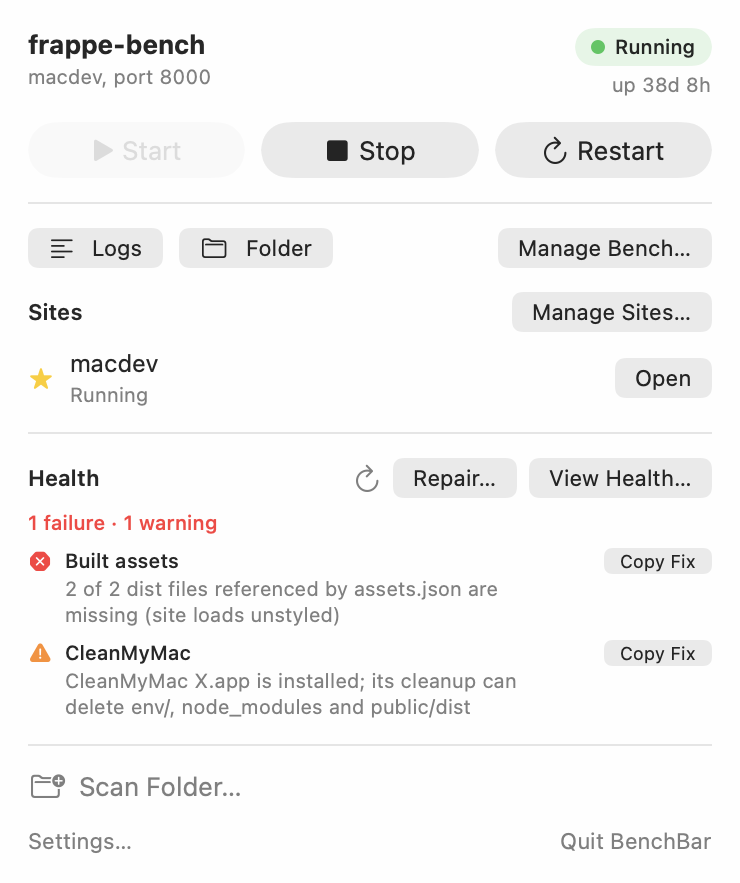
The runner in the menu bar sleeps while the bench is stopped, runs while
it is up and stumbles when it crashes. Click it for the popover: start,
stop, restart, open the site or the logs, and a read only doctor. ⌘M
opens the BenchBar window, with a page per bench for its sites, apps and
health. The app never writes to a bench itself; every button runsbenchbar ... --json and reads the answer.
You can also skip Terminal. On a Mac with no bench, the BenchBar window
opens on a short wizard: it checks your Mac, creates a bench from a
profile (or finds the one you have), and shows each step as it runs.
macOS asks for your password in its own dialog for the two steps that
need it. A four step walkthrough of the app follows, and every page says
what it is for and what to do next.
Features
- One command installs everything: Homebrew formulae, a MariaDB root password in your Keychain, wkhtmltopdf, a bench and a site.
- Runs in the background: one launchd agent per bench, restarted after a crash, paused after three crashes in ten minutes.
- Doctor and repair: read only checks that name the fix, then only the flagged fixes, with a backup before each change.
- A menu bar app: a runner that shows the state, start and stop, logs, doctor, and a window for each bench's sites, apps and health.
- A new bench without Terminal: a first run wizard in the app checks the Mac, installs a bench from a profile and adopts the ones you have.
- Linux and Windows: the same CLI on Ubuntu 24.04 with
systemd --user, and on Windows through WSL withbenchbar.exeand a tray app (a beta). - Several benches side by side: a v15 and a v16 bench, each with its own ports, sites and scheduler, on one MariaDB.
- Apps from anywhere: the app registry or any GitHub repository, private ones too, with a changelog before every update.
- Made for teams: team profiles, the
benchbar.tomllockfile, andbenchbar pullfor a local copy of production. - For coding agents:
benchbar mcplets Claude Code, Cursor and other agents read and drive your benches. Every command has--help, and--for-agentmakes it print JSON and ask nothing.
Documentation
The manual lives at
benchbar.akashmishra.com. Start with
Install for the requirements,
Homebrew, every installer flag and the DMG download. Read
The menu bar app for the popover,
the BenchBar window and the keyboard shortcuts. Keep
Doctor and repair
at hand: it lists every check with what it looks at and how it is fixed.
Teams covers team
profiles, the lockfile and pulling a copy of production. Every command
has a reference page, and the JSON the app reads is a documented API.
The same pages are plain markdown in docs/, so they read fine on
GitHub too, and benchbar docs opens them from the terminal.
Roadmap
0.6.1 is the first signed and notarized release, with Sparkle updates. 0.7.0 installs the CLI and the app with Homebrew, in 0.7.1 the app ships the CLI, so one update covers both, 0.7.2 gives the window one main action per page and one layout for every sheet, and 0.7.3 is a fix pass from a full review (node@22 for v15, ownership checks, fail closed writes, MCP hardening). 0.8.0 brings the first run wizard and a new bench from the app, the CLI on Linux, a Windows preview (benchbar.exe and a tray app), and commands that agents can drive: one JSON stream with a closing done line and a non interactive mode. 0.8.1 makes Windows a beta: the tray takes a PC from no WSL to a running bench. 0.8.2 adds Labs, experiments that stay off until you turn them on: rooms on your Wi-Fi and Quick Switch. 0.8.3 is a fix pass for Windows: the installer, benchbar.exe, the tray and the install inside WSL have fewer dead ends and say what is wrong and how to fix it. The rest is in ROADMAP.md.
Contributing
Issues and pull requests are welcome: read CONTRIBUTING.md first.
For a bug, attach the zip from benchbar report; it has no secrets, paths or names. On Windows, use Report a Bug in the tray instead.
Security
Report a vulnerability privately through GitHub security advisories; SECURITY.md says what counts.
License
MIT, see LICENSE. Frappe and ERPNext are trademarks of Frappe
Technologies; BenchBar is not affiliated with or endorsed by them.
Reviews (0)
Sign in to leave a review.
Leave a reviewNo results found