aso-skills
Health Warn
- License — License: MIT
- Description — Repository has a description
- Active repo — Last push 0 days ago
- Low visibility — Only 7 GitHub stars
Code Pass
- Code scan — Scanned 12 files during light audit, no dangerous patterns found
Permissions Pass
- Permissions — No dangerous permissions requested
No AI report is available for this listing yet.
ASO Agent Skills for Claude, Cursor, and any Agent-Skills-compatible AI assistant - App Store Optimization powered by the ASOScan API. 9 skills incl. two that work with no API key. MIT.
ASOScan: Claude ASO skill and ChatGPT plugin for App Store Optimization




ASOScan is an ASO skill for Claude, Claude Code and ChatGPT: ask about your own apps in plain words and get your real App Store and Google Play numbers. If you are looking for an aso skill Claude connects to directly, or aso skills Claude can run without an API key, this is it.
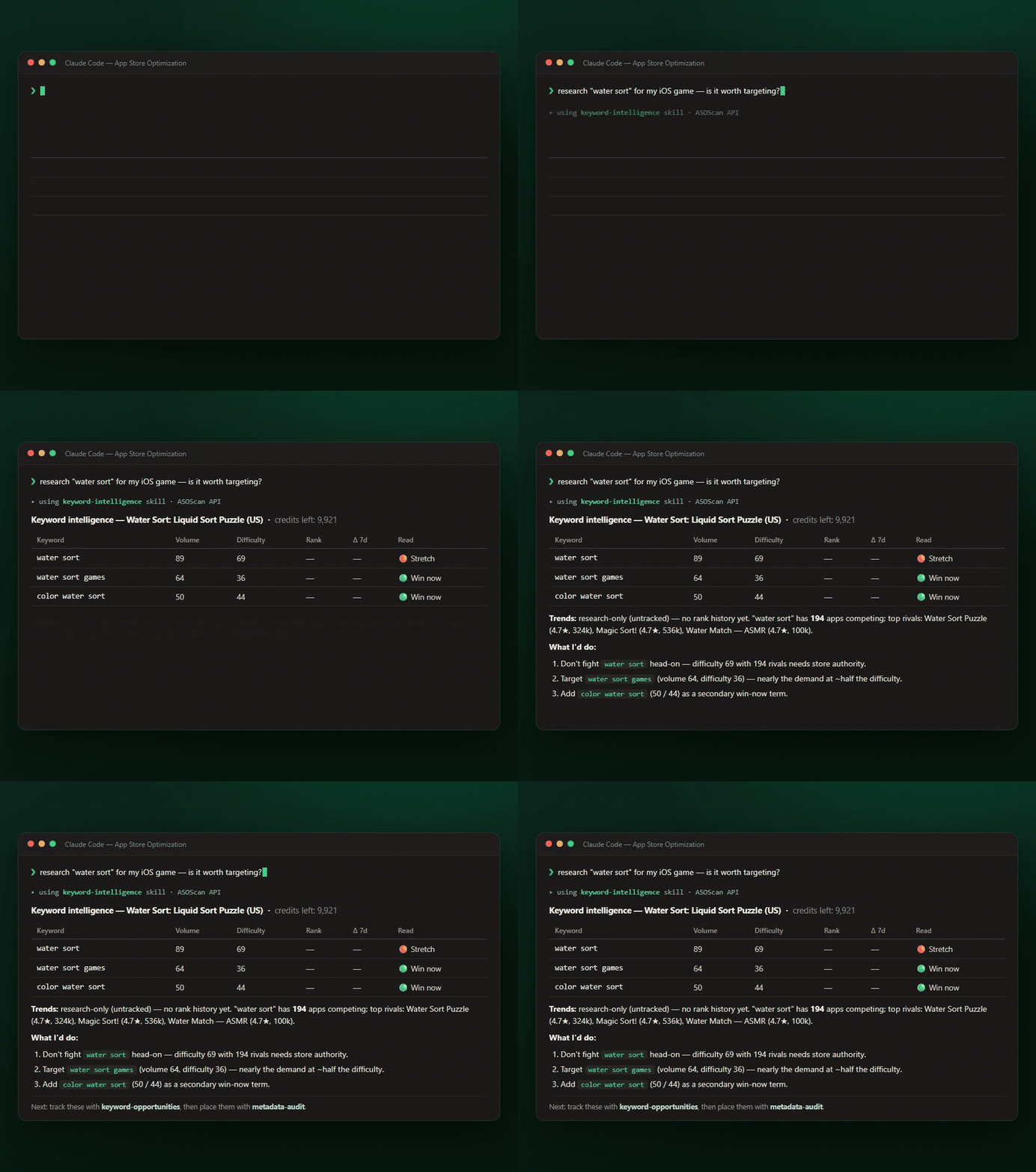
Real keyword volume, difficulty & competitors, from inside your AI coding agent.
What it is
ASOScan is App Store Optimization (ASO) software for iOS and Android apps, built and run by one app developer. This repo is the ASOScan plugin for ChatGPT and Claude and a skill pack for coding agents. Connect your ASOScan account and ask about your own apps in plain words.
- App store ranking and Google Play store ASO: your ASO score, ASOScan's recommendations and what to fix first.
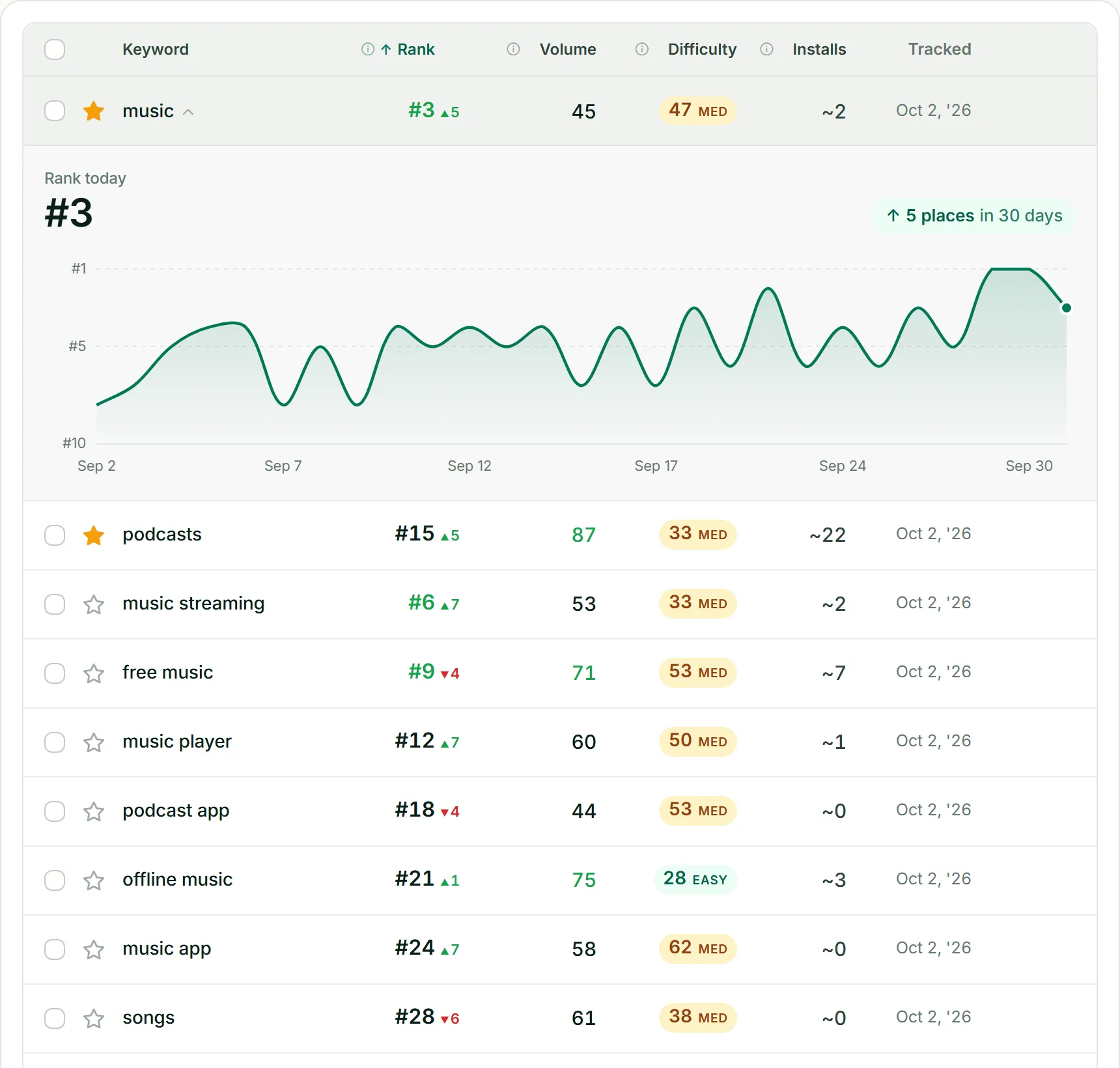
- App keywords: app store keyword research with search volume and difficulty, keyword opportunities you could rank for, and tracking for the ones you pick.
- Why is my app not showing in search: where you rank for each tracked keyword and how the rank moved day by day.
- ASO audit: your current title, subtitle, keywords and description, what changed, and drafts for other languages.
- App competitor analysis: add a competitor by store link and see its keywords, category rank and rating history.
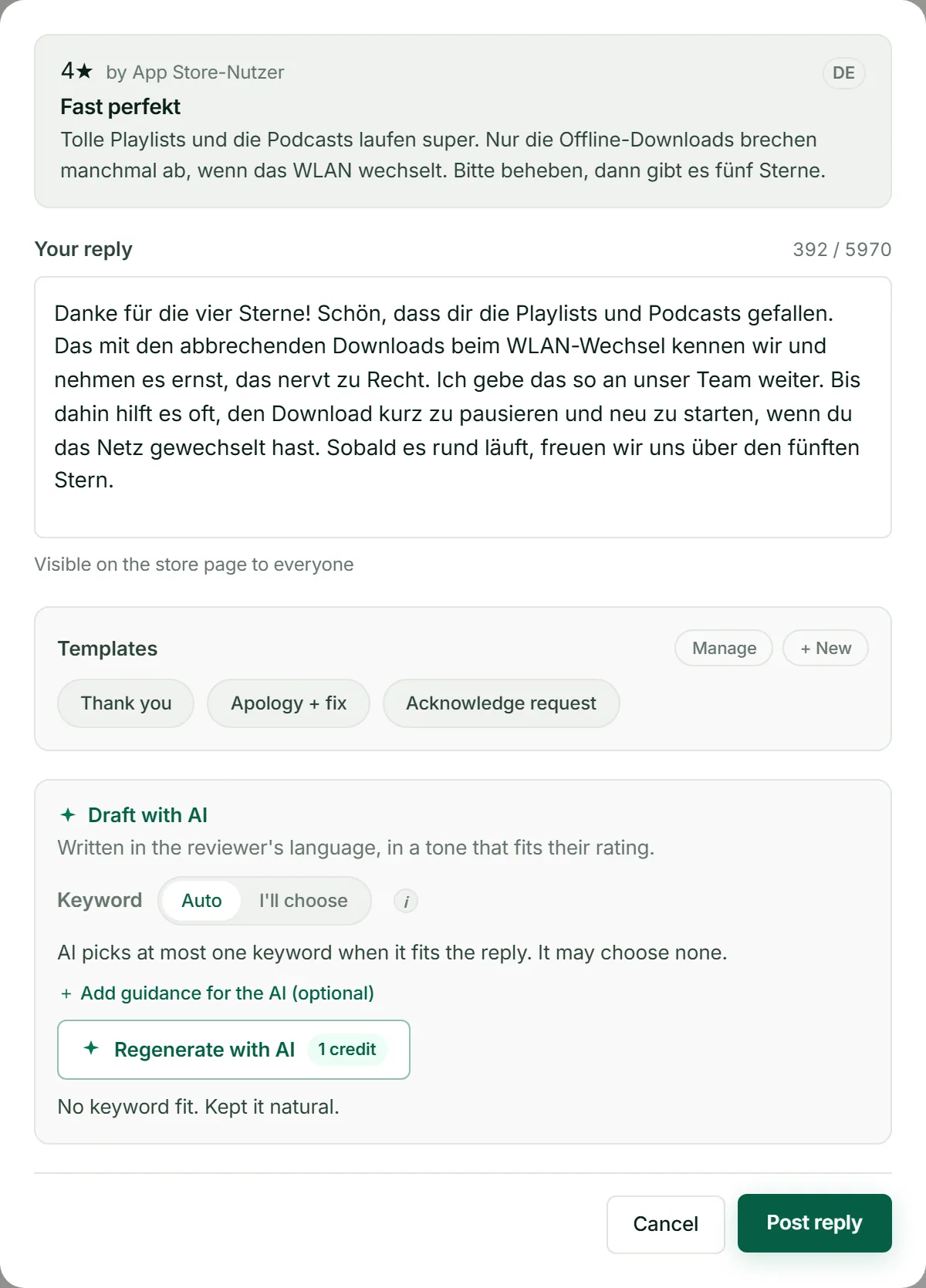
- App review analysis: sentiment, topics, bugs and feature requests, and AI reply drafts. A reply goes to the store only after you approve the exact text.
Good ASO improves organic rankings, and ASOScan helps you rank better. It does not promise a rank, does not publish listing text to the stores, and has no download or revenue data.
⚡ Quickstart
npx skills add ASOScan/aso-skills
Then just ask your agent, in plain language:
- "How does App Store search ranking work?" → answered instantly, no API key needed
- "Where do I rank for my keywords, and which should I target next?" → add an API key (API access depends on your plan; 7-day free trial)
⭐ Useful? Star the repo. It helps other developers find these skills.
Expert App Store Optimization in your AI workflow, powered by real data
from the ASOScan
API: live keyword volume + difficulty, your app's rank (and its
history), keyword opportunities, keyword spy, competitor + review
intelligence, and a metadata / ASO-score audit.
Each skill packages an ASO framework, a scoring rubric, and an
output template. The agent reads the skill, pulls live numbers from your ASOScan
account, and gives you specific, actionable recommendations, not generic advice.
Installed from the public repo
ASOScan/aso-skills(GitHub org: ASOScan).
Skills
| Skill | What it does |
|---|---|
| asoscan-router | Start here. Reads a natural-language ASO request, checks that the ASOScan tools are connected or an API key is set, and routes it to the right skill. |
| aso-fundamentals | Expert ASO best practices, keyword strategy, and golden tips. Works with no API key. |
| asoscan-setup | Guides connecting your ASOScan account or getting an API key, setting up webhooks (Slack/Teams), and connecting Play Console / App Store. No API key needed. |
| keyword-intelligence | Volume, difficulty, your rank & rank movement, rank/metrics history, and live keyword research. |
| keyword-opportunities | Gap-scored keyword suggestions worth targeting; can start tracking the winners. |
| keyword-spy | Reverse-lookup: every keyword an app ranks for (yours or a tracked competitor's). |
| competitor-analysis | Compare against tracked competitors; add a rival by store URL; category rank & rating history. |
| review-insights | Review sentiment + the top topics, feature requests, and bugs users mention. Drafts review replies and posts one only after you approve the exact text. |
| metadata-audit | Audits your listing (title/subtitle/description/keywords) with your ASOScan ASO score, drafts honest improvements, and drafts listing text for other languages. |
What it can answer
Ask in plain language. The router picks the right skill. Examples it handles today:
- Keyword intelligence: "What's the volume and difficulty of habit tracker?" ·
"Where do I rank for it, and is it moving?" · "Show my rank history." · "Research sleep sounds." - Suggestions: "Suggest keywords to track for my app." · "What keywords am I
missing vs my competitors?" · "Track these for me." - Which keywords to use in the store: "Which keywords should I put in my
title / subtitle / keyword field?" (finds the terms, then drafts where they go,
within Apple/Google limits). - Keyword spy: "What keywords does my app rank for?" · "What does <a competitor
I track> rank for that I don't?" - Competitors: "Compare me to my competitors." · "What category do my
competitors use?" · "Add <store URL> as a competitor." · "Am I gaining or
losing in the category chart?" - Listing audit: "What's my ASO score and how do I raise it?" · "Rewrite my
subtitle." · "What changed in my listing?" - Reviews: "What are users saying?" · "Top complaints / feature requests / bugs."
- Learn ASO (no key needed): "How does App Store search work?" · "How do I write
a good subtitle?" · "What's a solid keyword strategy?" · "Screenshot best practices?"
(answered by aso-fundamentals, grounded in Apple/Google docs). - Set up & connect (no key needed): "How do I get my API key?" · "Set up webhooks
/ send alerts to Slack or Teams." · "Connect my Play Console / App Store app."
(answered by asoscan-setup).
Scope: the data skills work on the apps in your ASOScan account (and
competitors you track) and need the ASOScan connector or an API key; the aso-fundamentals and
asoscan-setup skills work with no key. To analyze a rival, the skill first adds it
as a competitor by store URL (there's no lookup by app name).
Not included: pulling any app's keywords by name without adding it, download/revenue
estimates, Apple's secondary category, or generating listing copy without your data.
Requirements
- An ASOScan account with at least one app (new accounts start with a 7-day free trial, no card needed).
- Either the ASOScan plugin or connector (ChatGPT, Claude, Claude Code), or an API key (
asosk_live_…) for other agents. API access depends on your plan: see asoscan.com/pricing. - An Agent-Skills-compatible client that can make HTTP requests (Claude Code with
Bash is the reference environment).
The data skills need a connection or a key. aso-fundamentals and asoscan-setup work with neither.
Install
ChatGPT: add ASOScan from the ChatGPT plugin directory, then sign in to ASOScan when ChatGPT asks.
Claude, claude.ai / desktop / Cowork (coming soon): add ASOScan from the directory, then sign in.
Claude Code:
claude plugin marketplace add ASOScan/aso-skills
claude plugin install asoscan@asoscan
The plugin brings the skills and the ASOScan connector (https://asoscan.com/mcp); Claude Code asks you to sign in on first use.
Any coding agent (skills only, API key):
npx skills add ASOScan/aso-skills
# or a subset:
npx skills add ASOScan/aso-skills --skill keyword-intelligence keyword-spy
Cursor: Settings → Rules → Add Rule → Remote Rule (GitHub) → https://github.com/ASOScan/aso-skills
Manual: copy skills/* into your client's skills directory (for example .claude/skills/).
Set up an API key (coding agents without the connector)
Create an account and add an app:
asoscan.com/auth/registerSettings → API access → Create key (choose read or read + write).
Copy it. It is shown only once.Export it:
export ASOSCAN_API_KEY="asosk_live_XXXXXXXX..."Verify:
bash scripts/asoscan-check.sh
Full walkthrough: reference/onboarding.md.
How it works
- Each skill is self-contained: it names the ASOScan tool and the exact API call for each step (base
URL, endpoints, response fields, error + credit handling) and reads your key from
theASOSCAN_API_KEYenvironment variable, so any skill installs and runs on its
own. Thereference/folder is the full human API reference, andevals/holds manual test scenarios. - Credit-aware: each successful call spends credits from your monthly
allowance; failed calls are free. Live keyword research (8 credits) is treated
as expensive and cached within a session.GET /usage(free) shows what's left. - Owner-scoped: to analyze a rival, the skill adds it as a competitor first,
then reads its data.
What this plugin sends
- With the connector: requests go to
https://asoscan.com/mcpafter you sign in with OAuth. You can disconnect any time in ASOScan under Settings → Connected AI apps. - With an API key: the skills read
ASOSCAN_API_KEYfrom your environment and send it only tohttps://asoscan.com/api/public/v1in theAuthorizationheader. They never print it. - Nothing else is sent anywhere. No package contains a credential.
What's new in 1.3.0
- ChatGPT plugin (
plugin.json,mcp.json) and Claude plugin and marketplace (.claude-plugin/,.mcp.json) from this one repo. - Every data skill works with the ASOScan tools when they are connected, or with an API key when they are not.
- New: add an app, ASOScan recommendations, review reply drafts and posting (only after you approve the exact text), and listing drafts for other languages.
Honesty
These skills present keyword volume/difficulty as clean numbers, never claim that
review replies or ads boost search ranking, and never fabricate reviews or
testimonials. Recommendations sell the outcome, not a mechanism.
Contributing
New skill ideas, more markets for the ASO tips, extra example prompts: all
welcome. See CONTRIBUTING.md, or open an issue. Newcomer-friendly
tasks are labelled good first issue.
⭐ If these skills helped, a star makes them easier for the next developer to find.
License
MIT. See LICENSE.
Reviews (0)
Sign in to leave a review.
Leave a reviewNo results found