tamga-pcb
Health Warn
- License — License: MIT
- Description — Repository has a description
- Active repo — Last push 0 days ago
- Low visibility — Only 6 GitHub stars
Code Pass
- Code scan — Scanned 12 files during light audit, no dangerous patterns found
Permissions Pass
- Permissions — No dangerous permissions requested
No AI report is available for this listing yet.
Describe a circuit, get a routed, DRC-clean KiCad board and JLCPCB fab files. A Claude Code plugin with 22 compact MCP tools.

Describe a circuit. Get a routed, DRC-clean KiCad board and a JLCPCB order.





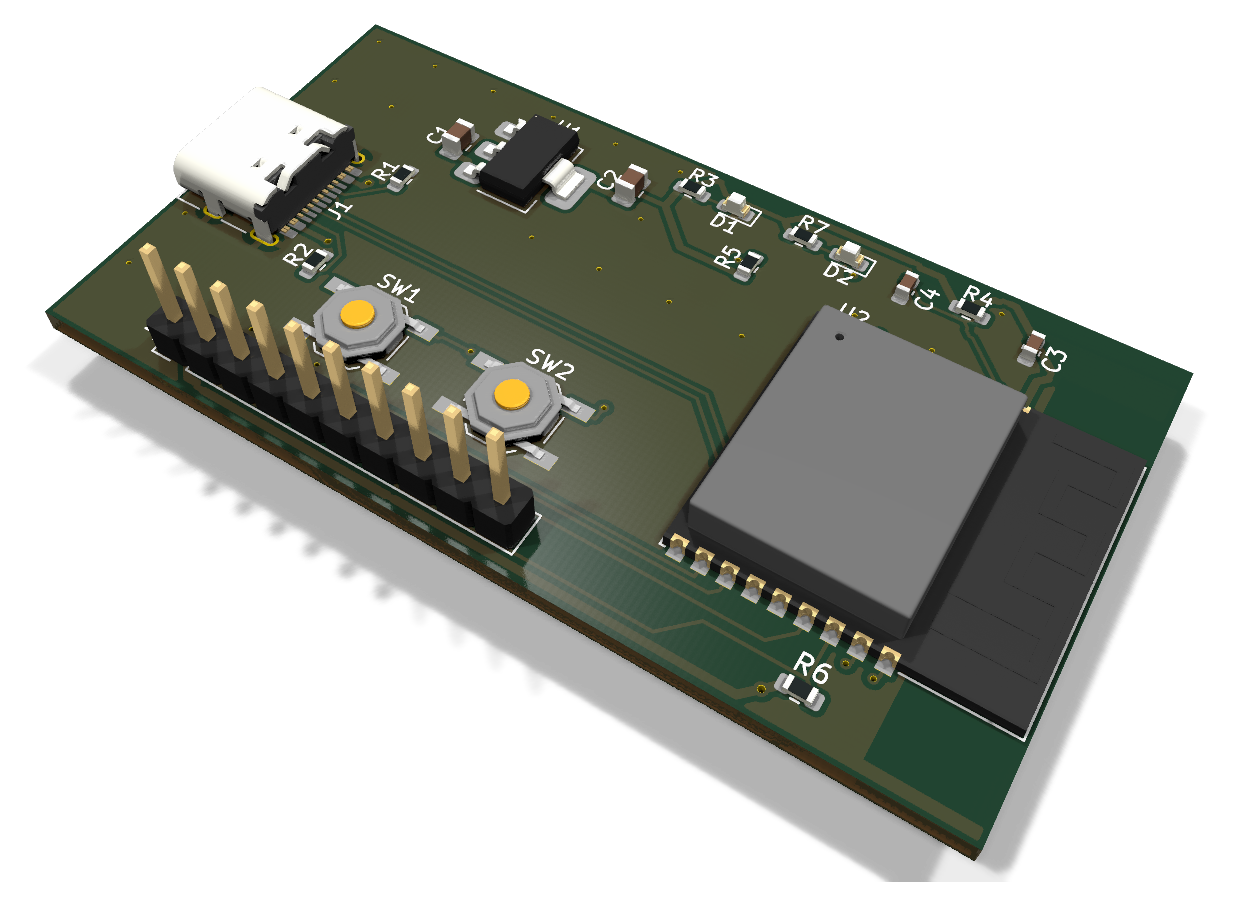
An ESP32-C3 board with USB-C, a 3.3 V regulator, reset/boot buttons and a GPIO header: schematic, placement, routing, ground pour, DRC and fab files all made through tamga-pcb's tools. Rebuild it yourself.
tamga-pcb gives Claude Code the whole KiCad workflow as 22 compact tools. You describe the board in plain
words; Claude writes a short circuit spec, tamga-pcb turns it into a schematic and a PCB, places the parts,
routes the board with Freerouting, pours ground, loops on DRC until it is clean, and exports Gerbers, BOM and
pick-and-place for JLCPCB. Every LCSC part is checked against its real pinout on the way, and Claude never reads
raw KiCad files: tools answer in one-line summaries, so a whole board fits comfortably in the context.
> Make me an ESP32-C3 board powered from USB-C, with reset and boot buttons, a user LED
  and a GPIO header. Keep it under 60 x 32 mm and get it ready for JLCPCB.
Examples
 |
|
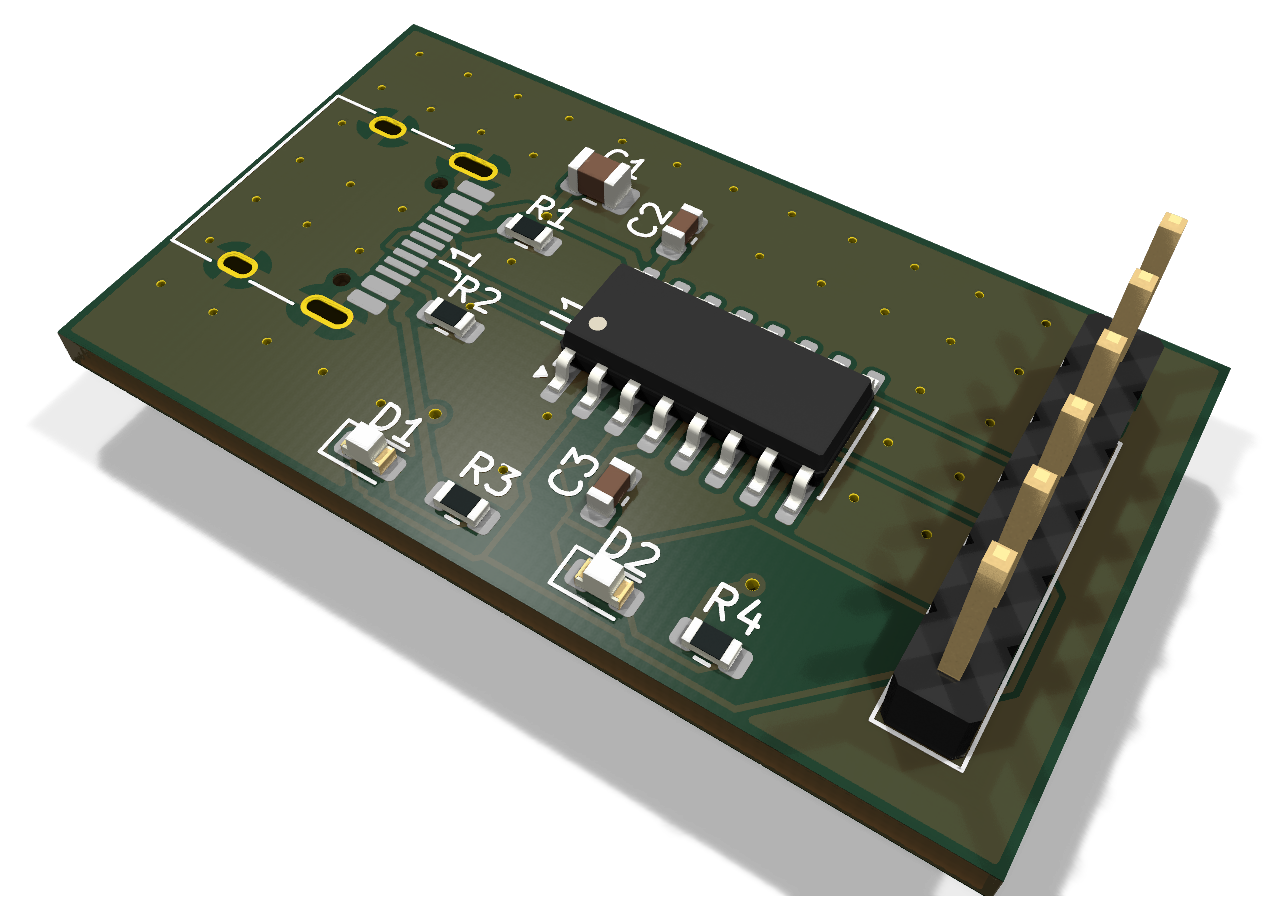
| CH340C USB-C to UART adapter Made by Claude Code from one prompt, unattended: 35 × 20 mm, DRC clean, fab files. 3 min, 48 tool calls, about $0.51 with Sonnet 5.5, measured. Session report |
ESP32-C3 USB-C dev board 60 × 32 mm, 19 parts, reset/boot, native USB. Rebuilt end to end by a script through the same tools; the reference for the images above. |
Token counts, cost, time and what the first attempt taught us: docs/BENCHMARKS.md. On the same prompt with the same model, the most-starred KiCad MCP server also finished the board; tamga-pcb used 48 % less money, 43 % fewer tool calls and 40 % less peak context (one run each, details).
Watch it live
Say "I want to watch" and Claude calls live_view: a page opens in your browser and redraws the board and the
schematic after every step, with each tool call, how long it took and what it found, and the DRC status on top.
It runs locally, needs no KiCad window, and costs no tokens: none of it goes back to Claude. From a terminal:uv run tamga watch follows whatever project Claude is working on.
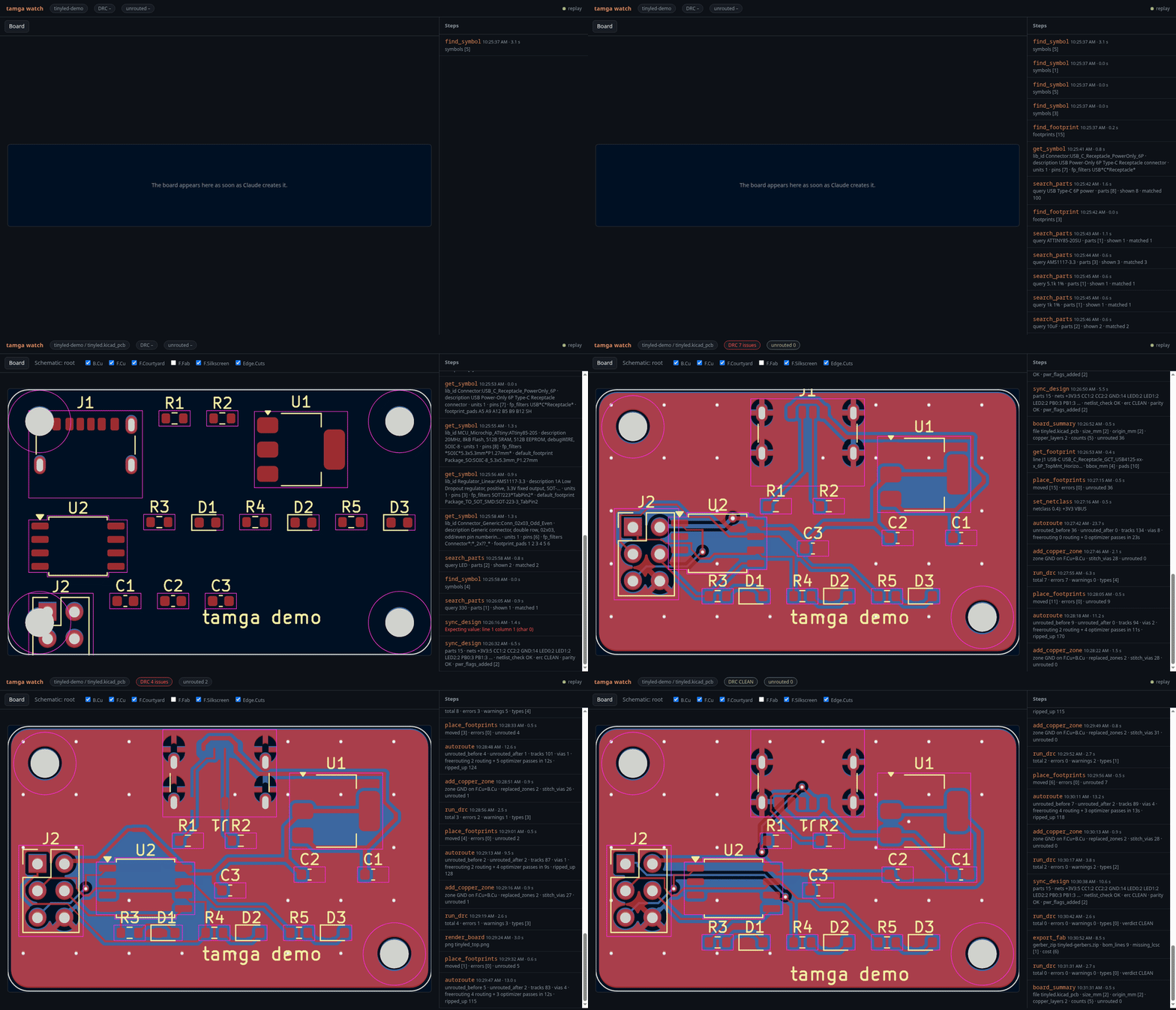
Replay of a real, unattended session: one prompt (an ATtiny85 board with USB-C, LDO, ISP header and
three LEDs, rounded corners, mounting holes), 59 tool calls, 5½ minutes, $0.68 with Sonnet 5.5. Every frame is one of
the session's own board states, made with scripts/replay_gif.py.
Install
Run this inside Claude Code:
/plugin install tamga-pcb --marketplace atillaertas1/tamga-pcb
You need KiCad 10 and uv; autorouting
also needs Java 25+. tamga-pcb finds KiCad on its own on Linux, macOS and Windows, builds its Python
environment on first start and downloads Freerouting the first time it routes. No API keys.
/plugin marketplace add atillaertas1/tamga-pcb
/plugin install tamga-pcb@tamga-pcb
Clone the repo and register this as a stdio server:
uv run --directory /path/to/tamga-pcb --extra lcsc tamga
The design workflow the plugin loads as a skill lives in skills/pcb-design/SKILL.md;
give it to your agent as instructions.
Ask Claude to run the tamga doctor. It checks KiCad, its Python, the libraries, Java and the network, and names the
environment variable to set for anything it cannot find: TAMGA_KICAD_CLI, TAMGA_KICAD_PYTHON,TAMGA_SYMBOL_DIR, TAMGA_FOOTPRINT_DIR, TAMGA_JAVA, FREEROUTING_JAR.
From a spec to a board
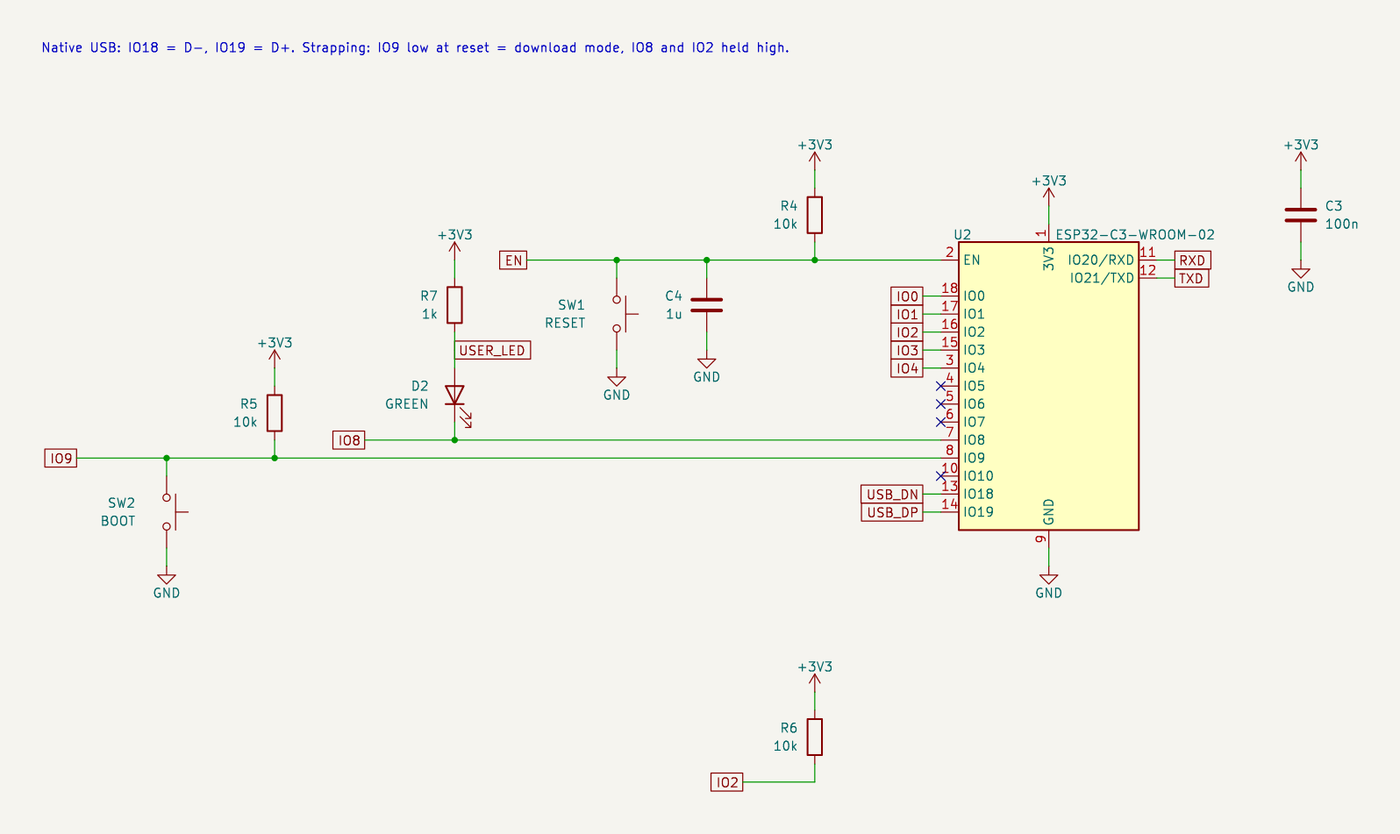
The single source of truth is a short <name>.circuit.json: parts, footprints, LCSC numbers and which net each
pin goes to. Claude writes it, tamga-pcb does the rest.
{"ref": "U2", "symbol": "RF_Module:ESP32-C3-WROOM-02", "lcsc": "C2934560",
 "footprint": "RF_Module:ESP32-C3-WROOM-02", "sheet": "MCU",
 "pins": {"1": "+3V3", "2": "EN", "13": "USB_DN", "14": "USB_DP", "9": "GND"}}
 |
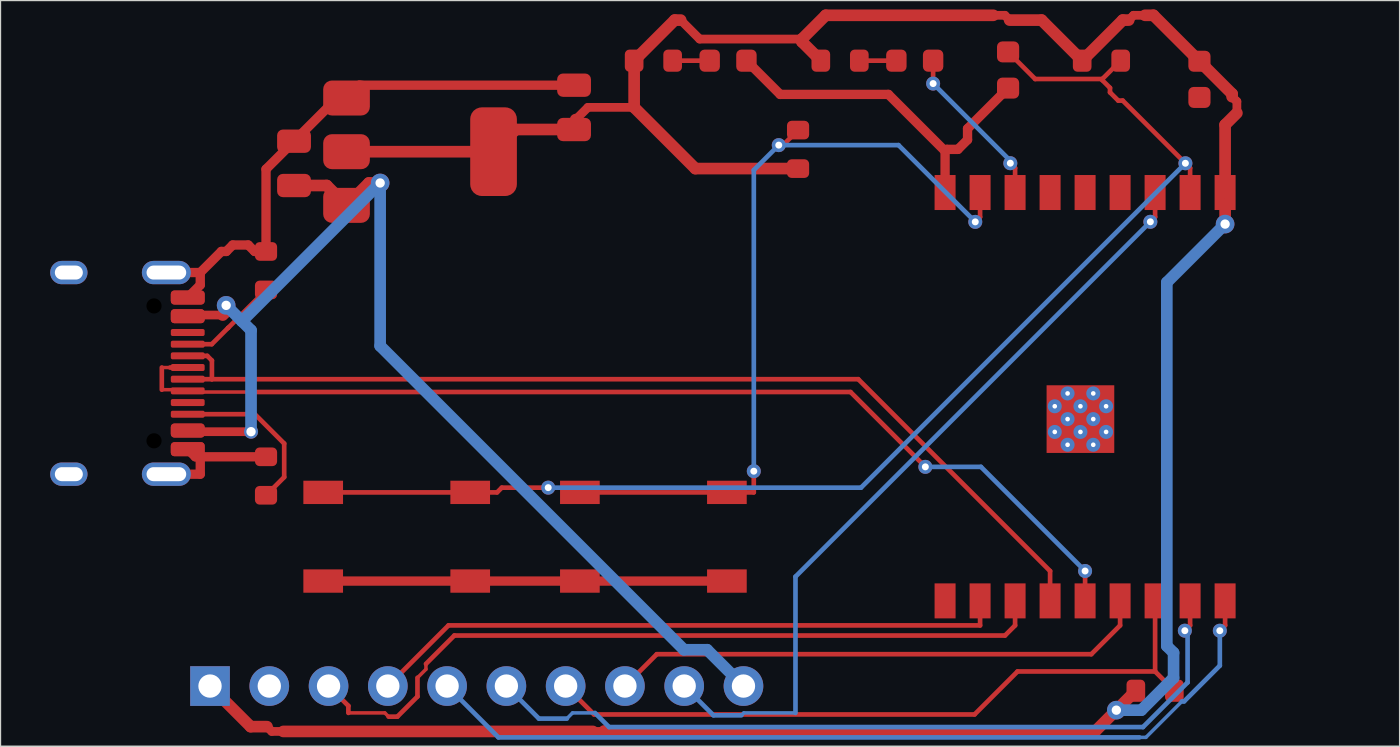 |
| Generated schematic, one sheet per function | Autorouted copper before the ground pour |
How it works
- Spec → schematic.
sync_designwrites the.kicad_sch(functional sheets, power symbols, notes,
deterministic UUIDs), exports the netlist withkicad-cliand checks it against the spec. A wrong pin name or a
missing pad writes nothing and lists the valid pins. - Check the real parts. Each LCSC number is compared with the part's EasyEDA pinout. A swapped LED or the wrong
symbol variant shows up here, not on the assembled board. - Schematic → PCB. The board is updated from the netlist like KiCad's Update PCB, keeping placement, then ERC
and a schematic↔PCB parity check run. - Place and route. Claude places the parts in one batch, widens power nets with netclasses, hand-routes critical
nets withroute_net(locked), and lets Freerouting route the rest headlessly. - Pour and verify. A two-layer ground pour with stitching vias, then
run_drcuntil it saysCLEAN, with the
violations grouped by type and located. - Order.
export_fabwrites Gerbers, drill files, a BOM and a CPL in JLCPCB's format and lists parts without an
LCSC code.
The pcb-design skill carries the loop, the placement checklist and JLCPCB's limits, so
Claude follows the same steps every time.
The tools
| Tool | What it does |
|---|---|
sync_design |
Spec → schematic + PCB, netlist and pinout checks, ERC, parity. Edits go through small patches. |
find_symbol, get_symbol, find_footprint |
Search KiCad's libraries; confirm pin names and that footprint pads match. |
search_parts, import_lcsc_part |
JLCPCB/LCSC stock and price, basic parts first, passives by value; bring in parts KiCad doesn't have. |
create_part |
Footprint and symbol from a datasheet when neither KiCad nor LCSC has the part: SOIC/TSSOP/MSOP, QFN/DFN, headers, custom pads. |
board_summary, get_footprint |
One line per footprint and net, pad positions, routed lengths and pair skew. No raw .kicad_pcb in the context. |
place_footprints |
Move, rotate and flip many footprints in one call. |
set_netclass, route_net |
Track widths per net class, sized from a target impedance; guided, locked routes and differential pairs. |
autoroute |
Freerouting without its GUI, with progress and a timeout that reports where it stopped. |
add_copper_zone, fill_zones |
Ground pours with stitching vias. |
run_drc, run_erc |
Violations grouped by type with example locations: 300 violations fit in about 1 KB. |
render_board |
PNG of the board for a visual check. |
live_view |
Opens the live page for the user (above); nothing comes back to Claude. |
export_fab |
Gerbers, drill, BOM and CPL for JLCPCB; optional schematic PDF, STEP, ODB++, IPC-2581 and a parts-cost summary. |
import_board |
Bring in Altium, Eagle, PADS or CADSTAR boards. |
Why it is cheap on tokens
| Choice | Effect |
|---|---|
| 22 tools with short descriptions | all tool schemas together ≈ 4.2k tokens (16.7k characters, measured) |
| Small answers | in the CH340 run all 48 tool results together were ≈ 4.2k tokens, about 350 characters per call |
| No raw KiCad files, one line per footprint | a 7-part board summary is about 900 characters |
| DRC/ERC grouped by type, three example locations | 300 violations → about 1 KB |
| Workflow in a skill | loaded only when you work on a PCB |
Under the hood
- pcbnew runs in a worker process in KiCad's own Python; it can crash without taking the server down.
- File based, not KiCad's IPC API: it works without the KiCad window open, and in CI.
- Freerouting through pcbnew's DSN/SES export, because
kicad-cli10 has none. - Self-contained projects: non-stock libraries are copied into
<project>/lib/, so a project folder can be zipped
and shared as is.
Development
git clone https://github.com/atillaertas1/tamga-pcb && cd tamga-pcb
uv sync --extra lcsc
uv run pytest -q          # KiCad-dependent tests are skipped when KiCad is not installed
claude --plugin-dir .     # run Claude Code with your working copy as the plugin
The example board is rebuilt end to end by uv run python examples/esp32c3-devboard/build.py. Changes are listed in
the changelog. Want to help? See CONTRIBUTING.md and the
good first issues.
Roadmap
- Live editing in an open KiCad through its IPC API
- Hierarchical pins on sheet symbols, tidier power-sheet layout
- Alternative routers (DeepPCB, Quilter)
- ngspice simulation of analog blocks
The name
A tamga is the seal Turkic clans stamped onto stone, metal and coins: a mark pressed permanently into a surface,
much like a circuit etched into copper.
License
MIT, see LICENSE. The boards you make are entirely yours; no tool's license carries over to its output.
Optional parts are installed separately under their own licenses: easyeda2kicad (AGPL-3.0, the lcsc extra, run as a
separate process) and Freerouting (GPL-3.0, a separate jar downloaded on first use). KiCad is GPL-3.0.
Reviews (0)
Sign in to leave a review.
Leave a reviewNo results found