LoopPrism
Health Warn
- License — License: MIT
- Description — Repository has a description
- Active repo — Last push 0 days ago
- Low visibility — Only 5 GitHub stars
Code Fail
- rm -rf — Recursive force deletion command in .github/workflows/publish-npm.yml
Permissions Pass
- Permissions — No dangerous permissions requested
No AI report is available for this listing yet.
See what your coding agents actually do and spend: sessions, context and cost for Claude Code, Codex, OpenCode, DeepSeek Harness, WorkBuddy. Local-first.
 LoopPrism
See what your coding agents actually do.
An inspector for Claude Code, Codex, Gemini CLI, OpenCode, DeepSeek Harness and WorkBuddy: every session, step by step.
What filled the context, where the time went, what it cost. Local-first, zero setup.






English · 简体中文
Download · Features · Get started
 |
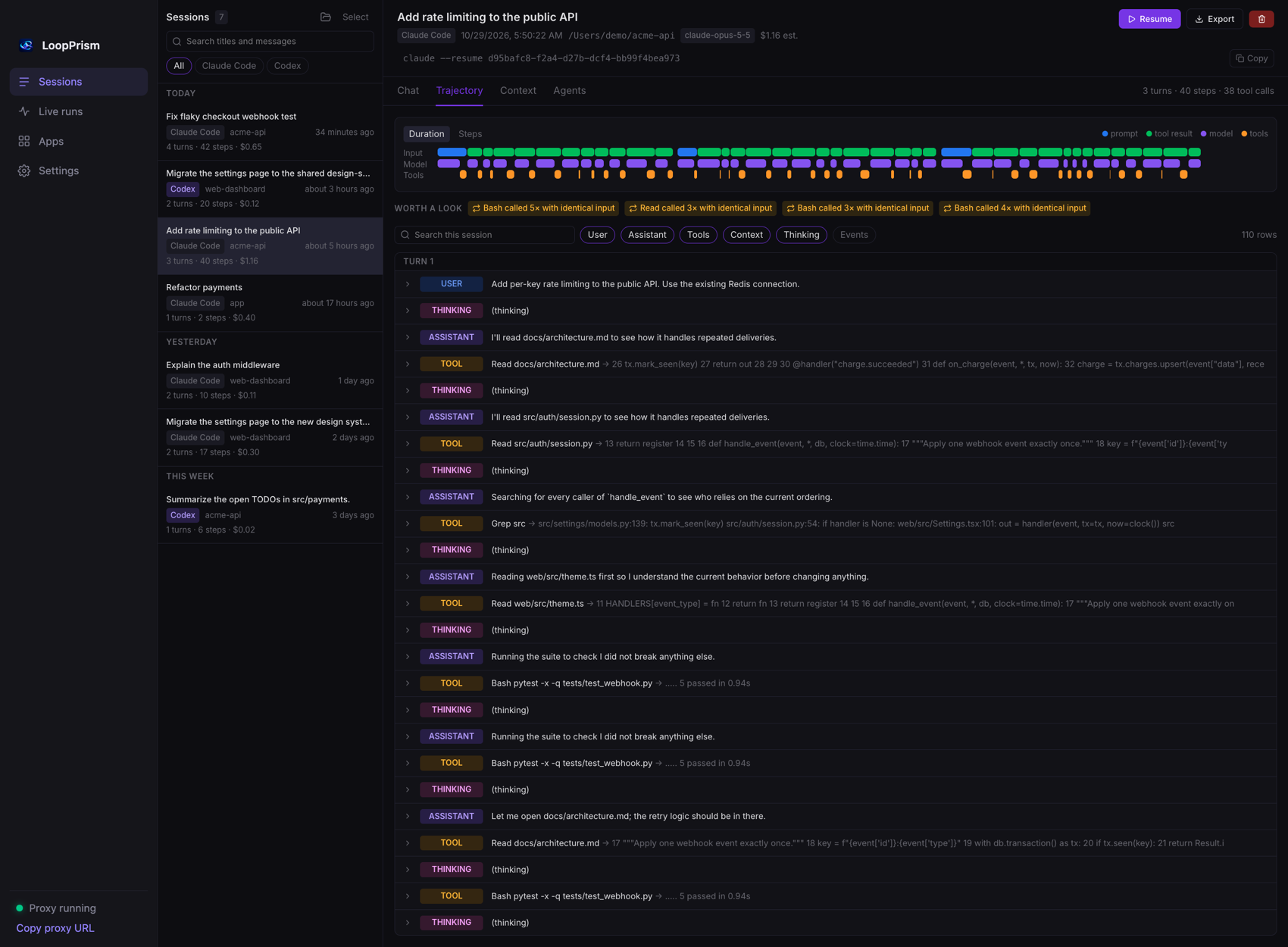 |
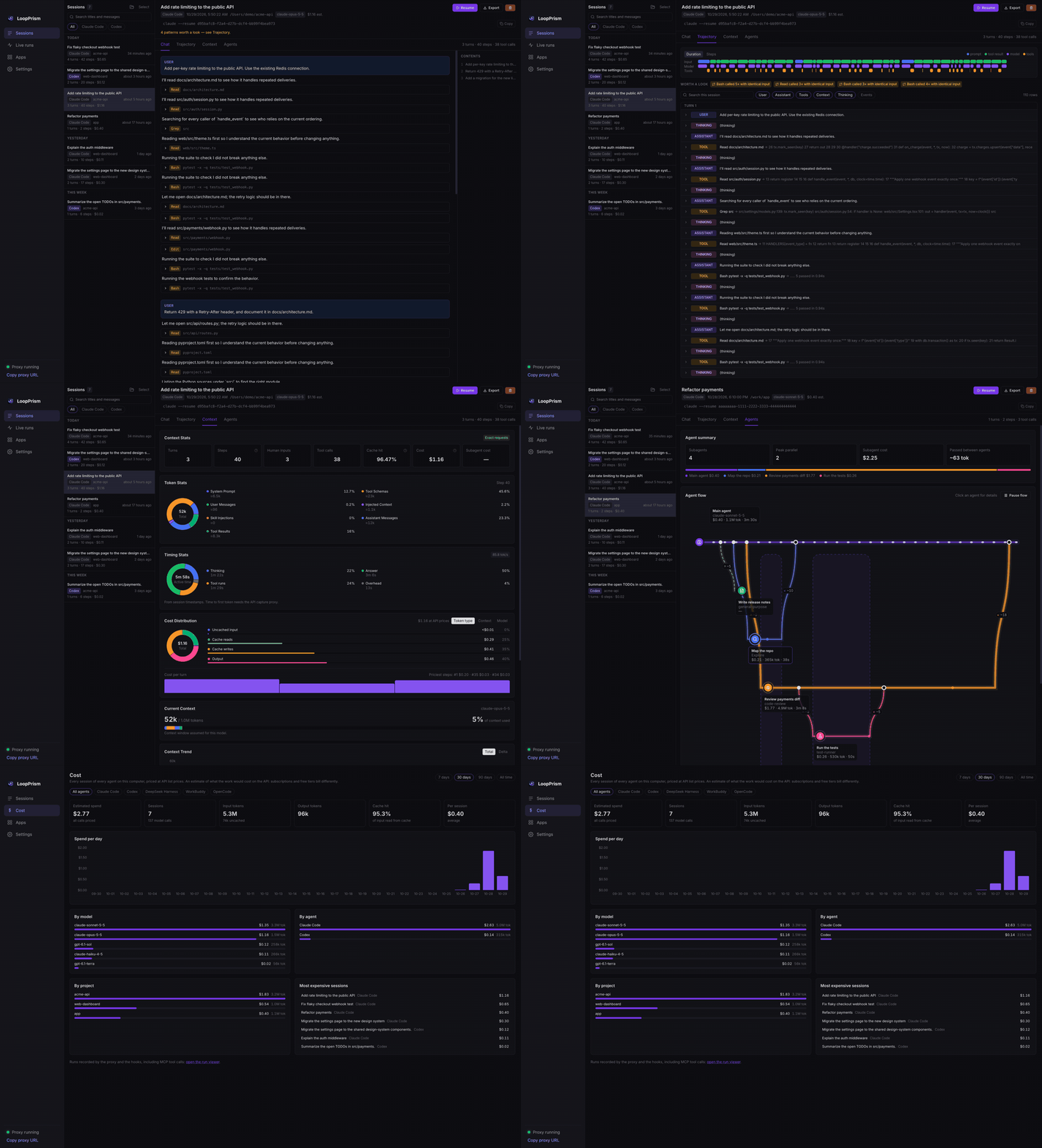
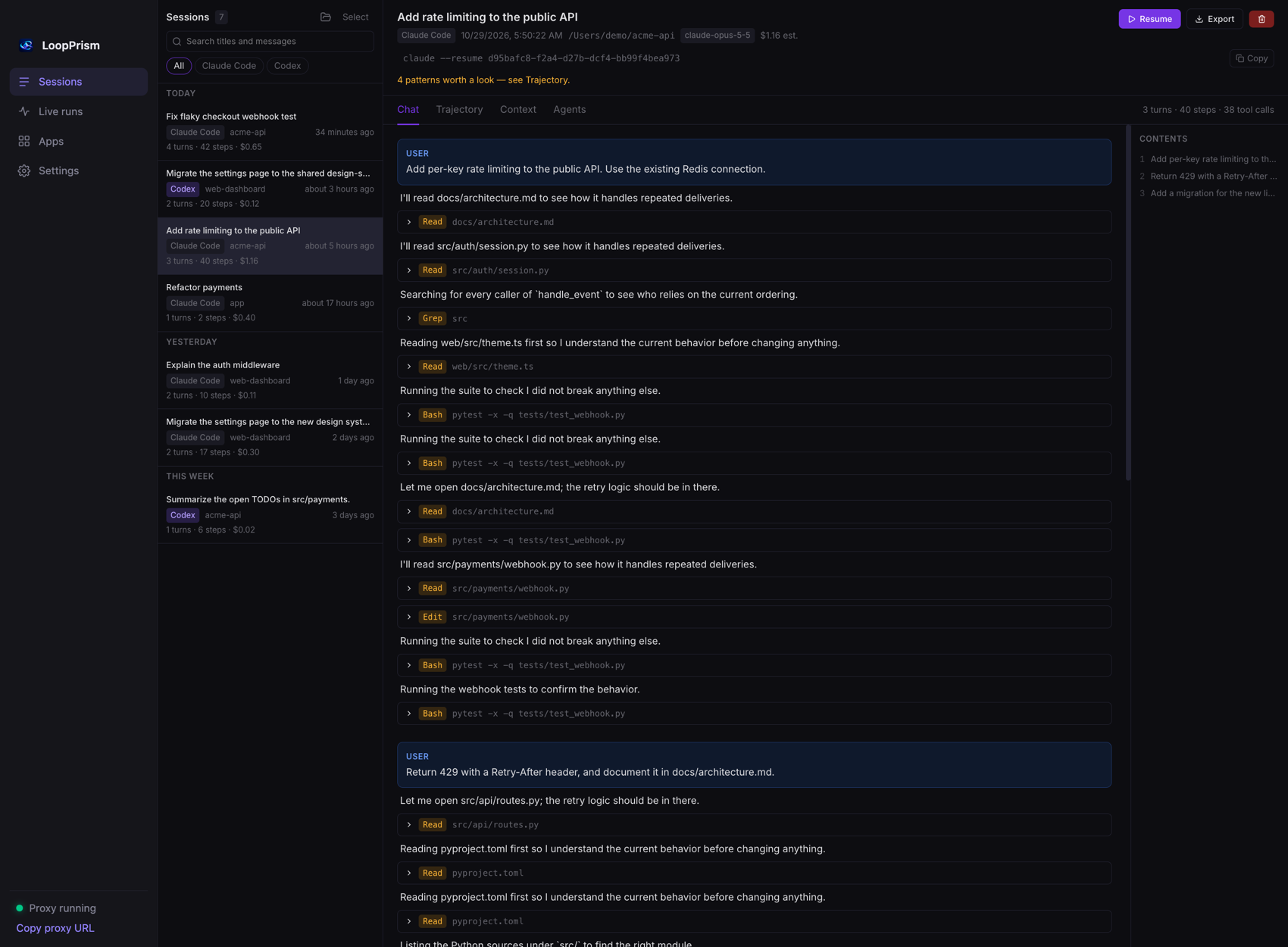
| Chat — the conversation, with every tool call expandable | Trajectory — every step on a timeline, loops and failure streaks flagged |
 |
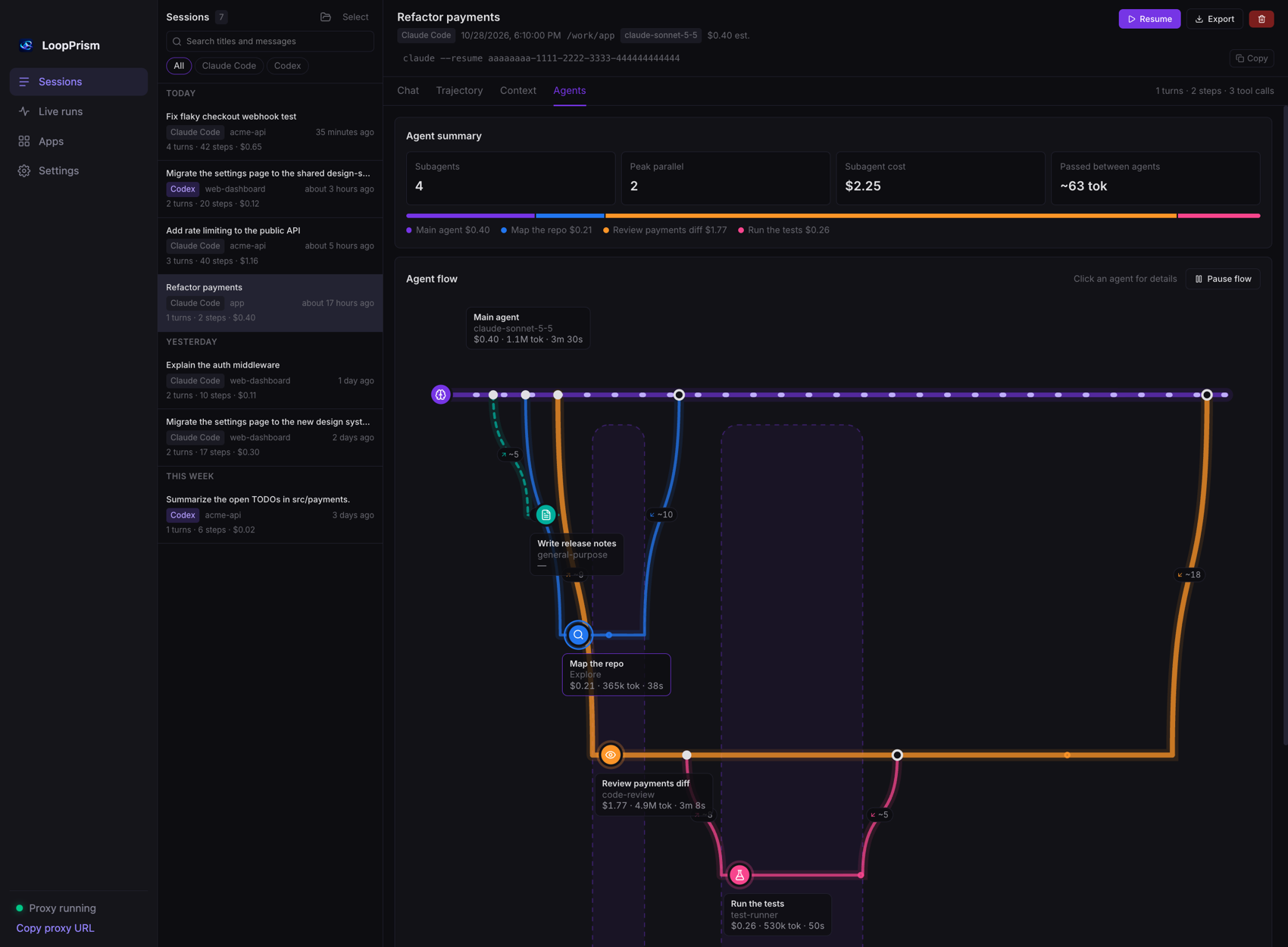 |
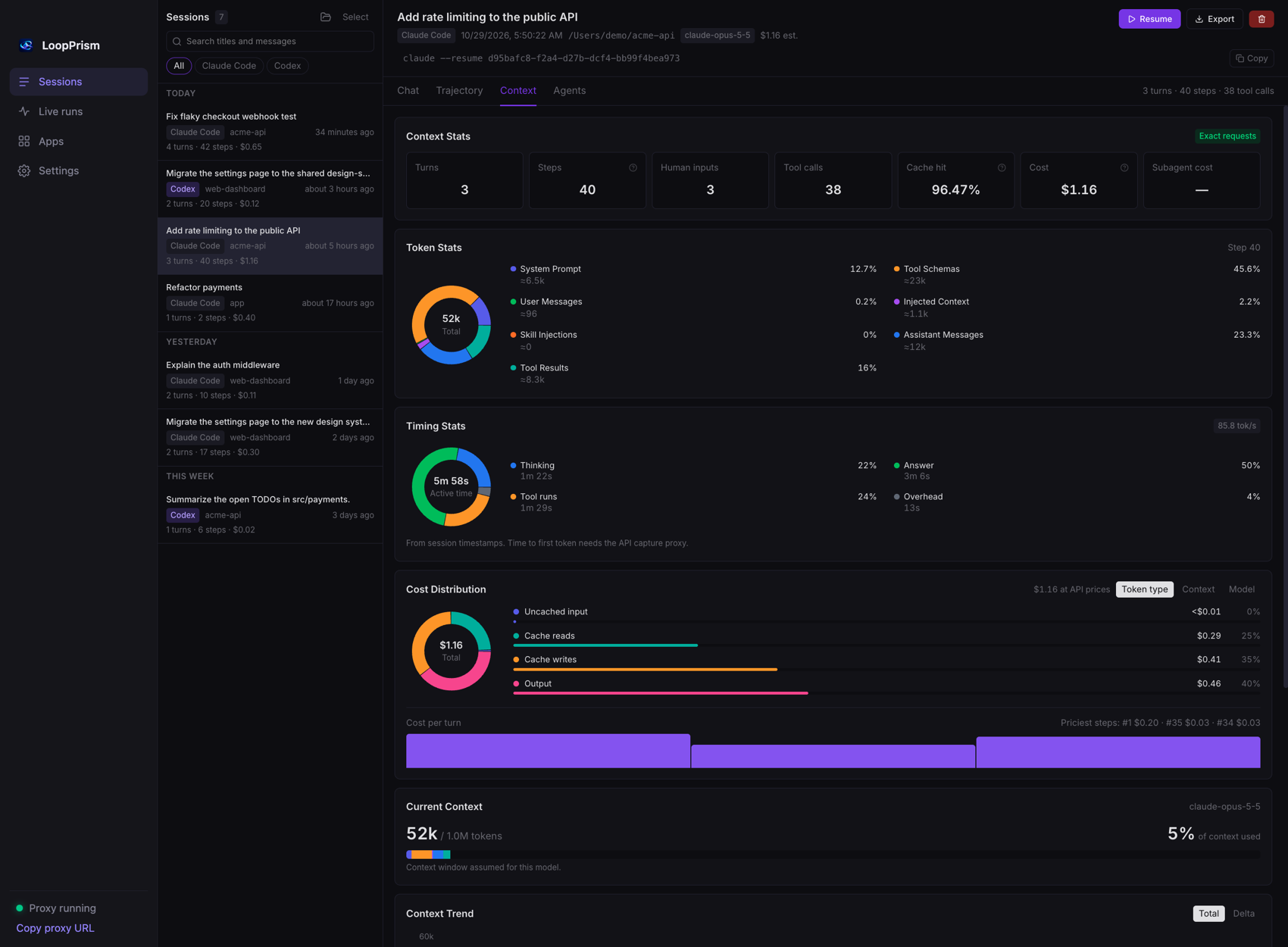
| Context — what filled the context, where the time and the money went | Agents — subagents branching off and merging back, with what was passed between them |
 |
|
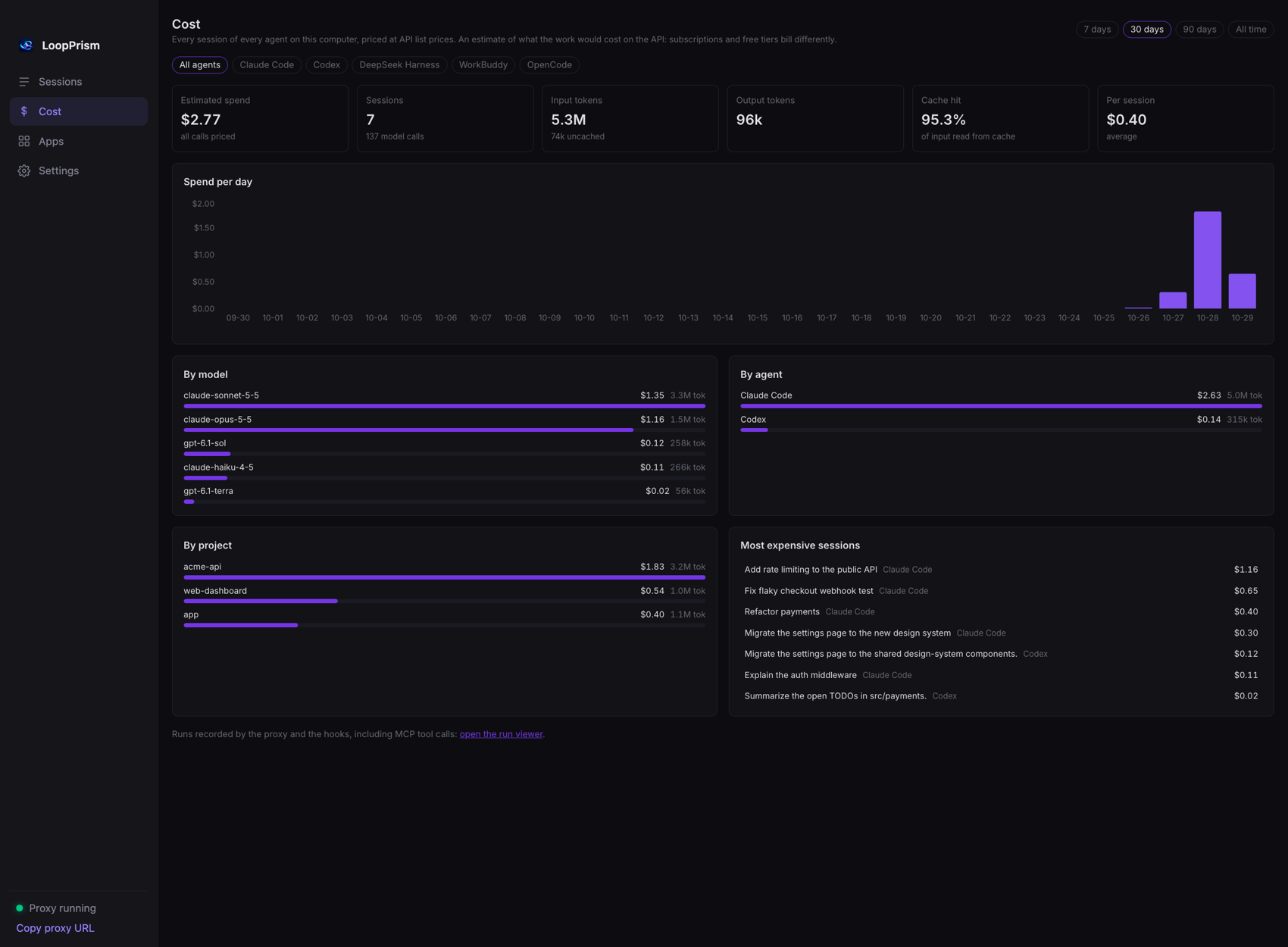
| Cost — everything your agents spent, across every app, in one place |
Made-up demo sessions, generated by scripts/make_demo_sessions.py and tests/support_agents.py.
Features
🗂 SessionsEvery Claude Code, Codex, Gemini CLI, OpenCode, DeepSeek Harness (dsh) and WorkBuddy session on your
machine. Search all messages, group by day or project, export to Markdown. Claude Code and
Codex sessions can also be resumed in a terminal or moved to the Trash from here; the other
others are read-only.
|
🧭 TrajectoryEvery step on a timeline: prompt, injected context, thinking, tool call, result. With durations, search, and flagged patterns: the same call again and again, runs of failures. |
🧮 ContextWhat filled the model's input at each step: system prompt, tool schemas, your messages, injected context, skills, tool results. Window fill, trend, cache hit rate. |
💸 CostReal token usage priced at API list prices, split by token type, by what filled the context, by model and by turn. The Cost page adds up every session of every app: per day, model, agent and project, plus the most expensive sessions. |
⏱ TimingThinking vs answering vs tool time, and tokens per second. |
🔌 MCP tracing & live runsAn optional proxy records every MCP tool call; hooks record what an agent does as it happens (the run viewer is linked from the Cost page). |
⚡ OptimizeFinds where you spend more than you need to (low cache hits, a big model on a simple task, repeated calls, huge tool outputs, endless sessions), estimates the saving of each, and shows the total as a percentage of your spend. Mark a suggestion as adopted and LoopPrism compares your cost per call before and after. It also points to open-source tools that help, found on GitHub. Optional AI analysis uses a model and API key of your own choice. |
|
🤖 AgentsA session that spawns subagents gets a flow view: the main agent as a line, each subagent branching off and merging back, with what it was asked, what it returned, its cost, and how much ran in parallel. Open any subagent's own conversation. (Claude Code; Codex agent trees are not read yet.) |
|
🎨 Look & languageDark, light or follow-the-system theme, and an interface in English or 简体中文 (or follow the system). Both are chosen in Settings and apply to the whole app, including the dashboard. |
Supported apps and models
 Claude Code |
 Codex |
 Gemini CLI |
 Cursor |
 OpenCode |
 DeepSeek Harness |
 WorkBuddy |
 More apps coming |
LoopPrism runs on macOS and Windows with the same features on both: the desktop app, the lprism CLI, the hooks and the dashboard behave identically (only the system's own wording differs, such as Trash and Recycle Bin).
| App | Sessions (read from disk) | Live runs (hooks) | Resume / delete here |
|---|---|---|---|
| Claude Code | ~/.claude/projects (also subagent trees) |
yes, plugin | yes |
| Codex | ~/.codex/sessions |
yes, ~/.codex/hooks.json |
yes |
| Gemini CLI | ~/.gemini/tmp/<project>/chats (JSON and JSONL), $GEMINI_CLI_HOME |
yes, ~/.gemini/settings.json |
read-only |
| Cursor | Cursor/User/globalStorage/state.vscdb (no cost: Cursor records no token usage) |
yes, ~/.cursor/hooks.json |
read-only |
| OpenCode | ~/.local/share/opencode/opencode.db |
yes, a plugin in ~/.config/opencode/plugins |
read-only |
DeepSeek Harness (dsh) |
~/.dsh/sessions (zstd), $DSH_HOME, and DSH Desktop's own dsh-desktop/harness/sessions in its app-data folder |
yes, via its hook plugin (one manual step) | read-only |
| WorkBuddy | ~/.workbuddy/projects, $WORKBUDDY_CONFIG_DIR |
yes, ~/.workbuddy/settings.json |
read-only |
Cost is priced from each model's published pay-as-you-go API price (cache reads and writes
priced separately). Built in: Claude (Fable, Opus, Sonnet, Haiku), OpenAI (GPT-6, GPT-5 and
Codex models), DeepSeek (chat, reasoner, V3.x, R1 and later versions), MiniMax (M2 and later),
GLM (4.5 to 5.x), Qwen (Max, Plus, Flash, Coder), Kimi (K2), Gemini (2.5, 3), and
free tiers such as OpenCode Zen's -free models. A newer version of a family is priced like
the latest known one; OpenCode's own reported cost is used when we have no price, and models with
no price at all (for example Tencent's hy3) show "no price" and are left out of totals. Set or
correct any price in ~/.loopprism/pricing.json. Costs are what the work would cost on the API:
subscriptions and free tiers bill differently.
Everything stays on your machine: SQLite on disk, no Docker, no cloud, no account.
Get started
Desktop app (macOS and Windows) — recommended
macOS
- Download the
.dmgfrom the latest release
(arm64for Apple Silicon,x64for Intel) and drag LoopPrism into Applications. - Open it. First launch: right-click the app → Open (it is not notarized yet), or
xattr -dr com.apple.quarantine /Applications/LoopPrism.app.
Windows (x64)
- Download
LoopPrism-<version>-x64.exefrom the latest release
and run it. The installer lets you choose the install folder
and whether to install for just you (default, no administrator prompt) or for everyone on the PC. - It is not code-signed yet, so SmartScreen may warn: click More info → Run anyway.
That's it. The app bundles everything (no Python, no terminal), opens on your sessions, connects
Claude Code and Codex for live runs, and keeps running from the menu bar (macOS) or system tray (Windows). Details:
desktop/README.md.
Command line
pip install "git+https://github.com/atlasmarkz/LoopPrism.git"   # or: uv tool install git+https://github.com/atlasmarkz/LoopPrism.git
lprism proxy                                                    # then open http://localhost:8080
Live runs from Claude Code, Codex and WorkBuddy
Sessions are read after the fact. To also watch an agent as it works:
npx loopprism install     # adds the hooks to Claude Code, Codex, Gemini CLI, Cursor, WorkBuddy, OpenCode and/or DeepSeek Harness, whichever you have
lpa status                # newest runs
Claude Code can also use the plugin directly (/plugin marketplace add atlasmarkz/LoopPrism, then/plugin install loopprism@loopprism). In Codex, run /hooks once to trust the hooks; restart
WorkBuddy, Gemini CLI and OpenCode after installing (OpenCode gets a one-file plugin). DeepSeek Harness sessions are read from ~/.dsh (or $DSH_HOME) and from DSH Desktop's own data folder, and
WorkBuddy's from ~/.workbuddy (or $WORKBUDDY_CONFIG_DIR), and OpenCode's from its database, with
nothing to set up. For live runs, DeepSeek Harness needs one manual step: lpa install dsh writes ~/.loopprism/dsh-hooks.json; in DSH Desktop install the plugin dsh-hooks-claude-code, set its configPath to that file and restart. Privacy options and uninstall: npm/README.md.
License
Star History
Reviews (0)
Sign in to leave a review.
Leave a reviewNo results found