agent-standup
Health Pass
- License — License: MIT
- Description — Repository has a description
- Active repo — Last push 0 days ago
- Community trust — 12 GitHub stars
Code Fail
- network request — Outbound network request in demo.js
- process.env — Environment variable access in extension.js
- fs module — File system access in scripts/build-landing.js
- child_process — Shell command execution capability in scripts/capture-demo.js
- fs.rmSync — Destructive file system operation in scripts/capture-demo.js
- process.env — Environment variable access in scripts/capture-demo.js
- fs module — File system access in scripts/capture-demo.js
- child_process — Shell command execution capability in server.js
- fs.rmSync — Destructive file system operation in server.js
- os.homedir — User home directory access in server.js
- process.env — Environment variable access in server.js
- fs module — File system access in server.js
- network request — Outbound network request in server.js
Permissions Pass
- Permissions — No dangerous permissions requested
No AI report is available for this listing yet.
Your Claude Code session as a live, animated team call (VS Code extension)
Agent Standup
Your Claude Code session as a live team call. The lead gives orders, sub-agents join the call, work at their desks, share their screen and report back — with voices, expressions and a view of the real work as it happens.
→ Website & download: https://atoll92.github.io/agent-standup/
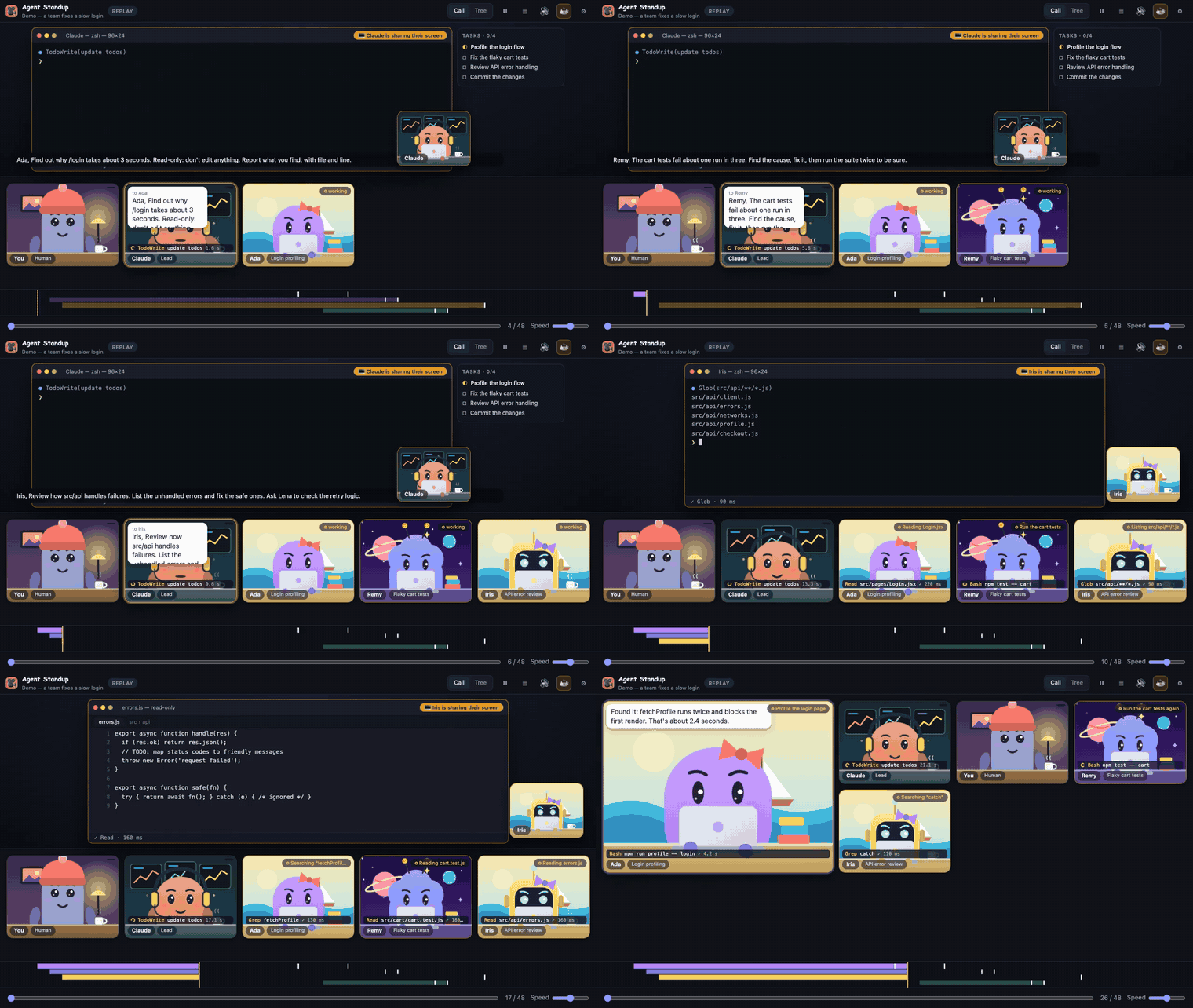
A fictional team fixing a slow login page — the built-in demo (⚙ → Source → Demo). Watch the full 1-minute video.
%20dev%20a%20coffee-ffdd00?logo=buymeacoffee&logoColor=black)
Unofficial community project, not affiliated with or endorsed by Anthropic. "Claude" is a trademark of Anthropic.
What you get
- Token usage per agent — a ⚡ counter in the header and on each tile shows how many tokens each agent used (input + output + cache writes; cache reads shown separately in the tooltip), counted once per message as recorded by Claude Code. Handy to see which sub-agent is the expensive one. It is read from the session files, not an estimate of your bill.
- Stuck or quiet agents — in the live call, a tile pulses amber with ⏳ when a command has been running for over a minute, shows 💤 when a working agent has gone quiet for 3 minutes, and a red ✗ counter for failed tool calls. The browser tab title shows how many agents are working.
- Built-in demo — no session yet? ⚙ → Source → Demo plays a fictional team (no data of yours).
- Live call — follows your newest Claude Code session in real time. Each agent is a small character at its desk; the one who speaks gets the spotlight and keeps it until someone else talks. Agents that talk back-to-back talk over each other, like a real meeting.
- Real voices, lip-sync — lines are spoken aloud; mouths follow the actual volume of the voice.
- Live screen sharing with the real output — when an agent works, its screen fills the stage (presenter's camera in the corner, "sharing" badge): a terminal with the command history and the actual output of each command, search results and tool calls; or an editor with the file it reads (real content and line numbers) or the exact diff it applies. See What you see for each agent below.
- Agents come and go — a sub-agent joins when it is given a task and leaves the call 2 minutes (playback time) after its report, with a dissolve animation. It comes back if it gets a new task.
- Sub-agent tree — the full hierarchy (you → Claude → sub-agents → their sub-agents) with status, tool counts and the current action.
- Click any agent — its prompt, tool usage and reports.
- Replay — pick any past session, scrub through it, see a timeline of who worked when, and get a recap (agents, tool calls, commands, files changed, busiest agents).
- Video export — records the call as a 1280×720
.webmwith voices and subtitles. - French or English — agent text is translated on the fly (see below).
- Office music — optional live web radio (FIP and its themed stations) that fades down smoothly while an agent talks and fades back up when the room goes quiet.
- Optional: office ambience and sound effects, small reactions and jokes between agents ("episode mode").
What you see for each agent
On its tile
- Activity tag (top right) — what the agent is doing right now:
Reading App.jsx,Editing foo.ts,Writing …,Running npm test(or the command's own description),Searching “pattern”,Listing **/*.js,Fetching host,Updating todo list; then✓ donewhen it reports. - Ticker (bottom) — the current tool call and target, with a spinner and a running counter while it executes, then
✓/✗and its real duration. - Status border: orange while working, spotlight while speaking, the tile fades and dissolves 2 minutes after its report.
On the shared screen (appears when an agent uses a tool, stays while a command is still running, then ~4 s after the last action)
- Terminal —
❯ command(with its description), then its real output (first lines, errors in red, “… +N lines”),● Grep(…)/● Glob(…)with matches, a spinner for what is still running. Footer:✓ Bash · 1.2 sor⠋ Bash · running 3.4 s. - Editor — for
Read: the file with its real content and line numbers (read-only); forEdit: the removed/added lines; forWrite: the new content, with the tool's result line. - Task list — if the agent keeps a todo list, a side panel shows it live (☐ pending, ◐ in progress, ☑ done).
- The presenter's camera lip-syncs when they speak; the subtitle bar shows what they say.
Click an agent — its prompt, tool counts and a Recent activity list (last 30 calls with status, duration, and expandable command + output).
Outputs are trimmed (about 1–2 KB each) to keep the call fast. Results of internal calls (sub-agent launches, messages) are not shown.
Screenshots
| Real commands, real output | The exact change | Who asked whom |
|---|---|---|
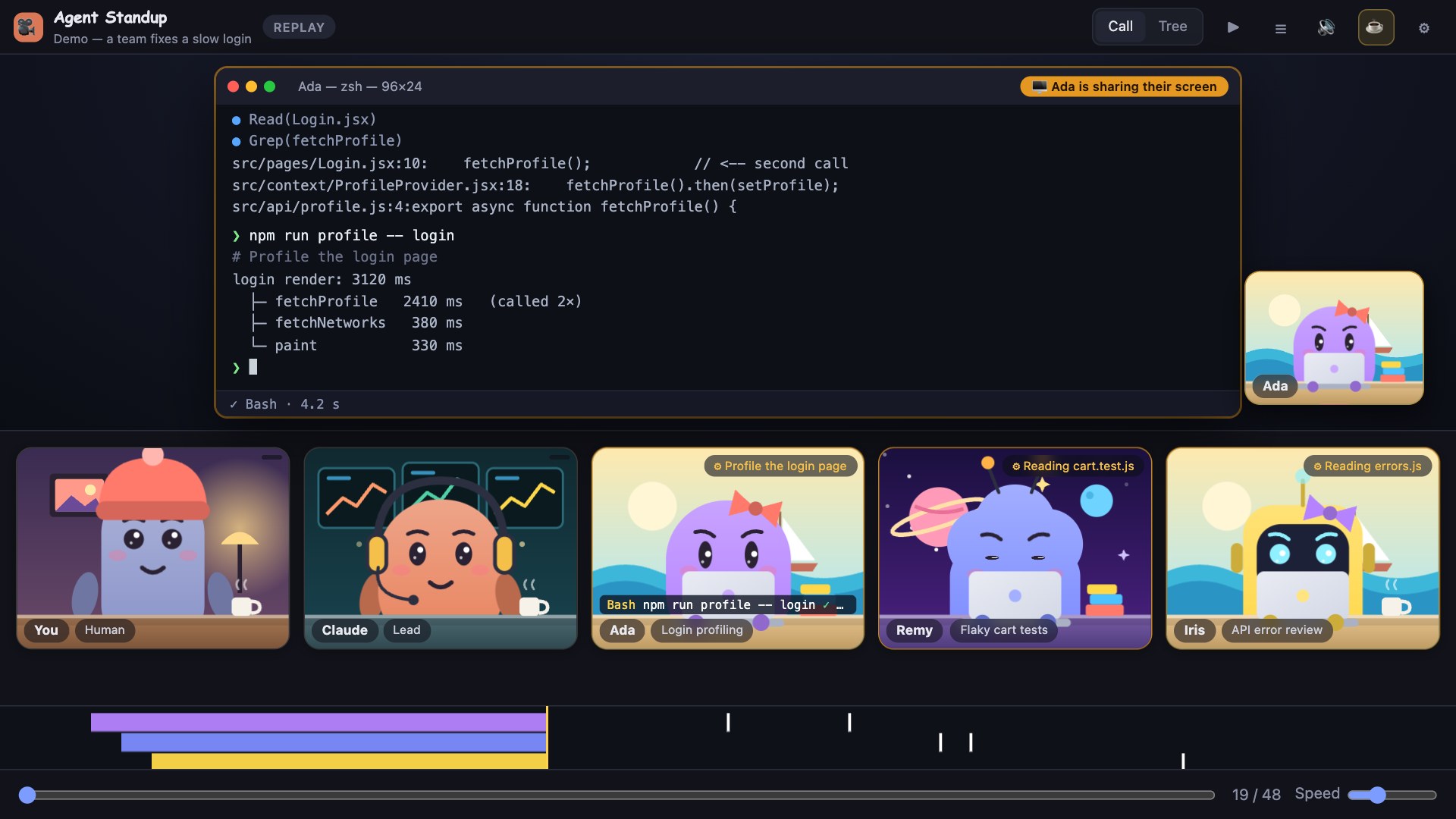 |
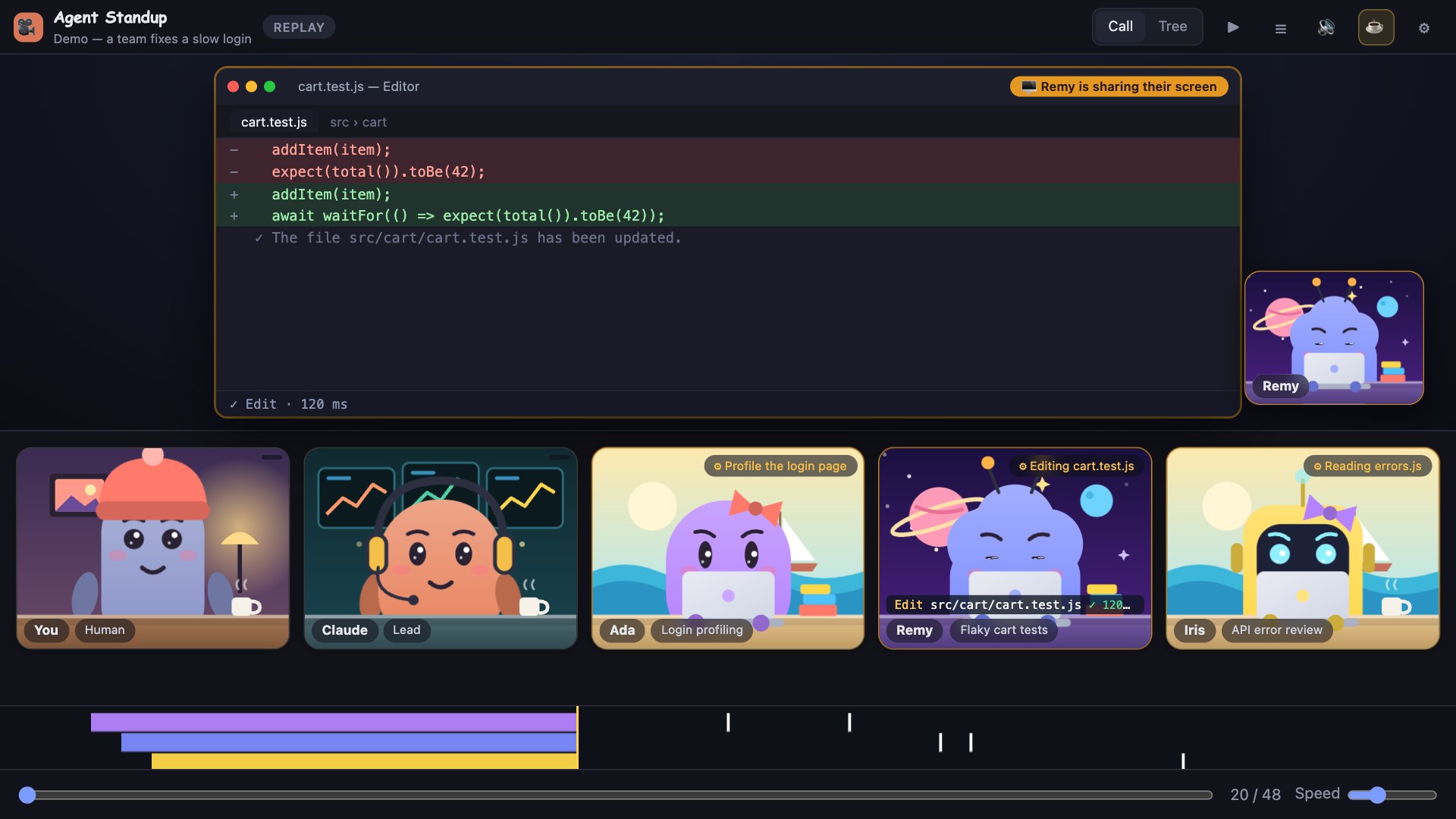 |
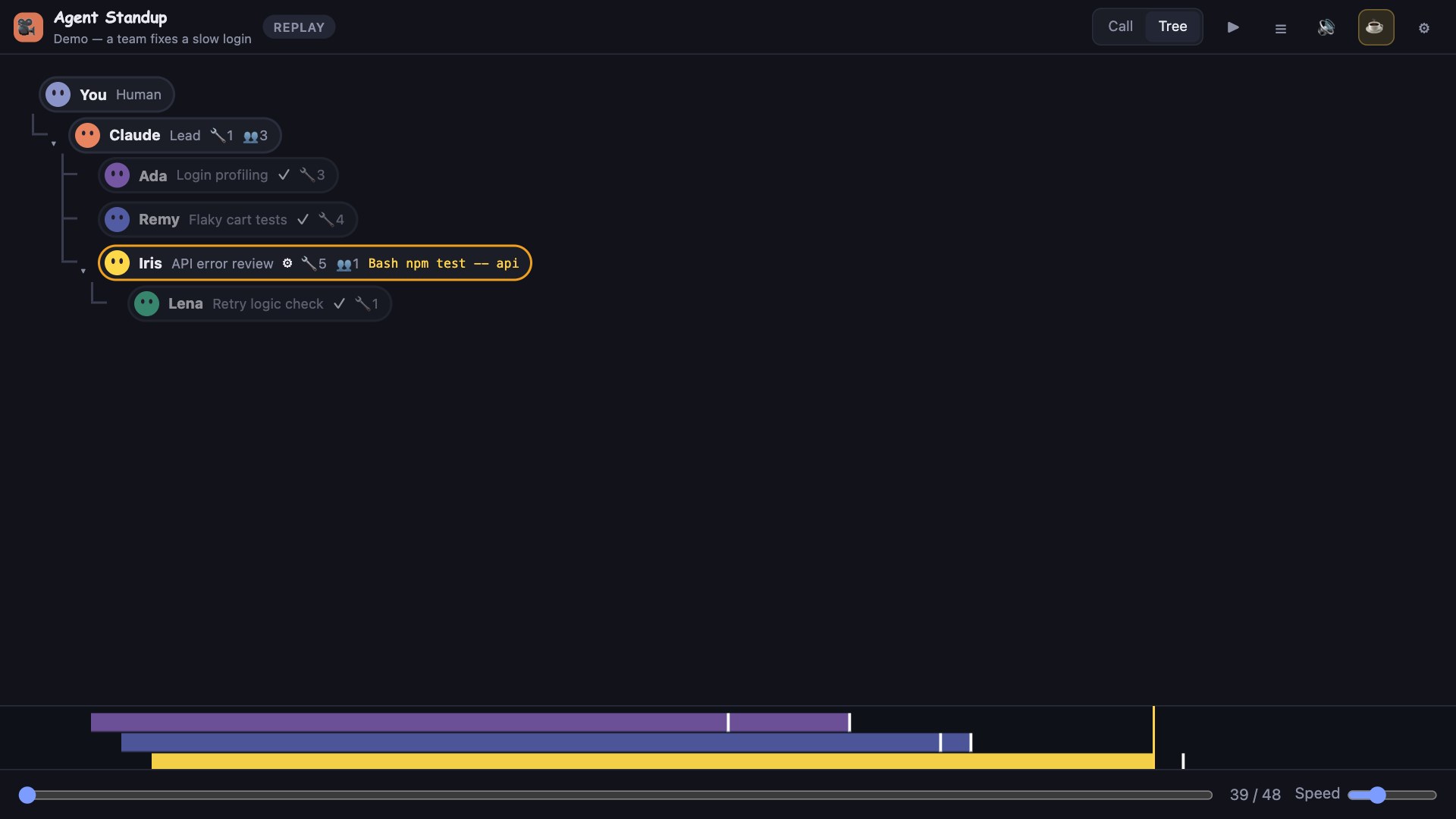 |
| Task list of an agent | End-of-episode recap | In French |
|---|---|---|
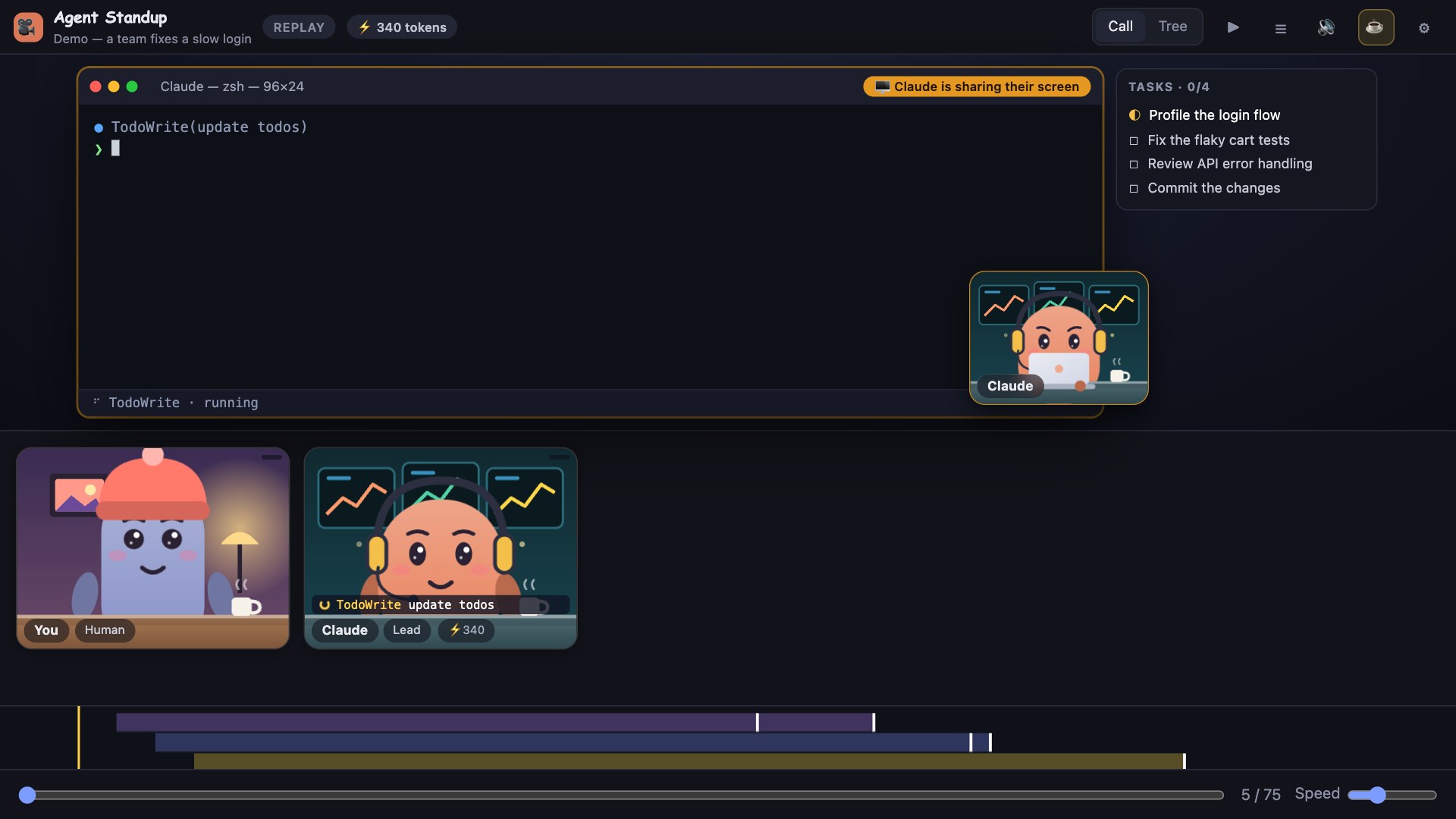 |
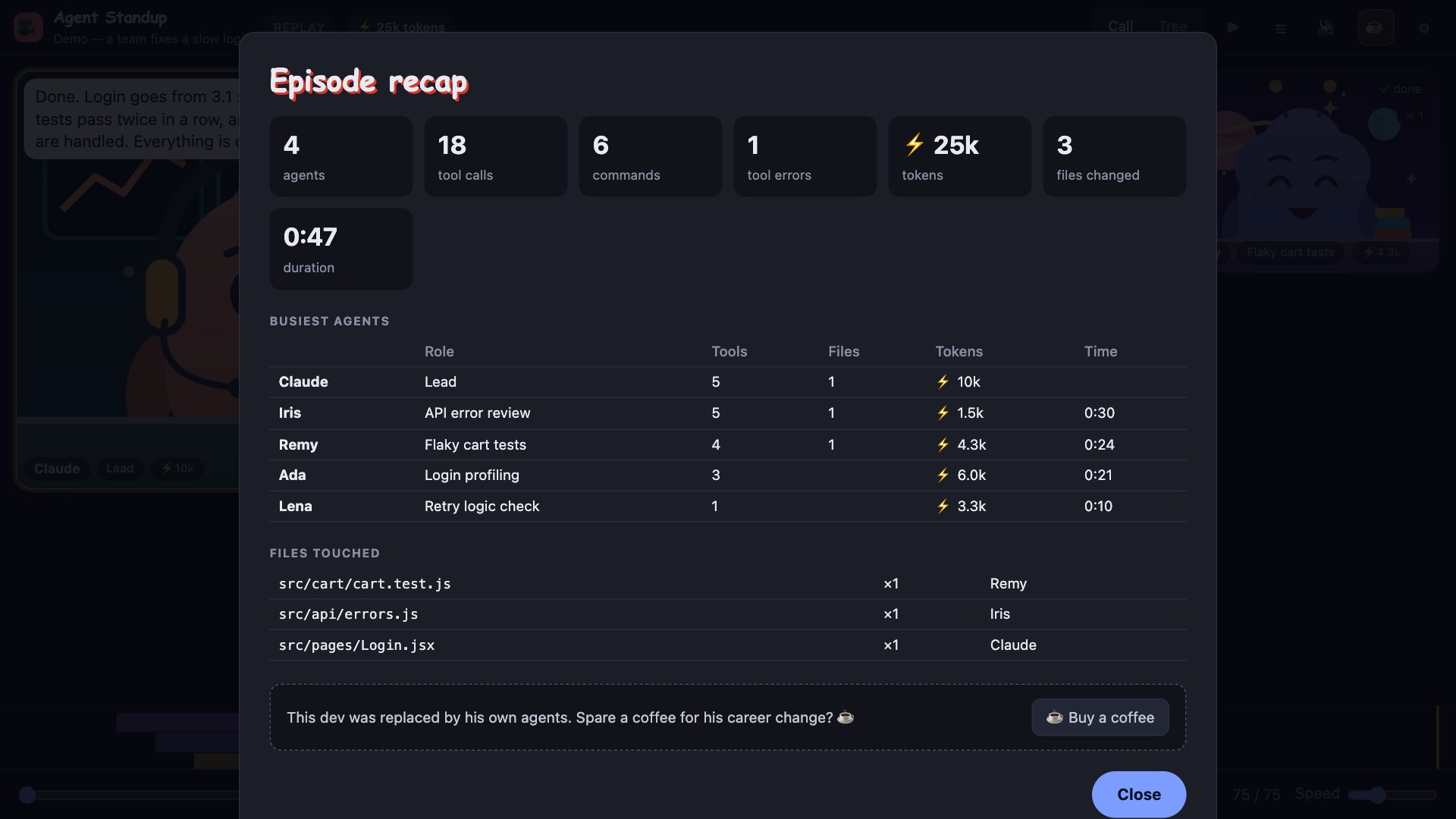 |
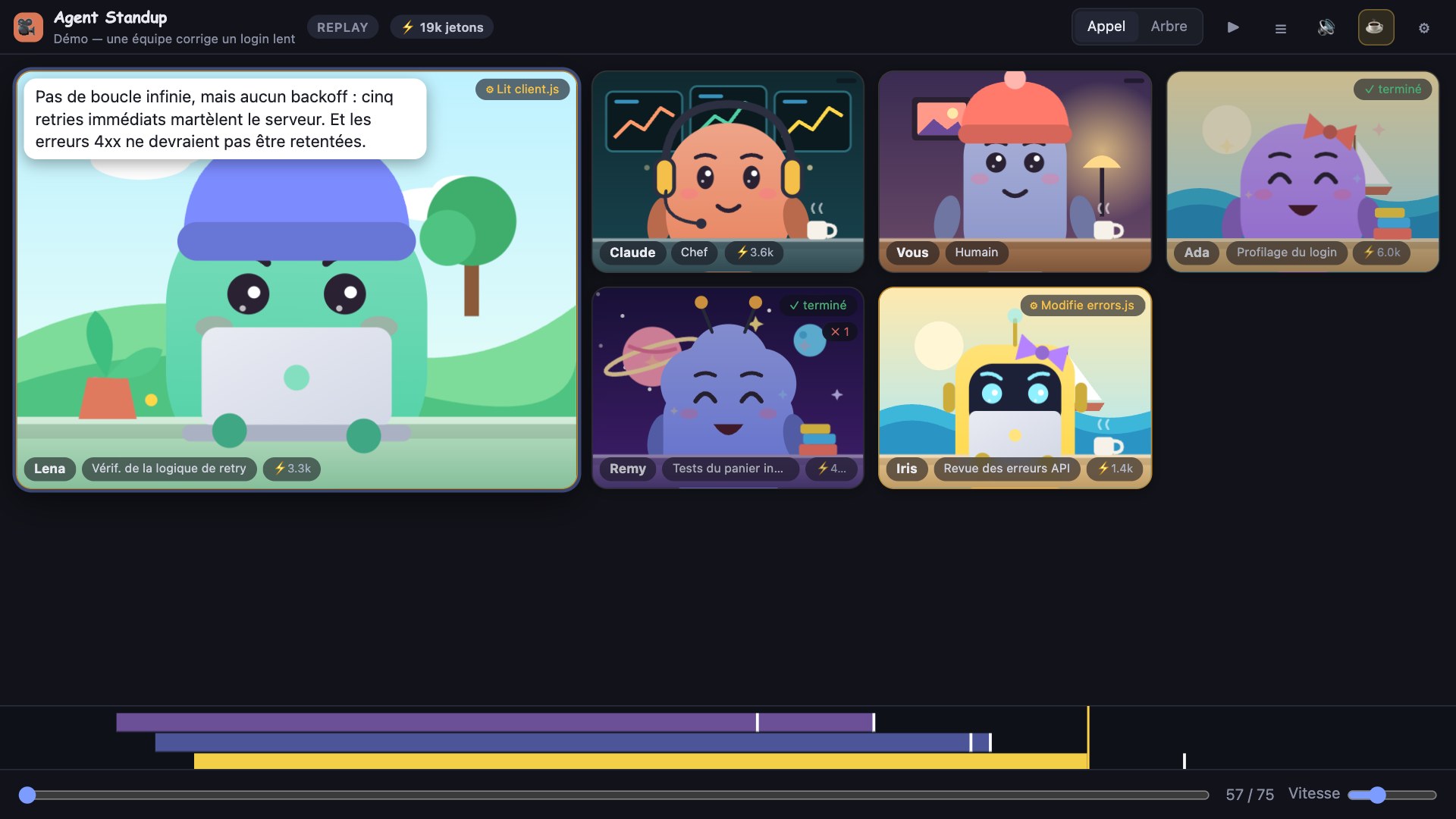 |
Install (VS Code)
Option 0 — from the Marketplace (easiest)
In VS Code: Extensions view → search Agent Standup → Install. Or: https://marketplace.visualstudio.com/items?itemName=DoubleGeste.agent-standup
Option A — from a GitHub Release
- Open the repository's Releases page and download
agent-standup-<version>.vsix(don't send it by email: Gmail and others block.vsixfiles). - In VS Code: Extensions view →
…menu (top right) → Install from VSIX… → pick the file.
Or from a terminal:code --install-extension agent-standup-<version>.vsix(macOS: run Shell Command: Install 'code' command in PATH first ifcodeisn't found). - Developer: Reload Window, then click the camera icon in the Activity Bar (or run Agent Standup: Open live call) and press Join.
Direct download of the current version: https://github.com/Atoll92/agent-standup/releases/download/v1.11.2/agent-standup-1.11.2.vsix
Or with the GitHub CLI: gh release download --repo Atoll92/agent-standup --pattern "*.vsix", then the code --install-extension line above.
Option B — build it yourself
git clone https://github.com/Atoll92/agent-standup.git
cd agent-standup
npm run package                       # needs Node 18+; produces agent-standup-<version>.vsix
code --install-extension agent-standup-*.vsix
To hack on it instead: open the folder in VS Code and press F5 (launches an Extension Development Host).
Option C — no extension
node server.js and open http://localhost:4747 (see Standalone below).
The first click on Join is required by browsers to allow sound.
Commands
| Command | What it does |
|---|---|
| Agent Standup: Open live call | Opens the call in a panel beside the editor |
| Agent Standup: Show sidebar | Opens the call in the Activity Bar view |
| Agent Standup: Open in browser (voice + sound) | Opens the same call in your default browser |
Settings
| Setting | Default | |
|---|---|---|
agentStandup.port |
0 |
Local port of the server. 0 = a free port is picked automatically for each VS Code window (recommended) |
agentStandup.claudePath |
(auto) | Full path to the Claude Code executable if it isn't found automatically (needed only for French translation) |
agentStandup.autoOpen |
false |
Open the call when VS Code starts |
agentStandup.onlyThisWorkspace |
true |
Follow only sessions started in the open folder (falls back to the newest session if there is none) |
Controls
| Appel / Call · Arbre / Tree | tiles or hierarchy |
| ⏸ / ▶ (Space) | pause / resume |
| ☰ | transcript |
| 🔊 / 🔇 (M) | mute everything |
| ⚙ | language · voices · ambience · office music (station + volume) · reactions · remove finished agents · Live ↔ Replay (and session picker) · recap · export video |
| T · R · L | tree/call · recap · transcript |
| Esc | close recap / menu |
In Replay, a slider and a speed control appear at the bottom, and clicking a transcript line jumps there.
Office music
Turn on Office music in ⚙ and pick a station (FIP, Groove, Jazz, Electro, Reggae, Rock, Nouveautés, Pop) and a volume. The stream is played live from Radio France's public Icecast servers directly in the page; it starts when you press Join (browsers require a click). When any agent speaks, the music drops to ~15 % within a fraction of a second and returns slowly after the last line. Muting (🔊 / M) stops the stream. Music is for your ears only: it is never included in video exports. Stations are for personal listening; nothing is stored or redistributed.
One window talks at a time
If several Agent Standup windows are open on the same machine (sidebar, editor panel, browser tab), only the last one where you pressed Join / Play / 🔊 plays sound; the others stay silent and show 🔈 (click it to take the sound back). This avoids hearing the same call twice, possibly in two languages. A window that stops answering releases the sound after a few seconds.
Voices
Voices are generated on your machine and played identically in the editor and in the browser:
| OS | Engine | Notes |
|---|---|---|
| macOS | say |
For nicer voices: System Settings → Accessibility → Spoken Content → System Voice → Manage Voices → download a Premium / Enhanced voice |
| Windows | installed system voices (SAPI, via PowerShell) | For French: Settings → Time & language → Speech (or Language) → add French |
| Linux | espeak-ng |
Must be installed |
If no voice is available the agents "mumble" instead. Each agent gets a stable voice from the best ones installed.
Translation (French ↔ English)
Agent messages are in the language of the session. With French selected, each line is translated as it arrives using your local claude CLI (claude -p, Haiku) through two warm background workers: about 3–4 s per line once warm (the very first line takes ~10 s), then spoken. If a translation is not ready in time (7 s live), that line is read in the original language. The menu shows a hint if translation or the French voice is unavailable.
Optional speed-up: set ANTHROPIC_API_KEY in the environment of VS Code / the server and translation calls the Anthropic API directly (~1–2 s).
Privacy & security: everything runs locally. The server listens on 127.0.0.1 only and rejects requests that do not come from localhost (other websites and DNS-rebinding attempts get a 403), so no web page can read your sessions. Translation and jokes send the shortened agent lines to Claude through your own Claude Code login (or your API key if you set one). With English selected and music off, nothing leaves your machine. (Office music connects your browser to icecast.radiofrance.fr while it is on.)
Standalone (no VS Code)
node server.js # http://localhost:4747 (PORT=… to change)
http://localhost:4747/→ live, newest sessionhttp://localhost:4747/?live=0→ replay picker?proj=<project-dir>→ limit live to one project folder under~/.claude/projects
Requires Node 18+.
How it works
Claude Code writes every session to ~/.claude/projects/<project>/<session>.jsonl, and each sub-agent to <session>/subagents/agent-*.jsonl (with a .meta.json linking it to the tool call that created it). Agent Standup merges these into one timeline: orders (the prompt a lead sends to a sub-agent), spoken text, tool calls (with their inputs), the results of those calls (matched by tool-call id, with real durations) and final reports. Each file is parsed once and then only the new lines are read, so even a very large session refreshes in a few milliseconds; responses are compressed. The page polls the server every 0.7 s and plays new events.
The website counts visits anonymously (a 1-pixel file hosted on GitHub per channel: no cookies, no third-party tracker); the app itself has no telemetry.
Troubleshooting
- Nothing happens / "Waiting for a session" — start Claude Code in the open folder; with
onlyThisWorkspacethe call follows that folder. - Panel is blank — use Open in browser; if you set a fixed
agentStandup.portit may be taken (use0). - Two voices at once (e.g. French and English) — update to ≥ 1.8.1: only one window plays sound now. A line that could not be translated in time is read by an English voice, not by a French voice reading English.
- No sound — press Join (or Play) once; check 🔊 isn't muted and Agent voices is on in ⚙.
- French is read in English / hint about translation — Agent Standup looks for Claude Code in your
PATH, the usual install folders (Homebrew, npm, nvm,~/.local/bin, Windows%APPDATA%\npm) and the copy bundled with the official VS Code Claude Code extension. If none is found the app quietly stays in English; setagentStandup.claudePath, or runclaudeonce in a terminal to sign in. If VS Code itself was started from inside a Claude Code session, restart it normally. - French is read in English —
claudeCLI not found or not logged in (hint in ⚙); install a French system voice. - Characters or backgrounds look empty — update to ≥ 1.2.1 (fixed a duplicate SVG id bug).
- Terminal output missing for a command — the call is still running (spinner), or it is an internal call (sub-agent launch / message); outputs are only recorded once a call finishes.
- Pill says OFFLINE — the local server stopped answering (another VS Code window that was serving the port was closed: the extension takes over within a few seconds), or restart
node server.js. - Delay behind the real session — expected ≈ 5–7 s in French (translation), ≈ 2 s in English; the call skips ahead when it falls too far behind.
Limits
- Tool outputs are trimmed (about 1–2 KB each); the shared screen shows the beginning of long outputs.
- Output only exists once a tool call has finished: a running command shows a spinner and its live timer, not partial output.
- Voices on macOS/Windows/Linux differ in quality; Windows needs a French voice installed for French.
- Very large sessions (10 MB+ of transcript) take a second or two to load the first time (about 1.9 s for a 12 MB, 168-sub-agent session on a recent Mac); after that updates take milliseconds.
- Video export records in real time and needs a Chromium-based browser/VS Code.
Support
This dev was replaced by his own agents. If Agent Standup made your sessions more fun, you can buy him a coffee ☕ — there is also a ☕ line in the ⚙ menu and at the end of each recap.
License
MIT
Reviews (0)
Sign in to leave a review.
Leave a reviewNo results found