autovio
Health Warn
- License — License: NOASSERTION
- Description — Repository has a description
- Active repo — Last push 0 days ago
- Low visibility — Only 8 GitHub stars
Code Warn
- process.env — Environment variable access in packages/backend/src/db/connection.ts
Permissions Pass
- Permissions — No dangerous permissions requested
This MCP server and open-source pipeline turn text prompts into finished MP4 videos. It automates the entire workflow, generating scenarios, images, and clips before editing and exporting the final result.
Security Assessment
Overall Risk: Low. The tool does not request dangerous system permissions or execute raw shell commands. Environment variable access is present in the database connection file, which is a standard and expected practice for handling credentials securely. There is no evidence of hardcoded secrets. Because the system acts as an AI pipeline aggregator, it inherently makes network requests to external AI providers, but this is required for its core functionality. As a self-hosted application, data exposure risks remain entirely under your control.
Quality Assessment
The project appears to be in its early stages but is actively maintained, with its most recent push happening today. It boasts a robust setup including dedicated documentation, CI workflows, and a well-structured TypeScript, React, and Express architecture. However, it currently suffers from low community visibility, evidenced by only 8 GitHub stars. A significant note for developers is the licensing: the repository specifies a "PolyForm Noncommercial" license, meaning it cannot be legally used for commercial purposes without acquiring a separate license.
Verdict
Safe to use for personal or experimental projects, but strictly off-limits for commercial SaaS applications due to the noncommercial license.
Open-source AI video pipeline. Text prompt → scenario → images → video clips → editor → MP4. Self-hosted, multi-provider, MCP-ready.
English | 简体中文 | 繁體中文 | 한국어 | Deutsch | Español | Français | Italiano | Dansk | 日本語 | Polski | Русский | Bosanski | العربية | Norsk | Português (Brasil) | ไทย | Türkçe | Українська | বাংলা | Ελληνικά | Tiếng Việt | हिन्दी
AutoVio
Open-source AI video generation pipeline for SaaS teams and developers.
From a text prompt to a finished video — scenario, images, clips, editing, export.
📖 Docs · 🚀 Quick Start · 📡 API · 🤖 MCP Server







What is AutoVio?
Most AI tools handle one step of video creation. AutoVio handles the whole thing.
You describe what you want — a product, an idea, a story. AutoVio writes the scene-by-scene scenario, generates an image for each scene, animates those images into video clips, and assembles everything in a timeline editor. You export a finished MP4. Especially useful for SaaS product demos, feature announcements, and marketing videos.
The entire pipeline runs on your own infrastructure. You bring your own API keys. You own the output.
Text prompt → Scenario (LLM) → Images (Gemini / DALL-E) → Video clips (Veo / Runway) → Edit → Export
The Pipeline
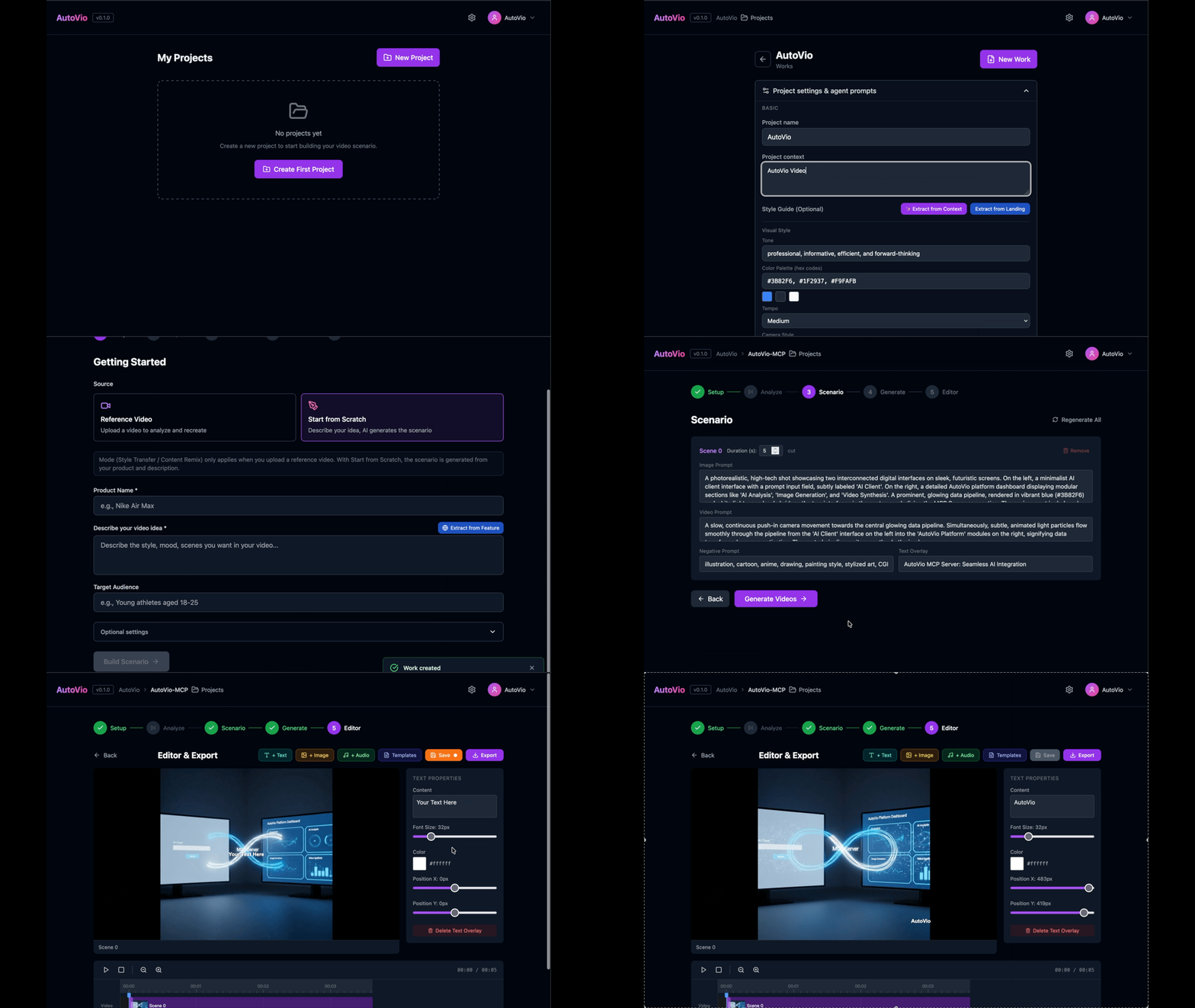
AutoVio breaks video production into five steps that mirror how a human team would work:
| Step | What happens |
|---|---|
| 1 · Init | Set your subject, audience, resolution, mode, and optional reference assets |
| 2 · Analyze | Upload a reference video — vision AI extracts style, tone, pacing, and colors |
| 3 · Scenario | LLM writes a scene-by-scene script with image prompts, video prompts, and transitions |
| 4 · Generate | Each scene gets an AI-generated image, then that image is animated into a video clip |
| 5 · Editor | Arrange clips on a timeline, add text/image overlays, set transitions, mix audio, export |
Two generation modes:
- Style Transfer — Replicate the visual style of an existing video on new content
- Content Remix — Build from scratch using a project style guide and your prompts
Key Features
- Full end-to-end pipeline — one system from idea to exported MP4
- Multi-provider AI — mix and match LLMs, image models, and video models per project
- Reference video analysis — vision AI decodes style, tempo, and composition from any video
- Project style guides — lock in brand voice, color palette, camera style, and tone once; apply across all videos
- Asset library — upload product photos, logos, or screenshots; use them directly in videos or as style references
- Timeline editor — text overlays, image overlays, transitions, audio mixing, frame-accurate trimming
- Template system — save overlay compositions as reusable templates across works
- Resolution control — Portrait 9:16, Landscape 16:9, or Square 1:1; each provider gets the right format automatically
- REST API + OpenAPI — every feature is accessible programmatically
- MCP server — use AutoVio from Claude Code, Cursor, Claude Desktop, or any MCP client
- Self-hosted — runs on your machine or your server; no data leaves without your API keys
AI Providers
AutoVio is provider-agnostic. Configure different providers for each role:
| Role | Supported providers |
|---|---|
| LLM (scenario) | Google Gemini, OpenAI, Anthropic Claude |
| Vision (analysis) | Google Gemini |
| Image generation | Google Gemini Image, OpenAI DALL-E 3 |
| Video generation | Google Veo, Runway Gen-3 |
New providers can be added by implementing the IImageProvider or IVideoProvider interface.
Use Cases
Developers & AI Coding Assistants
AutoVio has a full MCP server. Your AI coding assistant can generate product demo videos without leaving the editor:
- Claude Code — run
autovio_works_createafter shipping a feature - Cursor — generate tutorial videos for code changes inline
- Claude Desktop — describe a video in conversation, have it built automatically
Automation Workflows
The REST API connects to any automation platform:
- n8n / Make / Zapier — trigger video generation from webhooks, CRM events, or schedules
- CI/CD pipelines — auto-generate release announcement videos on every deploy
- Content calendars — batch-produce social media videos from a content schedule
SaaS & Product Teams
- Turn feature specs into product demo videos
- Generate localized video variants from a single scenario
- Create onboarding videos from documentation
- Automate release announcement videos for every new SaaS feature
- Maintain brand consistency across all video output with style guides
Researchers & Builders
- Experiment with new AI video providers without rebuilding infrastructure
- Use the REST API as a backend for your own video product
- Extend the pipeline with custom providers, prompts, or export formats
Quick Start
Requirements
- Bun >= 1.0 (or Node.js >= 18)
- MongoDB — local or Atlas
- FFmpeg — for video export (
brew install ffmpeg/apt install ffmpeg) - At least one AI provider API key (Google Gemini is free to start)
1. Clone and install
git clone https://github.com/Auto-Vio/autovio.git
cd autovio
bun install
2. Configure
cp .env.example .env
# Open .env and set MONGODB_URI and JWT_SECRET
| Variable | Required | Description |
|---|---|---|
MONGODB_URI |
Yes | MongoDB connection string |
JWT_SECRET |
Yes | Secret for JWT tokens |
PORT |
No | Backend port (default: 3001) |
3. Start
bun run dev
- Frontend:
http://localhost:5173 - Backend API:
http://localhost:3001 - OpenAPI docs:
http://localhost:3001/api/docs
MCP Server

The autovio-mcp package ships a full MCP server with 25+ tools covering the entire AutoVio API. Connect it to Claude Code, Claude Desktop, Cursor, or any MCP-compatible client and generate videos through conversation.
Claude Code:
claude mcp add autovio-mcp -- npx -y autovio-mcp \
  --autovio-base-url http://localhost:3001 \
  --autovio-api-token YOUR_TOKEN \
  --llm-model gemini-2.5-flash \
  --llm-api-key YOUR_KEY \
  --image-model gemini-2.5-flash-image \
  --image-api-key YOUR_KEY \
  --video-model veo-3.0-generate-001 \
  --video-api-key YOUR_KEY
Claude Desktop / Cursor (claude_desktop_config.json):
{
  "mcpServers": {
    "autovio": {
      "command": "npx",
      "args": [
        "-y", "autovio-mcp",
        "--autovio-base-url", "http://localhost:3001",
        "--autovio-api-token", "YOUR_TOKEN",
        "--llm-model", "gemini-2.5-flash",
        "--llm-api-key", "YOUR_KEY",
        "--image-model", "gemini-2.5-flash-image",
        "--image-api-key", "YOUR_KEY",
        "--video-model", "veo-3.0-generate-001",
        "--video-api-key", "YOUR_KEY"
      ]
    }
  }
}
See the MCP documentation for the full setup guide and tool reference.
Project Structure
AutoVio/
├── packages/
│   ├── backend/     # Express API — routes, AI providers, FFmpeg export
│   ├── frontend/    # React + Vite — 5-step pipeline UI, timeline editor
│   └── shared/      # TypeScript types shared between packages
└── package.json     # Bun/npm workspace root
Contributing
AutoVio is at an early stage and actively evolving. Contributions are welcome in any form:
- Bug reports — open an issue with reproduction steps
- New AI providers — implement
IImageProviderorIVideoProviderand open a PR - UI improvements — the frontend is React + TailwindCSS + Zustand
- Documentation — the docs site lives in AutoVio-Docs
- Ideas and feedback — open a discussion or issue
To get started, read the documentation and explore the codebase. The provider interfaces in packages/backend/src/providers/interfaces.ts are a good entry point for adding new AI integrations.
Repositories
| Repository | Description |
|---|---|
| autovio | Core platform — React frontend + Express backend |
| autovio-mcp | MCP server for Claude, Cursor, and AI assistants |
| autovio-docs | Documentation site (Astro Starlight) |
Scripts
| Command | Description |
|---|---|
bun run dev |
Start both backend and frontend in development mode |
bun run dev:backend |
Backend only |
bun run dev:frontend |
Frontend only |
bun run build |
Build all packages |
bun run typecheck |
Run TypeScript type checking across all packages |
License
AutoVio is licensed under PolyForm Noncommercial 1.0.0.
Free for personal, educational, and non-commercial use. For commercial use, contact the maintainers to discuss licensing.
Reviews (0)
Sign in to leave a review.
Leave a reviewNo results found