markdown_video
Health Pass
- License — License: MIT
- Description — Repository has a description
- Active repo — Last push 0 days ago
- Community trust — 46 GitHub stars
Code Fail
- process.env — Environment variable access in .github/scripts/select-video-previews.mjs
- process.env — Environment variable access in .github/scripts/upsert-preview-comment.mjs
- network request — Outbound network request in .github/scripts/upsert-preview-comment.mjs
- fs module — File system access in .github/workflows/publish-cli.yml
- rm -rf — Recursive force deletion command in .github/workflows/render-preview.yml
- fs module — File system access in action/action.yml
Permissions Pass
- Permissions — No dangerous permissions requested
No AI report is available for this listing yet.
Write markdown, render real MP4 videos — scenes, code, terminals, music, captions, 20+ locales. Browser editor, npm CLI, and an MCP server so AI agents can render video end-to-end.
🎬 Markdown to Video
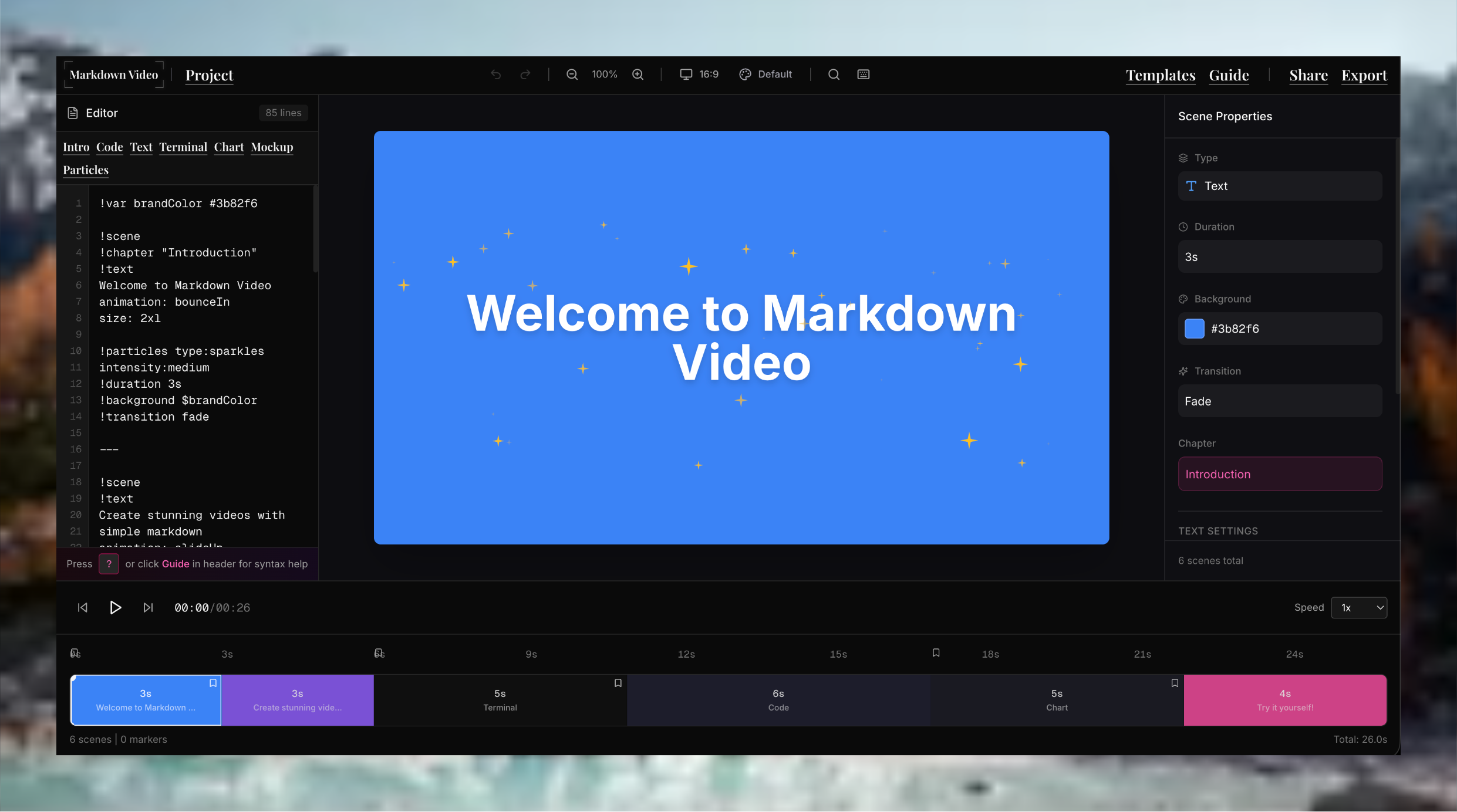
Transform your Markdown into animated videos with a custom syntax that brings your content to life. Markdown to Video is a Next.js-based web application that converts Markdown content into videos with rich animations, transitions, and scene types.
✨ Features
MCP server — an MCP endpoint at
/api/mcpexposes 12 tools: ten authoring/documentation/validation tools plusrender_previewandrender_videofor direct screenshots and temporary MP4 URLs so a coding agent can author and validate scenes against the same parser the editor uses.Custom Markdown Syntax: Write videos using an intuitive extended Markdown syntax with custom directives
Rich Scene Types: Support for text, code, images, terminal, diffs, charts, mockups, QR codes, countdowns, progress bars, and more
FFmpeg.wasm Export: Render and download MP4 videos or animated GIFs in the browser
Real-time Preview: See your video content as you edit it with live scene previews
Errors as you type: Unknown directives and invalid values are marked on the line that caused them, with one-click fixes for typos
Autocomplete: Directive names after
!, and allowed values for properties liketransition,animation:andtype:Advanced Animations: Multiple animation types including typewriter, slide, fade, bounce, and custom effects
Particle Effects: Add confetti, snow, rain, sparkles, and fireworks to your scenes
Code Syntax Highlighting: Beautiful syntax highlighting for multiple programming languages
Scene Transitions: Smooth transitions between scenes (fade, slide, wipe, zoom, magic effects)
Terminal & Diff Support: Render terminal commands and code diffs with syntax highlighting
Chart Rendering: Create animated charts (bar, line, pie, donut) embedded in videos
Video Variables: Define and reuse variables throughout your markdown
Local Projects: Autosave one document in browser storage, and open/save it as a
.mdvfile; there is no multi-project library yetKeyboard Shortcuts: Boost productivity with keyboard shortcuts for common editor actions
Find & Replace: Quickly edit content across your markdown
Theme Support: Light and dark theme with customizable color schemes
Experimental Sharing: Generate links that open a project in the editor; large-project links require a configured storage backend (Postgres or Redis) and expire after 7 days. There is no dedicated embed player yet; iframe embeds currently expose the editor UI
Platform note: The editor is designed primarily for modern desktop browsers. Mobile editing is not optimized yet, and browser-based export can be resource-intensive for longer videos.
🤖 Use it from an AI agent (MCP)
The hosted MCP server lets Claude, Cursor or any MCP client write and check scenes with the same parser the editor uses.
Claude Code:
claude mcp add --transport http markdown-video https://markdownvideo.avikmukherjee.com/mcp
Cursor, Windsurf and other clients that take a JSON config:
{
  "mcpServers": {
    "markdown-video": {
      "url": "https://markdownvideo.avikmukherjee.com/mcp"
    }
  }
}
Then ask your agent something like "Write a 30-second markdown_video script announcing our v2 release, and validate it."
🏗️ Architecture
flowchart LR
    MD["Markdown source<br/>with scene directives"]
    AGENT["MCP client<br/>Claude, IDEs"]

    subgraph EDITOR["Editor — /editor"]
        ED["markdown-editor"]
        PREV["scene-preview<br/>per scene-type renderers"]
        TL["timeline scrubber"]
        EXP["export-modal"]
    end

    PARSE["lib/parser<br/>index + code, chart,<br/>diff, terminal parsers"]
    STORE["lib/use-video-store<br/>Zustand"]
    MCP["/api/mcp<br/>12 tools: authoring + rendering"]
    FF["@ffmpeg/ffmpeg<br/>wasm, in the browser"]
    MP4["MP4 or GIF download"]
    DB[("Postgres or Redis<br/>shares, rate limits,<br/>temporary mp4 artifacts")]
    WORKER["render-worker container<br/>Chromium + native ffmpeg<br/>(self-hosted)"]
    SANDBOX["Vercel Sandbox<br/>fork-per-render, no network<br/>(zero-infra on Vercel)"]

    MD --> ED
    ED --> PARSE
    PARSE --> STORE
    STORE --> PREV
    STORE --> TL
    STORE --> EXP
    EXP --> FF
    FF --> MP4
    ED <-->|"/api/projects"| DB
    AGENT --> MCP
    MCP --> PARSE
    MCP --> WORKER
    MCP --> SANDBOX
    MCP --> DB
Interactive editing and manual export remain client-side: the parser produces scenes, the preview draws them,
and FFmpeg compiles the same scenes to MP4 or GIF in the browser. The editor's Assets panel can store music and images in browser-local IndexedDB and reference them as ./filename; those bytes never leave the browser during editing/export and are not included in share links. The MCP rendering tools are the deliberate exception: they send markdown to apps/render-worker, a separate authenticated Chromium + native-ffmpeg container, and store bounded temporary MP4 artifacts for one hour. Remote image URLs are blocked during worker rendering to prevent server-side request forgery/egress abuse.
🏗️ Project Structure
apps/web/                       # Next.js application
  ├── app/
  │   ├── layout.tsx            # Root layout
  │   ├── page.tsx              # Landing page
  │   ├── editor/
  │   │   └── page.tsx          # Video editor interface
  │   ├── api/
  │   │   ├── projects/route.ts # API endpoint for temporary share snapshots
  │   │   ├── renders/[id]/    # Range-capable temporary MP4 serving
  │   │   └── mcp/[transport]/  # MCP server (12 tools, including rendering)
  │   └── globals.css
  ├── components/
  │   ├── landing/              # Landing page components
  │   ├── ui/                   # Reusable UI components (50+ Radix UI based)
  │   └── video-editor/
  │       ├── markdown-editor.tsx     # Markdown input editor
  │       ├── scene-preview/          # Video scene renderer
  │       │   ├── scenes/             # Different scene type renderers
  │       │   ├── components/         # Preview helpers
  │       │   └── utils/              # Rendering utilities
  │       ├── timeline.tsx            # Timeline scrubber
  │       ├── export-modal/           # Video export with FFmpeg
  │       ├── templates-panel.tsx     # Template selection
  │       ├── theme-selector.tsx      # Theme customization
  │       └── keyboard-shortcuts.tsx  # Shortcuts reference
  ├── lib/
  │   ├── mcp/
  │   │   ├── syntax-validator.ts # Validation shared with the MCP tools
  │   │   └── documentation.ts    # Directive docs served over MCP
  │   ├── parser/
  │   │   ├── index.ts            # Main markdown parser
  │   │   ├── parsers/            # Specialized parsers for different scenes
  │   │   ├── constants.ts        # Scene types and directives
  │   │   ├── timeline.ts         # Timeline parsing
  │   │   └── utils.ts            # Helper utilities
  │   ├── types.ts                # TypeScript type definitions
  │   ├── use-video-store.ts      # Zustand video state management
  │   ├── kv.ts                   # Storage facade: Postgres (Neon) primary, Redis fallback
  │   ├── redis.ts                # Redis client used by the kv fallback backend
  │   ├── github.ts               # GitHub API integration
  │   ├── templates.ts            # Template definitions
  │   └── utils.ts                # General utilities
  └── public/
      ├── og-image.png          # Open Graph image for sharing
      └── site.webmanifest      # PWA manifest
apps/cli/                       # npm-published headless markdown-to-MP4/GIF CLI
apps/render-worker/             # Authenticated server-side Chromium/ffmpeg renderer
packages/                       # Shared core/scenes packages
⌨️ Command-line renderer
The markdown-video CLI renders the same document format headlessly to MP4 or GIF. The npm artifact is self-contained (including the render page and its 80 provenance-verified fonts); ffmpeg remains a system dependency and Chromium is installed into the Playwright user cache.
npm install -g markdown-video
markdown-video install-browser
markdown-video doctor
markdown-video render video.md -o video.mp4
See apps/cli/README.md for npx usage, all render flags, music/captions, safety semantics, and ffmpeg installation guidance.
The examples/ folder holds the exact sources for every video on the landing page — including examples/launch.video.md, the 2 kb document that renders the project's own launch video. Re-render any of them yourself:
markdown-video render examples/launch.video.md -o launch.mp4
☁️ Deploying MCP rendering
The normal editor needs only the existing web deployment. render_preview/render_video additionally need one of two backends — plus storage (NEON_DATABASE_URL or DATABASE_URL for Postgres, self-bootstrapping; Upstash/KV Redis remains a fallback for existing self-hosted deploys) and NEXT_PUBLIC_SITE_URL set to the canonical origin:
Option A — Vercel Sandbox (zero infrastructure on Vercel). Each render forks a warm mdv-render-template sandbox snapshot (Node + Chromium + ffmpeg + the CLI bundle), executes with networking disabled, and is deleted afterwards. One-time provisioning from a repo checkout after pnpm build:
node scripts/provision-render-sandbox.mts
Selected automatically when no worker is configured and Vercel sandbox credentials are available. See docs/sandbox-rendering.md.
Option B — dedicated render worker (preferred for self-hosted production). Deploy the worker image with the repository root as Docker context and configure the web app with the same RENDER_WORKER_SHARED_SECRET and RENDER_WORKER_URL:
docker build -t markdown-video-render-worker -f apps/render-worker/Dockerfile . — run it with RENDER_WORKER_SHARED_SECRET (at least 32 random characters). Optional worker limits are PORT, HOST, RENDER_WORKER_CONCURRENCY (default 1, max 4), and RENDER_WORKER_QUEUE_LIMIT (default 8). Prefer a private network; if public, always use HTTPS at the platform/load balancer. Restrict container egress where your host supports it—the browser already blocks non-loopback scene image requests, but network policy is still useful defense in depth.
Rendered MP4s use IDs containing 128 bits of cryptographic randomness, expire after 1 hour, and are capped at 6 MiB before base64 encoding (8 MiB stored, originally chosen below Upstash's common 10 MB request ceiling and kept backend-independent). render_preview allows 10 requests/IP/hour, render_video 5/IP/hour, and video reads 120/IP/minute; these policies are fail-closed because rendering is expensive.
The tools are absent only in the sense that they return configuration tool errors when these variables are missing; read-only authoring MCP tools continue to work.
🚀 Getting Started
Prerequisites
- Node.js 20.9 or higher (Node.js 22 is used in CI)
- pnpm 10.25.0 (pinned in
packageManager; runcorepack enableif pnpm is not installed)
Installation
Clone the repository:
git clone https://github.com/Avik-creator/markdown_video.git
cd markdown_video
Install dependencies:
pnpm installSet up environment variables (optional for local development):
cp apps/web/.env.template apps/web/.env.localRun the development server:
pnpm devOpen the application:
Visit http://localhost:3000 in your browser
🛠️ Technologies Used
- Framework: Next.js 16 - React framework with SSR
- UI Components: Radix UI - Unstyled, accessible component library
- Styling: Tailwind CSS 4 - Utility-first CSS framework
- State Management: Zustand - Lightweight state manager
- Markdown Parsing: Custom parser with extended syntax support
- Video Rendering: FFmpeg.wasm - Browser-based video encoding
- Screenshot to Canvas: HTML2Canvas Pro - DOM to canvas rendering
- Animations: Framer Motion - React animation library
- Database: Neon Postgres - Optional serverless Postgres backend for share links, rate limiting, and temporary render artifacts (Upstash Redis remains supported as a fallback)
- Icons: Lucide React - SVG icon library
- Toast Notifications: Sonner - Toast notification system
- Themes: Next.js Themes - Theme switching
📦 Available Scripts
Run these from the repository root (they delegate to workspace packages through Turborepo):
pnpm dev- Start the development server with hot reloadpnpm build- Build the application for productionpnpm start- Start the production serverpnpm lint- Lint the workspace with ESLintpnpm typecheck- Generate Next.js route types and type-check withtscpnpm test- Run the test suite with Vitest
🤝 Contributing
Contributions are welcome! To contribute:
- Fork the repository
- Create a feature branch (
git checkout -b feature/AmazingFeature) - Commit your changes (
git commit -m 'Add some AmazingFeature') - Push to the branch (
git push origin feature/AmazingFeature) - Open a Pull Request
💖 Sponsors
markdown_video is free and open source, and maintained in my spare time. If it saves you time, or your company builds on it, consider sponsoring the project on GitHub. Sponsorship pays for maintenance, new scene types, and keeping the hosted editor online.
Sponsored by

Neon supports markdown_video through the Neon Open Source Program.
📄 License
markdown_video is released under the MIT License. You can use, modify, and distribute it, including for commercial purposes, as long as the copyright notice is kept.
Code before v1.0.0 was published under CC BY-NC 4.0. From v1.0.0 on, the project is MIT-licensed.
👏 Acknowledgments
Built with amazing open-source libraries:
📧 Support
For questions, issues, or suggestions, please open an issue on GitHub.
Made with ❤️ by Avik Mukherjee
Reviews (0)
Sign in to leave a review.
Leave a reviewNo results found