glowup-ui
Health Pass
- License — License: MIT
- Description — Repository has a description
- Active repo — Last push 0 days ago
- Community trust — 20 GitHub stars
Code Fail
- spawnSync — Synchronous process spawning in benchmarks/activation/prepare-chat-trials.mjs
- spawnSync — Synchronous process spawning in benchmarks/activation/prepare-comparison.mjs
- crypto private key — Private key handling in benchmarks/blind-review.mjs
Permissions Pass
- Permissions — No dangerous permissions requested
No AI report is available for this listing yet.
An open-source design skill for AI coding agents. Create beautiful apps, transform existing UIs, and refine designs without breaking functionality.
Glowup UI — frontend design skill for existing apps
UI redesign with preservation checks. Glowup UI is an MIT-licensed Agent Skill for AI coding agents. It focuses on improving composition, typography, navigation and shared components in existing web apps while retaining routes, content, data and behavior. It also supports new apps (CREATE) and focused polish (REFINE).
Use it with Claude Code, Codex, OpenCode or GitHub Copilot through one canonical skill. Installation is tested; native activation and a comparative design-quality advantage remain unverified. Compatibility and evidence →
 · v0.1.1 · Public Preview · MIT
Skill source: published v0.1.1 skill · development instructions. These links identify the canonical Agent Skill maintained in this repository; the tagged source matches the pinned installation commands below.
v0.1.2 release preparation: engineering fixes and verification limits. The commands below deliberately retain published v0.1.1 until the new tag is published and verified. To test the candidate now, use a reviewed checkout as described in the installation guide.
Try it in your app
From your project, with Node 20+ and Git:
npx --yes --package=git+https://github.com/avivgerz-hue/glowup-ui.git#v0.1.1 glowup-ui install --agent codex --scope project
This installs .agents/skills/glowup-ui/SKILL.md in that project. End the old agent session and start a new trusted Codex conversation in the same app root; then ask:
$glowup-ui Transform this app across all pages. Improve composition, navigation,
 typography and shared components. Preserve routes, content, APIs and behavior.
 Inspect matching desktop and mobile screenshots before and after.
Claude Code: replace codex with claude, then invoke /glowup-ui. OpenCode uses --agent opencode; VS Code Copilot uses --agent copilot. Their loading conventions vary: follow the host-specific first-use steps, rather than assuming the Codex prompt works everywhere. The command runs our installer from the tagged GitHub source; no npm publication is implied. Other agents, updates, safe uninstall and troubleshooting →
Or use the standard skills CLI
With Node 22.20+ and Git, from your app's root (project scope; telemetry disabled):
DISABLE_TELEMETRY=1 DO_NOT_TRACK=1 npx --yes [email protected] add 'avivgerz-hue/glowup-ui#v0.1.1' --skill glowup-ui -a codex --copy
Both the CLI and skill release are pinned. For Claude Code, use -a claude-code. The standard CLI can replace existing copies; review them first and use one installer per destination. Our installer above supports Node 20+ and recoverable backups. Installation is not native activation proof. Removal, compatibility and skills.sh indexing →
Skill listed but not used? Confirm full instruction loading, inspect candidate copies, and uninstall safely →. Discovery and the agent saying “I used Glowup” are not activation proof.
For a first trial, choose a disposable copy or a clean branch of your app. Start with one page using REFINE, or explicitly request TRANSFORM for a full redesign. Save the original views, verify that the agent read the instructions and selected reference, then inspect the actual result and run the app's checks. Short independent testing guide → · Reproducible two-session redesign challenge →
Inspect the examples
Real renders. Fictional data. Maintainer examples, not controlled agent benchmarks.
| Before · functional fixture | TRANSFORM · same data and behavior tests |
|---|---|
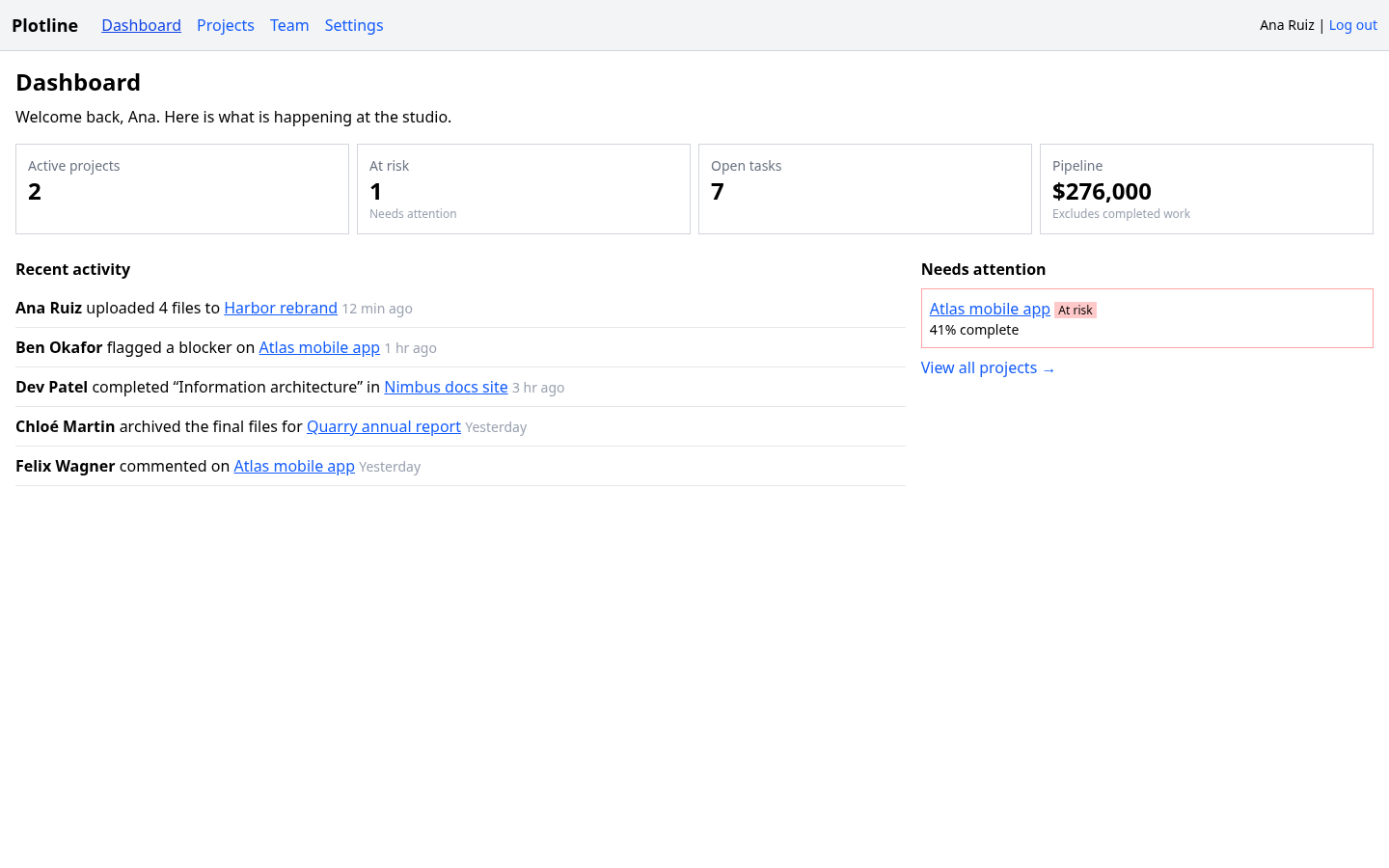 |
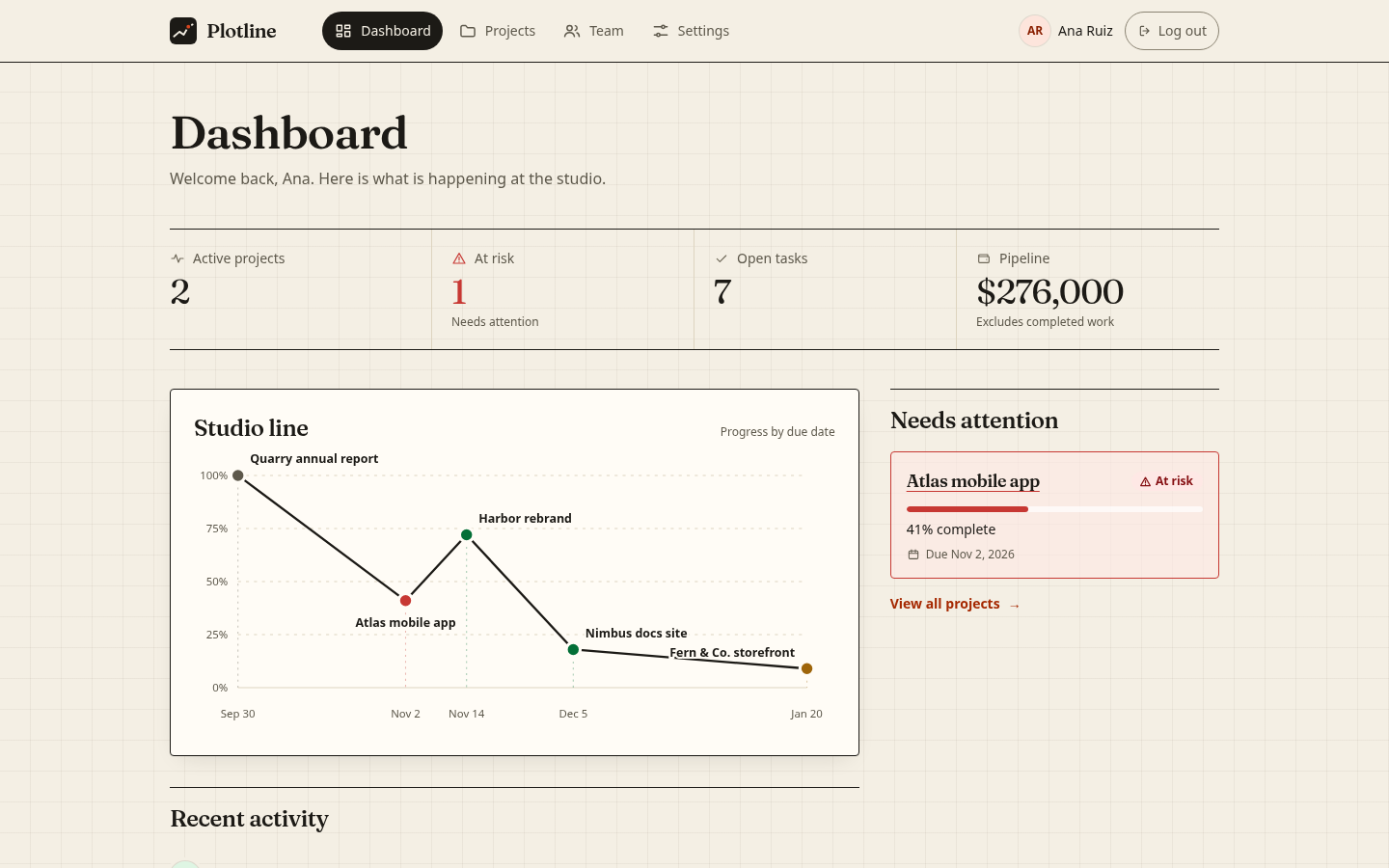 |
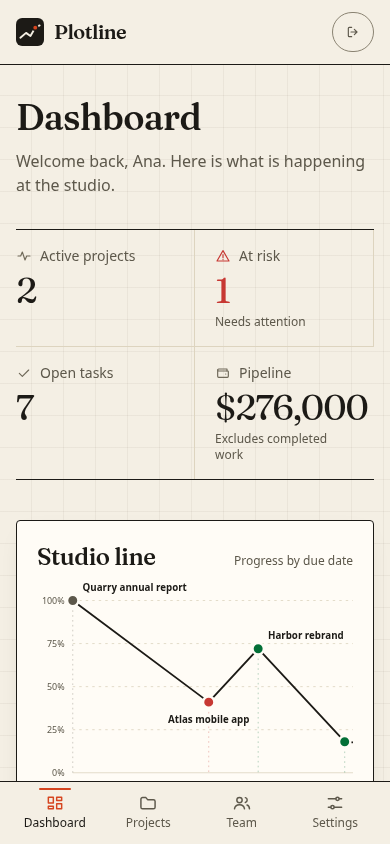
Fresh captures from the bundled source. Each version passes its original 12 behavior tests. Source, exact provenance and reproduction.
Compare the phone layouts · 390 × 844| Before | TRANSFORM |
|---|---|
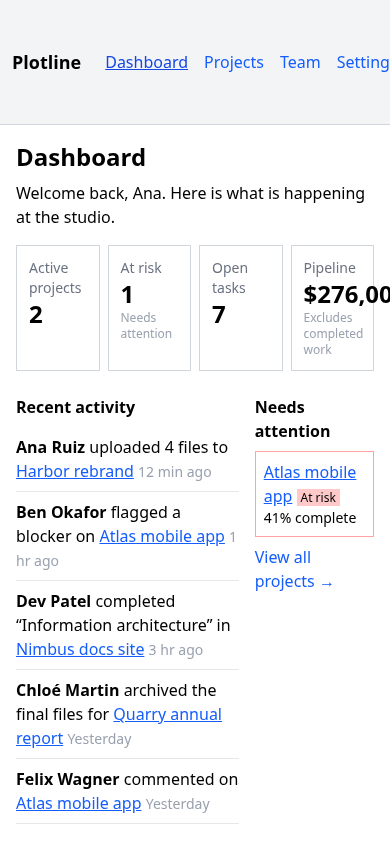 |
 |
CREATE · start with a point of view
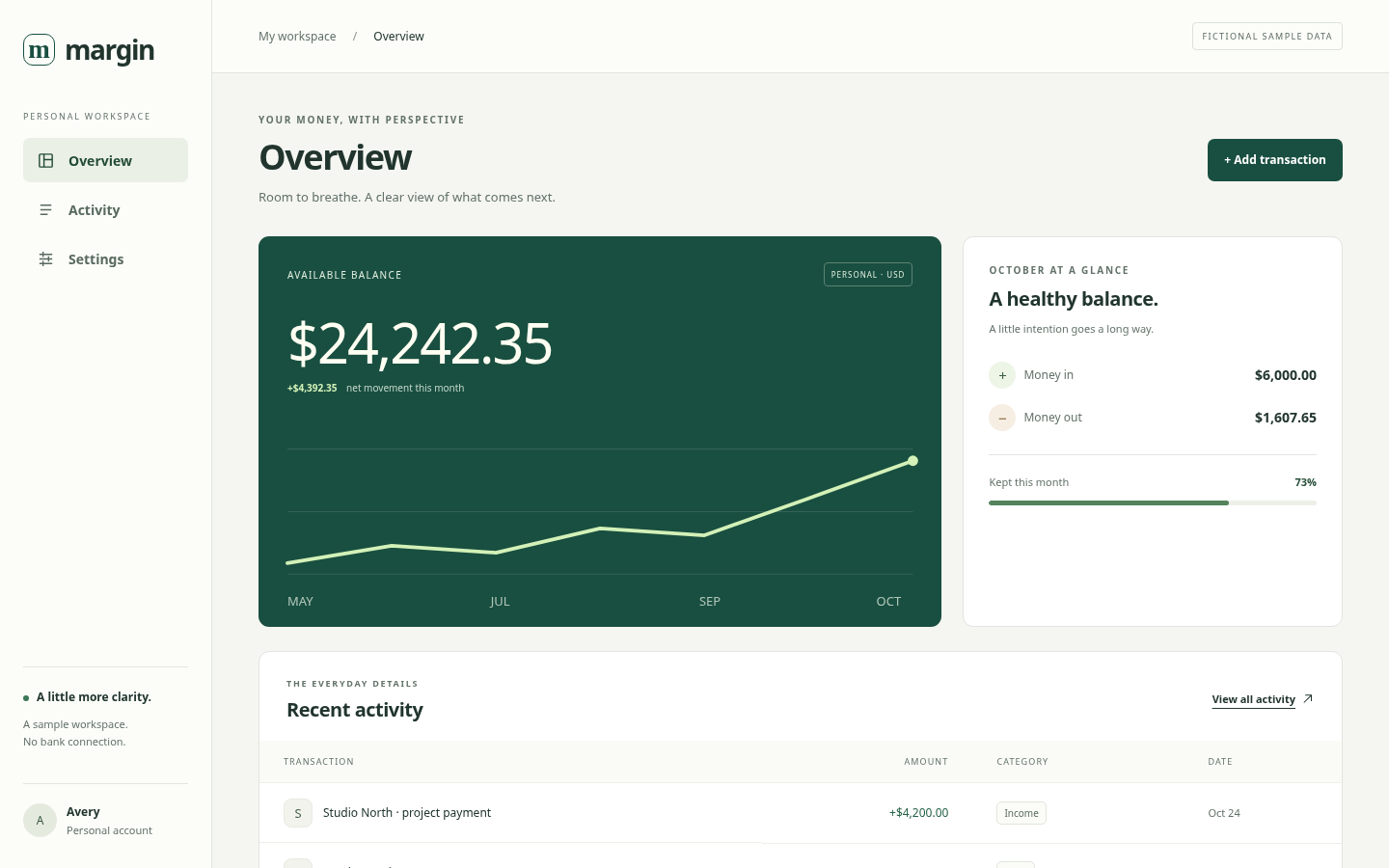
Margin, a maintainer-directed CREATE example with search, category filtering, a validated transaction dialog and local preferences. Phone view · Run the app and inspect its brief. It demonstrates a finance-specific composition, not a bank connection or a measured model-quality gain.
Choose the right scope
| Mode | Ask for | Preserve |
|---|---|---|
| CREATE | A new application with a coherent layout and shared components from the first pass | The brief, content and chosen stack |
| TRANSFORM | A substantial redesign across the existing app | Routes, data, APIs, behavior and brand constraints |
| REFINE | Fix observed weaknesses in an already-designed interface | Its identity and composition |
REFINE is the preservation-focused scope of TRANSFORM, not a second competing design system. See the restrained example: a larger logout target and keyboard-accessible chart, with the palette, type and original tests unchanged.
/glowup-ui Create an event-planning app with Dashboard, Events and Guests.
Include search, RSVP validation and responsive layouts.
$glowup-ui Refine the settings and project views. Keep the existing palette,
typography and layout. Fix evidenced spacing, focus and phone usability issues.
How it works
The agent reads one concise workflow, inspects the project, chooses a product-appropriate composition, implements shared primitives, and checks real desktop/phone views. Optional Node helpers provide design recipes, contrast-checked directions, a small starter, starting-state checkpoints and rendered issue reports. Detailed references load only when relevant.
An existing app keeps its framework and working logic. The agent is instructed to preserve routes, handlers, data, content and tests. Checkpoints, original tests and browser review help detect regressions; they do not guarantee every change is safe or aesthetically better. Review the diff.
Coding-agent support
| Agent | Installer selection | Explicit request | Evidence |
|---|---|---|---|
| Claude Code | --agent claude |
/glowup-ui |
Installer tested |
| OpenAI Codex | --agent codex |
$glowup-ui |
Installer tested |
| OpenCode, Gemini CLI, Copilot, VS Code, Pi, Vibe, Goose, Roo | Selections and paths | Host-specific | Installer tested; runtime varies |
One canonical skill, no separate prompt forks. Installation and discovery are not proof of full instruction loading. Current authenticated native activation and a controlled design-quality advantage remain unverified. Antigravity and other unverified hosts have no guessed aliases. Full compatibility and limits · Verify activation.
Build with us
- Contributing and development checks
- Try the independent testing guide · Share an installation result or real example
- Report a bug or suggest a feature · Security reporting
- Benchmarks and independent review · Research
- Roadmap · Changelog · Releases
Public preview. No guaranteed automatic activation, universal agent support, quality scores or speedups. The optional starter uses React/Vite; the workflow can adapt to the existing stack. Browser capture needs an available browser or optional Playwright and never installs it silently. Your coding agent has its own authentication and model costs.
Reviews (0)
Sign in to leave a review.
Leave a reviewNo results found