agent-message-queue
Health Pass
- License — License: MIT
- Description — Repository has a description
- Active repo — Last push 0 days ago
- Community trust — 36 GitHub stars
Code Pass
- Code scan — Scanned 12 files during light audit, no dangerous patterns found
Permissions Pass
- Permissions — No dangerous permissions requested
No AI report is available for this listing yet.
File-based message queue for local agent-to-agent communication (Maildir-style)
Agent Message Queue (AMQ)



A local, file-based interoperability bus for agent sessions and adapters.
AMQ manages the conversation: agent-to-agent messaging, thread continuity, cross-session and cross-project routing, handoff state, and operational visibility. It does not try to own task decomposition, worktree management, dependency scheduling, or scheduler execution; Claude Code teams, Codex, Kanban, Symphony, and similar orchestrators stay one layer above it.
Why AMQ?
Modern AI-assisted development often involves multiple agents working on the same codebase. But without coordination:
- Agents duplicate work or create conflicts
- Reviews require human intermediation
- Context switching kills productivity
AMQ gives agents a local interoperability bus: they can send messages, reply in threads, share status, and optionally consume adapter-emitted events through the same queue primitives. The core product stays intentionally small: file-based messages first, lightweight adapters second.
Key Features
- Zero infrastructure — Pure file-based. No server, no daemon, no database. Works anywhere files work.
- Crash-safe — Atomic Maildir delivery (tmp→new→cur). Messages are never partially written or lost.
- Human-readable — JSON frontmatter + Markdown body. Inspect with
cat, debug withgrep, version withgit. - Real-time notifications —
amq wakeinjects terminal notifications when messages arrive (experimental). - Built for agents — Priority levels, message kinds, threading, acknowledgments—all the primitives agents need.
- Cross-project federation — Route messages across peer repos, preserve reply routing, and run decision threads that span projects.
- Swarm mode — Join Claude Code Agent Teams, claim tasks, and bridge task notifications into AMQ.
- Optional adapters — Lightweight Symphony hooks and an experimental Kanban bridge can emit normal AMQ messages with structured metadata.
- Operational diagnostics —
amq doctor --opsshows queue depth, DLQ state, presence freshness, pending acks, and integration hints.
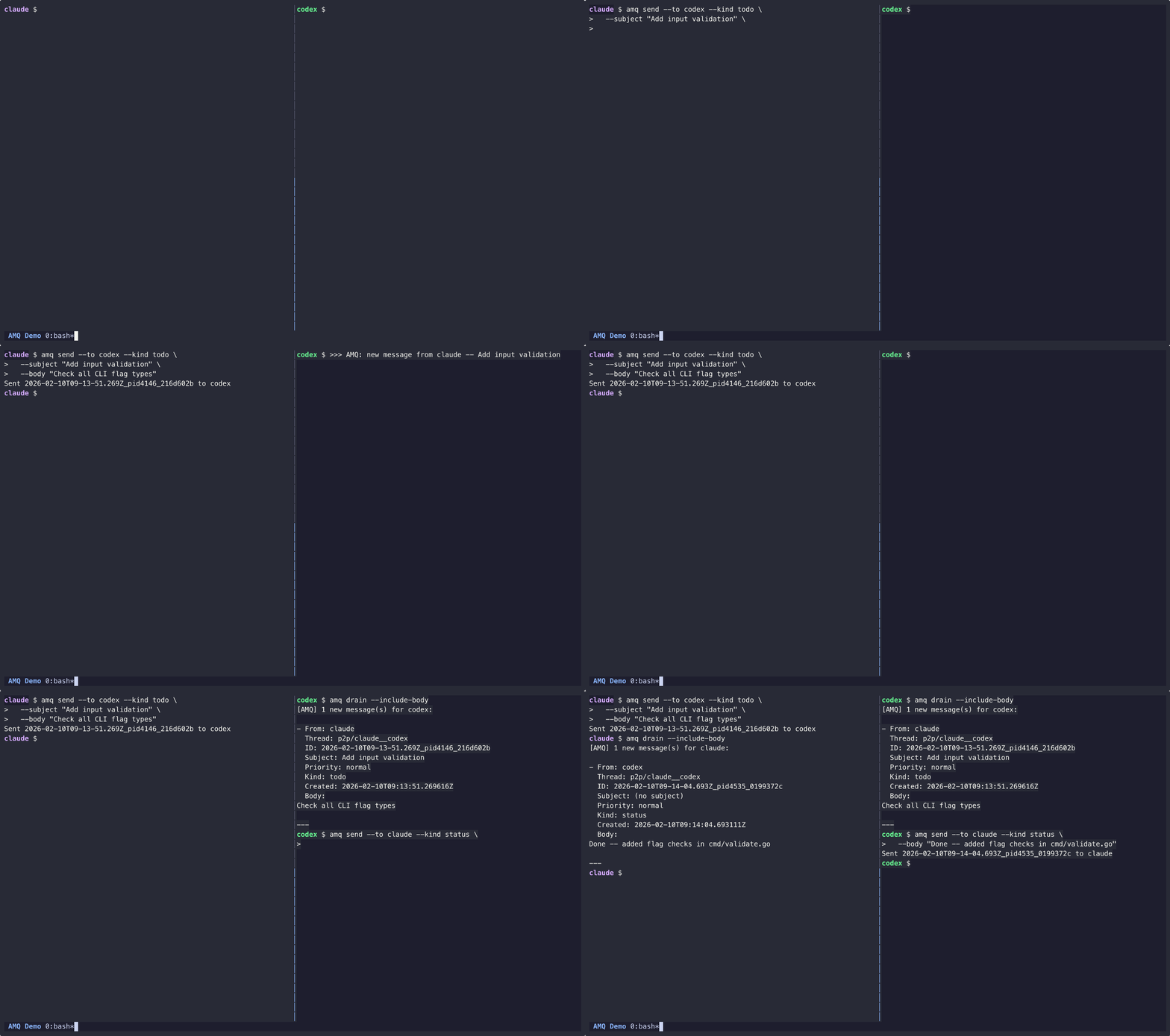
Installation
1. Install Binary
macOS (Homebrew):
brew install avivsinai/tap/amq
macOS/Linux (script):
curl -fsSL https://raw.githubusercontent.com/avivsinai/agent-message-queue/main/scripts/install.sh | bash
Installs to ~/.local/bin or ~/go/bin (no sudo required). Verify: amq --version
One-liner with skill:
curl -fsSL https://raw.githubusercontent.com/avivsinai/agent-message-queue/main/scripts/install.sh | bash -s -- --skill
Review the script before running; it verifies release checksums when possible.
2. Install Skill
Via skills (recommended):
npx skills add avivsinai/agent-message-queue -g -y
Or via skild:
npx skild install @avivsinai/amq-cli -t claude -y
For manual installation or troubleshooting, see INSTALL.md.
Updating
amq upgrade
Quick Start
1. Initialize Project
amq coop init
Creates .amqrc, mailboxes for claude and codex, and updates .gitignore.
Optionally add shell aliases (amc for Claude, amx for Codex):
eval "$(amq shell-setup)"
2. Start Agent Sessions
# Terminal 1 — Claude Code
amc

# Terminal 2 — Codex CLI
amx
Each alias sets up the environment, starts wake notifications, and launches the agent. For isolated sessions (multiple pairs working on different features):
amc feature-a          # Claude in feature-a session
amx feature-a          # Codex in feature-a session
Without aliases, use amq coop exec directly:
amq coop exec claude -- --dangerously-skip-permissions
amq coop exec --session feature-a codex
3. Send & Receive
# Send a message
amq send --to codex --subject "Review needed" --kind review_request \
  --body "Please review internal/cli/send.go"

# Check inbox
amq list --new

# Filter by priority or sender
amq list --new --priority urgent
amq list --new --from codex --kind review_request

# Read all messages (one-shot, moves to cur, auto-acks)
amq drain --include-body

# Reply to a message
amq reply --id <msg_id> --kind review_response --body "LGTM with comments"
4. Inspect Health
amq doctor
amq doctor --ops
amq doctor --ops --json
Message Kinds & Priority
AMQ messages support kinds (review_request, question, todo, etc.) and priority levels (urgent, normal, low). See COOP.md for the full protocol.
Co-op Mode
For real-time Claude Code + Codex CLI collaboration patterns, roles, and phased workflows, see COOP.md.
Cross-Project Federation
AMQ can route messages across repositories, not just across agents in one checkout. Add a project name plus peer roots to .amqrc:
{
  "root": ".agent-mail",
  "project": "app",
  "peers": {
    "infra-lib": "/Users/me/src/infra-lib/.agent-mail"
  }
}
Then send directly to another project:
amq send --to codex --project infra-lib --body "Can you review the shared API change?"
amq send --to codex@infra-lib:collab --thread decision/release-v0.24 --kind decision \
  --labels "decision:proposal,project:app,project:infra-lib" \
  --body "Proposal: align both repos on v0.24"
Replies route back automatically with the stamped reply_project metadata. When from matches your own handle, inspect from_project before treating the message as an echo; the same handle in a different project is a legitimate cross-project sender. This shipped in v0.22.0 and is the recommended way to coordinate multi-repo agent work without adding a broker.
Swarm Mode (Claude Code Agent Teams)
External agents (Codex, etc.) can join Claude Code Agent Teams via amq swarm join, claim tasks, and receive notifications through amq swarm bridge. Note: the bridge delivers task notifications only; direct messages require relay through the team leader.
For the full command reference, see CLAUDE.md.
Global Root Fallback
Most AMQ commands resolve the queue root from the project .amqrc. For agents launched outside the repo root by external orchestrators, you can configure a global fallback instead:
export AMQ_GLOBAL_ROOT="$HOME/.agent-mail"
Or create ~/.amqrc:
{"root": ".agent-mail"}
Root resolution precedence is:
flags > AM_ROOT > project .amqrc > AMQ_GLOBAL_ROOT > ~/.amqrc > auto-detect
This same chain is used by amq env, amq doctor, and the integration commands, so Symphony and Kanban-launched agents can find the correct queue even when they are not started from the project directory.
Integrations
AMQ transports messages, not remote task state. The integration layer is intentionally narrow: optional adapters convert external lifecycle or task events into normal AMQ messages. Integration messages are self-delivered (from=<me>, to=<me>) so an agent monitoring its own inbox can react without polling another tool directly.
Symphony
Symphony support is a lightweight hook recipe for Codex workspaces orchestrated through WORKFLOW.md:
amq integration symphony init --me codex
amq integration symphony init --me codex --check
amq integration symphony emit --event after_run --me codex
init patches an AMQ-managed fragment into WORKFLOW.md. emit is hook-friendly and supports after_create, before_run, after_run, and before_remove. This stays intentionally small: AMQ does not try to become a Symphony control plane. Current limitation: because WORKFLOW.md is parsed and rewritten as structured YAML/Markdown, comments and formatting inside the frontmatter may be normalized.
Cline Kanban Bridge
The Kanban bridge is experimental. Use it when you want runtime session transitions and review handoffs mirrored into AMQ, with the understanding that it depends on a fast-moving preview WebSocket surface:
amq integration kanban bridge --me codex
amq integration kanban bridge --me codex --workspace-id my-workspace
The bridge connects to ws://127.0.0.1:3484/api/runtime/ws by default, bootstraps from snapshot, refreshes from workspace_state_updated, and emits notifications only for task session transitions plus task_ready_for_review.
Integration Metadata
The built-in adapters share a versioned contract under context.orchestrator. See docs/adapter-contract.md for the formal v1 envelope and stability expectations.
Integration messages also carry standard labels such as:
orchestratororchestrator:symphonyororchestrator:kanbantask-state:<state>handofffor review-ready transitionsblockingfor failed or interrupted work
That makes integration traffic filterable with existing AMQ primitives such as amq list --label orchestrator --label handoff.
Command Reference
Common command groups:
| Area | Commands |
|---|---|
| Core messaging | init, send, list, read, drain, reply, thread, ack, watch, monitor |
| Collaboration | coop init, coop exec, swarm list, swarm join, swarm tasks, swarm bridge |
| Integrations | integration symphony init, integration symphony emit, integration kanban bridge |
| Operations | presence set, presence list, who, doctor, doctor --ops, cleanup, dlq *, upgrade, env, shell-setup |
For the full CLI syntax, examples, and message schema, see CLAUDE.md.
How It Works
AMQ uses the battle-tested Maildir format:
- Write — Message written to
tmp/directory - Sync — File fsynced to disk
- Deliver — Atomic rename to
new/(never partial) - Process — Reader moves to
cur/after reading
This guarantees crash-safety: if the process dies mid-write, no corrupt message appears in the inbox. See CLAUDE.md for the full directory layout.
Documentation
- INSTALL.md — Alternative installation methods
- docs/adapter-contract.md — Formal v1 adapter contract for integration messages
- COOP.md — Co-op mode protocol & best practices
- CLAUDE.md — Agent instructions, CLI reference, architecture
Development
git clone https://github.com/avivsinai/agent-message-queue.git
cd agent-message-queue
make build   # Build binary
make test    # Run tests
make ci      # Full CI: vet + lint + test + smoke
FAQ
Why not just use a database?
Files are universal, debuggable, and work everywhere. No connection strings, no migrations, no ORM. Just files.
Why not Redis/RabbitMQ/etc?
Those require infrastructure. AMQ is for local inter-process communication where agents share a filesystem. No server to configure or keep running.
What about Windows?
The core queue works on Windows. The amq wake notification feature requires WSL.
Is this production-ready?
For local development workflows, yes. AMQ is intentionally simple—it's not trying to be a distributed message broker.
How does AMQ compare to other multi-agent tools?
Tools like MCP Agent Mail (server-based coordination + SQLite), Gas Town (tmux-based orchestration), and others offer richer features. AMQ is intentionally minimal: single binary, no server, Maildir delivery. Best for 2-3 agents on one machine.
License
MIT
Reviews (0)
Sign in to leave a review.
Leave a reviewNo results found