Lead-Generation-System-using-Google-Map
Health Warn
- License — License: MIT
- Description — Repository has a description
- Active repo — Last push 0 days ago
- Low visibility — Only 9 GitHub stars
Code Pass
- Code scan — Scanned 2 files during light audit, no dangerous patterns found
Permissions Pass
- Permissions — No dangerous permissions requested
This is a conversational AI agent and n8n workflow that allows users to extract B2B leads from Google Maps via natural language chat, automatically enriching the data with emails and exporting it to Google Sheets.
Security Assessment
Overall Risk: Medium. Because the repository primarily consists of an n8n workflow rather than standard code, the automated scanner only analyzed 2 files. No hardcoded secrets or dangerous local shell executions were detected in those files. However, the workflow inherently requires extensive network access to external services (OpenAI, Serper.dev, Perplexity AI) to function. You will need to provide your own highly sensitive API keys to these third-party platforms and grant it write permissions to your Google Sheets. Users must trust both the tool's creator and the external services with their API credentials and the scraped data.
Quality Assessment
Quality is relatively low. The project is very new (last pushed 0 days ago) and lacks community visibility, evidenced by having only 9 GitHub stars. It operates under a standard MIT license, which is a positive sign for open-source transparency and legal usage. While the light code scan found no malicious patterns, the small user base means the tool has not undergone rigorous peer review or widespread testing by the developer community.
Verdict
Use with caution — the setup requires handing over your third-party API keys, and the project currently lacks the community trust and extensive peer review needed for an unreserved recommendation.
🗺️ Conversational AI agent that extracts unlimited business leads from Google Maps with automatic email enrichment. Chat with GPT-4o to find any business, anywhere. Built with n8n, Serper.dev, and Perplexity AI.
🗺️ Google Maps AI Agent




Conversational AI agent that extracts and enriches business leads from Google Maps through natural language chat.
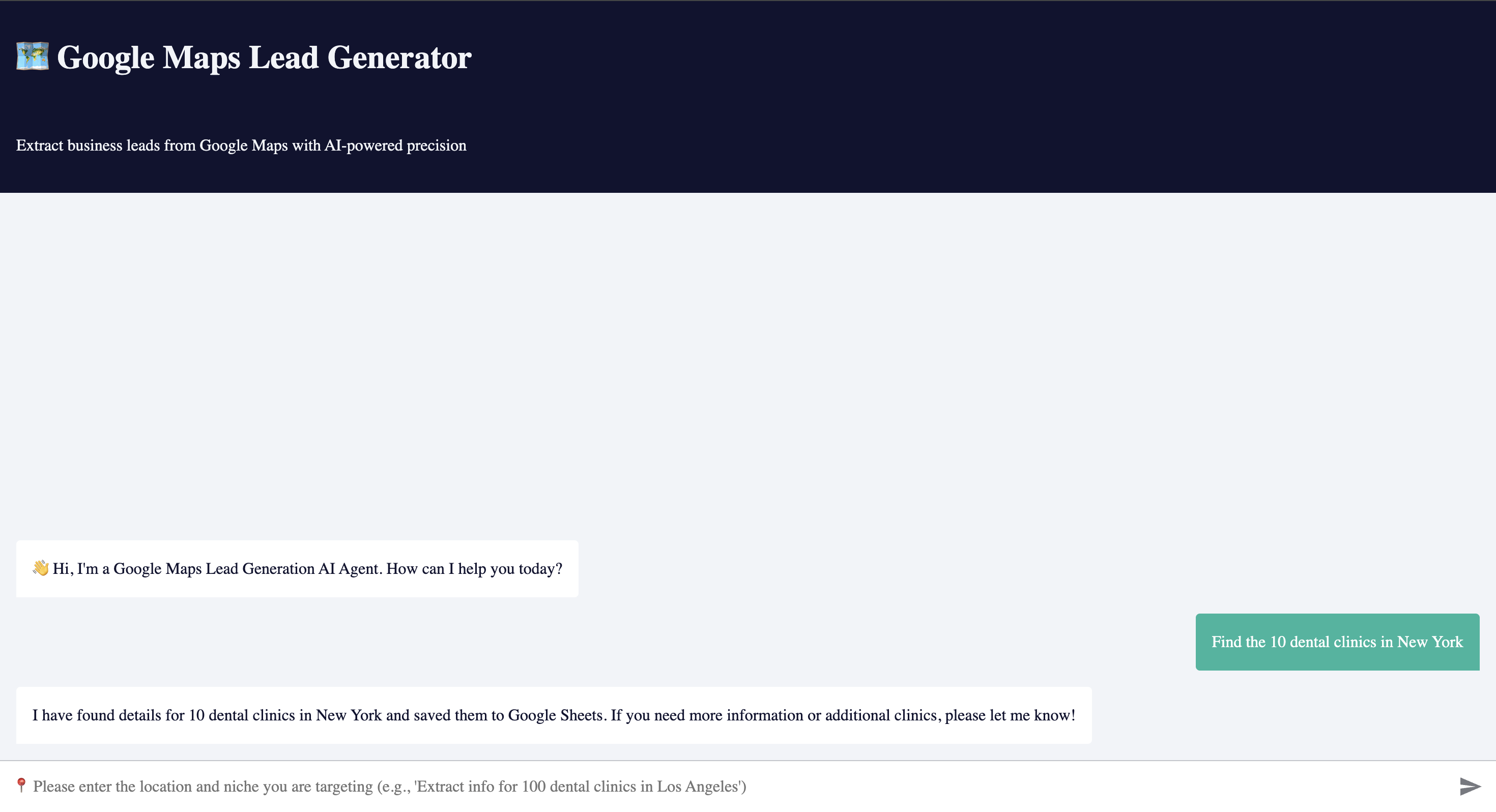
Simply chat with the AI: "Find me 100 dental clinics in Los Angeles" and watch it automatically scrape, enrich, and organize leads into Google Sheets.
📋 Table of Contents
- Overview
- Key Features
- How It Works
- System Architecture
- Tech Stack
- Prerequisites
- Installation
- Configuration
- Usage Examples
- Data Fields
- Enrichment Process
- Troubleshooting
- Best Practices
- License
🎯 Overview
Google Maps AI Agent is an intelligent conversational system that transforms Google Maps into a powerful B2B lead generation tool. Instead of manually searching and copying business data, simply chat with an AI agent that understands your requirements and automates the entire process.
What Makes This Special?
Unlike traditional scrapers with rigid forms, this system uses:
- 🤖 Natural Language Interface - Chat naturally like talking to a human assistant
- 🧠 AI-Powered Understanding - GPT-4o interprets your requests intelligently
- 🔄 Automatic Enrichment - Finds emails and company backgrounds automatically
- 📊 Smart Organization - Structures data perfectly in Google Sheets
- ⚡ Real-Time Processing - Watch leads populate as you chat
Who Is This For?
- 💼 Sales Teams - Build targeted prospect lists by location and niche
- 📞 Cold Callers - Get phone numbers and business info instantly
- 📧 Email Marketers - Extract contacts with email enrichment
- 🏢 B2B Agencies - Research local businesses for clients
- 🚀 Entrepreneurs - Find potential customers or partners in any area
✨ Key Features
🗣️ Conversational Interface
- Natural language input: "Find 50 restaurants in NYC"
- No complex forms or parameters
- AI understands context and intent
- Clarifying questions when needed
- Multi-turn conversations
🔍 Intelligent Google Maps Scraping
- Searches via Serper.dev Google Maps API
- Handles pagination automatically
- Extracts comprehensive business data
- Geographic targeting with coordinates
- Filters by location, type, and niche
📧 Automatic Email Enrichment
- Perplexity AI finds company emails
- Scrapes from websites automatically
- Background research on each business
- Validates and formats data
- Updates Google Sheets in real-time
📊 Structured Data Export
- Organized Google Sheets storage
- UUID tracking for each lead
- Clean, CRM-ready format
- Automatic deduplication
- Export-friendly structure
🔄 Two-Stage Workflow
- Stage 1: AI chat → Google Maps scraping → Initial data save
- Stage 2: Auto-triggered enrichment → Email finding → Data update
- Fully automated pipeline
- No manual intervention required
🔄 How It Works
User Experience
You: "Extract info for 100 dental clinics in Los Angeles"

AI Agent: "I'll search for dental clinics in Los Angeles. Starting now..."
         [Searches Google Maps]
         [Finds 100+ results across multiple pages]
         [Saves to Google Sheets automatically]

AI Agent: "✅ Found and saved 97 dental clinics to your sheet!"

[Background process automatically starts]
         [Enriches each lead with email and background]
         [Updates sheet with enriched data]
Technical Flow
User Chat Input
     ↓
GPT-4o AI Agent
     ↓
Map Search Tool (Serper.dev)
     ↓
Extract Business Data
     ↓
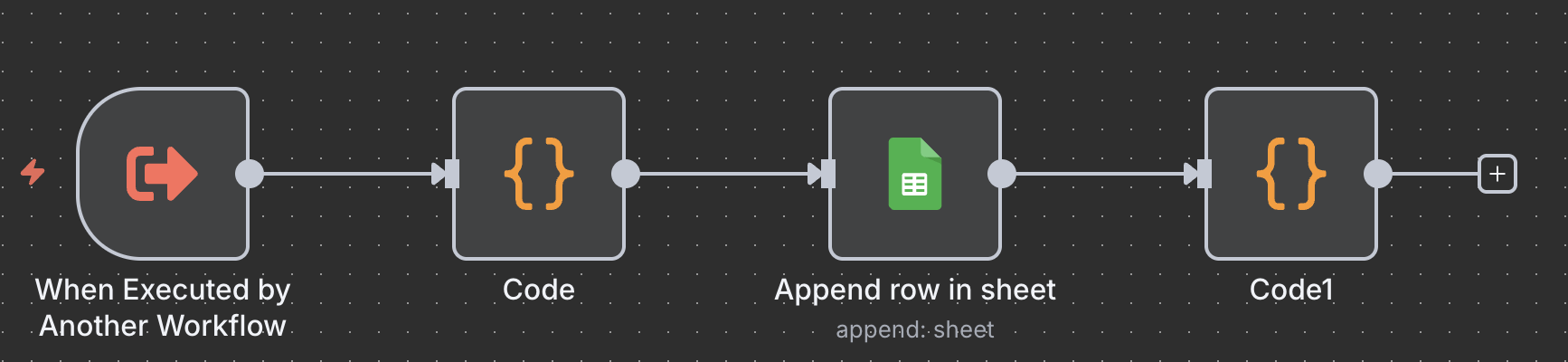
Call Sub-Workflow
     ↓
Generate UUID
     ↓
Save to Google Sheets
     ↓
[Automatic Trigger]
     ↓
Google Sheets Detects New Row
     ↓
Perplexity AI Enrichment
     ↓
Find Email & Background
     ↓
Update Sheet with Enriched Data
🏗️ System Architecture
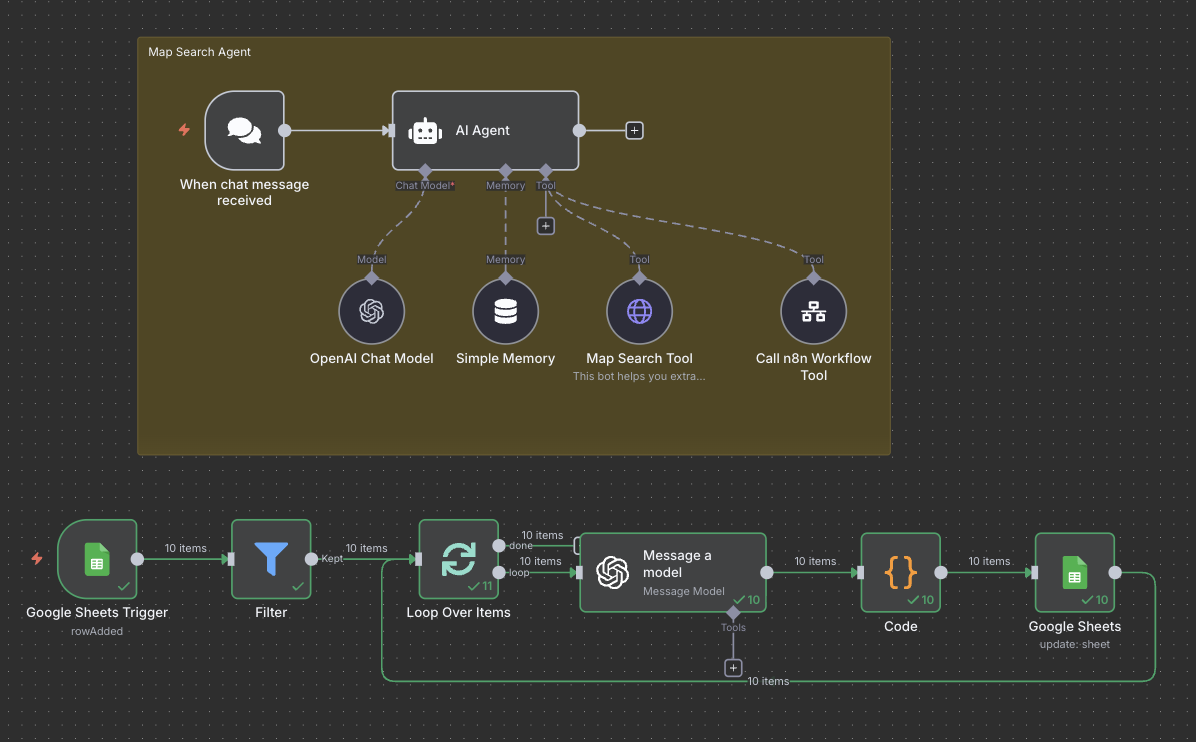
Main Workflow: Chat Agent
┌─────────────────────────────────────────────────────────────┐
│                    CHAT INTERFACE                            │
│              (User converses with AI)                        │
└───────────────────────┬─────────────────────────────────────┘
                        │
                        ↓
┌─────────────────────────────────────────────────────────────┐
│                   AI AGENT (GPT-4o)                          │
│        • Understands natural language requests               │
│        • Plans multi-step search strategy                    │
│        • Manages pagination and iteration                    │
│        • Calls tools intelligently                           │
└───────────────────────┬─────────────────────────────────────┘
                        │
            ┌───────────┴──────────┐
            ↓                      ↓
┌─────────────────────┐  ┌─────────────────────┐
│  MAP SEARCH TOOL    │  │ WORKFLOW TOOL       │
│  (Serper.dev API)   │  │ (Sub-workflow call) │
├─────────────────────┤  ├─────────────────────┤
│                     │  │                     │
│ • Query: "q"        │  │ • JSON data input   │
│ • Location: "ll"    │  │ • UUID generation   │
│ • Page: number      │  │ • Sheet append      │
│ • Returns:          │  │ • Returns: "ok"     │
│   - Name            │  │                     │
│   - Address         │  │                     │
│   - Phone           │  │                     │
│   - Website         │  │                     │
│   - Rating          │  │                     │
│   - Hours           │  │                     │
│                     │  │                     │
└──────────┬──────────┘  └──────────┬──────────┘
           │                        │
           └───────────┬────────────┘
                       │
                       ↓
           ┌───────────────────────┐
           │   GOOGLE SHEETS       │
           │   Initial Data Saved  │
           └───────────────────────┘
Sub-Workflow: Enrichment Process
┌─────────────────────────────────────────────────────────────┐
│              GOOGLE SHEETS TRIGGER                           │
│         (Monitors for new rows every minute)                 │
└───────────────────────┬─────────────────────────────────────┘
                        │
                        ↓
┌─────────────────────────────────────────────────────────────┐
│                      FILTER                                  │
│        • Exclude header row (Name ≠ "Name")                  │
│        • Only process rows with data                         │
└───────────────────────┬─────────────────────────────────────┘
                        │
                        ↓
┌─────────────────────────────────────────────────────────────┐
│                  LOOP OVER ITEMS                             │
│           (Process each lead individually)                   │
└───────────────────────┬─────────────────────────────────────┘
                        │
                        ↓
┌─────────────────────────────────────────────────────────────┐
│             PERPLEXITY AI ENRICHMENT                         │
├─────────────────────────────────────────────────────────────┤
│                                                              │
│  Prompt: "Get email and background for [Company] at         │
│          [Address], reference website: [URL]"                │
│                                                              │
│  Returns JSON:                                               │
│  {                                                           │
│    "Email": "[email protected]",                           │
│    "Background": "Company description..."                    │
│  }                                                           │
│                                                              │
└───────────────────────┬─────────────────────────────────────┘
                        │
                        ↓
┌─────────────────────────────────────────────────────────────┐
│                  UPDATE GOOGLE SHEETS                        │
│          (Match by UUID, update Email & Background)          │
└─────────────────────────────────────────────────────────────┘
🛠️ Tech Stack
| Category | Technology | Purpose |
|---|---|---|
| Automation | n8n | Workflow orchestration |
| AI Agent | OpenAI GPT-4o | Natural language understanding and task execution |
| AI Memory | Buffer Window | Conversation context retention |
| Maps Search | Serper.dev | Google Maps API for business data |
| Enrichment | Perplexity AI (Sonar) | Email finding and company research |
| Storage | Google Sheets | Lead database and organization |
| Trigger | n8n Chat Trigger | Conversational interface |
| Sub-workflow | n8n Workflow Tool | Modular data processing |
📦 Prerequisites
Required Accounts & API Keys
| Service | Required? | Purpose | Cost |
|---|---|---|---|
| n8n | ✅ Yes | Run workflows | Free (self-hosted) or $20/mo |
| OpenAI | ✅ Yes | GPT-4o AI agent | ~$0.01-0.03 per request |
| Serper.dev | ✅ Yes | Google Maps search | $50/mo for 5,000 searches |
| Perplexity AI | ✅ Yes | Email enrichment | $20/mo or pay-per-use |
| Google Account | ✅ Yes | Google Sheets storage | Free |
API Keys Needed
- ✅ OpenAI API Key
- ✅ Serper.dev API Key
- ✅ Perplexity API Key
- ✅ Google Sheets OAuth credentials
Technical Requirements
- n8n instance (v1.0+)
- Modern web browser
- Stable internet connection
🚀 Installation
Step 1: Download Workflows
Download these two JSON files:
Google map ai agent.json(Main workflow)Sub-Workflow of Google map lead ai agent.json(Helper workflow)
Step 2: Import Main Workflow
- Open your n8n instance
- Click "Workflows" → "Import from File"
- Select
Google map ai agent.json - Click "Import"
Step 3: Import Sub-Workflow
- Repeat the import process
- Select
Sub-Workflow of Google map lead ai agent.json - This workflow will be called by the main workflow
Step 4: Create Google Sheet
Create new spreadsheet: "Leads Google map ai agent"
Create headers in row 1:
UUID | Name | Address | Number | Website | Rating | Opening Hours | Email | BackgroundCopy the spreadsheet ID from URL:
https://docs.google.com/spreadsheets/d/SPREADSHEET_ID_HERE/edit
Step 5: Configure API Keys
See Configuration section below for detailed setup.
Step 6: Link Sub-Workflow
- In main workflow, find "Call n8n Workflow Tool" node
- Update
workflowIdto your imported sub-workflow ID - Find workflow ID in URL when viewing sub-workflow:
/workflow/YOUR_WORKFLOW_ID
Step 7: Activate Both Workflows
- Open main workflow → Toggle "Active" (green)
- Sub-workflow can remain inactive (called by main)
- Chat interface is now live!
⚙️ Configuration
1. OpenAI API Key
Node: "OpenAI Chat Model"
- Get API key from https://platform.openai.com/api-keys
- In n8n: Settings → Credentials
- Add "OpenAi account" credential
- Paste API key
- Select in node
Model: GPT-4o (recommended for best performance)
2. Serper.dev API Key
Node: "Map Search Tool"
- Sign up at https://serper.dev/
- Get API key from dashboard
- In node, find Headers section
- Update
X-API-KEYvalue with your key
Current in workflow:
"X-API-KEY": "c2305ea10799e51fd2b15865df14caac6ba573eb"
Replace with:
"X-API-KEY": "YOUR_SERPER_API_KEY"
Parameters explained:
q: Search query (provided by AI)ll: Location coordinates (default: New York area)page: Pagination (AI handles automatically)hl: Language (en = English)location: Country filtergl: Geographic location code (us = USA)
3. Perplexity API Key
Node: "Message a model1"
- Get API key from https://www.perplexity.ai/settings/api
- In n8n: Settings → Credentials
- Add "Perplexity account" credential
- Paste API key
- Select in node
Model: Sonar (optimized for research tasks)
4. Google Sheets OAuth
Nodes:
- "Google Sheets Trigger"
- "Append row in sheet" (in sub-workflow)
- "Google Sheets" (update node)
In n8n: Settings → Credentials
Add "Google Sheets OAuth2 API"
Follow OAuth flow to authorize
Grant permissions for:
- Read spreadsheets
- Write spreadsheets
- Create/update rows
Update all Google Sheets nodes:
- Set credential
- Select your spreadsheet
- Select "Sheet1" (or your sheet name)
5. Update Spreadsheet IDs
In Main Workflow:
Find "Google Sheets Trigger" node:
"documentId": "1R4PGBIBihrNCfj0olbDT2p3jbtWCwYVlCgKU6Z3rf48"  // Your ID
"sheetName": "gid=0"  // Sheet1
Find "Google Sheets" (update node):
"documentId": "1R4PGBIBihrNCfj0olbDT2p3jbtWCwYVlCgKU6Z3rf48" // Your ID
In Sub-Workflow:
Find "Append row in sheet" node:
"documentId": "1R4PGBIBihrNCfj0olbDT2p3jbtWCwYVlCgKU6Z3rf48" // Your ID
📖 Usage Examples
Example 1: Simple Search
You:
Find 50 coffee shops in Seattle
AI Agent:
- Searches Google Maps for coffee shops in Seattle
- Extracts all business data
- Saves to Google Sheets
- Returns: "✅ Found and saved 47 coffee shops!"
Example 2: Specific Niche
You:
Extract info for 100 dental clinics in Los Angeles
AI Agent:
- Searches: "Dental Clinic Los Angeles"
- Handles pagination (100 results = 5 pages)
- Saves each page to sheets automatically
- Background enrichment starts automatically
Example 3: Multiple Locations
You:
I need restaurants in Manhattan, specifically Italian ones
AI Agent:
- Refines query: "Italian Restaurant Manhattan"
- Searches with New York coordinates
- Extracts comprehensive data
- Enriches with emails and backgrounds
Example 4: Follow-up Requests
You:
Now find 30 more in Brooklyn
AI Agent:
- Remembers context (restaurants)
- Searches Brooklyn area
- Continues adding to same sheet
- Maintains conversation flow
📊 Data Fields
Fields Scraped from Google Maps
| Field | Description | Example |
|---|---|---|
| UUID | Unique identifier | 679a1234-5678-7abc-ydef-123456789012 |
| Name | Business name | "Joe's Pizza" |
| Address | Full address | "123 Main St, New York, NY 10001" |
| Number | Phone number | "212-555-0123" (+ prefix removed) |
| Website | Company website | "https://joespizza.com" |
| Rating | Google rating | "4.5" |
| Opening Hours | Business hours | "Mon-Fri 9AM-9PM" |
Fields Added by Enrichment
| Field | Description | Source |
|---|---|---|
| Contact email | Perplexity AI scrapes website | |
| Background | Company description | Perplexity AI research |
🔄 Enrichment Process
How Emails Are Found
Trigger: New row detected in Google Sheets
Filter: Skip header row and empty entries
Loop: Process each lead individually
Perplexity Query:
Get the email and background for [Company Name] at [Address],
reference website: [Website URL]
AI Research:
- Visits company website
- Scrapes contact pages
- Finds email patterns
- Researches company info
JSON Response:
{
  "Email": "[email protected]",
  "Background": "Family-owned pizza restaurant since 1985..."
}
Update Sheet: Matches by UUID, updates Email & Background columns
Enrichment Speed
- Processing: ~5-10 seconds per lead
- Batch: 60 leads in ~5-10 minutes
- Automatic: No manual intervention needed
🐛 Troubleshooting
Issue: Chat Interface Not Loading
Error: Webhook URL doesn't open
Solution:
- Verify main workflow is Active
- Click "When chat message received" node
- Copy "Production URL"
- Open URL in new browser tab
- Should see chat interface
Issue: No Results from Map Search
Error: AI says "Found 0 results"
Solution:
- Check Serper.dev API key is valid
- Verify you have credits remaining
- Try broader search terms
- Check location parameter (ll) is set
- Test query directly at serper.dev
Issue: Data Not Saving to Sheets
Error: Workflow runs but sheet empty
Solution:
- Verify Google Sheets credentials
- Check spreadsheet ID is correct
- Ensure sheet has proper headers
- Test sub-workflow independently
- Review execution logs for errors
Issue: Email Enrichment Not Working
Error: Email and Background stay empty
Solution:
- Check Perplexity API key is valid
- Verify Google Sheets Trigger is active
- Check filter conditions aren't too restrictive
- Ensure website URLs are valid
- Monitor trigger polling (every 1 minute)
- Review Perplexity AI response in logs
Issue: UUID Not Generating
Error: UUID column empty or errors
Solution:
- Check Code node in sub-workflow
- Verify UUID v7 generation function
- Test with simpler UUID generation
- Ensure JSON parsing is correct
Issue: AI Agent Not Understanding Requests
Error: AI gives irrelevant responses
Solution:
- Use clear, specific language
- Include: quantity, niche, location
- Example: "Find 50 dentists in Miami"
- Check system prompt in AI Agent node
- Verify GPT-4o model is selected
- Review conversation memory settings
💡 Best Practices
Effective Prompts
✅ Good:
- "Extract 100 dental clinics in Los Angeles"
- "Find 50 Italian restaurants in Manhattan"
- "Get coffee shops in Seattle, 30 results"
❌ Avoid:
- "Find some businesses" (too vague)
- "Restaurants" (missing location)
- "Get me leads" (not specific)
Cost Optimization
Serper.dev (Biggest cost):
- Each search = 1 credit
- 100 results = ~5 searches (pagination)
- $50/mo = 5,000 searches = ~100,000 leads
OpenAI GPT-4o:
- ~$0.01-0.03 per chat interaction
- Optimize: Ask for all leads in one message
Perplexity AI:
- ~$0.005 per enrichment
- 100 leads = ~$0.50
- Consider enriching only high-quality leads
Data Quality
Before Running:
- Define clear target criteria
- Use specific location names
- Include business type/niche
After Scraping:
- Spot-check first 10 results
- Verify data accuracy
- Remove duplicates if any
- Export to CRM
Scaling Tips
For 1,000+ Leads:
- Break into smaller batches (100-200)
- Use multiple conversations
- Monitor API rate limits
- Let enrichment complete between batches
- Export and backup regularly
🎯 Use Cases
1. Local Business Prospecting
Target specific niches in geographic areas:
- "Find 200 plumbers in Chicago"
- "Get auto repair shops in Texas"
2. Restaurant Database Building
Create comprehensive F&B lists:
- "Extract all sushi restaurants in Los Angeles"
- "Find Italian restaurants, NYC, 150 results"
3. Healthcare Provider Lists
Build medical practice databases:
- "Dental clinics in Florida, 500 leads"
- "Chiropractors in California"
4. Retail Location Research
Map out retail opportunities:
- "Coffee shops in Seattle metro area"
- "Boutique clothing stores in Manhattan"
5. Service Provider Sourcing
Find local service businesses:
- "HVAC companies in Phoenix"
- "Electricians in Boston area"
📄 License
This project is licensed under the MIT License.
What This Means
✅ Commercial use allowed
✅ Modification allowed
✅ Distribution allowed
✅ Private use allowed
⚠️ No warranty or liability
🌟 Acknowledgments
Built with powerful tools:
- n8n - Workflow automation
- OpenAI GPT-4o - Conversational AI
- Serper.dev - Google Maps API
- Perplexity AI - Email enrichment
- Google Sheets - Data storage
🚀 Roadmap
Planned Features
- Export to CSV/Excel
- CRM integration (HubSpot, Salesforce)
- Advanced filtering options
- Duplicate detection
- Email verification
- Social media profile finding
- Bulk search from file upload
- Custom data field extraction
- Schedule automated scraping
- Multi-language support
💬 Support
Get Help
- 📧 Email: [email protected]
- 🐛 Issues: GitHub Issues
📈 Performance Metrics
Expected Performance:
| Metric | Value |
|---|---|
| Search Speed | 20 results/page in ~2 seconds |
| Scraping | 100 leads in ~1 minute |
| Enrichment | 60 leads in ~5-10 minutes |
| Accuracy | 90%+ data accuracy |
| Daily Capacity | 5,000-10,000 leads |
Made with ❤️ for Sales & Marketing Professionals
⭐ Star this repo if it helps your lead generation!
📢 Share with teams who need automated prospecting!
🔗 Fork and customize for your specific needs!
Ready to generate thousands of leads? Start chatting with your AI agent now! 🗺️
Reviews (0)
Sign in to leave a review.
Leave a reviewNo results found