sample-deep-research-bedrock-agentcore
Health Pass
- License — License: MIT-0
- Description — Repository has a description
- Active repo — Last push 0 days ago
- Community trust — 24 GitHub stars
Code Warn
- network request — Outbound network request in frontend/package.json
Permissions Pass
- Permissions — No dangerous permissions requested
This tool is an AI-powered research agent that performs multi-dimensional analysis using Amazon Bedrock, AgentCore, and LangGraph. It includes a React frontend, an Express backend, and integrates with external APIs like web search, ArXiv, and Wikipedia.
Security Assessment
This agent processes research queries and interacts with multiple cloud resources and external services, meaning it inherently handles sensitive data and makes network requests. The automated deployment script (`deploy.sh`) provisions AWS infrastructure, creates Cognito users, and sets up databases, which requires executing shell commands and managing permissions at the cloud level. However, the automated scan noted no dangerous hardcoded permissions or secrets in the code itself. The only warning involves an outbound network request in the frontend package, which is standard behavior for fetching live research data. Overall risk is rated Medium, mainly because deploying and operating the tool requires broad access to your AWS environment and external APIs.
Quality Assessment
The project is in good health and actively maintained, with its last code push occurring just today. It uses the highly permissive MIT-0 license, making it completely free for commercial and private use. While community trust indicators like GitHub stars are currently low (24), this is typical for niche, complex sample projects provided by AWS.
Verdict
Use with caution — ensure you review and restrict the IAM policies deployed to your AWS account before running the automated setup.
Deep research agent using Amazon Bedrock, AgentCore, and LangGraph
Deep Research with Bedrock AgentCore
AI-powered research agent that conducts multi-dimensional analysis using AWS Bedrock AgentCore and LangGraph.
Features
- Multi-Dimensional Research - Breaks topics into dimensions and aspects for comprehensive coverage
- Parallel Processing - Concurrent analysis and synthesis for faster results
- Research Tools - Web search, Wikipedia, ArXiv, financial data, and more
- Real-Time Progress - Live status updates and stage tracking
- Multiple Outputs - Markdown, Word, PDF with embedded charts
- Chat Interface - Ask questions about research with context awareness
Demo

Click to watch the full demo video on Google Drive
Quick Start
1. Clone Repository
git clone <repository-url>
cd sample-deep-research-bedrock-agentcore
2. Configure Environment
cp .env.example .env
# Edit .env to add API keys (optional, Tavily recommended)
3. Deploy to AWS
./deploy.sh
Choose option 5 (Everything) to deploy all components.
4. View Deployment Outputs
After deployment completes, view all URLs, IDs, and ARNs:
./scripts/show-outputs.sh
Or check the configuration files:
frontend-config.json- Frontend URLs and Cognito details.env- Backend resource IDs
5. Create User
# Use USER_POOL_ID from outputs above
aws cognito-idp admin-create-user \
  --user-pool-id <USER_POOL_ID> \
  --username [email protected] \
  --user-attributes Name=email,[email protected] \
  --temporary-password 'TempPass123!' \
  --message-action SUPPRESS
6. Access Application
Navigate to the CloudFront URL from the outputs and log in with your credentials.
Architecture
System Architecture

Click image to view full size
The system consists of the following key components:
- Frontend Layer: CloudFront + React UI with Cognito authentication
- BFF Layer: ECS/ALB serving Express server
- Agent Runtime:
- Research Agent (LangGraph workflow)
- Chat Agent (Strands conversation)
- AgentCore Services:
- Memory: Chat and research memory with semantic search
- Gateway: MCP-based tool catalog and interfacing
- Code Interpreter: Sandboxed code execution
- AWS Services: DynamoDB, S3, Lambda tools
- Research Tools: Web search, ArXiv, Wikipedia, Financial data
How It Works
Research Workflow & User Interface
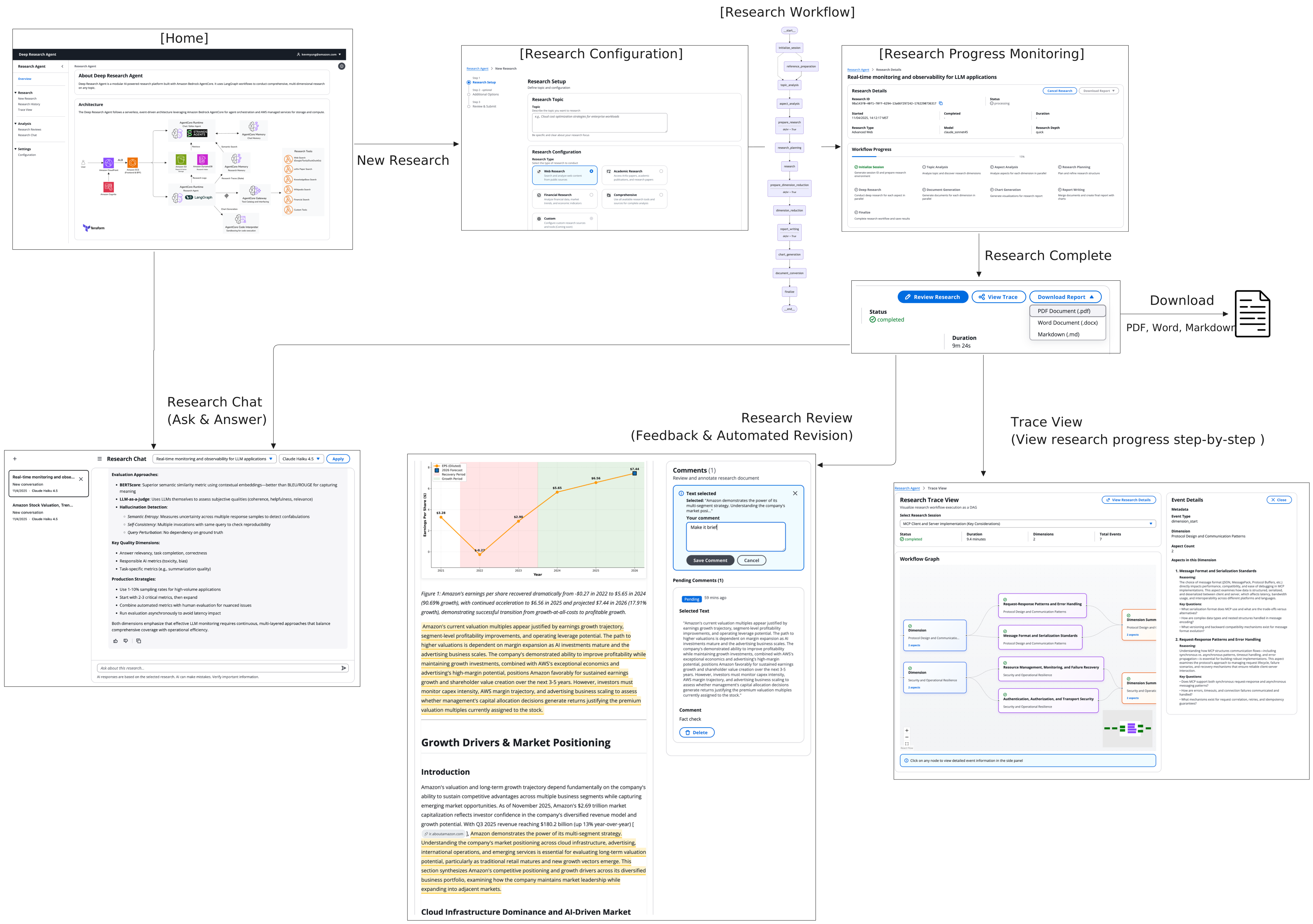
Complete research workflow from configuration to final output
Workflow Stages
The research process follows a 13-stage workflow:
1. Initialize → Setup session and logging
2. Reference Prep → Process user URLs/PDFs
3. Topic Analysis → Identify 2-5 dimensions
4. Aspect Analysis → Break dimensions into research questions
5. Research Planning → Refine plan and integrate references
6. Research → Deep ReAct agent research per aspect
7. Dimension Reduction → Synthesize findings per dimension
8. Report Writing → Create final comprehensive report
9. Chart Generation → Generate and insert visualizations
10. Document Conversion → Convert to Word and PDF
11. Finalize → Upload outputs to S3
Key Features:
- Map-Reduce Parallelism - Parallel analysis and synthesis with aggregation barriers
- Reference-Aware - Skips research for questions already answered by references
- Real-Time Status - DynamoDB polling for live UI updates
- Multi-Model - Different models for different stages
- Cancellable - Graceful cancellation at any stage
See RESEARCH_METHODOLOGY.md for detailed workflow explanation.
Research Types
| Type | Tools | Best For |
|---|---|---|
| Basic Web | DuckDuckGo, Wikipedia | General topics, quick research |
| Advanced Web | Google, Tavily, Wikipedia | In-depth web research |
| Academic | ArXiv, Wikipedia, Google | Scientific papers, research |
| Financial | Stock APIs, news, web | Market research, companies |
| Comprehensive | All tools | Complex multi-domain topics |
Depth Configurations
| Depth | Dimensions | Aspects/Dim | Total Aspects | Best For |
|---|---|---|---|---|
| Quick | 2 | 2 | 4 | Rapid overview |
| Balanced | 3 | 3 | 9 | Standard research |
| Deep | 5 | 3 | 15 | Comprehensive analysis |
Project Structure
.
├── research-agent/          # LangGraph research workflow
│   ├── src/
│   │   ├── agent.py        # Main entrypoint
│   │   ├── workflow.py     # LangGraph workflow
│   │   ├── nodes/          # Workflow stage implementations
│   │   ├── catalog/        # Tool discovery and loading
│   │   └── utils/          # Helpers (status, memory, S3)
│   └── Dockerfile
├── chat-agent/             # Strands chat agent
│   ├── src/
│   │   └── handler.py      # Chat entrypoint
│   └── Dockerfile
├── frontend/               # React application
│   ├── src/
│   │   ├── pages/         # Overview, CreateResearch, History, Chat
│   │   └── components/    # Cloudscape UI components
│   └── server/            # Express BFF server
├── terraform/             # Infrastructure as Code
│   ├── backend/           # AgentCore, DynamoDB, S3, ECR
│   ├── frontend/          # Cognito, ECS, ALB, CloudFront
│   └── tools/             # Gateway, Lambda functions
├── shared/
│   └── model_registry.json # Model configuration
├── scripts/               # Utilities
│   ├── show-outputs.sh    # Display deployment outputs
│   └── update_env.py      # Update .env from Terraform
└── deploy.sh              # Main deployment orchestrator
Key Components
Research Agent
- Framework: LangGraph
- Execution: AWS Bedrock AgentCore Runtime
- Memory: AgentCore Memory (6-month retention)
- Tools: 14 tools via AgentCore Gateway
- Output: Markdown, DOCX, PDF reports
Chat Agent
- Framework: Strands
- Execution: AWS Bedrock AgentCore Runtime
- Memory: Short-term memory (STM)
- Context: Access to research findings
- Output: Conversational responses
Frontend
- Framework: React 18
- Design: Cloudscape Design System
- Auth: AWS Cognito + Amplify
- Deployment: ECS Fargate + CloudFront
Tools (via AgentCore Gateway)
- Search: DuckDuckGo, Google, Tavily
- Knowledge: Wikipedia, ArXiv
- Financial: Stock quotes, history, news, analysis
- Code: Code Interpreter for data analysis
Configuration
Environment Variables (.env)
Auto-populated after backend deployment:
AWS_REGION- AWS regionMEMORY_ID- AgentCore Memory ID
Optional API keys:
TAVILY_API_KEY- Tavily search (recommended)GOOGLE_API_KEY+GOOGLE_SEARCH_ENGINE_ID- Google searchLANGCHAIN_API_KEY- LangSmith tracing
Model Selection
Edit shared/model_registry.json to:
- Add new models
- Configure per-stage model combinations
- Set cost/quality optimization
Research Configuration
Customize in research-agent/src/config/research_config.py:
- Research types and tool mappings
- Depth configurations
- Concurrency limits
Deployment Options
Option 1: All-in-One
./deploy.sh # Select option 5
Option 2: Individual Components
./terraform/deploy-backend.sh
./terraform/deploy-frontend.sh
./terraform/deploy-tools.sh
Option 3: Manual Terraform
cd terraform/backend
terraform init
terraform apply

cd ../frontend
terraform init
terraform apply

cd ../tools
terraform init
terraform apply
See DEPLOYMENT.md for detailed instructions.
Documentation
- DEPLOYMENT.md - Comprehensive deployment guide
- RESEARCH_METHODOLOGY.md - Detailed workflow explanation
- MODEL_CONFIGURATION.md - Model setup and customization
Requirements
- AWS Account with Bedrock enabled
- AWS CLI v2+ configured
- Terraform v1.0+
- Docker installed and running (required for frontend deployment)
- Node.js 18+ (for frontend build)
- Python 3.11+ (for scripts)
Useful Commands
# View all deployment outputs (URLs, IDs, ARNs)
./scripts/show-outputs.sh

# Update .env from Terraform outputs
python scripts/update_env.py

# Test gateway connection
python terraform/tools/scripts/test-gateway-simple.py
Support
- Documentation: See docs linked above
- Issues: Open GitHub issue
- Logs: Check CloudWatch logs
License
MIT
Acknowledgments
Built with:
- AWS Bedrock AgentCore
- LangGraph by LangChain
- React & Cloudscape Design
- Terraform
Reviews (0)
Sign in to leave a review.
Leave a reviewNo results found