axis
Health Warn
- License — License: MIT
- Description — Repository has a description
- Active repo — Last push 0 days ago
- Low visibility — Only 6 GitHub stars
Code Fail
- rm -rf — Recursive force deletion command in _Axis/Resources/secrets-capsule.sh
Permissions Pass
- Permissions — No dangerous permissions requested
No AI report is available for this listing yet.
The Axis Workflow - a simple, disciplined way to run real projects with AI. A folder of markdown files your Agent follows: plan, delegate, remember between sessions, verify the work. Portable across Cowork, Claude Code, Codex, Cursor, and Gemini CLI.
Axis Workflow



The Axis Workflow™ is an open-source project developed by SimAxis, released under the MIT License. The license grants no trademark rights. If you like Axis, please buy us a coffee. Please star the repo - it helps others to find it.
How to use Axis: read the User Manual. Technical, security and compliance details are in the Specification.
Quick Start
Download Axis and unzip - now you have a project folder.
Open the folder with Cowork, Claude Code, Codex, Cursor, Gemini, etc...
Type
Start Axis. Your Agent finds the Workflow and helps you get started.That's it. 60 seconds to go time!
What is the Axis Workflow?
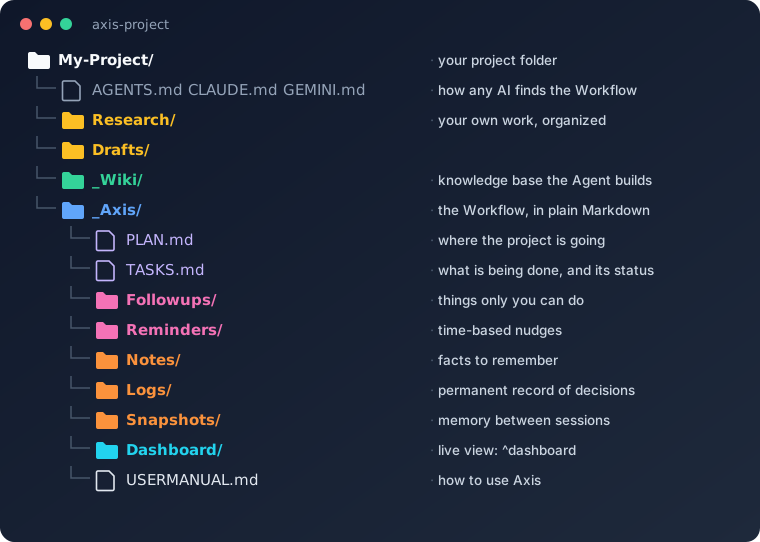
Axis is a simple but disciplined way to work with AI Agents. Drop Axis into your project (just a few folders of instructions), open your project folder with your AI (e.g., Claude Code, Codex, Cowork, etc.), and Agents will automatically start to plan, track tasks, keep records, hold memory between sessions, and cross-check everything you do. Best of all, the canonical project files stay in your own project folder.
You do not need to open an account, install an app, or set up a server. Axis is free - simply download the Axis files, drop them in, and go.
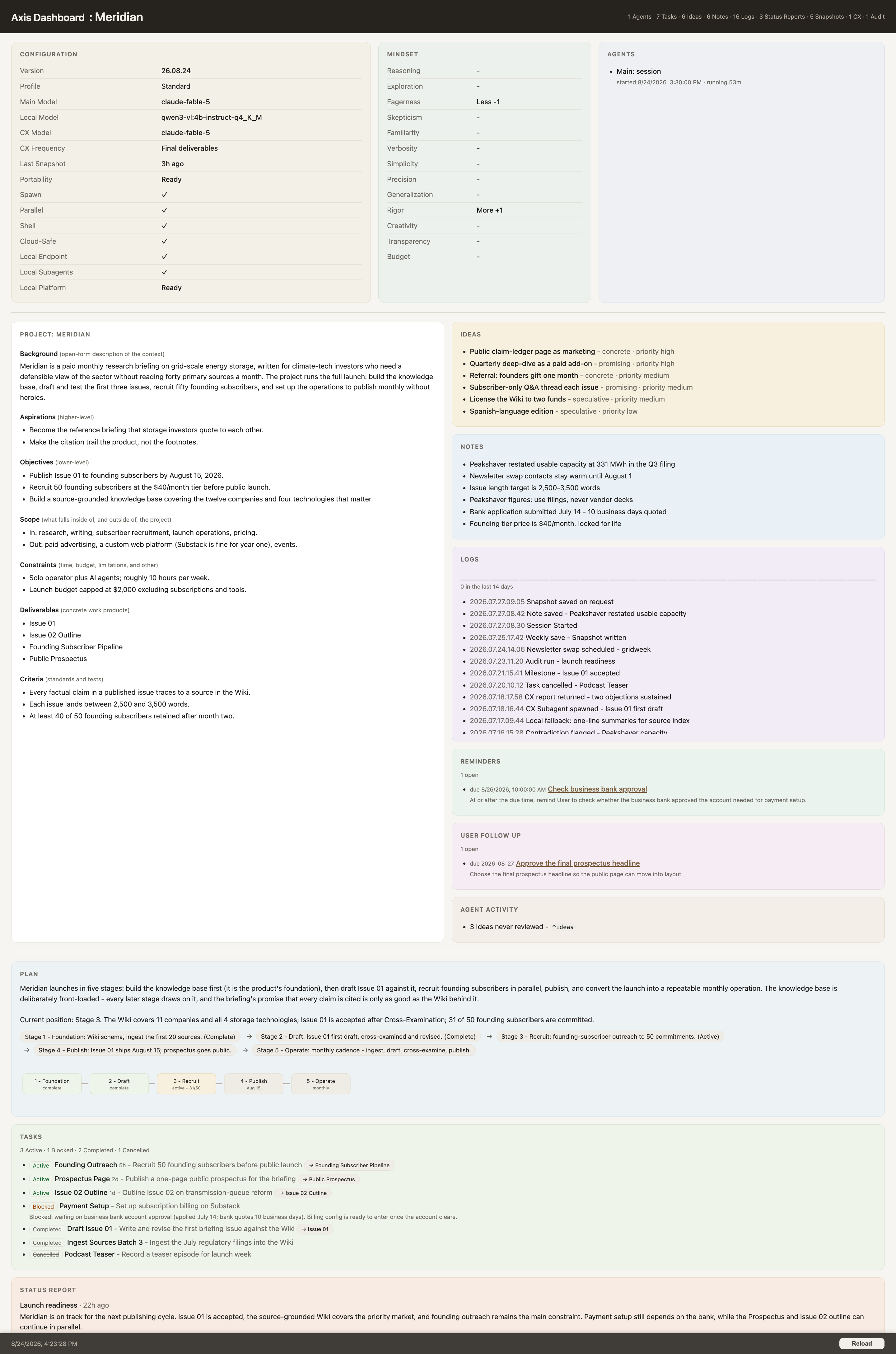
Open the live Dashboard with ^dashboard to see the whole project at a glance, read directly from those files:
Features at a Glance
- Memory between sessions. The Agent reads your Plan, Tasks, Follow-Ups, Snapshots and Notes at startup, so it knows where you left off without being prompted.
- Planning and tracking. A Plan, Tasks with status and history, Follow-Ups for the things only you can do, time-based Reminders, and optional Initiatives that group related Tasks.
- A permanent record. Logs, Snapshots, Reviews and Cross-Examinations are written once and never edited, so the history of your project can be audited.
- Cross-examination. A separate Agent can challenge key decisions and deliverables before you rely on them.
- A knowledge wiki. The Agent builds and cross-links a Wiki from your sources, readable in Obsidian or any Markdown editor.
- A live Dashboard.
^dashboardshows the Plan, Tasks, queues, activity and reports, read directly from your files. - Simple commands. Type
^helpfor the list: save and resume, notes, ideas, status, archive and more. - Portability. Switch AI tools or computers mid-project; optional Git support checkpoints and moves your work.
- Cost control. Routine work can go to cheaper or local models while stronger models handle judgment.
Why use the Axis Workflow?
Control your content.
Axis captures everything about your project and stores it on your computer: Plans, Tasks, Follow-Ups, Notes, Ideas, Logs, Snapshots, Wiki content, etc.
Avoid lock-in.
Axis runs from a simple collection of Markdown files. You can switch AI tools without exporting or converting your project; the new host reads the same directory and revalidates its own capabilities at startup.
Track changes.
Axis integrates the
gitversion-control system for knowledge work (optional - not required). A standard practice in software development,gitlets you track and roll back changes and makes coordinated, single-writer handoffs between computers much easier.Audit your work.
Axis records core events and material decisions in write-once files, creating a traceable history of your inputs, Logs, Tasks, Plans, Reminders, Follow-Ups, and deliverables.
Cross-examine results.
Axis does not just oversell the first solution - it can spin up a devil's advocate to cross-examine results. When a local model is used (see Settings > CX Model), that additional critique has no per-token provider charge, so you can use it on routine work as well as final deliverables.
Improve security.
Axis treats external sources as untrusted data and directs your Agent to warn you when it finds instruction-shaped content that may be a prompt-injection attempt.
Control Costs.
Axis implements an internal routing table to route tasks to the least expensive model that is qualified to perform it. Local and lower-cost models can handle routine work; stronger models are responsible for synthesis, judgment, and sensitive decisions. Every handoff is validated, with retry and fallback when the economical route does not meet a rigorous contract.
Work how YOU want to work.
Axis is completely open and transparent. Everything is right there in your own project directory; you can ask your Agent to customize the Workflow, add features that fit your needs, or adapt Axis and make it your own.
Compare Alternatives
| Capability | Axis | Chat projects | NotebookLM | Obsidian + Agent |
|---|---|---|---|---|
| Control your content |
Yes | Tied to vendor | Tied to vendor | Yes |
| Switch AI mid-project |
Yes | No | No | Only if you are ready |
| Versioning & Rollback |
Yes | No | No | Only if you know how |
| Knowledge Base |
Yes | Retrieval only | Retrieval only | Only if you build it |
| Cross Examination | Yes | No | No | Only if you build it |
Who needs the Axis Workflow?
- Knowledge workers with independent projects.
- Entrepreneurs with new products or business plans.
- Attorneys with a large number of case documents and filings.
- Managers with complex reporting across multiple teams.
- Scientists working on technical projects.
- Professors researching new topics.
- Teachers developing new courses.
- Students working on major projects.
- Parents keeping the family-life on track.
- Anyone who is just doing life (filing taxes, managing mail, etc.).
Axis is not the best solution for:
- Programming - Cursor and Visual Studio are better for building software.
- Complex collaboration - Asana, Trello, and Slack are better for coordinating teams.
- Knowledge sharing - Confluence and Notion are better for enterprise platforms.
- Skim Limitations before you commit a large project to the Axis Workflow - we want you to find the right fit for your particular project.
Learn More
- User Manual - how to use Axis day to day: setup, commands, the Dashboard, the Wiki, portability, and working with Agents and models.
- Specification - the technical reference for IT, security and compliance reviews, and for Agents: system design, security model, limitations and every key file.
Trademarks
"Axis Workflow", "Axis" when used as the name of this project, and their associated logos and lockups are trademarks of Kenneth A. Younge. The "Axis Workflow" trademark application was filed in Switzerland. "SimAxis" and its associated marks are trademarks of SimAxis. Together, these are the "Marks" used in this notice. The Axis MIT License covers Axis-authored text, templates, and code. It does not grant rights to the Marks or automatically license the User's project. Copyright and trademark are separate: the MIT License covers copyright only and grants no trademark rights.
You may, without asking
- Use the Marks to refer truthfully to this project - for example, "built with the Axis Workflow", "compatible with Axis Workflow", or "a tutorial for Axis Workflow".
- Redistribute unmodified copies of this repository under the project name, with a link to the official source.
- Say that your product, service, or training works with the Axis Workflow, provided no sponsorship or endorsement is implied.
Please do not
- Use the Marks, or confusingly similar names, logos, or domains, as the name of a fork, product, service, company, course, or website. Give forks their own name and describe them as "based on the Axis Workflow".
- Imply sponsorship, certification, or endorsement by SimAxis without a written agreement.
- Alter the Marks or combine them with other names or logos.
Symbols and attribution
- On first prominent use in a document, write "Axis Workflow™"; after that, plain "Axis Workflow" or "Axis" is fine.
- When an attribution line is appropriate, use: "Axis Workflow™ is free and open source (MIT License), from SimAxis - training and consulting at simaxis.ai."
Questions or permission requests can be sent to [email protected].
License
This release is licensed under the MIT License. Anyone may use, copy, modify, merge, publish, distribute, sublicense, and sell it, provided the copyright and permission notice stay with every copy. Releases before Version 2.00 remain under the Functional Source License (FSL-1.1-MIT), and each of them converts to MIT two years after it was first made available. Third-party components retain their own copyright and licenses, including the bundled Mermaid renderer. The software is MIT licensed. The Axis Workflow name and the brand assets in _Axis/Branding/ are not; see _Axis/Branding/LICENSE-ASSETS.md. The bundled Inter and IBM Plex Mono fonts are under the SIL Open Font License 1.1. See the complete Axis License, Contributor License Agreement and Copyright Assignment, and Trademarks.
Copyright
Copyright 2026 Kenneth A. Younge. All rights reserved except as expressly licensed.
Reviews (0)
Sign in to leave a review.
Leave a reviewNo results found