niri-computer-use
Health Warn
- License — License: MIT
- Description — Repository has a description
- Active repo — Last push 0 days ago
- Low visibility — Only 6 GitHub stars
Code Fail
- rm -rf — Recursive force deletion command in .github/workflows/release.yml
Permissions Pass
- Permissions — No dangerous permissions requested
No AI report is available for this listing yet.
MCP server for AI agents to observe and drive a niri Wayland desktop. Early development.
niri-computer-use





Let Claude Code, Codex, Pi or any MCP agent see and drive your niri desktop: windows, screenshots, buttons by name, keys and clicks, with a stop key you hold.
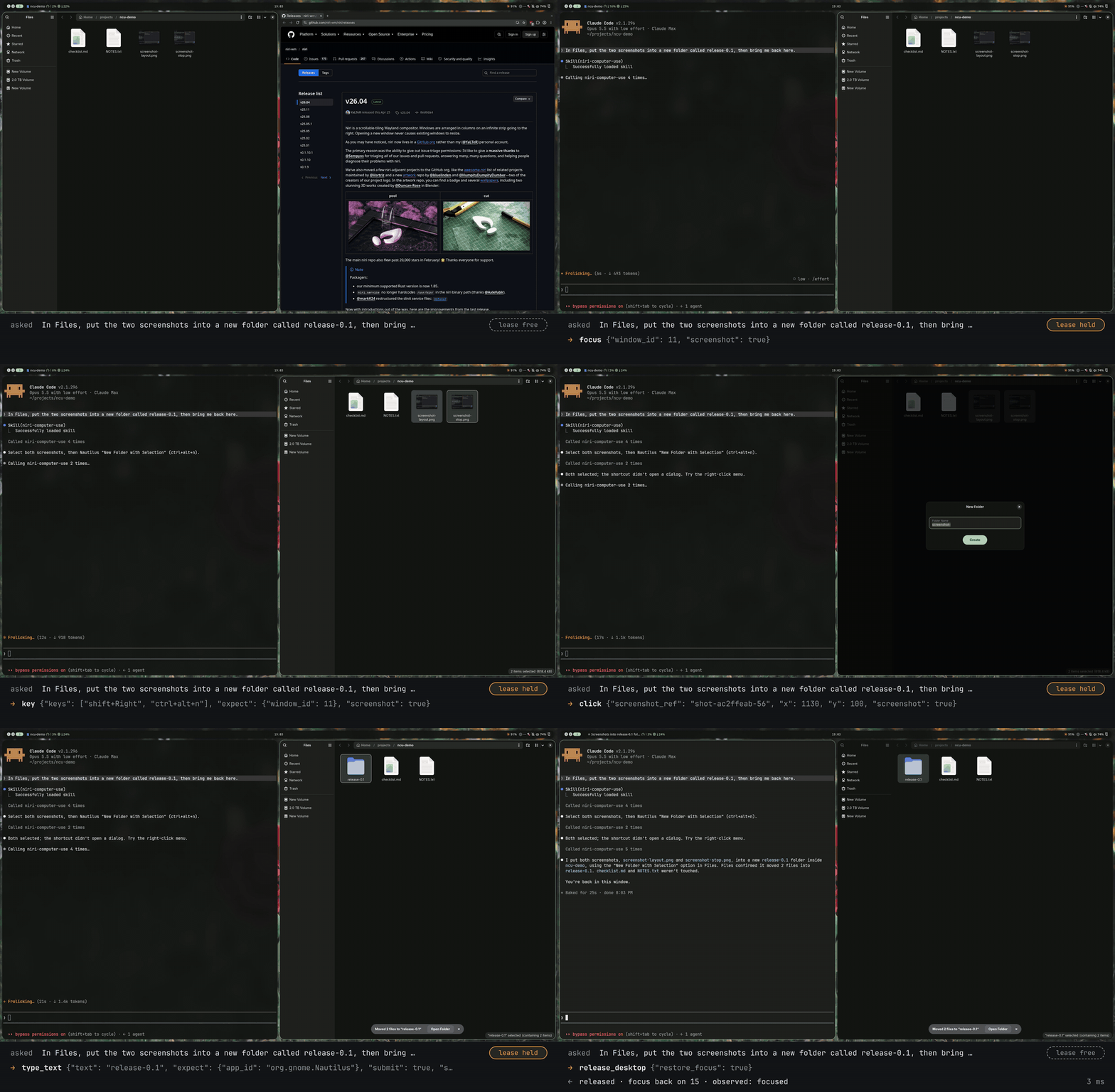
Asked: "In Files, put the two screenshots into a new folder called release-0.1, then bring me back here." This is a real Claude Code session (Opus 5.5) on a niri 26.04 desktop, with the installed server; nothing was scripted. The agent's keyboard shortcut doesn't open the dialog, so it uses the right-click menu instead. Thinking time between calls is shortened; the calls play in real time. The full 19-second recording (MP4).
Documentation: https://ayagmar.github.io/niri-computer-use/, also as plain Markdown for agents (llms.txt).
What it is
- Your real desktop, not a VM. The agent looks at and acts on the screen you are working on.
- niri only, through niri's own IPC. Windows, focus and layout come from niri. Where an app exposes its buttons and fields on the accessibility bus, the agent can act on them by name rather than by pixels. With a niri release other than 26.04 the server only looks; a 26.04 patch release works, with a warning in
status. - Guardrails, not a sandbox. A lease, a stop key, a lock check and an audit log. An agent holding the lease can do anything you could do with a mouse and keyboard.
It offers up to 22 tools over stdio: reading the desktop, screenshots it can save to ~/Pictures/niri-computer-use, zooming into part of a screenshot to read small text, accessible elements, and, under the lease, focus, launch, close, niri's layout actions, pointer, keyboard, paste, element actions and three Noctalia panels. Acceptance evidence for each milestone is in docs/results/. It is in early development.
Install
Release builds exist for x86_64 and aarch64 Linux, and both need glibc 2.39 or newer and libxkbcommon. Either way you need niri 26.04, and grim and loginctl at run time, plus notify-send if you turn on confirm_lease.
Two ways to install, both giving the same server:
| Install script | Cargo | |
|---|---|---|
| Gets | The release binary for your machine, checked against its .sha256 |
The crate from crates.io, built on your machine |
| Binary | ~/.local/bin/niri-computer-use |
~/.cargo/bin/niri-computer-use |
| Skill | Installed and linked for Claude Code, Pi and Codex | From the skills CLI or the clone, below |
| Update | Run the script again | Run cargo install again |
With the install script. Pipe it into sh, or download it with curl -fsSLO to read it first. It puts the binary in ~/.local/bin, copies the skill that tells your agents how to use the server to ~/.local/share/niri-computer-use, links it from ~/.claude/skills and ~/.agents/skills, links the Noctalia plugin when Noctalia is installed, and ends with the steps in the Quickstart below. The install script lists every file it writes, what it checks, NCU_VERSION and NCU_BIN_DIR, and how to uninstall.
curl -fsSL https://github.com/ayagmar/niri-computer-use/releases/latest/download/install.sh | sh
With cargo. With Rust 1.99 or newer and libxkbcommon's headers (libxkbcommon-dev on Debian and Ubuntu, libxkbcommon on Arch), cargo builds the crate from crates.io into ~/.cargo/bin:
cargo install --locked niri-computer-use
The crate holds no skill. Install it with the skills CLI, which copies it into ~/.agents/skills and links it from ~/.claude/skills, or link skills/niri-computer-use from a clone:
npx skills add ayagmar/niri-computer-use --skill niri-computer-use --agent claude-code --agent pi --agent codex -g
Install has the full steps, among them building from a clone, installing by hand from the tarball and updating while agents run.
Quickstart
From a shell inside your niri session, with the binary where you put it:
~/.local/bin/niri-computer-use status
status prints a readiness report as JSON; niri.compat should be ok. The install script offers to register the server in each agent it supports that it finds on PATH (Claude Code, Pi, Codex, Amp, GitHub Copilot CLI, Gemini CLI and Qwen Code), through the agent's own command. To do it yourself, here for Claude Code:
claude mcp add --scope user niri-computer-use -- ~/.local/bin/niri-computer-use serve
Client setup covers Codex, Pi and other MCP clients. None needs more than the command: the server finds your niri session itself when its environment lacks one.
Then bind the stop key in your niri config, with the binary's full path:
binds {
    Mod+Shift+Escape allow-inhibiting=false allow-when-locked=true hotkey-overlay-title="Stop the AI agent (niri-computer-use)" { spawn "/home/you/.local/bin/niri-computer-use" "stop"; }
}
The key cancels the running action and takes the lease back; ~/.local/bin/niri-computer-use resume (or ~/.cargo/bin/… after cargo install) lets agents act again. First session walks through the rest.
Example
Here is one run with every call and a full result. It is run 1791814792-1684005 of the following command, with the model claude-sonnet-5-5 through Claude Code 2.1.296 and the server at 8faae79, in a headless nested niri:
make nested-eval SCENARIO=errand SKILL=skills/niri-computer-use MODEL=sonnet
The prompt:
Open my notes app, then type exactly
Meeting moved to 3pminto the wev window and press Enter once to send it, then close the notes window you opened, and leave me on the window I was on.
The agent's eight calls:
status
desktop_state
acquire_desktop
launch            {"preset": "notes"}
focus             {"window_id": 2}
type_text         {"text": "Meeting moved to 3pm", "expect": {"window_id": 2}, "submit": true, "screenshot": true}
close_window      {"id": 4}
release_desktop   {"restore_focus": true}
What launch answered:
{
  "accepted": true,
  "observed": "one",
  "windows": [4],
  "focused_window": 4,
  "changes": {
    "focus": {"from": 3, "to": 4},
    "opened": [{"app_id": "notes", "id": 4, "title": "harness window", "workspace_id": 1}]
  }
}
accepted says niri took the request, observed what niri saw afterwards, and changes what niri saw change. The grader passed all nine of its checks, among them one launch, exactly the 20 characters before a single Enter, the notes window closed, and focus back on the user's window. The calls with their results and the grading are in docs/results/readme-example.md.
Safety
- One agent at a time holds the lease, and only the lease holder acts. Looking needs no lease.
- With
confirm_leaseon, you allow each lease on a desktop notification before the agent gets it, even when its client approves tool calls without asking you. It is off by default. - The stop key cancels the running action and takes the lease back. An agent can't press it.
- An action starts only after a read of the lock state at most 250 ms old says unlocked. Locked or unknown refuses it.
- Before typing, the server checks that the window the agent names in
expecthas focus, unless it passes"none". Text goes out one key at a time, with focus checked again before each key, and the lock state read again once its last read is over 250 ms old. Pointer and keyboard input is refused while an app on your deny list has focus, and element actions on its windows. - Element actions refuse fields the toolkit marks as password fields. Apps start only from presets you write;
unrestrictedlifts that and allows niri's gated actions such asSpawn. - Calls that reach a tool go to an audit log, without the text typed, the clipboard, window titles or images. It is moved aside at 10 MiB and the three latest old logs are kept, so it stays under about 40 MiB.
What isn't protected: any connected agent sees your screen and window titles, a click can land on a denied window that doesn't have focus, typing and clicking don't check for password fields, a lock that comes after the last read isn't caught, and an agent that can run shell commands can answer the confirm_lease notification itself. A click or a key can do anything you could do. Read Safety before letting an agent act, and SECURITY.md to report a problem.
Limits
- niri 26.04 only. With another major or minor release the server is read-only. niri built from
mainstill reports 26.04, so the server acts on it, but it isn't a supported release: againstmainatfc9e8c4, typing around a keyboard layout switch went wrong in the nested checks. - The pointer tools need one monitor at transform
Normal. The keyboard, screenshots and the other tools work with any monitors. - Release builds exist for x86_64 and aarch64 only.
- Accessibility varies by toolkit. GTK 4 works; GTK 3 and Qt apps that draw their own title bar give no element boxes, and niri 26.04 gives tiled windows none until they float. Activating an element and setting its text work in both cases.
Documentation
- Install, The install script and Client setup: install, check, and register the server in your agent
- Noctalia plugin: see which agent drives the desktop and what it does, and stop it from the bar
- Safety: what the server enforces, what it doesn't, and how you take the desktop back
- Configuration:
policy.toml, launch presets, the deny list,unrestricted,confirm_lease, the shared engine and tool profiles - Tools: every tool, its arguments and results
- Error reference and Troubleshooting: what each error means and what to do
- CLI reference:
serve,status,stop,resume,recover,watch - For agents: every page as Markdown,
llms.txt, and the skill at stable URLs
Development
See docs/development.md and CONTRIBUTING.md.
License
MIT. See LICENSE. Built binaries include niri-ipc, which is GPL-3.0-or-later, so a distributed binary follows GPL-3.0 terms.
Reviews (0)
Sign in to leave a review.
Leave a reviewNo results found