rind
Health Pass
- License — License: MIT
- Description — Repository has a description
- Active repo — Last push 0 days ago
- Community trust — 18 GitHub stars
Code Fail
- spawnSync — Synchronous process spawning in agent-management/scripts/run-tests.mjs
- process.env — Environment variable access in agent-management/src/bridge.ts
Permissions Pass
- Permissions — No dangerous permissions requested
No AI report is available for this listing yet.
Folders are agents. Lightweight multi-agent collaboration, built around your workspaces.

Rind
Light by design. Folders are agents.
Turn your folders into a team. Let each agent work in its own workspace.
Website & demos · Docs · English | 简体中文



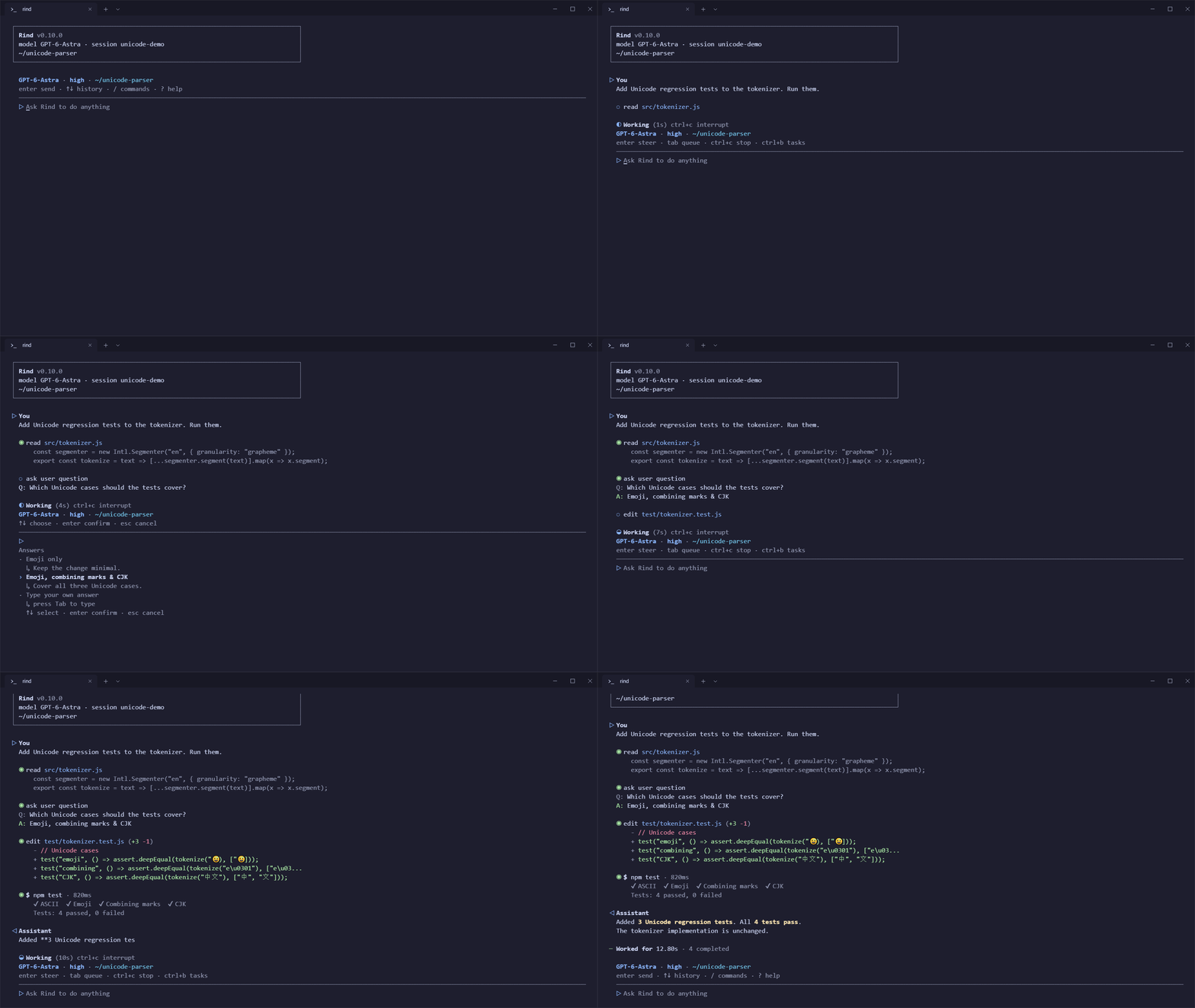
Read. Ask. Edit. Test. Deliver. · 15-second simulated CLI session · Watch the video
Give your team a goal. Follow the work. Review the delivery.
One agent for a quick fix. A team for a bigger goal. Rind keeps the work in your workspaces, the tools visible, and you in the conversation.
Team Agents Management
Folders are agents. Every folder is a teammate.
Add workspaces to your team. Let each agent work in its own folder.
A workspace gives an agent a place to work: files for context, RIND.md for standing instructions, and skills for reusable expertise. Give it a role, connect it to the team, and let specialists work in parallel. Your existing directories can stay where they are; Git worktrees offer separate working copies when you need them.

Rind CLI · Agents Management · example team · click to enlarge
- One goal. Different responsibilities. The lead delegates, specialists implement, test and review, and reports return for the lead to check before delivery to you.
- Coordination you can see. Organization shows the team and reporting relationships; Tasks tracks the work; Inbox brings questions and deliveries to you. Background keeps ongoing work visible.
- Your structure, not a template. A development team, research desk or personal assistant network. Choose the roles, workspaces and reporting lines that fit your work.
The folder is the agent's home; a conversation is one session of its work. Team membership does not require a permanently loaded execution engine for every member.
Light by design. Work on demand.
Keep the work. Release the weight.
Rind separates lasting context from temporary execution. Conversation history lives in files on disk, not only in a resident agent's memory. When a session has work, the shared Worker assembles its execution context; when the turn is idle and nothing is queued, it releases the execution container and model client. The next turn reloads the saved context.
- Shared infrastructure, independent workspaces. Sessions reuse Worker services without keeping an execution container alive for every saved conversation.
- History outlives execution. Resume a conversation without needing its old execution objects to remain in memory. No database service to maintain.
- Background work has its own lifetime. Managed shell processes can continue after a turn's container is released; the Worker still owns their output, status and cancellation.
“Stateless” describes how persistent session context is restored—not a Worker with no live state. Active processes, queues and cancellation still have clear owners. Low load comes from loading what is needed and releasing what is idle, not from discarding your history.
Inside the lightweight Worker →
One core. More ways to work.
At your desk. In your browser. On your phone.

Desktop · Web · App · real client renderers with sample data · click to enlarge
- Desktop. A local visual workspace for conversations, project files and tool results. Download v0.9.0 for Windows, macOS or Linux.
- Web. Connect from a browser through Desktop remote access, or self-host the Web surface with a standalone Worker. Web setup →
- App. Continue host-side sessions from your phone. The mobile client connects to your computer or server; models, tools and files stay on the host. Android / iOS source and build guide →
The interfaces share a runtime, not an identical feature set. Team Agents Management is currently available in CLI 0.10.0. Mobile is a remote client, not an on-device coding runtime; native builds require the platform toolchains.
Your models, your choice.
Use your ChatGPT subscription. Or bring your own API keys.
Rind supports OpenAI account sign-in alongside API-key connections to OpenAI, Anthropic, Google, DeepSeek and other compatible providers. Choose the model that fits the work; keep using Rind's tools and local workspaces. Available subscription models and usage depend on your account and plan.
Get started
Install the CLI
Open your project and start a conversation.
Requires Node.js 18+. Supports Windows, macOS and Linux.
npm install -g @rind-ai/cli
cd your-project
rind
Inside Rind, use /login to connect a provider and /model to choose a model. For a ChatGPT subscription, choose OpenAI → Sign in with an account and complete the browser sign-in. Available models and usage depend on your account and plan.
Want a quick look first? Explore the interactive demos, or open /tour inside Rind. The built-in tour needs no API key.
Standalone downloads
Prefer a standalone package? Download CLI 0.10.0 from Releases. Desktop 0.9.0 downloads are linked in the multi-client section above.
Start from source
Requires Python 3.12+, Node.js 18+ and Git. Clone the repository and create a Python environment:
git clone https://github.com/Azzurroooo/rind.git
cd rind
python -m venv .venv
Activate it with source .venv/bin/activate on macOS/Linux, or .\.venv\Scripts\Activate.ps1 in Windows PowerShell. Then install the runtime dependencies, build Agents Management, and start the CLI:
python -m pip install -r requirements-runtime.txt
npm install --prefix agent-management
npm run build --prefix agent-management
npm install --prefix frontend-cli
node frontend-cli/bin/rind.js
To work in another project, run node /absolute/path/to/rind/frontend-cli/bin/rind.js from that project's directory. Source setup and configuration →
More ways to work
Bring Rind into your channels
Talk to your agent through Telegram, Discord, Slack or Feishu. The gateway connects your channels to the same host-side runtime. Gateway setup →
Use Rind in scripts and CI
Use rind run for non-interactive work. The final answer goes to stdout; progress and diagnostics go to stderr, so the result is ready for your pipeline:
rind run --prompt "Review the current diff and identify actionable issues." > review.md
Use rind send to steer a running conversation from another terminal. Team management also exposes a command-line API alongside its interactive interface.
Extend Rind. Reuse its parts.
Rind separates the runtime from its interfaces. Build another client on the runtime protocol, add a tool, or reuse the standalone Agents Management service.
Explore the internals, system map and development guide.
Contributing
Contributions and issues are welcome. See CONTRIBUTING.md.
Reviews (0)
Sign in to leave a review.
Leave a reviewNo results found