terminal-jarvis
Health Pass
- License — License: MIT
- Description — Repository has a description
- Active repo — Last push 0 days ago
- Community trust — 123 GitHub stars
Code Pass
- Code scan — Scanned 12 files during light audit, no dangerous patterns found
Permissions Pass
- Permissions — No dangerous permissions requested
No AI report is available for this listing yet.
In the midst of all the tools out there that you can possibly use to keep track of them. Here's a "shovel" that just works to try them all out.
Terminal Jarvis
Unified command center for AI coding tools
Manage Claude, Gemini, Qwen, and 19 more AI assistants from one terminal interface.





Safe Testing Recommended: Terminal Jarvis is a harness for AI coding tools that can modify files and execute commands. For the safest experience, we recommend testing in a remote development environment such as GitHub Codespaces, Coder, DevPod, or Google Colab. These environments provide isolation from your local machine while offering full development capabilities.
Quick Start
# Try instantly (no install)
npx terminal-jarvis

# Or install globally
npm install -g terminal-jarvis    # NPM
cargo install terminal-jarvis     # Cargo
brew tap ba-calderonmorales/terminal-jarvis && brew install terminal-jarvis  # Homebrew
What It Does
| Feature | Description |
|---|---|
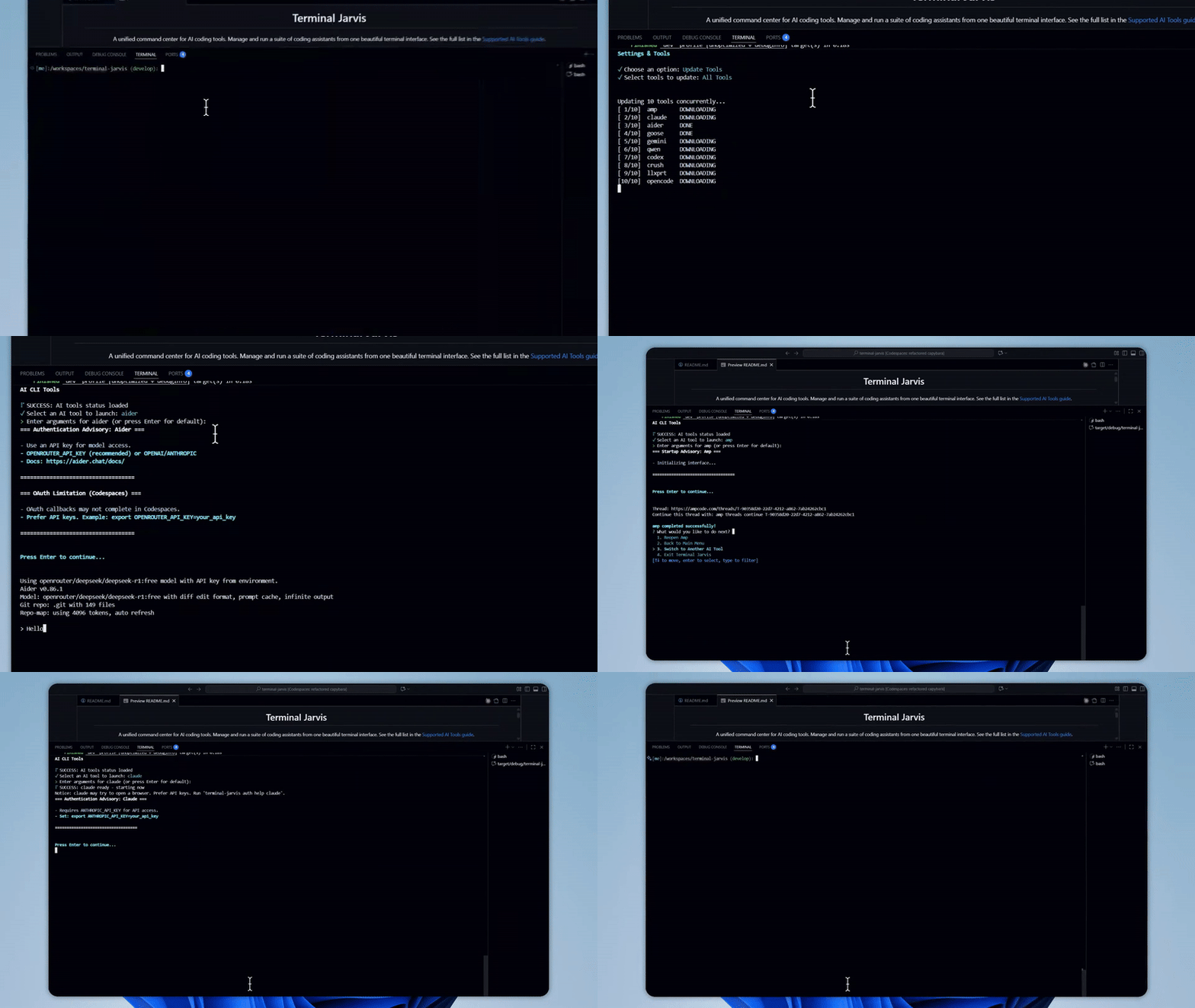
| Interactive Interface | Beautiful terminal UI with ASCII art, themed menus, and keyboard navigation for a polished command-line experience. |
| 22 AI Tools Supported | Claude, Gemini, Qwen, OpenCode, Codex, Aider, Goose, Amp, Crush, LLXPRT, and many more - all manageable from a single interface. |
| Integrated Installation | Install, update, or uninstall any supported AI tool directly from the menu without leaving the terminal. |
| Session Continuity | Preserves your terminal session state during browser-based authentication flows. Currently in development with expanding coverage. |
Documentation
Full guides at Terminal Jarvis Docs
| Guide | Description |
|---|---|
| Installation | Step-by-step platform setup for NPM, Cargo, and Homebrew with troubleshooting tips for common issues. |
| AI Tools | Detailed overview of all 11 supported AI coding assistants including authentication requirements and capabilities. |
| Configuration | Customize themes, keybindings, default tools, and environment variables to match your workflow. |
| Architecture | Technical deep-dive into the Rust codebase, module organization, and design decisions. |
Project Structure
Expand/Collapseterminal-jarvis/
├── src/ # Rust application
│ ├── main.rs # Entry point
│ ├── cli.rs # CLI definitions
│ ├── cli_logic/ # Business logic (22 modules)
│ ├── auth_manager/ # Authentication (8 modules)
│ ├── config/ # Configuration (6 modules)
│ ├── services/ # External integrations (6 modules)
│ ├── tools/ # Tool management (14 modules)
│ ├── theme/ # UI theming (9 modules)
│ └── api/ # API framework (4 modules)
│
├── config/ # Configuration files
│ ├── tools/ # Per-tool configs (*.toml)
│ ├── evals/ # Evaluation metrics
│ └── *.toml # Global settings
│
├── scripts/ # Automation
│ ├── cicd/ # CI/CD (local-ci.sh, local-cd.sh)
│ └── verify/ # Verification feedback loop
│
├── .github/ # GitHub integrations
│ └── skills/ # AI agent skills (17 modules)
│ ├── verification/ # Quality verification
│ ├── release-checklist/ # Pre-release automation
│ ├── qa-testing/ # Minimal QA branch testing
│ ├── deployment/ # Release workflows
│ └── ... # 13 more skills
│
├── tests/ # Rust tests (cargo test)
├── e2e/ # E2E tests (TypeScript/Vitest)
├── npm/terminal-jarvis/ # NPM wrapper
└── homebrew/ # Homebrew Formula
Development
Remote Development Environments (Recommended)
For the safest and most consistent development experience, use a cloud-based environment:
| Environment | Description |
|---|---|
| GitHub Codespaces | Zero-setup cloud development with VS Code integration. Pre-configured with all dependencies. |
| Coder | Self-hosted or cloud workspaces with full IDE support. Great for teams with custom infrastructure. |
| DevPod | Open-source, client-only solution that works with any cloud provider or local Docker. |
| Google Colab | Free cloud notebooks with terminal access. Useful for quick experimentation. |
Local Development
Prerequisites: Node.js 20+, Rust toolchain (for source builds)
Verification
# Run before commits - comprehensive quality check
./scripts/verify/verify-change.sh

# Individual checks for faster iteration
./scripts/verify/verify-build.sh      # Compilation only
./scripts/verify/verify-quality.sh    # Clippy + formatting
./scripts/verify/verify-tests.sh      # Unit + integration tests
./scripts/verify/verify-cli.sh        # CLI smoke tests
Testing
cargo test              # Rust unit and integration tests
cd e2e && npm test      # End-to-end tests with Vitest
Contributing
See AGENTS.md for AI-assisted development guidelines and the Contribution Guide.
License
MIT - see LICENSE

Reviews (0)
Sign in to leave a review.
Leave a reviewNo results found