flock
Health Warn
- License — License: MIT
- Description — Repository has a description
- Active repo — Last push 0 days ago
- Low visibility — Only 9 GitHub stars
Code Fail
- rm -rf — Recursive force deletion command in build.sh
- rm -rf — Recursive force deletion command in release.sh
Permissions Pass
- Permissions — No dangerous permissions requested
This is a macOS terminal multiplexer designed to manage multiple Claude Code sessions, shell terminals, and markdown panes in a single tiled window. It includes an agent mode for parallel task execution and a broadcast feature to send commands across all active panes simultaneously.
Security Assessment
Overall risk is Medium. As a desktop AppKit application designed to run and control shell sessions, it inherently executes local terminal commands and interacts with the filesystem. The scan identified recursive force deletion commands (`rm -rf`) inside `build.sh` and `release.sh`. While this is a common practice for automated build and release cleanup, it requires caution. No hardcoded secrets or dangerous explicit permissions were detected, though the tool's core functionality relies on managing external processes.
Quality Assessment
The project is licensed under the permissive MIT license and was actively updated recently (last push was today). However, it currently has very low community visibility with only 9 GitHub stars, meaning it has not been broadly tested or vetted by a large audience. The included README is detailed and provides clear documentation on features and privacy policies.
Verdict
Use with caution — the core utility is useful for power users, but the low community visibility and the presence of `rm -rf` in build scripts warrant a manual code review before deploying in sensitive environments.
Swift/AppKit terminal multiplexer for Claude Code + shell sessions

flock


let your agents loose.
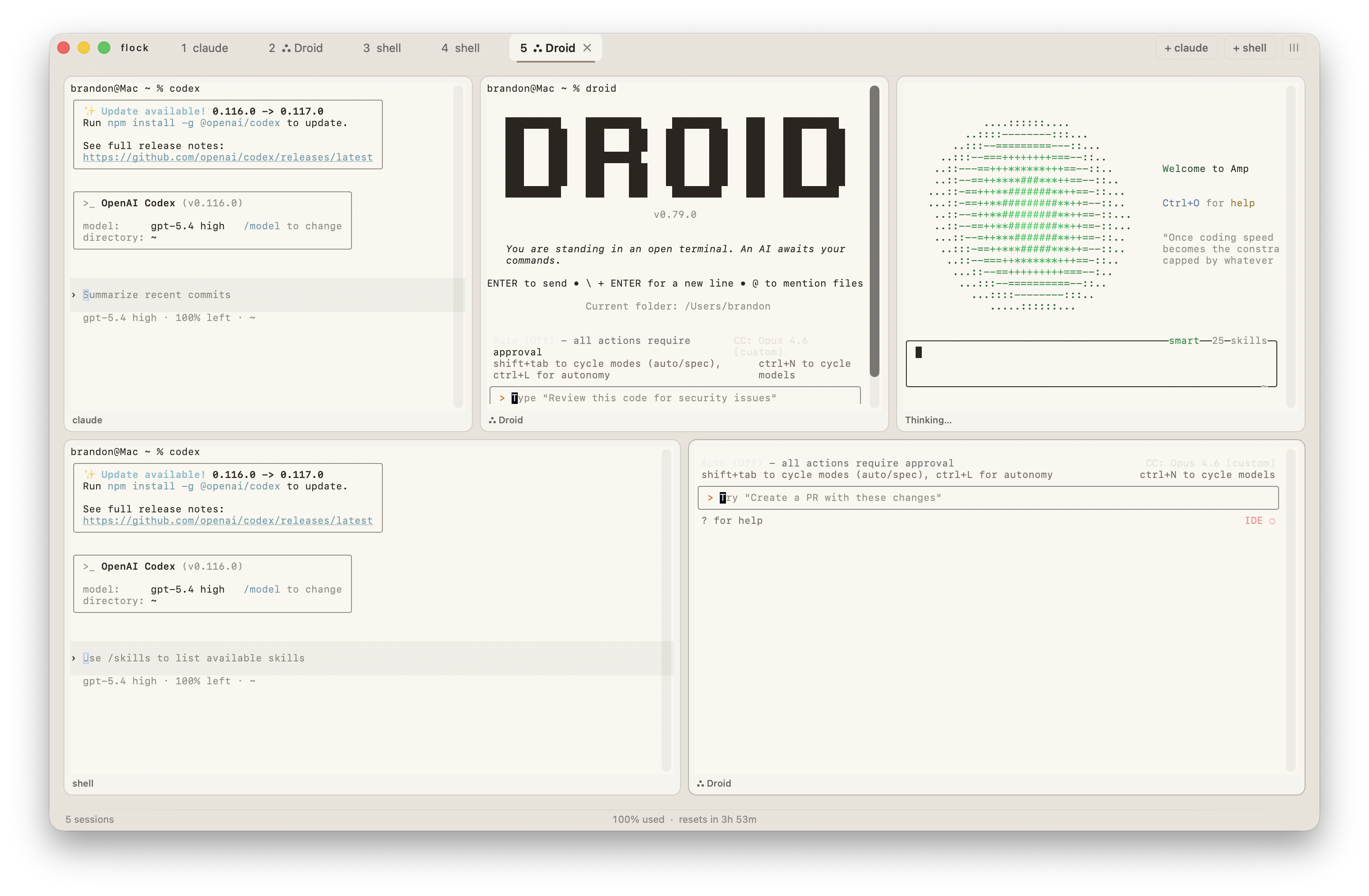
flock is a tiny, beautiful macOS app that lets you run as many Claude Code sessions as you want, all at once, all in one window. it also gives you shell panes and editable markdown panes alongside them. watch them think, read, edit, and build in real time. it's like having a team of programmers that never sleeps.
you open flock. you press ⌘T a few times. suddenly four claudes are working on four different things and you're just... watching. it's kind of mesmerizing honestly.
get it
grab the .pkg installer or .zip from releases and you're done.
support lives on GitHub issues. privacy details live at baahaus.github.io/flock/privacy.html.
what you get
panes
flock has three kinds of panes. they tile themselves automatically -- 1 fills the screen, 2 split in half, 4 make a grid. split horizontal, split vertical, maximize one, whatever you want. it figures it out.
- claude panes run full Claude Code sessions with real-time activity detection, state indicators (thinking, working, waiting, idle), and a change log overlay (
⌘⇧L) showing every file read, edit, and command. - shell panes are regular terminals with autosuggestions baked in.
- markdown panes let you open or create
.mdfiles, edit them directly, and autosave back to disk. external changes are detected and you get a clean conflict resolution dialog.
agent mode
hit ⌘⇧A and flock becomes a task manager. throw tasks at a queue, watch them flow across a kanban board (backlog, in progress, done, failed). each agent gets a live timeline showing every action in real time. run up to 3 agents in parallel (configurable). tasks persist across sessions. costs are tracked per task.
you can send follow-up messages to running agents, resume completed conversations, or cancel anything mid-flight.
command palette
⌘K opens everything. new panes, markdown files, themes, layouts, broadcast mode, memory management, pane navigation. fuzzy search, keyboard-driven. if you've used raycast or arc you already know how this works.
broadcast mode
⌘⇧B -- type once, every pane hears it. useful when you want all your claudes to know something at the same time.
find
⌘F searches inside the current terminal pane with live highlighting and prev/next navigation. ⌘⇧F opens global find that searches across every open pane simultaneously -- terminals and markdown -- with results showing match counts per pane.
memory
flock has a built-in memory system (⌘⇧M) that captures task summaries and lets you add, edit, pin, and delete memories. pinned memories survive auto-trimming. everything syncs to a .flock-context.md file in your working directory so claude has persistent context across sessions.
wren compression
toggle on prompt compression in preferences and flock runs your messages through wren before sending. compresses prompts 50-80%, preserving meaning while saving tokens. works on paste in terminal panes and message input in agent mode.
usage tracking
tracks your daily token usage and cost across all claude sessions. shows input, output, cache read, and cache write tokens with model-specific pricing. monitors plan limits from the Anthropic API. toggle it on in preferences to see it in the status bar.
themes
7 built-in themes, each with a complete color palette including terminal ANSI colors:
flock (warm cream) -- claude (terracotta) -- midnight (dark blue) -- ember (charred brown) -- vesper (indigo) -- overcast (cool grey) -- linen (light)
session restore
close the app, open it later, everything's still there. your layout, your panes, your working directories, right where you left them.
notifications & sounds
flock taps you on the shoulder when an agent finishes something. native macOS notifications with optional sound effects. long-running commands (>10s) trigger a notification automatically so you can go get coffee.
global hotkey
`Ctrl+`` summons flock from anywhere. hit it again to hide. customizable key and modifiers.
auto-updater
checks for new versions on launch, shows a formatted changelog when you update, and links you straight to the download. toggle it off if you want.
keyboard shortcuts
flock is keyboard-first. your hands never leave the keys.
⌘T |
new claude |
⌘⇧T |
new shell |
⌘W |
close pane |
⌘1--⌘9 |
jump to pane |
⌘←→↑↓ |
navigate panes |
⌘↩ |
maximize / restore |
⌘D |
split horizontal |
⌘⇧D |
split vertical |
⌘K |
command palette |
⌘⇧A |
agent mode |
⌘⇧B |
broadcast mode |
⌘⇧M |
memory panel |
⌘⇧L |
change log overlay |
⌘F |
find in pane |
⌘⇧F |
find in all panes |
⌘G |
find next |
⌘⇧G |
find previous |
build it yourself
you'll need xcode (swift 5.9+).
git clone https://github.com/baahaus/flock.git
cd flock
./build.sh
that's it. app goes to /Applications, cli goes to flock.
under the hood
native swift. no electron. terminal panes are powered by SwiftTerm, and markdown panes are native editable text views that autosave to disk. agent mode talks to claude code over stream-json and parses every event in real time to build the timelines and kanban board. prompt compression runs through wren, a LoRA fine-tuned model on Apple Silicon via MLX. it's fast because it's not pretending to be a website.
why "flock"
a flock of claudes. working together. that's it. that's the name.
made by baahaus
Reviews (0)
Sign in to leave a review.
Leave a reviewNo results found