archik
Health Warn
- License — License: MIT
- Description — Repository has a description
- Active repo — Last push 0 days ago
- Low visibility — Only 6 GitHub stars
Code Fail
- spawnSync — Synchronous process spawning in bin/archik.js
- process.env — Environment variable access in bin/archik.js
Permissions Pass
- Permissions — No dangerous permissions requested
This tool generates architecture diagrams from plain YAML files, designed to serve as a shared specification between developers and AI assistants like Claude. It provides a local web canvas to render and edit the diagrams visually while keeping the YAML file as the single source of truth.
Security Assessment
The overall security risk is Medium. The tool does not request dangerous system permissions, but the rule-based scan flagged synchronous process spawning and environment variable access in the packaged JavaScript file. While accessing environment variables and spawning processes can be standard for developer CLI tools (e.g., starting a local web server or reading system paths), they expand the attack surface. If a malicious dependency is introduced, these capabilities could theoretically be leveraged to execute unauthorized commands. There are no hardcoded secrets, and no sensitive user data is actively scraped.
Quality Assessment
The project uses the standard, permissive MIT license and is actively maintained, with its most recent code push occurring today. However, community trust and visibility are currently very low. The repository has only 6 GitHub stars, meaning the codebase has not been widely scrutinized by the open-source community. Developers should be aware that a lack of peer review increases the risk of undetected vulnerabilities or bugs.
Verdict
Use with caution — the tool is actively maintained and conceptually useful, but its low community adoption combined with local process execution requires you to review the code before integrating it into sensitive workflows.
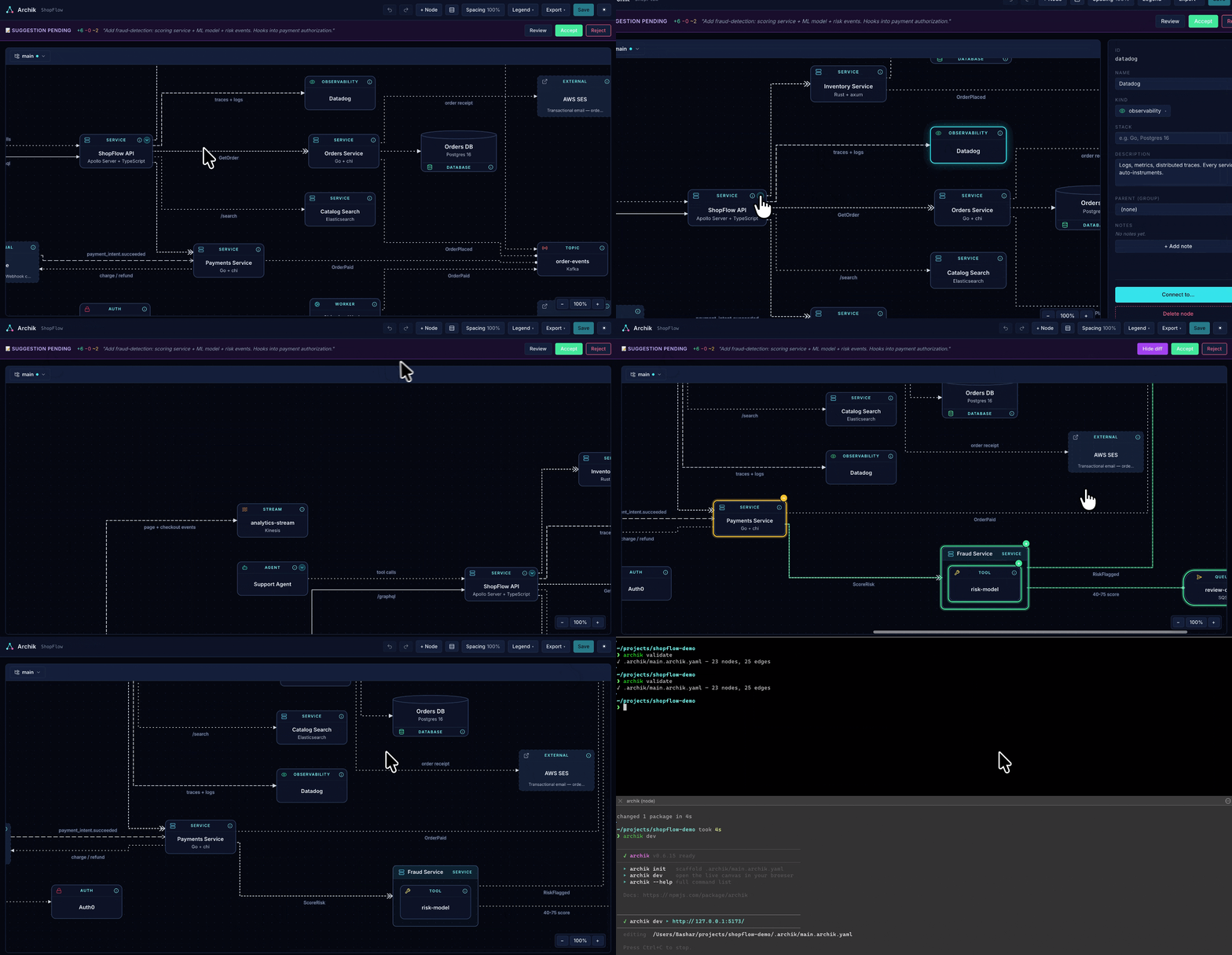
Architecture diagrams as plain YAML. The YAML file is the source of truth; the canvas is a stateless projection.

archik
The shared vocabulary between you and Claude Code, at the engineering level.








archik gives your project — and the AI editing it — one file that
describes what the system actually looks like. Services, databases,
queues, agents, LLMs, the edges between them. Plain YAML, schema-
validated, no coordinates, no proprietary format.
Open it in your browser for a live canvas. Render it in CI for a
self-contained SVG. Install the Claude Code skill
so the model edits the same file you do — the diagram and the
codebase stop drifting because Claude treats the diagram as the
spec.
If you've ever asked an AI agent "where would I add X?" and watched
it guess from filenames, archik is the fix: the YAML answers the
question, and Claude is required to read it before doing structural
work.
Quickstart
npx archik init       # scaffold .archik/main.archik.yaml in cwd
npx archik start      # canvas at http://localhost:5173 (background)
npx archik stop       # done
That's the whole onboarding. The canvas saves edits straight back to the YAML; the file is the truth, the canvas is a projection.
What you write
version: "1.0"
name: Support Hub
nodes:
  - id: api
    kind: service
    name: Support API
    stack: Go + Postgres
  - id: agent
    kind: agent
    name: Support Agent
    description: Drafts replies, escalates risky ones.
  - id: claude
    kind: llm
    name: Claude
edges:
  - id: api-agent
    from: api
    to: agent
    relationship: invokes
  - id: agent-claude
    from: agent
    to: claude
    relationship: invokes
    label: draft reply
No x / y / width — layout is computed by ELK on every render. The schema rejects coordinates so diffs stay meaningful.
What it gives you
- Live canvas —
archik dev(foreground) orarchik start/stop(detached, multi-project). - 27 node kinds across compute, data, messaging, networking, hexagonal, AI/ML, identity, observability, cloud, UI, and external.
- 12 relationships with distinct visual styling —
http_call,invokes,reads,writes,publishes,subscribes,streams_to,routes_to,implements,depends_on,has_a,uses. - Drag-to-connect, multi-select, undo/redo, compact view, themed (dark / light), notes per node, color overrides on edges.
- CI-ready CLI —
validate,render(headless SVG),watch,check(drift between YAML and source dirs). - AI skill —
archik skill --userinstalls a Claude Code skill that teaches Claude the schema, the protocol, and the verification workflow.
For Claude Code & other LLMs
The whole reason Archik uses YAML instead of a binary format: the file is the shared map between you and the model. Run:
archik skill --user # install once into ~/.claude/skills
…and Claude Code in any project gets the right vocabulary automatically. The skill defines a 3-rule protocol:
- Read
architecture.archik.yamlbefore answering structural questions. - Propose YAML updates whenever new work introduces or rewires components.
- Run
archik validateafter every edit to fail fast on schema errors.
So conversations like "add a payments worker that subscribes to the orders queue" end with both the code change and the matching YAML diff — kept in sync without anyone having to remember.
Commands
archik init [path]       Scaffold a starter .archik/main.archik.yaml
                         (also installs the Claude skill by default)
                         --no-skill       skip installing the Claude skill

archik dev [path]        Open the canvas in your browser (foreground, Ctrl+C to stop)
archik start [path]      Same as dev, but detached — prompt returns immediately
archik stop [path]       Stop the background server started with `archik start`
archik status            List running archik instances across all projects
                         (dev / start share these flags)
                         --port <n>       dev server port (default 5173)
                         --host <addr>    bind address (default 127.0.0.1)
                         --no-open        don't auto-open the browser

archik validate [path]   Validate against the schema (CI-friendly, exit code 1 on error)
archik render [path]     Render to a self-contained SVG file
                         --out <file>     output path (default: diagram.svg)
                         --theme <name>   "dark" (default) or "light"
archik watch [path]      Re-render to SVG on every file change (Ctrl+C to stop)
archik check [path]      Drift detection — flag nodes without matching source dirs

archik skill             Install the Claude skill for AI editing
                         --user           install into ~/.claude/skills (all projects)
                         --force          overwrite an existing skill
Without a [path] argument, archik resolves the file in this order:
.archik/main.archik.yaml(preferred new convention — keeps the project root tidy)architecture.archik.yaml(legacy root location — still fully supported)
If both exist the command errors out and asks you to pick one. New projects get the .archik/ layout from archik init; existing projects keep working without any migration.
Single instance per file is enforced via a lock file in $TMPDIR/archik-cli/, so parallel dev and start against the same YAML are rejected with a friendly error.
Use it in CI
# Fail the build on schema errors
archik validate

# Generate a committable SVG of your architecture for the docs site
archik render --theme light --out docs/architecture.svg

# Warn when nodes don't have a matching source folder under src/, services/, packages/, or apps/
archik check
Schema
The full schema reference (every node kind, every relationship, common patterns, hard rules) lives in the AI skill. After installing it locally:
archik skill --user
$EDITOR ~/.claude/skills/archik/SKILL.md
Or read it directly in this repo: .claude/skills/archik/SKILL.md.
Design notes
- The YAML is the only persistent truth. The canvas is a stateless projection that reloads on every file change (live-reload via SSE).
- Layout is non-negotiable: ELK lays out every render. Putting an
x/y/widthfield at any level fails schema validation. No more "the diagram drifted because someone dragged a box." - The published npm package ships only the bundled binary — no source files, no build tooling. Zero runtime dependencies.
License
MIT © Bashar
Reviews (0)
Sign in to leave a review.
Leave a reviewNo results found