bateri
Health Warn
- License — License: GPL-3.0
- Description — Repository has a description
- Active repo — Last push 0 days ago
- Low visibility — Only 6 GitHub stars
Code Pass
- Code scan — Scanned 12 files during light audit, no dangerous patterns found
Permissions Pass
- Permissions — No dangerous permissions requested
No AI report is available for this listing yet.
A dock to type in, a multiplexer built in, pens in its panes. A GPU-drawn terminal for macOS.
bateri
A GPU-rendered terminal for macOS. bateri is written in Rust and draws every
frame on the GPU through wgpu (Metal on macOS), talking to AppKit directly —
there is no Swift or web layer in between. It aims to feel calm: commands are grouped into blocks,
the line you type lives in a dock at the bottom of the window, the cursor
glides instead of jumping, and an idle window draws nothing at all.
Download for macOS →
· macOS 14 or later · Apple silicon · bateri.dev ·
Changelog · Free software (GPL-3.0)
Install
Download bateri.dmg
from the latest release,
open it and drag bateri into Applications. The app is signed with a
Developer ID and notarized by Apple, so it opens without a warning.
Or install it with Homebrew:
brew install bateri/tap/bateri
Features
- Command blocks. Each prompt and its output form a block, marked in the
gutter with a chevron colored by how the command ended. Commands that run
longer than a second show their duration. - Input dock. In zsh, fish and bash 4.4 or newer, the line you are editing moves to a dock at the
bottom of the window with your current directory and git branch beneath it.
It wraps, grows for multi-line input, supports mouse selection and editing,
and animates typing and deleting (configurable, or off). - Tabs and splits. Tabs along the top or in a column down the left edge;
split any tab right or down, move between panes, resize, equalize and
zoom — all from the keyboard. Zoom is also a button on every pane's bar:
the pane grows to fill the tab and pushes the others out, and again brings
them back. - Floating panes. A pane can float over its tab's splits as a card you move
and resize with the pointer or the keyboard, dock back among the splits, or
minimize to a capsule — in a strip under the splits or at the tab's top right
corner (minimized_panesin Settings) — and open again with a click. Programs
and agents open them from thebatericommand. - Search in scrollback with case-sensitive and regular-expression modes and
a live match count. - SSH aware. Over ssh or mosh the dock turns into a status bar showing the
host, colored by how you marked it (production, staging, development). Drop
files from Finder onto the window to upload them to the remote directory,
with progress, cancel and a summary. - Agent aware. Claude Code, Codex or any program on a server you
sshinto
can open panes and tabs in bateri, list what is open, close what it opened and
send a notification, with thebatericommand bateri puts on that server (see
Agents on a server). - Modern text rendering. Emoji sequences (flags, ZWJ families, skin tones),
wide characters, and box-drawing, block and Braille characters drawn to fit
the cell exactly. - Motion that respects you. A spring-animated cursor, smooth trackpad
scrolling, and content that settles to the bottom of the window. Everything
follows the system's Reduce Motion setting. - Zero idle frames. Nothing is drawn unless something changed, so an idle
window costs no GPU time. - Automatic updates from GitHub Releases via Sparkle, signed and notarized.
Pens
A pen is a program that shows a real interface in the pane it runs in, on your machine or on a server over plain ssh, in your font and your theme. Each is one file, made with pencere.
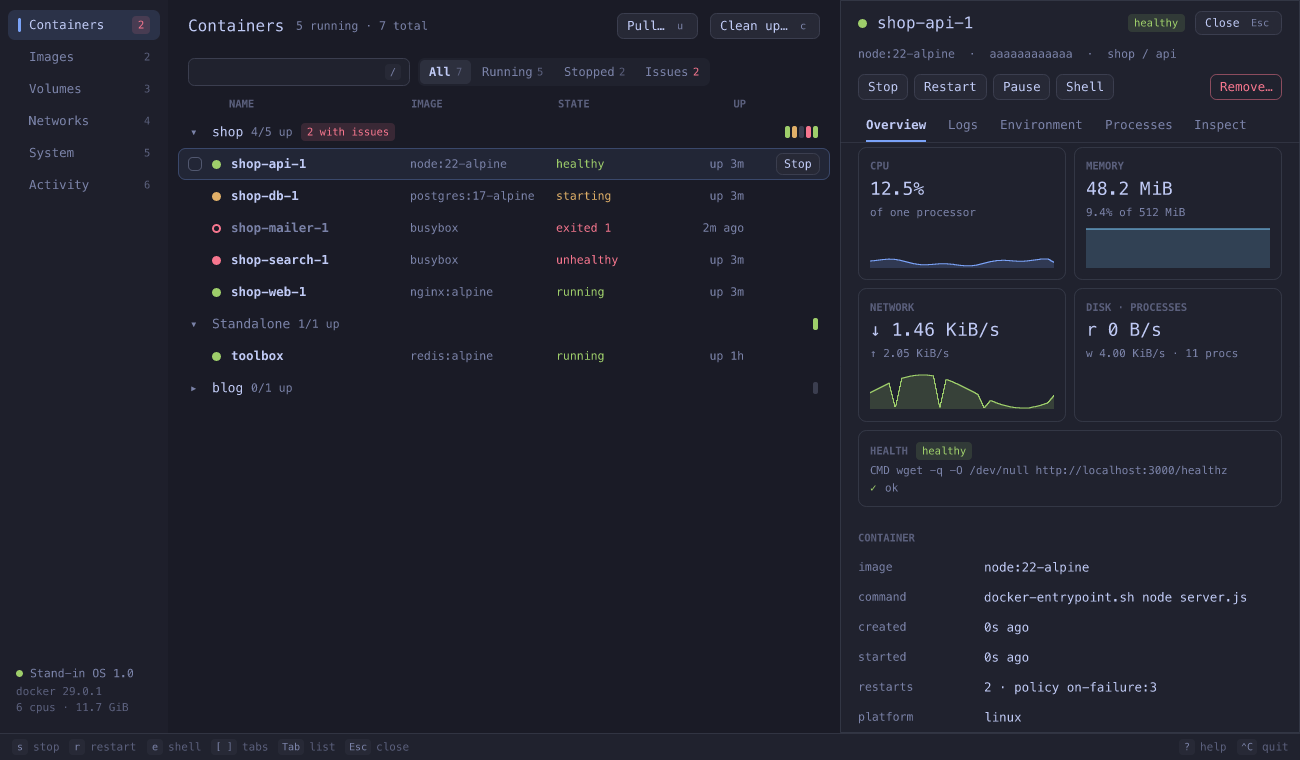 dockerpen Docker in the pane: containers, their logs and resource use, images, volumes, networks and disk. |
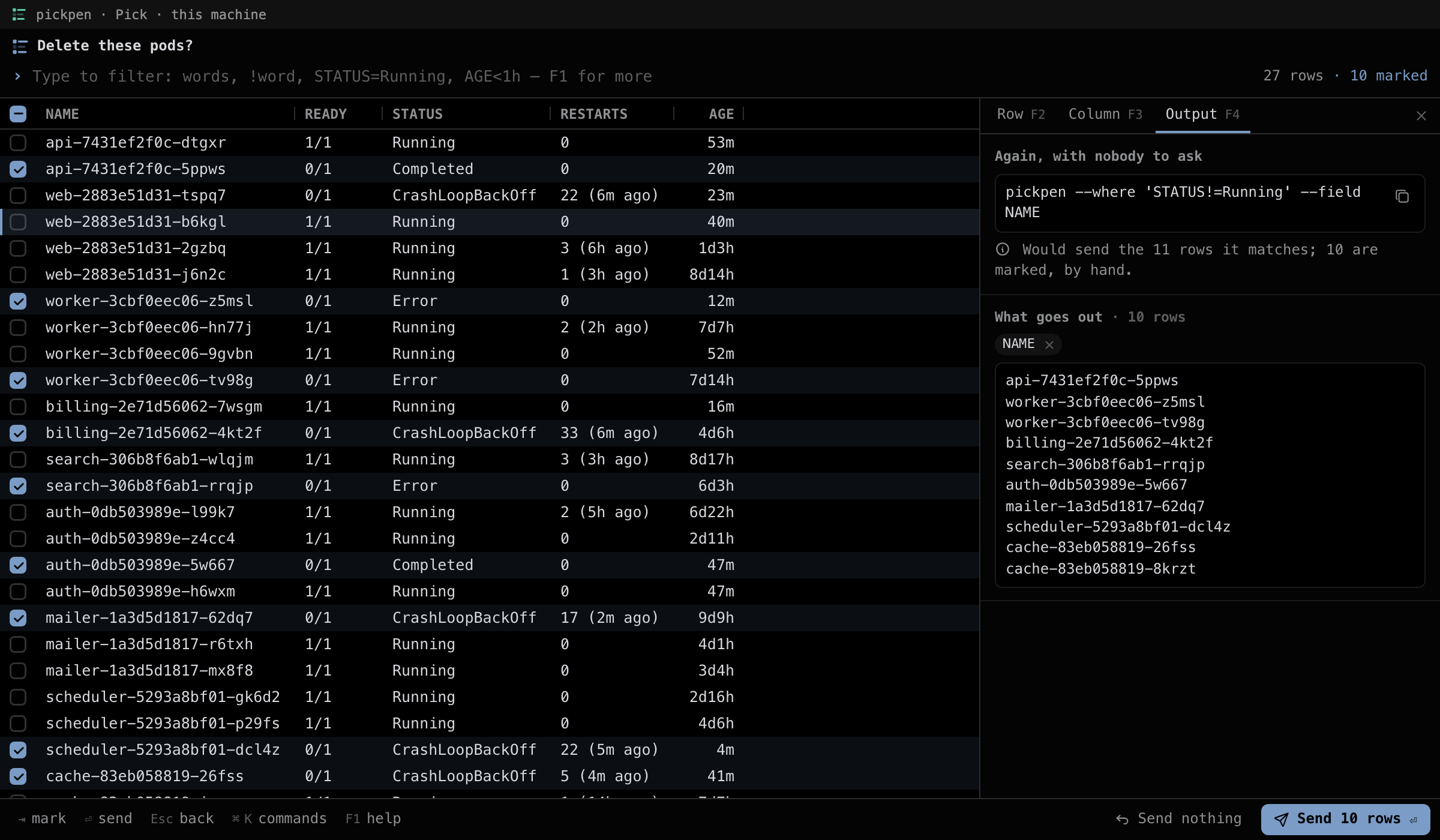 pickpen Choose rows in the middle of a pipeline: filter, sort and mark them, and the rows you chose go out on stdout. |
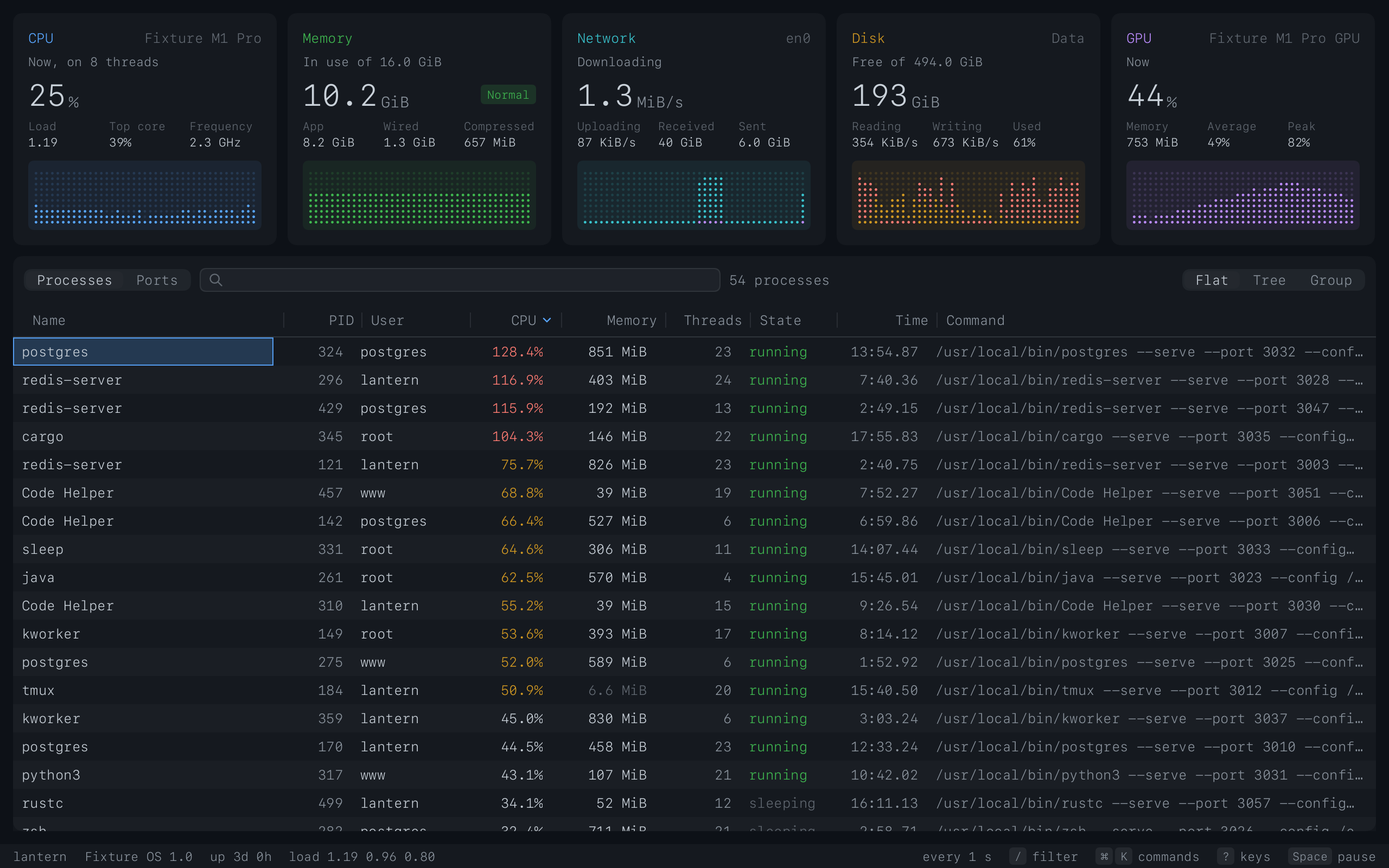 toppen A system monitor in the way of top and btop: CPU, memory, network, disks, GPU and a process table you can sort and act on. |
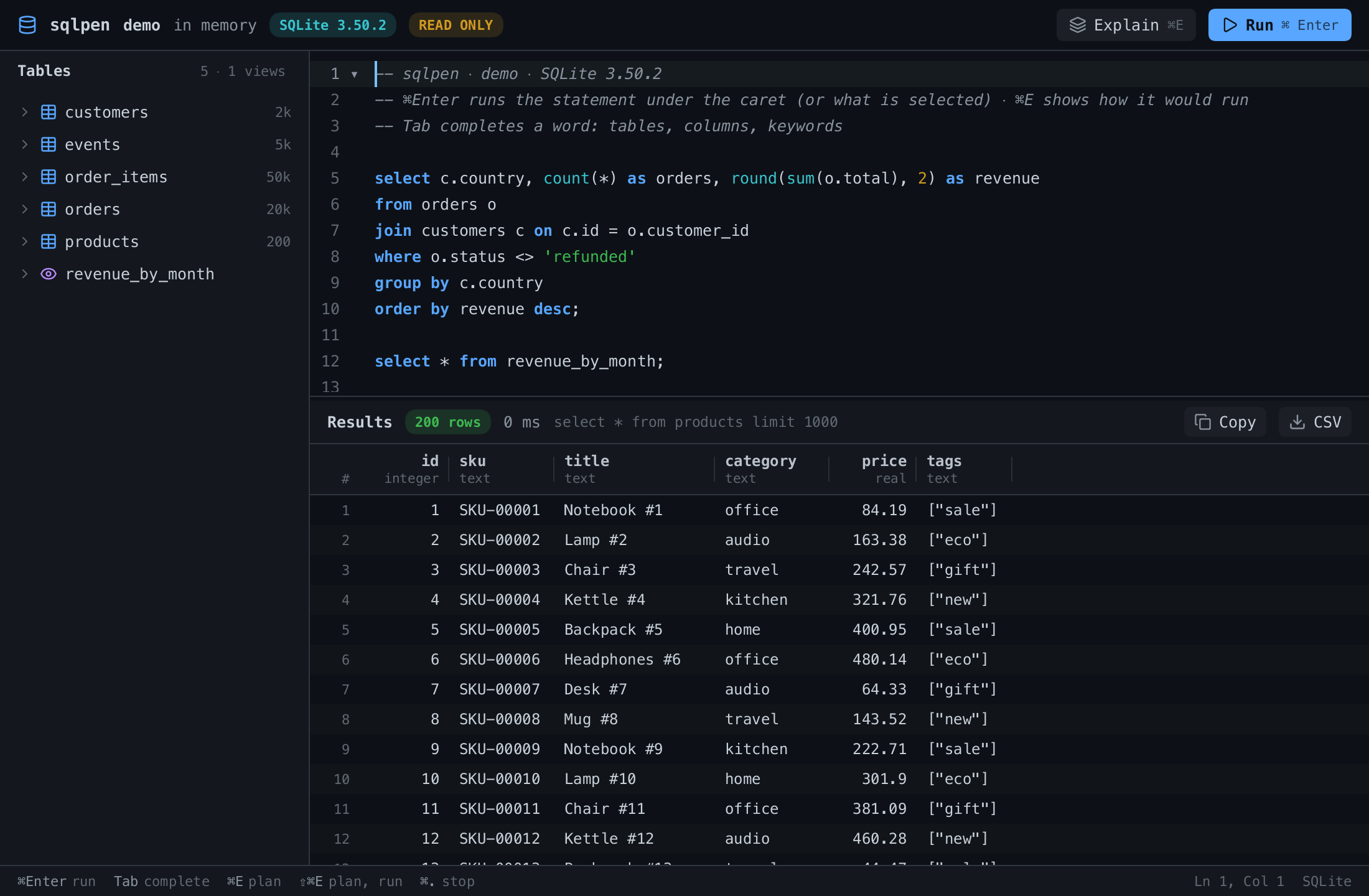 sqlpen A SQL client for PostgreSQL and SQLite: the tables of the database, an editor that knows SQL, and the rows in a grid. |
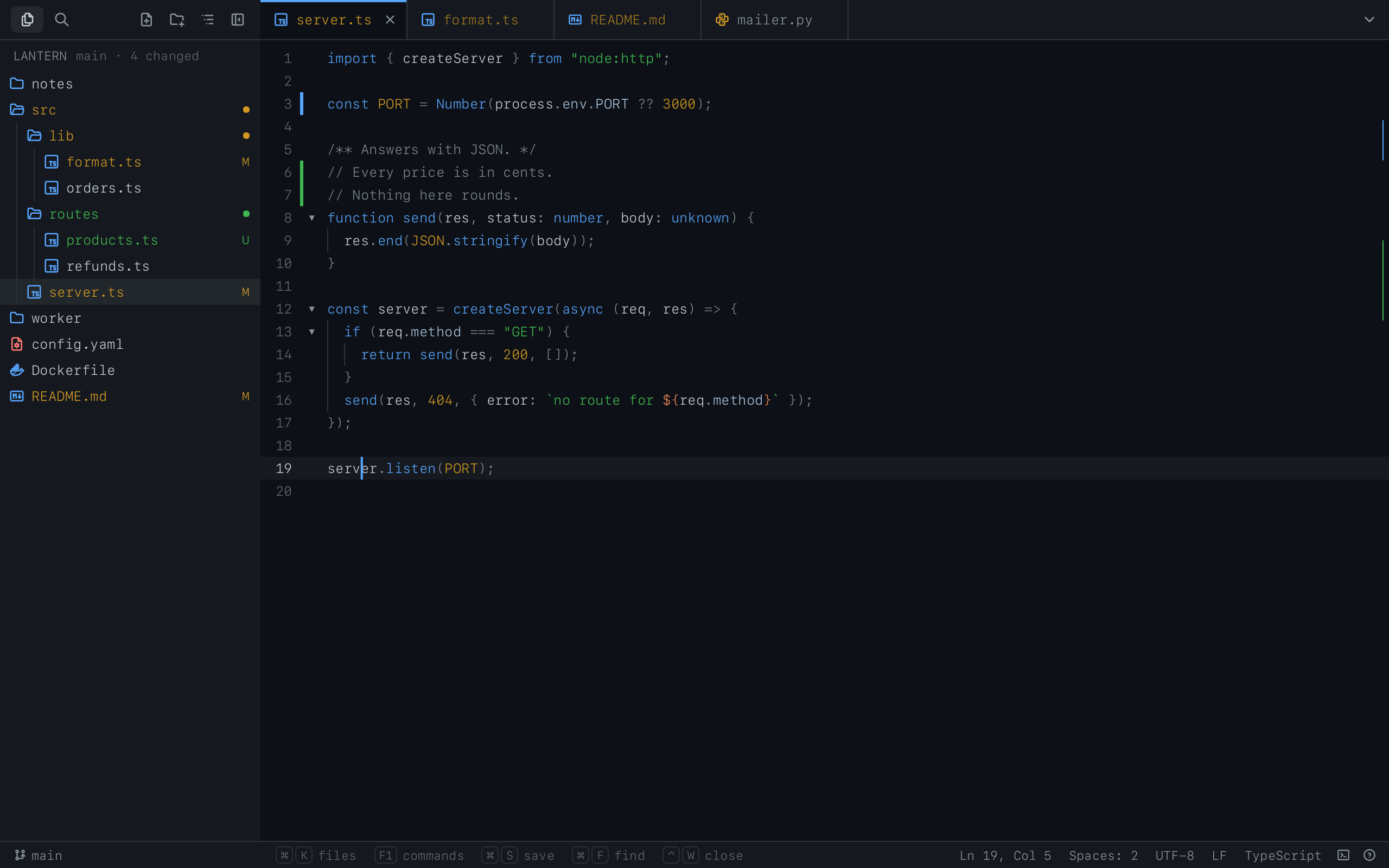 textpen A code editor: the project's files as a tree, tabs, search across them, and what git says of them. |
Your own A pen is one file, made with pencere, in Lua, TypeScript or Rust: pencere new starts one. |
Each installs with its one line:
curl -fsSL https://raw.githubusercontent.com/bateri/dockerpen/main/install.sh | sh
curl -fsSL https://raw.githubusercontent.com/bateri/pickpen/main/install.sh | sh
curl -fsSL https://raw.githubusercontent.com/bateri/toppen/main/install.sh | sh
curl -fsSL https://raw.githubusercontent.com/bateri/sqlpen/main/install.sh | sh
curl -fsSL https://raw.githubusercontent.com/bateri/textpen/main/install.sh | sh
Keyboard shortcuts
| Action | Shortcut |
|---|---|
| New tab / new window | ⌘T / ⌘N |
| New local tab (from an ssh tab) | ⌥⌘T |
| Split right / split down | ⌘D / ⇧⌘D |
| Previous / next split | ⌘[ / ⌘] |
| Select split in a direction | ⌥⌘ + arrow |
| Resize split | ⌃⌘ + arrow |
| Equalize splits | ⌃⌘= |
| Zoom pane (a split pane or a floating one fills the tab) / unzoom | ⌥⌘. |
| Float pane / dock pane | ⌥⌘↩ |
| Move floating pane | ⌃⌥⌘ + arrow |
| Minimize floating pane (or open the last one minimized) | ⌥⌘M |
| Hide / show all floating panes | ⌥⇧⌘↩ |
| Close pane or tab / close window | ⌘W / ⇧⌘W |
| Find / next / previous | ⌘F / ⌘G / ⇧⌘G |
| Clear screen and scrollback / scrollback only | ⌘K / ⌥⌘K |
| Paste as a single escaped argument | ⌃⌘V |
| Bigger / smaller / actual size | ⌘+ / ⌘− / ⌘0 |
| Cancel upload | ⌘. |
Hold Shift to select text with the mouse inside programs that capture the
mouse, such as vim.
Configuration
Settings live in ~/.config/bateri/settings.toml and apply as soon as you
save the file. bateri ▸ Settings… (⌘,) opens a settings window that edits
the same file. Every key is optional; a missing key uses its default.
[appearance]
theme = "system"          # follows light/dark; or a theme name

[font]
family = "Menlo"
size = 13
line_height = 1.0

[terminal]
cursor = "block"          # "block" | "underline" | "beam"
confirm_close = "running" # ask before closing while a program is running

[motion]
cursor_motion = "spring"  # "snap" | "ease" | "spring"
keypress = "fade"         # how typed letters appear in the dock

[remote]
hosts = [
  { host = "prod-*", mark = "production" },
]
Themes are TOML files in ~/.config/bateri/themes/, selectable from
View ▸ Theme. The full reference for every key and the theme format is indocs/SETTINGS.md.
Updates
bateri checks for a new version once a day and asks before installing it; you
can also check any time with bateri ▸ Check for Updates…. The check goes
straight to this repository's releases
(releases/latest/download/appcast.xml) — there is no update server of our
own, and nothing but the version check is sent. Every update is signed with
bateri's EdDSA key and verified before it is installed.
Shell integration
bateri sets up zsh, fish and bash (4.4 or newer) automatically when
it starts a shell. It never writes to your dotfiles: the integration is loaded
through ZDOTDIR (zsh), XDG_DATA_DIRS (fish) or ENV (bash) and your own
startup files run as usual. This is what enables command blocks, the input dock
and the ssh status bar.
If you prefer to keep your own prompt and edit on the grid like a classic
terminal, set integration = "blocks" (blocks and marks stay, the dock goes)
or "off" in the [shell] section of your settings.
Agents, here and on a server
In a terminal bateri opened on this Mac, or on a server over ssh, thebateri command is on the PATH (zsh, bash and fish, put there after your own
files and never written to them; cron jobs call~/.local/share/bateri/shell/bin/bateri, one line that starts the bateri
subcommand of kablo, so the command is the same program on every machine). A pane you open yourself (⌘D, ⌘T) has
a number too, so bateri send p3 'q' reaches it. On a server the terminal
itself lives there, under kablo, so these keep working with your Mac asleep; the
pane takes its place when bateri connects. bateri on the Mac is never asked to
run anything: what a program sends it only places, lists, labels, moves or
closes panes, tabs, groups and windows and shows a notification. Withlevel = "off" in [commands] the command is not written to this Mac at all.
Everything is named by an id, a letter and a number: p9 a pane, t3 a tab,g1 a group, w1 a window. The opening commands print the pane (--json prints
it with the tab, group and window it stands in) and ls lists every window,
group and tab by the same names. An id never changes when the thing moves, and
a number is not given twice. A label is information, not a name: no command
takes one in place of an id.
bateri split --below --ratio 30 -- npm run dev   # prints p9; the pane appears below this one
bateri split --tab t3 --label server -- make up  # a pane in that tab, with a label kablo shows
bateri tab -- make watch                         # in a tab of its own, next to this one
bateri tab --new-group api --label web           # in a group made for it; also --group g1, --window w1
bateri window -- make watch                      # in a window of its own; the keyboard stays where it was
bateri split -- zsh                              # a shell named alone is a shell: its dock, and bateri in it (also fish, bash 4.4+)
bateri ls [--json]                               # windows, groups, tabs, splits, and the server's panes
bateri send p9 'q'                               # type into a pane (kablo's send)
bateri send-key p9 enter
bateri capture p9                                # what is on its screen
bateri wait p9 [--for TIME]                      # until its program ends; exits with its status
bateri close pane|tab|group|window [ID]          # no question; the programs in it end
bateri focus pane|tab|group|window [ID]          # take the keyboard there (see below)
bateri rename pane|tab|group ID LABEL            # an empty label takes it away
bateri move tab t3 --group g1                    # or --window w1, which also takes it out of its group, or --new-group api
bateri move pane p9 --beside p3 --right          # or --tab t3, beside its focused pane
bateri move pane p9 --new-tab web                # a tab of its own, its name optional; --group g1, --new-group api or --window w1 say where; prints the tab
bateri zoom [p9]    bateri swap p9 p3    bateri resize [p9] --left [--by N]
bateri split --float [--at X,Y] [--size W,H]     # a floating pane over this tab; a pane or --tab t3 says whose; percents of the tab
bateri move pane p9 --float [--at X,Y] [--size W,H]   # a flat pane floats; --dock puts it back; --at, --size alone move or resize it
bateri minimize [p9]                             # a floating pane shrinks to a capsule, or opens again
bateri notify "tests failed"                     # a notification when bateri is behind or has no tab of it
bateri split -S prod -- make test                # a terminal on the server prod (full level only); prints p9@prod
bateri send p9@prod 'q'                          # capture, send-key and wait reach it the same way
The kind is always written: close tab t3, never close t3, and an id of
another kind (close group t3) is a mistake that says what to write. With no id
the command acts on the one it runs in (close tab). split takes --left,--right, --above or --below, --ratio PERCENT, --cwd DIR, --keep-open
(the pane stays when the program ends), --wait (the command waits for the
program and exits with its status) and --focus (the pane takes the keyboard;
by default the focus stays where it was). Fields that contradict each other
(split p9 --tab t3, tab --group g1 --window w1) are refused. Without a
program the pane runs bateri's shell. On this Mac --keep-open leaves your login
shell in the pane when the program ends, and --wait needs a program.
Floating panes. A floating pane is a card over the tab's other panes, with
its own place and size, and the flat area always keeps at least one pane.split --float opens one; move pane p9 --float lifts a flat pane out of its
place, --dock puts a floating one back among the flat panes and --at X,Y
or --size W,H (percents of the tab, from 0 to 100) move or resize it. --float
goes with no side, --ratio, --new-tab, --group or --window. move pane p9 --beside p3 --right, --tab t3 (another tab) and --new-tab take a floating
pane too and put it flat where they say; --dock sets it back in its own tab.resize p9 --right or --left changes the card's width and --below or--above its height, as ⌃⌘ + arrow does. zoom p9 of a floating pane makes its
card fill the tab over the other panes, and again gives the room back. swap
of two panes that are not in one layer, a plain split or move --beside beside
a floating pane, --dock or --at of a flat pane are mistakes (64). minimize p9 turns a floating pane's card into a capsule, or opens the capsule again where
the card was, and is a mistake (64) on a flat pane; focus pane p9 of a pane in a
capsule opens it and takes the keyboard. The programs in a minimized card keep
running. bateri ls marks such a pane (floating), and (minimized) in a
capsule, and in --json a pane's object carries floating and minimized (the
tab's zoomed pane and the entries for another machine do not).
What a machine may do is a setting per machine, off, own, screen orfull, and nobody is asked ([commands]). own,
the default, lets a program manage what is made of its own machine's panes:
closing a tab that holds a pane of another machine is refused. Closing ends
the programs in the panes.
Another machine. A pane of another machine is written with the machine
after an @, as bateri ls writes it: p9@prod, and p3@local for this Mac.focus, close, zoom, swap, move and resize take such an address from
level screen up. -S SERVER starts the terminal on a server instead of here,
by the name you give ssh (prod, an alias of ~/.ssh/config, with no list of
its own and through the same gate as ssh prod in a bateri pane), and send,send-key, capture and wait for p9@prod run there over the connection
bateri keeps; both are for level full alone, and the server's own commands
must not be off. bateri asks for a password in its usual sheet when the
connection must be made, installs nothing on the server (open a terminal on it
in bateri first), and the pane opens at once and connects by its own path.
From a server. A server you gave full (commands = "full" in its[remote] hosts entry, by its exact name) can do the same to your other
machines: bateri split -S rasp -- make test, bateri send p9@rasp 'q',bateri capture p3@local, and -S @local for a terminal on this Mac. It has no
connection to them, so bateri runs the command for it: the bateri of the other
machine, from its full path in a login shell, and hands back what it printed and
how it ended. That is the one thing bateri runs for a program, which is why the
level is spelled out: a server that is taken over can then do on your other
machines what you can. split, send, send-key, capture, wait andclose are all it relays; a server at own or screen gets the same refusal
as anywhere else. A split with no program on this Mac needs a pane to go
beside, which a relayed command is not in: name a program.
The keyboard has one rule. A command that would change where you type
(focus, move, zoom, swap, resize, --focus) is done only from the pane
the cursor is in, or while bateri is behind, or in a window other than the one
you are typing in; otherwise it is refused (77) and says so, and bateri notify
is how to ask you to look. Exit codes: 0, 1, 64 (a mistake in the command), 69
(needs bateri and none is connected), 77 (refused) and, for wait, the
program's own.
Building from source
Requirements: macOS 14+ and a Rust toolchain (1.99 or later).
cargo run -p bateri   # run a debug build
make check            # format check, lints, clippy and the full test suite
make bundle              # build target/release/bateri.app (signed if a signing identity is available)
make install            # build and install to /Applications
The Makefile targets are named in Turkish, as are the project's internal
documents; code, identifiers, UI strings and settings are in English.
Project layout
| crate | role |
|---|---|
bt-core |
Platform-independent terminal core: VT parsing (via alacritty_terminal), grid and scrollback, PTY, shell integration, command blocks, search, settings |
bt-atlas |
Glyph rasterization with Core Text and the glyph atlas |
bt-gpu |
wgpu renderer, WGSL shaders, frame pacing and motion |
bt-shell-common |
The platform-independent half of the app shell: settings reading, split tree, key encoding, upload rules, process table, the shell's command and environment, file watching |
bt-shell-macos |
The AppKit app: windows, tabs, splits, menus, input, settings window, updates |
bateri |
The binary and app bundle |
Dependencies only point downward; bt-core, bt-atlas, bt-gpu andbt-shell-common have no AppKit dependencies.
Releasing
Releases are cut from main on a Mac with the Developer ID certificate, anotarytool keychain profile (bateri-notary) and Sparkle's signing key in
the keychain.
- Put user-facing changes under Unreleased in
CHANGELOG.mdas they land. - To release, bump
versioninCargo.toml, rename Unreleased to that
version and today's date, and commit. - Run
make ship. It builds and notarizes the app and the disk image,
writes a one-item Sparkle feed signed with the EdDSA key, pushesmain,
tags the built commitv<version>and creates the GitHub release withbateri.dmg,bateri-<version>.zipandappcast.xml, using the changelog
section as its notes.
make ship is make release (build everything locally, nothing public yet —
try the app first) followed by a push and make publish (tag and publish).
Publishing the release is publishing the update: installed copies read the
newest release's appcast.xml, and the website's download button points at
the newest bateri.dmg, so neither needs a change. A bad release is fixed by
releasing a newer version; Sparkle never downgrades.
Contributing
Bug reports and pull requests are welcome on
GitHub. By contributing you agree that your
contribution is licensed under the same terms as bateri (GPL-3.0-or-later).
Run make check before opening a pull request; it is the same gate the project
uses.
License
bateri is free software: you can redistribute it and/or modify it under the
terms of the GNU General Public License as published by the Free
Software Foundation, either version 3 of the License, or (at your option) any
later version. It is distributed in the hope that it will be useful, but
WITHOUT ANY WARRANTY; see the license for details.
Copyright © 2026 Ömer Kala.
bateri includes third-party software under their own licenses (Apache-2.0,
MIT); seeassets/bundle/THIRD-PARTY-LICENSES.txt.
Reviews (0)
Sign in to leave a review.
Leave a reviewNo results found