bayplan
Health Warn
- License — License: Apache-2.0
- Description — Repository has a description
- Active repo — Last push 0 days ago
- Low visibility — Only 5 GitHub stars
Code Fail
- exec() — Shell command execution in backend/internal/agent/rbac.yaml
Permissions Pass
- Permissions — No dangerous permissions requested
No AI report is available for this listing yet.
Self-hosted multi-cluster Kubernetes management: one panel for every cluster, scoped RBAC, audited actions, SSO, Helm, GitOps and AI troubleshooting.

Bayplan
Every container, in its place.




Spanish version: README.es.md
Lightweight, self-hosted multi-cluster Kubernetes management: a single binary (Go + embedded
React) plus Postgres, deployed on the customer's own container infrastructure, from which
several clusters (on-prem, kubeadm, k3s, RKE2, Talos, cloud…) are observed and
operated, with local login or OIDC SSO (Entra ID, Keycloak, Okta, Google…) and a per-cluster
permission model with three roles (admin, editor, readonly).
What it does: inventory and status of workloads, networking, configuration and storage
from an informer cache per cluster; logs and terminal; restart, scale, rollback, cordon/drain;
edit and apply YAML with prior validation in the cluster (server-side apply with dry-run);
immutable audit of everything. What it does not do: provision clusters or upgrade their
Kubernetes version, nor is it a full GitOps controller.
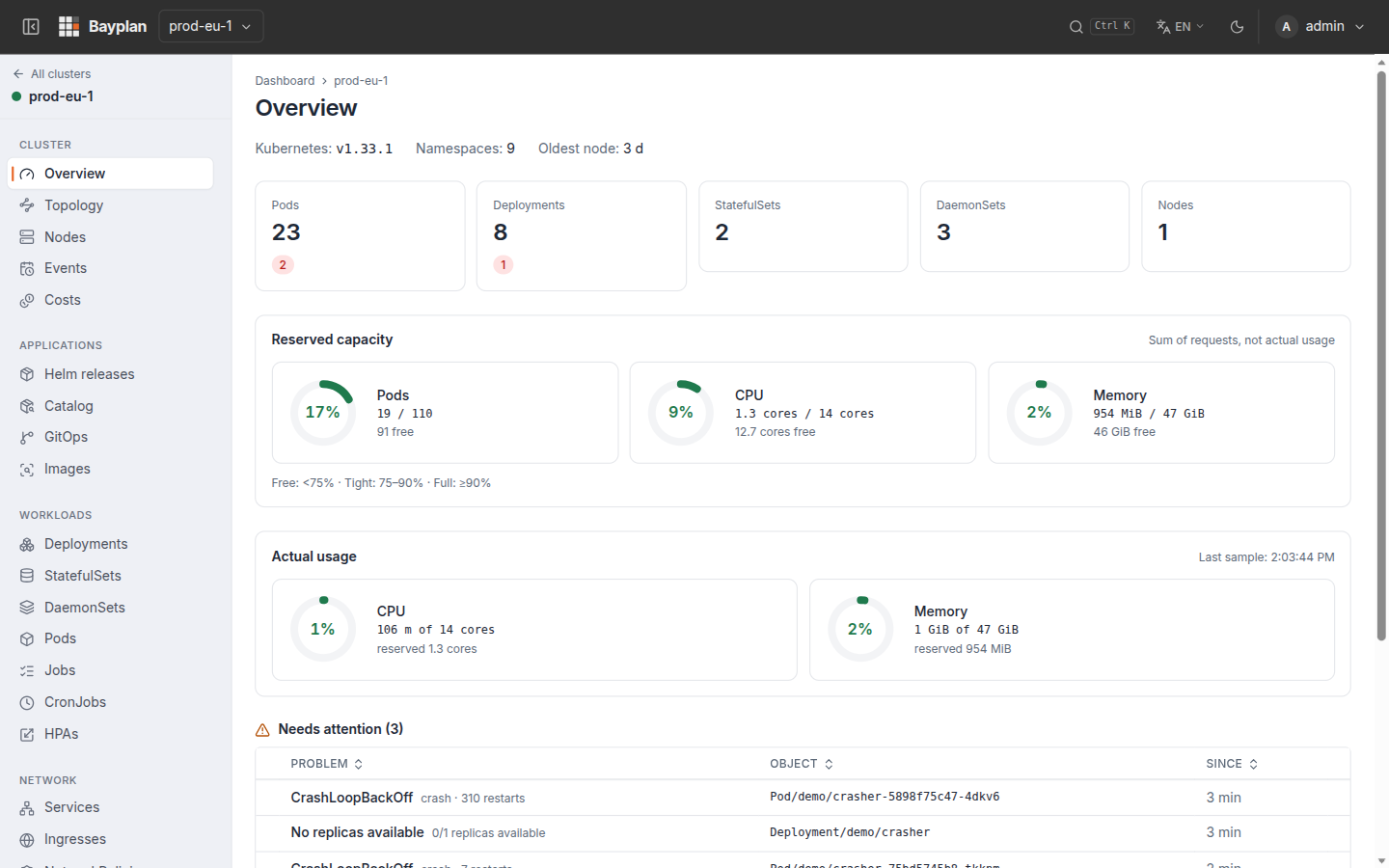
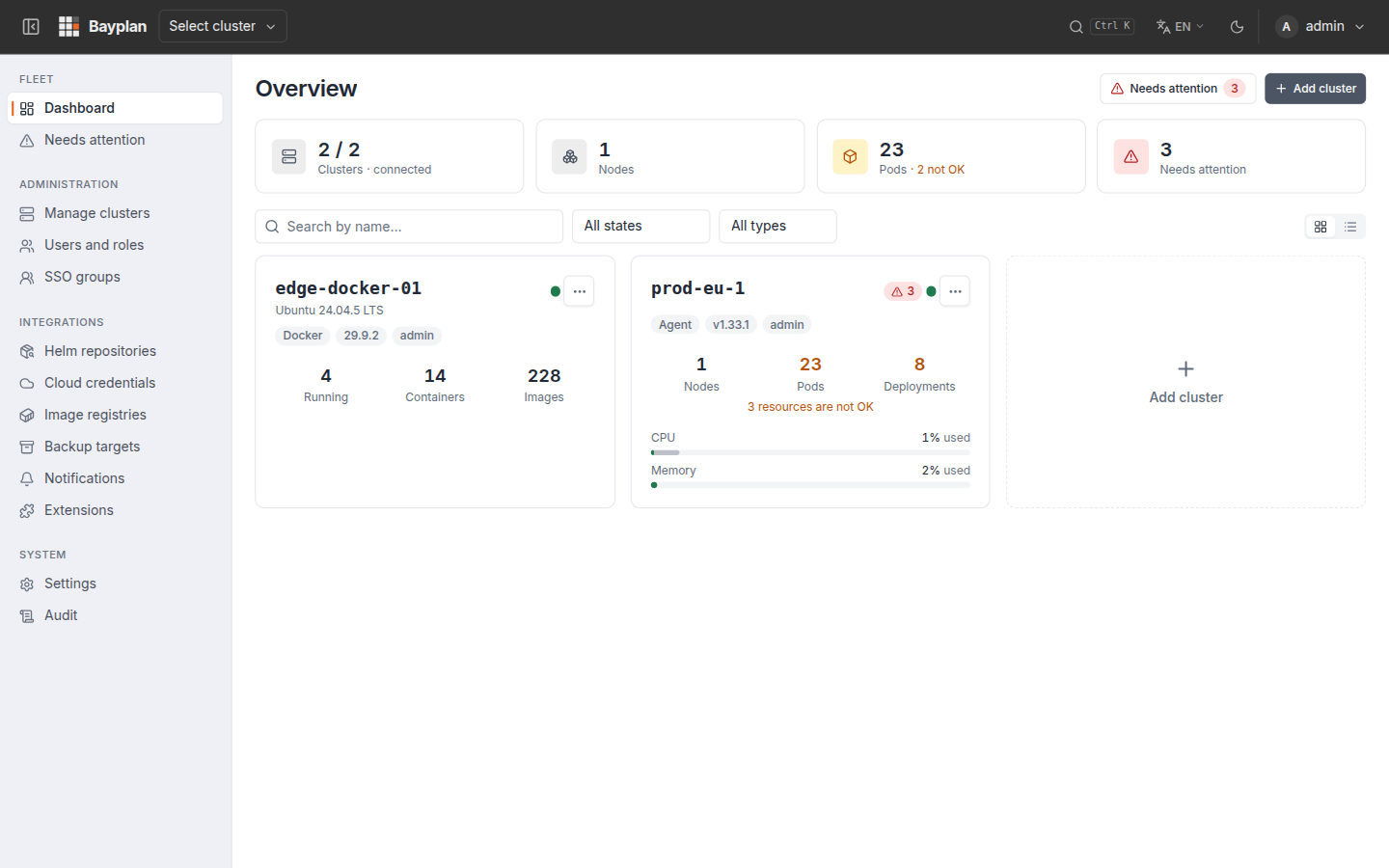 |
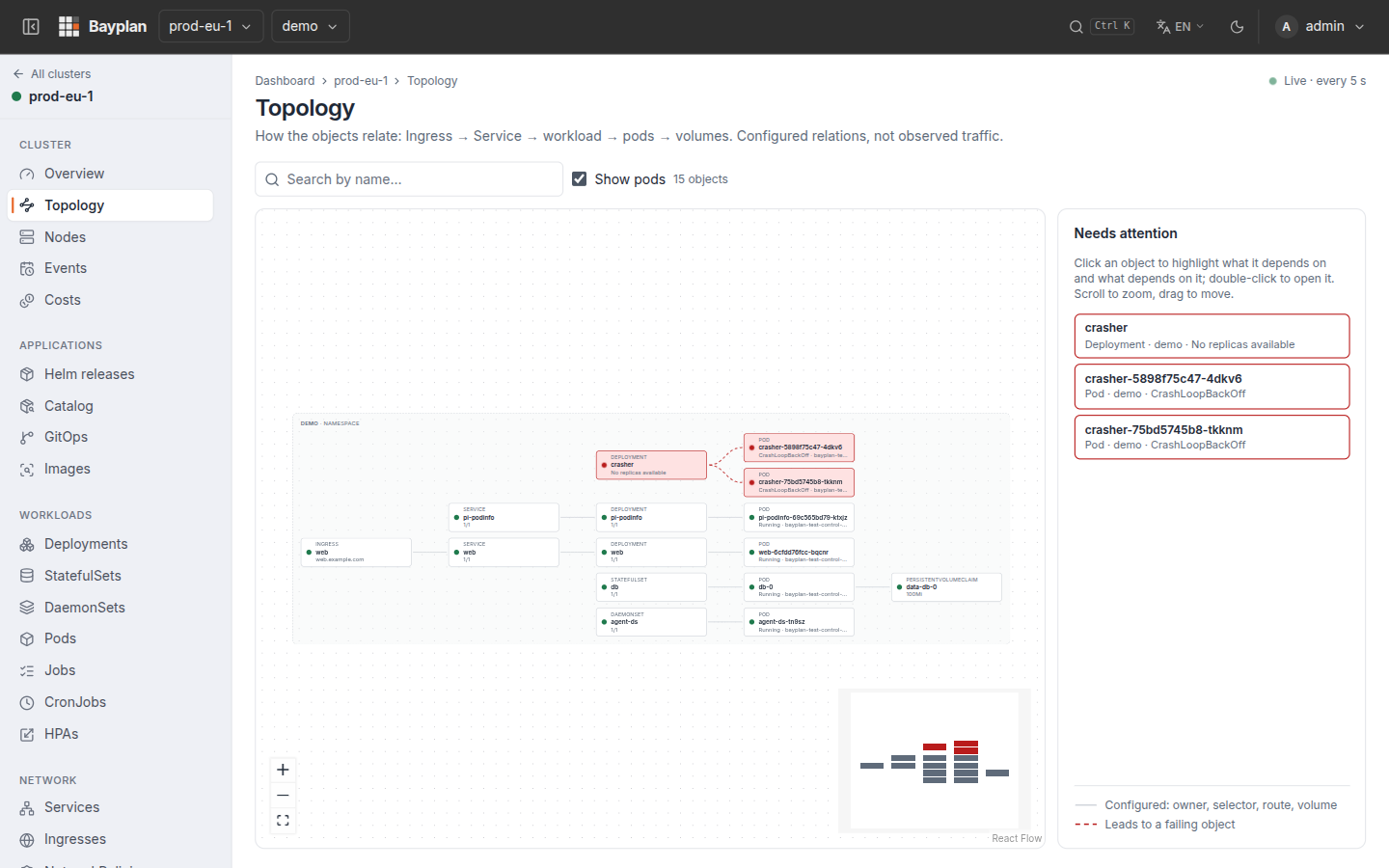 |
| Fleet dashboard | Topology: Ingress → Service → workload → pods → volumes |
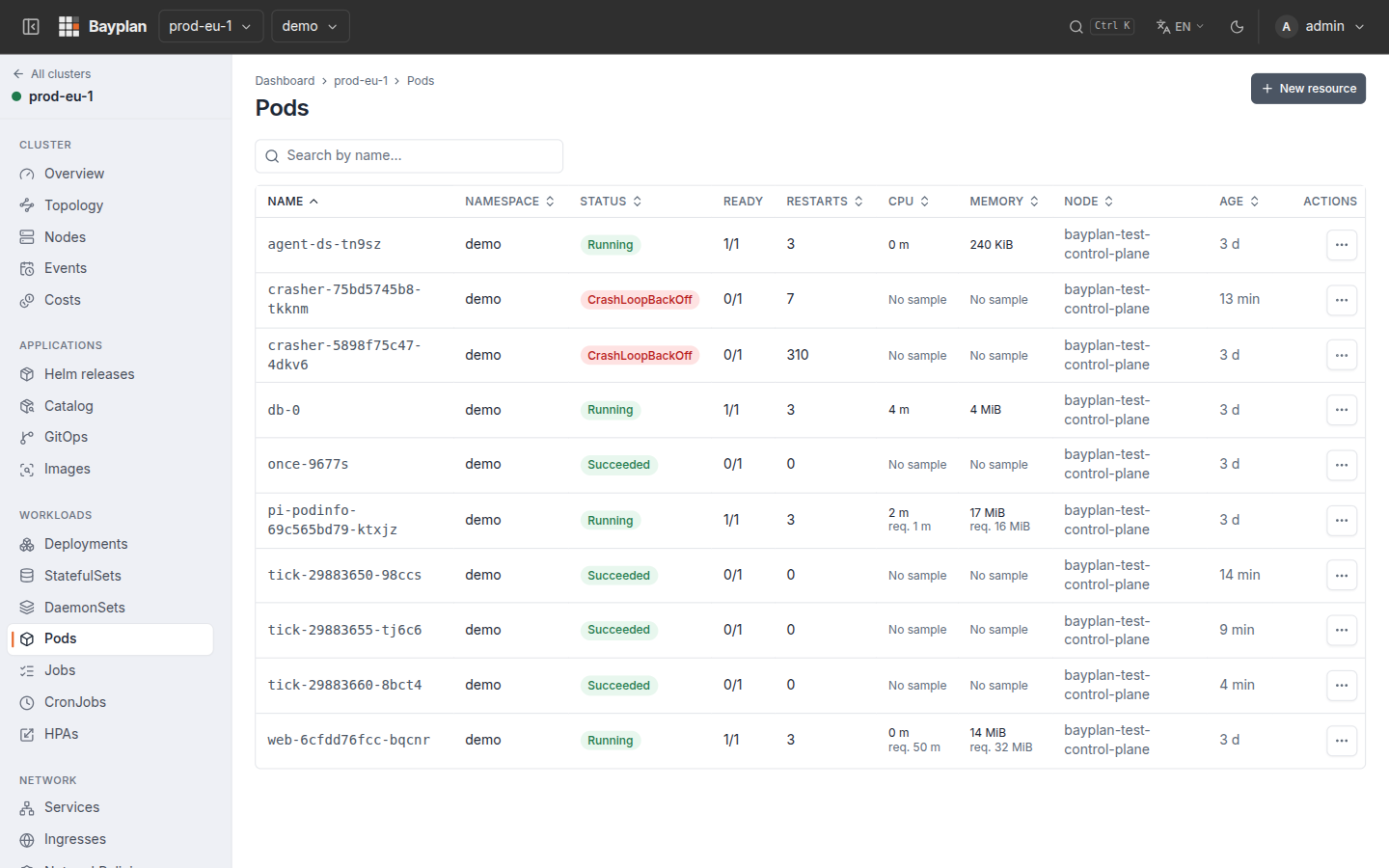 |
 |
| Pods with live usage | Dark theme |
Install
To try it, or on a single host, one container with its own database and HTTPS:
docker run -d --name bayplan --restart=always -p 8443:8443 -v bayplan-data:/data ghcr.io/bayplan/bayplan
docker logs bayplan 2>&1 | grep -A3 "First startup"   # one-time /setup token, then open https://<host>:8443
The same images are on Docker Hub as docker.io/bayplan/bayplan and docker.io/bayplan/bayplan-agent.
On Kubernetes, with Helm (the cluster where it is installed shows up as local; the rest are
added from the UI with an agent):
helm upgrade --install bayplan oci://ghcr.io/bayplan/charts/bayplan -n bayplan --create-namespace \
  --set ingress.enabled=true --set ingress.host=bayplan.example.com --set ingress.tls.enabled=true
kubectl -n bayplan get secret bayplan-bootstrap -o go-template='{{.data.bootstrapPassword|base64decode}}{{"\n"}}'
With Postgres as its own container (Docker or Podman Compose; put a TLS proxy in front):
curl -fsSLO https://raw.githubusercontent.com/bayplan/bayplan/main/deploy/compose/docker-compose.yml
curl -fsSLo bayplan.env https://raw.githubusercontent.com/bayplan/bayplan/main/deploy/env.example
# edit bayplan.env: DATABASE_URL (password), ENCRYPTION_KEY_V1 (openssl rand -base64 32), PUBLIC_URL
POSTGRES_PASSWORD=<the one in DATABASE_URL> docker compose up -d
Images for amd64 and arm64, signed with cosign. Options, Let's Encrypt, Podman Quadlet, GitOps,
air-gapped installs, backups and upgrades:deploy/README.md.
Features
- Auth: local login (bcrypt, rate limit, forced password change on first access) +
optional SSO with any OIDC provider (Entra ID, Keycloak, Okta, Google…; Authorization Code +
PKCE, configured from Settings). Revocable server-side sessions,HttpOnlycookie,
double-submit CSRF. - Scoped RBAC:
admin/editor/readonlyroles, assignable globally or per specific
cluster (a user can be admin on staging and readonly on production). User and role management from the UI itself
(/admin/users): create, disable/re-enable (reversible removal, cuts their sessions
instantly) and delete local users. The system never runs out of an active global admin: the
last account with that role cannot be deleted, disabled or demoted. Each user's detail shows
their effective permissions: which role they really have on each cluster and where it
comes from (global role, cluster assignment or both), which is what you need to know in
order to take it away. - SSO group mapping from the UI (
/admin/group-mappings): translates membership of an
identity-provider group into a Bayplan role. Together with manual assignments it is the only
source of permissions for SSO users, so the screen warns when SSO is enabled and there is no
mapping at all. - Multi-cluster: each managed cluster has its own
SharedInformerFactoryin the backend —
reads (pods, deployments, statefulsets, daemonsets, services, nodes, events) are served from
an in-memory cache, without hitting the cluster's API server on every request. - Vulnerability scanning of the images in use with Trivy (on the server), per image and
shared across clusters, with a report filterable by severity. - UI extensions: links to Grafana, Kibana, Harbor… in each cluster's menu, in
another tab or embedded, with cluster and namespace placeholders in the URL. - Zero-config local cluster: the cluster where it is installed shows up as
localwithout
configuring anything; the rest join through an agent (generated manifest) that keeps its own
RBAC and version up to date; direct (kubeconfig/token/certificate) and cloud (EKS/AKS/GKE)
remain available. - Permissions of your choosing: scoped RBAC by default (the panel only reads what it shows
and writes through three roles) or optionalcluster-adminto install and forget.
metrics-server can be installed from the panel if missing. - Estimated cost per namespace from core·hour and GiB·hour prices: reserved, consumed (with
metrics-server) and billable (the higher of the two per resource). It is an allocation, not billing. - Backups of cluster configuration to S3 (AWS, MinIO, Ceph…), scheduled and with
retention, restorable object by object with dry-run. They do not copy volumes (Velero). - API with personal tokens: each user creates tokens (
Authorization: Bearer bpl_…,
optionally read-only) for scripts and CI; OpenAPI specification at/api/openapi.jsonand
browser at/api-docs. - Explain with AI: one click on a failing pod, deployment or node sends its state, events and
last log lines (env values and secrets removed) to the provider you configure — OpenAI or any
compatible server such as Ollama, Anthropic or Gemini — and shows the probable cause and the fix.
Minimum role, daily limit per person and audit included. - AI assistant panel: ask about your clusters in plain language ("what is failing in shop?",
"why does this pod restart?") from a panel at the bottom of any page. It looks things up with
your own permissions, only reads, keeps nothing once closed, and every question is audited. - MCP server for AI clients at
/api/mcp: drive Bayplan from Claude Code, Codex or Cursor with a
personal token ("what is failing in shop?", "restart the api deployment"). Every tool goes
through the same API with your permissions and is audited as yours; a read-only token only
gets the read tools, and manifests are applied only after a dry-run. - Topology per cluster: Ingress → Service → workload → pods → volumes, live, with what is
broken highlighted and the whole dependency path of any object. - Web kubectl shell per cluster (admin only): real kubectl on the server with your
identity, every command audited, no access to the server's system. - Namespace quotas: ResourceQuota + LimitRange (and the namespace if it does not exist)
from a form with dry-run; the Quotas and LimitRanges tabs show usage against the limit. - Image registries: private registry credentials at platform level, distributed as
imagePullSecretsto the namespaces you choose in each cluster; rotating the credential
updates every copy (/admin/registriesand the cluster's Registries tab). - Real consumption of CPU and memory (metrics-server, optional) per cluster, node and pod,
next to what is reserved; without metrics-server the panel says so instead of painting zeros. - Notifications: rules over the detected problems (CrashLoopBackOff, stuck rollouts,
NotReady nodes, disconnected cluster…) to Slack, Teams, webhook or email, with minimum
duration, cooldown and resolution notice (/admin/notifications). - Actions: rollout restart and scale of deployments, impersonating the user's real
identity against the Kubernetes API server (native attribution in the K8s audit, not only
in the internalaudit_log). - Logs and interactive terminal: live pod log streaming and a terminal (
kubectl exec -it
equivalent) over WebSocket, both with start/end auditing. - Navigation: cluster and namespace pickers in the top bar, cluster resources in the
sidebar and global search withCtrl/Cmd+K(clusters, namespaces and already-loaded
resources). Filters, sort order and page live in the URL, so any view is a shareable link
and survives a reload. - Filtered events (type, date range) and name search across
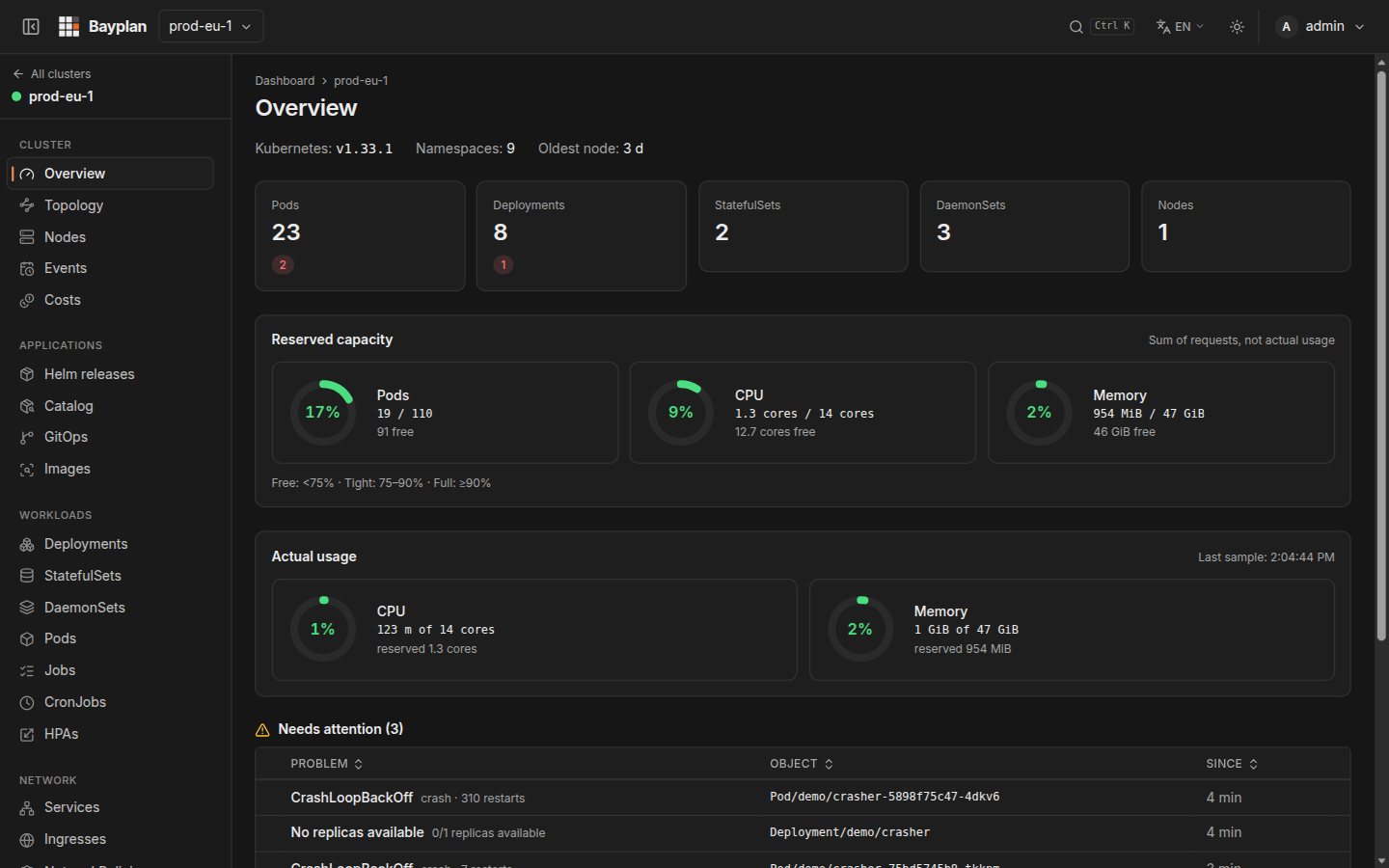
pods/namespaces/services/nodes, with sortable, paginated tables. - Per-cluster overview: counters by state, a prioritized "needs attention" list
(CrashLoopBackOff, incomplete rollouts, nodes with problems…), reserved capacity (sum of
requests against allocatable — withoutmetrics-server, this is not real consumption) and
the latest Warning events. Plus a fleet view with the problems of every cluster at once.
An unreachable cluster is always distinguished from an empty cluster. - Prometheus metrics at
/metrics. - Audit: append-only
audit_log(immutable at trigger level, includingTRUNCATE),
partitioned by month with configurable retention. It records successful actions, denied
attempts (access.denied, authorization 403s, and rejections by the security guards) and,
through database triggers, changes made by direct SQL onusers/role_assignments/group_role_mappings(db.*actions). It is browsed from the UI
(/admin/audit) with combinable filters, cursor pagination and CSV export. - Per-user profile and preferences (
/profile): name and email, light/dark/system
theme, language, table density, rows per page and home page. They are stored in the
account, not in the browser, so they follow the user on any machine. - i18n and light/dark theme. UI available in eight languages: English (default), Spanish,
Catalan, German, French, Brazilian Portuguese, Simplified Chinese and Japanese.
Stack
- Backend: Go,
net/http(native mux of Go 1.22+),client-go(informers,remotecommandfor exec),pgx(Postgres),goose(embedded migrations),coder/websocket,go-oidc/x/oauth2(OIDC SSO), Helm SDK,go-git,remotedialer
(agent tunnel),prometheus/client_golang. - Frontend: React 19 + TypeScript + Vite, Tailwind CSS v4, TanStack Query,
react-i18next,xterm.js(terminal),lucide-react(icons). It is compiled and embedded
inside the Go binary (internal/web,embed.FS) — a single artifact to deploy. - Database: PostgreSQL.
- Deployment: Helm chart (recommended), Docker Compose or Podman Quadlet (see
deploy/README.md).
Repository layout
bayplan/
├── backend/
│   ├── cmd/server/          # server entrypoint (also `bayplan reencrypt`)
│   ├── cmd/agent/           # agent deployed inside managed clusters
│   └── internal/
│       ├── ai/              # LLM providers, redaction and prompt for "Explain"
│       ├── api/             # HTTP handlers and the OpenAPI spec
│       ├── agent/           # agent hub (remotedialer tunnel), manifest and RBAC rendering
│       ├── audit/           # append-only audit_log
│       ├── auth/            # local login, bootstrap, passwords
│       ├── backup/          # cluster configuration backups and Bayplan's own pg_dump, to S3
│       ├── cloud/           # EKS/AKS/GKE discovery and provider tokens
│       ├── config/          # environment variables
│       ├── costs/           # estimated cost per namespace
│       ├── crypto/          # keyring (AES-GCM) for every stored secret
│       ├── db/              # connection + migrations (goose)
│       ├── dockerenv/       # Docker/Podman hosts through the agent
│       ├── embeddedpg/      # PostgreSQL inside the container (all-in-one mode)
│       ├── extensions/      # UI extensions (external tools in the sidebar)
│       ├── gitops/          # lightweight GitOps (go-git, kustomize, prune)
│       ├── helm/            # Helm SDK without a kubeconfig on disk
│       ├── k8s/             # multi-cluster Manager: informers, actions, exec, logs, metrics
│       ├── kubectl/         # kubectl web shell (validator + local proxy)
│       ├── mcp/             # MCP server for AI clients (a client of the API itself)
│       ├── metrics/         # /metrics (Prometheus)
│       ├── middleware/      # auth, CSRF, rate limit, audit of denials
│       ├── notify/          # notification rules and channels
│       ├── oidc/            # generic OIDC SSO
│       ├── rbac/            # effective role resolution (global/cluster)
│       ├── registries/      # image registry credentials and pull secrets
│       ├── rotate/          # encryption key rotation (`bayplan reencrypt`)
│       ├── scan/            # image scanning with Trivy
│       ├── session/         # server-side sessions and API tokens
│       ├── settings/        # instance settings stored in the database
│       ├── tlsserve/        # built-in HTTPS: own files, ACME or a self-signed CA
│       ├── web/             # serves the embedded frontend
│       └── ws/              # WebSockets: logs, terminal, kubectl shell
├── frontend/
│   └── src/{pages,components,api,i18n,hooks,lib}/
├── docs/brand/              # logo kit
└── deploy/
    ├── helm/bayplan/        # Helm chart
    ├── compose/             # Docker Compose
    ├── airgap/              # image list and mirroring script for offline installs
    ├── *.container, *.network, *.volume   # Podman Quadlet units
    ├── rbac/serviceaccount.yaml           # RBAC to apply in every directly connected cluster
    ├── rbac/admission-policy.yaml         # its ValidatingAdmissionPolicies (1.30+)
    └── README.md                          # production deployment guide
Local development
Requirements: Go 1.27+, Node 24 (20.19+ works), Docker (or Podman) for Postgres, kubectl if
you are going to connect a real cluster.
make dev and the other environment targets (scripts/dev.sh) are written for Linux and
also need: docker compose (or podman compose), jq, openssl, curl, ss (iproute2) andsetsid (util-linux). They use Docker by default; with Podman, run them asCONTAINER_ENGINE=podman make dev. make test, make vet and make lint need no frontend
build: only backend/internal/web/dist/.gitkeep is committed, and without a build the binary
serves a placeholder page.
Quick start
Everything goes through the Makefile (make help lists the targets). A single command brings
up the whole environment (Postgres + backend + embedded frontend) and creates the admin
automatically:
make dev
It leaves: Postgres in a container, migrations applied, and the app at http://localhost:8080 with
the admin already configured — admin / devlocal12345. Ctrl-C for the backend
(Postgres is left running; stop it with make stop).
On the first start make dev generates a local .env.dev (gitignored) with a newENCRYPTION_KEY_V1. Never commit or delete it: that key determines which cluster
credentials are recoverable. On subsequent starts it reuses it as is.
make dev        # DB + build + backend + admin -> full app on :8080
make web        # Vite with hot-reload on :5173 (another terminal, to edit the frontend)
make restart    # rebuild and restart the backend
make status     # Postgres, backend (/readyz) and synced clusters
make stop       # stops the backend and Postgres
make check      # what CI runs: lint + tests
make reencrypt  # re-encrypts the DB with the active key (key rotation, see deploy/README.md)
make reset-db   # recreates the DB from scratch (new bootstrap on the next make dev)
make clean      # purges Postgres (container + volume) and deletes bin/
The targets with logic (waiting for the backend, creating the admin, registering the test
cluster) call scripts/dev.sh.
To develop the frontend with hot reload: make dev in one terminal and make web in
another — then use http://localhost:5173 (Vite proxies /api and /ws to the backend on:8080).
Registering a test cluster automatically (optional)
So you do not have to register the cluster by hand in /admin/clusters every time the DB is
recreated, make dev can register it on its own. Copy the template and fill it in (the real
file is gitignored and is never pushed):
cp .cluster.dev.env.example .cluster.dev.env
# edit .cluster.dev.env with display name, endpoint and token, and dump the CA:
kubectl config view --raw --minify \
  -o jsonpath='{.clusters[0].cluster.certificate-authority-data}' | base64 -d > .cluster.dev.ca.pem
On the next make dev the cluster is registered after creating the admin (idempotent: if
one already exists with that endpoint, nothing happens; if the cluster does not respond, it warns
and carries on). If you leave the template unfilled, the step is simply skipped.
Manual start (equivalent, without make dev)
make dev does no magic: it is Postgres in Docker + .env.dev + make build + starting the
binary. If you prefer the steps by hand:
docker run -d --name bayplan-db \
  -e POSTGRES_USER=bayplan -e POSTGRES_PASSWORD=devlocal -e POSTGRES_DB=bayplan \
  -p 5432:5432 postgres:18.6-alpine3.24

cat > .env.dev <<EOF
DATABASE_URL=postgres://bayplan:devlocal@localhost:5432/bayplan?sslmode=disable
LISTEN_ADDR=:8080
LOG_LEVEL=info
COOKIE_SECURE=false
ENCRYPTION_KEY_ACTIVE_ID=v1
ENCRYPTION_KEY_V1=$(openssl rand -base64 32)
EOF

make build
set -a && source .env.dev && set +a && ./bin/bayplan
When starting by hand, the admin is not created automatically: in the logs you will see a
one-time setup token (it expires after 30 minutes) — no password is ever generated or
logged, only this token. Open http://localhost:8080/setup, paste it and choose the admin
password.
Connecting a real cluster
From /admin/clusters. With an agent (recommended, see deploy/README.md) or with a
cloud credential (EKS/AKS/GKE: the provider credential is stored in/admin/cloud-credentials, the "Cloud" tab discovers the clusters and the server authenticates
with short-lived tokens from the provider; the registration returns the RBAC to apply for that
identity). Or directly, in three ways: paste a full kubeconfig (what kubeadm, k3s, RKE2,
Talos… export with kubectl config view --raw --flatten; only with embedded data, an aws/gcloud/azexec plugin will not do), a ServiceAccount token + endpoint + CA, or a client
certificate. In every case the panel's RBAC has to be applied in that cluster first; that is
what grants read permissions to the technical SA and to the impersonated groups
(bayplan:admins, bayplan:editors, bayplan:readonly):
kubectl apply -f deploy/rbac/serviceaccount.yaml
kubectl apply -f deploy/rbac/admission-policy.yaml   # Kubernetes 1.30+
kubectl create token bayplan-technical -n kube-system --duration=87600h   # if using a token
The backend validates the connection against the real cluster before saving anything, and
checks it live every 30 s afterwards: an expired token or an RBAC that was not reapplied shows
up in the clusters table with the exact error. Credentials are rotated from "Edit" without
deleting the cluster or losing the permissions granted on it. Secondary resource types (ingress,
jobs, configmaps…) are optional informers: if the ClusterRole lacks one of their
permissions, only that tab warns; the rest keeps working.
Build and checks:
make build          # frontend + backend, a single binary in bin/bayplan
make test           # go test ./... (backend)
make lint           # gofmt + go vet + frontend lint (oxlint, locale keys)
make images         # server and agent images with podman (VERSION=…)
Frontend only with hot reload (equivalent to make web): cd frontend && npm run dev.
Production deployment
See deploy/README.md: Helm chart (deploy/helm/bayplan), Docker Compose,
Podman Quadlet, images, cluster RBAC, SSO (OIDC) from Settings and audit_log retention.
CI
.github/workflows/ci.yml: backend and frontend lint + test, vulnerability checks, image scan,
secret scanning (gitleaks) and a check that THIRD_PARTY_NOTICES.md is up to date on every
push/PR; on main and v* tags it publishes the images to GHCR, and on v* tags also the chart
and the GitHub release. It does not deploy.
License
Bayplan is free software under the Apache 2.0 license. You can use, modify and
redistribute it, including for commercial purposes; in return, the files you modify must state
that they have been changed, and the NOTICE file must be preserved. The Bayplan name
and logo are not part of the license: a modified fork needs its own name
(TRADEMARKS.md). The licenses of the third-party software bundled in binaries
and images are in THIRD_PARTY_NOTICES.md.
To contribute, see CONTRIBUTING.md (DCO, no CLA); to report a
vulnerability, SECURITY.md.
Reviews (0)
Sign in to leave a review.
Leave a reviewNo results found