ai-image-generator-skill
Health Warn
- License — License: MIT-0
- Description — Repository has a description
- Active repo — Last push 0 days ago
- Low visibility — Only 5 GitHub stars
Code Pass
- Code scan — Scanned 11 files during light audit, no dangerous patterns found
Permissions Pass
- Permissions — No dangerous permissions requested
No AI report is available for this listing yet.
AI image generator agent skill for Claude Code, Cursor, Codex, Windsurf, Cline & OpenClaw: generate, compose, and edit product images, brand visuals, posters, social graphics, illustrations, and photo variations. AI图片生成 · 文生图 · AI修图
AI Image Generator Skill
👉 See also AI Video Generator Skill
Generate, compose, and edit product images, brand visuals, posters, social graphics, illustrations, and photo variations, from inside Claude Code, Cursor, Codex, Windsurf, Cline, or OpenClaw.
[!IMPORTANT]
Rendering needs a Beatra account and uses credits. The skill itself is free to install.
| Question | Answer |
|---|---|
| What it does | Generate, compose, and edit product images, brand visuals, posters, social graphics, illustrations, and photo variations. |
| Models | Qwen Image 3.0, MiniMax H3 Image, Qwen Image 2.0 Fast, Qwen Image 3.0 Pro, GPT Image 2.5 Flare, GPT Image 2.5 Sunburst, GPT Image 2, Wan Image 2.7 Fast, Qwen Image 2.0 Pro, Wan Image 2.7 Pro, Wan 3.0 Video, Wan 2.7, MiniMax H3, Seedance 2.0 Mini, HappyHorse 1.1, Seedance 2.0 Fast, Seedance 2.0, Wan 3.0 Video Prime, Seedance 2.5 |
| Requirements | Python 3.10+ and an agent that loads SKILL.md |
| Cost | Free to install. Each render uses credits on your Beatra account, and paid steps run only when you ask for that exact render or approve its card. |
| Works with | Claude Code, Cursor, Codex, Windsurf, Cline, OpenClaw |
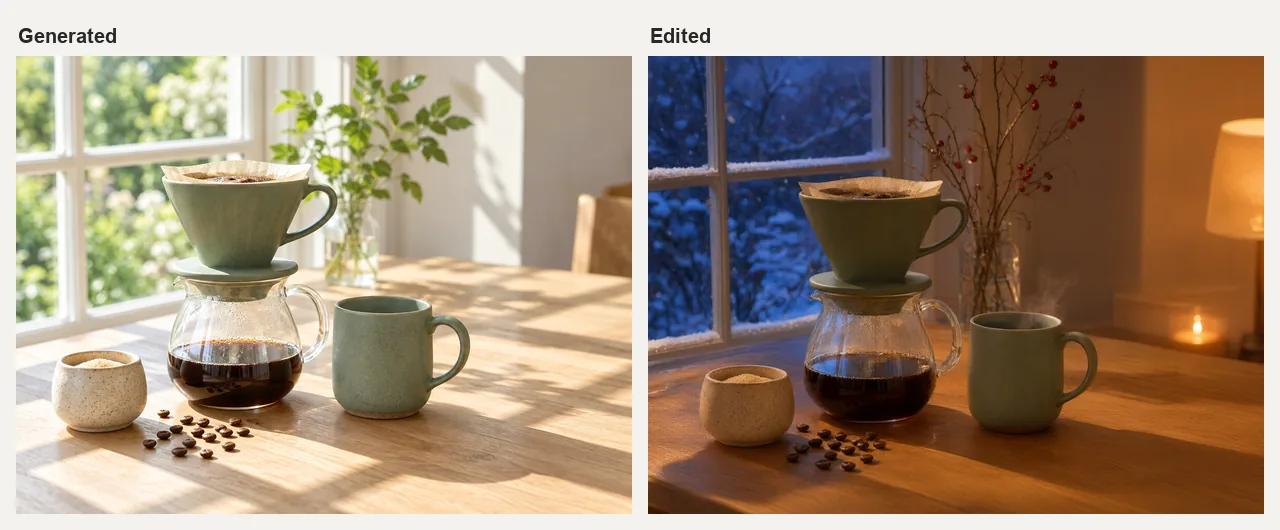
A sunlit summer photo of a fictional sage-green ceramic pour-over coffee set, then the same image edited into a snowy winter evening with lamplight while the set and its layout stay in place. AI-generated with Beatra.
| Skill | Entry point | Version |
|---|---|---|
ai-image-generation-studio |
SKILL.md | 0.2.6 |
This repository is published automatically from beatra-ai/beatra-skills. Report issues there.
Also known as ai-image-generator (installed under the Beatra slug ai-image-generation-studio).
Install
With the skills CLI:
npx skills add beatra-ai/ai-image-generator-skill
As a Claude Code plugin:
claude plugin marketplace add beatra-ai/ai-image-generator-skill
claude plugin install ai-image-generation-studio@ai-image-generator-skill
As a Codex plugin:
codex plugin marketplace add beatra-ai/ai-image-generator-skill
codex plugin add ai-image-generation-studio@ai-image-generator-skill
As a GitHub Copilot CLI plugin:
copilot plugin marketplace add beatra-ai/ai-image-generator-skill
copilot plugin install ai-image-generation-studio@ai-image-generator-skill
As a Gemini CLI extension:
gemini extensions install https://github.com/beatra-ai/ai-image-generator-skill
As an Antigravity CLI plugin:
agy plugin install https://github.com/beatra-ai/ai-image-generator-skill
With the GitHub CLI:
gh skill install beatra-ai/ai-image-generator-skill ai-image-generation-studio
Or clone this repository and copy skills/ai-image-generation-studio into ~/.claude/skills/ for Claude Code,~/.cursor/skills/ for Cursor, ~/.agents/skills/ for Codex, ~/.codeium/windsurf/skills/ for Windsurf,~/.cline/skills/ for Cline, or ~/.openclaw/skills/ for OpenClaw.
Or paste this into your agent:
Install the ai-image-generation-studio skill from https://github.com/beatra-ai/ai-image-generator-skill (folder skills/ai-image-generation-studio), then follow its SKILL.md to connect my Beatra account.
Tested in clean-room CI: Antigravity CLI (2026-11-09).
Examples
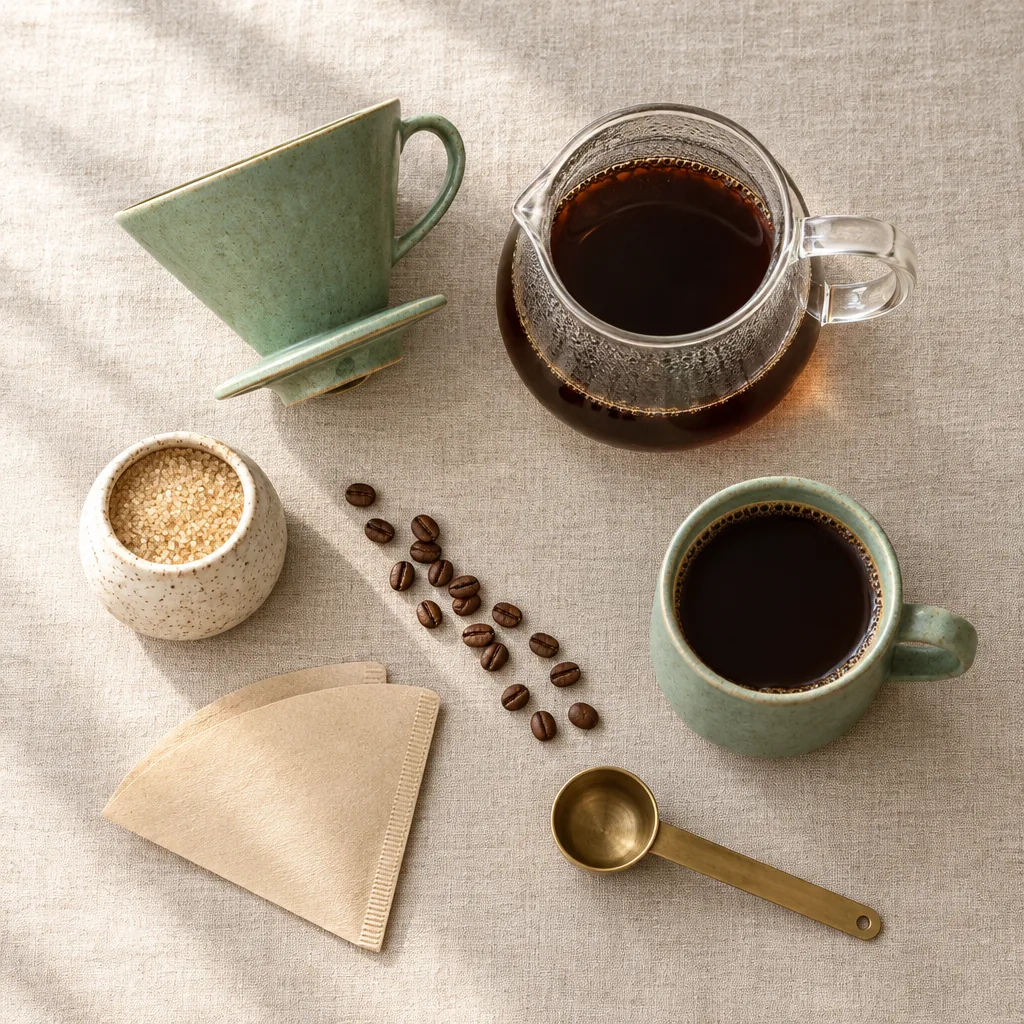
The generated pour-over set used as a reference for a new composition: a square overhead flat lay on linen with beans, a paper filter and a brass scoop. AI-generated with Beatra.
Ask your agent:
Use ./pourover-set.png as the product reference and compose a square overhead flat lay on natural linen for a social post: the dripper, carafe, mug of coffee and sugar bowl with scattered beans, a paper filter and a brass scoop. Keep the set's shapes and glaze colors recognizable.
Prompt:
New composition for a square social media post. Image 1 is the product reference: the sage-green ceramic pour-over dripper, the glass carafe, the sage-green mug and the speckled cream sugar bowl. Keep their shapes, glaze colors, speckled texture and proportions recognizable. Arrange them as a top-down overhead flat lay on a textured natural linen tablecloth: the dripper lying beside the carafe, the mug filled with black coffee seen from directly above, the sugar bowl, a small scattered line of whole coffee beans, a folded unbleached paper filter, and a brass coffee scoop. Soft even daylight from the upper left with gentle short shadows, calm balanced spacing between objects with breathing room around the edges, muted sage, cream, linen and warm brown palette, photoreal editorial product photography. No people, no hands, no text, no logos, no labels, no watermarks.
Inputs and outputs
| Type | Formats | Specifications | |
|---|---|---|---|
| Input | Text — Written image brief | — | — |
| Input | Image — Reference images or a base image to edit (optional) | JPG, PNG, WEBP | up to 4 images per request |
| Output | Image — Generated or edited images | PNG | up to 4 images per request; 1K, 2K, 4K |
| Output | Video — Short clip that starts from a generated image (optional) | MP4 | — |
Technical Specifications & Output Limits
As of 2026-11-14. Live list: https://docs.beatra.ai/en/docs/models
- Uploads — up to 100 MB per file; the per-model input limits below also apply
- Text to image — 10 models (Qwen Image 3.0, MiniMax H3 Image, Qwen Image 2.0 Fast, Qwen Image 3.0 Pro, GPT Image 2.5 Flare, GPT Image 2.5 Sunburst, GPT Image 2, Wan Image 2.7 Fast, Qwen Image 2.0 Pro, Wan Image 2.7 Pro); PNG; up to 4 images per request; canvas up to 16.8 MP
- 16.8 MP (4K tier): MiniMax H3 Image, Wan Image 2.7 Pro (up to 4 images per request); GPT Image 2.5 Flare, GPT Image 2.5 Sunburst, GPT Image 2 (1 image per request)
- Image to image — 10 models (Qwen Image 2.0 Fast, MiniMax H3 Image, Qwen Image 3.0, Qwen Image 3.0 Pro, Wan Image 2.7 Fast, Qwen Image 2.0 Pro, Wan Image 2.7 Pro, GPT Image 2.5 Flare, GPT Image 2.5 Sunburst, GPT Image 2); PNG; up to 4 images per request; canvas up to 16.8 MP
- 16.8 MP (4K tier): MiniMax H3 Image (up to 4 images per request); GPT Image 2.5 Flare, GPT Image 2.5 Sunburst, GPT Image 2 (1 image per request)
- Input images: up to 4 per request, 10–20 MB each; BMP, GIF, JPEG, PNG, TIFF, WEBP
- Image editing — 7 models (Qwen Image 2.0 Fast, MiniMax H3 Image, Qwen Image 3.0, Qwen Image 3.0 Pro, Wan Image 2.7 Fast, Qwen Image 2.0 Pro, Wan Image 2.7 Pro); PNG; up to 4 images per request; canvas up to 16.8 MP
- 16.8 MP (4K tier): MiniMax H3 Image (up to 4 images per request)
- Input images: up to 4 per request, 10–20 MB each; BMP, GIF, JPEG, PNG, TIFF, WEBP
- Image to video — 9 models (Wan 3.0 Video, Wan 2.7, MiniMax H3, Seedance 2.0 Mini, HappyHorse 1.1, Seedance 2.0 Fast, Seedance 2.0, Wan 3.0 Video Prime, Seedance 2.5); 480p to 4K; 2–30 s; aspect ratios 16:9, 1:1, 21:9, 3:4, 4:3, 9:16; MOV, MP4
- 4K: Seedance 2.0, up to 15 s
- 30 s: Wan 3.0 Video, Wan 3.0 Video Prime, Seedance 2.5, up to 1080p
- Native audio: Wan 2.7, MiniMax H3
Why use Beatra instead of calling model APIs directly
- One account for every model this skill uses — Text to image 10; Image to image 10; Image editing 7; Image to video 9 (Qwen Image 3.0, MiniMax H3 Image, Qwen Image 2.0 Fast, Qwen Image 3.0 Pro, GPT Image 2.5 Flare, GPT Image 2.5 Sunburst, GPT Image 2, Wan Image 2.7 Fast, Qwen Image 2.0 Pro, Wan Image 2.7 Pro, Wan 3.0 Video, Wan 2.7, MiniMax H3, Seedance 2.0 Mini, HappyHorse 1.1, Seedance 2.0 Fast, Seedance 2.0, Wan 3.0 Video Prime, Seedance 2.5) (as of 2026-11-14), behind one Beatra sign-in; no keys from individual model providers to manage.
- You decide what gets paid for — Paid renders run only when you ask for that exact render or approve its card, which shows the live credit estimate.
- Direction before rendering — the skill plans, directs, and reviews the work, then renders it on Beatra.
- Files you can verify — every file under
skills/matches the release archive on cdn.beatra.ai byte for byte, checked by SHA-256 before each push. - Updates you control — no self-updater; update with the tool you installed it with.
- Runs in your agent — Claude Code, Cursor, Codex, Windsurf, Cline, OpenClaw.
How it compares
| Beatra (this skill) | ZeroLu/Ultimate-AI-Media-Generator-Skill | wuyoscar/GPT-Image2-Skill | black-forest-labs/skills | |
|---|---|---|---|---|
| Account or key needed | A Beatra account; no model provider keys | A CyberBara API key, stored in ~/.config/cyberbara/api_key (source) | Your own OPENAI_API_KEY (source) | A BFL API key (source) |
| Models | Text to image 10; Image to image 10; Image editing 7; Image to video 9 (Qwen Image 3.0, MiniMax H3 Image, Qwen Image 2.0 Fast, Qwen Image 3.0 Pro, GPT Image 2.5 Flare, GPT Image 2.5 Sunburst, GPT Image 2, Wan Image 2.7 Fast, Qwen Image 2.0 Pro, Wan Image 2.7 Pro, Wan 3.0 Video, Wan 2.7, MiniMax H3, Seedance 2.0 Mini, HappyHorse 1.1, Seedance 2.0 Fast, Seedance 2.0, Wan 3.0 Video Prime, Seedance 2.5) | CyberBara image models: Nano Banana 2, Nano Banana 2 Lite, Nano Banana Pro, GPT Image 2, Midjourney v7, Seedream 5 Pro (source) | OpenAI GPT Image 2, GPT Image 2.5 Flare and Sunburst (source) | FLUX.2 and FLUX.1 models (source) |
| Before spending | Paid renders run only when you ask for that exact render or approve its card, which shows the live credit estimate | quote CLI command returns estimated_credits and can_afford before submission (source) |
Asks before switching models or adding outputs; confirms the model only when unclear; suggests low-quality drafts first (source) | Lists per-model prices, e.g. FLUX.2 [klein] from $0.014/image, [pro] from $0.03/MP; [dev] free for non-commercial use (source) |
| Agents | Claude Code, Cursor, Codex, Windsurf, Cline, OpenClaw | OpenClaw, Claude Code, Codex, Claude Cowork, Cursor, Antigravity (source) | Claude Code, Codex, OpenClaw, Hermes Agent (source) | Coding agents (skills follow the agentskills.io spec); also a Claude Code plugin (source) |
| Install | npx skills add beatra-ai/ai-image-generator-skill |
npx skills add ZeroLu/Ultimate-AI-Media-Generator-Skill --all (source) |
Claude Code plugin marketplace, or Codex's skill installer (source) | npx skills add black-forest-labs/skills (source) |
| License | MIT-0 | MIT (source) | MIT (source) | MIT (source) |
| Last updated | Updated with every release (v0.2.6) | 2026-09-08 (source) | 2026-09-30 (source) | 2026-08-26 (source) |
Facts checked on 2026-10-16. Corrections: open an issue in beatra-ai/beatra-skills.
What you get
- Direction before generation — Define the message, subject, composition, style, light, color, destination, and must-keeps before creating.
- Start from the source that matters — Use a written brief, one to four ordered reference images, or one base image while keeping your chosen starting point clear.
- Review before another version — Inspect the generated image, then choose one focused edit, new composition, or new generation.
Use cases
- Create product images — Place a supplied product into a new scene or generate a new product concept, then check shape, color, label, and destination fit.
- Build ad and brand visuals — Turn one message, palette, and audience into a campaign image or brand-led visual draft.
- Make social graphics and posters — Plan one image around the channel, orientation, room for text, and message.
- Develop illustrations and concepts — Explore a named visual style for an illustration, cover, scene, or concept image.
- Change a photo or background — Use an existing image as the base and focus the requested change on an object, region, background, or overall treatment, then inspect the whole result.
- Compose from reference images — Use ordered product, subject, style, or scene references to guide a new image, then check what carried through.
FAQ
What can AI Image Generation Studio make?
It can create product images, ad creative, brand visuals, posters, social graphics, illustrations, concept art, photo variations, and background changes from text, references, or an existing base image.
Can it use my own photos or product images?
Yes. One to four supplied images can guide a new composition, or the first supplied image can remain the base for an edit.
Can it change only part of an image?
Yes. A focused edit changes only a defined area of an existing base image.
Which image models does it use?
It matches the image goal, reference materials, canvas, output count, and creative controls with current models, and keeps a named model when it fits those inputs.
How is a series made to match?
Every image in the series reuses the same direction, wording, reference images, subject cues, style, logo placement, and text plan.
Updates and security
Since the 2026-10 release, this skill contains no self-updater: it runs only the
files you installed and never replaces them on its own. Update it with the tool
you installed it with — npx skills update ai-image-generation-studio or gh skill update ai-image-generation-studio.
Details: references/updates-and-security.md inside the skill.
License
The skill files in this repository (SKILL.md, references, and scripts) and this README are licensed under
MIT-0: free to use, modify, and redistribute, including commercially, with no attribution required.
Media generation runs on Beatra's cloud service under the Beatra Terms of Service.
Links
- Skill page — https://beatra.ai/skills/ai-image-generation-studio?utm_source=github&utm_medium=flagship&utm_campaign=ai-image-generator-skill
- Website — https://beatra.ai?utm_source=github&utm_medium=flagship&utm_campaign=ai-image-generator-skill
- Docs — https://docs.beatra.ai?utm_source=github&utm_medium=flagship&utm_campaign=ai-image-generator-skill
- Console — https://console.beatra.ai
- For AI agents — https://beatra.ai/llms.txt (index) · https://beatra.ai/llms-full.txt (every skill in one file)
Reviews (0)
Sign in to leave a review.
Leave a reviewNo results found