ai-video-generator-skill
Health Warn
- License — License: MIT-0
- Description — Repository has a description
- Active repo — Last push 0 days ago
- Low visibility — Only 6 GitHub stars
Code Pass
- Code scan — Scanned 11 files during light audit, no dangerous patterns found
Permissions Pass
- Permissions — No dangerous permissions requested
No AI report is available for this listing yet.
AI video generator agent skill for Claude Code, Cursor, Codex, Windsurf, Cline & OpenClaw: generate, animate, edit, and extend short videos from text, images, or existing clips for ads, product stories, social posts, b-roll, and cinematic concepts. AI视频生成 · 文生视频 · 图生视频
AI Video Generator Skill
👉 See also AI Image Generator Skill
Generate, animate, edit, and extend short AI videos for ads, product stories, social posts, b-roll, transitions, and cinematic concepts, from inside Claude Code, Cursor, Codex, Windsurf, Cline, or OpenClaw.
[!IMPORTANT]
Rendering needs a Beatra account and uses credits. The skill itself is free to install.
| Question | Answer |
|---|---|
| What it does | Generate, animate, edit, and extend short AI videos for ads, product stories, social posts, b-roll, transitions, and cinematic concepts. |
| Models | Qwen Image 3.0, MiniMax H3 Image, Qwen Image 2.0 Fast, Qwen Image 3.0 Pro, GPT Image 2.5 Flare, GPT Image 2.5 Sunburst, GPT Image 2, Wan Image 2.7 Fast, Qwen Image 2.0 Pro, Wan Image 2.7 Pro, Wan 3.0 Video, Seedance 2.0 Mini, Wan 2.7, MiniMax H3, HappyHorse 1.1, Seedance 2.0 Fast, Seedance 2.0, Wan 3.0 Video Prime, Seedance 2.5, Wan 2.7 Video Edit, HappyHorse 1.0 Video Edit |
| Requirements | Python 3.10+ and an agent that loads SKILL.md |
| Cost | Free to install. Each render uses credits on your Beatra account, and paid steps run only when you ask for that exact render or approve its card. |
| Works with | Claude Code, Cursor, Codex, Windsurf, Cline, OpenClaw |
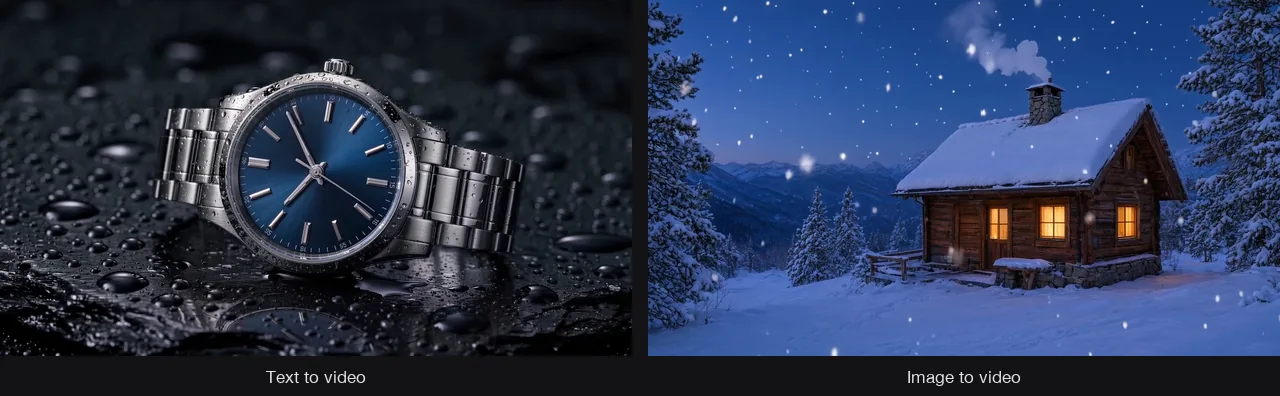
One frame from each clip: a text-to-video product shot of a fictional wristwatch (left) and an image-to-video snowy cabin scene (right). AI-generated with Beatra.
| Skill | Entry point | Version |
|---|---|---|
beatra-ai-video-studio |
SKILL.md | 1.3.8 |
This repository is published automatically from beatra-ai/beatra-skills. Report issues there.
Also known as ai-video-generator (installed under the Beatra slug beatra-ai-video-studio).
Install
With the skills CLI:
npx skills add beatra-ai/ai-video-generator-skill
As a Claude Code plugin:
claude plugin marketplace add beatra-ai/ai-video-generator-skill
claude plugin install beatra-ai-video-studio@ai-video-generator-skill
As a Codex plugin:
codex plugin marketplace add beatra-ai/ai-video-generator-skill
codex plugin add beatra-ai-video-studio@ai-video-generator-skill
As a GitHub Copilot CLI plugin:
copilot plugin marketplace add beatra-ai/ai-video-generator-skill
copilot plugin install beatra-ai-video-studio@ai-video-generator-skill
As a Gemini CLI extension:
gemini extensions install https://github.com/beatra-ai/ai-video-generator-skill
As an Antigravity CLI plugin:
agy plugin install https://github.com/beatra-ai/ai-video-generator-skill
With the GitHub CLI:
gh skill install beatra-ai/ai-video-generator-skill beatra-ai-video-studio
Or clone this repository and copy skills/beatra-ai-video-studio into ~/.claude/skills/ for Claude Code,~/.cursor/skills/ for Cursor, ~/.agents/skills/ for Codex, ~/.codeium/windsurf/skills/ for Windsurf,~/.cline/skills/ for Cline, or ~/.openclaw/skills/ for OpenClaw.
Or paste this into your agent:
Install the beatra-ai-video-studio skill from https://github.com/beatra-ai/ai-video-generator-skill (folder skills/beatra-ai-video-studio), then follow its SKILL.md to connect my Beatra account.
Tested in clean-room CI: Antigravity CLI (2026-11-09).
Examples
Full 4-second 1080p text-to-video clip of a fictional wristwatch on wet black stone with soft rim light, with model-generated ambient sound. AI-generated with Beatra.
Ask your agent:
Make a 4-second cinematic product clip from text: a steel automatic wristwatch with a midnight-blue dial, no text or logos, lying on wet black stone, slow push-in, soft rim light.
Prompt:
Cinematic luxury product ad shot. A steel automatic wristwatch with a deep midnight-blue sunburst dial, plain polished baton hour markers, no text and no logos on the dial, lies on a slab of wet black stone covered in small water droplets. Dark studio, soft rim light traces the case edge and bracelet, a gentle highlight glides across the sapphire crystal. The camera makes one slow, steady push-in from a three-quarter view toward the dial; a single water droplet slides slowly down the stone beside the watch. The watch stays perfectly still and keeps its exact shape, the second hand ticks smoothly. Shallow depth of field, crisp macro detail, restrained elegant pacing, ends on a close framing of the dial. Subtle ambient sound of soft water drips.
Full 5-second 720p image-to-video clip of a snowy mountain cabin with falling snow and rising chimney smoke, with model-generated ambient sound. AI-generated with Beatra.
Ask your agent:
Animate ./cabin-blue-hour.png into a 5-second clip: gentle snow falling across the scene, chimney smoke curling to the left, the window light glowing warmly, and one slow smooth push-in.
Prompt:
Gentle falling snow drifts down across the whole scene in soft, slow flakes. Chimney smoke rises and curls lazily to the left. The window light glows warmly with a faint flicker. The camera makes one slow, smooth push-in toward the cabin. The cabin, roof, pine trees and mountains stay still and keep their exact shape. Calm, quiet winter evening pacing. Soft ambient sound of wind and falling snow.
Inputs and outputs
| Type | Formats | Specifications | |
|---|---|---|---|
| Input | Text — Written shot description | — | — |
| Input | Image — Opening image, first and last frames, or references (optional) | JPG, PNG, WEBP | — |
| Input | Video — Footage to edit or extend (optional) | MP4, MOV | up to 100 MB each |
| Output | Video — Short AI video clip | MP4 | 1 video per request; 2–30 s; 480p, 720p, 1080p, 2K, 4K; aspect ratios 16:9, 9:16, 1:1, 4:3, 3:4, 21:9; editable |
| Output | Image — Opening image (optional) | PNG | 1 image per request |
Technical Specifications & Output Limits
As of 2026-11-14. Live list: https://docs.beatra.ai/en/docs/models
- Uploads — up to 100 MB per file; the per-model input limits below also apply
- Text to image — 10 models (Qwen Image 3.0, MiniMax H3 Image, Qwen Image 2.0 Fast, Qwen Image 3.0 Pro, GPT Image 2.5 Flare, GPT Image 2.5 Sunburst, GPT Image 2, Wan Image 2.7 Fast, Qwen Image 2.0 Pro, Wan Image 2.7 Pro); PNG; up to 4 images per request; canvas up to 16.8 MP
- 16.8 MP (4K tier): MiniMax H3 Image, Wan Image 2.7 Pro (up to 4 images per request); GPT Image 2.5 Flare, GPT Image 2.5 Sunburst, GPT Image 2 (1 image per request)
- Image to image — 10 models (Qwen Image 2.0 Fast, MiniMax H3 Image, Qwen Image 3.0, Qwen Image 3.0 Pro, Wan Image 2.7 Fast, Qwen Image 2.0 Pro, Wan Image 2.7 Pro, GPT Image 2.5 Flare, GPT Image 2.5 Sunburst, GPT Image 2); PNG; up to 4 images per request; canvas up to 16.8 MP
- 16.8 MP (4K tier): MiniMax H3 Image (up to 4 images per request); GPT Image 2.5 Flare, GPT Image 2.5 Sunburst, GPT Image 2 (1 image per request)
- Input images: up to 4 per request, 10–20 MB each; BMP, GIF, JPEG, PNG, TIFF, WEBP
- Image editing — 7 models (Qwen Image 2.0 Fast, MiniMax H3 Image, Qwen Image 3.0, Qwen Image 3.0 Pro, Wan Image 2.7 Fast, Qwen Image 2.0 Pro, Wan Image 2.7 Pro); PNG; up to 4 images per request; canvas up to 16.8 MP
- 16.8 MP (4K tier): MiniMax H3 Image (up to 4 images per request)
- Input images: up to 4 per request, 10–20 MB each; BMP, GIF, JPEG, PNG, TIFF, WEBP
- Text to video — 9 models (Wan 3.0 Video, Seedance 2.0 Mini, Wan 2.7, MiniMax H3, HappyHorse 1.1, Seedance 2.0 Fast, Seedance 2.0, Wan 3.0 Video Prime, Seedance 2.5); 480p to 4K; 2–30 s; aspect ratios 16:9, 1:1, 3:4, 4:3, 9:16, 21:9, 4:5, 5:4, 9:21; MOV, MP4
- 4K: Seedance 2.0, up to 15 s
- 30 s: Wan 3.0 Video, Wan 3.0 Video Prime, Seedance 2.5, up to 1080p
- Native audio: Wan 2.7, MiniMax H3
- Image to video — 9 models (Wan 3.0 Video, Wan 2.7, MiniMax H3, Seedance 2.0 Mini, HappyHorse 1.1, Seedance 2.0 Fast, Seedance 2.0, Wan 3.0 Video Prime, Seedance 2.5); 480p to 4K; 2–30 s; aspect ratios 16:9, 1:1, 21:9, 3:4, 4:3, 9:16; MOV, MP4
- 4K: Seedance 2.0, up to 15 s
- 30 s: Wan 3.0 Video, Wan 3.0 Video Prime, Seedance 2.5, up to 1080p
- Native audio: Wan 2.7, MiniMax H3
- First and last frames to video — 8 models (Wan 3.0 Video, Wan 2.7, MiniMax H3, Seedance 2.0 Mini, Seedance 2.0 Fast, Seedance 2.0, Wan 3.0 Video Prime, Seedance 2.5); 480p to 4K; 2–30 s; aspect ratios 16:9, 1:1, 21:9, 3:4, 4:3, 9:16; MOV, MP4
- 4K: Seedance 2.0, up to 15 s
- 30 s: Wan 3.0 Video, Wan 3.0 Video Prime, Seedance 2.5, up to 1080p
- Native audio: Wan 2.7, MiniMax H3
- Reference to video — 9 models (Wan 3.0 Video, Wan 2.7, MiniMax H3, HappyHorse 1.1, Seedance 2.0 Mini, Seedance 2.0 Fast, Seedance 2.0, Wan 3.0 Video Prime, Seedance 2.5); 480p to 4K; 2–30 s; aspect ratios 16:9, 1:1, 3:4, 4:3, 9:16, 21:9, 4:5, 5:4, 9:21; MOV, MP4
- 4K: Seedance 2.0, up to 15 s
- 30 s: Wan 3.0 Video, Wan 3.0 Video Prime, Seedance 2.5, up to 1080p
- Native audio: Wan 2.7, MiniMax H3
- Video editing — 8 models (Wan 3.0 Video, Wan 2.7 Video Edit, HappyHorse 1.0 Video Edit, Seedance 2.0 Mini, Seedance 2.0 Fast, Seedance 2.0, Wan 3.0 Video Prime, Seedance 2.5); 480p to 4K; 2–30 s; aspect ratios 16:9, 1:1, 3:4, 4:3, 9:16, 21:9; MOV, MP4
- 4K: Seedance 2.0, up to 15 s
- 30 s: Wan 3.0 Video, Wan 3.0 Video Prime, Seedance 2.5, up to 1080p
- Video extension — 7 models (Wan 2.7, Wan 3.0 Video, Seedance 2.0 Mini, Seedance 2.0 Fast, Seedance 2.0, Wan 3.0 Video Prime, Seedance 2.5); 480p to 4K; 2–30 s; aspect ratios 16:9, 1:1, 21:9, 3:4, 4:3, 9:16; MOV, MP4
- 4K: Seedance 2.0, up to 15 s
- 30 s: Wan 3.0 Video, Wan 3.0 Video Prime, Seedance 2.5, up to 1080p
- Native audio: Wan 2.7
Why use Beatra instead of calling model APIs directly
- One account for every model this skill uses — Text to image 10; Image to image 10; Image editing 7; Text to video 9; Image to video 9; First and last frames to video 8; Reference to video 9; Video editing 8; Video extension 7 (Qwen Image 3.0, MiniMax H3 Image, Qwen Image 2.0 Fast, Qwen Image 3.0 Pro, GPT Image 2.5 Flare, GPT Image 2.5 Sunburst, GPT Image 2, Wan Image 2.7 Fast, Qwen Image 2.0 Pro, Wan Image 2.7 Pro, Wan 3.0 Video, Seedance 2.0 Mini, Wan 2.7, MiniMax H3, HappyHorse 1.1, Seedance 2.0 Fast, Seedance 2.0, Wan 3.0 Video Prime, Seedance 2.5, Wan 2.7 Video Edit, HappyHorse 1.0 Video Edit) (as of 2026-11-14), behind one Beatra sign-in; no keys from individual model providers to manage.
- You decide what gets paid for — Paid renders run only when you ask for that exact render or approve its card, which shows the live credit estimate.
- Direction before rendering — the skill plans, directs, and reviews the work, then renders it on Beatra.
- Files you can verify — every file under
skills/matches the release archive on cdn.beatra.ai byte for byte, checked by SHA-256 before each push. - Updates you control — no self-updater; update with the tool you installed it with.
- Runs in your agent — Claude Code, Cursor, Codex, Windsurf, Cline, OpenClaw.
How it compares
| Beatra (this skill) | ZeroLu/Ultimate-AI-Media-Generator-Skill | scenario-labs/skills | black-forest-labs/skills | |
|---|---|---|---|---|
| Account or key needed | A Beatra account; no model provider keys | A CyberBara API key, stored in ~/.config/cyberbara/api_key (source) | A Scenario account (OAuth) or a Scenario API key (source) | A BFL API key (source) |
| Models | Text to image 10; Image to image 10; Image editing 7; Text to video 9; Image to video 9; First and last frames to video 8; Reference to video 9; Video editing 8; Video extension 7 (Qwen Image 3.0, MiniMax H3 Image, Qwen Image 2.0 Fast, Qwen Image 3.0 Pro, GPT Image 2.5 Flare, GPT Image 2.5 Sunburst, GPT Image 2, Wan Image 2.7 Fast, Qwen Image 2.0 Pro, Wan Image 2.7 Pro, Wan 3.0 Video, Seedance 2.0 Mini, Wan 2.7, MiniMax H3, HappyHorse 1.1, Seedance 2.0 Fast, Seedance 2.0, Wan 3.0 Video Prime, Seedance 2.5, Wan 2.7 Video Edit, HappyHorse 1.0 Video Edit) | CyberBara video models: Sora 2, Seedance 2.5, Seedance 1, Kling 3.0/2.6/O3, Veo 3.1, Gemini Omni Video, MiniMax H3, HappyHorse 1.0 (source) | Video models on Scenario incl. MiniMax Hailuo, Gemini Omni, Grok Imagine, Veo, Seedance, Kling, Vidu, Wan, Runway, Luma Ray (source) | FLUX 3 video models, with native audio (source) |
| Before spending | Paid renders run only when you ask for that exact render or approve its card, which shows the live credit estimate | quote CLI command returns estimated_credits and can_afford before submission (source) |
Dry-run price estimates in its quality-gate and model-comparison skills (source) | draft: true returns a fast low-step preview before a full render (source) |
| Agents | Claude Code, Cursor, Codex, Windsurf, Cline, OpenClaw | OpenClaw, Claude Code, Codex, Claude Cowork, Cursor, Antigravity (source) | Claude Code, Cursor, Codex, Copilot and 70+ others (source) | Coding agents (skills follow the agentskills.io spec); also a Claude Code plugin (source) |
| Install | npx skills add beatra-ai/ai-video-generator-skill |
npx skills add ZeroLu/Ultimate-AI-Media-Generator-Skill --all (source) |
npx skills add scenario-labs/skills, then connect the Scenario MCP server (https://mcp.scenario.com/mcp) (source) |
npx skills add black-forest-labs/skills --skill flux-3-video (source) |
| License | MIT-0 | MIT (source) | MIT (source) | MIT (source) |
| Last updated | Updated with every release (v1.3.8) | 2026-09-08 (source) | 2026-10-15 (source) | 2026-08-26 (source) |
Facts checked on 2026-10-16. Corrections: open an issue in beatra-ai/beatra-skills.
What you get
- Direction before creation — Clarify the action, camera, pacing, duration, and destination before creating the clip.
- Use the right starting point — Begin with words, one opening image, exact boundary frames, creative references, or existing footage.
- Revise with purpose — Review the delivered motion and choose one focused edit, extension, or new render.
Use cases
- Product videos — Turn product stories, packshots, and creative references into short demonstration or reveal clips.
- AI ad video — Create concise campaign shots around one message, action, and placement.
- Social clips — Design short vertical or feed-ready ideas with purposeful pacing and framing.
- Transitions and reveals — Define exact first and last images and direct the movement between them.
- Video edits — Change a focused visual detail or style in existing footage and review what stayed recognizable.
- B-roll and continuations — Create a new supporting shot or add footage directly before or after one existing clip.
FAQ
What can I make with Beatra AI Video Studio?
You can create short product, ad, social, b-roll, transition, reveal, and cinematic concept clips from text, images, references, or existing footage.
Can I start from my own image?
Yes. Use one image as the opening frame, or provide exact first and last images for a directed transition.
Can it edit or continue existing footage?
Yes. It can make a focused change to one clip or add new footage directly before or after it.
Which video model does it use?
It matches the requested inputs and settings to a currently eligible model. If you name a compatible model, that choice is kept.
Can it make a longer sequence?
Yes. It plans a longer idea shot by shot, creates the clips in sequence, and organizes the delivered shots for captions, narration, transitions, and timeline assembly.
Updates and security
Since the 2026-10 release, this skill contains no self-updater: it runs only the
files you installed and never replaces them on its own. Update it with the tool
you installed it with — npx skills update beatra-ai-video-studio or gh skill update beatra-ai-video-studio.
Details: references/updates-and-security.md inside the skill.
License
The skill files in this repository (SKILL.md, references, and scripts) and this README are licensed under
MIT-0: free to use, modify, and redistribute, including commercially, with no attribution required.
Media generation runs on Beatra's cloud service under the Beatra Terms of Service.
Links
- Skill page — https://beatra.ai/skills/beatra-ai-video-studio?utm_source=github&utm_medium=flagship&utm_campaign=ai-video-generator-skill
- Website — https://beatra.ai?utm_source=github&utm_medium=flagship&utm_campaign=ai-video-generator-skill
- Docs — https://docs.beatra.ai?utm_source=github&utm_medium=flagship&utm_campaign=ai-video-generator-skill
- Console — https://console.beatra.ai
- For AI agents — https://beatra.ai/llms.txt (index) · https://beatra.ai/llms-full.txt (every skill in one file)
Reviews (0)
Sign in to leave a review.
Leave a reviewNo results found