yahoo-finance-mcp
Health Uyari
- License — License: MIT
- Description — Repository has a description
- Active repo — Last push 0 days ago
- Low visibility — Only 5 GitHub stars
Code Gecti
- Code scan — Scanned 12 files during light audit, no dangerous patterns found
Permissions Gecti
- Permissions — No dangerous permissions requested
Bu listing icin henuz AI raporu yok.
Unofficial MCP server for Yahoo Finance data (via yfinance), read-only, stdio or HTTP
 Unofficial Yahoo Finance MCP Server









An MCP server that exposes Yahoo Finance
data to MCP clients (such as Claude Desktop). It runs over stdio (default,
for local clients) or an HTTP transport (for standalone / containerized
hosting). Market data is sourced through theyfinance library, which uses
Yahoo's unofficial endpoints.
Disclaimer
- This project is not affiliated with, endorsed by, or sponsored by Yahoo.
"Yahoo" and "Yahoo Finance" are trademarks of their respective owners.- It relies on unofficial Yahoo Finance endpoints via
yfinance. Those
endpoints can change or break at any time, and Yahoo may rate limit or block
requests. Review Yahoo's Terms of Service before use.- Data may be delayed, incomplete, or inaccurate. Nothing here is financial
advice. Do not rely on it for trading or investment decisions.- Provided "as is", without warranty. Intended for personal and educational
use. You use it at your own risk. See LICENSE.- For commercial use, review Yahoo's Terms of Service and consider a
properly licensed market-data provider instead of the unofficial endpoints.
Contents
- What it is for
- Tools
- Symbol resolution
- Compatible clients
- Requirements
- Installation
- Running as a standalone server
- Caching
- Development
- Trademarks
What it is for
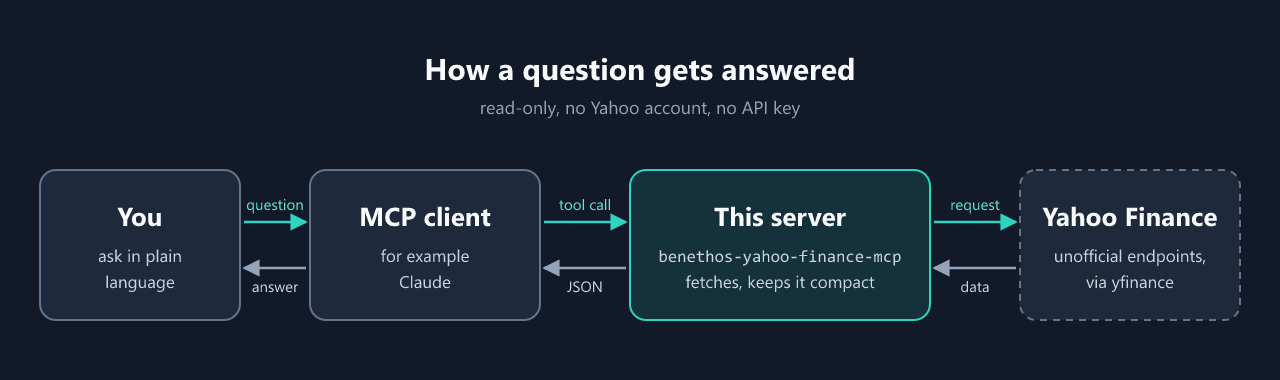
The server lets an MCP client such as Claude Desktop answer questions about
markets from live Yahoo Finance data: the price of a share and how it moved,
what a company earns, what analysts expect, who owns it, what an ETF holds,
and how a sector or a market is doing. You ask in plain language, the client
picks the tools, and the answer rests on what Yahoo returns rather than on
what the model remembers.
Typical uses:
- Quick lookups in a chat. A quote, the 52-week range, the next earnings
date or the dividend history, without opening a browser. - Research on one company. Profile, financial statements, estimates,
rating changes, holders and insider trades in one conversation, summarised
by the model. - Comparisons. Several tickers side by side, the top companies of a sector
or an industry, the holdings and weightings of an ETF. - Calculations on raw data. Six months of daily closes for an RSI, a MACD
or a drawdown, which the model works out from the series. - Recipes for recurring questions. Six built-in prompts, among them an
asset analysis, an earnings preview and a dividend calendar for your
holdings, each a fixed order of tools with the traps of the data spelled
out, see Built-in prompts. - A shared service. Run over HTTP, in Docker, for a team's web front end or
an automation such as n8n, with an optional result cache in front of Yahoo.
Everything is read-only. The server places no orders, holds no portfolio and
signs in nowhere. The data comes from unofficial endpoints, may be delayed and
is no basis for a trading decision, see the disclaimer above.
Example prompts
Once the server is connected, ask the client in plain language and it will pick
the tools. Replace the bracketed placeholders with concrete values.
Price & quote
- "What's the current price of [Ticker], and how far is it from its 52-week high?"
- "Is [Ticker] trading above or below its 50- and 200-day moving averages?"
- "Get the daily closes of [Ticker] for the last 6 months and compute RSI and MACD."
- "What was the deepest drawdown of [Ticker] in the last 12 months?"
- "Compare [Ticker A] and [Ticker B] over the last 3 months and show which held up better."
- "Get current quotes for [Ticker A], [Ticker B] and [Ticker C] and compare them in a table."
Company & valuation
- "Give me P/E, beta, market cap and dividend yield for [Ticker]."
- "What does [Company name] actually do, and which sector and industry is it in?"
- "Show the last three annual income statements for [Ticker] and how revenue developed."
- "How has [Ticker]'s share count changed over the past years, and does that mean buybacks or dilution?"
Analysts & news
- "What's the analyst consensus for [Ticker], and how far is the average price target from the current price?"
- "Any upgrades or downgrades for [Ticker] in the last few weeks?"
- "What are the forward revenue and EPS estimates for [Ticker], and how were they revised recently?"
- "Compare the EPS estimates of [Ticker A] and [Ticker B] on the same basis, GAAP or normalized."
- "Summarize the recent news on [Ticker]."
Earnings & calendar
- "When does [Ticker] report next, and what EPS is expected?"
- "How did [Ticker] do against estimates in the last few quarters?"
- "When are [Ticker]'s next earnings and ex-dividend dates?"
Dividends
- "Show [Ticker]'s dividends over the last ten years and the current yield."
- "Has [Ticker] cut its dividend in the last 20 years, and did it split the stock?"
Ownership & insiders
- "Who are the largest institutional holders of [Ticker]?"
- "What share of [Ticker] is held by insiders versus institutions?"
- "Has there been notable insider buying or selling in [Ticker] recently?"
Funds & ETFs
- "What are the top holdings and sector weightings of the ETF [Ticker]?"
- "What's the asset-class split of [ETF Ticker], and which fund family runs it?"
- "What does the ETF [Ticker] cost per year, how large is it, and how did it do over three and five years?"
Filings
- "Show the most recent SEC filings for [US Ticker] with links."
Options
- "Which option expiration dates are available for [US Ticker]?"
- "Show the calls and puts for [US Ticker] expiring [Date]."
Sectors & markets
- "What are the top companies and industries in the technology sector?"
- "Show the top-performing companies in the semiconductors industry."
- "Is the US market open right now, and when does it open next?"
- "How did the major indices in Europe and Asia close?"
Screening
- "Find US stocks with a dividend yield above 4 % and a P/E below 15."
- "Which companies have raised their dividend for at least 25 years in a row?"
- "List the largest German-listed technology stocks with a positive P/E under 20."
Finding a symbol
- "Which Yahoo ticker belongs to [Company name] on [Exchange]?"
- "Resolve the ISIN [ISIN] to a Yahoo ticker."
A daily round-up
- "For [Ticker A], [Ticker B] and [Ticker C]: pull quote, six months of history,
company info and analyst recommendations, then give me a short picture of each."
The server itself
- "Which version of the Yahoo Finance server is running, and did its last
request reach Yahoo?"
The server computes nothing itself. It passes through what Yahoo returns,
which already includes derived figures such as moving averages, P/E, beta and
dividend yield. Anything Yahoo does not carry — RSI, MACD, drawdown,
sentiment, total return — the model works out from the raw series.
Built-in prompts
Six recipes come with the server. Pick one in the client and fill in its
arguments, and the model calls the right tools in the right order and minds the
traps of the data on the way: currencies that are never converted, London
prices in pence, an ETF that has no balance sheet. Each one gathers and
reports data and gives no recommendation.
| Prompt | Asks for | What you get |
|---|---|---|
| Asset analysis | a symbol | price, market cap and range, the distance to every analyst target, a check of the share count behind the market cap, revenue, earnings and shares over several years, P/E with its basis or price to sales for a loss, the next report and the headlines. Facts and own calculations, no outlook and no case for or against. For an ETF the fund profile |
| Compare instruments | symbols, a period (=1y) | one table: performance rebased to 100, drawdown, market cap, P/E and dividend yield, each on one basis |
| Earnings preview | a symbol | the next report date and what is expected, beats and misses so far, how the estimates moved, recent rating changes |
| ETF profile | a symbol | holdings, sector and asset-class weights, costs against the category, size and returns, computed from the prices where Yahoo has none |
| Dividend calendar | positions with share counts, a year, a currency (=EUR) | dividends per position and month, paid so far and forecast for the rest, converted and gross, with every estimated pay date and gap listed |
| Find a symbol | a name or ISIN, an exchange | the listings as a table and the one to use, a WKN named as unresolvable |
Starting one. A prompt is picked by you, the model cannot start one on
its own and does not see that they exist.
- Claude Desktop: click "+" in the message box, then Connectors,
Add from and the server's name, then the prompt. A small form asks for
the arguments, and an optional one may stay empty. The recipe is attached to
the message as a text file, and nothing happens until you send it. The
recipes are written in English, so add a line such as "answer in German"
if you want the answer in another language. - Claude Code: each prompt is a slash command,
/mcp__benethos-yahoo-finance-mcp__asset_analysis SAP.DEand so on, with
the arguments after the command. - Other clients show them where they show MCP prompts, if they do.
Without a prompt, a plain question works as before and the model picks the
tools itself. What the prompt adds is the fixed order and the traps of the
data spelled out every time.
Positions for the dividend calendar. The model reads them in almost any
form, as long as each holding has an instrument and a share count:
SAP.DE:50, ALV.DE:20, IE00B4L5Y983:120
50x SAP.DE, 12,5x IE00B4L5Y983
Rows pasted from a bank export or a spreadsheet work too, with whatever
columns they bring, such as name, WKN, ISIN and currency.
- A ticker or an ISIN is safer than a company name, which has to be looked
up first. A German WKN resolves nowhere, so a row needs its ISIN as well. - Fractional counts from a savings plan work with a decimal point or a
decimal comma. - An entry without a count, such as
MSFT, is a watch item: shown per share
and left out of the totals. - Year and currency may stay empty, they default to the current year and EUR.
- Leave out the account number of a bank export. The model is told to
ignore it, but it would still reach the server with the rest.
It is the one prompt that takes personal data. The share counts go to the
server as part of that argument, as does anything else pasted with them,
which for a server you host over HTTP means that machine. The server only
puts them into the prompt's text: no tool receives them, Yahoo never sees
them, and no log line carries them. The forecast repeats the last twelve
months without growth, so it is a plan, not a promise. For many European
stocks Yahoo reports the ex-date but no pay date, and the calendar then
estimates the pay date at 14 days later and
marks it.
Tools
Every tool only reads, and each one says so to the client with the MCP
annotation readOnlyHint. Every tool that asks Yahoo also carriesopenWorldHint, which is all of them but server_status. A client that
honours them may run the tools without asking for confirmation each time.
Each tool also has a short title, such as "Stock screener", that a client may
show in place of its name.
| Tool | Description |
|---|---|
search |
Find instruments by name, ticker, or ISIN, returning Yahoo symbols. |
get_quote |
Current price and key intraday figures for a symbol. |
get_quotes |
Compact current quotes for several symbols at once (per-symbol not-found list). |
get_history |
Historical OHLCV data (period/interval or explicit date range). |
get_company_info |
Company profile and key statistics (sector, market cap, P/E, …). |
get_financials |
Income statement, balance sheet, or cash flow (annual/quarterly/ttm). |
get_dividends |
Dividend and stock-split history. |
get_news |
Recent news headlines (title, summary, publisher, URL), 10 by default and up to 50, from Yahoo's search when the symbol's own news is empty. |
get_recommendations |
Analyst recommendation trend and price targets. |
get_options |
Option expiration dates and the calls/puts chain for a date, centred on the money. |
get_earnings |
Upcoming and historical earnings (EPS estimate/actual, surprise), the history on a GAAP or normalized basis. |
get_estimates |
Forward analyst estimates (earnings, revenue, EPS trend/revisions, growth), the EPS tables on a GAAP or normalized basis. |
get_upgrades_downgrades |
Recent analyst rating changes (upgrades/downgrades). |
get_holders |
Ownership breakdown (insider/institutional %, top institutional and mutual-fund holders). |
get_insider_activity |
Insider transactions, 6-month purchases/sales summary, and current roster. |
get_sec_filings |
Recent SEC filings (type, date, title, EDGAR/exhibit links). |
get_calendar |
Upcoming earnings and dividend / ex-dividend dates with estimate ranges. |
get_shares |
Shares-outstanding history (date → shares), the last 18 months unless a start date is given. |
get_fund_data |
Fund/ETF profile: overview, expense ratio, size and returns, asset-class & sector weightings, top holdings. |
get_sector |
Browse a market sector by key: overview, top companies/ETFs/funds, industries. |
get_industry |
Browse an industry by key: overview, parent sector, top/top-performing/top-growth companies. |
get_market |
Trading status and headline index summary for a market (US, EUROPE, ASIA, …). |
screen |
Find stocks by criteria (dividend yield, P/E, market cap, region, sector, …), ranked, with the total number of matches. |
server_status |
This server's version, transport and uptime, and with details the yfinance version in use and whether its last request reached Yahoo and how long ago. Asks Yahoo nothing. |
Most get_* tools take a Yahoo Finance symbol — either a ticker (AAPL,SAP.DE) or a plain ISIN. Use search to turn a company name into one. Four
tools are exceptions: get_sector and get_industry take a sector or industry
key (e.g. technology, semiconductors), get_market takes a market
key (e.g. US), and screen takes filters such as{"field": "dividend_yield", "op": "gt", "value": 3} and finds the symbols
itself.
basic-materials (14)agricultural-inputs, aluminum, building-materials, chemicals, coking-coal, copper, gold, lumber-wood-production, other-industrial-metals-mining, other-precious-metals-mining, paper-paper-products, silver, specialty-chemicals, steel
communication-services (7)advertising-agencies, broadcasting, electronic-gaming-multimedia, entertainment, internet-content-information, publishing, telecom-services
consumer-cyclical (23)apparel-manufacturing, apparel-retail, auto-manufacturers, auto-parts, auto-truck-dealerships, department-stores, footwear-accessories, furnishings-fixtures-appliances, gambling, home-improvement-retail, internet-retail, leisure, lodging, luxury-goods, packaging-containers, personal-services, recreational-vehicles, residential-construction, resorts-casinos, restaurants, specialty-retail, textile-manufacturing, travel-services
consumer-defensive (12)beverages—brewers, beverages—non-alcoholic, beverages—wineries-distilleries, confectioners, discount-stores, education-training-services, farm-products, food-distribution, grocery-stores, household-personal-products, packaged-foods, tobacco
energy (8)oil-gas-drilling, oil-gas-e&p, oil-gas-equipment-services, oil-gas-integrated, oil-gas-midstream, oil-gas-refining-marketing, thermal-coal, uranium
financial-services (15)asset-management, banks—diversified, banks—regional, capital-markets, credit-services, financial-conglomerates, financial-data-stock-exchanges, insurance-brokers, insurance—diversified, insurance—life, insurance—property-casualty, insurance—reinsurance, insurance—specialty, mortgage-finance, shell-companies
healthcare (11)biotechnology, diagnostics-research, drug-manufacturers—general, drug-manufacturers—specialty-generic, health-information-services, healthcare-plans, medical-care-facilities, medical-devices, medical-distribution, medical-instruments-supplies, pharmaceutical-retailers
industrials (25)aerospace-defense, airlines, airports-air-services, building-products-equipment, business-equipment-supplies, conglomerates, consulting-services, electrical-equipment-parts, engineering-construction, farm-heavy-construction-machinery, industrial-distribution, infrastructure-operations, integrated-freight-logistics, marine-shipping, metal-fabrication, pollution-treatment-controls, railroads, rental-leasing-services, security-protection-services, specialty-business-services, specialty-industrial-machinery, staffing-employment-services, tools-accessories, trucking, waste-management
real-estate (12)real-estate-services, real-estate—development, real-estate—diversified, reit—diversified, reit—healthcare-facilities, reit—hotel-motel, reit—industrial, reit—mortgage, reit—office, reit—residential, reit—retail, reit—specialty
technology (12)communication-equipment, computer-hardware, consumer-electronics, electronic-components, electronics-computer-distribution, information-technology-services, scientific-technical-instruments, semiconductor-equipment-materials, semiconductors, software—application, software—infrastructure, solar
utilities (6)utilities—diversified, utilities—independent-power-producers, utilities—regulated-electric, utilities—regulated-gas, utilities—regulated-water, utilities—renewable
Symbol resolution
All get_* tools expect a Yahoo Finance symbol. Both a ticker (AAPL,SAP.DE) and a plain ISIN (US0378331005) work. An ISIN is resolved byyfinance itself: anything shaped like one is looked up through Yahoo's search
the moment the ticker object is created, and the ticker found stands in for it
from then on. The server passes the symbol through unchanged apart from
trimming and uppercasing, and echoes what it was given. A symbol has at most
32 characters and the shape Yahoo uses, letters, digits and . - ^ = & with
at least one letter or digit among them, as in ^GSPC, EURUSD=X or BRK-B.
Anything else, and an ISIN-shaped string that Yahoo cannot resolve, answers as
an unknown symbol.
To turn a company name into a symbol, call search first — the same Yahoo
search endpoint handles free text, tickers, and ISINs. A ticker is preferable to
an ISIN in any case, because the symbol reported back then stays consistent
across tools.
Two caveats. That ISINs work is observed behaviour of an unofficial endpoint,
not a guarantee: it did not work in earlier versions and it may stop again.
And German WKNs resolve nowhere, not through the tools and not throughsearch — Yahoo has no lookup for them, so ask for a ticker, an ISIN or the
company name instead.
Compatible clients
MCP is an open protocol, so this server is not tied to one application. Every
MCP client can use it. What differs is only which transport the client speaks,
and that decides how you start the server.
Locally, over stdio. The client launches the server as a subprocess and
talks to it over stdin and stdout. This is the default transport and needs no
network. Claude Desktop, Claude Code, Cursor, VS Code (Copilot agent mode), Zed,
Windsurf, the JetBrains AI assistants, Cline, Roo Code, Continue and Goose all
work this way. Claude Desktop also takes the server as an extension, a single
file to open, see Quick start, and
Claude Code adds it with one command, see Claude Code. The
configuration file differs per client, but the command is always the one shown
under Claude Desktop with uv:
{ "command": "uvx", "args": ["benethos-yahoo-finance-mcp"] }
Over the network, streamable-HTTP. The server runs once and clients connect
to http://<host>:8000/mcp, or to https://<domain>/mcp with a bearer token
behind the Caddy profile of the production compose file. Start it with--transport streamable-http, or use
the Docker image, which serves this transport by default. Browser-based and
multi-user front ends need it — Open WebUI supports MCP natively over
streamable-HTTP and over no other transport, because a shared web front end
cannot hold one stdio process per user. LibreChat and Windsurf accept it
alongside stdio.
Over the network, SSE. The older HTTP transport, still expected by some
clients. Start it with --transport sse and point the client athttp://<host>:8000/sse. The MCP Client Tool node in n8n connects this way.
Both HTTP transports are open by default, guarded by a
Hostallow-list and
an optional bearer token. Read the notes under
Running as a standalone server before
exposing either one.
Not listed? Client support moves quickly. Check which transport yours
speaks, then use the matching command above — the transports are stable even
when the list of names is not.
Requirements
- uv (recommended) — manages Python, the virtual
environment, and dependencies in one tool. - Or, without uv: Python 3.11.5+ with
pip/venv. gitis only needed for the optional install-from-source method.
Installation
Quick start: Claude Desktop extension
The simplest way for Claude Desktop. Nothing needs to be installed first, no
uv, no Python and no configuration file: Claude Desktop brings what the
extension needs.
- Download
benethos-yahoo-finance-mcp.mcpb,
the extension of the newest release. Every release also carries it under
its version, on the releases page. - Open it with a double click, or drag it onto Claude Desktop → Settings
→ Extensions. Claude Desktop shows the tools and asks to install. - Ask something that needs market data, in a new chat. The first start
installs the dependencies and takes a few seconds, later starts are quick.
If the server is also listed in claude_desktop_config.json, remove that
entry, or every tool shows up twice. The extension is for Claude Desktop only.
Other clients use the command below.
Windows with Smart App Control on. The extension may not start there,
and its tools never appear. Claude Desktop runs it through uv, and on a
machine without uv it downloads a copy of its own. Smart App Control judges
programs by their signature and reputation, and it can block that copy,
which Windows records as a Code Integrity block ofuv.exe. The same goes
for the.exelaunchersuvxwrites for the manual setup below. The way
around both is From PyPI with pip: Claude
Desktop then starts thepython.exeof a virtual environment made from
the signed Python installer, with no generated program in between.
Claude Desktop extension that updates itself
The extension above runs the release it was downloaded with, and a new
release means a new download. A second extension runs the newest release on
PyPI instead, so a new release arrives with a restart of Claude Desktop.
- Download
benethos-yahoo-finance-mcp-auto-update.mcpb.
Every release carries it, the copy with a version in its name as well.
Any of them runs the newest release, the version only says which release
built it. - Open it as above. Install this one or the pinned one, not both, or
every tool shows up twice. Installing one does not remove the other, so
when you switch, remove the old one in Claude Desktop under Settings →
Extensions.
How and when it updates:
- At the start of the server, not during a chat. Claude Desktop starts it
withuv tool run benethos-yahoo-finance-mcp, using uv of its own on a
machine without uv. uv looks for a newer release only then, when Claude
Desktop starts or reconnects the extension. To pick up a release, quit
Claude Desktop from the tray and start it again. - Up to 10 minutes late. uv keeps PyPI's list of releases for 10 minutes,
as PyPI tells it to. A start within 10 minutes of the last check runs the
release found then, so a release published in between arrives with the
first restart after those 10 minutes. In a test, a restart 11 seconds
before the end of the 10 minutes still ran the previous release. - It needs to reach PyPI. Once the 10 minutes are over, uv asks PyPI
before it starts the server, and without an answer it stops withFailed to fetchinstead of falling back to the release it has. A network that
blocks PyPI, as some company networks do, keeps this extension from
starting. The pinned one is the choice there. - The first start after a release takes longer. uv downloads and
installs the new release and its dependencies once, a few seconds, and
later starts reuse them. - The running version is the one
server_statusnames. Claude Desktop's
extension list shows the version of the file it was installed from, and
that stays as it was. - Installed before 0.13.0? Install it once more for the prompts. Tools
arrive with a restart, but an extension file from an earlier release does
not tell Claude Desktop that the server brings prompts of its own. Desktop
then lists them under "+" and refuses to attach them. The file of 0.13.0
or later says so, and later prompts arrive with a restart like the rest. - Dependencies are not pinned. uv takes the newest versions each
release allows, asuvxdoes, not the tested set inuv.lockthe pinned
extension and the container image run. The six libraries that decide what
an answer looks like (mcp,yfinance,pandas,pydantic,lxmlandcurl_cffi) stay inside a patch window, so only their patch releases
arrive on their own, and a minor or major waits for a release here that
was checked against it. Everything underneath them moves freely. A check
in this repository runs the newest versions allowed every day and after
each release, installs the published package from PyPI as this extension
does, and opens an issue when the tests or a live call to Yahoo fail on
them, an empty answer included. A wrong value passes it, and a day on which
Yahoo blocks the run says nothing. - Smart App Control blocks it as it blocks the pinned extension, see the
note above.
If it fails:
- It can come without a release of this project. A patch of a dependency
arrives while this server's version stays the same, soserver_status
naming the version that worked yesterday proves nothing, and two machines
on one version can run different dependencies.server_statuswithdetailsnames the yfinance in use, the likeliest cause. - A crash shows. The extension does not start and its tools are missing
from the chat, or a tool answers with an error. The reason is in Claude
Desktop's log folder, inmcp-server-<extension name>.log, uv's own
messages included. - Wrong data does not show. A dependency that changes a field or its
meaning can leave the server running, with empty or wrong values and no
error anywhere. If an answer looks off, compare it with the pinned extension
or with Yahoo's page before relying on it. - Nothing rolls back on its own. uv runs the newest versions at every
start. Once something broke, every restart runs it again, until a release
fixes it. Restarting does not help, and the auto-update file of an older
release does not either, since it runs the newest release as well. - The way out is the pinned extension. Remove this one and install
benethos-yahoo-finance-mcp-X.Y.Z.mcpbof a release that worked, from the
releases page.
It runs that release with the versions tested for it, and stays there until
you install another. Please
open an issue with
the log, so the fix comes sooner.
Claude Desktop with uv (manual config)
No clone, no manual virtual environment, no git. uvx fetches and runs it
on demand from
PyPI (published asbenethos-yahoo-finance-mcp).
Install uv, if you have not already — the
uv installation page
covers every platform. It bringsuvx, and that is the only thing needed
here.Add the server to
claude_desktop_config.json(Claude Desktop →
Settings → Developer → Edit Config):{ "mcpServers": { "benethos-yahoo-finance-mcp": { "command": "uvx", "args": ["benethos-yahoo-finance-mcp"] } } }Pin a version for stability with
benethos-yahoo-finance-mcp==0.13.7. To
enable the optional result cache, add anenvblock, e.g."env": { "YF_MCP_CACHE": "1" }(see Caching).Restart Claude Desktop (quit from the tray, not just close the window).
The tools then appear in the client.
Installing from source instead? You can run the unreleased
mainbranch
withuvx --from "git+https://github.com/benethos-hub/yahoo-finance-mcp.git" benethos-yahoo-finance-mcp.
That path needsgiton thePATHof the process the client spawns — some
GUI clients don't pass a fullPATH, so prefer the PyPI install above.
uvxmust be on thePATHthe client uses. After installing uv, fully restart
the app — or use the absolute path touvxascommand. The first launch
downloads the package and its dependencies, so it takes a moment. Later
launches use the cache.
Claude Code
Claude Code adds the server with one command and needs uv as above. With-s user it is there in every project, without it only in the current
directory:
claude mcp add benethos-yahoo-finance-mcp -s user -- uvx benethos-yahoo-finance-mcp
Settings go in with -e, after the name, since -e takes several values and
would read the name as one of them:
claude mcp add benethos-yahoo-finance-mcp -s user -e YF_MCP_CACHE=1 -- uvx benethos-yahoo-finance-mcp
A server already running over HTTP is added by its URL. --transport http
names MCP's streamable-HTTP transport, the scheme is the URL's own: plainhttp:// for the container on this machine, https:// behind the Caddy
profile of the production compose file, where you set the bearer token, since
nothing in the stack enforces it:
claude mcp add --transport http benethos-yahoo-finance-mcp http://127.0.0.1:8000/mcp

claude mcp add --transport http benethos-yahoo-finance-mcp https://<domain>/mcp \
  --header "Authorization: Bearer <token>"
A local server with a token set takes the same --header. A server
started with --transport sse takes --transport sse and its /sse URL
instead.
-s project writes the entry to a .mcp.json in the current directory,
which a team can commit to its repository. Claude Code asks each person once
before it starts a server from that file, and until then claude mcp list
shows it as pending approval. After that it shows whether the server starts,
and in a chat server_status says which version runs.
Other ways to install
From the MCP Registry. Every release from 0.8.2 on is listed in the
official MCP Registry asio.github.benethos-hub/benethos-yahoo-finance-mcp, with the PyPI package and
the container image, and since 0.8.4 with the Claude Desktop bundle too
(entry).
A client that installs from the registry starts it with uvx, or withdocker run -i --rm and --transport stdio, and needs no settings. Since
0.8.3 the container entry also runs read-only, without capabilities and
without the HTTP health check, as in the hardened docker run example under
Docker. The MCP
list in VS Code's extension view (@mcp) is GitHub's own selection, and a
listing in the registry does not put a server there.
From PyPI with pip (no uv, no clone). Install the published package into a
virtual environment and run it as a module. The only platform difference is the
venv interpreter path: Windows uses .venv\Scripts\python.exe, Linux/macOS use.venv/bin/python.
# Windows (PowerShell)
py -m venv .venv
.\.venv\Scripts\python.exe -m pip install benethos-yahoo-finance-mcp
# Linux / macOS (bash)
python3 -m venv .venv
.venv/bin/python -m pip install benethos-yahoo-finance-mcp
Point Claude Desktop at the absolute path of the venv interpreter and run the
module (no generated console script involved):
{
  "mcpServers": {
    "benethos-yahoo-finance-mcp": {
      "command": "/abs/path/to/.venv/bin/python",
      "args": ["-m", "benethos_yahoo_finance_mcp"]
    }
  }
}
(On Windows use C:\\abs\\path\\to\\.venv\\Scripts\\python.exe as command.)
From source with uv (for development or local changes):
git clone https://github.com/benethos-hub/yahoo-finance-mcp.git
cd yahoo-finance-mcp
uv sync --extra dev          # creates .venv + installs deps from uv.lock
uv run benethos-yahoo-finance-mcp     # run over stdio
Point Claude Desktop at the checkout:
{
  "mcpServers": {
    "benethos-yahoo-finance-mcp": {
      "command": "uv",
      "args": ["run", "--project", "/abs/path/to/yahoo-finance-mcp", "benethos-yahoo-finance-mcp"]
    }
  }
}
From source with venv + pip (no uv). The only platform difference is the
venv interpreter path: Windows uses .venv\Scripts\python.exe, Linux/macOS use.venv/bin/python.
# Windows (PowerShell)
py -m venv .venv
.\.venv\Scripts\python.exe -m pip install -e .
# Linux / macOS (bash)
python3 -m venv .venv
.venv/bin/python -m pip install -e .
Claude Desktop config uses the absolute path to the venv interpreter:
{
  "mcpServers": {
    "benethos-yahoo-finance-mcp": {
      "command": "/abs/path/to/.venv/bin/python",
      "args": ["-m", "benethos_yahoo_finance_mcp"]
    }
  }
}
(On Windows use C:\\abs\\path\\to\\.venv\\Scripts\\python.exe as command.)
Running as a standalone server
For use outside Claude Desktop — a network-reachable HTTP service — run an HTTP
transport (streamable-http or sse). Docker is the simplest way.
Every option has both a CLI flag and an environment variable (handy for
containers), with one deliberate exception noted below. Precedence is
CLI > environment > default (--help lists the flags):
| Flag | Env var | Default | Description |
|---|---|---|---|
--version |
— | — | Print the version and exit. The same value the server reports in the MCP handshake and server_status answers. |
--transport |
YF_MCP_TRANSPORT |
stdio |
stdio, streamable-http, or sse. |
--host |
YF_MCP_HOST |
127.0.0.1 |
Bind host for HTTP transports (0.0.0.0 for remote). |
--port |
YF_MCP_PORT |
8000 |
Port for HTTP transports, 1 to 65535. Anything else stops an HTTP start, from the flag and from the variable alike. |
--path |
YF_MCP_PATH |
/mcp (/sse for sse) |
URL path for HTTP transports. |
| (none) | YF_MCP_BEARER_TOKEN |
unset | Require this bearer token on every HTTP request. Environment only, deliberately: an argument is visible in the process list. |
--allowed-hosts |
YF_MCP_ALLOWED_HOSTS |
see below, or derived from origins | Comma-separated Host header allow-list for the DNS-rebinding guard. |
--allowed-origins |
YF_MCP_ALLOWED_ORIGINS |
derived from hosts | Comma-separated Origin header allow-list. |
--log-level |
YF_MCP_LOG_LEVEL |
INFO |
DEBUG/INFO/WARNING/ERROR/CRITICAL. |
--cache / --no-cache |
YF_MCP_CACHE |
off | Enable/disable the persistent result cache. |
--cache-dir |
YF_MCP_CACHE_DIR |
OS cache dir | Directory for the cache file. |
--cache-max-entries <N> |
YF_MCP_CACHE_MAX_ENTRIES |
10000 |
Most entries the cache keeps, the oldest go first. |
--cache-ttl <NAME>=<SECONDS> |
YF_MCP_CACHE_TTL_<NAME> |
per-tool defaults | Override one tool's TTL. |
Logging always goes to stderr, so under stdio stdout stays reserved for the
JSON-RPC protocol. At INFO every tool call leaves one line with its symbol,
the size of the answer, the time it took and whether the result cache
answered, for example get_history SAP.DE 250 rows, truncated, 412 ms. A
failed call is a WARNING naming the error's class, and so is a Yahoo rate
limit. Over HTTP a refused request (status 400 and up, 401 and 421 included)
is logged with the address that tried. DEBUG adds every answered request.
The log never contains the bearer token, a search query, a URL's query
string, the data Yahoo returned or the text of an error message. A line another
library writes is reduced to printable characters on its way out, so nothing
a caller sends can forge a second line or reach a terminal as an escape
sequence.
Every line names its source short: server, tools, yahoo, cache,uvicorn for uvicorn's server log and http for requests, and the time as
ISO 8601 to the millisecond with its offset, for example2026-09-30T13:19:02.840+02:00 INFO tools: get_quote AAPL 312 ms. The
time is the machine's local time. A container's is UTC (+00:00) unless you
set TZ, e.g. TZ=Europe/Berlin. At a terminal the lines come in colour,
set NO_COLOR to turn that off. Anywhere else, in a container log say, each
line is plain text.
Bearer token (optional). Set
YF_MCP_BEARER_TOKENand every HTTP request
must carryAuthorization: Bearer <token>. Anything else gets HTTP 401.
It is off by default, because the ordinary case is a server on the loopback
address of the machine that uses it, where a token guards against nothing. It
is a single shared secret compared in constant time, not an OAuth flow — the
question is only whether the caller is expected. stdio ignores it: the client
owns that process and nothing else can reach it.A token does not make a port safe to publish. The data here is public and
read-only, so the realistic damage is somebody spending your Yahoo rate limit,
not reading something private. Beyond a trusted network, put a reverse proxy
with real authentication in front.
Hostheader / DNS-rebinding guard. The MCP HTTP transport validates theHostheader. A localhost bind keeps a protective allow-list
(localhost/127.0.0.1). An exposed bind (0.0.0.0) accepts anyHost
by default, so containers and other hosts can reach it out of the box. To lock
it down again, set--allowed-hosts(e.g.benethos-yahoo-finance-mcp:8000) — clients
whoseHostis not on the list then get HTTP 421.--allowed-origins
works on its own as well, and either list is derived from the other when
only one is given. The image and both compose files incontainers/set the
list for you:localhost:*,127.0.0.1:*,[::1]:*,benethos-yahoo-finance-mcp:*.
Without it a web page whose domain an attacker points at 127.0.0.1 could call
every tool from a browser on the host. Add the name a proxy in front uses, or
any other address the container is reached by, or it gets HTTP 421.
Docker
The published image is the shortest path to a running server — no Python, no
clone, no build. Every release is pushed to the GitHub Container Registry forlinux/amd64 and linux/arm64:
docker run --rm -p 127.0.0.1:8000:8000 ghcr.io/benethos-hub/benethos-yahoo-finance-mcp:latest
# Server is now reachable at http://localhost:8000/mcp
The examples publish the port on the loopback address only. Drop the127.0.0.1: prefix only behind a reverse proxy that authenticates, or at the
very least with YF_MCP_BEARER_TOKEN set.
Pin a version for anything you depend on — :0.13.7 for an exact release, :0.13
to follow its patch releases. :latest moves with every release, and :edge is
built from main on demand and is not a release at all.
The image carries the name of the PyPI distribution, and every release from
0.4.0 on is available under it. Its earlier name,ghcr.io/benethos-hub/yahoo-finance-mcp, gets no releases since 0.8.0.
The image hosts the server over the streamable-HTTP transport. The stdio
transport is for local subprocess use and is not what you containerize.
Dependencies are installed reproducibly from uv.lock via uv, and the base
images are pinned by digest, so a rebuild of the same commit gets the same
bytes.
The image is configured entirely through environment variables (see the
options table above) — it carries no default command arguments, so overriding a
single setting with -e does not disturb the others.
# Build it yourself instead of pulling (e.g. to run an unreleased main),
# from the repository root
docker build -f containers/images/yahoo-finance-mcp/Dockerfile -t benethos-yahoo-finance-mcp .

# Run with the built-in defaults (streamable-HTTP on 0.0.0.0:8000)
docker run --rm -p 127.0.0.1:8000:8000 benethos-yahoo-finance-mcp
# Server is now reachable at http://localhost:8000/mcp

# Override settings via -e, opt into the cache and persist it in a named volume
docker run --rm -p 127.0.0.1:9000:9000 \
    -e YF_MCP_PORT=9000 \
    -e YF_MCP_LOG_LEVEL=DEBUG \
    -e YF_MCP_CACHE=1 \
    -v benethos-yahoo-finance-mcp-cache:/cache \
    benethos-yahoo-finance-mcp
The image runs as a non-root user and includes a healthcheck on the configured
HTTP port. The healthcheck reads that port from YF_MCP_PORT, so change it with-e YF_MCP_PORT=9000, not with an appended --port 9000, or the container
stays unhealthy. The cache is off by default. Enable it with -e YF_MCP_CACHE=1, in
which case it is written to /cache (declared as a volume) — mount a named
volume there to keep it across container restarts. To require a bearer token
on every request, put YF_MCP_BEARER_TOKEN=... in a .env (seecontainers/production/.env.example) and pass --env-file .env. -e YF_MCP_BEARER_TOKEN=... works
as well, but leaves the secret in your shell history. Beyond a trusted network,
front it with a reverse proxy that authenticates. Docker keeps the
container's log without a cap unless told otherwise, so add--log-opt max-size=10m --log-opt max-file=5 to a docker run that is meant
to stay up, or set the same in the daemon's log-opts once for every
container.
The container runs with a read-only root file system, as the compose files do,
when it gets a writable /tmp and a writable cache for yfinance in the home
directory. Without the second, yfinance silently does without its cookie and
time zone cache and asks Yahoo again each time:
docker run --rm -p 127.0.0.1:8000:8000 --read-only --tmpfs /tmp \
    --tmpfs /home/appuser/.cache:uid=10001,gid=10001,mode=0700 \
    --cap-drop ALL --security-opt no-new-privileges:true \
    ghcr.io/benethos-hub/benethos-yahoo-finance-mcp:latest
The server needs a home directory it can resolve, because yfinance keeps a
small cache of its own there and looks the location up as soon as it is
imported. The image's user has one, and Docker and Kubernetes give any other
UID HOME=/, so nothing needs doing in the usual setups. If you run as a UID
with no passwd entry and remove HOME, which a hardened pod spec or a
systemd unit can do, the server stops at startup withcould not determine the home directory. Set HOME or an absoluteXDG_CACHE_HOME and it starts.
Docker Compose
Two compose files, each in a folder of its own undercontainers/:
| Folder | For | Image | Port |
|---|---|---|---|
containers/production/ |
running the released server, no clone needed | ghcr.io/benethos-hub/benethos-yahoo-finance-mcp at the version in .env |
127.0.0.1:8000, with the profile https Caddy on 443 |
containers/development/ |
trying a change, the only way to run an unreleased main |
built from this checkout | 127.0.0.1:8001 |
To operate the server, fetch the production folder's three files into an
empty folder and start it there:
mkdir yahoo-finance-mcp && cd yahoo-finance-mcp
for file in compose.yaml Caddyfile .env.example; do
  curl -fsSL -o "$file" "https://raw.githubusercontent.com/benethos-hub/yahoo-finance-mcp/main/containers/production/$file"
done
cp .env.example .env      # names the version, set the token here too
docker compose up -d      # pull (if needed) and start in the background
docker compose logs -f    # follow logs
docker compose down       # stop and remove
The server is then reachable at http://localhost:8000/mcp.YAHOO_FINANCE_MCP_VERSION in .env names the image version and has no
default, so nothing changes under you on a pull. To update, set the new
version there, then docker compose pull && docker compose up -d. From a
checkout, docker compose up -d --build in containers/development/ builds
and starts the server on port 8001. Their project names differ, so both can
run side by side, each with a cache volume of its own. This requires Docker
Compose 2.24 or newer.
The port is published on 127.0.0.1 only, so the service is reachable from
the host but not from the rest of the network. That is deliberate, since the
server is unauthenticated unless YF_MCP_BEARER_TOKEN is set. To expose it,
remove the 127.0.0.1: prefix from the ports: entry, set the token at the
very least, and put a reverse proxy with authentication in front of it. SetYAHOO_FINANCE_MCP_PORT in .env if the host port is taken. The port inside
the container stays 8000, both compose files fix it, since the port mapping
and Caddy forward to that number.
For clients on other machines, the production folder brings such a proxy
along. With COMPOSE_PROFILES=https, YAHOO_FINANCE_MCP_DOMAIN andYF_MCP_BEARER_TOKEN in .env, Caddy starts in front of the server on port
443 of every address, gets a certificate for the domain from its own CA (the
default), from files you provide or from a public CA (YAHOO_FINANCE_MCP_TLS),
and turns away a request without an Authorization header before it reaches
the server. Port 80 stays closed, so a client set up with http:// fails at
once instead of sending its token in the clear. If 443 is taken on the host,YAHOO_FINANCE_MCP_HTTPS_PORT moves Caddy to another port, and clients put
that port into the URL. The server's port stays on 127.0.0.1. The
containers README
has the details.
Both files run the container with a read-only root file system, no Linux
capabilities and no-new-privileges, with a tmpfs for /tmp and foryfinance's cache. They cap the log Docker keeps of the container at 5 files
of 10 MB, the oldest dropped first (x-logging). To keep more, raisemax-size or max-file. To keep the log elsewhere, replace the driver, for
example with journald, and read it withjournalctl CONTAINER_NAME=benethos-yahoo-finance-mcp.
Secrets go in the .env beside the compose file, which Compose reads throughenv_file and git and the Docker build context both ignore. SetYF_MCP_BEARER_TOKEN there, not in compose.yaml. Compose takesYAHOO_FINANCE_MCP_VERSION, YAHOO_FINANCE_MCP_PORT,YAHOO_FINANCE_MCP_HTTPS_PORT and COMPOSE_PROFILES for itself, handsYAHOO_FINANCE_MCP_DOMAIN and YAHOO_FINANCE_MCP_TLS to Caddy, and
everything else to the server. A name set under environment: incompose.yaml wins over the same name in .env: YF_MCP_PORT,YF_MCP_ALLOWED_HOSTS and YF_MCP_CACHE_DIR are fixed there, and the domain
is appended to the allowed hosts on its own. Only Compose reads the file. The
server itself never loads it, so for a plain docker run pass--env-file .env, and for a local or Claude Desktop setup keep using the
environment.
Manual (uv or venv)
With uv (any OS):
# Streamable HTTP on http://127.0.0.1:8000/mcp
uv run benethos-yahoo-finance-mcp --transport streamable-http

# Bind all interfaces on a custom port / path
uv run benethos-yahoo-finance-mcp \
    --transport streamable-http --host 0.0.0.0 --port 9000 --path /yf
With the venv interpreter directly (Windows: .venv\Scripts\python.exe):
.venv/bin/python -m benethos_yahoo_finance_mcp --transport streamable-http
Caching
An opt-in persistent cache. When enabled, successful tool results are
cached in a small SQLite file with a per-tool time-to-live (TTL) to reduce load
on Yahoo's endpoints and survive restarts. Fast-moving data has a short TTL,
stable data a long one.
Every call asks Yahoo anew, and the cache is what makes a repeat cheap, across
restarts and as rate-limit protection. It is off by default because the
ordinary case is an interactive session over stdio, where a repeat is rare and
fresh data counts for more, and because a file on disk is the operator's
choice.
Cache names (used for --cache-ttl <NAME>=<SECONDS> andYF_MCP_CACHE_TTL_<NAME>) and their default TTLs:
| Name | Tool | Default TTL |
|---|---|---|
quote |
get_quote |
30 s |
quotes |
get_quotes |
30 s |
history |
get_history |
10 min |
news |
get_news |
10 min |
options |
get_options |
10 min |
screen |
screen |
10 min |
search |
search |
1 h |
company_info |
get_company_info |
6 h |
dividends |
get_dividends |
6 h |
recommendations |
get_recommendations |
6 h |
earnings |
get_earnings |
6 h |
estimates |
get_estimates |
6 h |
upgrades_downgrades |
get_upgrades_downgrades |
6 h |
insider_activity |
get_insider_activity |
6 h |
sec_filings |
get_sec_filings |
6 h |
calendar |
get_calendar |
6 h |
financials |
get_financials |
24 h |
holders |
get_holders |
24 h |
shares |
get_shares |
24 h |
fund_data |
get_fund_data |
24 h |
sector |
get_sector |
24 h |
industry |
get_industry |
24 h |
market |
get_market |
60 s |
- Off by default. Enable with
--cacheorYF_MCP_CACHE=1. - Location: the OS user cache directory, or
--cache-dir/YF_MCP_CACHE_DIR.
The file grows with what it holds and shrinks again after expired entries
are swept. A file made by an earlier version is rewritten once at start. - Size: at most 10 000 entries, the most recently written kept, set with
--cache-max-entries/YF_MCP_CACHE_MAX_ENTRIES. - Override a TTL:
--cache-ttl quote=15(repeatable) or theYF_MCP_CACHE_TTL_<NAME>env var (e.g.YF_MCP_CACHE_TTL_QUOTE=15).
Set a TTL to0to bypass caching for that tool.
Precedence is CLI > environment > default. Errors are never cached, and a
failing cache never fails a call: a locked or damaged cache file is logged
and the data is fetched as if caching were off.
When to enable it
Enable the cache (--cache / YF_MCP_CACHE=1) if you:
- run the server as a long-running or containerized HTTP service that
restarts periodically (the cache survives restarts → instant repeat results). - hit Yahoo rate limits or make many repeated identical requests over time.
- mostly query slow-changing data (search, company info, financials), where
staleness is irrelevant.
Leave it off (the default) if you:
- run it locally over stdio for interactive sessions — a repeat of the
same question within minutes is rare there, and fresh data counts for more. - need the freshest possible data.
- use it only occasionally.
Development
How the code is laid out, module by module, is in
the concept.
Install the dev extras, then run the test, lint, and type-check steps (the same
ones CI runs).
With uv (any OS):
uv sync --extra dev

uv run pytest -q                 # unit tests (offline)
uv run ruff check .              # lint
uv run ruff format .             # format
uv run mypy                      # type check
uv run pytest --cov=benethos_yahoo_finance_mcp   # coverage
With the venv interpreter directly (replace .venv/bin/python with.venv\Scripts\python.exe on Windows):
.venv/bin/python -m pip install -e ".[dev]"

.venv/bin/python -m pytest -q                 # unit tests (offline)
.venv/bin/python -m ruff check .              # lint
.venv/bin/python -m ruff format .             # format
.venv/bin/python -m mypy                      # type check
.venv/bin/python -m pytest --cov=benethos_yahoo_finance_mcp   # coverage
Before the first commit. git config core.hooksPath .githooks enables
the pre-commit hook of this repository, once per clone. It refuses a commit
that stages a token, a key or a local state file such as an .env. CI runs
no hook, so a test holds every tracked file to the same patterns there.
Trying a checkout in Claude Desktop. To see a change to a tool or a
prompt in Desktop before it is released, start the server from the clone
rather than from the index. Add an entry like this toclaude_desktop_config.json, with the path to your clone:
{
  "mcpServers": {
    "benethos-yahoo-finance-mcp-dev": {
      "command": "uv",
      "args": [
        "run",
        "--directory",
        "/path/to/yahoo-finance-mcp",
        "benethos-yahoo-finance-mcp"
      ]
    }
  }
}
- It runs whatever branch is checked out, so switching branches changes what
Desktop sees after the next restart. - The name with
-devlets it stand beside an installed extension instead
of replacing it. - Quit Desktop from the tray, not only the window, to reload tools and
prompts. server_statusreports the version inpyproject.toml, which is still
the last release while the change is unreleased.- If Desktop cannot find
uv, give its full path ascommand. - Started this way, the server brings no bundle manifest, so a change to the
manifest itself shows only in a packed bundle. To try one, stage it with.github/publish/mcpb/build.py, pack it with the mcpb CLI as its
docstring shows and open the file. How Desktop treats the manifest's
prompts is in
the concept. - On Windows, while Desktop runs the server from the clone,
uv synccannot
replace the server's.exein.venvand stops with "os error 32". Quit
Desktop for the sync, or run the checks in a second environment withUV_PROJECT_ENVIRONMENTset to another folder.
In Claude Code the same works withclaude mcp add yf-dev -- uv run --directory /path/to/yahoo-finance-mcp benethos-yahoo-finance-mcp.
The unit tests mock yfinance and run fully offline. tests/smoke.py performs
an ad-hoc check against live Yahoo Finance and is not part of the unit suite.
CI also runs across Python 3.11–3.15 and enforces an 80% coverage floor,
measured on 3.15, and the coverage badge above shows what that run measured
on main. Two
more jobs install without the lockfile: fresh-install with the newest
versions pyproject.toml allows, lowest-versions with the oldest. Every
version in uv.lock and every lowest version is checked for known
vulnerabilities against PyPI and OSV. CodeQL reads the code and the workflows
with GitHub's security and quality queries on every change and once a week,
and hadolint reads the Dockerfile on every change. Both file their findings
under Security, Code scanning.
Trademarks
"Yahoo" and "Yahoo Finance" are trademarks of Yahoo Inc. This project is not
affiliated with, endorsed by, or sponsored by Yahoo, and it is not an official
Yahoo product.
The names are used here only to describe what the software does, namely read
market data from Yahoo Finance through the yfinance library. That is the only
accurate way to say it. All trademarks remain the property of their respective
owners.
The project itself is published as benethos-yahoo-finance-mcp and is
maintained independently under the MIT licence.
Yorumlar (0)
Yorum birakmak icin giris yap.
Yorum birakSonuc bulunamadi