mcp-koii
Health Pass
- License — License: MIT
- Description — Repository has a description
- Active repo — Last push 0 days ago
- Community trust — 32 GitHub stars
Code Pass
- Code scan — Scanned 12 files during light audit, no dangerous patterns found
Permissions Pass
- Permissions — No dangerous permissions requested
No AI report is available for this listing yet.
MCP Server for Teenage Engineering EP-133 KO-II
koii studio
Make beats, songs and sounds for the Teenage Engineering EP-133 K.O. II, with Claude.
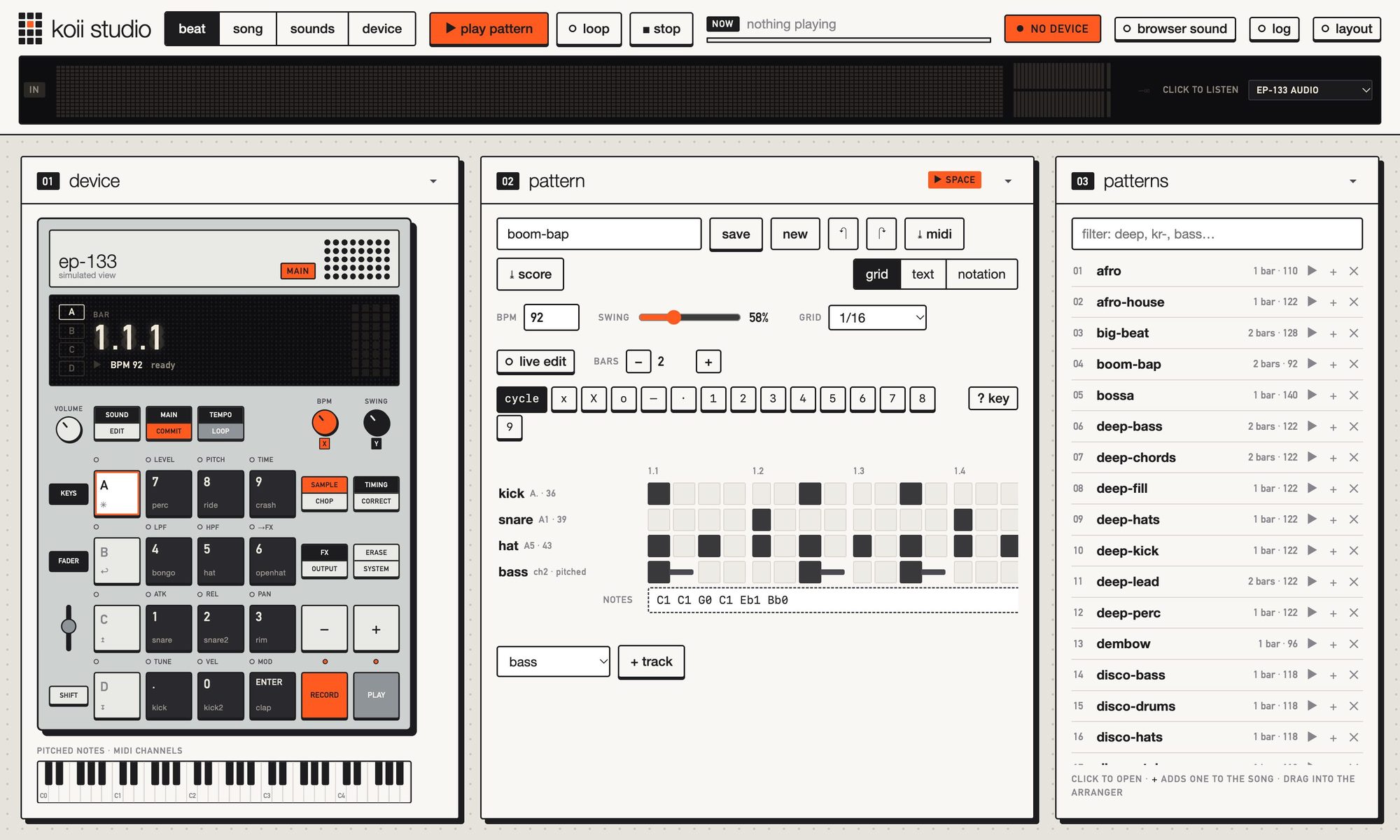
An MCP server that lets Claude make beats and songs with you on an EP-133 K.O. II over MIDI.
You talk about the music; Claude writes patterns in a small, strict text notation, plays
them on your device, loops them while you iterate, and arranges them into songs.
@bpm 92
@swing 58

kick:  x... ..x. x... ....
snare: .... x... .... x..o
hat:   x.x. x.x. x.x. x.xX
Install
Requires Python 3.9–3.12 and an EP-133 connected over USB-C. (Python 3.13 works too, butpython-rtmidi, which talks to the MIDI hardware, has no prebuilt wheels for it yet and
will compile from source.)
git clone https://github.com/benjaminr/mcp-koii.git
cd mcp-koii
uv venv --python 3.12 .venv
uv pip install -r requirements.txt

# Add to Claude Desktop
mcp install koii_studio_server.py --name koii-studio -e .

# Or try it in the MCP inspector
mcp dev koii_studio_server.py -e .
For Claude Code: claude mcp add koii-studio -- /path/to/mcp-koii/.venv/bin/python /path/to/mcp-koii/koii_studio_server.py.
Making music
Ask Claude something like "connect to my K.O. II and let's make a slow boom-bap beat",
or use the make_a_beat prompt. A typical session:
connect(): finds the EP-133 automatically.open_visualiser()shows it all live.- Claude writes a pattern, checks it with
check_pattern, and runsplay(..., loop=True). - You say what to change. Each new
playswitches at the end of the current loop,
so the groove never stops while you iterate. save_pattern("verse", ...)keeps versions you like (saved to~/.koii-studio/library.json).save_song("track", "intro x2, verse x4, verse+bassline x4, chorus x8, outro")andplay("track").export_midi("track")writes a.midfile for your DAW.
The visualiser
The server also runs a live page at http://127.0.0.1:8133 (ask Claude to open_visualiser).
It shows everything that happens, whoever does it: Claude's tool calls, your edits, and
pads you press on the device.
It has four views, one per job, switched from the top bar (and linked: #beat, #song,#sounds, #device). GUIDE.md walks through each one with annotated
screenshots.
| View | For | What's in it |
|---|---|---|
| Beat | making a pattern | the device simulator and keyboard, the pattern editor, the pattern list |
| Song | arranging | the song picker and arranger grid, the pattern list to drag from |
| Sounds | making sounds | the sound designer, sampler and kit maker |
| Device | what's on the EP-133 | the open project and all 48 of its pads (click one to change it), packs, the sample library and backups |
On a window at least 1100 × 600, each view is one screen with no page scrolling: modules
share the height, long lists and the designer's controls scroll inside them, and the device
simulator and the pad map scale down to fit. Smaller windows scroll as a page. The top bar
(transport, now playing, connection) and the live strip are always there, and the log
opens as a drawer. Space plays what the view is about: the pattern in Beat, the
song in Song, the sound being designed in Sounds. Each view's layout is arranged and kept
separately.
- KO II simulator: pads light as notes play (orange) and when you press them on the
device (blue); the display shows bar and beat. Click a pad to hear it. - Pattern editor with three views of the same pattern:
- Grid: a step sequencer. Paint with brushes (hit, accent, ghost, levels 1–9, hold,
rest); shift-drag holds, right-click erases. Add tracks and bars, type basslines. ? key
explains every symbol and colour. - Text: the notation itself, checked as you type, with clickable errors.
- Notation: sheet music, with a drum staff and a bass or treble staff for pitched tracks.
- Grid: a step sequencer. Paint with brushes (hit, accent, ghost, levels 1–9, hold,
- Play and stop: every ▶ toggles: press it again (or Space) to stop. The top bar's ▶,
Space and the device's PLAY play whichever you used last, the pattern editor or the
arranger; the top button says which, and that module wears a ▶ space badge. The
arranger's ▶ and each library row's ▶ play their own thing and show ■ while it plays.
Pressing play switches at once; one loop setting covers everything. Turn on Live
edit and every change to a looping pattern switches in at the end of the current pass.
Undo and redo (⌘Z / ⇧⌘Z). - Library and arranger: saved patterns, to open, play and delete, beside a song grid
with its own song picker (open, name, save, delete, new). Rows are lanes (one per pattern) and columns are sections: light
several cells in a column to layer patterns, add columns to play them in turn, and set
each section's repeats with − / +. Columns are as wide as they play, so the song's
shape shows at a glance, and the playing section lights up. Drag patterns in from the
list: onto the empty lane at the bottom for a new lane, onto a cell or a section to
layer it there, or onto + for a new section. Drag section headers to
reorder them, and move lanes up or down (the top lit lane sets a section's tempo). The
grid and the text form (intro x2, verse+bass x4) stay in step, so you can type too.
Patterns download as.midfiles. - Activity: each MCP call Claude makes, with Open in editor for its patterns.
- Live strip: the EP-133 is also a USB audio device, so a strip across the top bar
shows what it actually plays: spectrum as LED columns, stereo meters with peak hold and
clip lights, and the peak level. It only listens. Once the browser may use the EP-133's
audio input, listening starts by itself whenever the EP-133 is plugged in, and it never
falls back to your microphone. Click the strip to stop or start it (stopping keeps it
off on later visits), or switch it to the browser simulator's voices. - Samples: the EP-133's sample library (all 999 slots), with search, waveforms,
metadata, play-on-device, WAV download and backups with progress. This uses the device's
private file protocol as reverse-engineered by
ep-series-sysex; close TE's EP Sample Tool
while using it, since the device handles one file session at a time. - Sound design: a layered synthesiser and sampler that renders at the device's own
46,875 Hz (the same engine Claude uses):- Design: up to six layers (analog, FM, pluck, modal, metal, additive, noise and
sample engines), each with envelopes, a pitch drop, a sweeping filter and LFOs, into
an effects chain (EQ, drive, lofi, compressor, transient, chorus, delay, reverb,
width). - Analysis and preview: waveform, spectrum and spectrogram, pitch, loudness and
brightness, and the closest sounds already on the device. Play it here or through the
EP-133's own output. - Exploring: variations with locks, morphing towards another sound, and a library
of saved designs. - Sample: record the EP-133, bounce a pattern to a tempo-synced loop, load files,
edit (trim, fades, reverse, pitch, stretch) and chop at the hits. - Kit: twelve sounds in a style (808, 909, lofi, acoustic, industrial, glitch).
- Upload: detects the root note and fine tune, finds a seamless loop and sets the
play mode, so pads play in tune and sustain. Uploads need a complete backup, never
touch sounds koii studio didn't upload, and are checked against the device's own checksum.
See SOUND_DESIGN.md.
- Design: up to six layers (analog, FM, pluck, modal, metal, additive, noise and
- Your own layout: press layout to move modules (drag a header), resize them (drag
the corner) and hide them; reorder or hide the parts inside them; and drag the line
between two-column areas. ▾ collapses a module at any time. The layout is kept in
this browser; reset goes back to the default. - Packs: demos and kits in
~/.koii-studio/packs(none come with koii studio; ask Claude
to build one), each with its samples, a project's pad
layout, patterns, songs and credits. Install uploads the samples to empty slots
(reusing any already there), opens the project and fills its pads, and adds the songs;
remove samples deletes them to free space and empties their pads, keeping the songs. - Projects: the pad settings panel shows which project is open and opens another.
- Pad settings: click a pad on the simulated device to see what it plays on the real one,
and change its sound slot, MIDI channel, play mode or level there, live. This is how a
pad becomes a melodic voice: give a keys sound channel 3, name the channel once withset_alias("chords", "ch3"), and a pattern'schordstrack plays it in tune. See DEVICE.md. - No device? Choose Browser simulator (top right) and the page plays synthesised
drums and bass itself.
To run it without Claude: python -m koii_studio.visualiser (or koii-studio). It connects to
the EP-133 on start if it's plugged in (--no-connect to skip that). Settings:KOII_STUDIO_WEB_PORT (default 8133; the next free port is used if it's taken) and KOII_STUDIO_WEB=off
to disable it. It only listens on localhost and ignores commands from other websites.
The notation
Full spec: NOTATION.md. The short version:
kick: x...x... |
one line per sound; one character = one step (a 16th note) |
x X o 1–9 |
hit, accent, ghost, level 1–9 |
. - |
rest, hold the previous note |
spaces, | |
ignored; use them to group beats |
@bpm @swing @grid |
tempo, swing (50–75), step length |
@map bass = ch2 + bass notes: C1 Eb1 G0 |
pitched lines on a MIDI channel |
verse x4, chorus+bass x2 |
arrangements: repeat with xN, layer with + |
Sounds are named with kit aliases (kick, snare, hat, oh, clap, …), pad labels
(A1, B., CEnter) or MIDI notes. show_kit shows them all and set_alias adds your
own. Mistakes come back as errors with line and column, e.g.line 2: 'snare' has 15 steps, which doesn't divide the longest track 'kick' (16 steps).
Device setup
Drums need no setup. For basslines and melodies, give the pad its own MIDI channel: koii studio
does it over USB (set_pad, or click the pad in the Device view), or set it by hand in Sound
Edit (OS 2.0+). Dynamics (o, X, 1–9) work with no setup. Details, with
sources and what has been checked on hardware, are in DEVICE.md.
Tools
| Tool | |
|---|---|
list_midi_ports, connect, disconnect, status |
connection |
check_pattern |
validate and show a pattern without playing (no device needed) |
play, stop |
play pattern text, saved names, layers or arrangements; loop and switch seamlessly |
audition |
hear one sound or pad |
save_pattern, save_song, show, list_library, delete |
the library |
export_midi |
write a .mid file (no device needed) |
export_musicxml |
write sheet music for a pattern (MuseScore, Dorico, Sibelius…) |
list_device_sounds, play_sample |
the samples stored on the EP-133 |
backup_device, cancel_backup |
copy every sample (WAV) and project to ~/.koii-studio/backups |
upload_sample, delete_upload |
put a WAV on the device (converted to 46,875 Hz), or remove koii studio's own uploads |
sound_presets, sound_design_schema |
starting points, and every engine, effect and setting |
design_sound, vary_sound, morph_sounds |
render and describe a design (shown in the visualiser), make variations, morph |
save_design, list_designs |
the design library, plus recorded and loaded sources |
upload_design, change_sound_settings |
put a design on the device as an instrument (root, loop, play mode); change an upload's settings in place |
make_kit, kit_status, chop_source |
twelve-sound kits in a style; slices from a recording; uploads to slots in a row |
list_packs, install_pack, remove_pack, pack_status |
sample packs: put a demo or kit's samples, a project's pads, patterns and songs on the EP-133 in one go, or take its samples off to free space |
open_project |
open another project (1–9) on the EP-133 over USB |
get_pads, set_pad, undo_pad_change |
read or change pads on the EP-133 over USB: sound slot, MIDI channel, play mode, level, envelope, pan (live, checked, undoable) |
open_visualiser |
open the live browser view |
show_kit, set_alias, remove_alias, list_factory_sounds |
the kit |
Prompts: notation_guide, device_guide, sound_design_guide, make_a_beat, design_a_sound.
Development
uv pip install -r requirements-dev.txt
.venv/bin/python -m pytest
The tests check the notation from several sides: parser fuzzing, generated patterns whose
sheet music must match what plays, MusicXML re-read by music21,
and a round trip through the browser editor's own JavaScript (needs Node).
The code is in koii_studio/: notation (parser), sequence (timing, swing, arrangements,
MIDI files), player (background playback), library (persistence), studio (ties it
together), events (live updates), visualiser (the web server, with the page inkoii_studio/static/) and server (MCP tools). Device files: files (the SysEx file protocol),backup and samples. Sound design: koii_studio/synth/ (schema is the design format,engine and dsp render it, analysis, instrument for device settings, variation,edit, presets, and the designs, sources and factory stores), joined up bysound_design. Set KOII_STUDIO_HOME to keep the library, designs and sources somewhere else.
Acknowledgements
- Teenage Engineering for the EP-133 K.O. II.
- Anthropic for Claude and the Model Context Protocol.
- MIDO for MIDI handling.
- ep-series-sysex by Kevin Morrill, for the
reverse-engineered file protocol behind samples, backups, packs and pad settings (MIT; see
THIRD_PARTY_NOTICES.md).
Use at your own risk
koii studio is a hobby project, provided as is, with no warranty (see LICENSE).
Besides playing notes over MIDI, it writes to the EP-133's own storage through a private
protocol that teenage engineering doesn't document or support: uploading and deleting
samples, and changing pads and the open project. It takes care to do that safely (a
complete backup before any upload, only its own uploads changed or deleted, every write read
back and checked), but a firmware update or an unexpected reply could still lose sounds,
projects or settings, or leave the device needing a restart. Keep your own backups, close
TE's EP Sample Tool while koii studio is running, and use it at your own risk.
Licence
koii studio is free software under the MIT licence: use it, change it and share it,
including commercially, as long as the copyright notice stays with it.
Audio isn't part of koii studio: packs bring their own, with their sources credited in eachpack.json. The demo packs made while building it use only public-domain recordings.
Screenshots: koii studio's own page. koii studio isn't affiliated with or endorsed by teenage engineering; EP-133 and
K.O. II are their trademarks.
Reviews (0)
Sign in to leave a review.
Leave a reviewNo results found