ready-for-agent
Health Warn
- No license — Repository has no license file
- Description — Repository has a description
- Active repo — Last push 0 days ago
- Community trust — 15 GitHub stars
Code Fail
- exec() — Shell command execution in .agents/skills/audit-opencode-session-tokens/scripts/audit.ts
- spawnSync — Synchronous process spawning in .agents/skills/audit-opencode-session-tokens/scripts/audit.ts
Permissions Pass
- Permissions — No dangerous permissions requested
No AI report is available for this listing yet.
Get to 150+ PRs a week by letting ready-for-agent do the babysitting of your clankers, while you do the valuable work
Ready for Agent: Clanker Harness for 150+ PRs a week
Create issues in GitHub and use this harness to implement them, review
the code, create a PR, and merge the PR. It supports a different way
of working: you talk to your agent to create GitHub issues, and this
harness works on them.
It's a loop based around issues labelled with ready-for-agent. The
harness will only show these, you select the ones you want to work on,
and it autonomously completes the task using your preferred coding
agent. You can even select a parent issue, and ready-for-agent will
implement all child issues.
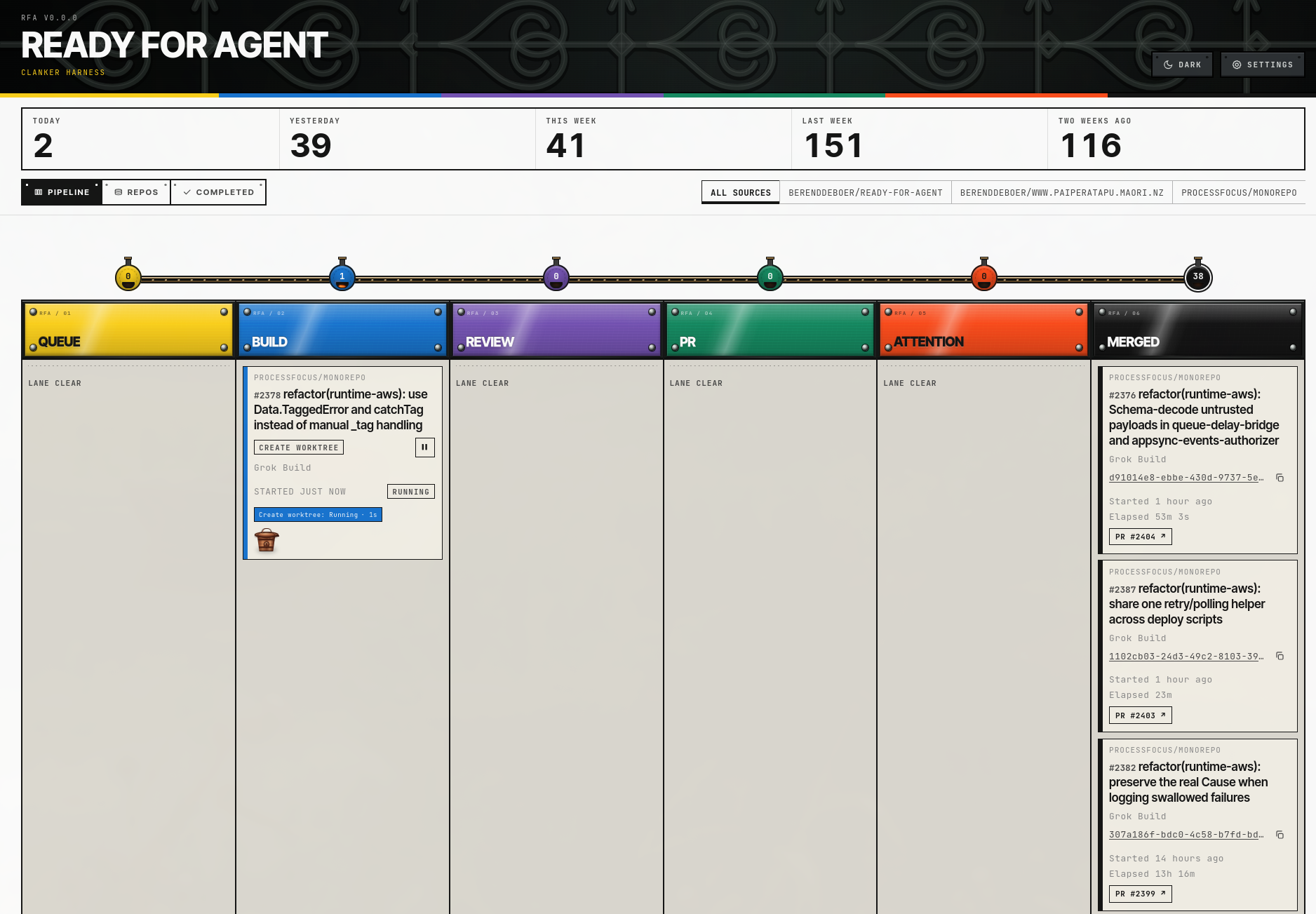
It very much supports a HITL workflow (Human in the Loop): you design,
you architect, you verify where needed.
It works very well if you follow the Matt Pocock
workflow: start a
grilling session, create a specification (/to-spec), then create
tickets (/to-tickets). These tickets will be labeled with
ready-for-agent, and show up immediately in the harness. Install his
Skills for Real Engineers to
get started with this kind of workflow.
Steps 1 to 3 are you. Steps 4 and 5 are the harness.
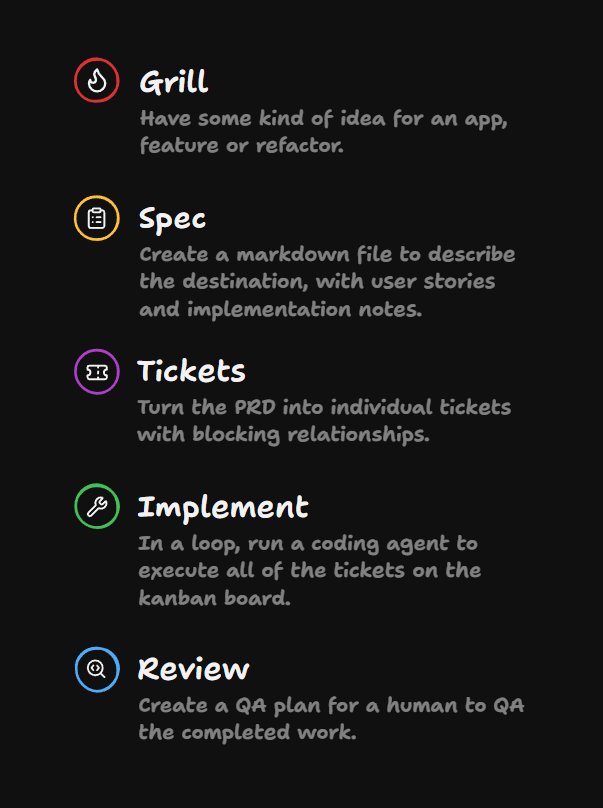
But as long as an issue has the ready-for-agent label, this tool can
work on it.
How it works
The harness creates a new worktree, installs packages, and asks a
selectable headless Agent Backend (OpenCode,
Codex, Grok
Build, or Claude
Code) to implement the
issue, review the issue, create a PR, and merge if allowed.
The goal of this clanker harness is to get you to that 25+ PRs merged
a day nirvana. It does that by removing the time spent babysitting an
agent and guiding it through the implementation, review, commit, and PR
status-check stages.
See the introduction
video to see the tool in
action.
Usage
Requires a supported platform: Linux, macOS, or Windows (x64 or arm64).
Run:
npx ready-for-agent@latest
Or install the package and use the ready-for-agent command:
npm install -g ready-for-agent
ready-for-agent
This opens the UI in the browser
(http://127.0.0.1:6056/). This shows the
configured state. If you open this for the first time, you will be
prompted to set a default build model and effort (thinking), and configure repos.
Stop opening a browser window
Disable opening a browser window with:
ready-for-agent --no-open
# or
NO_BROWSER=1 ready-for-agent
Use a different port
Use a different port than 6056:
PORT=7000 ready-for-agent
Configuring a repo
If you open ready-for-agent without any repo configured, it will prompt. Add with:
ready-for-agent add /path/to/local/repo
If you use a non-default port:
READY_FOR_AGENT_GRAPHQL_URL=http://127.0.0.1:7000/graphql \
  ready-for-agent add /path/to/local/repo
Working on issues
Currently the harness does not automatically pick issues to work
on. Click on the kebab menu and implement this end to end via
"Implement now".
You can configure your repo to automatically merge the PR. Default is
for human review to take place. If auto-merge is enabled, the harness
will ask the AI about the risk of auto-merge. Only low risk PRs are
auto-merged, higher risk still require human review.
Pick the "Implement locally" option to implement the issue in the new
worktree, but without creating a PR yet. This allows you to test and verify.
Assumptions
- You use GitHub or GitLab.
- You have a repo cloned locally, either "normally" or as a bare clone
(recommended). Install the git-bare-worktree
skill and let
your agent create this setup for you:npx skills@latest add berenddeboer/git-bare-worktree --global - The harness is designed to run on your local laptop. This avoids
cloud costs, and you already paid for an extensive
machine. Secondly, your machine will be set up for your repo, so we
avoid the setup issues you get with running compute in the cloud. - Ideally, you have set up a CI pipeline with automated build/test and an AI code review.
Requirements
Always required on PATH (start fails fast if missing):
Forge-specific tools (required only when at least one Repository uses that
Forge):
- GitHub CLI (
gh) for GitHub Repositories - curl for GitLab Repositories.
glabis an optional
ambient credential source, not a required host tool.
Agent Backend executable (only the backend selected in Settings is
required; default is OpenCode):
- OpenCode (
opencodeon PATH) when OpenCode is the
selected Agent Backend - Codex (
codexon PATH) when Codex is the
selected Agent Backend - Grok Build (
grokon PATH) when Grok Build is the
selected Agent Backend - Claude Code (
claudeon
PATH) when Claude Code is the selected Agent Backend
Authenticate Grok Build with grok login or XAI_API_KEY before Recheck /
Agent Turns. Harness-launched Grok processes disable auto-update for that
session (--no-auto-update / GROK_DISABLE_AUTOUPDATER). Grok Build Agent
Turns do not integrate Keymaxxer; Session Telemetry is live-read from on-disk
Grok session files under $GROK_HOME/sessions (default ~/.grok). Authenticate
Claude Code with claude auth login or ANTHROPIC_API_KEY before Recheck /
Agent Turns. Harness-launched Claude processes disable auto-update for that
session (DISABLE_AUTOUPDATER). Claude Code Agent Turns do not integrate
Keymaxxer; Session Telemetry is unsupported in v1. Opt-in live adapter tests
use GROK_INTEGRATION=1 / OPENCODE_INTEGRATION=1 / CODEX_INTEGRATION=1 /CLAUDE_INTEGRATION=1; normal CI does not need paid model credentials.
KeyMaxxer
Ready for Agent supports
keymaxxer, but does not
require it. With KeyMaxxer secrets stay encrypted, and are only
granted to agents when they need them.
Keymaxxer is automatically enabled if keymaxxer is in your path. Disable with:
KEYMAXXER_ENABLED=false npx ready-for-agent@latest
Frequently Asked Questions
- Is there support for agents other than OpenCode?
Yes. Settings can select OpenCode,
Codex, Grok Build, or
Claude Code as the
instance-wide Agent Backend. The change hot-activates on Save when no Work
Items are unfinished (including Needs Human). Model catalogs and effort
(thinking) options are backend-local, and build/review prefs are remembered per
backend.
- Does the harness support a Forge other than GitHub?
Yes. GitLab Repository identity, Issue reconciliation, and local Agent Turns
through Review are supported. GitLab Pull Request lifecycle operations are
being delivered in later phases.
- Can I implement something locally, and then check myself?
Yes, pick "Implement locally" from the kebab menu. Everything stays
local, and no commit is made.
Architecture
The Forge is source of truth
Issues on the configured Repository Forge (GitHub/GitLab) remain the
source of truth; the local database is book-keeping. Style and
guidelines come from the target repository—this harness steers an
agent swarm on ready-for-agent labeled work.
GraphQL API
The backend serves a GraphQL API at http://127.0.0.1:6056/graphql.
Ontology-based domain model
The Work Item lifecycle is driven by a machine-readable ontology underontology/ (Turtle + SHACL), not by ad-hoc enums scattered through the
code. States, legal transitions, guards, and glossary terms are declared
there; TypeScript types, GraphQL enums, database columns, and the runtime
transition check are generated from or validated against it. Agents propose
work; the ontology defines what a state means and which moves are legal.
See ontology/README.md and
docs/why-agentic-systems-need-ontologies.md.
Application data
Product state defaults to the platform data directory:
- Linux:
$XDG_DATA_HOME/ready-for-agent/or~/.local/share/ready-for-agent/ - macOS:
~/Library/Application Support/ready-for-agent/
The SQLite database is ready-for-agent.db in that directory. SetSQLITE_DATABASE_PATH to use another file. Stop the harness completely before
opening the database with external write tooling (single-writer SQLite).
Contributing
Contributions welcome, see CONTRIBUTING.md.
Reviews (0)
Sign in to leave a review.
Leave a reviewNo results found