FixThis
Health Warn
- License — License: MIT
- Description — Repository has a description
- Active repo — Last push 0 days ago
- Low visibility — Only 5 GitHub stars
Code Warn
- fs module — File system access in .github/workflows/promote-maven-central-staging.yml
Permissions Pass
- Permissions — No dangerous permissions requested
No AI report is available for this listing yet.
Point at any Jetpack Compose UI element, annotate it, and hand off source pinned prompts to AI coding agents. Local only, debug only, MCP native.
FixThis for Android Compose



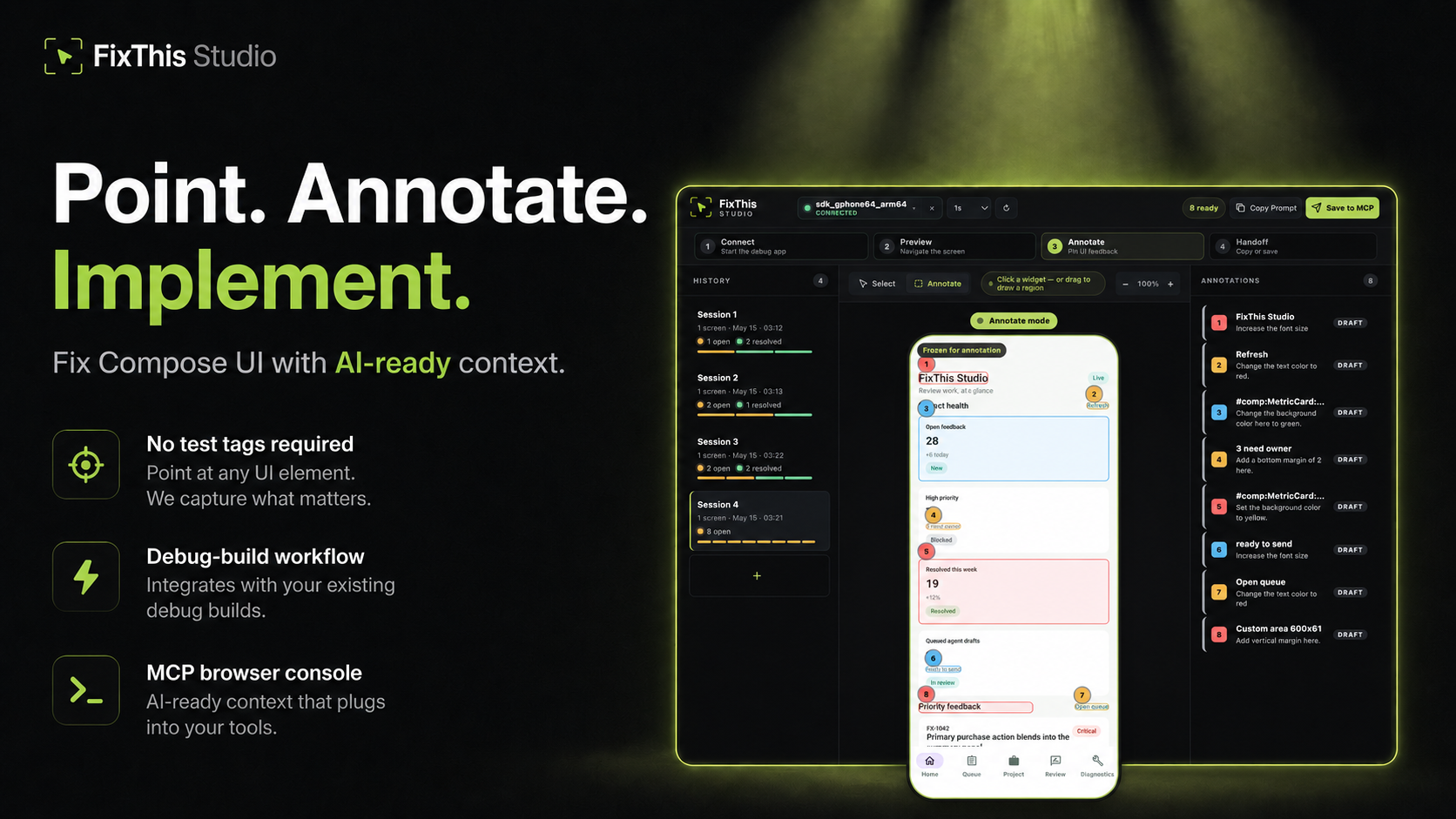
Point at a Jetpack Compose UI, write the change you want, and hand Claude,
Codex, Cursor, or another coding agent the source context it needs.
FixThis adds a debug-only sidekick to a Compose app, mirrors the current screen
into a local browser console, and turns your UI annotations into a compact
agent handoff with screenshot bounds, semantics context, source candidates, and
target-confidence warnings.
In the browser console, a single click selects the nearest Compose UI
component, and a drag selects any visual area when the target is spacing, empty
room, interop content, or another region that is not a clean component.
Works Today
- Try the bundled sample app in about five minutes.
- Install the published desktop CLI/MCP package with Homebrew on macOS or from
npm / GitHub Releases on macOS/Linux. - Add FixThis to an external Android app with the published Gradle plugin:
io.github.beyondwin.fixthis.compose. - Let Claude Code or Codex configure the sample MCP server with
./scripts/bootstrap-mcp.sh --sample. - Let an agent configure your Android app with
fixthis install-agent. - Use Copy Prompt with Cursor, ChatGPT, or any chat-style coding agent.
- Use Save to MCP with Claude Code or Codex after running the bootstrap script.
- Runs locally over ADB and
127.0.0.1; FixThis makes no external API calls. - Debug builds only. Jetpack Compose only.
Quick Start: Agent Installs FixThis in Your App
From the root of a Jetpack Compose Android app, ask Claude Code or Codex:
Install FixThis in this project and configure it for this agent.
The agent should run:
# macOS package-manager path
brew install beyondwin/fixthis/fixthis

# Node/npm path
npm install -g @beyondwin/fixthis

# macOS/Linux fallback path
curl -fsSL https://raw.githubusercontent.com/beyondwin/FixThis/main/scripts/install-fixthis.sh \
  | bash -s -- --version v0.3.0

fixthis install-agent --project-dir . --target all
./gradlew fixthisSetup
fixthis doctor --project-dir . --json
fixthis install-agent patches the detected Android app module with the
published Gradle plugin:
plugins {
    id("io.github.beyondwin.fixthis.compose") version "0.3.0"
}
The plugin adds the debug-only sidekick dependency automatically, generates
FixThis project metadata, and keeps release builds out of scope. Restart Claude
Code or Codex after MCP config is written, then callfixthis_open_feedback_console.
Quick Start: Sample App to Agent Handoff
git clone <this-repo> && cd FixThis
./gradlew :fixthis-cli:installDist :fixthis-mcp:installDist
fixthis-cli/build/install/fixthis/bin/fixthis doctor --package io.github.beyondwin.fixthis.sample
fixthis-cli/build/install/fixthis/bin/fixthis run --package io.github.beyondwin.fixthis.sample
fixthis run installs the sample debug APK, launches it, attaches the
sidekick bridge, and opens FixThis Studio at http://127.0.0.1:<port>.
In the console:
- Click Annotate.
- Click a Compose UI element, or drag a visual area.
- Type the requested change.
- Click Add annotation.
- Click Copy Prompt for any chat-style agent, or Save to MCP for
Claude Code / Codex.
You are done when the console shows a numbered annotation and you have either
copied compact Markdown or saved a local MCP handoff.
Pick Your Path
| Goal | Start here |
|---|---|
| Try FixThis without touching your app | Quick Start with the sample |
| Add FixThis to your Compose debug build | Add FixThis to your app |
| Connect Claude Code, Codex, Cursor, or a chat agent | Connect your agent |
| Let an agent bootstrap MCP from the repo | MCP bootstrap |
| Learn the browser console workflow | Feedback console tour |
| Understand the product concept and handoff rationale | Concept and handoff rationale |
| Diagnose setup problems | Troubleshooting |
| Inspect CLI, MCP, or JSON contracts | Documentation index |
| Contribute | Contributing guide |
Why FixThis vs. just sending a screenshot?
Modern coding agents already accept screenshots and accessibility trees. FixThis differs in three ways:
- Pin to source, not pixels. Top-3 ranked source-file candidates with line numbers, match reasons, and a margin score — the agent edits the right call site instead of guessing which composable rendered which pixel.
- Stable target identity. Instance grouping (
instance i/N), duplicate-marker detection, and overlap-group hints keep N visually identical cards distinguishable. - Screen integrity checks. Frozen previews carry a screen fingerprint; if the app rotates, changes window mode, or otherwise moves to a different screen before saving, FixThis asks you to re-capture, force-save, or cancel.
- Honest target confidence. Handoffs can mark visual-only, stale, or
possible AndroidView/WebView targets so agents know when to verify rather
than trust source hints directly. - Retry-safe local batches. Slow or retried
Copy Prompt/Save to MCP
saves reuse browser draft ids, so duplicate requests do not create duplicate
agent work. - Batched, structured handoff. One prompt can carry many annotations across many screens, each with its own bounds, severity, and source pin.
If your screen has a single obvious target with clear text, a plain screenshot may already be enough. FixThis pays off when the UI is dense, list-rendered, or labeled mostly by composable name.
Module Map
| Module | Role |
|---|---|
:app (sample/) |
Validation sample app |
:fixthis-compose-core |
Pure Kotlin domain |
:fixthis-compose-sidekick |
Debug Android runtime |
:fixthis-gradle-plugin |
Source-index generation and debug DI |
:fixthis-cli |
Desktop CLI |
:fixthis-mcp |
stdio MCP server and local HTTP feedback console |
Product and architecture details live in
Concept and handoff rationale,
Product concept,
Decision rationale, and
Architecture overview.
Status
FixThis has public artifacts for the agent-first path:
- Gradle plugin:
io.github.beyondwin.fixthis.compose - Maven artifacts:
io.github.beyondwin:fixthis-compose-sidekickandio.github.beyondwin:fixthis-compose-core - Homebrew tap:
brew install beyondwin/fixthis/fixthis - CLI/MCP package: GitHub Release asset
fixthis-cli-mcp-vX.Y.Z.tar.gz - npm wrapper:
npm install -g @beyondwin/fixthis - MCP Registry entry:
io.github.beyondwin/fixthis
The live release dashboard is
Release readiness. It lists current
coordinates, verification commands, and registry follow-ups.
Current main may contain changes after the latest tag. SeeCHANGELOG.md and
release notes before cutting another release.
Agents working inside this repository should also read AGENTS.md.
Trust and Privacy
FixThis is local-first: the sidekick talks to the desktop tools over ADB, the
browser console binds to localhost, and Save to MCP writes local files under.fixthis/. FixThis does not call an external AI API.
Screenshots may still contain sensitive pixels. Review copied prompts or local
artifacts before sharing them outside your machine, and do not commit.fixthis/.
Details: Privacy, Security, and
Threat model.
Roadmap
FixThis V1 stays intentionally narrow: Jetpack Compose debug builds, local ADB
transport, MCP-first handoff, best-effort source candidates, and no cloud
upload.
The detailed roadmap lives in Roadmap. It covers V1
scope, public artifact release work, deeper interop awareness, SSE-driven
console state sync, smarter source matching, and future agent integrations.
License
MIT License. See also NOTICE for third-party attribution.
Reviews (0)
Sign in to leave a review.
Leave a reviewNo results found