solvecraft
Health Pass
- License — License: Apache-2.0
- Description — Repository has a description
- Active repo — Last push 0 days ago
- Community trust — 10 GitHub stars
Code Fail
- rm -rf — Recursive force deletion command in .github/release/package-linux.sh
- rm -rf — Recursive force deletion command in .github/release/package-macos.sh
Permissions Pass
- Permissions — No dangerous permissions requested
No AI report is available for this listing yet.
Parametric 3D CAD in pure Rust: sketches, constraints, a feature timeline, B-rep solids. Desktop, browser and an MCP server so AI agents can model too.
SolveCraft
SolveCraft is an open-source parametric 3D CAD application written in Rust, in the style of
Autodesk Fusion: sketch on a plane, constrain and dimension the sketch, turn profiles into solids
with extrude and revolve, round edges, combine bodies, and change a parameter to watch the whole
timeline rebuild. It is a clean-room implementation (see CLAUDE.md) and part of the
storytold "craft" family.
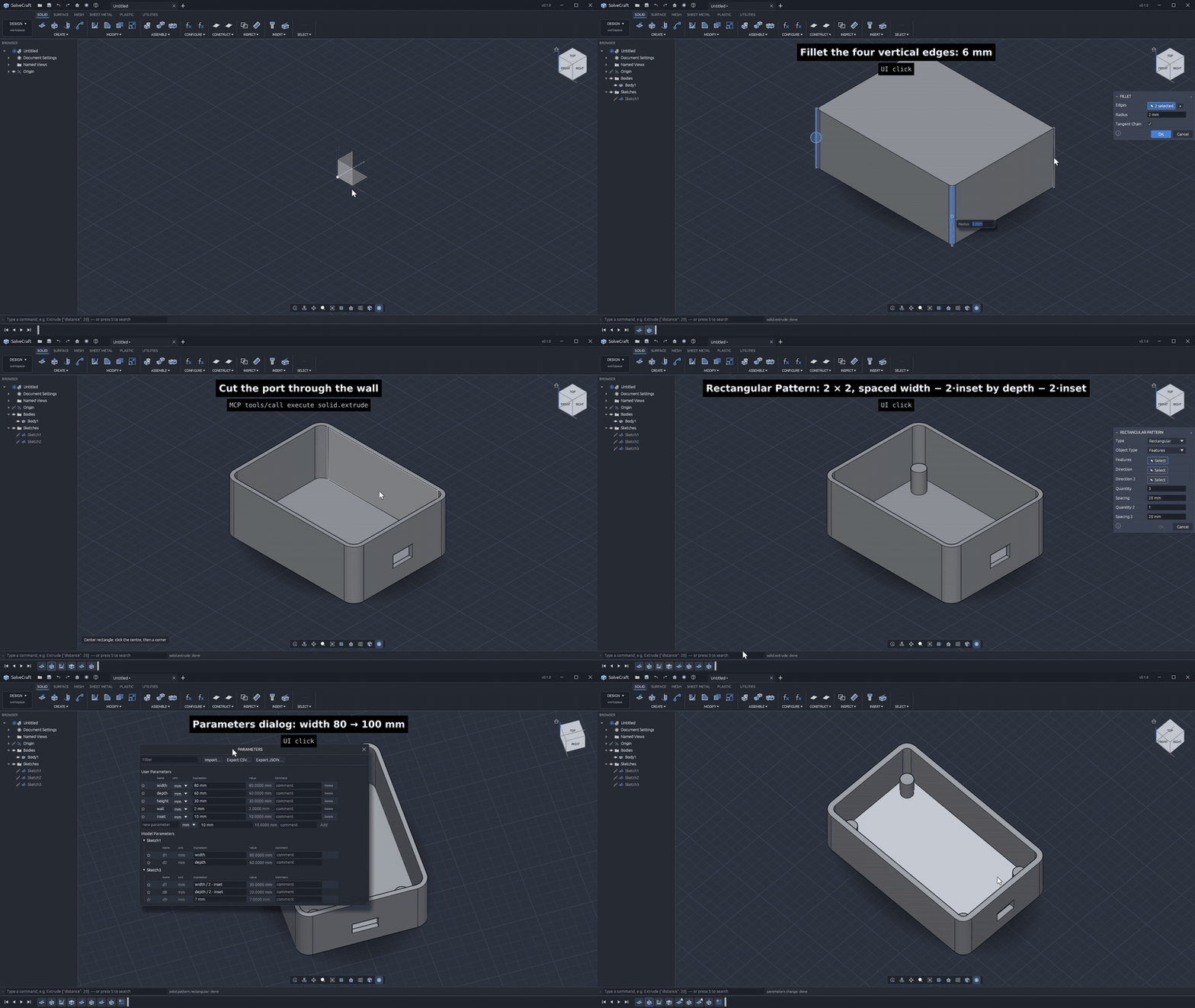
An agent builds an electronics enclosure over MCP: sketches on faces, shell, a port cut, one screw boss patterned to four, then width 80 → 100 mm in the Parameters dialog and the timeline rebuilds. 3× speed; full video, script in examples/demo.
Documentation: the SolveCraft book (user guide,
developer guide and command reference; sources in docs/book), and the
web app to try it in the browser.
Status: early but usable for simple parts. 76 of 76 reference parts built in Fusion
rebuild in SolveCraft with the same volume, area and topology (docs/oracle.md);
command parity with Fusion's Design workspace is tracked in docs/parity.md.
Open work and known bugs are in GitHub issues,
and help is welcome: see CONTRIBUTING.md.
What works
- Sketches on the origin planes, offset planes or planar faces: lines, rectangles (2-point,
3-point, centre), circles (centre, 2-point, 3-point), arcs (3-point, centre), polygons, slots
and points; construction geometry. - Constraints and dimensions solved by our own solver (damped Gauss–Newton with
degree-of-freedom analysis): coincident, horizontal/vertical, parallel, perpendicular, tangent,
equal, concentric, collinear, midpoint, symmetry, fix; linear, aligned, horizontal, vertical,
radius, diameter and angle dimensions driven by parameters. Over-constraining edits are
rejected; fully constrained geometry turns black. - Profiles found automatically, including regions split by lines and holes inside outlines.
- Features on a parametric timeline: extrude (one side, flipped, symmetric, two-sided, start
offset; new body, join, cut, intersect), revolve, fillet and chamfer (straight convex edges),
box, cylinder, sphere, torus, combine, move. The timeline rebuilds incrementally from the first
changed feature; it can be rolled back, and features can be suppressed, renamed, edited and
deleted. - Parameters with unit-aware expressions (
2 * width + 5 mm,angle / 2). - Files: designs as JSON (
.solvecraft), export to STEP (AP242 with body names, colours and
components as assemblies; revolved faces as native planes, cylinders, cones, spheres and tori),
IGES 5.3 (manifold solid B-reps with names and colours), 3MF, STL (binary/ASCII) and OBJ;
3MF, STL and OBJ import as mesh bodies (they render, measure, move and export; solid features
need B-rep bodies);
STEP import (AP203/AP214/AP242 solids, assemblies, units, names, colours) and IGES import
(manifold solid B-reps, or trimmed and bounded surfaces sewn into solids) as a base feature
that later features build on — open a.step/.stp/.igs/.igesfile, insert one into a
design, or drop it on the window (docs/step-import.md). - Desktop app (egui + wgpu): toolbar with workspace tabs, browser, timeline, 3D viewport with
view cube and navigation bar, sketch tools, feature dialogs, command palette, and a JSON-lines
control channel so agents and tests can drive it. - Headless CLI
solvecraft-cli: run command scripts, measure (volume, area, centre of mass,
face/edge/vertex counts), export, render PNG snapshots, replay Fusion oracle recipes. - MCP server
solvecraft-cli mcp: AI agents model, measure and look at parts headless or
in the running app (see below).
Build and run
cargo run --release -p solvecraft -- --sample          # desktop app with a sample part
cargo run --release -p solvecraft-cli -- commands      # the command registry
cargo run --release -p solvecraft-cli -- run examples/bracket.json --out bracket.step
cargo run --release -p solvecraft-cli -- snapshot examples/bracket.json --out bracket.png
cargo run --release -p solvecraft -- part.step          # open a STEP file as a new design
cargo run --release -p solvecraft-cli -- eval part.step # measure an imported STEP file
cargo xtask ci                                          # fmt, clippy, tests, assets, layers, wasm
Windows builds: cargo xwin build --release --target x86_64-pc-windows-msvc -p solvecraft.
In the browser: cd apps/solvecraft-web && trunk build --release --public-url ./ (WebGPU, or
WebGL2 with ?webgl; ?sample opens the sample part).
Scripts
A script is a JSON list of commands, the same ones the UI runs:
{"commands": [
  {"command": "sketch.create", "params": {"plane": "XY"}},
  {"command": "sketch.rectangle.two_point", "params": {"p0": [0, 0], "p1": [40, 30]}},
  {"command": "solid.extrude", "params": {"distance": 20}},
  {"command": "solid.fillet", "params": {"edges": [[0, 0, 10]], "radius": 3}}
]}
AI agents (MCP)
solvecraft-cli mcp is a Model Context Protocol server on
stdio. Headless it runs its own design session; with --connect 127.0.0.1:PORT it drives the app
started with solvecraft --control PORT, so you can watch the agent model. Tools:list_commands, execute, batch, inspect_design, measure, body_topology,set_parameter, screenshot (returns the image), export, undo, redo, new_design, open,save. Claude Code: claude mcp add solvecraft -- solvecraft-cli mcp. Details, client
configuration and an example session: docs/mcp.md.
Architecture
| Layer | Crates | Role |
|---|---|---|
| L0 | geom |
vectors, planes, profiles, meshes and their measures |
| L1 | sketch, kernel, render |
constraint solver and profiles; the B-rep kernel boundary (truck); view math and CPU rasterizer |
| L2 | doc |
parameters, expressions, the feature timeline and its incremental evaluation |
| L3 | io |
design files, STL/OBJ/STEP/3MF export, STEP and 3MF/STL import features |
| L4 | engine |
the session and the command registry (everything is a command) |
| L5 | ui-egui, mcp |
the swappable desktop front end; the MCP server (headless or bridged to the app) |
| apps | solvecraft, solvecraft-cli |
desktop app, headless CLI |
Contributing
See CONTRIBUTING.md: how to build and test, the code map, the clean-room
and licence rules, and where help is wanted most.
Licence
MIT OR Apache-2.0, at your option. SolveCraft is not affiliated with Autodesk; Fusion is a
trademark of Autodesk, Inc.
Reviews (0)
Sign in to leave a review.
Leave a reviewNo results found