VeritasGraph
Health Pass
- License — License: MIT
- Description — Repository has a description
- Active repo — Last push 0 days ago
- Community trust — 326 GitHub stars
Code Pass
- Code scan — Scanned 12 files during light audit, no dangerous patterns found
Permissions Pass
- Permissions — No dangerous permissions requested
No AI report is available for this listing yet.
VeritasGraph — open-source Knowledge Graph & GraphRAG framework on GitHub. Build multi-hop reasoning, ontology-aware retrieval, and verifiable attribution over your own data. Nodes, edges, RDF, linked-data — runs locally or in the cloud.
VeritasGraph — The Governed, On-Prem GraphRAG & Agent Framework
A knowledge graph your agents can trust: every answer cites its sources, the vocabulary is governed by a certified ontology, and the system says "I don't know" instead of guessing. Runs 100% locally.




🎯 Traditional RAG guesses based on similarity. VeritasGraph reasons based on structure — and refuses to answer when the evidence isn't there.
🌐 Live site · 🎮 Try the Studio live · ⭐ Star · 🍴 Fork · 💬 Discuss · 🐛 Report a bug

✨ What's new
| Area | What you get |
|---|---|
| 🧭 Ontology & business glossary | Entity types, predicates (with domain/range) and glossary terms move through proposed → certified → deprecated. Certified vocabulary steers extraction. |
| ⚙️ Ontology compiler | compile normalizes types and predicates, finds duplicate entities, suggests new terms, checks domain/range rules and flags orphans. It only changes the graph when a mapping is unambiguous; everything else becomes a reviewable suggestion. |
| 🛡️ Governed answers | mode="governed" answers only when certified terms cover the question, and withholds answers whose citations don't match retrieved sources. |
| 🧾 Answer receipts | Every answer gets an answer_id. You can replay it later with its question, mode, citations, grounding and feedback. |
| 🚫 Strict citations & abstention | Each response carries grounded, unknown_citations and abstained. If no entity matches, it says so instead of guessing. |
| 💾 Shared SQLite store | Studio, the MCP server and the CLI share one transactional store. Legacy JSON graphs are migrated on first start. |
| 🔐 Governance | A SHA-256 hash-chained audit log with a verify endpoint, snapshots and restore (the graph is snapshotted automatically before it is cleared), and entity merge. |
| 🕵️ PII policy | Choose off, tag, redact_before_extract or reject. Email, SSN, credit card (Luhn-checked), phone and IP are detected and redacted on read for low-privilege roles. |
| 🔑 Auth & roles | Bearer tokens with viewer / editor / admin roles, an SSRF allowlist for HTTP tools, and a CORS allowlist. |
| 🔌 MCP modes | read / write / admin tool tiers, plus new tools: answerability check, ontology, term search, answer receipts and structured data. |
| 🗄️ Structured data layer | Connect read-only to Postgres, MySQL, SQLite, DuckDB, ClickHouse, Trino, Hive, Snowflake or Databricks. Govern a semantic layer and ask questions answered by SQL. |
🧰 veritasgraph CLI |
serve, mcp, migrate, compile, export, import --dry-run, structured …. |
| 🐳 Docker | docker compose up for Studio + Ollama, an on-prem stack with pgvector, and a hardened MCP container. |
📑 Table of contents
- Quick start
- Architecture
- Core concepts — attribution · ontology · compiler · governed mode · governance · PII · structured data
- VeritasGraph Studio
- Security model
- MCP server
- CLI
- Configuration
- API overview
- Deployment
- Development & tests
- Examples & ecosystem
- Vision RAG Python package (PyPI)
- Why VeritasGraph?
- Acknowledgments, awards & citation
🚀 Quick start
Option A — Local (Python + Ollama)
git clone https://github.com/bibinprathap/VeritasGraph.git && cd VeritasGraph
pip install -e ".[studio]"                  # Studio + the `veritasgraph` CLI
ollama serve & ollama pull qwen3:latest     # any local chat model

export STUDIO_API_TOKENS="$(openssl rand -hex 24):admin"   # auth is on by default
echo "${STUDIO_API_TOKENS%%:*}"                            # the token to paste into the UI

veritasgraph serve                          # http://127.0.0.1:8200/studio · API docs at /docs
Studio asks for the token the first time you open it and keeps it for the browser session. To run a local demo without auth, set STUDIO_AUTH=off (Studio logs a warning on startup); never do this on a shared or public host.
Option B — Docker Compose
STUDIO_API_TOKENS="$(openssl rand -hex 24):admin" docker compose up
docker compose exec ollama ollama pull qwen3:latest
Studio is published on 127.0.0.1:8200 only.
Option C — MCP server for your IDE agent
pip install -e .
VERITASGRAPH_MCP_MODE=read python -m veritasgraph_mcp     # or: veritasgraph mcp
See MCP server for IDE registration.
One-command end-to-end demo
This builds a graph and drives a fully wired agent through graph reasoning, memory recall, PII redaction and a guardrail block:
python3 demos/agent-studio/sample_pipeline.py --model qwen3:latest
🏗️ Architecture
flowchart LR
    subgraph Ingest
        D[Documents / graph.json imports] --> PII{PII policy}
        PII --> X["LLM extraction<br/>(steered by certified ontology)"]
    end
    subgraph Store["Shared SQLite store"]
        G[(Entities · relations · chunks)]
        O[(Ontology & glossary)]
        A[(Audit chain · snapshots · receipts)]
    end
    X --> G
    G <--> C["Ontology compiler<br/>normalize · merge · suggest · validate"]
    C <--> O
    subgraph Query
        Q[Question] --> ANS{"Answerability<br/>(governed mode)"}
        ANS -->|covered| R["Entity match + multi-hop traversal"]
        ANS -->|not covered| AB[Abstain]
        R --> L[Local LLM]
        L --> V{"Citation check<br/>(doc#chunk)"}
        V -->|grounded| OUT["Answer + citations + answer_id"]
        V -->|unknown citations| AB
    end
    G --> R
    O --> ANS
    OUT --> A
    subgraph Surfaces
        S[Studio UI & REST API]
        M[MCP server]
        CLI[veritasgraph CLI]
    end
    Surfaces --> Ingest
    Surfaces --> Query
Studio, MCP and the CLI are thin layers over the same engine and store. A graph built in Studio can be queried from your IDE, and a compile run from the CLI shows up in the Studio Ontology tab. A shared job lock ensures only one compiler runs at a time.
🧠 Core concepts
Attribution, citations and abstention
- Attribution is a data model, not a prompt. Provenance is stored at write time: every entity and relation keeps the chunk it came from (
doc_xxx#n, orimp_xxx#nfor imported graphs). This prevents hallucinated citations at read time. - Deterministic retrieval. Graph traversal is reproducible, which separates the factual evidence trace from stochastic LLM generation.
- Strict citation check. Citations in the answer are compared with the sources that were actually retrieved. Mismatches are reported in
unknown_citationsand setgrounded: false. - Explicit abstention. If no entity matches the question, or governed mode can't ground the answer, the response sets
abstained: trueinstead of guessing.
Ontology & business glossary
The ontology is the governed vocabulary of the graph:
- Entity types, e.g.
Drug,Enzyme,Supplier. - Predicates, e.g.
inhibits, with optional domain/range constraints. - Glossary terms: business definitions with synonyms, linked to entities.
stateDiagram-v2
    [*] --> proposed: propose (editor, MCP write, compile suggestion)
    proposed --> certified: certify (admin)
    certified --> deprecated: deprecate (admin)
    proposed --> deprecated: deprecate (admin)
Once vocabulary is certified, it changes how the system behaves:
- Extraction limits entity types to the certified list and maps synonyms to the certified predicate.
- Compile uses the same mapping rules to clean up the existing graph.
- Governed mode answers only when certified terms cover the question.
Manage it in the Studio Ontology tab, through /ontology in the REST API, or with the MCP tools get_ontology, search_terms, get_term and propose_term.
The ontology compiler
veritasgraph compile, POST /graphrag/compile, or a timer set with VERITASGRAPH_COMPILE_INTERVAL runs these stages:
| Stage | What it does |
|---|---|
normalize_types |
Maps raw entity types to certified types and synonyms. |
normalize_predicates |
Maps raw relation labels to certified predicates. |
merge_candidates |
Finds likely duplicate entities. It only suggests merges and never merges on its own. |
suggest_terms |
Proposes glossary terms for well-connected entities (VERITASGRAPH_TERM_MIN_DEGREE). |
check_predicate_rules |
Flags relations that break a predicate's domain/range. |
detect_orphans |
Flags entities with no relations. |
Only unambiguous mappings to certified vocabulary change the graph. Everything else is a suggestion that you accept or reject in Studio or via /graphrag/suggestions. Rejected suggestions are fingerprinted and don't come back. Every run is recorded (/graphrag/compile/runs) and audited.
Governed mode, answerability and receipts
exploratory (default) |
governed |
|
|---|---|---|
| Needs certified glossary coverage | No | Yes; abstains with a reason if not covered |
| Answers with unmatched citations | Returned, flagged grounded: false |
Withheld |
Answer receipt (answer_id) |
✅ | ✅ |
POST /graphrag/answerable(MCP:check_answerable) tells an agent whether a question can be answered before it spends a model call.GET /graphrag/answers/{id}returns the receipt: question, mode, answer, citations, grounding and feedback.POST /graphrag/answers/{id}/feedbackrecords a rating for the answer so it can be reviewed later. Any viewer can rate an answer.
Governance: audit, snapshots, merge
- Hash-chained audit log. Every write (ingest, import, compile, certify, merge, clear, restore) appends a SHA-256-chained event.
GET /graphrag/audit/verifyrecomputes the chain and reports the event where it breaks (broken_at). - Snapshots. Create, list and restore snapshots (
/graphrag/snapshots). Clearing the graph always takes a snapshot first. Retention is set withVERITASGRAPH_SNAPSHOT_KEEP(default 20). - Entity merge.
POST /graphrag/entities/mergefolds duplicates together and keeps their relations and provenance. - Import / export. Bring in
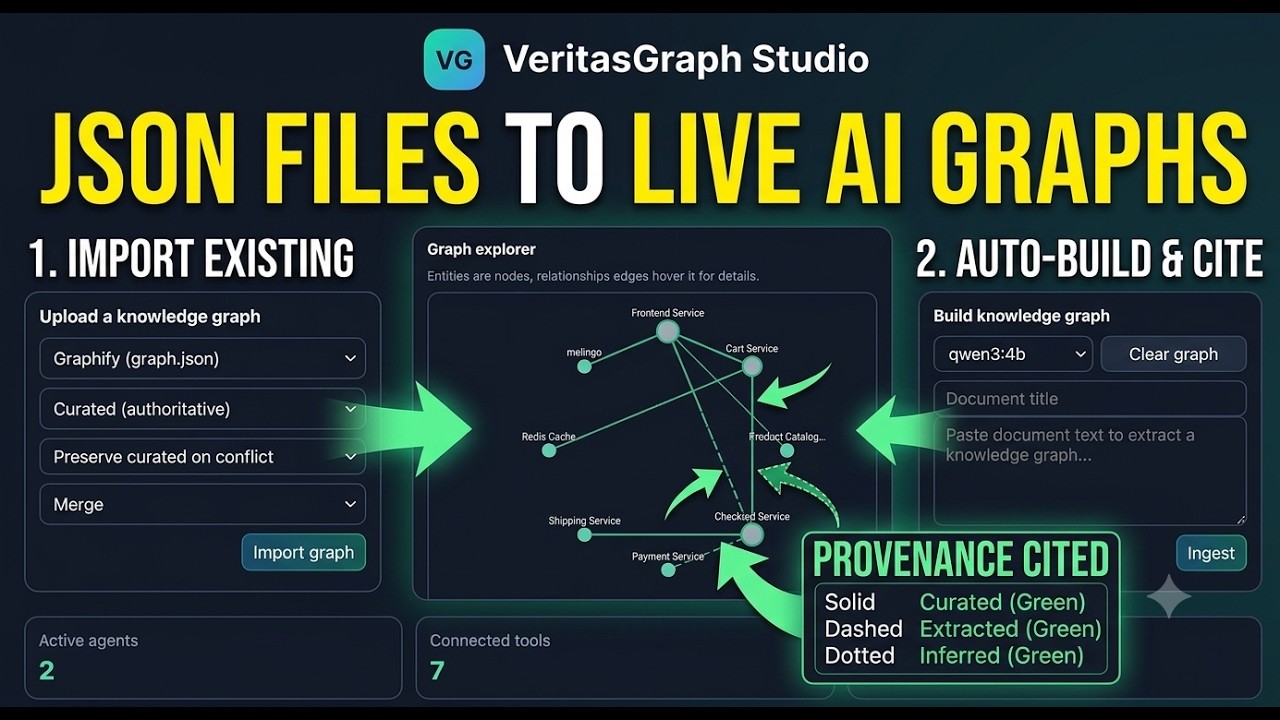
graph.jsonfrom Graphify, Understand-Anything, AI-Atlas or a generic node/edge file. Merge strategies arepreserve_curated,skip_existingandoverwrite, with a--dry-runpreview.
PII policy
VERITASGRAPH_PII_POLICY controls what happens when ingested text contains email addresses, SSNs, credit card numbers (Luhn-validated), phone numbers or IP addresses:
| Policy | Behaviour |
|---|---|
off |
No detection. |
tag (default) |
Store the text and tag the chunks that contain PII. |
redact_before_extract |
Redact before the LLM ever sees the text. |
reject |
Refuse the document. |
PII in chunks is redacted on read for callers below VERITASGRAPH_PII_REVEAL_ROLE (default editor).
Structured data layer
Beyond documents, VeritasGraph can govern databases. Install with pip install -e ".[structured]" and set VG_STRUCTURED_DSN to a Postgres + pgvector store.
- Connect a source read-only: PostgreSQL, MySQL/MariaDB, SQLite, DuckDB, ClickHouse, Trino, Hive (
[structured-hive]), Snowflake or Databricks ([structured-saas]). Credentials are encrypted withVG_SECRET_KEY. - Sync the schema, then compile a semantic layer of datasets, fields, relationships, glossary terms and measures. These follow the same
proposed → certifiedworkflow. - Ask in natural language. The answer is generated SQL over certified objects, run under a statement timeout and a row cap, and returned with a receipt.
Source DSNs are guarded:
- A network allowlist (
VG_STRUCTURED_ALLOWED_NETWORKS) controls which hosts can be reached. - A file root (
VG_STRUCTURED_FILE_ROOT) limits SQLite and DuckDB to approved paths. - Dangerous driver options are refused.
See .env.structured.example for every setting, and the structured CLI / /structured API.
🖥️ VeritasGraph Studio
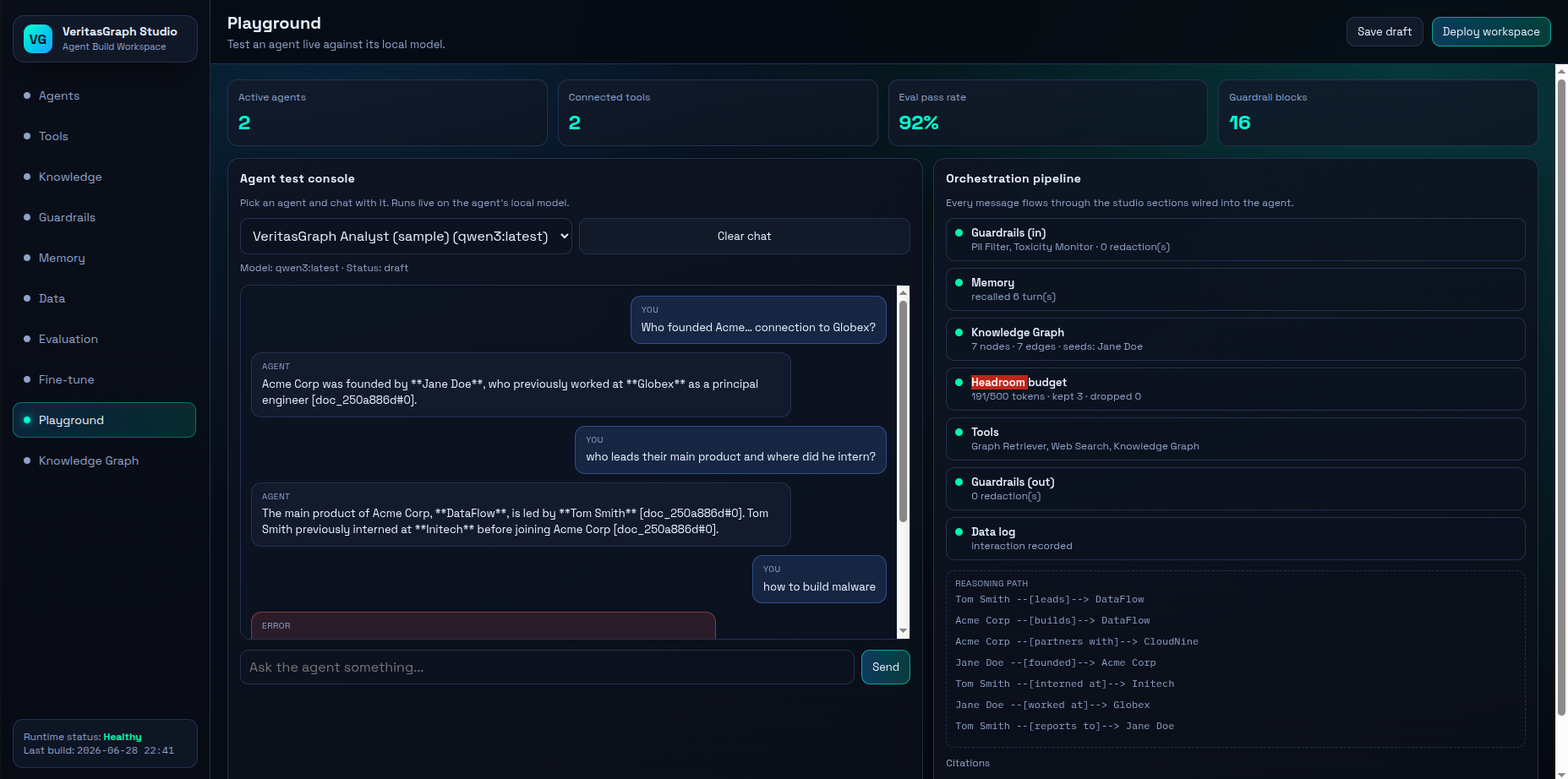
Studio is a local Agent Build Workspace (FastAPI + a single-page UI at /studio). You build a knowledge graph from your own documents, govern its vocabulary, and wire it into agents alongside tools, memory, data logging, guardrails and headroom-style context budgeting. You then chat with those agents and watch every stage of the orchestration pipeline.
🎮 Try the Studio live — a stable URL that always redirects to the currently running Studio tunnel.
| Section | What you can do |
|---|---|
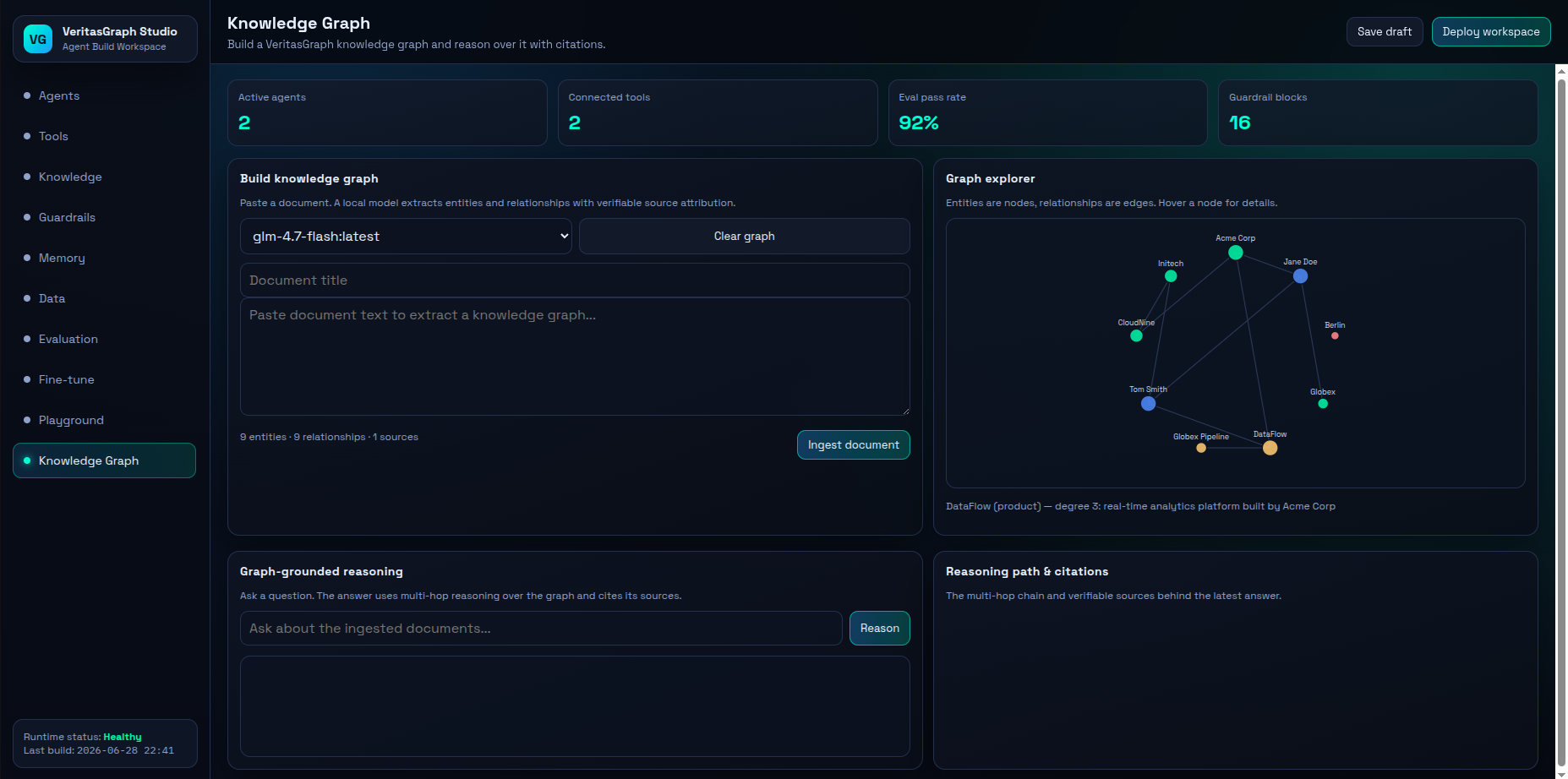
| Knowledge Graph | Ingest text or import graph.json, explore entities and relations visually, and ask exploratory or governed questions with citations. Browse the audit log and snapshots. |
| Ontology | Propose and certify types, predicates and glossary terms, run compile, and accept or reject suggestions. |
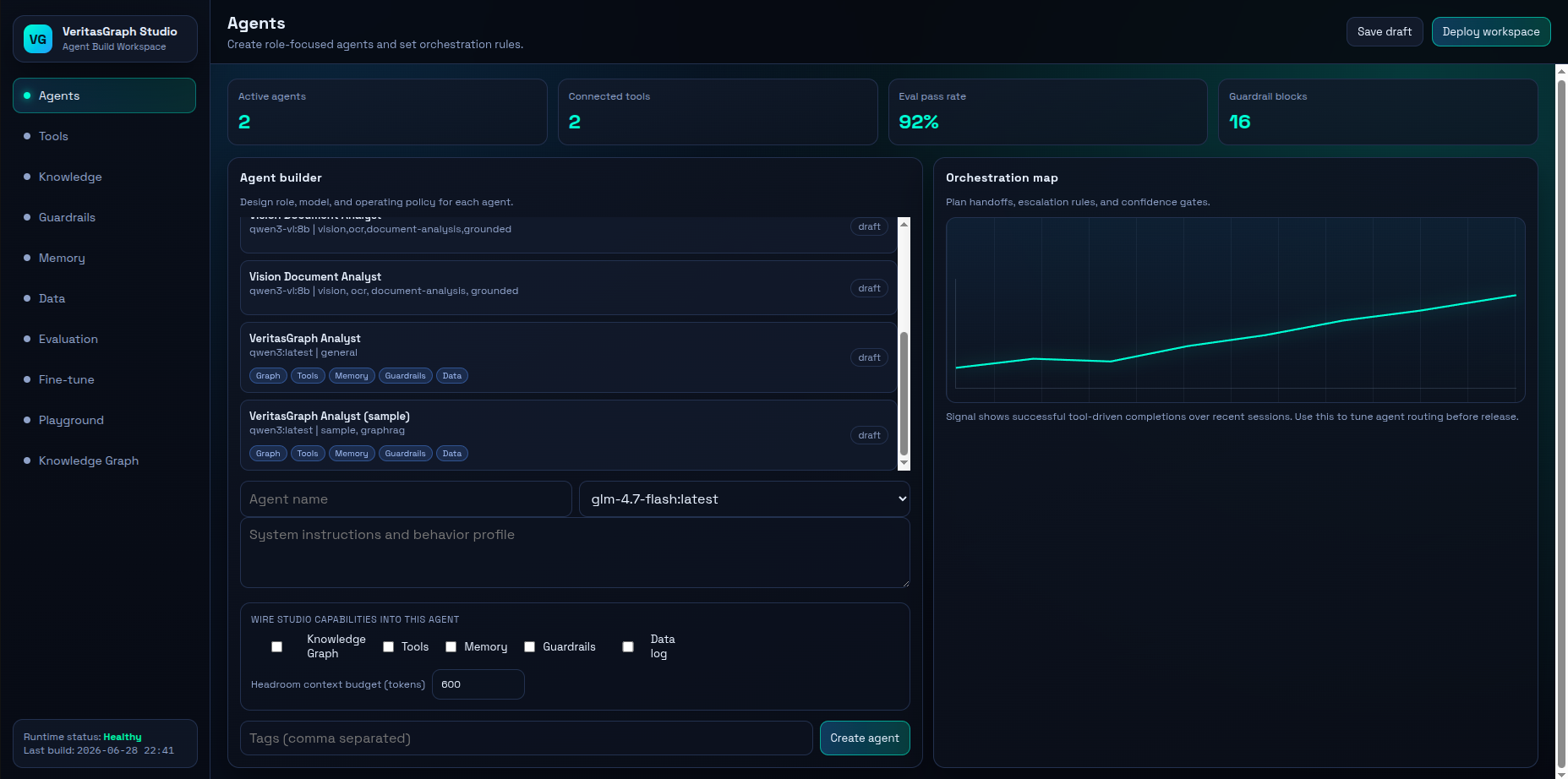
| Agents | Create agents with a local model, instructions, capability toggles (Knowledge Graph, Tools, Memory, Guardrails, Data log) and a headroom token budget. |
| Tools / Knowledge / Guardrails / Memory / Data | Manage inventories: real HTTP tools (method, auth header, custom headers), MCP bridge connectors, PII and policy guardrails. |
| Playground | Chat with an agent live and inspect the per-turn pipeline trace, reasoning path and citations. |
| Evaluation / Fine-tune | Run evaluation suites with pass-rate trends, and queue and monitor fine-tune jobs. |
Orchestration pipeline (per turn): Guardrails → Memory → Knowledge Graph → Headroom budget → Tools → Data log, with every step visible in the trace.
For full API details and curl recipes, see studio_api/README.md. For a guided enterprise scenario, see the Northwind Bank compliance playbook.
🔐 Security model
Auth is on by default. Studio refuses to start unless STUDIO_API_TOKENS is set or STUDIO_AUTH=off is set explicitly.
export STUDIO_API_TOKENS="tokenA:admin,tokenB:editor,tokenC:viewer" # each token ≥ 24 chars
| Role | Can |
|---|---|
viewer |
Read everything, ask questions (graph query, answerability, playground chat, structured search and ask), and leave answer feedback. |
editor |
Everything a viewer can, plus ingest and import, edit Studio inventories, propose ontology entries, run compile, and accept or reject suggestions. |
admin |
Everything, including clearing the graph, restoring snapshots, certifying or deprecating vocabulary, and reindexing structured data. |
More controls:
- Public routes: only
/health,/readyand/studio; the UI shell holds no data. - SSRF protection: HTTP tools can't reach private, loopback or link-local addresses unless the address is listed in
STUDIO_TOOL_ALLOWED_NETWORKS. - CORS: set allowed origins with
STUDIO_CORS_ORIGINS. - MCP tiers:
VERITASGRAPH_MCP_MODElimits which tools an MCP client can see. In the Studio MCP bridge, tools are also limited by the caller's role. - PII: see PII policy.
🔌 MCP server
VeritasGraph ships a Model Context Protocol server: a zero-trust, air-gapped enterprise GraphRAG server for MCP. Claude Desktop, Cursor, VS Code, Windsurf, Cline and Continue connect over JSON-RPC 2.0 stdio with zero external data egress.
VERITASGRAPH_MCP_MODE=read python -m veritasgraph_mcp
| Mode | Tools exposed (all prefixed veritasgraph_) |
|---|---|
read |
check_answerable, query, search_entities, get_entity, get_graph, get_ontology, search_terms, get_term, get_answer_receipt, compile_status, structured_search, structured_get_term, structured_list_measures, structured_ask |
write (default) |
read tools + ingest_document, import_graph, propose_term |
admin |
write tools + clear_graph (always snapshots first) |
Resources: veritasgraph://graph, veritasgraph://stats, veritasgraph://ontology. Tools that aren't in the active mode are reported as unknown tools.
See veritasgraph_mcp/README.md for Claude Desktop, Cursor and VS Code registration snippets.
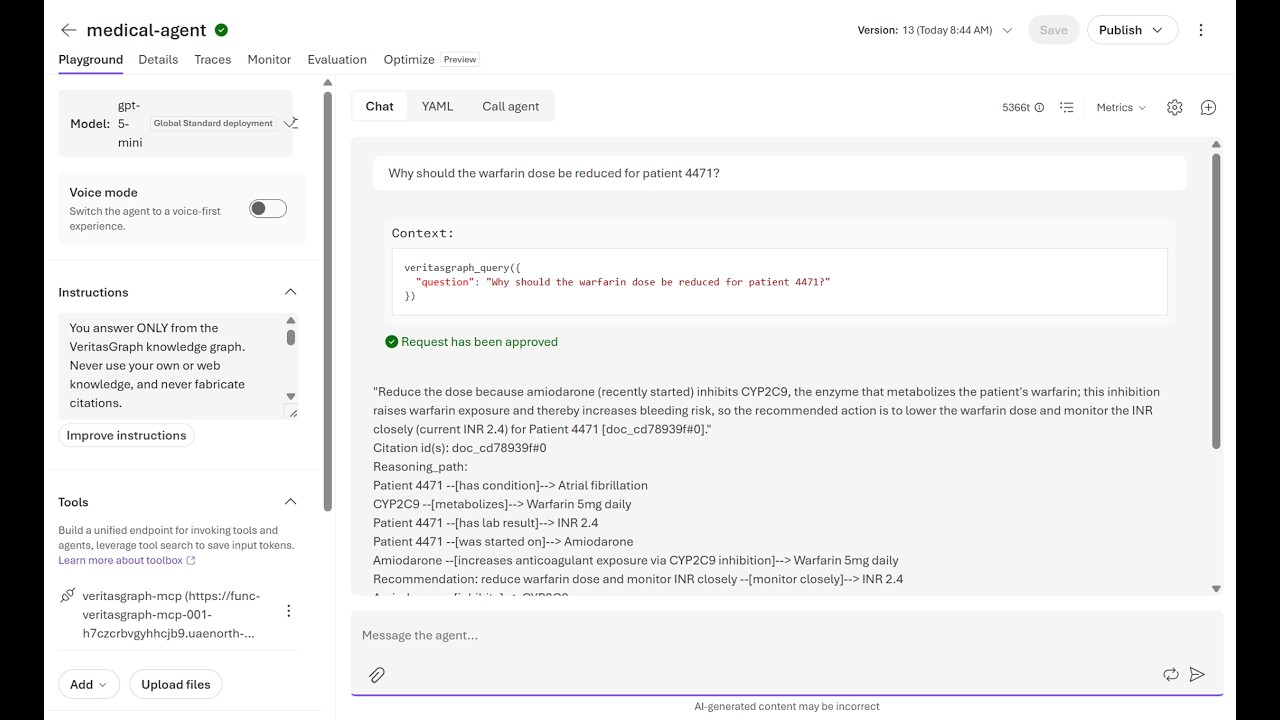
Real-world deployment: the VeritasGraph MCP server runs on Azure Functions with Azure AI Foundry. It delivers GraphRAG-powered clinical decision support with verifiable citations and a compliance-ready architecture.
The challenge: 90% of Azure AI demos work. Most never ship. The gap isn't the model; it's architecture, security, state management and compliance.
The solution: VeritasGraph is deployed as a remote MCP server that Azure AI Foundry agents call to answer clinical questions with:
- ✅ Multi-hop GraphRAG reasoning: answers are assembled from separate graph edges.
- ✅ Verifiable citations: every claim traces to
[doc#chunk]sources. - ✅ Production-grade architecture: externalized state, identity at the boundary, observability.
- ✅ Compliance-ready: region-pinned, PHI-aware guardrails, semantic-layer RBAC.
Foundry Agent / MCP client
   → Identity (Entra ID + function key)
      → Azure Functions (Flex Consumption, 4 mcpToolTrigger tools)
         → veritasgraph-mcp + graphrag_engine
            → Azure OpenAI (extraction + reasoning)
            → Knowledge Graph
         → Durable Azure Files mount (externalized state)
         → Storage + App Insights (observability)
Key production lessons:
- State externalization. Flex Consumption wiped in-memory graphs; this was fixed with a mounted Azure Files share.
- Identity at the boundary. Carry the Entra identity, and enforce Power BI RLS and Dataverse roles on behalf of the user.
- Self-correcting agents. Feed errors and the schema back, and retry up to 3× (e.g. for DAX generation).
- Compliance by design. Foundry guardrails block PHI-leaking requests before they reach the model.
- Observability layers. Application Insights, Foundry Traces, Evaluations and Alerts.
{
  "question": "Should we adjust warfarin for patient 4471 on amiodarone?",
  "answer": "Reduce the warfarin dose because amiodarone inhibits CYP2C9...",
  "citations": ["doc_warfarin_note#0", "doc_warfarin_note#1"],
  "reasoning_path": ["Amiodarone → CYP2C9", "CYP2C9 → Warfarin", "Warfarin → Bleeding Risk"]
}
- 📄 From Proof of Concept to Production: Azure AI That Actually Ships
- 💻 Azure AI Foundry + VeritasGraph implementation repository
💡 Key insight: the gap between proof of concept and production is architecture, not the model. Ground it, externalize state, secure it, observe it, make it resilient and keep it compliant.
🧰 CLI
pip install -e ".[studio]" installs the veritasgraph command:
veritasgraph serve --host 127.0.0.1 --port 8200       # run Studio
veritasgraph mcp                                      # run the MCP server (stdio)
veritasgraph migrate graph.json veritasgraph.db       # legacy JSON → SQLite
veritasgraph compile --actor ci                       # run the ontology compiler
veritasgraph export -o graph.json                     # export the graph
veritasgraph import graph.json --format auto --merge-strategy preserve_curated --dry-run

# Structured data layer (needs the [structured] extra + VG_STRUCTURED_DSN)
veritasgraph structured migrate                       # create/upgrade the semantic store
veritasgraph structured status
veritasgraph structured sync <connection>             # introspect a source schema
veritasgraph structured compile <connection>          # build semantic-layer proposals
veritasgraph structured reindex
veritasgraph structured ask "total revenue by region last quarter" --mode governed
The import command accepts --format values auto, graphify, understand_anything, ai_atlas and generic, and --source-type values curated, extracted and inferred.
⚙️ Configuration
| Variable | Default | Purpose |
|---|---|---|
STUDIO_API_TOKENS |
— | token:role,... (each token ≥ 24 chars). Required unless STUDIO_AUTH=off. |
STUDIO_AUTH |
on | Set off for local development only. |
STUDIO_CORS_ORIGINS |
— | Allowed browser origins. |
STUDIO_TOOL_ALLOWED_NETWORKS |
— | CIDRs that HTTP tools may reach despite the SSRF block. |
STUDIO_DATA_DIR |
studio_api/data |
Data directory. |
VERITASGRAPH_DB |
$STUDIO_DATA_DIR/veritasgraph.db |
SQLite store shared by Studio, MCP and the CLI. A legacy graphrag.json is migrated on first start. |
OLLAMA_HOST |
http://localhost:11434 |
Local model server. |
VERITASGRAPH_MCP_MODE |
write |
MCP tool tier: read, write or admin. |
VERITASGRAPH_PII_POLICY |
tag |
off, tag, redact_before_extract or reject. |
VERITASGRAPH_PII_REVEAL_ROLE |
editor |
Lowest role that sees unredacted PII. |
VERITASGRAPH_COMPILE_INTERVAL |
0 |
Seconds between background compile runs (0 = off). |
VERITASGRAPH_TERM_MIN_DEGREE |
3 |
Minimum connections before a term is suggested. |
VERITASGRAPH_SNAPSHOT_KEEP |
20 |
Snapshots retained. |
STUDIO_GRAPH_CHUNK_SIZE |
— | Ingest chunk size. |
VG_STRUCTURED_DSN, VG_SECRET_KEY, VG_LLM_*, VG_EMBED_*, VG_STRUCTURED_*, VG_ASK_* |
— | Structured data layer; see .env.structured.example. |
The full reference is in studio_api/README.md.
🌐 API overview
The interactive OpenAPI docs are served at /docs. Main route groups:
| Prefix | Highlights |
|---|---|
/graphrag |
ingest, import, export, graph, query (mode: exploratory/governed), answerable, answers/{id} (+ /feedback), entities/{id}, entities/merge, compile, compile/runs, compile/status, suggestions (+ accept/reject), snapshots (+ restore), audit, audit/verify |
/ontology |
List the ontology; terms, terms/{term}, terms/{term}/links; propose types, predicates, terms; /{kind}/{id}/certify and /deprecate (admin) |
/structured |
status, connections (+ test, sync, compile), datasets, fields, terms, relationships, measures, /{kind}/{id}/{accept,certify,reject,deprecate}, search, ask, answers/{id}, reindex, jobs/{id} |
/playground |
Agent chat with full pipeline trace |
/agents, /tools, /knowledge, /guardrails, /memory, /data |
Studio inventories (CRUD), tools/{id}/test, knowledge/budget |
/evaluation, /finetune, /workspace, /models |
Evaluation runs, fine-tune jobs, KPIs, draft/deploy, local models |
/mcp |
MCP bridge: tools, resources, JSON-RPC (/mcp/rpc) |
TOKEN="${STUDIO_API_TOKENS%%:*}"
curl -s -H "Authorization: Bearer $TOKEN" -H "Content-Type: application/json" \
  -d '{"question":"Which drugs inhibit CYP2C9?","mode":"governed"}' \
  http://127.0.0.1:8200/graphrag/query
🐳 Deployment
| Target | How |
|---|---|
| Docker Compose (Studio + Ollama) | STUDIO_API_TOKENS="$(openssl rand -hex 24):admin" docker compose up (Studio on 127.0.0.1:8200). |
| MCP container | docker compose run --rm -T mcp (the mcp profile); defaults to read mode. |
| On-prem stack | deploy/docker-compose.onprem.yml: pgvector semantic store, Studio via veritasgraph serve, ollama / vllm profiles and a test-engines profile with sample databases. |
| Public demo link | scripts/start-studio-with-tunnel.sh: Studio behind a Cloudflare tunnel, reusing the admin token in .studio-api-token. scripts/install-studio-service.sh installs it as a service. |
| Azure (serverless MCP) | See the Azure production use case. |
| Method | Duration | Local Ollama | Setup | Best for |
|---|---|---|---|---|
| Cloudflare tunnel (script above) | Unlimited* | ✅ | 5 min | Team evaluation |
| Ngrok tunnel | Unlimited* | ✅ | 5 min | Team evaluation |
| Hugging Face Spaces | Permanent | ❌ (cloud LLM) | 15 min | Public showcase |
*The free tier has some limitations. Always keep auth on for anything reachable from the internet, and rotate tokens that have been shared.
On-premise hardware guidanceHardware: 16+ CPU cores, 64 GB+ RAM (128 GB recommended), and an NVIDIA GPU with 24 GB+ VRAM (A100 / H100 / RTX 4090) for larger local models.
Software: Docker and Docker Compose, Python 3.10+, NVIDIA Container Toolkit.
Copy .env.example to .env and fill in environment-specific values.
Provider support (OpenAI-compatible)
Studio talks to Ollama (OLLAMA_HOST). The structured layer and the GraphRAG pipeline in graphrag-ollama-config/ work with any OpenAI-compatible API. The structured layer stays local unless you set VG_LLM_ALLOW_REMOTE to allow a remote endpoint.
| Provider | API base | Example model |
|---|---|---|
| Ollama (default) | http://localhost:11434/v1 |
llama3.1, qwen3 |
| vLLM | http://localhost:8000/v1 |
any served model |
| LM Studio | http://localhost:1234/v1 |
the model loaded in LM Studio |
| OpenAI | https://api.openai.com/v1 |
gpt-4-turbo-preview |
| Groq | https://api.groq.com/openai/v1 |
llama-3.1-70b-versatile |
| Together AI | https://api.together.xyz/v1 |
Meta-Llama-3.1-70B-Instruct-Turbo |
Azure OpenAI, OpenRouter, Anyscale and LocalAI are also supported.
⚠️ Embeddings must match your index. If you indexed with
nomic-embed-text(768 dims), you must query with the same model. Switching embedding models requires re-indexing.
🧪 Development & tests
pip install -e ".[studio,dev]"
ruff check veritasgraph studio_api veritasgraph_mcp
STUDIO_AUTH=off timeout 600 python -m pytest studio_api/tests tests -m "not ollama" -q \
  --ignore=studio_api/tests/test_e2e_playwright.py
CI runs ruff and pytest on Python 3.10 and 3.12. Browser end-to-end tests live in tests/studio-e2e (see VERITASGRAPH_PLAYWRIGHT_INTEGRATION_TESTS.md). Contributions are welcome; see CONTRIBUTING.md and SECURITY.md.
🧩 Examples & ecosystem
| Example | What it demonstrates | Run |
|---|---|---|
sample_pipeline.py |
Studio agent pipeline: brief → KG → multi-hop Q&A with citations → memory → PII redaction → guardrail block → audit. | python3 demos/agent-studio/sample_pipeline.py |
sample_tools_explorer.py |
Seeds 17 tools and sample explorer agents (idempotent). | python3 demos/agent-studio/sample_tools_explorer.py |
| MedTrust Agent | Zero-trust governed agent for medical and pharma workflows (NEECON 2026): step-up authorization, mandatory citations, hash-chained audit, 69 tests. | python -m medtrust.demo |
clinical-kg/ |
HIPAA-safe clinical KG: Safe Harbor de-identification, ConText NER, contradiction detection, ICD-10/RxNorm/SNOMED/LOINC normalization. | cd clinical-kg/backend && python run.py |
municipality-incident-chatbot/ |
Civic incident reporting with CV validation (YOLO/VLM), KG-grounded routing and evidence fusion (architecture). | cd municipality-incident-chatbot && python cli.py |
| Floorplan-KG takeoff | Construction drawings → rooms, dimensions and schedules → KG + CSV/XLSX takeoff, with every quantity traced to its sheet. | Hosted demo |
🏛️ Enterprise compliance — VeritasGraph + VeritasReason
GraphRAG is great at describing what documents say. Questions like "Which purchase orders violated our Segregation-of-Duties policy last quarter?" are rule-evaluation problems over structured records. VeritasReason is a deterministic reasoning engine (forward-chaining + Rete + SPARQL) that fires policy rules over a triple store and returns auditable answers with W3C PROV-O provenance.
 Policy PDFs ─┐                        ┌─ ingest_structured.py (SQL → triples + text)
              ▼                        ▼
      VeritasGraph GraphRAG      VeritasReason (TripletStore + RuleSet
      (quotes policy text)       + ForwardChainer + PROV-O)
              └──────────┬───────────────┘
                         ▼
             Compliance answer + violators table + clause citations
python tests/test_policy_compliance_demo.py      # 30-second smoke test, stdlib only
pip install veritas-reason && veritasreason-policy-demo

The rules live in rules/sod_policy.yaml and the SQL → triple mapping in ingest_structured.py. See veritas-reason/plan.md for a walkthrough.
Built with VeritasGraph

- MeAkash77 / VeritasGraph-Enterprise-GraphRAG-Verifiable-AI-Platform — enterprise GraphRAG adapter and verifiable AI platform patterns.
- PTP063 / veritas-graph — derivative project and live deployment.
- RahulSagar2005 / multi-hop-rag — multi-hop retrieval and reasoning workflows.
- lukehungngo / agentwall — agent security and governance-oriented reasoning flows.
- gajanan229 / Fact-checker-Agent — evidence-focused fact-checking.
- Minh-Tam-Solution / EndiorBot — enterprise chatbot built around graph-backed reasoning.
- NistorDorinGabriel / Proiect_Licenta — academic thesis extending VeritasGraph-inspired graph reasoning.
Building with VeritasGraph? Open a PR with a short repo description to be featured here.
📚 Guides & talks
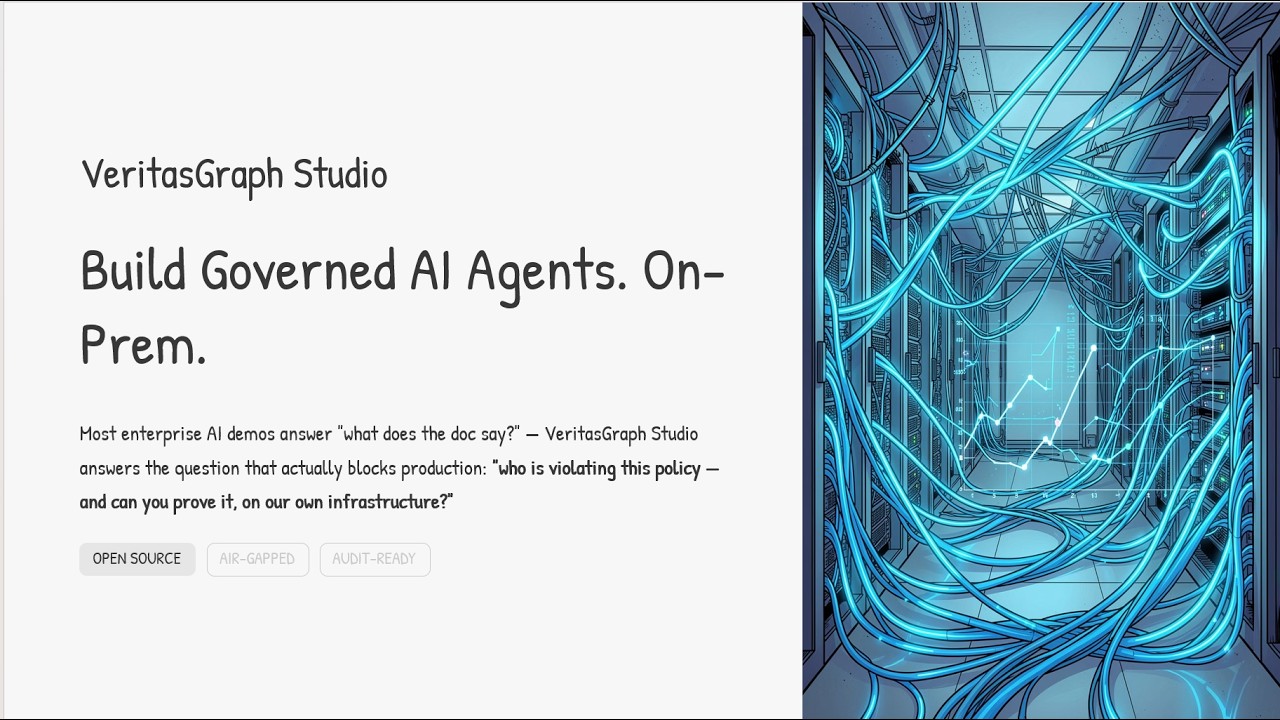
- 📄 Build Governed AI Agents On-Prem (PDF): designing, wiring and shipping governed agents on your own infrastructure.
- ⚡ Live docs · 🎮 Live demo · 📖 Article · 📄 Research paper
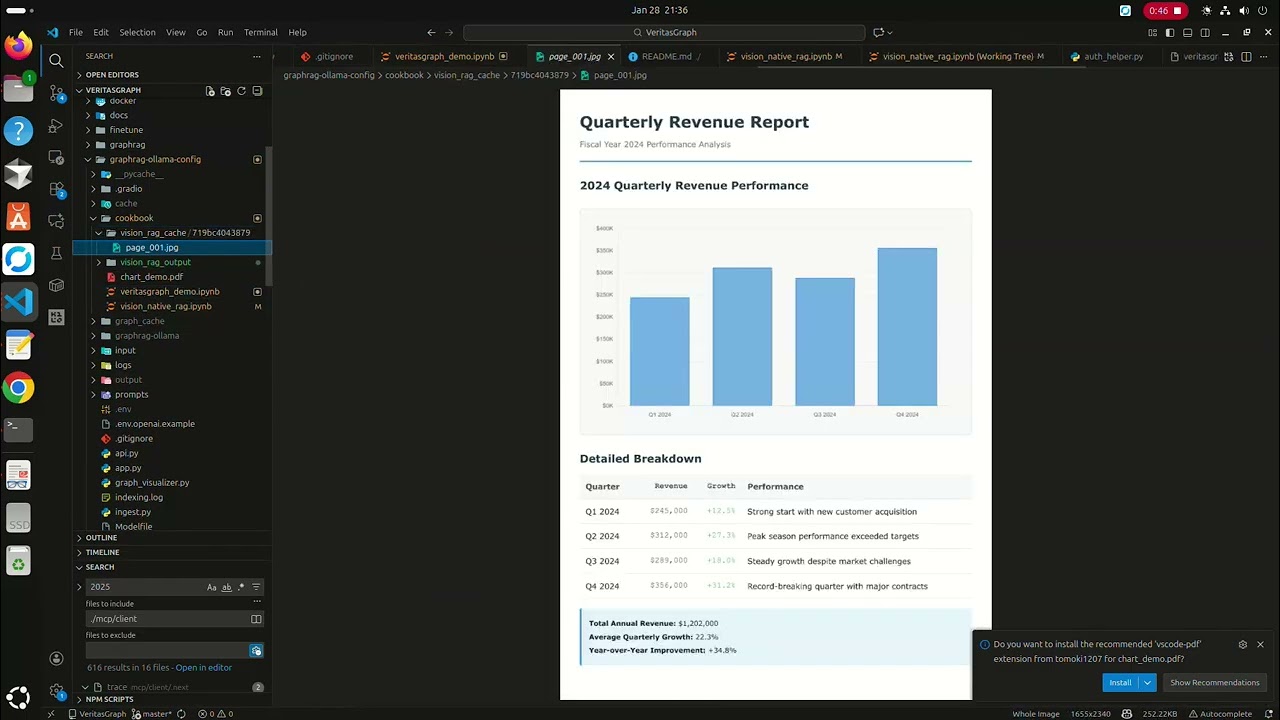
📦 Vision RAG Python package (PyPI)
Note: the
veritasgraphpackage on PyPI is the Vision RAG / tree + graph library. It is separate from the Studio / MCP / governance stack in this repository. Both install averitasgraphcommand, so use separate virtual environments if you need both.
pip install veritasgraph            # basic (includes lite mode)
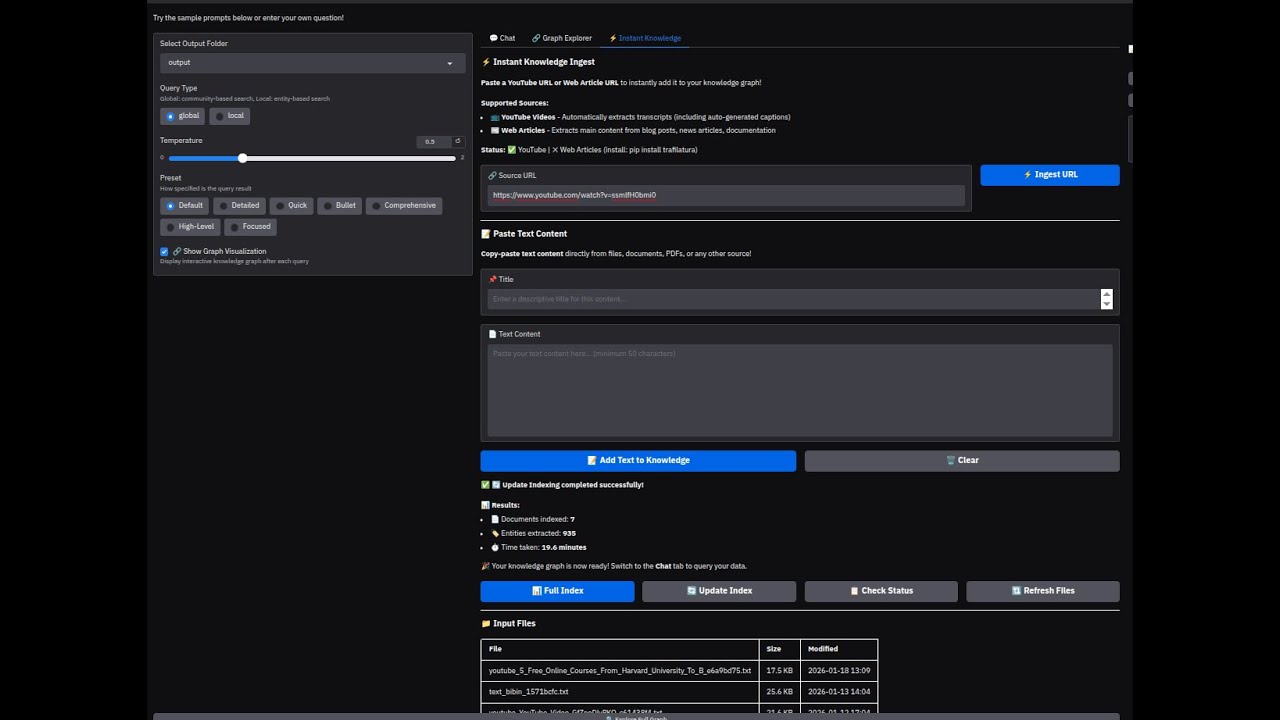
pip install veritasgraph[all]       # + web UI, Microsoft GraphRAG, YouTube/web ingestion
veritasgraph demo --mode=lite       # cloud APIs, no GPU   (--mode=local for Ollama)
from veritasgraph import VisionRAGPipeline, VisionRAGConfig

pipeline = VisionRAGPipeline(VisionRAGConfig(ingest_mode="document-centric"))  # tables stay intact
doc = pipeline.ingest_pdf("report.pdf")
print(pipeline.get_document_tree())                         # hierarchical "table of contents"
print(pipeline.navigate_to_section("Methodology")["breadcrumb"])
print(pipeline.query("What methodology was used?").answer)  # graph search with section context
| Ingest mode | Description | Best for |
|---|---|---|
document-centric |
Whole pages/sections as nodes (default) | Most documents |
page |
Each page = one node | Slide decks, reports |
section |
Each section = one node | Structured documents |
chunk |
Traditional 500-token chunks | Legacy compatibility |



Graph + Tree retrieval
Document Root
├── [1] Introduction
│   ├── [1.1] Background ←── Tree Navigation
│   └── [1.2] Objectives
├── [2] Methodology ←───────── Graph Links
│   └── relates_to ──────────→ [3.1] Findings
└── [3] Results
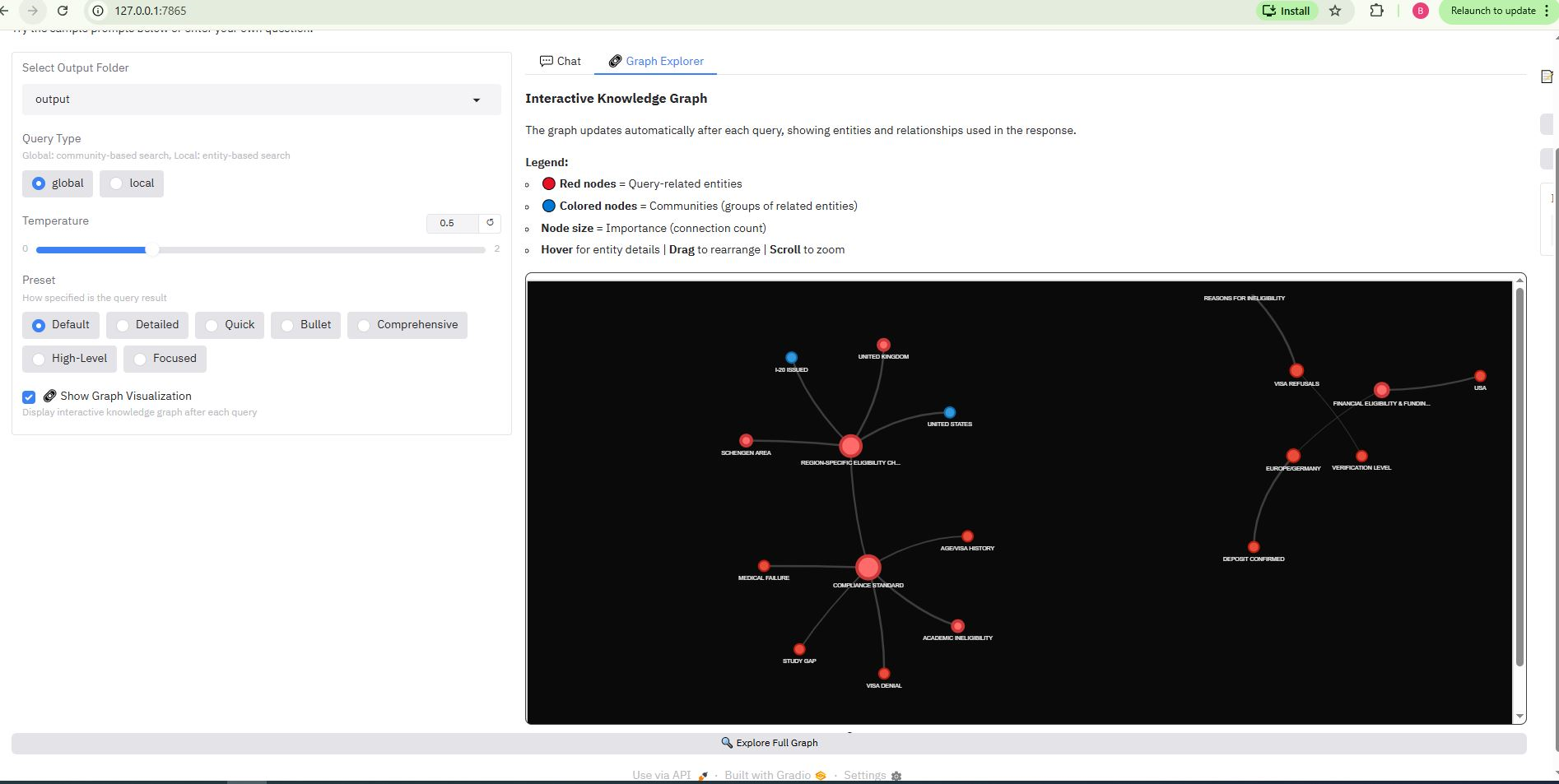
The package also includes an interactive PyVis graph explorer. It shows a query-aware subgraph, colors nodes by community, highlights query entities in red, and sizes nodes by number of connections.
Why VeritasGraph?
| Feature | Vector RAG | PageIndex | VeritasGraph |
|---|---|---|---|
| Retrieval type | Similarity | Tree search | 🏆 Tree + graph reasoning |
| Attribution | ❌ Low | ⚠️ Medium | ✅ Verified citations + receipts |
| Abstains when evidence is missing | ❌ | ❌ | ✅ |
| Governed vocabulary (ontology) | ❌ | ❌ | ✅ |
| Tamper-evident audit | ❌ | ❌ | ✅ |
| Multi-hop reasoning | ❌ | ❌ | ✅ |
| Structured data (SQL) under the same governance | ❌ | ❌ | ✅ |
| MCP server for IDE agents | ⚠️ Varies | ❌ | ✅ |
| 100% local/private | ⚠️ Varies | ❌ Cloud | ✅ On-premise |
| Open source | ⚠️ Varies | ❌ Proprietary | ✅ MIT license |

Who is it for? Engineers building enterprise search, compliance assistants, research copilots, scientific literature explorers and agent memory systems: anywhere "the answer" depends on how facts connect, and where a wrong answer costs more than no answer.
🙌 Acknowledgments
Builds on the foundational work of HopRAG, Microsoft GraphRAG, LangChain & LlamaIndex, and Neo4j.
🏆 Awards & Citation
Presented at the International Conference on Applied Science and Future Technology (ICASF 2025) — 📄 Appreciation Certificate.
@article{VeritasGraph2025,
  title={VeritasGraph: A Sovereign GraphRAG Framework for Enterprise-Grade AI with Verifiable Attribution},
  author={Bibin Prathap},
  journal={International Conference on Applied Science and Future Technology (ICASF)},
  year={2025}
}
Star History


Licensed under MIT. ⭐ Star the repo to follow the roadmap for open-source, governed GraphRAG.
Reviews (0)
Sign in to leave a review.
Leave a reviewNo results found