OPENCODE-ANDROID
Health Warn
- License — License: MIT
- Description — Repository has a description
- Active repo — Last push 0 days ago
- Low visibility — Only 8 GitHub stars
Code Pass
- Code scan — Scanned 2 files during light audit, no dangerous patterns found
Permissions Pass
- Permissions — No dangerous permissions requested
No AI report is available for this listing yet.
The real OpenCode AI coding agent on Android. Upstream Bun engine, native Compose UI, all on-device.
OpenCode Android
The real OpenCode AI coding agent, running on your phone.
Not a remote control. Not a WebView. Not a chatbot mockup.



Independent project. Not built, endorsed, or supported by the OpenCode team.
"OpenCode" is used descriptively to identify the upstream project this port is based on.
What is this?
OpenCode is an open source AI coding agent: you describe a task, it reads your project, runs
tools, edits files, and reports back. This project runs the actual upstream engine (the
TypeScript/Bun server) as a child process inside the Android app, and wraps it in a native
Jetpack Compose interface.
Everything happens on the device. Your code stays in your project folder, the engine listens only
on 127.0.0.1, and the only network traffic is the call to the model provider you configure.
Features
| Chat that streams | Replies appear token by token, with Markdown, tables, and code blocks. Copy a block, or save it straight to a file. |
| See what the agent does | Tool calls show as a readable timeline ("Reading index.html"), live while it runs and in history afterwards, with failures marked. |
| You stay in control | Permission prompts arrive in the chat: Allow once, Always, or Reject. |
| Bring your own provider | Add an API key for a built-in provider, or define a custom OpenAI-compatible endpoint from inside the app. Replace or delete keys at any time. |
| Modes, models, commands | Switch mode and model from the composer, and use / commands with autocomplete. |
| Real project folders | Point the app at any folder on shared storage; the agent works on real POSIX paths. Switch projects and the engine restarts for you. |
| Files and diffs | Browse the project, read and edit files with syntax highlighting, and review real git diffs with A/M/D badges. |
| Search that works | git and ripgrep are bundled, so the agent's grep and glob tools function. |
| Session history | Reopen any past conversation, for this project or all of them. |
| Survives the swipe | A foreground service keeps the engine alive when you leave the app or swipe it from recents. |
| Two languages, two themes | English and Indonesian, switchable at runtime without leaving the screen. Dark and light themes. |
| Built-in diagnostics | Engine state, log, runtime paths, and git/rg self-checks, so release builds can be debugged without adb. |
Not yet
MCP servers, an interactive terminal, LSP, session fork/revert, git over https (clone/push/fetch), and adaptive tablet layouts. See docs/BUILD.md for the
current list of known gaps.
Install
Open the Releases page.
Download the APK for your device:
APK For app-arm64-v8a-release.apkalmost every phone made in the last decade app-x86_64-release.apkemulators and x86 Chromebooks Install it, open the app, and grant All-files access when asked (see below).
In Settings → Connect a provider, add an API key. Without one the agent is limited to
OpenCode's free tier.
APKs are large (about 99 MB for arm64) because the engine is a self-contained binary.
Requirements: Android 10 (API 29) or newer, and network access for cloud model providers.
Why not Google Play or F-Droid? The engine needs real filesystem paths for your project
folder, which requiresMANAGE_EXTERNAL_STORAGE. Neither store accepts that permission for this
kind of app. Install from GitHub Releases, or follow the repo with
Obtainium for updates.
Permissions and privacy
| Permission | Why |
|---|---|
INTERNET |
Reach the model provider you configured, and nothing else. |
MANAGE_EXTERNAL_STORAGE |
Give the engine real paths to project folders outside the app. Optional: without it you can still use the app-private workspace. |
Foreground service (specialUse) |
Keep the engine running while you are away. Shows one low-priority notification. |
POST_NOTIFICATIONS |
Show that notification. The app works if you decline. |
- The engine binds to
127.0.0.1on a random port, protected by a per-run password. - Cleartext HTTP is allowed for loopback only.
- Provider keys live in the engine's app-private storage, protected by the Android sandbox and not
encrypted beyond it. There is no telemetry and no crash reporting.
How it works
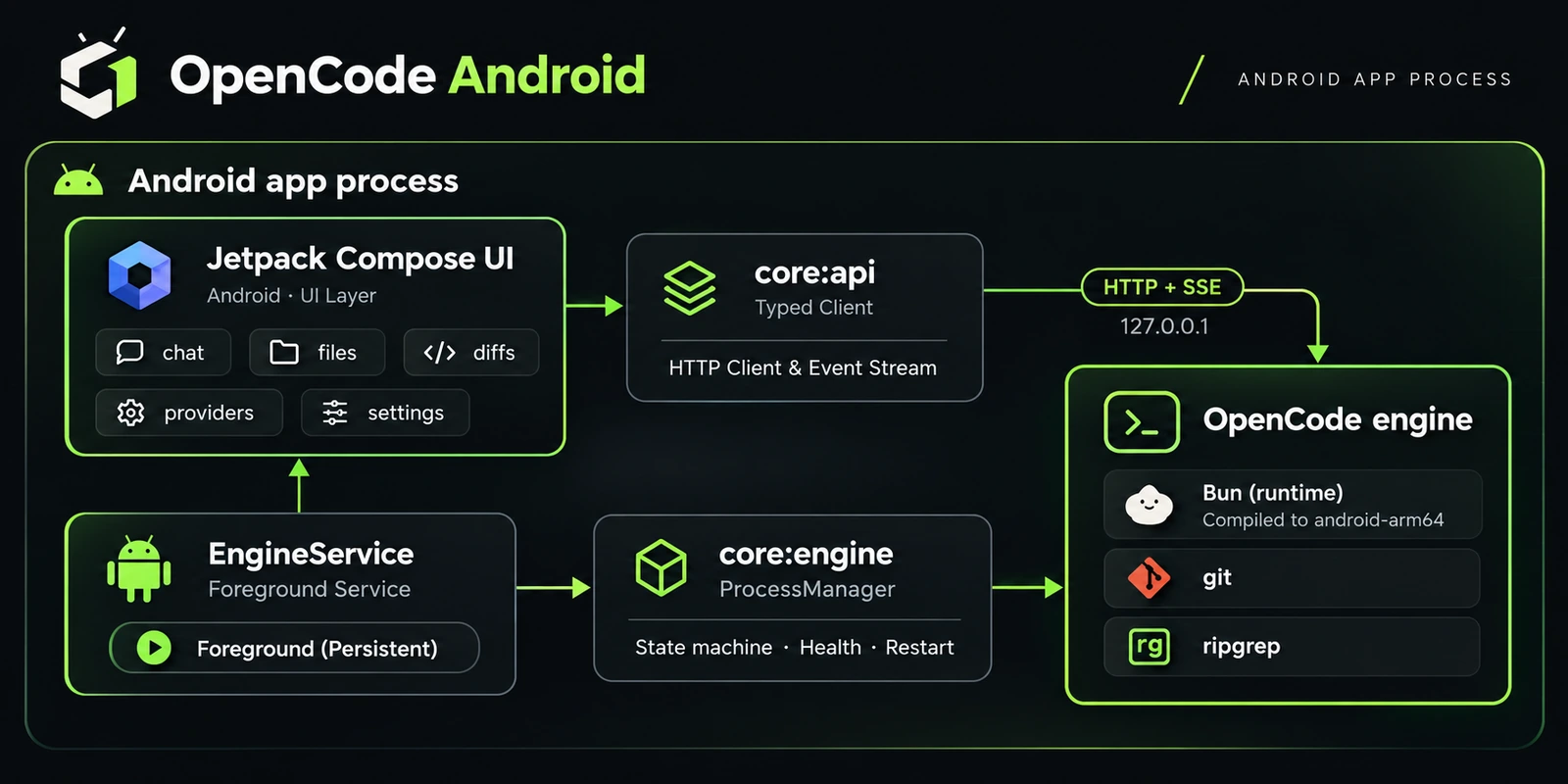
- Engine. Upstream
@opencode/*v2.2.2, cross-compiled with Bun forlinux-arm64-androidandlinux-x64-android, with a small set of documented
patches. It ships aslibopencode.soin the APK's native library
directory, the one place Android lets an app execute code from. - Supervisor.
ProcessManagerruns the engine through an explicit state machine
(STOPPED → INITIALIZING → STARTING → RUNNING, withDEGRADED,FAILED, andSTOPPING),
checks its health, and restarts it on demand. - Tools.
git2.56.0 andripgrep15.1.0 are built with NDK 29 and are 16 KB page aligned,
so they run on Android 15+ devices too. - UI. Plain Compose with its own small design system (
core:design) and hand-drawn icons.
No navigation library and no icon pack.
| Module | Role |
|---|---|
app |
Compose UI, foreground service, workspace and language stores |
core:engine |
Engine process supervisor and environment |
core:api |
Typed HTTP client, SSE event stream, DTOs |
core:design |
Colour, type, spacing, and theme tokens |
core:common |
Shared utilities |
Building from source
The short version, for the app only (engine and tool binaries already staged):
cd android
.\gradlew.bat :app:assembleDebug
adb install -r app\build\outputs\apk\debug\app-arm64-v8a-debug.apk
Building the engine and the git/rg binaries from scratch needs Bun, the Android NDK 29, and
Rust. The complete walkthrough, including release signing, is in
docs/BUILD.md. The full upstream HTTP surface is documented indocs/API-REFERENCE.md.
android/        Gradle project (app + core modules)
engine/         Android patches for the upstream engine, with notes
script/android/ Engine staging and tool build scripts
docs/           Build guide and API reference
About the developer
Made by Muhammad Abid (Bidzz), a student exploring web development, OSINT, digital security,
and reverse engineering.
Portfolio ·
GitHub ·
Telegram ·
Instagram
The same details are inside the app under Settings → About the developer.
Contributing
Issues and pull requests are welcome. For a bug report, include your Android version, device, ABI,
and the output of Settings → Diagnostics, which covers the engine log and the git/rg
checks. Please open an issue before starting on a large change.
License
The app is MIT. Upstream copyright (c) 2025 opencode is retained.
Bundled third-party binaries carry their own licenses, listed inTHIRD_PARTY_NOTICES.md: git (GPL-2.0, run as a separate
executable, source published with each release) and ripgrep (MIT).
Credits
- OpenCode, the engine this app is built around.
- Bun, for compiling the engine to a single Android binary.
- Git and ripgrep.
Bahasa Indonesia
OpenCode Android menjalankan engine agen coding OpenCode
yang asli langsung di dalam aplikasi Android, dengan antarmuka Jetpack Compose. Bukan remote
control desktop, bukan WebView.
- Chat streaming dengan Markdown dan blok kode (salin atau simpan ke file).
- Jejak tool call yang terbaca, dan kartu izin: Izinkan sekali, Selalu, atau Tolak.
- Hubungkan penyedia sendiri: kunci API atau endpoint kustom, langsung dari aplikasi.
- Pilih folder proyek di penyimpanan bersama, jelajahi dan edit file, lihat diff git.
gitdanripgrepsudah dibundel. Engine tetap hidup walau aplikasi di-swipe.- Bahasa Indonesia dan Inggris, tema gelap dan terang.
Pasang: unduh APK dari halaman Releases
(arm64-v8a untuk hampir semua HP), pasang, lalu berikan Akses semua file. Butuh Android 10
atau lebih baru. Tidak tersedia di Google Play atau F-Droid karena izin akses semua file.
Data tetap di perangkat: engine hanya mendengarkan di 127.0.0.1, dan satu-satunya lalu lintas
jaringan adalah ke penyedia model yang kamu atur sendiri.
Reviews (0)
Sign in to leave a review.
Leave a reviewNo results found