Bamboo-agent
Health Warn
- License — License: MIT
- Description — Repository has a description
- Active repo — Last push 0 days ago
- Low visibility — Only 8 GitHub stars
Code Pass
- Code scan — Scanned 12 files during light audit, no dangerous patterns found
Permissions Pass
- Permissions — No dangerous permissions requested
No AI report is available for this listing yet.
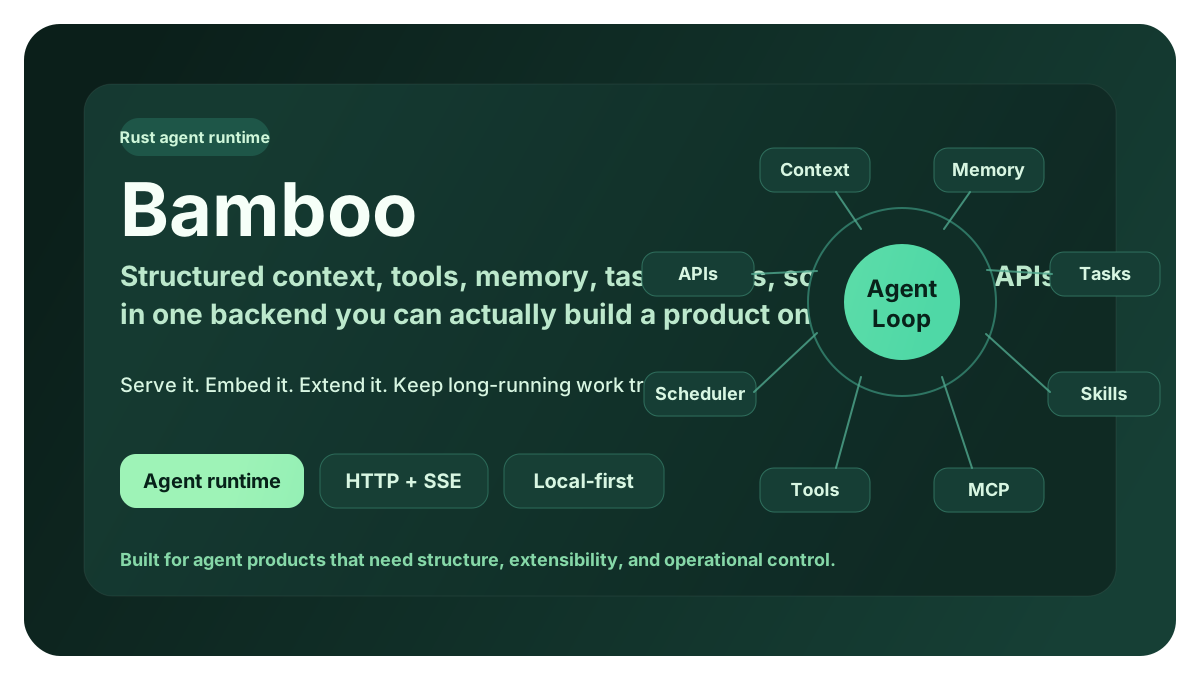
Bamboo — a local-first AI agent runtime in Rust: tasks, tools, memory, MCP, workflows and schedules behind an HTTP + SSE API. The self-contained execution core powering the Bodhi desktop agent.
Bamboo 🎋
📖 中文版请看 README.zh-CN.md
Bamboo — the local-first Rust agent runtime that powers Zenith (the execution engine).
What is this
Bamboo is the "brain" of an AI assistant that runs on your own machine. It does far more than chat — it takes notes, grows a searchable long-term memory, uses tools (read/write files, run commands, search the web), and automatically compacts very long conversations so the assistant never "forgets" or grinds to a halt. All of this lives inside one compact, self-hostable program, with your data staying local by default.
If Bodhi is the AI product you see, Bamboo is the engine running underneath it.
Key Capabilities at a Glance
| Capability | What it does |
|---|---|
| 🧠 Memory system | Session notes, Dream notebook, cross-session durable memory, with auto-dream and background gardener |
| 🗜️ Context compression | Hybrid compression with rolling summary + recent-window retention, automatic trimming of oversized tool output, executed against the model's context-window budget |
| 🛠️ Built-in tools | 22 built-in tools: files, search, Shell, Web, plan mode, tasks, permission requests, and more |
| 🎯 Skills | Optional/discoverable skills with lightweight selection based on request hints, including built-in docx / pdf / pptx / xlsx / skill-creator |
| 🔌 MCP | Model Context Protocol client that hooks into external tool servers |
| ⏰ Workflows & schedules | Declarative workflow loading + a cron-style schedule trigger engine |
| 🌐 HTTP / SSE | Actix server, REST API, Server-Sent Events streaming, compatible with OpenAI / Anthropic / Gemini endpoints |
| 🏗️ Multi-provider | anthropic (default), openai, gemini, copilot, bodhi routing |
Architecture
Bamboo is a Cargo workspace: a thin root binary (bamboo-agent, which exposes the bamboo command) sits on top of focused crates under crates/. The live server is crates/bamboo-server (there is no duplicate server tree). bamboo-agent-core depends only on bamboo-domain, keeping the core abstractions clean.
graph TD
  CLI["bamboo (root bin)<br/>serve / config"] --> SRV[bamboo-server<br/>Actix HTTP + SSE, routes, schedules, workflows, MCP wiring]
  SRV --> ENG[bamboo-engine<br/>agent runtime, auto-dream, gardener, skills, MCP, metrics]
  ENG --> CORE[bamboo-agent-core<br/>core abstractions]
  CORE --> DOM[bamboo-domain<br/>pure domain types]
  ENG --> MEM[bamboo-memory<br/>session notes, durable memory, plan store, budget]
  ENG --> CMP[bamboo-compression<br/>token budgeting, summarizer, limits]
  ENG --> TOOLS[bamboo-tools<br/>22 built-in tools, registry, guides, permissions]
  ENG --> INFRA[bamboo-infrastructure<br/>config, LLM providers, session store]
  SRV --> INFRA
  TOOLS --> INFRA
  MEM --> INFRA
  CLI2["bamboo-cli / bamboo-tui<br/>thin clients over HTTP"] -.-> SRV
Workspace members (from Cargo.toml):bamboo-domain, bamboo-infrastructure, bamboo-engine, bamboo-agent-core, bamboo-memory, bamboo-compression, bamboo-tools, bamboo-cli, bamboo-server, bamboo-tui, plus the root bamboo-agent bin.
Place in the Zenith stack: lotus (the React UI) and bamboo communicate over HTTP; bodhi (the Tauri shell) is just the container that hosts the interface. Bamboo is the execution engine, and bodhi-server (Go) handles accounts/persistence/billing and the LLM proxy.
Signature Deep-Dives
Memory System · crates/bamboo-memory
Memory has three layers:
- Session notes — written by the
session_notetool (actions:session_read/session_append/session_replace/session_clear/session_list_topics); these are temporary drafts/facts within the current session. - Dream notebook — a background process "dreams" over a stretch of conversation, distilling it into structured candidate memories and consolidating them into the notebook (
auto_dream.rs). - Durable memory — survives across sessions, with frontmatter (type, status, source, relations, retrieval metadata), scoped as
session/project/global(memory_store/types.rs).
Auto-dream (MemoryConfig.auto_dream_enabled, off by default because it consumes model tokens) performs extraction, consolidation, and Dream generation as the conversation evolves; it supports three modes: Incremental, Refine, Rebuild.
Gardener (bamboo-engine/src/gardener.rs, gardener_enabled off by default) specializes in splitting "multi-topic blob memories." It has cost guardrails: a hard per-run split cap, a slow cadence (daily by default), and it calls no LLM when the deterministic pre-screen finds no candidates — an idle gardener costs nothing. The split "work list" is produced for free by MemoryStore::scan_blob_candidates; only the split "decision" uses the model.
Why it matters: the memory system lets the assistant understand your project better over long-term use, while keeping cost controlled and data local.
Context Compression · crates/bamboo-compression
Long conversations don't grow without bound. Bamboo uses a hybrid strategy: a rolling summary + a recent message window.
counter— counts tokens via tiktoken BPE or heuristic estimation (TiktokenTokenCounter/HeuristicTokenCounter).segmenter— preserves the atomicity of tool calls when segmenting (it won't split a single tool call apart).limits— deliberately ships no per-model table. Real context/output limits come from (1) provider runtime metadata, (2) user overrides inmodel_limits.json; with neither, it falls back to a global default of 200K context / 64K output. This way the table never goes stale as models are updated.summarizer/preparation— builds the compression plan, generates the summary message, prepares context against the budget (prepare_hybrid_context), and can estimate prompt-cache savings.- Oversized output — oversized output produced by tools is trimmed/managed at
bamboo-tools/output_manager.rs, avoiding stuffing the context all at once.
Why it matters: the assistant can do long, multi-step work without crashing from context overflow or "losing its memory."
Skill System · crates/bamboo-engine/src/skills
Skills are enableable capability bundles. At runtime it resolves the "selected skills" from session metadata (supporting JSON arrays or the legacy comma-separated format), and performs lightweight, request-hint-based relevance selection for unselected skills to inject into context (capped at MAX_UNSELECTED_SKILLS_IN_CONTEXT = 24), avoiding stuffing every skill into the prompt. It also includes access control and runtime metadata.
Built-in skills live in builtin_skills/: docx, pdf, pptx, xlsx, skill-creator.
Tools, Workflows, Schedules, MCP
- Tools (
bamboo-tools, 22 built-in, registered inexecutor.rs::register_builtin_tools):Bash,BashOutput,KillShell,Read,Write,Edit,NotebookEdit,Glob,Grep,GetFileInfo,Workspace,WebFetch,WebSearch,JsRepl,Task,Sleep,EnterPlanMode,ExitPlanMode,RequestPermissions,SessionNote,ConclusionWithOptions, and more. Tools come with usage guides injected at runtime, a permission/policy-aware execution path, and parallel execution support (parallel.rs). - Workflows — declarative loading (
bamboo-server/src/workflow/loader.rs), exposed via/bamboo/workflows. - Schedules — a cron-style trigger engine and store (
bamboo-server/src/schedules/:manager,trigger_engine,session_factory,store). - MCP — Model Context Protocol client (
bamboo-engine/src/mcp/:manager,protocol,transports,tool_index), managing external tool servers via the/mcp,/serversroutes.
Quick Start & Development
Run the server
# build & run from the workspace
cargo run --bin bamboo -- serve

# or install then run
cargo install --path .
bamboo serve
Arguments supported by bamboo serve (all override the config file):--port, --bind, --data-dir, --static-dir, --workers.
The other subcommand, bamboo config [--path] [--show-secrets], is used to inspect configuration.
Defaults (verified against code):
- HTTP API:
http://127.0.0.1:9562/api/v1(port defaults to9562, bind defaults to127.0.0.1) - Health:
GET /api/v1/health - Data dir:
BAMBOO_DATA_DIRor${HOME}/.bamboo - Default provider:
anthropic
Call the agent loop
Once the server is running, the simplest way to run the full agent loop — the LLM plans, calls tools, and streams its work — is two HTTP calls: kick off a turn with POST /api/v1/chat, then watch the live events on the SSE feed GET /api/v1/stream.
# 1. Start an agent turn. This runs the agent loop against the LLM and returns immediately.
#    Response: { "session_id": "...", "stream_url": "...", "status": "streaming" }
curl -s http://127.0.0.1:9562/api/v1/chat \
  -H 'Content-Type: application/json' \
  -d '{
        "message": "List the files in the current directory and tell me what this project does.",
        "model": "claude-sonnet-4-6"
      }'

# 2. Watch the agent work in real time (resumable SSE event feed).
#    Each event is one step of the loop: assistant text, tool calls, tool results,
#    token usage, and completion.
curl -N http://127.0.0.1:9562/api/v1/stream
message and model are the only required fields. Useful optionals: session_id (continue a conversation), system_prompt, selected_skill_ids, workspace_path, provider, images. The chat call returns right away and the loop runs in the background; the stream endpoint (SSE, resumable via ?since=<seq> or the Last-Event-ID header) is where the assistant's reasoning, tool calls, and final answer arrive as they happen.
Use it as a Rust SDK (in-process)
No server needed — the same agent loop runs in-process. The bamboo_agent crate is an ergonomic facade over the engine: you supply a model and an instruction, .with_defaults_for_data_dir wires the eight runtime dependencies (storage, persistence, attachment reader, skills, metrics, config, provider, default tools) from ~/.bamboo, and then agent.run(&mut session, input) drives one turn (draining events internally) while agent.run_stream(session, input) streams AgentEvents back over an mpsc channel. Every call funnels into the engine's single canonical execution path — the facade never forks the loop. The ergonomic types live in bamboo_agent::agent (Agent, AgentBuilder, ExecuteRequestBuilder, plus re-exported AgentEvent, Session, …).
use bamboo_agent::agent::{Agent, Session};

#[tokio::main]
async fn main() -> anyhow::Result<()> {
    let home = dirs::home_dir().unwrap().join(".bamboo");

    // Build the agent. One call assembles storage, persistence, skills,
    // metrics, the provider (from ~/.bamboo/config.json), and the default
    // built-in tool set — no manual dependency wiring.
    let agent = Agent::builder()
        .model("claude-sonnet-4-6")
        .instruction("You are a helpful coding agent.")
        .with_defaults_for_data_dir(home)
        .await
        .expect("wire runtime deps")
        .build()
        .expect("agent fully configured");

    // Stream one turn: `run_stream` appends the user message, runs the loop on
    // a background task, and hands back a receiver of AgentEvents.
    let session = Session::new("demo-session", "claude-sonnet-4-6");
    let mut rx = agent.run_stream(
        session,
        "List the files here and tell me what this project does.",
    );
    while let Some(event) = rx.recv().await {
        println!("{event:?}"); // assistant text, tool calls, tool results, token usage, completion
    }
    Ok(())
}
Don't need the event stream?
agent.run(&mut session, input).await?drives the turn to completion and leaves the answer as the last message onsession. For full control over per-request overrides (split fast/background/summarization models, skill selection, provider handles, …) drop one layer down tobamboo_engine'sExecuteRequest/ExecuteRequestBuilderandagent.execute(&mut session, req)— the same path the facade calls.
Add the facade crate as a dependency (path or git):
[dependencies]
bamboo-agent = { git = "https://github.com/bigduu/Bamboo-agent" }
tokio = { version = "1", features = ["full"] }
dirs = "5"
anyhow = "1"
Prefer not to manage these dependencies yourself? Run
bamboo serveand use the HTTP API above — it drives the exact same loop. The full type reference lives indocs/guides/API.md.
Example configuration
${HOME}/.bamboo/config.json:
{
  "provider": "anthropic",
  "server": {
    "port": 9562,
    "bind": "127.0.0.1"
  },
  "providers": {
    "anthropic": {
      "api_key": "sk-ant-...",
      "model": "claude-sonnet-4-6"
    }
  }
}
Config precedence: file < environment variables < CLI arguments. Environment variables include
BAMBOO_DATA_DIR,BAMBOO_PORT,BAMBOO_BIND,BAMBOO_PROVIDER,BAMBOO_WORKERS,BAMBOO_CORS_ALLOW_ORIGINS.
Docker
cd docker && docker compose up -d --build
curl http://localhost:9562/api/v1/health
docker-compose.yml maps 9562:9562 and sets BAMBOO_DATA_DIR=/data, BAMBOO_PORT=9562, BAMBOO_BIND=0.0.0.0.
Selected API routes
REST prefix /api/v1: chat, execute/{session_id}, stream, sessions, skills, tools, tools/execute, models, commands, workflows, metrics/*, mcp, servers, stop/{session_id}, health.
There are also provider-compatible endpoints: /openai/v1, /anthropic/v1, /gemini/v1beta, /v1/{chat/completions,responses,messages}.
Tests & quality
cargo test            # workspace tests
cargo clippy          # lints (.clippy.toml present)
cargo build --release
The Rest of the Stack
Zenith is a monorepo, and bamboo is the execution-engine submodule within it.
| Module | Role |
|---|---|
| bodhi | Desktop AI product surface (Tauri shell) |
| lotus | React+Vite UI layer (talks to bamboo over HTTP) |
| bamboo | Local-first Rust agent runtime (this repo) |
| bodhi-server | Go backend: auth, persistence, billing+quota, LLM proxy |
| pavilion | Official website & docs |
| Zenith (root) | Monorepo entry, submodule pointers, release train |
In-module docs:
- API reference:
docs/guides/API.md - Migration:
docs/guides/MIGRATION_GUIDE.md - CONTRIBUTING · CHANGELOG · SECURITY
License
MIT
Reviews (0)
Sign in to leave a review.
Leave a reviewNo results found