kicad-copilot
Health Pass
- License — License: MIT
- Description — Repository has a description
- Active repo — Last push 0 days ago
- Community trust — 24 GitHub stars
Code Fail
- process.env — Environment variable access in .github/workflows/publish.yml
- fs module — File system access in .github/workflows/publish.yml
- network request — Outbound network request in docs/datasheets/scripts/download.mjs
- exec() — Shell command execution in docs/datasheets/scripts/pdf-outline.mjs
- process.env — Environment variable access in docs/datasheets/scripts/pdf-outline.mjs
Permissions Pass
- Permissions — No dangerous permissions requested
No AI report is available for this listing yet.
AI-powered MCP server for KiCad schematic generation, PCB placement, local routing, and project automation.
KiCad Copilot
AI-powered MCP server for KiCad. Create and modify schematics from natural language, search real components, work with hierarchical projects, generate PCB placement, route boards locally, and create simple copper pours directly through an AI agent.
KiCad Copilot is the KiCad counterpart to EasyEDA Copilot. It provides the same core circuit-generation and PCB automation capabilities—and goes further with file-oriented hierarchical projects, recoverable checkpoints, native kicad-cli integration, and fully local PCB routing.
Integrated analysis: KiCad Copilot downloads a pinned, verified kicad-happy v2.2.0 release on first use of
analyze_schematicoranalyze_pcb. The MCP tools return compact, token-efficient actionable findings and focused design data.


What it does
KiCad Copilot gives AI agents a high-level, file-oriented interface to KiCad:
- Generate and modify schematics: add, remove, replace, and connect real components without editing every KiCad object individually.
- Rebuild schematic blocks: reorganize selected components while preserving their electrical connections.
- Search components and reusable blocks: resolve components by MPN or part UUID and insert proven functional circuits.
- Work with KiCad projects: inspect project trees and create projects, standalone schematics, hierarchical sheets, and PCB files.
- Preserve recoverable checkpoints: save, list, and restore exact versions of individual KiCad files.
- Synchronize schematic and PCB: explicitly import schematic changes into the associated board.
- Generate PCB placement: describe board constraints in a compact JavaScript DSL, checkpoint and apply returned layouts, and validate changed mechanics with native KiCad views.
- Route locally: use
eda-copilot-routerwith its managed KRT backend without sending routing work to an external service. - Create copper pours: add simple full-board zones with optional stitching vias.
- Use native KiCad tooling: discover
kicad-clifor ERC, DRC, previews, exports, manufacturing files, and other native operations.
KiCad Copilot works directly with saved .kicad_pro, .kicad_sch, and .kicad_pcb files. It does not require KiCad IPC or a plugin installed inside KiCad.
Examples
These projects were generated and iterated through KiCad Copilot. The complete KiCad source files are available in the examples directory.
ATmega328P development board
A hierarchical ATmega328P design with the MCU core, clock, reset, decoupling, USB-UART power, Nano-compatible headers, and debug connections split across functional sheets.
 Project overview |
 USB-UART and power |
 MCU core |
 Nano headers and debug |
Download the ATmega328P project
Geiger high-voltage supply
A larger multi-sheet design covering power input, 3.3 V regulation, the high-voltage generator, flyback stage, feedback, detector, controller, and user interface.
 Project overview |
 Power input |
 High-voltage generator |
 Detector |
 Controller UI |
 3.3 V power |
 HV flyback |
 HV feedback |
 User interface |
Download the Geiger high-voltage project
RP2350 development board
A hierarchical RP2350 design with power, clock, flash, USB/debug, GPIO headers, and an AI-generated PCB placement. The example includes the placement DSL and an editable KiCad board.
 Project overview |
 Power |
 RP2350 and clock |
 Flash |
 USB and debug |
 GPIO headers |
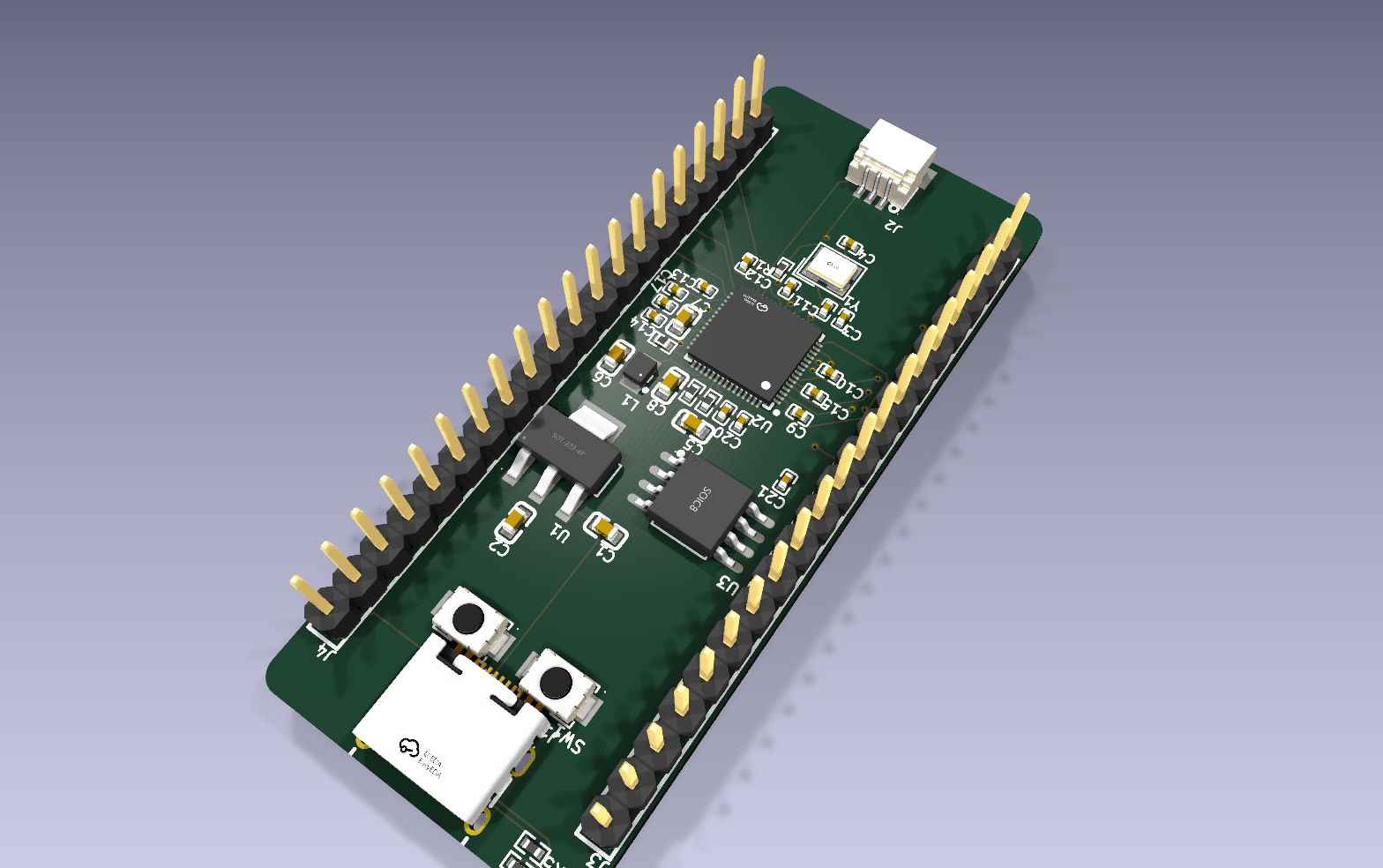
KiCad 3D render of the generated PCB placement
Installation
Add the MCP server to your AI agent.
Codex:
codex mcp add kicad-copilot -- npx -y kicad-copilot-mcp
Claude Code:
claude mcp add kicad-copilot -- npx -y kicad-copilot-mcp
Generic MCP configuration:
{
  "mcpServers": {
    "kicad-copilot": {
      "command": "npx",
      "args": ["-y", "kicad-copilot-mcp"]
    }
  }
}
Restart the MCP client after adding the server. KiCad Copilot includes local workflow documentation for the agent; tool descriptions expose its installed path automatically.
Requirements
- Node.js 20.19 or newer
- KiCad 9 or 10
- Python 3 for managed EasyEDA2KiCad installation and kicad-happy analysis
KiCad Copilot searches for kicad-cli in PATH and standard KiCad installation locations, preferring KiCad 10 when multiple supported versions are installed. Set KICAD_CLI_PATH when the executable is stored elsewhere.
The first real-component conversion uses an existing EasyEDA2KiCad installation or installs it automatically into a managed local virtual environment.
The first design-analysis call downloads the pinned kicad-happy release into the shared
EDA Copilot asset cache after verifying its archive size and SHA-256 hash. SetKICAD_HAPPY_DIR to use a trusted local checkout instead.
Local backend and standalone skill
Schematic layout, component search, PCB sizes and placement call eda-copilot-backend
directly. No Copilot HTTP server, server URL or server credentials are needed.
Catalog search and first-use downloads still require network access. KiCad supplies
its symbol and footprint geometry as UUID-keyed fallback maps; catalog geometry wins
when it resolves successfully.
The npm package pins [email protected]. Downloadkicad-copilot-skill.zip from GitHub Releases
and follow the installation guide.
From source, run npm ci and npm run build:skill for the portable skill, ornpm run build:skill:bundled to include dependencies for the current platform.npm run check:skill validates the generated skill/.
Use export_pcb_routing_board for a saved Board V2 snapshot andrun_pcb_analysis for local DSL calculations and JSON/PNG reports. See the
PCB analysis skill.
Development checks: npm run check runs types, build and fast regression tests.npm run test:native runs native KiCad acceptance; npm run test:local-backend checks
the actual local placement backend. Set KICAD_CLI_PATH for nonstandard installations.
Schematic workflow
Ask the agent to inspect a KiCad project or give it the path to a target .kicad_sch file. A typical request can be as simple as:
Open D:\Projects\sensor\sensor.kicad_pro and add a 3.3 V regulator block to the Power sheet.
The agent can inspect the project tree, read the target sheet as compact component/net JSON, find exact components, assemble the requested change, and validate the saved result through KiCad.
Hierarchical projects remain file-oriented: each physical schematic sheet is modified through its own .kicad_sch path, while project-wide context is used where the operation requires the complete signal map.
File synchronization
KiCad Copilot changes files on disk. KiCad does not reliably merge those changes with newer unsaved edits in an already open editor.
Before a write:
- Save intentional changes in KiCad.
- Avoid keeping the only copy of newer work in the editor buffer.
After a write:
- Reload, revert, or reopen the document in KiCad.
- Do not overwrite the updated file with an older editor buffer.
PCB workflow
PCB placement, mechanics, copper, and routing can be requested independently. For a complete board:
- Synchronize the target
.kicad_pcbonly when the schematic changed. - Select new, preserved-outline, add-only, or subset placement.
- Validate connectors and other changed mechanics first.
- Complete and analyze placement.
- Apply only the requested stackup, rules, copper, and routing operations.
- Run focused PCB analysis and final native KiCad DRC.
Every placement response containing a PCB is checkpointed and applied atomically, including preview and issue-bearing results; no separate assembly call exists. Solver PNG/SVG output is diagnostic. When mechanics change, the agent validates the applied board through focused analysis and a native kicad-cli render, then asks whether to keep, fix, or restore the result.
Placement and router DSL execution remain separate operations. This keeps schematic-to-PCB synchronization explicit and makes it possible to clear or rebuild routing without deleting placed components.
KiCad CLI
get_project_info reports the discovered kicad-cli path and version. Agents should use the native CLI whenever KiCad already provides the operation, including:
- schematic ERC and PCB DRC;
- schematic and PCB PDF/SVG exports;
- 3D PCB renders;
- Gerber and drill generation;
- BOM, position, STEP, STL, GLB, and VRML exports;
- project jobsets and format upgrades.
See KiCad CLI workflow for ready-to-use commands.
Design analysis
analyze_schematic runs the offline schematic checks and can return focused top-level
overview, hierarchy, block, connectivity, power, bus, BOM, assembly, and verification data.analyze_pcb automatically enriches PCB analysis from the associated schematic, runs
cross-domain checks, and optionally adds thermal, EMC, or trace-proximity analysis. Individual
boolean flags control each optional report field; compact findings are enabled by default.
Long-running PCB layout, PCB routing, and lifecycle audits return a prefixedoperation_id such as pcb-dsl:1a2b3c4d. Continue any of them withwait_operation; stop obsolete work with cancel_operation.
The tools omit internal rule identifiers, runtime metrics, and coordinate-level copper from
the LLM response.
See design analysis for the exact compact result contract and workflow.
Compatibility
| KiCad version | Status |
|---|---|
| KiCad 10 | Supported |
| KiCad 9 | Supported |
Other major versions are rejected because their file formats and CLI behavior are not covered by the current implementation.
Documentation
- AI agent instructions
- Full and independent workflows
- Schematic workflow
- Circuit modification schema
- Projects and hierarchical sheets
- Checkpoints
- PCB placement workflow and rules
- Mechanical validation
- Placement DSL
- PCB routing workflow
- Routing DSL
- KiCad CLI
- Design analysis
- Verification gates
- Troubleshooting
Development
Call the actual MCP tools from a terminal after npm run build:
node dist/cli.js list
node dist/cli.js call get_schematic @request.json
node dist/cli.js batch @calls.json
request.json contains the tool arguments, for example { "path": "D:/board/main.kicad_sch" }.calls.json contains an array of { "name": "get_schematic", "arguments": { "path": "..." } } requests.
Use - instead of @file.json to read JSON from stdin. A batch uses one stdio MCP session and stops on the first error. Results are MCP JSON; tool errors produce exit code 1. Installed packages expose the same commands as kicad-copilot-cli.
Run npm run test:mcp-ldo to reproduce creation and beautification of two reusable AP2112 LDO sheets connected to three catalogue headers. It uses the local backend and native KiCad CLI, saves requests and results under .test-output/mcp-ldo, and verifies local sheet lookup after an MCP restart.
git clone https://github.com/biosshot/kicad-copilot.git
cd kicad-copilot
npm install
npm run check
npm start
Run the MCP Inspector with:
npm run inspect
The repository also contains focused schematic, PCB, and routing test scripts for development against disposable files.
License
MIT
Reviews (0)
Sign in to leave a review.
Leave a reviewNo results found