mcp-assert
Health Warn
- License — License: MIT
- Description — Repository has a description
- Active repo — Last push 0 days ago
- Low visibility — Only 5 GitHub stars
Code Fail
- spawnSync — Synchronous process spawning in bun-plugin/src/runner.ts
Permissions Pass
- Permissions — No dangerous permissions requested
This tool acts as a testing client for MCP servers. It connects via real transports (stdio, SSE, HTTP), runs actual tool calls, and validates the server's responses against user-defined YAML configurations.
Security Assessment
Overall risk: Low. The server does not request dangerous permissions, and no hardcoded secrets were found. Its intended behavior is to make real network and local transport requests to execute tests against your server. However, there is one notable finding: synchronous process spawning was detected in a runner script (`bun-plugin/src/runner.ts`). While typical for a tool designed to launch and test local servers, this can present a minor risk of command injection if the test configurations are ever sourced from untrusted third-party YAML files.
Quality Assessment
The project is actively maintained, with repository updates pushed as recently as today. It uses the standard MIT license, and its clear documentation suggests a professional setup. The primary concern is low community visibility; the project currently has only 5 stars. However, this is heavily offset by strong real-world credibility. The developers have successfully merged testing fixes into major industry projects including Google, Grafana, and official MCP SDKs. This public track record demonstrates high reliability and practical usefulness.
Verdict
Safe to use, though you should treat external YAML test configurations with the same caution as any executable script.
Test your MCP server against the real protocol. Any language, any transport. No mocks, no imports, no language lock-in.





Test your MCP server against the real protocol. No mocks. No imports. No language lock-in.
mcp-assert connects to your server exactly like Claude, Cursor, or any MCP client would: real stdio/SSE/HTTP transport, full initialize handshake, actual tool calls. It checks responses against expectations you define in YAML. If it passes mcp-assert, it works with every MCP client.
[!WARNING]
We scanned 58 MCP servers and found 32 real bugs across 13 servers. The most common failure: tools crash instead of returning errors agents can recover from. See the scorecard.
Your YAML        ──→  mcp-assert  ──→  MCP Server
(inputs + assertions)    (client)        (any language)
                            │
                        Pass / Fail
Your server can't tell the difference
mcp-assert speaks the full MCP protocol: initialize handshake, tools/list discovery, tools/call with real arguments. It finds bugs that unit tests miss because it tests over the wire, not in-process.
Adopted in production
- Wyre Technology: 25 MCP servers tested via shared baseline workflow using
mcp-assert-action - Ant Group (AntV): integrated into CI within 3 days of launch
- Vera: recommended test harness on project roadmap (#529)
- Fix PRs merged: Google, Grafana, LangChain, official MCP SDKs
The testing standard for MCP, like pytest for Python or Jest for JavaScript.
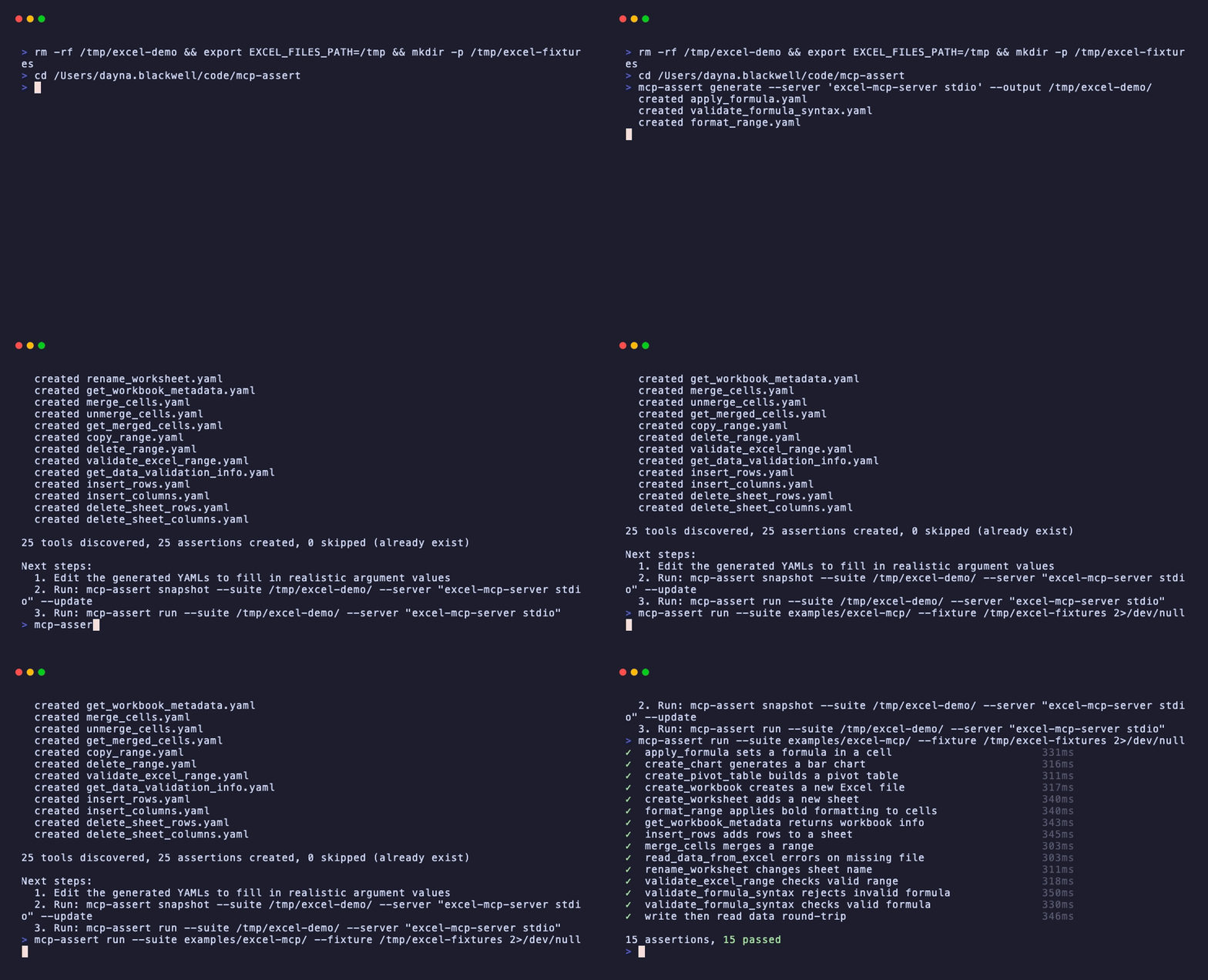
Add it to any MCP server project in one line:
- uses: blackwell-systems/mcp-assert-action@v1
  with:
    suite: evals/
[!NOTE]
LLMs are for subjective outputs. Assertions are for deterministic ones. Most MCP tools are deterministic. mcp-assert covers them.
Install
# npm (no Go required)
npx @blackwell-systems/mcp-assert

# pip (no Go required)
pip install mcp-assert

# Go
go install github.com/blackwell-systems/mcp-assert/cmd/mcp-assert@latest

# Homebrew
brew install blackwell-systems/tap/mcp-assert

# Docker
docker run blackwellsystems/mcp-assert audit --server "npx my-server"

# Snap (Linux)
sudo snap install mcp-assert --classic

# Scoop (Windows)
scoop bucket add blackwell-systems https://github.com/blackwell-systems/scoop-bucket
scoop install mcp-assert

# Winget (Windows)
winget install BlackwellSystems.mcp-assert

# curl | sh (macOS / Linux)
curl -fsSL https://raw.githubusercontent.com/blackwell-systems/mcp-assert/main/install.sh | sh
Quick Start
Audit any MCP server in seconds. No setup.
Point it at any server:
mcp-assert audit --server "npx my-mcp-server"
  Server: my-server
  Transport: stdio
  Score: 83%

  ✓ read_query      1ms  responds, returns content
  ✗ create_table    0ms  internal error: panic: nil pointer...
  ✓ list_tables     1ms  responds, returns content

  3 tools tested, 2 healthy, 1 crashed
[!TIP]
The audit connects, discovers every tool viatools/list, calls each one with schema-generated inputs, and reports which tools crash vs. handle errors properly. No YAML needed. To go deeper, generate assertion files and customize them:
# Audit + generate starter YAML for CI
mcp-assert audit --server "npx my-mcp-server" --output evals/

# Edit the generated YAMLs: add expected content, setup steps, multi-step flows

# Run in CI with regression detection
mcp-assert ci --suite evals/ --threshold 95
Write assertions from scratch
# Scaffold your first assertion
mcp-assert init evals                   # Or: init evals --server "my-server" for auto-generation

# Run it
mcp-assert run --suite evals/ --fixture evals/fixtures
See the Getting Started guide for a full walkthrough.
Already using Vitest, Jest, Bun, PHPUnit, or pytest?
# Vitest
npm install -D vitest-mcp-assert
// mcp.test.ts
import { describeMcpSuite } from 'vitest-mcp-assert'
describeMcpSuite('mcp server', 'evals/')
# pytest
pip install pytest-mcp-assert
pytest --mcp-suite evals/
[!IMPORTANT]
Same YAML files work across the CLI, Vitest, Jest, Bun, PHPUnit, pytest, and Go test. No migration needed. Write once, run anywhere.
Everything you can do
| Command | What it does | Setup required |
|---|---|---|
audit --server "..." |
Scan any server, classify every tool as healthy/crashed/timed out | None |
fuzz --server "..." |
Throw adversarial inputs at every tool, find crashes and hangs | None |
init --server "..." |
Generate a complete test suite from tools/list + capture snapshots | None |
run --suite evals/ |
Run YAML assertions, report pass/fail | YAML files |
ci --suite evals/ |
Run with thresholds, baselines, JUnit XML, GitHub Step Summary | YAML files |
coverage --suite evals/ --server "..." |
Report which tools have assertions and which don't | YAML files |
snapshot --suite evals/ --update |
Capture responses as golden files for regression detection | YAML files |
watch --suite evals/ |
Re-run on YAML changes, show diffs when status flips | YAML files |
matrix --languages go:gopls,ts:tsserver |
Same suite across multiple language servers | YAML files |
intercept --server "..." --trajectory t.yaml |
Proxy between agent and server, capture live tool call trace | Trajectory YAML |
lint --server "..." |
Check tool schemas for missing descriptions, untyped params, and agent usability issues | None |
Start with audit (zero setup), then fuzz (adversarial testing), then init (generates everything), then customize the YAML for your specific assertions.
Zero-Effort Coverage
# Generate stub assertions for every tool the server exposes
mcp-assert generate --server "my-mcp-server" --output evals/ --fixture ./fixtures

# Capture actual outputs as snapshots
mcp-assert snapshot --suite evals/ --server "my-mcp-server" --update

# Assert nothing changed
mcp-assert run --suite evals/ --server "my-mcp-server"
How It Differs From LLM-as-Judge Frameworks
For deterministic tools, mcp-assert is the better fit. For subjective outputs, LLM-as-judge frameworks remain the right choice. Use both if your server mixes tool types.
| Dimension | LLM-as-judge eval frameworks | mcp-assert |
|---|---|---|
| Best for | Subjective outputs (prose, creative content) | Deterministic outputs (data, state, validation) |
| Grading | Language model scoring (flexible, costly) | Assertion-based (exact, free) |
| Speed | Seconds per test (LLM round-trip) | Milliseconds per test (no LLM) |
| CI cost | API calls on every run | Zero external dependencies |
| Reliability | Not measured | pass@k / pass^k per assertion |
| Regression | Not supported | Baseline comparison, fail on backslide |
| Multi-language | Not supported | Same assertion across N language servers |
Why not just write tests?
You'd need MCP protocol bootstrapping, a server-agnostic runner (your Go tests can't test your TypeScript server), and eval features (regression detection, Docker isolation, JUnit output). mcp-assert handles all of that. One YAML file, any server, any language.
CI Integration
Use the mcp-assert GitHub Action for zero-setup CI:
- uses: blackwell-systems/mcp-assert-action@v1
  with:
    suite: evals/
    threshold: 95
Downloads the binary, runs assertions, uploads JUnit XML results, writes GitHub Step Summary. No Go toolchain required on your runners.
Or run directly:
mcp-assert ci --suite evals/ --threshold 95 --junit results.xml
See the CI Integration guide for JUnit XML, markdown summaries, badges, and regression detection.
pytest Integration
Run mcp-assert assertions as pytest test items:
pip install pytest-mcp-assert
pytest --mcp-suite evals/
Each YAML file becomes a pytest Item with pass/fail/skip semantics. Configure via pyproject.toml:
[tool.pytest.ini_options]
mcp_suite = "evals/"
mcp_fixture = "fixtures/"
Then just run pytest. See pytest-plugin/README.md for all options.
Vitest Integration
Run mcp-assert assertions as Vitest tests:
npm install -D vitest-mcp-assert
Auto-discover all YAML files in a directory:
// mcp.test.ts
import { describeMcpSuite } from 'vitest-mcp-assert'
describeMcpSuite('mcp server', 'evals/')
Or run individual assertions:
import { test } from 'vitest'
import { runMcpAssert } from 'vitest-mcp-assert'
test('echo tool', () => runMcpAssert('evals/echo.yaml'))
Same YAML files work across Vitest, pytest, and the CLI. See vitest-plugin/README.md for all options.
Documentation
Full documentation is available at blackwell-systems.github.io/mcp-assert:
- Getting Started: install, scaffold, first run
- Writing Assertions: YAML format, all 18 assertion types + 4 trajectory types, 8 block types, 6 test framework plugins (pytest, Vitest, Jest, Bun, PHPUnit, Go test), setup steps, capture, fixtures
- CLI Reference: full command reference with flags and examples
- Examples: 65 example suites across 8 languages (606 assertions)
- CI Integration: GitHub Action, JUnit XML, regression detection
- Badge: add the "Works with mcp-assert" badge to your server README
- Architecture: internals and design decisions
- Roadmap: what's shipped and what's next
- Scorecard: 32 bugs found across 13 servers, 9 fix PRs submitted, 58 servers scanned

License
MIT
Reviews (0)
Sign in to leave a review.
Leave a reviewNo results found