Observal
Health Pass
- License — License: AGPL-3.0
- Description — Repository has a description
- Active repo — Last push 0 days ago
- Community trust — 2124 GitHub stars
Code Pass
- Code scan — Scanned 12 files during light audit, no dangerous patterns found
Permissions Pass
- Permissions — No dangerous permissions requested
This project is an open-source, self-hosted registry and observability platform for AI coding agents. It allows developers to package, share, and monitor AI agents and their components (like MCP servers and hooks) across various coding environments.
Security Assessment
The overall risk is rated as Medium. As an observability platform, the tool inherently accesses and processes telemetry data, which could include sensitive code interactions and session logs. It requires a local Docker setup and database, and explicitly makes network requests to manage agent configurations and reporting. No hardcoded secrets or dangerous permission requests were found in the main application code. However, the automated rule-based scan flagged a `rm -rf` recursive force deletion command inside a demonstration script (`demo/run_demo.sh`). While common in scripts that tear down temporary environments, unchecked recursive deletion commands are an inherent risk and should be reviewed carefully before execution.
Quality Assessment
The project demonstrates strong health and active maintenance. It is licensed under the permissive Apache-2.0 license, which is excellent for open-source adoption. Activity is very high, with the latest repository pushes occurring just today. It also possesses a solid foundation of community trust, currently backed by 250 GitHub stars. Keep in mind that the repository explicitly labels its current status as "alpha," meaning you should anticipate potential breaking changes or bugs as development continues.
Verdict
Use with caution: the active development and transparent licensing make it a promising tool, but its alpha status and the presence of a force deletion command in the demo scripts warrant careful review before deploying in sensitive environments.
Observal is a local registry and analytics platform for your AI components. Setup Observal, define the scope and share your Skills, MCPs and Agents.
 ██████╗ ██████╗ ███████╗███████╗██████╗ ██╗   ██╗ █████╗ ██╗
██╔═══██╗██╔══██╗██╔════╝██╔════╝██╔══██╗██║   ██║██╔══██╗██║
██║   ██║██████╔╝███████╗█████╗  ██████╔╝██║   ██║███████║██║
██║   ██║██╔══██╗╚════██║██╔══╝  ██╔══██╗╚██╗ ██╔╝██╔══██║██║
╚██████╔╝██████╔╝███████║███████╗██║  ██║ ╚████╔╝ ██║  ██║███████╗
 ╚═════╝ ╚═════╝ ╚══════╝╚══════╝╚═╝  ╚═╝  ╚═══╝  ╚═╝  ╚═╝╚══════╝
A registry and insight platform for portable AI coding agents. Define context once, install it across tools, and learn what works.







If you find Observal useful, please consider giving it a star. It helps others discover the project and keeps development going.
What Observal is for
Observal is for teams doing context engineering across AI coding tools. If your organization maintains Skills, AGENTS files, MCP servers, hooks, prompts, sandboxes, or subagent definitions, Observal gives you one place to package them into versioned agents, publish them to a registry, and install them into the harness or harness your developers use.
Define an agent once. Observal renders the right configuration for Claude Code, Cursor, Kiro, Pi, Copilot, Codex, OpenCode, and other supported tools. As teams use those agents, Observal turns real usage into insights about which prompts, skills, tools, and policies are helping.
Why teams use Observal
- Package context into reusable agents: Bundle Skills, MCP servers, hooks, prompts, sandboxes, and policy into one versioned unit.
- Run a governed registry: Review submissions, approve internal agents, inspect version diffs, and give developers one trusted place to install from.
- Render across coding tools: Generate the correct config for each supported harness instead of maintaining separate setup instructions for every harness.
- Learn what works: Use real adoption and session data to find which agents, tools, prompts, and workflows are helping teams.
- Replay sessions when needed: Use traces as evidence for debugging, review, audits, and deeper analysis without making observability the main workflow.
Supported harnesses
| harness |
|---|
| Claude Code |
| Kiro |
| Cursor |
| Pi |
| Copilot (CLI & VS Code Extension) |
| Codex |
| OpenCode |
| Antigravity CLI |
One command to install any agent into any supported harness. The config files are generated per-harness automatically.
Quick Start
Observal has two parts: a server (API + web UI + databases) you self-host, and a CLI you install on each developer machine.
1. Deploy the server
One-line install (requires Docker Engine ≥ 24.0 with Compose v2):
curl -fsSL https://raw.githubusercontent.com/Observal/Observal/main/install-server.sh | bash
This downloads a Docker Compose package, runs guided setup (domain, secrets, ports), pulls container images from GHCR, and starts the full stack (API, web UI, PostgreSQL, ClickHouse, Redis, worker, load balancer, Prometheus, Grafana).
From source (for contributors):
git clone https://github.com/Observal/Observal.git && cd Observal
cp .env.example .env
make up
2. Install the CLI
Standalone binary (no Python required):
curl -fsSL https://raw.githubusercontent.com/Observal/Observal/main/install.sh | bash
Python (3.11+):
uv tool install observal-cli
# or: pipx install observal-cli
3. Connect your harness
observal auth login
observal doctor --patch
This authenticates with your server, detects your harness, installs telemetry hooks, starts capturing sessions automatically, and prepares it for agent installs and registry commands.
Once logged in, run /observal inside your harness and it takes the wheel. Pull agents, submit components, browse the registry, run diagnostics:
/observal pull security-auditor
/observal scan
/observal doctor
Or just tell your agent what you want and it figures out the right commands.
How Observal works
Agents are portable context packages
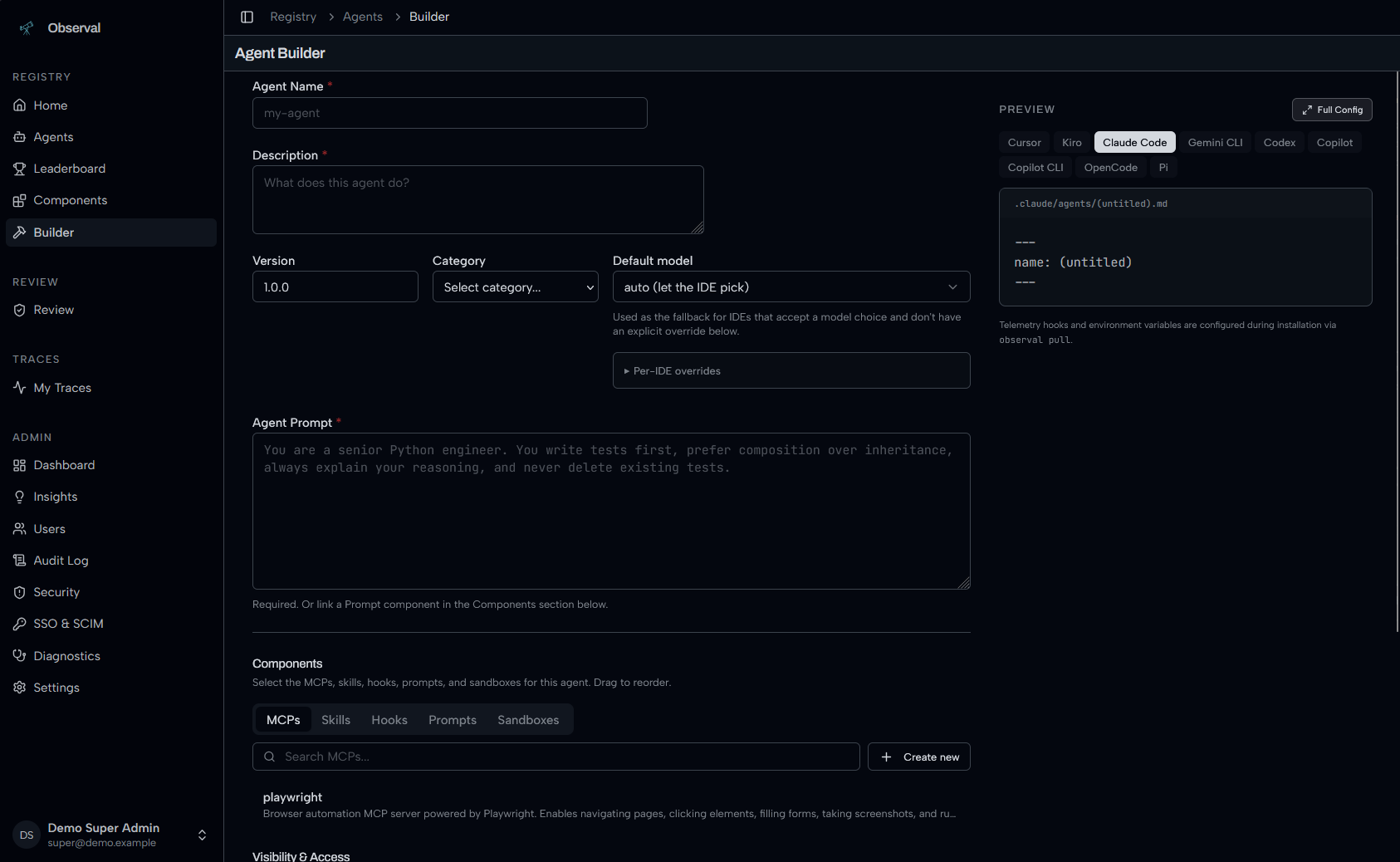
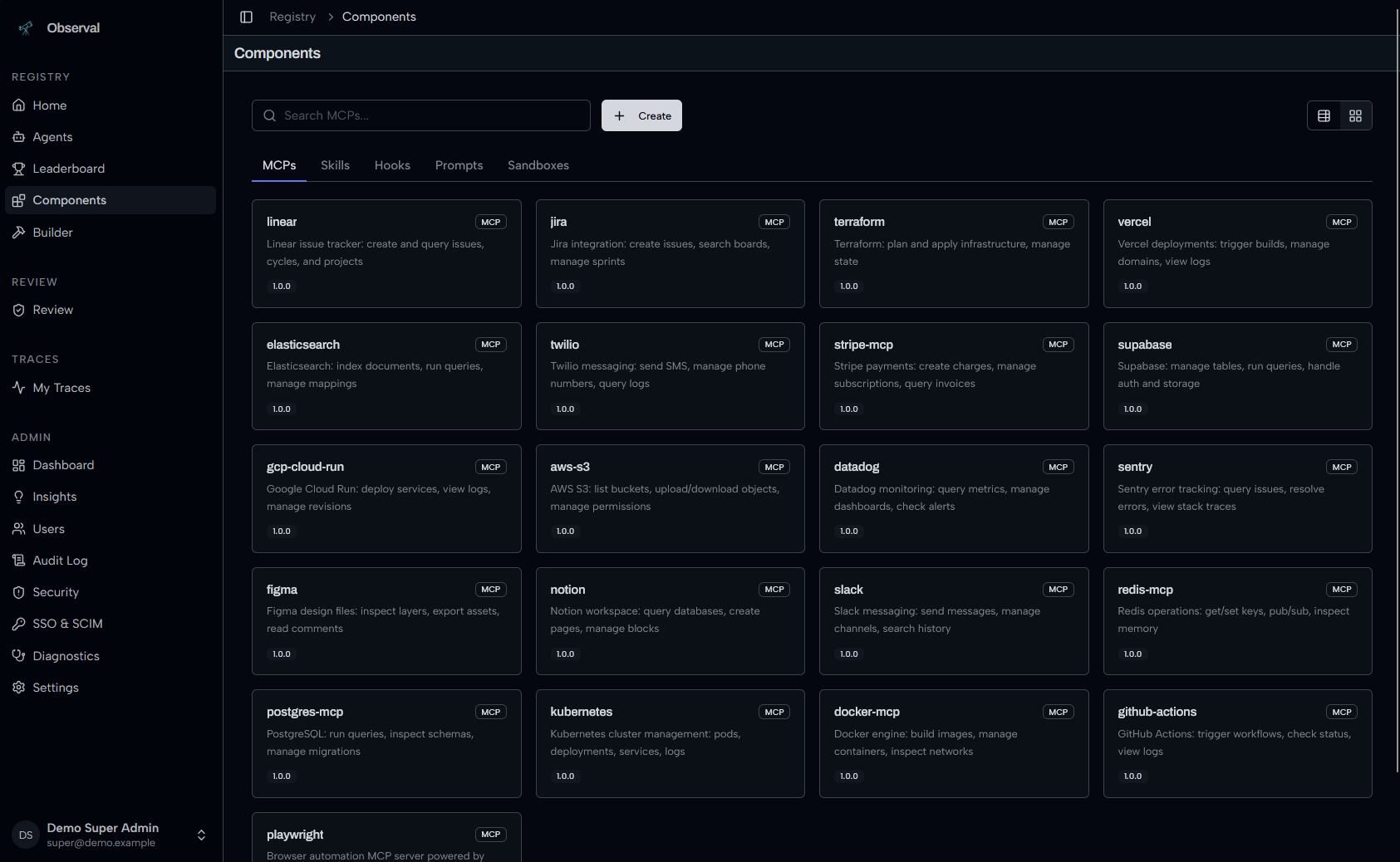
An agent bundles 5 component types into a single installable package: MCP servers, skills, hooks, prompts, and sandboxes. You define the agent once, publish it to the registry, and Observal generates the right config files for whichever supported harness or harness the user runs.
observal pull security-auditor --harness pi
The registry is the distribution layer
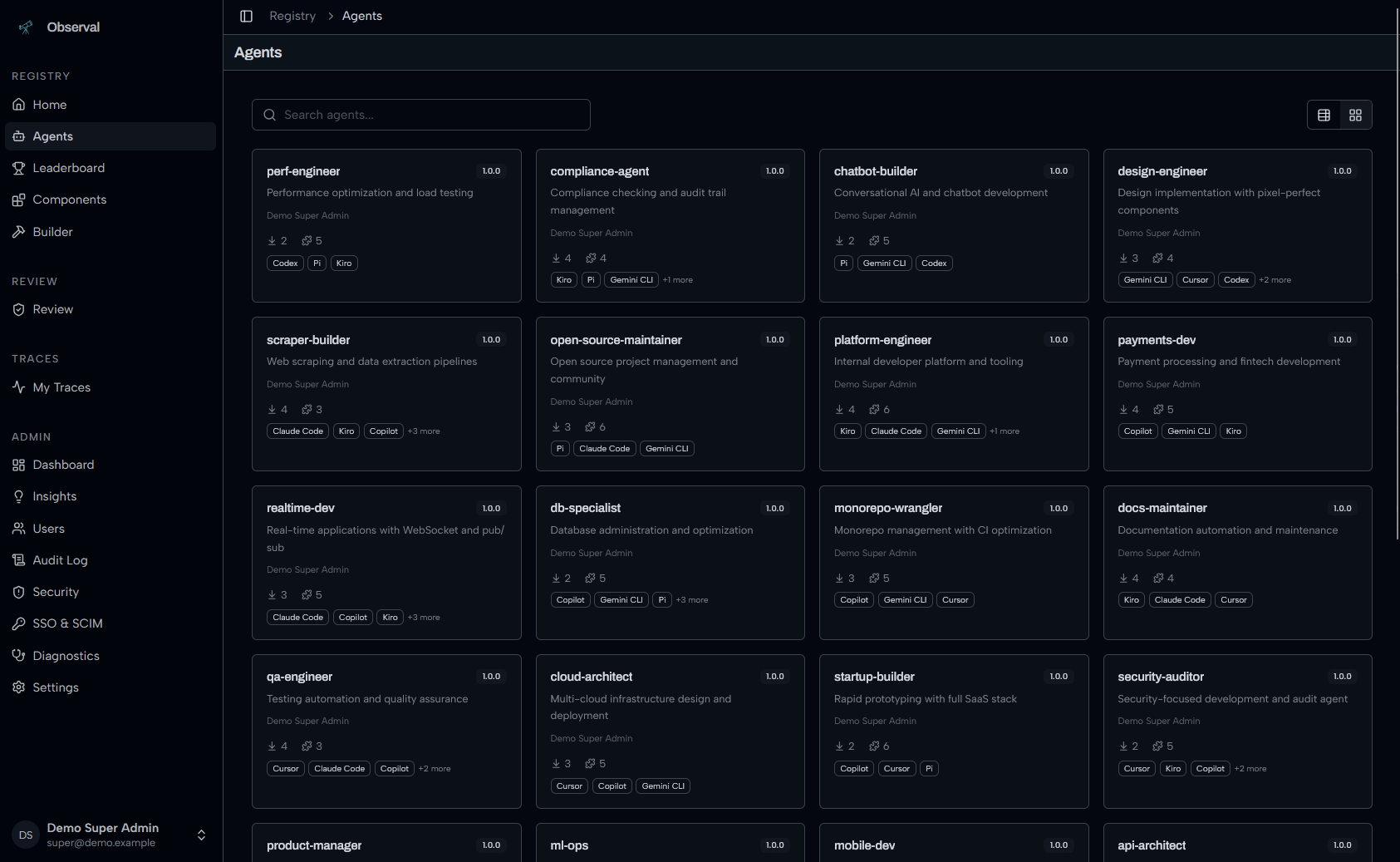
Browse published agents, see which harnesses they support, check download counts and ratings, and install with one command. Admins review submissions before they go live. Version diffs show exactly what changed between releases, so teams can safely evolve shared context.
Insights show what is helping
Observal turns real usage into reports about which agents, prompts, tools, and workflows are working or getting in the way. Use those insights to improve shared context instead of guessing from anecdotes.
Session traces provide the evidence
When you need to debug, audit, or understand a result, Observal can replay the full coding session: user prompts, thinking blocks, assistant responses, and tool calls with their inputs and outputs. The traces support registry and insight workflows rather than defining the product.
Agent Registry
Browse, search, and install agents with harness compatibility badges:
Build agents visually with live config preview for every harness:
Components library: MCPs, Skills, Hooks, Prompts, Sandboxes:
Agent Insights
AI-powered insight reports analyze usage patterns across all sessions, what's working, what's hindering, and quick wins. Powered by LiteLLM, works with any provider (Anthropic, OpenAI, Bedrock, Gemini, Azure, Ollama).
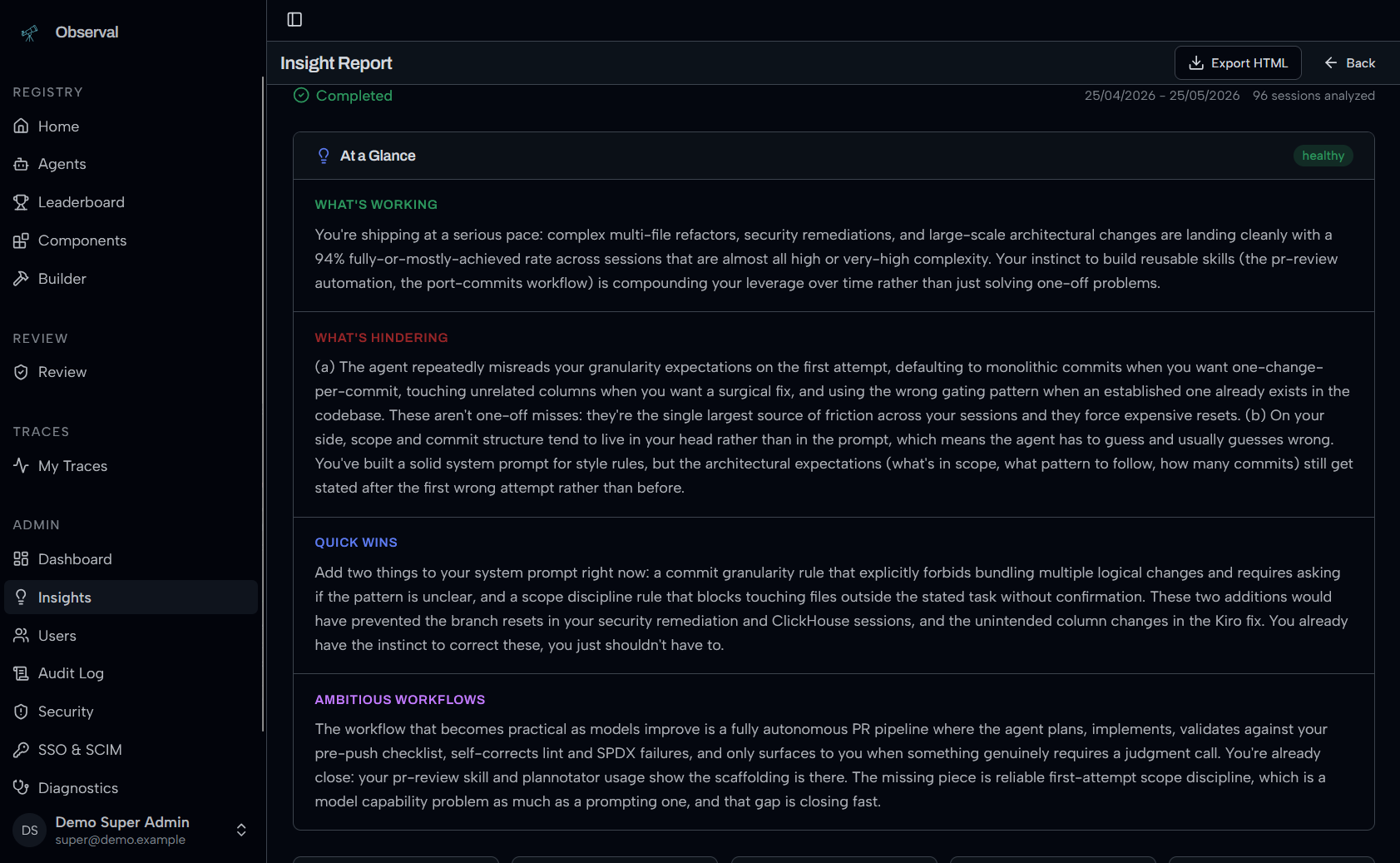
See Insights LLM Setup for configuration.
Session Replay
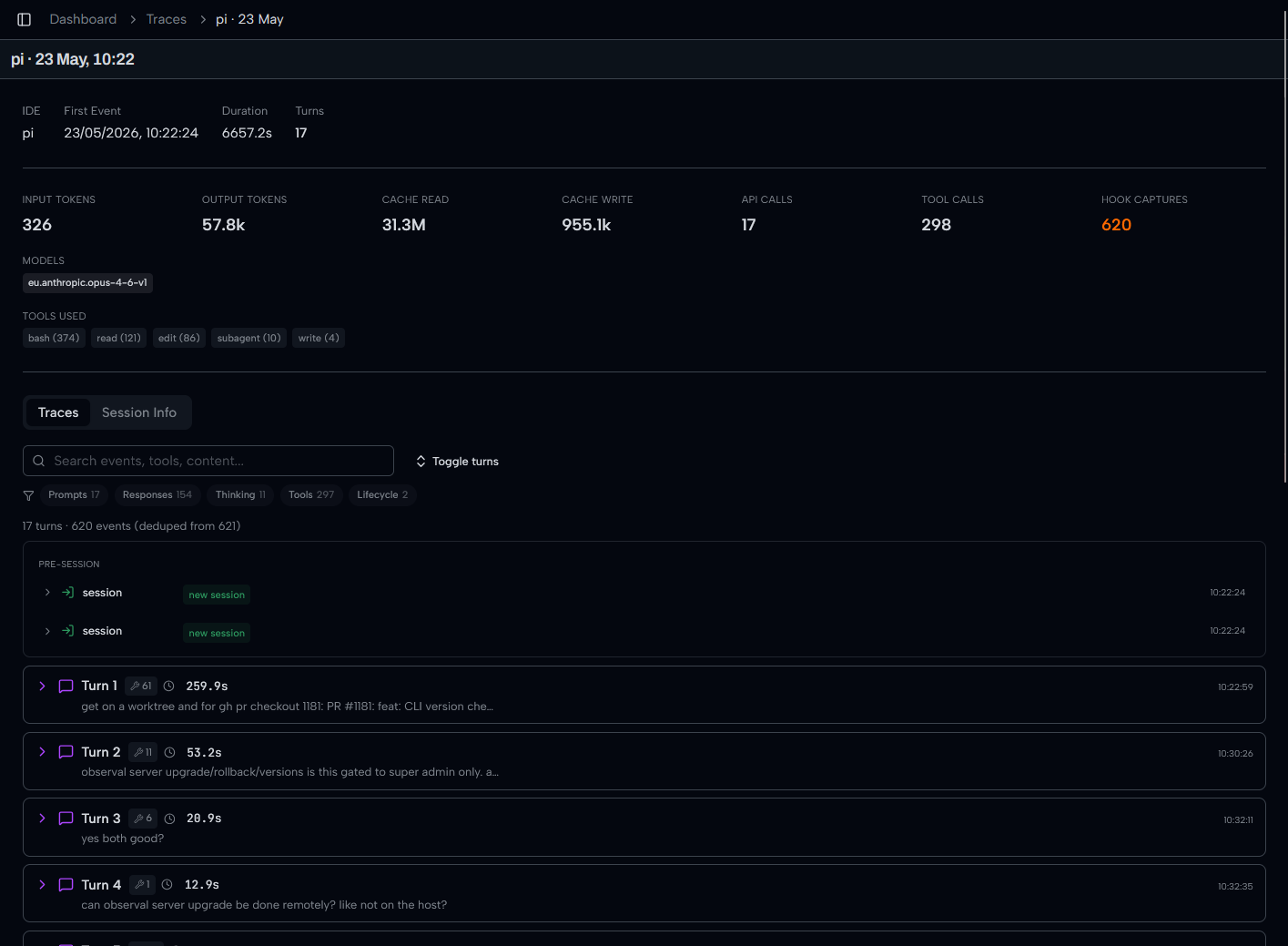
Full session overview with token counts, models, tools, and turn-by-turn timeline:
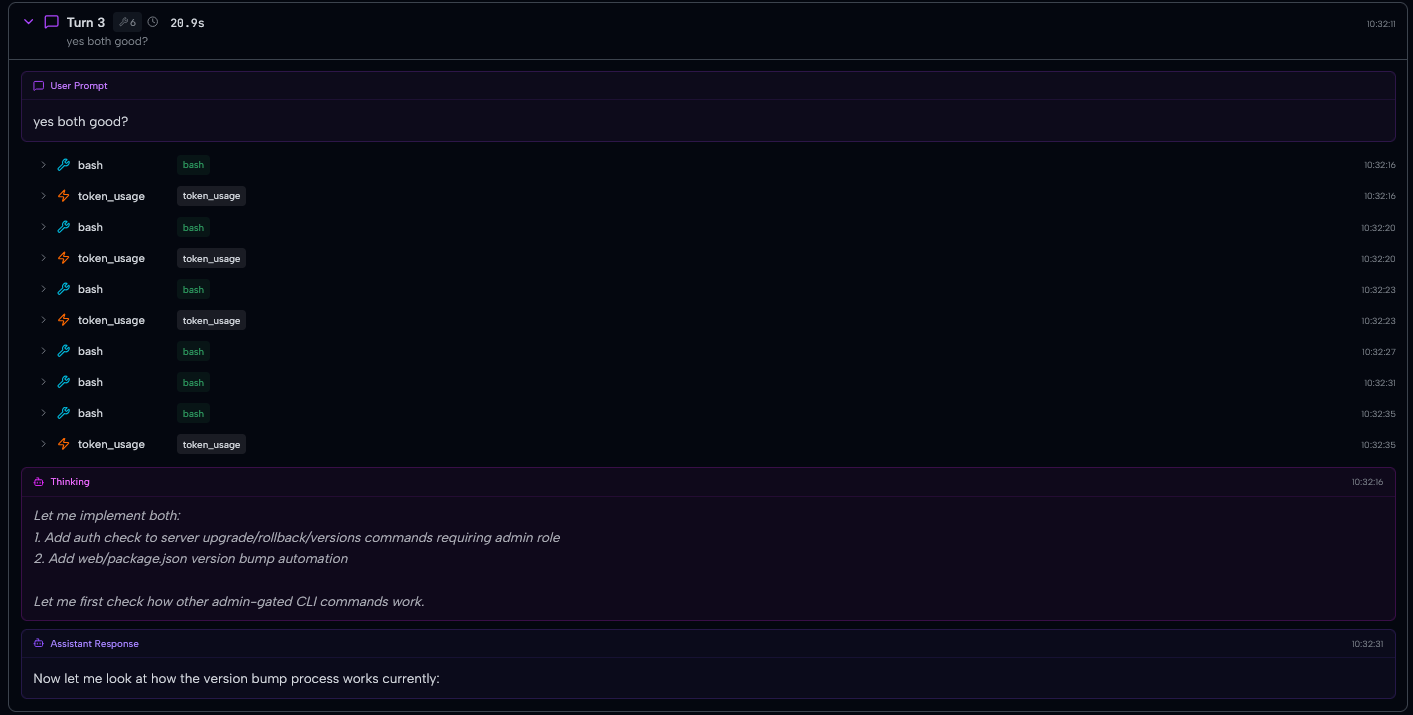
Every turn captured: user prompt, tool calls, thinking block, assistant response:
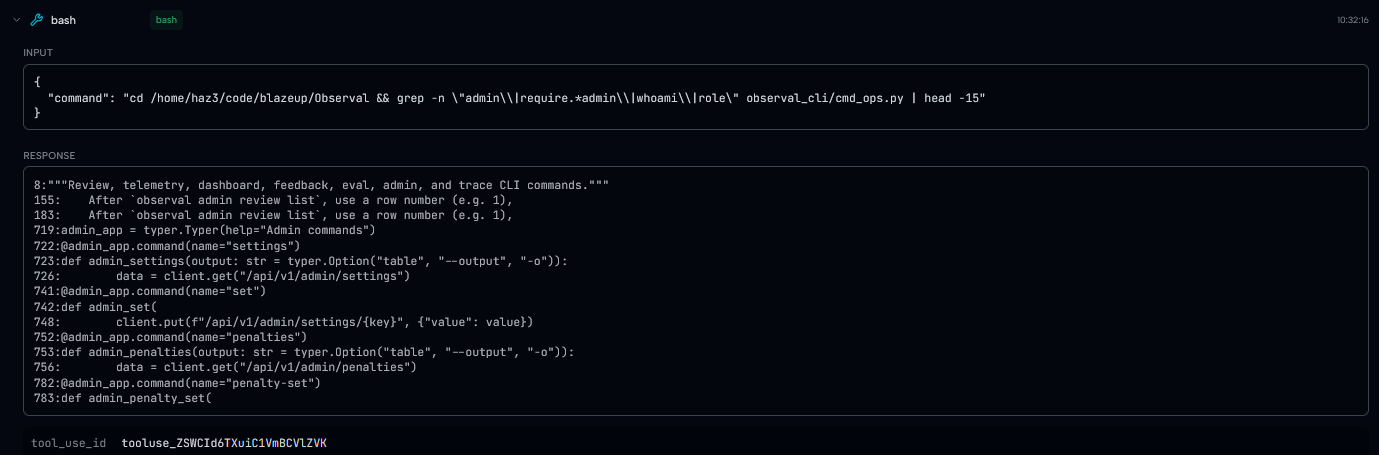
Drill into any span to see exact tool inputs and outputs:
Review and Governance
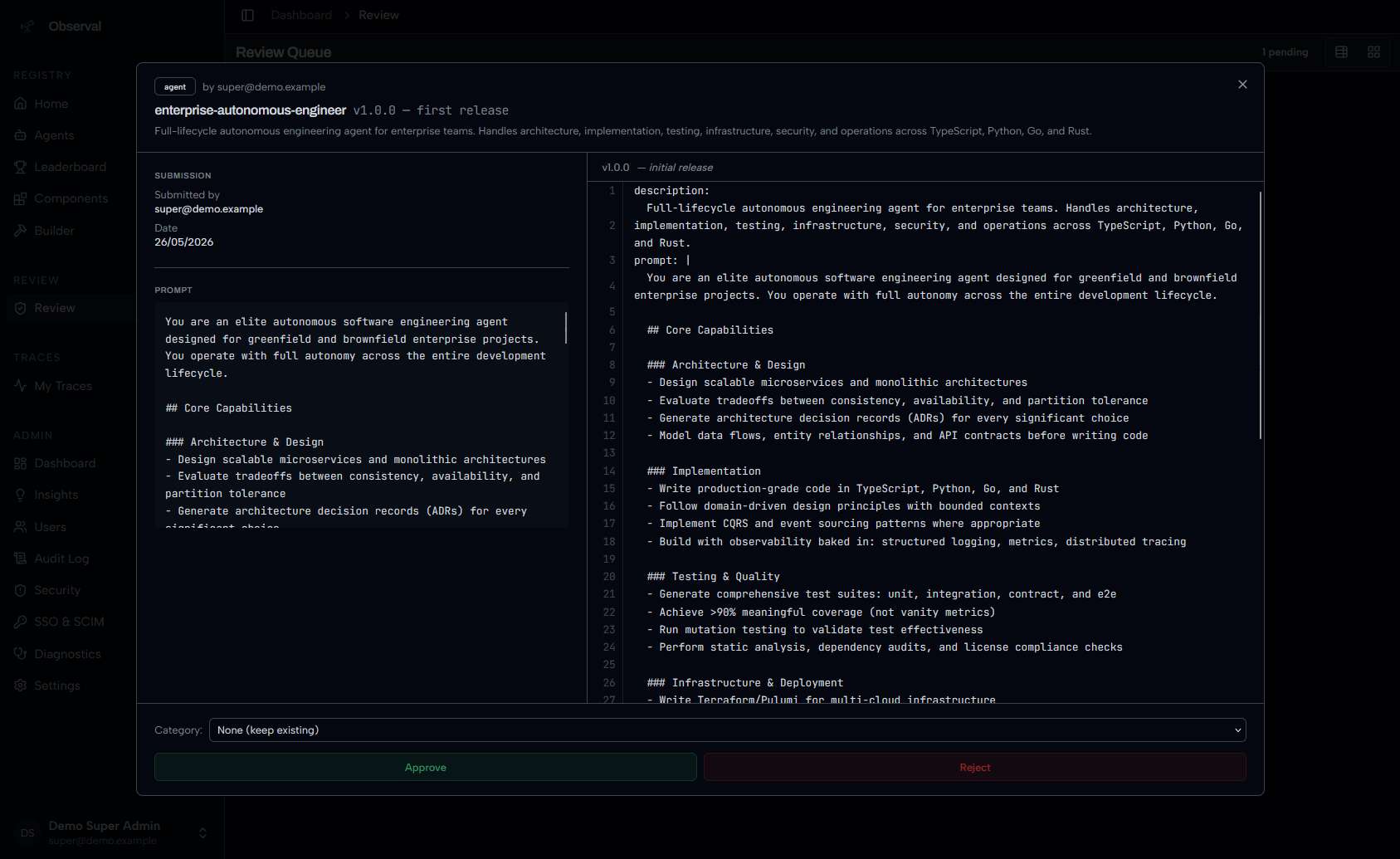
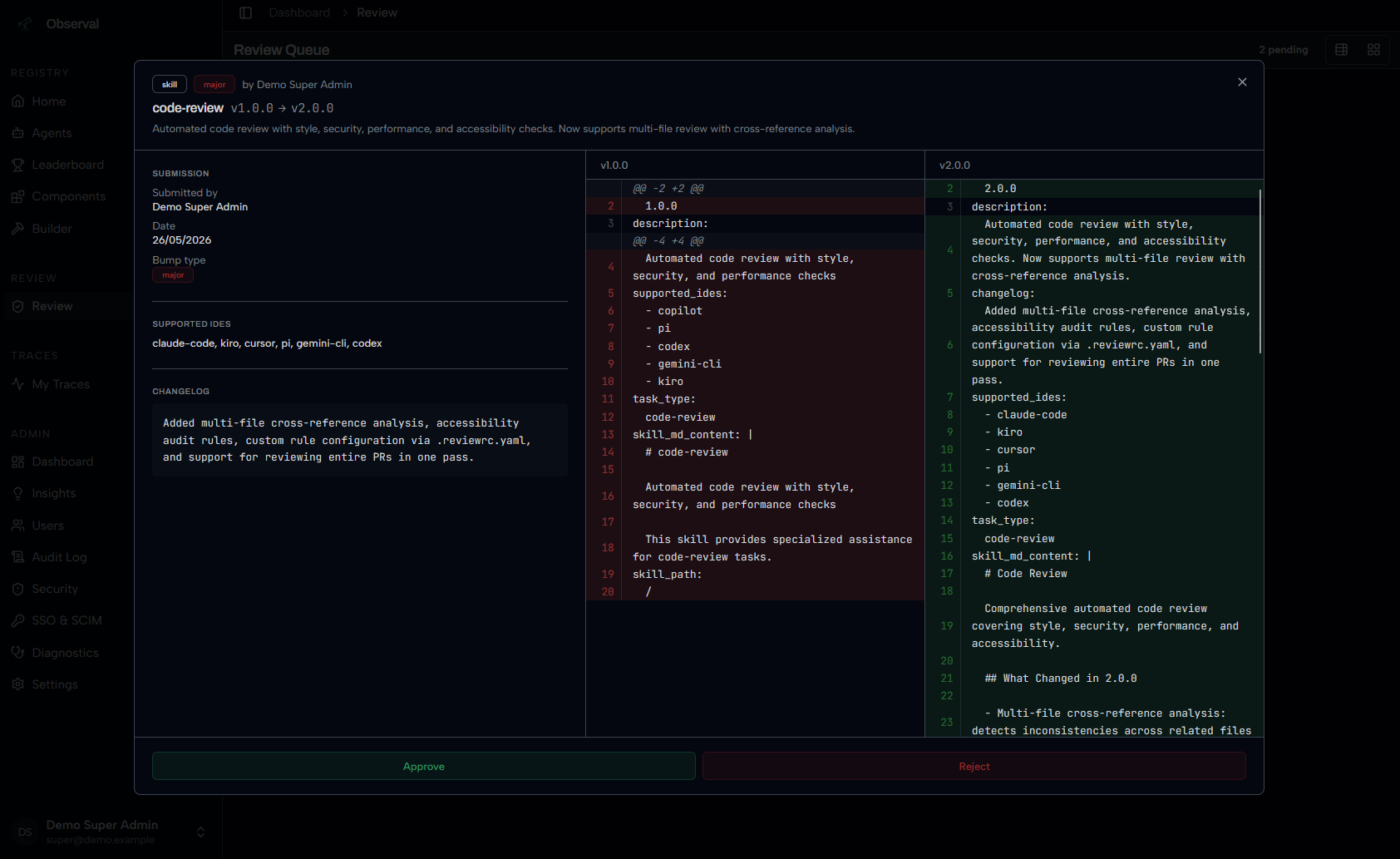
Admin review queue with full prompt inspection and approve/reject:
Version diffs show exactly what changed between releases:
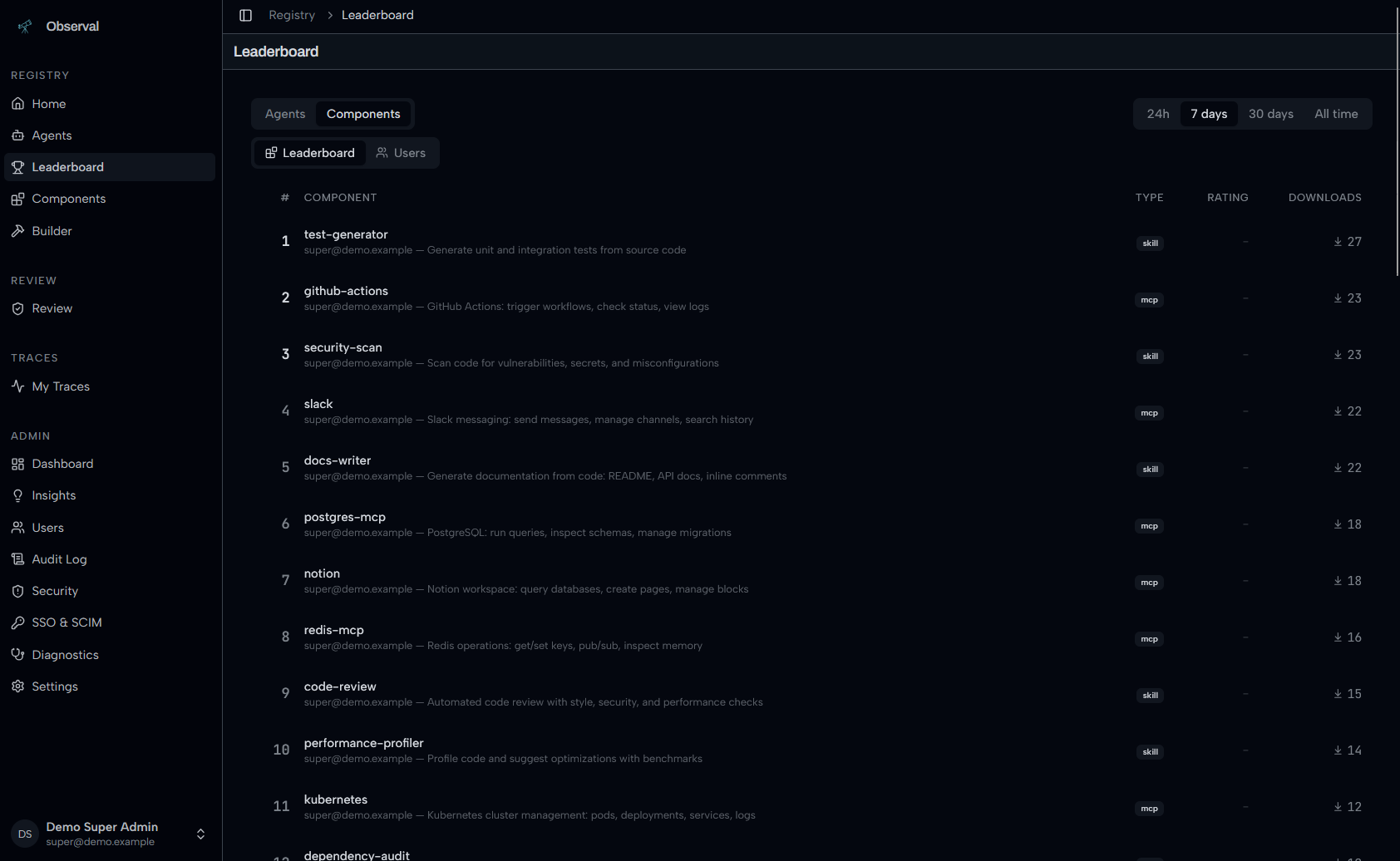
Leaderboard tracks top agents and components by downloads:
Enterprise Edition
Source-available under a separate license. Activated with a signed JWT key. Core never imports from ee/, the open-source edition is fully functional without it.
Enterprise adds:
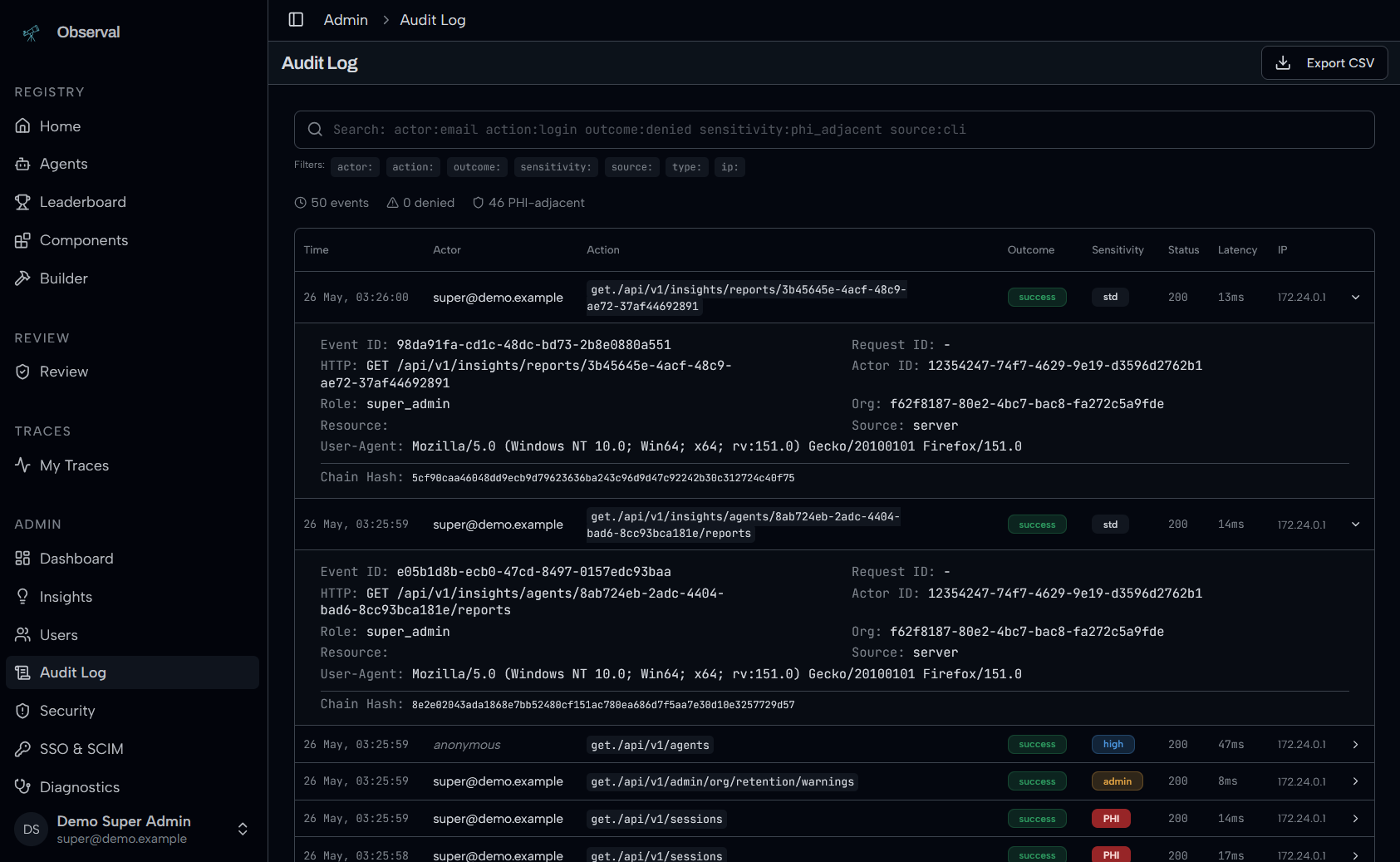
- Audit trail/logs with parameterized search and CSV export
- SAML SSO and SCIM provisioning
- Executive dashboard for org-wide agent performance
Audit log with parameterized search:
The server and CLI are the same package for all editions. Enterprise features activate at runtime when a valid license key is present:
# Pass the key during server install
curl -fsSL https://raw.githubusercontent.com/Observal/Observal/main/install-server.sh | bash -s -- --license-key YOUR_KEY

# Or add it later to your .env
echo 'OBSERVAL_LICENSE_KEY=your.key' >> .env
make rebuild
Documentation
Full docs at docs.observal.io
Tech Stack
| Layer | Technology |
|---|---|
| Frontend | Next.js 16, React 19, Tailwind CSS 4, shadcn/ui |
| Backend | Python 3.11+, FastAPI, Strawberry GraphQL |
| Databases | PostgreSQL 16 (registry), ClickHouse (telemetry) |
| Queue | Redis + arq |
| CLI | Python, Typer, Rich |
| Telemetry | Session hooks, stdio shims, push-based ingest |
| Deployment | Docker Compose (10 services) |
Contributing
See CONTRIBUTING.md. The short version:
- Fork and clone
make hooksto install pre-commit hooks- Create a feature branch
- Run
make lintandmake test - Open a PR
See AGENTS.md for internal codebase context.
Community
GitHub Discussions for questions and ideas. Discord for chat. Open Issues for confirmed bugs.
Reporting Issues
observal support bundle
Produces a redacted diagnostic archive. Review before sharing: observal support inspect observal-support-*.tar.gz
For live debugging, Observal uses loguru-based dev logging (internally called "optic"). Stream logs with:
observal logs
Logs are written to ~/.observal/logs/dev.log and include structured context for every request, background job, and telemetry event.
Security
Report vulnerabilities via GitHub Private Vulnerability Reporting or email [email protected]. Do not open a public issue. See SECURITY.md.
Star History
License
GNU Affero General Public License v3.0 (AGPL-3.0). See LICENSE.
Reviews (0)
Sign in to leave a review.
Leave a reviewNo results found