tandem
Health Warn
- License — License: MIT
- Description — Repository has a description
- Active repo — Last push 0 days ago
- Low visibility — Only 5 GitHub stars
Code Pass
- Code scan — Scanned 12 files during light audit, no dangerous patterns found
Permissions Pass
- Permissions — No dangerous permissions requested
This tool acts as a collaborative, real-time document editor that lets AI analyze your files and provide annotations, suggestions, and comments. It functions as a local MCP server integrated directly with Claude Code.
Security Assessment
Overall risk: Medium. The server runs locally and is designed to read, open, and process your documents, which inherently requires handling whatever potentially sensitive data resides in your files. A light code audit of 12 files found no dangerous patterns, hardcoded secrets, or malicious execution scripts, and no dangerous permissions are requested. However, the instructions require launching Claude Code with a specific flag (`--dangerously-load-development-channels`), which enables real-time data pushing. This requirement indicates the use of experimental features that could broaden the system's usual attack surface. Additionally, standard network requests are made to localhost to run the local server.
Quality Assessment
The project is extremely new and currently has low community visibility with only 5 GitHub stars, meaning it has not been broadly tested or vetted by a wide audience. On the positive side, it is actively maintained with very recent updates and uses a standard MIT license. The setup instructions are thorough and a clear verification process is provided, which speaks well of the developer's intent to create a usable, transparent tool.
Verdict
Use with caution: the underlying code appears safe and free of malicious elements, but it requires enabling experimental CLI features and processes whatever sensitive data is contained in your documents.
Collaborative AI-human document editor — real-time annotations, suggestions, and review powered by Claude Code via MCP

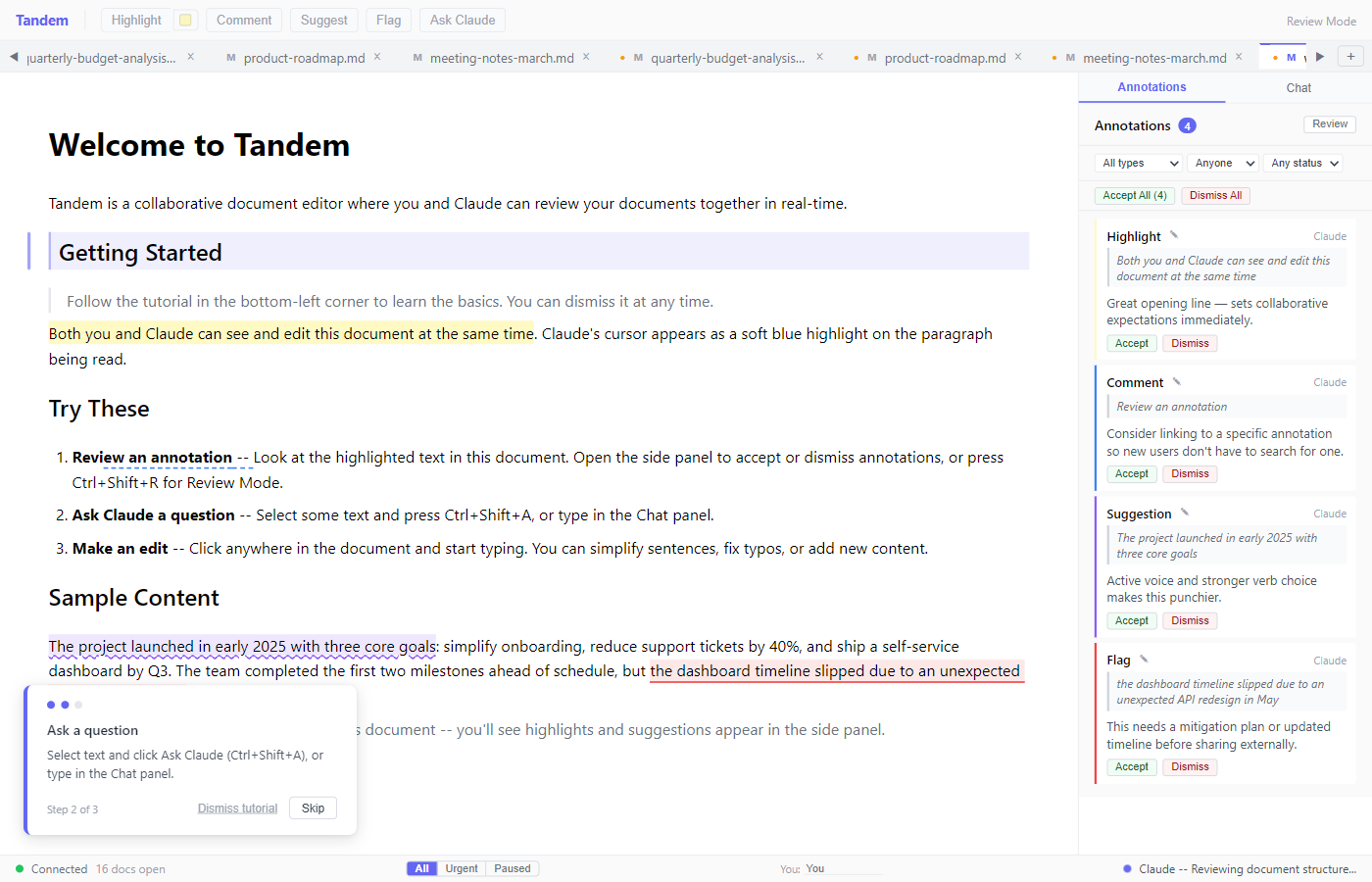
An AI document reviewer — open a progress report, RFP, or compliance filing and Claude reviews it alongside you in real time. Highlights, comments, suggestions, and questions appear as first-class annotations you accept, dismiss, or discuss. The original file is never modified unless you save.
Quick Start
Prerequisites
- Node.js 22+ (download)
- Claude Code (
irm https://claude.ai/install.ps1 | iex)
Install and Run
npm install -g tandem-editor
tandem setup     # registers MCP tools + installs Claude Code skill
tandem           # starts server + opens browser
tandem setup auto-detects Claude Code and Claude Desktop, writes MCP configuration, and installs a skill (~/.claude/skills/tandem/SKILL.md) that teaches Claude how to use Tandem's tools effectively. Re-run after upgrading (npm update -g tandem-editor && tandem setup).
Connect Claude Code
Start Claude Code with channel push for real-time notifications:
claude --dangerously-load-development-channels server:tandem-channel
Then try:
"Review the welcome document with me"
Claude calls tandem_open, the document appears in the browser, and annotations start flowing. Chat messages, annotation actions, and text selections push to Claude instantly.
Without channels: Use the /loop skill in Claude Code to poll:
/loop 30s check tandem inbox and respond to any new messages
Verify
npm run doctor # checks Node.js, MCP config, server health, ports
Or check the raw health endpoint:
curl http://localhost:3479/health
# → {"status":"ok","version":"0.1.2","transport":"http","hasSession":false}
hasSession becomes true once Claude Code connects.
git clone https://github.com/bloknayrb/tandem.git
cd tandem
npm install
npm run dev:standalone   # starts server (:3478/:3479) + browser client (:5173)
Open http://localhost:5173 — you'll see sample/welcome.md loaded automatically on first run. The .mcp.json in the repo configures Claude Code automatically when run from this directory.
Features
Annotations
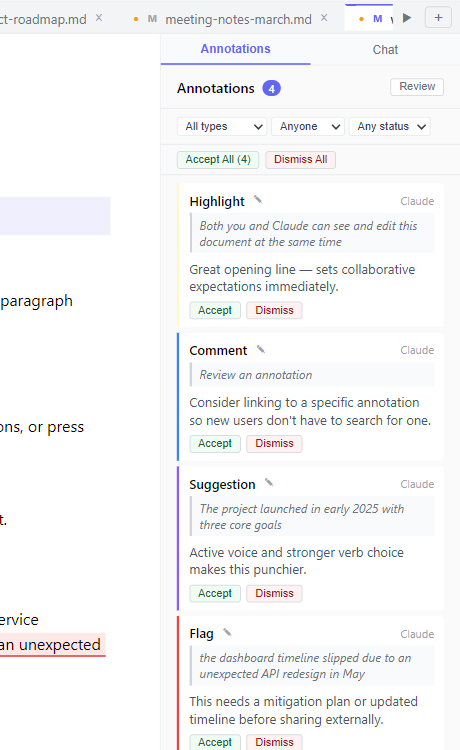
Claude adds highlights, comments, suggestions, and flags directly in the document. Suggestion cards show a visual diff — original text in red strikethrough, replacement in green. The side panel lists all annotations with filtering by type, author, and status. Accept, dismiss, or edit each one individually — or use bulk actions to process them in batches.
Chat
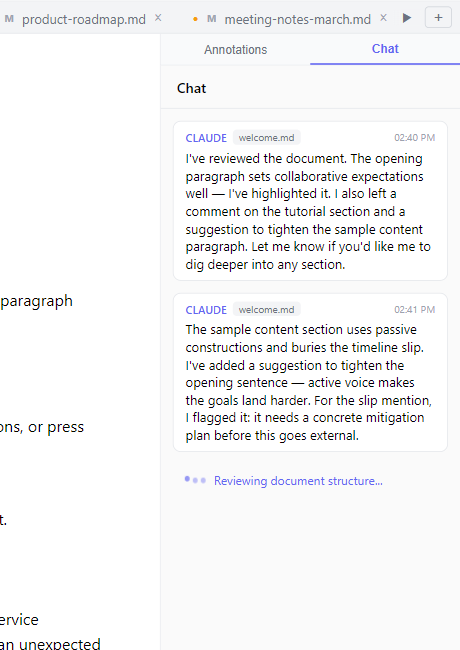
Send freeform messages to Claude alongside annotation review. Select text before sending to attach it as a clickable anchor — clicking it later scrolls back to that passage.
Review Mode
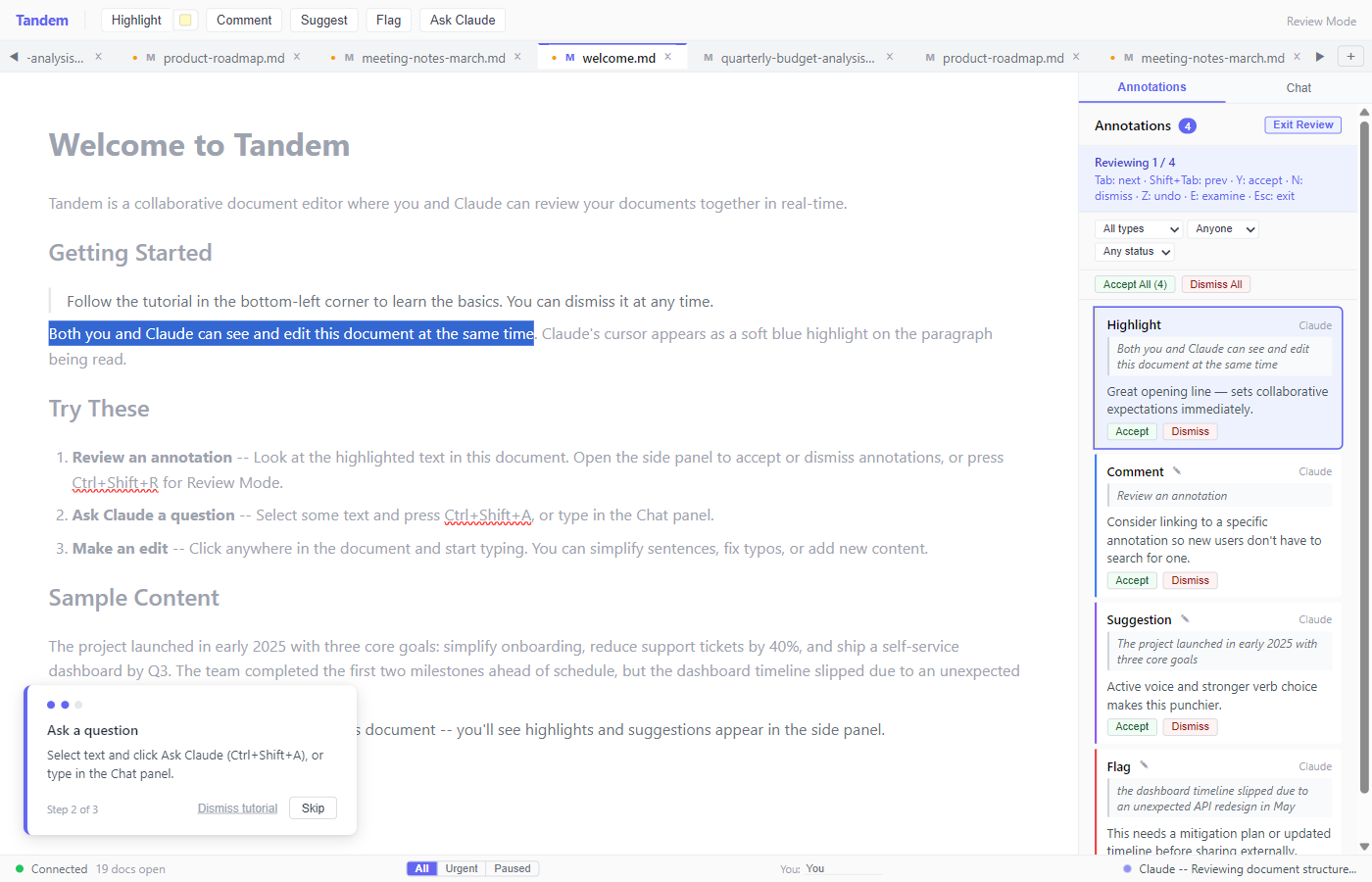
Press Ctrl+Shift+R to enter keyboard review mode. Navigate with Tab, accept with Y, dismiss with N, examine with E. A 10-second undo window with a visual countdown lets you reverse accidental accepts. Shortcut hints appear below the Review button.
More
- Multi-document tabs — open
.md,.txt,.docxfiles side by side; drag to reorder - .docx review-only mode — open Word documents for annotation; imported Word comments appear alongside Claude's
- Session persistence — documents and annotations survive server restarts
- Real-time channel push — annotation actions, chat, and selections push to Claude instantly
- Keyboard shortcuts — press
?for the full reference - Unsaved-changes indicator — dot on tab title when a document has pending edits
- Configurable display name — set your name so Claude knows who's reviewing
- Atomic file saves — write to temp, then rename, preventing partial writes
- E2E tested — Playwright tests cover the annotation lifecycle end-to-end
Documentation
- User Guide — How to use Tandem: browser UI, annotations, chat, review mode, keyboard shortcuts
- MCP Tool Reference — 30 MCP tools + channel API endpoints
- Architecture — System design, data flows, coordinate systems, channel push
- Workflows — Claude Code usage patterns: document review, cross-referencing, multi-model
- Roadmap — Phase 2+ roadmap, known issues, future extensions
- Design Decisions — ADR-001 through ADR-021
- Lessons Learned — 31 implementation lessons
CLI Commands
| Command | What it does |
|---|---|
tandem |
Start server and open browser (global install) |
tandem setup |
Register MCP tools with Claude Code / Claude Desktop |
tandem setup --force |
Register to default paths regardless of auto-detection |
tandem --version |
Show installed version |
tandem --help |
Show usage |
MCP Configuration
Tandem uses two MCP connections: HTTP for document tools (30 tools including annotation editing), and a channel shim for real-time push notifications.
Global install (tandem setup): Automatically writes both entries to ~/.claude/mcp_settings.json (Claude Code) and/or claude_desktop_config.json (Claude Desktop) with absolute paths. No manual configuration needed.
Development setup (.mcp.json): The repo includes a .mcp.json that configures both entries automatically when Claude Code runs from the repo directory:
{
  "mcpServers": {
    "tandem": {
      "type": "http",
      "url": "http://localhost:3479/mcp"
    },
    "tandem-channel": {
      "command": "npx",
      "args": ["tsx", "src/channel/index.ts"],
      "env": { "TANDEM_URL": "http://localhost:3479" }
    }
  }
}
Both entries are cross-platform — no platform-specific configuration needed.
Environment Variables
All optional — defaults work out of the box.
| Variable | Default | Description |
|---|---|---|
TANDEM_PORT |
3478 |
Hocuspocus WebSocket port |
TANDEM_MCP_PORT |
3479 |
MCP HTTP + REST API port |
TANDEM_URL |
http://localhost:3479 |
Channel shim server URL |
TANDEM_TRANSPORT |
http |
Transport mode (http or stdio) |
TANDEM_NO_SAMPLE |
unset | Set to 1 to skip auto-opening sample/welcome.md |
TANDEM_CLAUDE_CMD |
claude |
Claude Code executable name (for tandem setup auto-detection) |
See .env.example for a copy-paste template.
Troubleshooting
Run npm run doctor for a quick diagnostic of your setup. It checks Node.js version, .mcp.json config, server health, and port status.
Claude Code says "MCP failed to connect"
Start the server first (tandem for global install, or npm run dev:standalone for dev setup), then open Claude Code. The server must be running before Claude Code probes the MCP URL. If you restart the server, run /mcp in Claude Code to reconnect.
Port already in use
Tandem kills stale processes on :3478/:3479 at startup. If another app uses those ports, set TANDEM_PORT / TANDEM_MCP_PORT to different values and update TANDEM_URL to match.
Channel shim fails to start
The tandem-channel entry spawns a subprocess. For global installs, tandem setup writes absolute paths to the bundled dist/channel/index.js — re-run tandem setup after upgrading. For dev setup, if you see MODULE_NOT_FOUND with a production config (node dist/channel/index.js), run npm run build. The default dev config uses npx tsx and doesn't require a build step.
Browser shows "Cannot reach the Tandem server"
The browser connects to the server via WebSocket. For global installs, run tandem to start the server. For dev setup, use npm run dev:standalone (or npm run dev:server). The message appears after 3 seconds of failed connection.
Empty browser with no document
On first run, sample/welcome.md auto-opens. If you've cleared sessions or deleted the sample file, click the + button in the tab bar or drop a file onto the editor.
Development
| Command | What it does |
|---|---|
npm run dev:standalone |
Recommended — both frontend + backend (via concurrently) |
npm run dev:server |
Backend only: Hocuspocus (:3478) + MCP HTTP (:3479) |
npm run dev:client |
Frontend only: Vite dev server (:5173) |
npm run build |
Production build (dist/server/ + dist/channel/ + dist/cli/ + dist/client/) |
npm test |
Run vitest (unit tests) |
npm run test:e2e |
Run Playwright E2E tests |
npm run test:e2e:ui |
Playwright UI mode |
Tech Stack: React 19, Tiptap, Vite, TypeScript | Node.js, Hocuspocus (Yjs WebSocket), MCP SDK, Express | Yjs (CRDT), y-prosemirror | mammoth.js (.docx), unified/remark (.md)
Reviews (0)
Sign in to leave a review.
Leave a reviewNo results found