ui-testing
mcp
Fail
Health Warn
- License — License: MIT
- Description — Repository has a description
- Active repo — Last push 0 days ago
- Low visibility — Only 5 GitHub stars
Permissions Warn
- Permission: site_bfs_traversal — Manifest requests 'site_bfs_traversal' which grants fs access
- Permission: e2e_execution — Manifest requests 'e2e_execution' which grants exec access
Code Fail
- process.env — Environment variable access in scripts/cdp-proxy.mjs
- network request — Outbound network request in scripts/cdp-proxy.mjs
- os.homedir — User home directory access in scripts/chrome-devtools-mcp.mjs
- process.env — Environment variable access in scripts/chrome-devtools-mcp.mjs
- network request — Outbound network request in scripts/chrome-devtools-mcp.mjs
Purpose
This is a UI automation testing tool that connects directly to your local Chrome browser via the Model Context Protocol (MCP). It automatically traverses web pages, generates end-to-end test cases, and outputs standardized reports without requiring users to write manual test scripts.
Security Assessment
Overall Risk: Medium. The tool is designed to deeply interact with your local browser environment, which inherently requires broad system permissions. It successfully passes basic health checks and contains no hardcoded secrets. However, it requests `e2e_execution` access, granting it shell command execution capabilities, and `site_bfs_traversal` for file system access. The underlying scripts also access the user's home directory (`os.homedir`), read environment variables, and make outbound network requests (likely to fetch dependencies via `npx`). While these actions are consistent with its stated purpose, users should be aware that the tool will have deep access to their active, logged-in Chrome sessions and local file system.
Quality Assessment
The repository is actively maintained, with its most recent push occurring today. It uses the permissive MIT license and provides a clear, detailed description. However, community trust and visibility are currently very low. The project only has 5 GitHub stars, indicating that it has not been widely tested or adopted by the broader developer community yet. Compatible command-line interfaces are also unlisted.
Verdict
Use with caution — it is an active and well-described project, but its deep system permissions and extremely low community visibility mean you should thoroughly review the code before granting it access to your local browser environment.
This is a UI automation testing tool that connects directly to your local Chrome browser via the Model Context Protocol (MCP). It automatically traverses web pages, generates end-to-end test cases, and outputs standardized reports without requiring users to write manual test scripts.
Security Assessment
Overall Risk: Medium. The tool is designed to deeply interact with your local browser environment, which inherently requires broad system permissions. It successfully passes basic health checks and contains no hardcoded secrets. However, it requests `e2e_execution` access, granting it shell command execution capabilities, and `site_bfs_traversal` for file system access. The underlying scripts also access the user's home directory (`os.homedir`), read environment variables, and make outbound network requests (likely to fetch dependencies via `npx`). While these actions are consistent with its stated purpose, users should be aware that the tool will have deep access to their active, logged-in Chrome sessions and local file system.
Quality Assessment
The repository is actively maintained, with its most recent push occurring today. It uses the permissive MIT license and provides a clear, detailed description. However, community trust and visibility are currently very low. The project only has 5 GitHub stars, indicating that it has not been widely tested or adopted by the broader developer community yet. Compatible command-line interfaces are also unlisted.
Verdict
Use with caution — it is an active and well-described project, but its deep system permissions and extremely low community visibility mean you should thoroughly review the code before granting it access to your local browser environment.
UI Testing 是基于 Chrome DevTools MCP 构建的 UI 自动化测试 Skill,无需编写测试脚本,仅需输入 URL 即可自动完成页面遍历、E2E 用例梳理、测试执行与标准化报告输出。核心依托 MCP 直连浏览器会话,复用本地已登录 Chrome 环境,通过 Playbook 沉淀用例并实现经验自进化,让 UI 自动化测试零脚本、高复用、易扩展。
README.md
ui-testing ——— 基于 Chrome DevTools MCP 的 UI 自动化测试 Skill
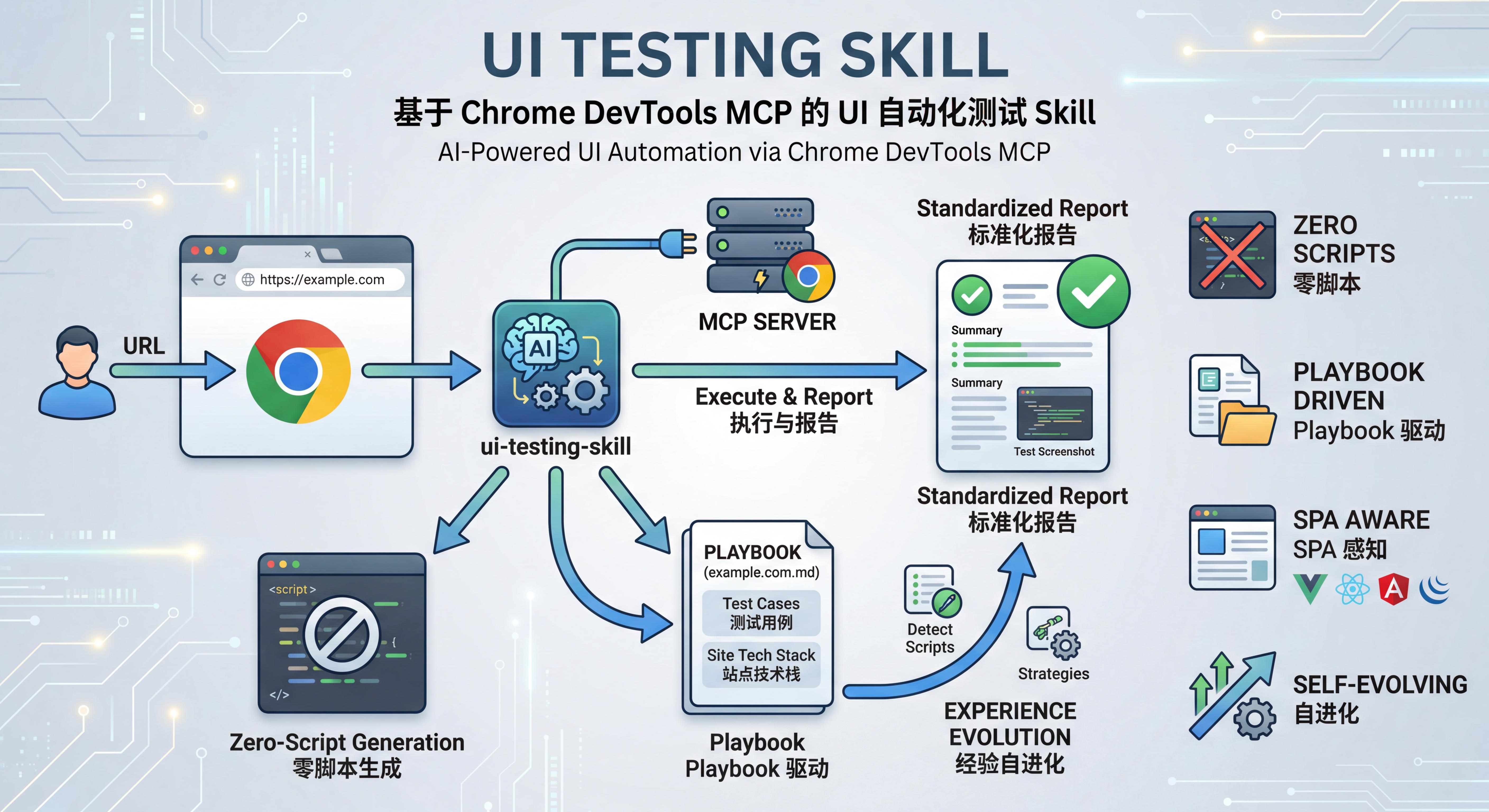
UI Testing 是基于 Chrome DevTools MCP 构建的 UI 自动化测试 Skill,无需编写测试脚本,仅需输入 URL 即可自动完成页面遍历、E2E 用例梳理、测试执行与标准化报告输出。核心依托 MCP 直连浏览器会话,复用本地已登录 Chrome 环境,通过 Playbook 沉淀用例并实现经验自进化,让 UI 自动化测试零脚本、高复用、易扩展。
特性
- 零脚本生成 — 通过 MCP 工具直接操作浏览器,不生成任何中间测试脚本
- Playbook 驱动 — 按站点/路径自动沉淀用例,复用优先,避免重复劳动
- 前端框架感知 — 内置 Vue2/Vue3/React/Angular 探测,自动选择最佳交互策略
- 组件库感知 — 自动识别 Arco Design / Ant Design / Element UI 等 8 种组件库,匹配最佳交互方案
- 页面模式识别 — 自动识别 CRUD 列表、向导表单、Dashboard 等 10 种页面模式
- 经验自进化 — 9 层进化架构:从失败模式挖掘、组件库知识沉淀到置信度生命周期管理
前置条件
| 依赖 | 版本要求 |
|---|---|
| Node.js | MCP 模式 >= 20.19;CDP Proxy 模式 >= 22 |
| Google Chrome | 本机已安装 |
| chrome-devtools-mcp | 通过 npx 自动拉取 |
安装
默认使用 Agent 自然语言自动安装(推荐)。你只需要把下面这段话发给 Agent,让它自己完成下载、放置和接入:
请帮我安装 ui-testing:
1) 从 https://github.com/bodhiye/ui-testing 获取最新代码,将整个 ui-testing 目录放到你的 skills 目录下
2) 运行 node scripts/chrome-devtools-mcp.mjs 启动 Chrome DevTools 端口
3) 将脚本输出的 mcpServers.chrome-devtools 配置片段注册到你的 MCP 配置中,确保端口号与脚本输出一致;若需重载配置则自行重启
4) 调用 list_pages 验证 MCP 工具可用,确认能返回 Chrome 标签页列表
完成后告诉我:Skill 放置路径、MCP 配置位置、验证结果
说明:
- 本项目不依赖
npm install。chrome-devtools-mcp运行时通过npx自动拉取;CDP Proxy 使用 Node.js 内置能力。 - 若 Agent 不支持自动放置 skill 文件,才需要人工把目录放入 Agent 的 skills 目录(具体路径以 Agent 文档为准)。
项目结构
ui-testing/
├── SKILL.md                          # Skill 核心定义(Agent 读取此文件驱动所有行为)
├── skill.json                        # Skill 元数据
├── README.md                         # 本文件
├── scripts/
│   ├── chrome-devtools-mcp.mjs       # Chrome DevTools 端口启动/复用 + 输出 MCP 配置片段
│   └── detect.mjs                    # 页面探测工具集(ES Module)
├── knowledge/
│   ├── component-lib.md              # UI 组件库交互知识库(跨站点复用)
│   └── evolution-log.md              # 进化日志(变更追踪与自检)
└── playbooks/
    └── {domain}/
        ├── {domain}.md               # 站点 Playbook(用例 + 技术特征)
        └── {YYYYMMDDHHmm}/
            ├── report.md             # 测试报告
            ├── results.json          # 结构化测试结果(可选但推荐)
            └── *.png                 # 测试截图
Skill 工作流概览
URL 输入
  │
  ▼
校验 URL → 解析 Playbook 路径 → 是否已有 Playbook?
  │                                  │          │
  │                                  有         无
  │                                  │          │
  │                                  ▼          ▼
  │                              复用用例    BFS 遍历 → 梳理用例 → 写入 Playbook
  │                                  │          │
  │                                  └────┬─────┘
  │                                       ▼
  │                              按优先级执行用例
  │                                       │
  │                                       ▼
  │                              生成测试报告
  │                                       │
  │                                       ▼
  └──────────────────────────── 经验进化回写(§13)
经验进化机制
Skill 在反复使用中自动积累能力,不只是完成当次测试。9 层进化架构:
| 层级 | 触发条件 | 回写目标 |
|---|---|---|
| Playbook | 每次测试必执行 | 站点 Playbook「站点技术特征」章节 |
| 通用脚本 | detectFramework/ComponentLib/Pattern 返回 unknown | scripts/detect.mjs 的 [EXTEND] 标记处 |
| 策略 | 遇到未覆盖场景且找到方案 | SKILL.md §8.x 新子章节 |
| 跨站复用 | 新站点与已测站点技术栈有交集 | 读取已有 Playbook + 组件库知识 |
| 组件库知识 | 遇到新交互问题或发现可泛化模式 | knowledge/component-lib.md |
| 失败模式挖掘 | 有失败用例时必执行 | Playbook「已知问题与恢复方案」+ 组件库知识 |
| 置信度管理 | 每次测试后 | 知识条目的置信度升降级与废弃 |
| 历史趋势 | 每次测试后 | Playbook「测试历史」+ 回归/Flaky 检测 |
| 进化日志 | 每次进化变更 | knowledge/evolution-log.md |
详见 SKILL.md §13 经验进化章节。
scripts/detect.mjs
统一的页面探测工具集,ES Module 格式。Agent 读取后将函数体注入 evaluate_script 执行。
| 导出函数 | 用途 |
|---|---|
detectFramework |
识别 SPA 框架(Vue2/Vue3/React/Angular/jQuery) |
detectFormElements |
收集所有表单元素的类型、选择器、当前值、可选项 |
findVue2FormComponent |
Vue 2:递归查找持有表单数据的组件路径及方法 |
detectComponentLib |
识别 UI 组件库(Arco Design/Ant Design/Element UI/Element Plus/MUI/Chakra UI/Bootstrap/Tailwind) |
detectPagePattern |
识别页面结构模式(crud-list/wizard-form/list-detail/tabbed-detail/dashboard 等) |
扩展方式:在文件中搜索 [EXTEND: new framework]、[EXTEND: new component lib] 和 [EXTEND: new finder] 标记。
常用命令
| 用户指令 | 说明 |
|---|---|
测试 https://example.com |
执行完整测试流程 |
测试 https://example.com,更新用例 |
重新遍历并覆盖 Playbook |
查询 example.com 的 Playbook |
查看已有用例列表 |
查询本次测试的报错明细 |
查看报错分类与详情 |
导出本次测试报告 |
获取报告文件路径 |
删除 example_com_001 用例 |
删除指定用例 |
查询 Arco Design 的交互策略 |
查看组件库知识库 |
查询进化日志 |
查看知识库统计与进化状态 |
注意事项
- Chrome 必须以
--remote-debugging-port启动,否则 MCP 无法连接 - 若自动注册 MCP 失败,可手动将以下配置添加到 Agent 的 MCP 配置文件中(将
${PORT}替换为实际端口):
{
  "mcpServers": {
    "chrome-devtools": {
      "command": "npx",
      "args": ["-y", "chrome-devtools-mcp@latest", "--browser-url=http://127.0.0.1:${PORT}"]
    }
  }
}
- 首次配置 MCP 后需要重启 Agent 使配置生效
- 若端口连通正常但
list_pages仍无法返回页面,请打开chrome://inspect/#remote-debugging,确认已启用Allow remote debugging for this browser instance - Skill 通过 MCP 工具直接操作浏览器,不会生成任何 Python/Node.js 测试脚本
- Skill 默认应复用单一工作标签页,并在测试结束后关闭本轮新增页面,避免残留大量浏览器窗口
- 截图默认使用
fullPage=true,确保捕获完整页面内容 - 测试过程中遇到的登录页,需要用户提供测试账号;Skill 不会持久化存储凭据
License
MIT. See LICENSE .
Star History
Reviews (0)
Sign in to leave a review.
Leave a reviewNo results found