claude-usage-widget
Health Pass
- License — License: MIT
- Description — Repository has a description
- Active repo — Last push 0 days ago
- Community trust — 14 GitHub stars
Code Fail
- exec() — Shell command execution in claude_usage/cli.py
Permissions Pass
- Permissions — No dangerous permissions requested
No AI report is available for this listing yet.
Cross-platform desktop widget + CLI showing real-time Claude Code usage limits — session/weekly utilisation, cost, forecasts, 11 themes. One pip install (Linux/macOS/Windows).
Claude Usage Widget
A cross-platform desktop widget that displays your Claude Code usage limits in real time. Always-on-top OSD overlay showing session and weekly utilization — built with PySide6 (Qt), so a single pip install works on Linux, macOS, and Windows.



Screenshots
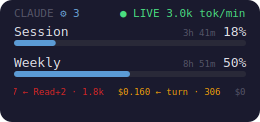
Always-on-top OSD: session + weekly utilisation, reset timers, live token-per-minute badge, subagent counter, and a scrolling per-turn cost ticker along the bottom.
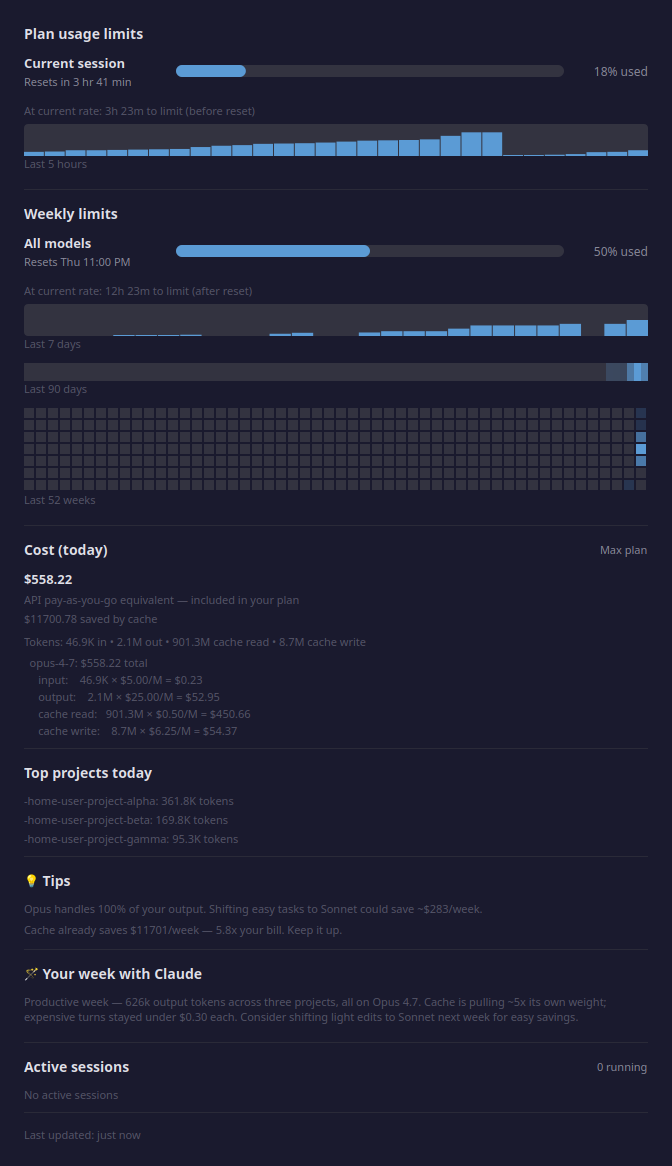
Click the OSD to open the detail popup: forecasts, 5h/7d sparklines, 90-day heatmap, 52-week GitHub-style calendar, per-model cost breakdown with Anthropic-published rates, top projects, tips, and a Claude-authored weekly summary.
OSD view modes
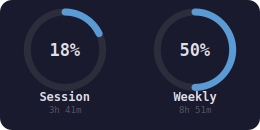
Two layouts, switch with right-click → OSD View ▸. Selection persists to ~/.config/claude-usage/config.json so a restart keeps it.
| Bars — default, includes the scrolling ticker | Gauge — circular rings, car-dashboard vibe |
|
 |
Themes
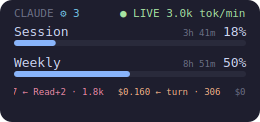
11 built-in palettes — 5 classics + 6 Claude-designed skins. Right-click the OSD → Theme ▸ to switch instantly; the choice persists to ~/.config/claude-usage/config.json.
Classics (dark):
| default | catppuccin-mocha | dracula |
|
 |
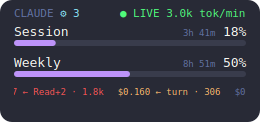 |
| nord | gruvbox-dark | |
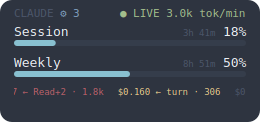 |
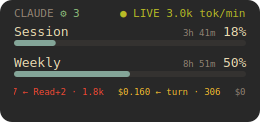 |
Claude-designed skins:
| terminal htop vibe, green-on-black |
dashboard Bloomberg-terminal cool blue |
hud car-dashboard amber |
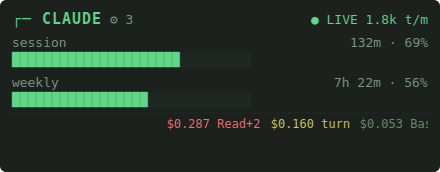 |
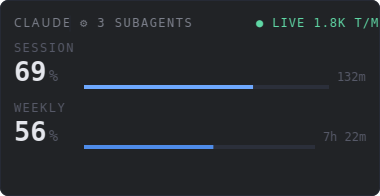 |
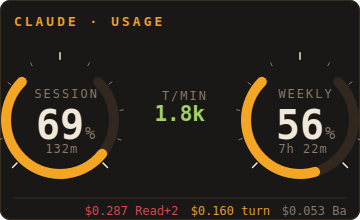 |
| receipt (light) thermal-paper cream + red |
strip cool mint on mono-gray |
brutalist (light) white, heavy rules, crimson |
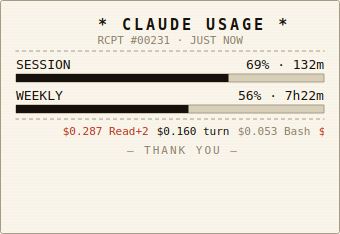 |
 |
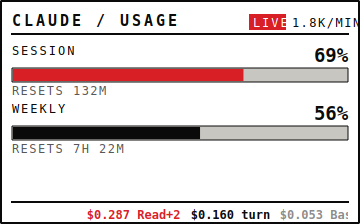 |
Gauge variants for every theme are available at screenshots/osd-gauge-<theme>.png.
Features
- Single
pip install-- noapt/brew/system libraries required, Qt is bundled - Real API data -- 5h / 7d plan utilisation read from Claude Code's
/api/oauth/usageendpoint (the same data the Claude UI shows) - OSD overlay -- transparent, frameless; left-click opens the details popup, right-click shows a context menu. Stays on top by default — toggle it off to use it as a background desktop widget.
- Live token stream --
● LIVE 5.3k tok/minbadge on the OSD while a Claude Code session is actively writing, derived from the conversation JSONLs - Per-turn cost ticker -- a scrolling strip at the bottom of the OSD shows the USD cost of each assistant turn as it lands (
$0.156 ← Bash · 116), colour-coded by quartile within the visible window so the tape always stays visually varied. Toggle via right-click → "Show cost ticker" or set"show_ticker": falseinconfig.json. - Live news ticker (opt-in) -- a second scrolling strip shows the latest Anthropic/Claude headlines sourced from Hacker News (top stories with 50+ upvotes). Fetched lazily, cached locally for 1 hour. Click the strip to open the article in your browser. Off by default because it makes outbound calls to a 3rd-party feed; enable via right-click → "Show news ticker" or set
"show_news": trueinconfig.json. - Subagent rozet -- when you spawn parallel subagents via the Task tool, the
CLAUDEtitle gets a⚙ Ncounter next to it showing how many are currently writing. Hidden when zero so single-session use isn't cluttered. - Detail popup -- usage bars, forecast, 5h/7d sparklines, 90-day heatmap, 52-week GitHub-style calendar, per-model cost breakdown, top projects, active sessions (resizable)
- Auto-refresh -- every 60 seconds by default; the interval adapts automatically, backing off up to 300 s when the endpoint rate-limits and snapping back on the next clean refresh (
refresh_seconds/refresh_max_seconds) - Positioning -- snap the OSD to any screen corner via right-click → "OSD Position", or drag it anywhere; the spot is remembered (
osd_position,osd_x/osd_y) - Resizable -- scroll wheel on the OSD (0.6x -- 2.0x); drag the popup window edges to widen it
- Draggable -- left-click drag on the OSD
- Cost estimation -- USD equivalent per model, cache savings, pay-as-you-go comparison for flat-fee subscribers
- Usage forecasting -- burn-rate prediction: "At current rate: 2h 30m to limit"
- Per-project breakdown -- top 5 projects by token usage today
- Prompt-cache opportunities -- scans recent sessions for repeated prompt prefixes and suggests
cache_controlchanges with a concrete $ savings estimate - AI-generated weekly report -- Claude Haiku writes a 3-4 sentence summary of your past week of usage (cached 1h; never leaks prompt text)
- Anomaly detection -- flags days whose utilisation exceeds the 7/90-day baseline
- Cost optimisation tips -- suggests cache-hit-rate improvements and model-mix changes
- Themes -- 11 in all: 5 classic palettes (default, catppuccin-mocha, dracula, nord, gruvbox-dark) plus 6 designed skins (terminal, dashboard, hud, receipt, strip, brutalist)
- Threshold notifications -- native desktop notifications on crossing 75% / 90%
- Webhooks -- optional POST to Slack / Discord / custom URLs on threshold, daily, or anomaly events
- Localhost JSON API -- optional
http://127.0.0.1:8765/usagefor tmux / polybar / waybar integrations (prompt previews redacted at the serialization boundary) - CLI mode --
--json,--field,--export csvfor scripts and status bars
Requirements
- Python 3.10+
- Claude Code CLI installed and authenticated (OAuth) — the widget reads the same token, checking the
CLAUDE_CODE_OAUTH_TOKENenvironment variable first, then~/.claude/.credentials.json, then the macOS Keychain
Installation
Any platform (pip — recommended)
pip install --user --upgrade claude-usage-widget
claude-usage              # launches the OSD overlay (foreground)
claude-usage --detach     # …or run it in the background and free the shell
claude-usage --version    # 0.9.1
That's it — no apt, no brew, no PyGObject, no rumps. PySide6 ships Qt in the wheel, so the widget is fully self-contained.
macOS (Homebrew — optional)
If you prefer brew over pip:
brew tap bozdemir/tap
brew install claude-usage-widget
From source
git clone https://github.com/bozdemir/claude-usage-widget.git
cd claude-usage-widget
pip install -e .
python3 main.py
Usage
OSD overlay controls
| Action | Effect |
|---|---|
| Left-click | Open the details popup |
| Left-click drag | Move the OSD |
| Right-click | Open context menu (Details, Refresh, OSD Opacity, OSD View, OSD Position, Theme, Minimize/Restore, Show cost ticker, Show news ticker, Always on top, Quit) |
| Scroll up / down | Resize (0.6x -- 2.0x) |
Context menu (right-click OSD)
- Details… -- open the detail popup
- Refresh -- force an immediate data refresh
- OSD Opacity -- 100% / 75% / 50% / 25%
- OSD View ▸ -- switch between Bars (default — progress bars + cost ticker) and Gauge (two circular rings); auto-persisted
- OSD Position ▸ -- snap the overlay to Top Left / Top Right / Bottom Left / Bottom Right, or drag it anywhere for a remembered Custom position; auto-persisted
- Theme ▸ -- pick one of the 11 themes (5 classic palettes plus 6 skins: terminal, dashboard, hud, receipt, strip, brutalist); the choice persists to
~/.config/claude-usage/config.jsonso a restart keeps it - Minimize / Restore -- collapse the OSD to a thin progress strip
- Show cost ticker -- toggle the scrolling per-turn cost strip on the OSD
- Show news ticker -- toggle the Anthropic/Claude news headline strip on the OSD
- Always on top -- keep the OSD pinned above other windows (default), or turn it off to let it sit as a normal background desktop widget the window manager stacks behind your focused windows; persisted
- Quit -- exit the widget
Configuration
All settings are optional. Copy config.json.example to config.json and edit the values you want to change:
cp config.json.example config.json
{
    "daily_message_limit": 200,
    "weekly_message_limit": 1000,
    "daily_token_limit": 5000000,
    "weekly_token_limit": 25000000,
    "refresh_seconds": 60,
    "refresh_max_seconds": 300,
    "osd_opacity": 0.75,
    "osd_scale": 1.0
}
| Setting | Default | Description |
|---|---|---|
refresh_seconds |
60 |
Base poll interval — how often to fetch new data from the API (seconds) |
refresh_max_seconds |
300 |
Max poll interval when the API rate-limits/errors; the interval backs off exponentially toward this cap and snaps back to refresh_seconds on the next clean refresh |
osd_opacity |
0.75 |
OSD background opacity (0.15--1.0) |
osd_scale |
1.0 |
OSD scale factor (0.6--2.0) |
daily_message_limit |
200 |
Daily message limit for local tracking in the popup |
weekly_message_limit |
1000 |
Weekly message limit for local tracking in the popup |
daily_token_limit |
5000000 |
Daily token limit for local tracking |
weekly_token_limit |
25000000 |
Weekly token limit for local tracking |
claude_dir |
~/.claude |
Path to the Claude Code data directory |
theme |
default |
Color theme for the OSD and popup. One of default, catppuccin-mocha, dracula, nord, gruvbox-dark, terminal, dashboard, hud, receipt, strip, brutalist |
show_ticker |
true |
Whether the scrolling per-turn cost ticker is painted at the bottom of the OSD. Toggle at runtime via right-click → "Show cost ticker". |
show_news |
false |
Whether the live Anthropic/Claude news headline strip is shown on the OSD. Off by default because it makes outbound calls to a 3rd-party feed. Toggle at runtime via right-click → "Show news ticker". |
osd_position |
top-right |
Where the OSD anchors: top-left, top-right, bottom-left, bottom-right, or custom. Set from right-click → "OSD Position", or automatically to custom when you drag the overlay. |
osd_x / osd_y |
null |
Exact screen coordinates used only when osd_position is custom. Written automatically on drag. |
osd_scale |
1.0 |
OSD zoom level (0.6–2.0). Updated automatically when you scroll the mouse wheel over the OSD, so it reopens at the same size. |
osd_minimized |
false |
Whether the OSD is in its collapsed thin-strip form. Written automatically via right-click → "Minimize / Restore". |
osd_visible |
true |
Whether the OSD overlay is shown. Written on quit so the widget reopens in the same visible/hidden state. |
osd_always_on_top |
true |
Keep the OSD pinned above other windows. Set to false (or right-click → "Always on top") to let it sit as a normal background desktop widget. |
osd_view_mode |
bars |
OSD layout: bars (progress bars + cost ticker) or gauge (circular rings). |
notifications_enabled |
true |
Whether desktop notifications fire when usage crosses a threshold. |
notify_thresholds |
[0.75, 0.90] |
Utilisation fractions that fire a notification when first crossed. |
api_server_enabled |
false |
Enable the opt-in localhost JSON API (/usage, /healthz). |
api_server_host / api_server_port |
127.0.0.1 / 8765 |
Bind address and port for the localhost API. |
webhooks |
{} |
Map of event → URL (threshold_crossed, daily_report, anomaly). |
Keys omitted from config.json fall back to built-in defaults. claude_dir is not included in the example file because the default is correct for most setups.
Themes
The widget ships with 11 built-in color themes — 5 classics plus 6 Claude-designed skins. Select one by adding "theme": "<name>" to your config.json:
{
    "theme": "dracula"
}
Available themes (gallery above):
Classics (dark):
- default -- the original widget palette
- catppuccin-mocha -- soft pastel dark theme
- dracula -- classic purple-and-pink dark theme
- nord -- cool arctic blue palette
- gruvbox-dark -- warm retro-style dark theme
Claude-designed skins:
- terminal -- htop/btop vibe, green-on-black hacker aesthetic
- dashboard -- Bloomberg-terminal clean cool blue, near-zero chroma
- hud -- car-dashboard amber on warm black, mil-spec green live dot
- receipt -- cream thermal-paper + near-black ink + red accents (light)
- strip -- cool mint on mono-gray, ultra-compact menu-bar vibe
- brutalist -- white, heavy rules, one crimson accent (light)
How It Works
The widget reads your Claude Code OAuth token using the same lookup order as Claude Code itself — the CLAUDE_CODE_OAUTH_TOKEN environment variable, then ~/.claude/.credentials.json, then (macOS only) the Keychain — and calls Claude Code's own /api/oauth/usage endpoint, the same one the Claude UI uses, to read your plan-level utilization:
{
  "five_hour": { "utilization": 58, "resets_at": "2026-04-14T10:00:00+00:00" },
  "seven_day": { "utilization": 10, "resets_at": "2026-04-20T03:00:00+00:00" }
}
These are the same values shown on the claude.ai usage page. (A tiny /v1/messages call that reads anthropic-ratelimit-* headers remains as a fallback if the OAuth endpoint is unreachable.) The widget also reads local data from ~/.claude/ for message counts, token usage per model, and active session tracking.
How the OSD works
Qt's QWidget with FramelessWindowHint | Tool | WindowStaysOnTopHint plus WA_TranslucentBackground gives us a transparent, borderless floating window that behaves identically on X11, XWayland, native Wayland, macOS, and Windows. All drawing goes through QPainter (drawRoundedRect, drawText), so there's a single code path with no platform shims.
Scale and opacity -- the overlay stores a scale (0.6 -- 2.0, default 1.0) and opacity (0.15 -- 1.0, default 0.75). Scale multiplies every pixel dimension before drawing, so the widget resizes proportionally. Opacity is the alpha channel of the background fill only; bar and text remain at full alpha so they stay legible at low opacity.
Refresh cycle -- a daemon thread wakes on the poll timer, performs the API call, and emits a Qt signal back to the GUI thread (Signal(object)). The GUI thread then updates the OSD and the popup together. The poll interval is adaptive: it runs at refresh_seconds (default 60) while refreshes succeed, and backs off exponentially toward refresh_max_seconds (default 300) whenever a poll is rate-limited or errors, snapping back to the base on the next clean refresh — Anthropic's /api/oauth/usage is a low-budget endpoint shared with Claude Code, so a fixed fast poll against it just prolongs throttling. User interactions (scroll, drag, right-click) update in place and request an immediate repaint.
Live token stream
The OSD renders a ● LIVE 5.3k tok/min badge when a Claude Code session is actively writing. The detector scans ~/.claude/projects/*/*.jsonl for assistant turns in the last 5 minutes (filtered cheaply by file mtime), sums their output_tokens, and divides by the window. The "live" dot only lights up when the newest turn is under 90 seconds old; the rate keeps showing for the full 5-minute window so bursts are visible in context.
Per-turn cost ticker
A thin scrolling strip along the bottom of the OSD shows the USD cost of each assistant turn as it lands ($0.156 ← Bash · 116). The same JSONL scan that powers the live-tokens badge reads usage.{input, output, cache_read, cache_creation}_tokens from each unique message (dedup'd by Anthropic's message.id) and multiplies by the Anthropic-published rates in pricing.py. Multi-tool turns collapse to a compact Read+2 label. Items are colour-coded by quartile rank within the current 40-item buffer (dim → blue → amber → red), so you always see four tiers regardless of whether you're on Haiku, Sonnet, or Opus — the tape stays meaningful when every turn happens to land in a narrow dollar band. Disable with the right-click menu or show_ticker: false in config.json.
Subagent rozet
Right next to the CLAUDE title, a ⚙ N badge shows how many Task-tool subagents are actively writing. Detection is a stat-only glob of ~/.claude/projects/<proj>/<uuid>/subagents/agent-*.jsonl filtered to files whose mtime is within the last 60 s — no file contents opened, negligible cost on every refresh. The rozet is hidden when the count is zero so single-session users aren't nagged by a permanent ⚙ 0.
Prompt-cache opportunities
Scans your recent conversation history for repeated user-prompt prefixes (≥1024 tokens, ≥3 occurrences within the last 7 days) and estimates how much you'd save by enabling Anthropic's ephemeral prompt cache on them (cache_creation write once + cache_read for the rest). The top 5 are shown in the popup with a $ figure. Prompt previews stay local -- they're redacted from --json and the localhost API so raw prompt text never leaves your machine via those surfaces.
AI-generated weekly report
A 3-4 sentence natural-language summary of the past week (top projects, total volume, cost/model mix) is generated on demand by Claude Haiku 4.5 and cached at ~/.claude/widget-cache/weekly-report.json for one hour. The generator runs on a background thread so refresh stays synchronous. If the OAuth token is missing or Anthropic is unreachable, the section simply disappears -- no retries, no errors in your face.
Calendar heatmap (52 weeks × 7 days)
GitHub-style yearly activity grid below the 90-day strip. Rows are weekdays (Sunday at the top), columns are ISO weeks with today anchored in the rightmost column at its real weekday. Cell alpha maps to per-day peak session utilisation.
Troubleshooting
OSD not visible
- Check if the process is running:
ps aux | grep claude-usage(Linux/macOS) or the Task Manager (Windows). - Try launching from a terminal:
claude-usage— any startup error prints to stderr.
Linux: qt.qpa.plugin: Could not load the Qt platform plugin "xcb"
Qt 6.5+ needs one tiny system library that ships separately from the wheel:
sudo apt install -y libxcb-cursor0     # Ubuntu/Debian
sudo dnf install -y xcb-util-cursor    # Fedora
sudo pacman -S xcb-util-cursor         # Arch
Linux: notifications don't appear
The widget shoots notifications via notify-send. Install it if missing:
sudo apt install libnotify-bin    # Ubuntu/Debian
sudo dnf install libnotify        # Fedora
sudo pacman -S libnotify          # Arch
API authentication fails
- Make sure the Claude Code CLI is installed and you are logged in (the
claudecommand should work in a terminal). - The OAuth token is loaded in this order: the
CLAUDE_CODE_OAUTH_TOKENenvironment variable, then~/.claude/.credentials.json, then (macOS only) the login Keychain. - macOS — blank session/weekly with "No credentials": Claude Code often stores the token only in the Keychain, and a GUI launch (Finder / Homebrew / a login item) may not have access to it. Launch
claude-usageonce from a Terminal and click Always Allow on the Keychain prompt, or exportCLAUDE_CODE_OAUTH_TOKEN.
Status shows "Rate limited"
The usage figures come from Anthropic's /api/oauth/usage endpoint, a low-budget endpoint shared with Claude Code. Polling it too often can trip its rate limit; the widget handles this gracefully (it keeps showing your last-known numbers and backs the poll interval off automatically), so it's harmless. If you see it a lot, raise refresh_seconds in config.json.
Contributing
Contributions are welcome. A few guidelines:
- Bug reports — open an issue with your OS, Python version, and the full error output.
- Pull requests — keep changes focused. One fix or feature per PR. Run the widget manually before submitting.
- No new runtime dependencies — PySide6-Essentials is the only runtime dep. Everything else uses the Python stdlib and platform-native CLIs.
- Code style — follow the existing conventions. No formatter is enforced; just match the surrounding code.
License
MIT
Reviews (0)
Sign in to leave a review.
Leave a reviewNo results found