agent-co-governance-toolkit
Health Warn
- License — License: MIT
- Description — Repository has a description
- Active repo — Last push 0 days ago
- Low visibility — Only 5 GitHub stars
Code Pass
- Code scan — Scanned 12 files during light audit, no dangerous patterns found
Permissions Pass
- Permissions — No dangerous permissions requested
No AI report is available for this listing yet.
Long-term project memory and multi-workspace collaboration for Codex. Coordinate AI work, preserve progress, and build shared results. English · 简体中文 · 繁體中文.
Agent Co-Governance Toolkit
Give AI collaboration lasting project memory, with multiple workspaces advancing one long-running project.
Download and install · User manual · Architecture
Maintain and upgrade an existing project
Agent Co-Governance Toolkit (AGCT) is an open-source project collaboration toolkit for Codex users. It organizes task progress, stage deliverables, important decisions, and continuation information from different workspaces into project records you can save, trace, and use again.
Different Codex chats can advance software, hardware, algorithms, research, operations, or writing. A governance chat combines AI and tools to bring together progress, receive deliverables, and update participating workspaces with shared results when appropriate. Existing chats can join, and work already in progress can continue.
It is for people already using Codex who want to organize multiple conversations into a long-running project. You set the direction and make important decisions, Codex helps understand and advance the work, and AGCT keeps its state and results traceable.
Why AGCT?
A conversation can complete a task, but a long-running project often spans many conversations, files, and versions. As the work grows, the difficult parts become:
- Returning after a week and having to explain where you stopped, why you made certain choices, and what comes next.
- Keeping several chats moving while trying to tell which deliverables have joined the project and which remain in individual workspaces.
- Managing several versions of one task when old records and current action items are mixed together.
- Working out what actually finished after an interruption, and whether anything needs to start again.
AGCT retains these relationships during everyday work. Project continuity does not have to depend entirely on chat context; independent work can also contribute to a clear view of the whole project.
What can you do with it?
| Capability | How it helps your work |
|---|---|
| Lasting project memory | Keep progress, key decisions, deliverable locations, and next steps for registered tasks so work can continue across sessions. |
| Multiple-workspace collaboration | Prepare independent workspaces for tasks that need to run in parallel, letting specialist chats advance their work before bringing the results together. |
| Build results stage by stage | A task does not need to be entirely finished before it contributes. A stable stage can be handed to governance for inclusion in the shared version. |
| Retain unfinished work | Save selected files and continuation notes when work pauses. Return to the previous position while paused tasks remain quietly available. |
| Keep iterations clear | Record relationships between earlier and later results, retain history, and clearly distinguish results already integrated, stages offered for receipt, and work being retained for later. |
| Reuse verified recovery methods | For known problems the tools already support, check current conditions before applying a suitable recovery method to reduce repeated operations. |
| Focus each governance turn | Read a limited, paginated selection of current work from a consistent project snapshot. Keep paused work and completed history without treating them as new obligations. |
The same local tools provide these capabilities. You can use MCP tools connected to Codex or work from the command line; both read and write the same project state.
How people, AI, and tools work together
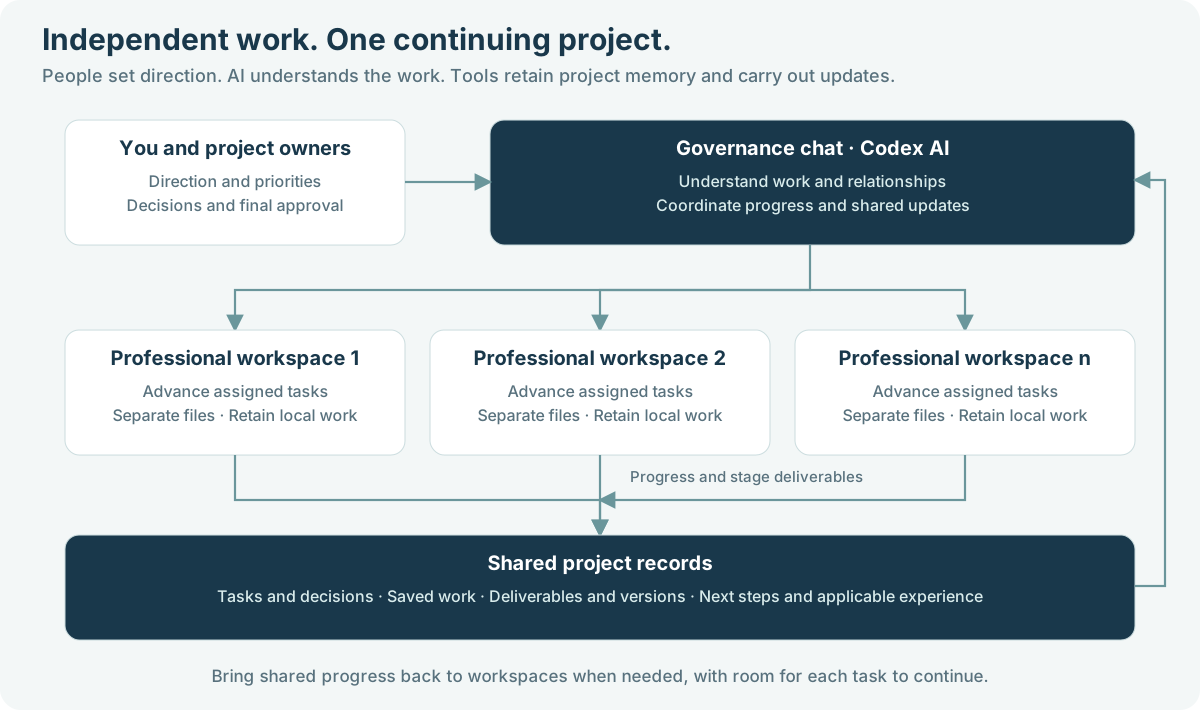
The governance chat is the project's coordination point. It uses Codex to understand the work information provided, assess relationships between tasks and deliverables, and call tools to save state, organize delivery, and update workspaces.
Specialist chats focus on their actual work. One chat can continue through related subtasks; add independent workspaces when parallel work is needed. Your project determines the roles and their number.
AGCT tools retain tasks, files, versions, and operation results, checking targets and conditions before updates run. AI interprets the work, tools provide repeatable recording and execution, and people retain control of direction, important tradeoffs, and final business decisions.
This gives collaboration a shared record while allowing each workspace to keep its own pace.
From starting work to continuing progress
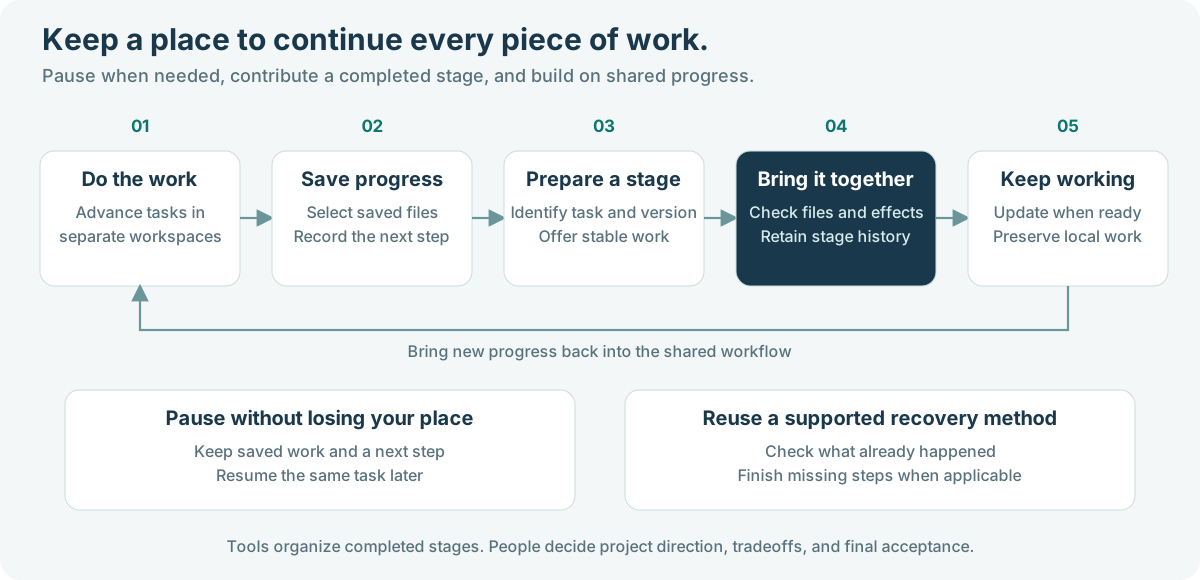
For example, a product project might use three workspaces for software, experiments, and documentation. Software has a usable module, experiments are still being prepared, and documentation has a first draft. Governance can receive the stable software result while recording the current positions of the experiments and documentation. They do not have to wait for the whole project to finish together.
When a newer software version arrives, governance organizes the results using the declared task and version relationships, retaining the necessary history. Workspaces that need shared progress first have their supported local work checked and preserved. If a conflict appears, governance identifies it so the relevant workspace can resolve it.
Here, “receiving” means bringing a stage's deliverables into the project. You and the appropriate owners still decide whether they meet product goals or are ready for external delivery.
What does lasting memory retain?
AGCT stores project memory outside the chat, in your local project. It records the information needed to continue the work:
| Project record | Questions it can answer later |
|---|---|
| Task state and key decisions | How far has this progressed? Why was it arranged this way? |
| Saved work and next steps | Where did we stop? What should happen next? |
| Stage deliverables and version relationships | Which result is already part of the project? Which stage did it evolve from? |
| File references and deliverable locations | Where are the materials? Do they need to be saved separately? |
| Operation results and applicable experience | What has already run? Which method may help with a similar problem? |
You do not need to put every large file into Git. The tools can record material locations to help you find files and arrange backups; actual copying and backup still follow your storage setup. When you want remote storage for project deliverables and selected records, the manual explains how to configure a private Git repository.
You or the governance chat explicitly record this information; unrecorded decisions in conversations do not automatically become project memory. It comes from the tasks and work materials you connect. It does not automatically collect every conversation or save editor content that has not been written to disk.
Connect an existing project or start a new one
Existing work can continue. In the original chat, summarize the current task, deliverables, important context, and unfinished work. Give that summary to governance for onboarding, then bring the continuation instructions back to the original chat. You can keep a suitable existing chat without redoing the project.
Add workspaces when parallel work is needed. Each workspace has a clear task scope. Multiple workspaces advance separately through independent directories and Git worktrees. If several existing chats share a directory, keep one primary writer there and follow the manual to move responsibilities that need parallel work into separate workspaces.
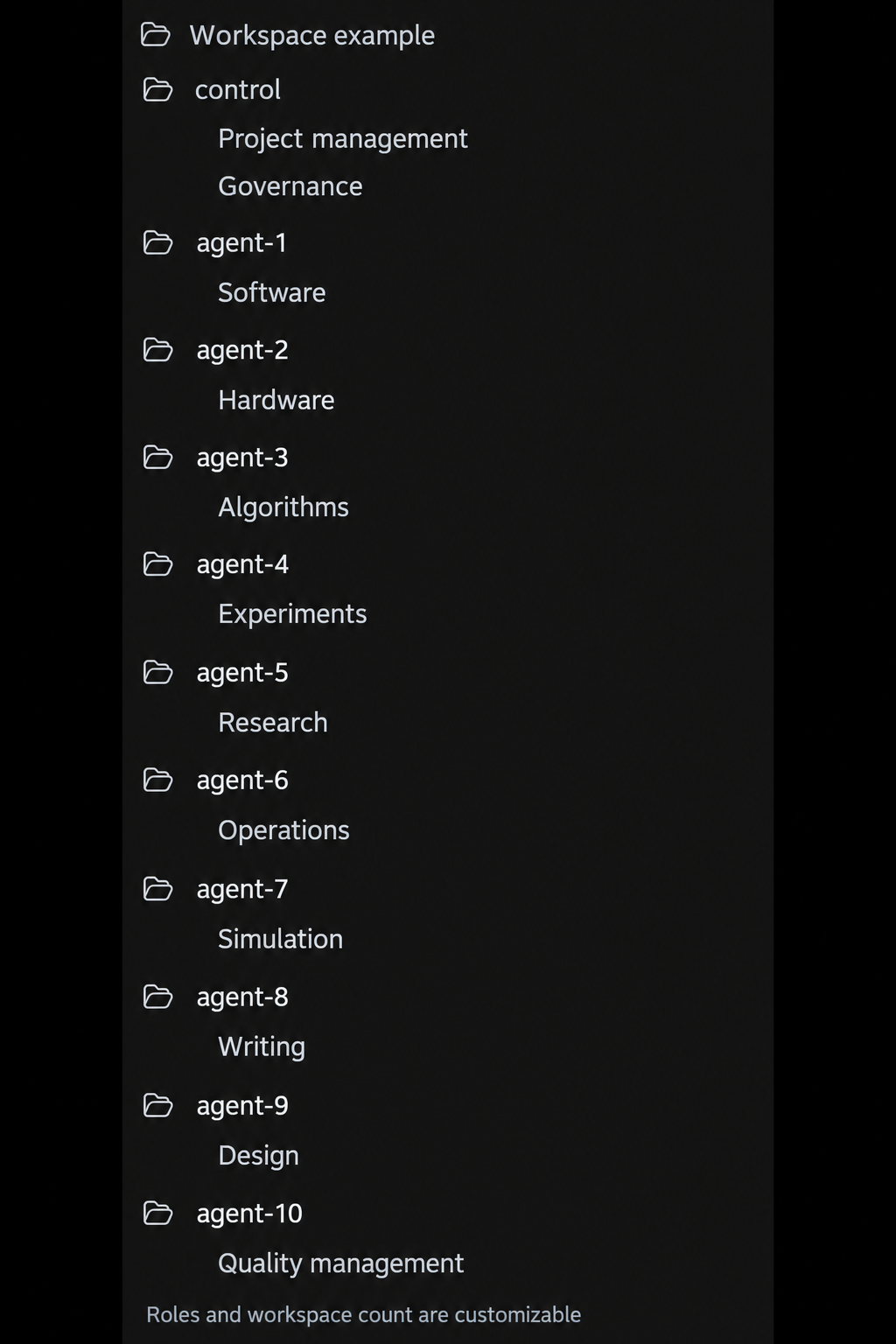
The image is a generic organization example. You choose the specialist names and their number; backup or observer chats are not required.
Start in three steps
- Prepare a project. Download the product package and follow the user manual to create its directory. Each project directory corresponds to one actual project.
- Create the governance chat. Select the directory specified by the manual, paste the installation prompt, and fill in [Project name] and [One-sentence introduction].
- Connect your work. Continue existing chats or add specialist workspaces, specify [The actual work each workspace is responsible for], and start making progress.
The complete user manual provides directory examples, copyable prompts, MCP setup, and automation configuration. Follow its steps; you do not need to read engine source code or run development tests first.
Expand gradually from local collaboration
- Organize the project on a schedule. Configure a scheduled task in Codex or another host so governance reviews connected work, summarizes changes, and handles eligible updates. The host provides scheduling.
- Store results in private Git. Push selected deliverables and project records to your own remote repository for traceability and recovery. Remote synchronization is configured separately and follows your authorization.
- Assign different tasks to different computers. The manual suggests a workflow with independent task branches and one integration computer. It has not completed a real two-computer end-to-end validation; consider it after the local workflow is stable.
Technology and usage
AGCT uses Python 3.11+ and Git, with your existing Codex providing AI capabilities. It includes a local execution engine, CLI, MCP interface, and four project Skills: setup, task delivery, governance reconciliation, and experience recovery. Its runtime uses the Python standard library and does not require a separate model service.
Each control scope has one local governance store and one baseline for receiving shared results. A product spanning independent repositories can configure a separate control for each and bring their progress together in one governance chat. Concurrent writes and updates within the same workspace still need coordination. Recovery covers implemented and verified methods and cannot guarantee automatic resolution of every unknown failure. See Architecture and Operating scope for implementation details.
Documentation and participation
| Document | English | 简体中文 | 繁體中文 |
|---|---|---|---|
| Product introduction | README | 项目介绍 | 專案介紹 |
| User manual | Manual | 完整手册 | 完整手冊 |
| Quick orientation | Overview | 快速了解 | 快速瞭解 |
| Architecture | Architecture | 架构 | 架構 |
| Private Git and multiple computers | Guide | 说明 | 說明 |
CLI / MCP reference · Public Skills · Contributing · Issues and suggestions
Share your use cases, ask questions, or contribute improvements. Before submitting feedback, remove project materials, personal paths, credentials, and sensitive runtime records; see the Security guide. Version changes are recorded in Releases.
Open-source license
The public source, documentation, templates, and examples use the MIT license, allowing use, modification, and commercial reuse under its terms. You retain control of the projects and materials you manage with the toolkit; this repository contains no private business project. Dependencies and services retain their own licenses and terms. See License scope.
Reviews (0)
Sign in to leave a review.
Leave a reviewNo results found