agent-pulse
Health Pass
- License — License: MIT
- Description — Repository has a description
- Active repo — Last push 0 days ago
- Community trust — 16 GitHub stars
Code Fail
- network request — Outbound network request in claude_limits.py
- network request — Outbound network request in codex_limits.py
- rm -rf — Recursive force deletion command in install.sh
Permissions Pass
- Permissions — No dangerous permissions requested
No AI report is available for this listing yet.
Local AI coding usage for Omarchy: token trends, usage limits, API-value estimates, reset notifications, and a customizable bar widget — all counted locally.
Agent Pulse for Omarchy

See how much your coding agents use, which account is nearing its limit, and when its allowance resets. Agent Pulse counts local token history and shows it in an Omarchy bar widget and dashboard. API value estimates include recorded Codex Fast mode.
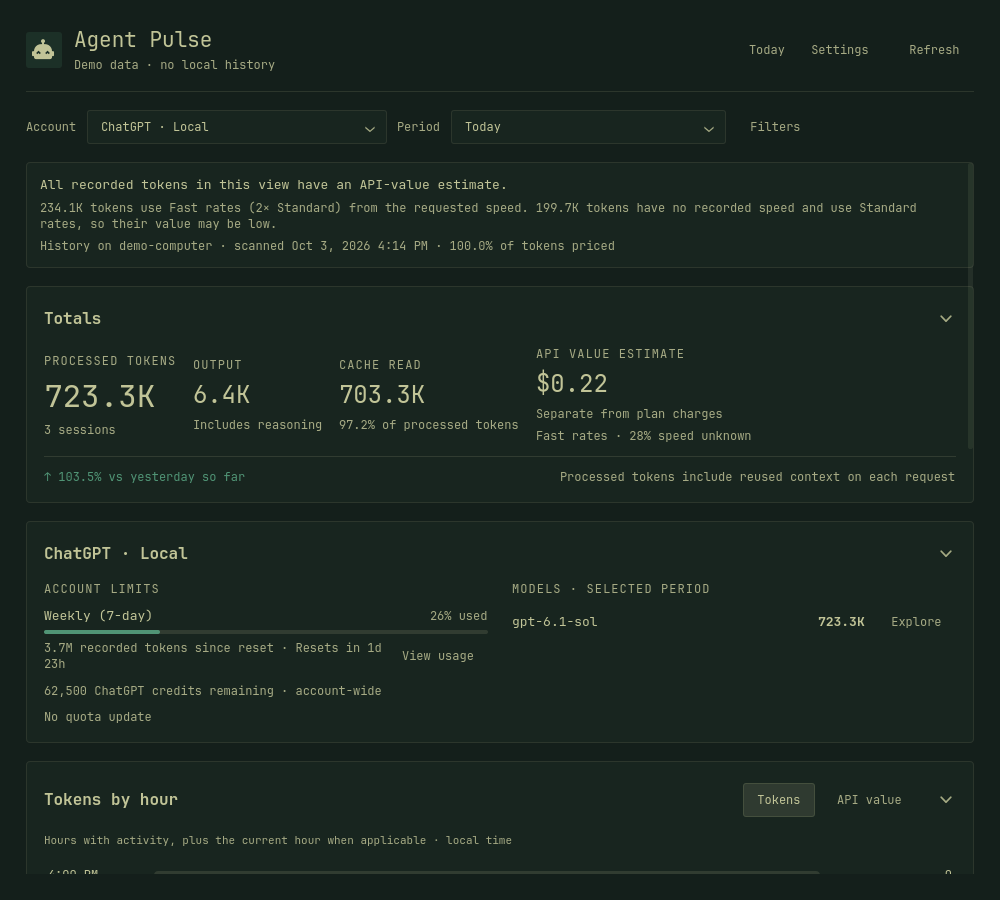
Screenshot uses demo data.
Install
Requires Omarchy 4 with Quickshell, Python 3.11+, and a systemd user session. Older Waybar-based versions are not supported.
curl -fsSL https://raw.githubusercontent.com/btsouth/agent-pulse/main/install.sh | bash -s -- --with-plugin
Drop --with-plugin for the dashboard without the bar widget. To pin a release, pass the ref to Bash after the pipe: curl -fsSL https://raw.githubusercontent.com/btsouth/agent-pulse/main/install.sh | OMARCHY_USAGE_REF=v1.10.1 bash -s -- --with-plugin. Installing from a checkout also works:
git clone https://github.com/btsouth/agent-pulse.git
cd agent-pulse
python3 install.py --with-plugin
Open the new bar widget and click Open analytics, or search for Agent Pulse in your application menu. Both open the same dashboard.
Using it instead of the built-in widget
The installer adds Agent Pulse alongside Omarchy's built-in Agents widget. It does not automatically replace it, and it says so when another installed widget serves the same job, naming the plugin it found.
For a single AI icon, remove the old Agents widget from your bar layout after installing. Keep the new Agent Pulse widget: it covers Codex, Claude, and Fireworks like the built-in one (Fireworks starts off; enable it in Settings), and adds the providers, ordering, launch commands, and notifications described below. Omarchy's packaged files are unchanged, and you can add the original widget back later.
If the new widget does not appear, run:
omarchy-shell shell rescanPlugins
The icon appears once recorded usage is available. You can open the dashboard from the application menu at any time. Large histories may take longer on the first scan.
Dashboard without a bar widget
Use python3 install.py without --with-plugin. Open it from the application menu or run:
~/.local/bin/omarchy-usage-dashboard
Both install options run without sudo and keep working if you move or delete the checkout. See installation details for file locations.
Features
- A live Today count that checks local agent histories every 15 seconds while the panel or dashboard is open and rolls up to each newly recorded total, plus exact hourly totals and source segments.
- 7-day, 30-day, 90-day, and yearly trends, with a daily chart and a full-screen breakdown.
- Every overview section folds to its header: Totals, Pinned limits, Tokens by hour, Accounts, the selected account's limits and models, Cache and output, Breakdown, and the yearly activity map each keep one line carrying their headline figure, so a view can show two sections and skip whatever sits between them. A folded section is remembered for the next window.
- Input, output, and cache totals, estimated API value, and provider comparisons.
- Breakdowns by model, project, client, model provider, account, and session.
- Named accounts with multiple history folders and deduplication of copied records.
- A primary account picker with each login's tokens, models, and limits, plus reset-window periods that keep totals and model breakdowns in sync.
- Synced machine ledgers: one shared folder, with each machine importing the others so all stats appear in one dashboard.
- Available usage limits, up to three limits you can pin to the panel and dashboard overview, optional monthly plan prices, and Omarchy theme colors.
- Desktop notifications when a weekly or monthly limit resets, a session limit resets after reaching 90%, or banked reset credits arrive, with the provider's own mark on the popup.
- A bar widget with the latest six hourly token totals, reset-aware limit meters, agent launch commands, and extra providers of your own.
The hourly bars show event-timed usage in your local time zone. Hour labels, reset times, and dashboard timestamps follow the 12- or 24-hour format selected for Omarchy's bar clock. Hermes reports accumulating session totals without request timestamps. Those tokens remain in the day total and are shown separately as having no exact hour. Agent Pulse checks local histories every 15 seconds while a view is open. Counts advance when an agent records usage, usually after a model response, rather than estimating tokens mid-stream. The full history, synced ledgers, and provider limits still refresh on their normal schedule. The dashboard starts on Today. Choose an Account and Period at the top. An account's View usage button selects Since reset for that limit, showing its recorded tokens and tokens per model for the exact window. Switching accounts clears drill-down filters. Source and model filters remain available under Filters; Settings separates sources, accounts, pricing, sync, and appearance. Analytics opened from the bar follows the selected account. Click a section header to fold it to one line, and click again to open it; the triangle at the right end of the header points the way the section will go. Folded, the header keeps the section's name and its headline figure on one line, and the section's own controls come back when it opens.
To keep limits visible, open each source in the bar panel and choose Pin beside a limit. Up to three pins appear together on the panel's main view and at the top of the dashboard, each with its usage and reset time. Unpin removes one limit. The panel also shows three separate "Limits to watch" suggestions, with all reset times above the hourly history.
Bar widget settings
The widget reads its settings from its entry in bar.layout in ~/.config/omarchy/shell.json, alongside the settings panel's own keys:
{
  "id": "community.ai-usage-dashboard",
  "providerOrder": ["codex", "commandcode", "clinepass"],
  "extraProviders": ["codex-second"],
  "launchCommands": { "codex": "codex", "commandcode": "command-code" }
}
- providerOrder sets the order the bar and panel walk providers in. Ids not listed follow alphabetically, so an agent nobody listed still appears.
- extraProviders admits providers the dashboard does not collect itself. Write an upstream-format record named
<id>.jsoninto~/.local/state/omarchy/agents/usage/— the same directory Omarchy's collectors use — and the widget picks it up, with the record's ownnameas its label. Whoever writes the record owns the collecting. - launchCommands maps a provider id to the command right-click launches in a terminal. Providers without an entry fall back to Omarchy's agent picker.
- alwaysShow keeps a provider on the bar before it has numbers. Unlike the keys above it lives in the settings panel's own map, per provider:
settings.providers.<id>.alwaysShow, not a top-level key.
Reset notifications
After every refresh, the dashboard compares each provider's limits against the previous run and sends a desktop notification when a weekly or monthly window resets — or when banked reset credits arrive, which is how Codex delivers dropped resets. Short windows, such as Claude's 5-hour session or any label shaped in minutes or hours, notify only when they reached 90% or more before resetting. Alerts cover Codex and Claude by default; adding a provider to the dashboard never silently opts it in. Extend the list by running the notifier yourself with more providers:
~/.local/bin/omarchy-usage-dashboard-notify-resets --provider commandcode
When an external Codex collector supplies a resetCreditsAvailable field, the dashboard refresh checks it against that card's Codex account using the local auth.json. The token is sent only to ChatGPT's credit endpoint. A failed check leaves the count unknown until the next successful refresh rather than showing an old credit. The panel also shows when the earliest unspent credit expires.
The Codex panel and dashboard source details also show purchased ChatGPT credits remaining for Work and Codex when the account has a positive balance. Zero or unavailable balances stay hidden. Refresh reads each account's balance from ChatGPT using that Codex home's existing sign-in. Credits used are estimated from observed balance decreases since tracking began, with the start date shown. This is account-wide, including other devices, and is separate from token counts, API value, and banked resets. Top-ups or expirations between refreshes can affect the estimate; earlier credit usage is unavailable. Tracking stays local in ~/.local/state/omarchy/ai-usage/chatgpt-credits.json. Failed reads preserve the tracking history for the next successful refresh.
Claude's banked resets are added to the Claude card the same way. Anthropic's usage endpoint only lists them for a current Claude Code CLI, so the refresh asks as the installed claude version, using the sign-in Claude Code already saved. The token is sent only to Anthropic's usage endpoint. The answer is reused for five minutes because the endpoint rate-limits quickly, and the panel shows when an unspent reset expires.
Supported sources
| Source | Token history | Usage limits |
|---|---|---|
| Codex | CLI and Codex desktop, including archives | From Omarchy |
| Claude Code | Project transcripts | From Omarchy |
| Grok Build | Completed turns and model calls | From the existing Grok login |
| Gemini CLI | Sessions and subagents | When an Omarchy snapshot is available |
| OpenCode Go | Requests through opencode-go |
From the existing OpenCode connection |
| OpenCode | Other model providers used through OpenCode | Not collected |
| Pi / Oh My Pi | Saved assistant usage | Not collected |
| Muse | Completed model responses, including subagents | From the existing Muse login |
| Ollama Cloud | T3 Code, Hermes agent sessions, and background work | From an Ollama Cloud API key |
| CommandCode | T3 Code, Hermes agent sessions, and Command Code CLI transcripts | From a CommandCode API key: plan windows and the extra-credit balance |
| ClinePass | T3 Code and Hermes agent sessions | From a ClinePass API key |
| Cursor | Cloud usage events (tokens and list-price cost per model) | Billing-cycle usage from your Cursor sign-in |
| Hermes (OpenCode Go, Ollama Cloud, CommandCode, ClinePass) | Agent sessions, including background work | Not collected; adds to the cards for those routes |
Sources with recorded history appear automatically on a fresh install. Use Settings to choose which ones to show. OpenCode Go uses your existing API key; no cookie setup is needed. If Grok authentication expires, run grok login. Ollama Cloud, CommandCode, and ClinePass may need a key: type it in Settings, export OLLAMA_API_KEY / COMMANDCODE_API_KEY / CLINE_API_KEY, or put it in ~/.config/omarchy/ai-usage/ollama.key / commandcode.key / clinepass.key (the key file an Ollama CLI install would use is also read, if one exists).
T3 Code's custom provider instances are discovered from ~/.t3/userdata/settings.json. Their isolated Codex, Claude, and OpenCode histories are read in place, and a CommandCode runtime is attributed to the CommandCode card rather than to Codex.
Hermes records its own per-route totals, and OpenCode Go reaches the same account through two apps now. Both are counted: OpenCode's transcripts carry the per-request detail from the OpenCode client, and Hermes sessions are added from its own ledger. The two share no session or message ids, so nothing is double counted, and the added total reconciles to the agent's own ledger exactly. Hermes rows can additionally be split by what they were for (typed prompts versus title generation, compression, vision, approvals, and background review) in the client breakdown.
Normal ChatGPT, Grok web, and Gemini web conversations are not included. Copilot, Windsurf, and Antigravity are not supported. See provider coverage for formats and validation limits.
Multiple accounts
Under Settings → Accounts, add a name and one or more agent home folders, such as /mnt/work/.codex and /mnt/work/.claude. Filter by account or use the Accounts breakdown to compare them.
Folders must already be available locally or mounted. The dashboard does not sync files. Copied records count once; conflicting account assignments are flagged.
Account labels group history, not credentials. All accounts shows the current login's quota on this PC, and a labelled account whose usage record carries the same id or name shows its own limits beside it. The source comparison keeps each labelled account separate. The hourly chart uses source colors, while the daily chart shows the filtered total. Optional monthly prices apply to the local history group when set on a provider, or to one account when set on its label; imported history never inherits the local price. See account setup.
Understanding the numbers
- Processed tokens count reused context on every request. They are not a count of unique text.
- API value uses recorded estimates or catalog prices. OpenCode Go follows the documented model rates, including peak-hour doubling for DeepSeek and the per-model monthly allowances shown on the Go card. Ollama Cloud and CommandCode follow their own published rates, each including that provider's peak window for the DeepSeek models. ClinePass follows the reference rates its own documentation publishes for a flat-rate subscription. Codex usage is priced at the speed each turn requested, so Fast turns use Fast rates; turns with no recorded speed use Standard rates and are counted on the dashboard. It is not your subscription bill. Missing prices stay marked as unpriced.
- Per-session averages cover recorded activity in the selected period. A session is not a completed task or a model-efficiency benchmark.
- Models are counted once per model across the routes that served it, so a model reached through more than one provider is a single row. Its detail shows the split by route and the model string each route recorded. Prices are unaffected: every route's tokens are priced at that route's own rates and then added up.
- Filter by model under Filters to narrow the whole page to one model, across every route that served it. The summary, chart, source comparison, breakdown table, and Go allowance then describe only that model. A Models-table row also opens that model's sessions. Changing the period keeps the model filter.
- Exclude a source under Filters to leave its history out of the view. The summary, chart, source comparison, and every breakdown update together. This is a view filter only: Settings controls visible providers and optional quota collection. Local transcript history continues to be indexed during scans. Use the source picker to focus on one source. Choosing All sources clears source exclusions and shows every enabled source again; other filters stay in place.
History refreshes every 15 minutes, along with OpenCode Go, Ollama Cloud, CommandCode, ClinePass, and enabled Grok quota. Refresh also requests fresh Codex and Claude limits from Omarchy. See pricing details for rates and accounting.
Reports are generated locally. Provider quota requests and Cursor history requests contact the provider using your existing credentials. Optional ledger sync writes counters and source paths into the folder you choose, which your sync software may transfer to another machine. See network and privacy details. The ledger stores counters, model names, project paths, session IDs, and timestamps. It does not copy conversation bodies or credentials. There is no telemetry.
Update
The dashboard and bar panel show a command when a newer GitHub release is available. Checks run once a day and can be disabled in Settings → Updates. Select and copy the command, then run it in a terminal. It installs the published release and keeps your existing widget choice.
For older installations, re-run the install command once to enable notices:
curl -fsSL https://raw.githubusercontent.com/btsouth/agent-pulse/main/install.sh | bash -s -- --with-plugin
From a checkout, use git pull --ff-only and python3 install.py --with-plugin instead. Omit --with-plugin if you installed without the bar widget. Updates preserve your history and preferences.
The updater refuses to overwrite a file you have edited yourself, and stops before changing anything else, so one local edit blocks the whole update. It names the file it stopped on. Move that file aside and re-run:
mv ~/.local/share/omarchy-usage-dashboard/app/collector.py ~/collector.py.mine
The update then completes and installs the current copy. Your version stays where you moved it, so you can compare or reapply it.
Uninstall
Quit the dashboard with Ctrl+Q, then run from the checkout or the archive:
python3 install.py --uninstall
This removes the managed installation and stops its timer. Your usage history and preferences remain. If you removed the built-in Agents widget from your bar, add it back through your bar layout settings.
Demo and development
Run python3 demo.py for generated data without reading your history or credentials. Press Ctrl+C to close it.
See Contributing for tests and UI checks.
Credits
Independent community project. The bar widget is adapted from Omarchy's Agents plugin. The pricing snapshot comes from LiteLLM.
Reviews (0)
Sign in to leave a review.
Leave a reviewNo results found