ai-slop-linter
Health Warn
- License — License: MIT
- Description — Repository has a description
- Active repo — Last push 0 days ago
- Low visibility — Only 8 GitHub stars
Code Pass
- Code scan — Scanned 12 files during light audit, no dangerous patterns found
Permissions Pass
- Permissions — No dangerous permissions requested
No AI report is available for this listing yet.
Linter for AI-writing tells in commit messages, PR descriptions and docs. It does not guess who wrote it. It shows the tells.
My coding agent keeps putting em dashes and stock phrases into commit messages, pull requests and READMEs even though my rules file bans them, and nothing checks the text before it ships.
ai-slop-linter is a linter that flags AI-sounding phrases and em dashes in commit messages, pull request descriptions and Markdown docs, and runs in CI. It lists each tell with a line, a column and a reason, and --explain <rule> gives the source for that rule. It runs on your machine and calls no model.
npx ai-slop-linter README.md

The recording is the unedited output of the build in this repository. The file it lints is a model-written sample from bench/corpus, not a real pull request. The command exits 1 when a file has an error-severity finding or a score above --max-score (default 10). Run on this README, the same command prints grade A.
Benchmark: round 8 result.
English | Türkçe






The dash rule is an error today, so one em dash fails a run. Turn it off with --ignore dash. Whether it should stay an error by default has not been decided; the measurement is in bench/DASH-DEFAULT.md.
The first line paraphrases what users wrote in public issues. The sources are in docs/PAIN.md.
slop --compare shows which numbers, names, versions, links, quotes or code spans a rewrite lost or added, so keeping the facts is checked rather than assumed. The tool calls no model and has zero dependencies.
Most of the rules are built from the Wikipedia page Signs of AI writing, which records the patterns that editors who review machine-written edits keep finding. The rule table below names the source of each rule.
Install
Three routes, one set of rules.
- Command line:
npx ai-slop-linter README.md, from npm. The npm version is 0.1.10. It takes--languagebut does not detect the language of a file, does not exempt dialogue, and has no--compare; those are in the unreleased 0.2.0. - Agent skill:
npx skills add Bubblegunn/ai-slop-linter. The skill makes an agent lint what it writes and compare the facts after each rewrite. Its--compare, per-file language detection and French rule need ai-slop-linter 0.2.0 or later, so until 0.2.0 is on npm the skill'snpxcommands run the older version. - Claude Code plugin:
/plugin marketplace add Bubblegunn/ai-slop-linter, then/plugin install ai-slop-linter@ai-slop-linter.
Before and after
The input is bench/head-to-head/fixtures/h2/README.md. The output below is what this build prints for it.
# Fastq

Fastq 2.3 is not just a queue — it's a game-changer for modern backends. Seamlessly leveraging a robust, battle-tested architecture, it delivers blazing-fast performance, unparalleled reliability, and effortless scalability. In benchmarks, Fastq 2.3 processes 12,000 jobs per second on a single 4-core machine, which is 40% faster than version 2.2. Maintainers at Acme Corp reported a 35% drop in p99 latency on their staging cluster. It requires Node 20 or later and is released under the MIT license. Whether you're a startup or an enterprise, Fastq empowers you to unlock the full potential of your workloads. The future of job processing is here.

## Install

```sh
npm install [email protected]
```

See the [changelog](CHANGELOG.md) for details.
$ npx ai-slop-linter bench/head-to-head/fixtures/h2/README.md
bench/head-to-head/fixtures/h2/README.md  F (score 85.5, 117 words, 8 findings)
     3:14  warning not-x-but-y          "not just X but Y": say the thing itself
     3:30  error   dash                 em dash
     3:40  warning ai-vocabulary        "game-changer": a word models reach for; use the plain one
     3:74  warning ai-vocabulary        "Seamlessly": a word models reach for; use the plain one
     3:85  warning ai-vocabulary        "leveraging": a word models reach for; use the plain one
     3:98  warning ai-vocabulary        "robust": a word models reach for; use the plain one
     3:172 warning sales                "unparalleled": sounds like an advertisement; give the fact instead
     3:569 warning ai-vocabulary        "unlock the": a word models reach for; use the plain one

Why any of these is a tell, and what to write instead: slop --explain not-x-but-y
The rewrite, bench/head-to-head/golden/h2/README.md, is a hand-written version of the same paragraph:
# Fastq

Fastq 2.3 is a queue for job processing. In benchmarks, Fastq 2.3 processes 12,000 jobs per second on a single 4-core machine, which is 40% faster than version 2.2. Maintainers at Acme Corp reported a 35% drop in p99 latency on their staging cluster. It requires Node 20 or later and is released under the MIT license.

## Install

```sh
npm install [email protected]
```

See the [changelog](CHANGELOG.md) for details.
It grades A with no finding:
$ npx ai-slop-linter bench/head-to-head/golden/h2/README.md
bench/head-to-head/golden/h2/README.md  A (score 0, 69 words, 0 findings)
--compare checks the rewrite against the original:
$ npx ai-slop-linter --compare bench/head-to-head/fixtures/h2/README.md bench/head-to-head/golden/h2/README.md
facts: 11 kept, 0 lost, 0 added
OK: no fact lost or added
It also reads first-person words and claim words, which a rewrite can add without touching a number or a name. A rewrite that turns "In benchmarks" into "In our benchmarks" prints added person our and exits 1, because the source never said whose benchmarks. Only words that passed a measurement on the head-to-head rewrites are flagged, and bench/COMPARE-WORDS.md lists every candidate word with its verdict. Text in double quotation marks, code, urls and link targets are not read.
A qualifier next to a number is part of the fact. When the rewrite keeps the number but drops up to, at least, nearly, environ, bis zu, más de or a word like them, or adds one, the comparison prints lost qualifier up to 3 or added qualifier over 300 and exits 1. A swap within one meaning (roughly for around, over for more than) is not reported. Every qualifier passed a stricter measurement than the words above: it flags none of the goldens, none of the 357 round 1 rewrites by other tools and none of 40 hand-written honest pairs (bench/COMPARE-QUALIFIERS.md). English about is not read: it flagged one honest rewrite.
--verify <before> <after> is the single gate for a rewrite. On the <after> file it runs the lint errors, the same comparison as --compare, a scan of the stock phrases listed in plugin/skills/ai-slop-linter/references/<lang>.tells.txt for the text's language (--language sets it), and a hedge check: a modal verb with a hedge adverb within three words (could potentially, may possibly) or an evidential with a vague link (seems to be related to), in English, Portuguese, Spanish, French and German. A modal or seems alone is never a hit. Text in code, quotation marks and dialogue lines is skipped. It prints line:col catalog <phrase> for each phrase it finds, then verify: ok or verify: N problem(s), and exits 1 on any problem. A language with no tells file gets no phrase hits. It also blocks a length collapse or growth (the rewrite outside 35 to 130 percent of the original, measured outside code blocks), and prints without blocking each original sentence that the rewrite dropped with no finding to explain it.
How it compares
A head-to-head benchmark against six other Claude Code skills (Humanizer, unslop, everwrite, slopless, avoid-ai-writing and slop-cop; the first three also called by name) and Claude with no plugin, on editing tasks scored by scripted checks and blind grading. It is a result on those tasks, not a general ranking.
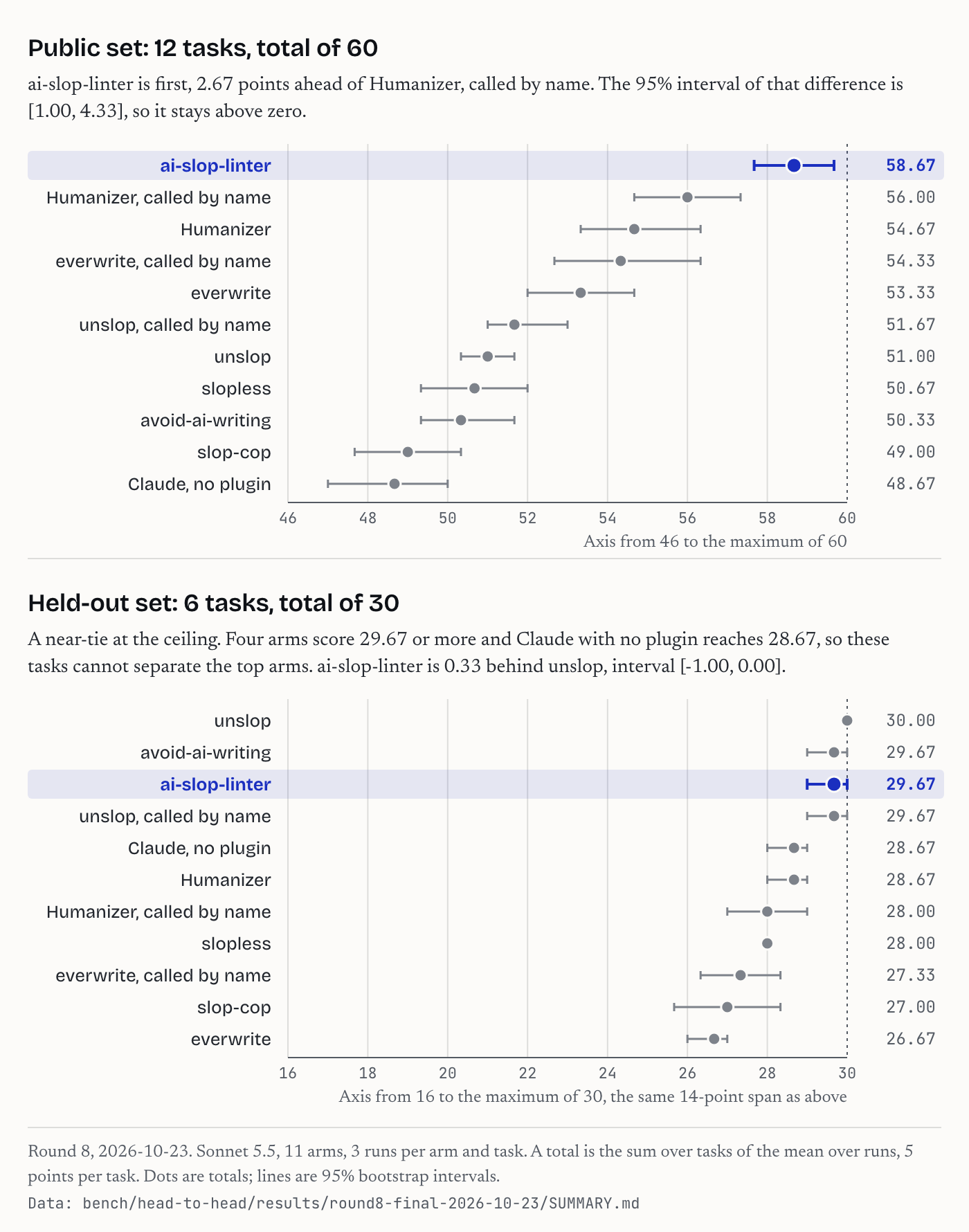
Round 8 (2026-10-23, Sonnet 5.5, 11 arms, 3 runs each): on the 12 public tasks this linter scored 58.67 of 60 and the best other arm (Humanizer, called by name) 56.00; the 95% bootstrap interval of the difference is [1.00, 4.33]. On 6 held-out tasks written by an author who had not read the code, four arms scored 29.67 or more of 30 (this linter 29.67, unslop 30.00), so that set does not separate them. Every cell, the departures from the frozen protocol and a recompute step are in bench/head-to-head/results/round8-final-2026-10-23/; the rounds and rulings are in docs/HEAD-TO-HEAD.md; the tasks, criteria and harness are public in bench/head-to-head/.
Use it
npx ai-slop-linter                    # every .md file under the current directory
npx ai-slop-linter --commit           # the last commit message
npx ai-slop-linter README.md --fix    # apply the safe fixes in place
slop is the same binary, for people who type it a lot. To read the rules against your own text in a browser before installing anything, open bubblegunn.github.io/ai-slop-linter. The page runs the same engine this README documents, in your own browser. No request in it can carry your text anywhere, and it loads nothing from a third party. Two tests check that, and the deploy builds the page from this repository. npm run playground builds the same page locally.
Some readers have learned these tells: the em dash, not just X but Y, I hope this helps, a testament to, the bold label on every bullet.
It is not an authorship detector. It never prints a probability that a model wrote the text, and it cannot tell you who typed it: someone who writes delve gets the same finding a model does. A clean pass means one thing, that none of the listed tells are present. Every rule names its source and says when you should switch it off rather than obey it. What it cannot show is the full list of limits.
Where it runs
| where | how | status |
|---|---|---|
| Command line | npx ai-slop-linter |
published on npm |
| GitHub Action | uses: Bubblegunn/ai-slop-linter@v0, see In a repository |
listed on GitHub Marketplace |
| commit-msg hook, pre-commit, commitlint | In a repository | available from this repository |
| Agent skill | npx skills add Bubblegunn/ai-slop-linter, see For agents |
available from this repository |
| Claude Code plugin | /plugin marketplace add Bubblegunn/ai-slop-linter |
available from this repository |
| MCP server | npx --yes ai-slop-linter --mcp, see docs/mcp.md |
in the unreleased 0.2.0 |
| textlint rule | package textlint-rule-ai-slop, see its README |
in this repository, not yet on npm |
| VS Code extension | a .vsix built from vscode/, see its README |
not yet on the Marketplace |
| Browser | the playground | live |
What it looks like
Real output on test/fixtures/sloppy.md, a 282-word file
written to trip every rule once (first eleven of fifty-two findings):
test/fixtures/sloppy.md  F (score 192.6, 282 words, 52 findings)
     5:1   info    title-case-heading   Title Case heading; sentence case reads as written by a person
     7:1   warning announcing           "Let's dive into": make the point instead of announcing it
     7:26  error   dash                 em dash
     7:32  warning inflated             "is a testament to": say what happened; let the reader judge the importance
     7:37  warning ai-vocabulary        "testament": a word models reach for; use the plain one
     7:72  warning ai-vocabulary        "In today's fast-paced": a word models reach for; use the plain one
     7:83  info    hyphen-density       7.4 hyphenated compounds per 100 words; drop the hyphen after the noun ("the report is high quality")
     7:115 warning inflated             "stands as a": say what happened; let the reader judge the importance
     7:127 warning inflated             "pivotal moment": say what happened; let the reader judge the importance
     7:127 warning ai-vocabulary        "pivotal": a word models reach for; use the plain one
     7:156 warning ing-tail             ", highlighting": cut the tail or make it its own sentence with a fact in it
Each file gets a score, weighted findings per 1,000 words (error 3, warning 1,
info 0.3), and a grade: A under 3, B under 8, C under 15, D under 30, F above. The run
exits 1 when any file has an error-severity finding or a score above --max-score
(default 10), so it can run in CI without a cleanup commit first.
How the score is built, why density and not severity, how words are counted and what a finding's
column means: docs/SCORING.md.
The rules
Twenty-two rules. Most come from the Wikipedia page
Signs of AI writing,
written by editors who review thousands of machine-written edits; the three marked "house"
are ours. Run npx ai-slop-linter --rules for the same list from the binary, andnpx ai-slop-linter --explain <rule> for one rule in full: why the pattern reads as
machine-made, a line that trips it, the same line rewritten, and the case where you should
switch the rule off instead of obeying it. Every finding in the text output ends with the
command for the rule that fired.
$ slop --explain ing-tail
ing-tail  warning  Present-participle tail adding significance
source: Wikipedia, Signs of AI writing: Superficial analyses

Why
  The tail attaches a claim of significance to a fact already stated, without adding a
  second fact. It is the cheapest way to make a sentence sound like a conclusion.

Instead of
  We shipped the fix on Friday, underscoring the team's commitment to quality.

Write
  We shipped the fix on Friday. The next release is on Tuesday.

Ignore it when
  The tail states a real consequence with its own detail, and the sentence would be
  incomplete without it.
The tests check that every rule carries this material and that the "instead of" line
actually trips the rule it illustrates.
| rule | severity | what it catches | fix |
|---|---|---|---|
dash |
error | em dash or en dash used as a dash (ranges like 2019–2021 are left alone) | comma, full stop, or removed after punctuation |
chatbot |
error | I hope this helps, Certainly!, Let me know if, As an AI |
|
cutoff-disclaimer |
error | as of my last update, as of [date], I cannot |
|
not-x-but-y |
warning | not just X but Y, It's not X. It's Y., not because A, because B |
|
triad |
warning | three single words in a row sharing a suffix (careful, thoughtful, and mindful) |
|
reveal |
warning (house) | The real question is, At its core, What really matters |
|
ing-tail |
warning | a comma then , highlighting, , showcasing, , underscoring |
|
inflated |
warning | is a testament to, pivotal, stands as a, marks a turning point |
|
ai-vocabulary |
warning | delve, tapestry, robust, seamless, vibrant, leverage, elevate, foster, crucial, abstract landscape and friends |
|
sales |
warning | world-class, best-in-class, state-of-the-art, cutting-edge, nestled in the heart of |
|
vague-source |
warning | experts argue, studies show, it is widely believed (silent when the line has a link) |
|
announcing |
warning (house) | Let's dive in, In this article we will, Without further ado |
|
closer |
warning | Exciting times ahead, the future looks bright, stay tuned |
|
bold-label |
warning | - **Speed:** ... mini-headings in list items |
|
emoji |
warning | emoji decorating a heading or list item | |
filler |
info | in order to, due to the fact that, it is important to note that |
the plain phrase |
curly-quotes |
info | “ ” ‘ ’ |
straight quotes |
title-case-heading |
info | Every Word Capitalised In A Heading (ALL CAPS is left alone) | |
challenges-section |
info | a Challenges and future outlook section |
|
hyphen-density |
info | more than three hyphenated compounds per hundred words | |
reference-markup |
error | internal citation and rendering residue such as contentReference, oaicite, turn0search0, grok_card, attached_file and related markers |
|
invisible-character |
warning (house) | zero-width spaces and joiners, direction controls and Unicode tag characters in Latin-script text (joined emoji, flags, other scripts, a leading byte order mark and right-to-left lines are left alone) | deleted |
reference-markup was written by @Aaqibhafeezkhan (#46), with one test line per marker so that deleting any of them fails the suite.
Fenced code, inline code, front matter, link targets, URLs, HTML tags and comments are
masked before any rule runs, so a dash in a code sample is never a finding.
To silence a finding you have judged wrong:
<!-- slop-ignore-next-line RULE -->
<!-- slop-ignore RULE-A, RULE-B -->    (from here to the end of the file)
Commit message rules
--commit, --commit-msg and --pr also run these rules, which only a commit message or a pull request description gets. The phrase lists are adapted from tbhb/vale-ai-tells by Tony Burns (MIT). bench/COMMIT-RULES.md shows how each was measured on commits written before 2021.
| rule | what it flags |
|---|---|
commit-hedging |
a hedge about a change already made, such as "this should fix" |
commit-overexplanation |
a frame that adds nothing, such as "as part of this change" |
commit-marketing |
claims such as "production ready" or "enterprise grade" |
commit-trailing-justification |
a trailing clause that claims a benefit the diff has to show |
commit-unquantified |
a speed claim with no number |
If you do not write in English
The vocabulary rules are English word lists, so they find nothing in another language. The dash rule is the one that matters here, because correct French, Polish or Russian punctuation is not an English dash. The tool works out the language of each file from "language" in .slop.json, from --language, from a lang: key in the front matter, or from the prose, which is detected for French, Spanish, German, Italian, Portuguese and Dutch. For text that is not English, dash does not run, and the output names the language it used. Dialogue dashes and dashes inside « », ‹ › and „ “ quotations are exempt. A quoted line of fewer than 12 tokens inside an English paragraph is not.
The French pack has one rule, fr/closer, and it is provisional. Spanish and German have no rule. The measured rates and the limits are in docs/LANGUAGES.md, and the candidate patterns with their counts are in bench/packs/CANDIDATES.md.
Configuration
slop --init writes a .slop.json to start from, slop --init action adds the pull request
workflow, and slop --init hook adds the commit-msg hook. None of them overwrites a file that
is already there.
A repository rarely wants one setting everywhere. Published docs can be held to a stricter
score than a changelog, and a file that quotes machine writing needs the rules that quote
turns on switched off. overrides are applied in order to any file whose path matches, and a
later entry wins:
{
  "include": ["**/*.md"],
  "maxScore": 10,
  "ignore": ["emoji"],
  "overrides": [
    { "files": ["docs/**/*.md"], "maxScore": 3, "ignore": [] },
    { "files": ["CHANGELOG.md"], "ignore": ["bold-label", "emoji"] },
    { "files": ["**/prompts/*.md"], "only": ["chatbot", "cutoff-disclaimer"] }
  ]
}
On the command line, --only dash,chatbot runs those rules and nothing else, --ignore
(also spelled --skip) drops rules, and both reject a rule id that does not exist rather than
silently doing nothing. --languages <tag>, or "languages" in .slop.json, switches on a
rule pack for a language other than English; asking for one that does not exist is an error
rather than a quiet clean run. Inside a file, <!-- slop-ignore-next-line RULE --> covers one line
and <!-- slop-ignore RULE-A, RULE-B --> covers the rest of the file (RULE stands for a rule id).
A star hint appears once per machine in an interactive terminal; turn it off with --quiet or AI_SLOP_LINTER_NO_STAR_HINT=1.
What the rules never see
Before any rule runs, the document is blanked in the places code lives: front matter in YAML
or TOML, fenced blocks including a fence inside a blockquote, code quoted by four-space or tab
indentation, inline code, link targets, bare URLs, HTML tags and the contents of pre andcode. A README that quotes a diff is the common case, and a diff line that starts with -
is not a dash finding. Content indented under a list item stays visible, because list
continuation is prose more often than it is code.
Fixes
--fix only does what cannot change meaning: dashes become commas or full stops, curly
quotes become straight, filler phrases become their plain form, and an invisible character
next to a space or punctuation is deleted (one between two letters is only reported). It runs to a fixed
point (fixing a fixed file changes nothing) and leaves every other finding for you,
because not just X but Y needs a rewritten sentence, not a character swap.
In a repository
Commit messages and pull request descriptions are the writing this section is about, and
they are a harder register to read than an article. They are short, often templated, and
already the subject of a benchmark: Zhang, Liu, Di and Qian's
CodeFuse-CommitEval asks six models to spot commit
messages that contradict their diff, and reports average recall of 85.95% and precision of
80.28% against specificity of 63.8%, so on consistent commits the models raised a false
alarm about a third of the time. That number is the reason this tool is rule-based. A
rule that fires on a phrase it can point at is wrong in ways a reader can check.
Whether the tells this linter looks for survive into that register is an open question, and
RESEARCH.md is the harness for answering it, along with the two runs done so
far and what they do not yet support.
Pull requests. The Action lints the pull request title, its description and every
changed Markdown file, annotates the lines on the files tab, and keeps one comment on the
pull request with the findings table, updated in place on every push:
name: prose
on: pull_request
permissions:
  contents: read
  pull-requests: write   # read is enough with comment: "false"
jobs:
  slop:
    runs-on: ubuntu-latest
    steps:
      - uses: actions/checkout@v7
      - uses: Bubblegunn/ai-slop-linter@v0
        # with:
        #   max-score: "5"
        #   baseline: ".slop-baseline.json"
        #   comment: "false"
        #   warn-only: "true"
| input | default | what it does |
|---|---|---|
files |
changed .md files |
Files or globs to lint instead of the changed Markdown, separated by spaces, or one per line (files: |) when a path contains a space; a path that does not exist fails the run |
pr-body |
true |
Lint the title and description as one more text |
comment |
true |
Post and update the review comment; needs pull-requests: write |
baseline |
none | A file from --baseline-write; only new findings fail |
max-score |
10 |
Fail above this weighted score per 1,000 words |
warn-only |
false |
Annotate and comment, never fail |
The Action outputs findings, the total count, for a later step.
pre-commit. The repository ships both a Markdown hook and a commit-msg hook. pre-commit creates the Node environment and installs this repository at the pinned rev, so neither Node nor ai-slop-linter needs to be installed globally.
Pin the -pre-commit rev, not the plain release tag: it is the same release plus the built output, which is what pre-commit needs to find an executable. Paste these four lines into .pre-commit-config.yaml:
repos:
- repo: https://github.com/Bubblegunn/ai-slop-linter
  rev: v0.2.0-pre-commit
  hooks: [{id: ai-slop-markdown}, {id: ai-slop-commit-msg}]
Run pre-commit install for Markdown hooks and pre-commit install --hook-type commit-msg for the commit message hook. Both hooks were written by @Aaqibhafeezkhan (#27).
Commit messages. A commit-msg hook refuses a message with an error-severity tell:
curl -fsSL https://raw.githubusercontent.com/Bubblegunn/ai-slop-linter/main/scripts/install-hook.sh | sh
Skip it once with git commit --no-verify. The hook reads the message file git hands
it; npx ai-slop-linter --commit-msg "$1" is all it does.
If commitlint already guards your messages, add the rule there instead of a second hook:
// commitlint.config.js
export default {
  extends: ["@commitlint/config-conventional", "ai-slop-linter/commitlint/config"],
};
That turns on ai-slop-linter/tells as an error; [2, "always", { maxScore: 10, ignore: [] }]
is the full form if you want the threshold or the ignore list changed.
Pull request bodies from the shell. npx ai-slop-linter --pr 42 reads the body
through gh and lints it like a file.
Adopting it in a repository with history. A baseline records the findings that are
already there, so the check fails only on new ones and nobody has to land a cleanup
commit first:
npx ai-slop-linter --baseline-write      # writes .slop-baseline.json
npx ai-slop-linter --baseline            # fails only on findings the baseline does not list
Entries are keyed by file, rule and the sentence, not by line number, so editing above
a known tell does not make it new. Commit the file; "baseline": "path" in .slop.json
names a different one. When a file is cleaned up, run --baseline-write again to shrink it.
CI output. --format github prints workflow annotations and an error line for every
text that fails; --format markdown prints the table the Action posts, for an issue or a
review; --format json prints findings with fixable flags for other tools.
In the editor. The text output is stable enough for a problem matcher, so VS Code shows
findings in the Problems panel and underlines them inline. Copy the task from
.vscode/tasks.json into your own; the matcher is two patterns, the file
header line and the finding lines under it:
"pattern": [
  { "regexp": "^(\\S.*?)  (?:[A-F] \\(score |not graded \\().*$", "file": 1 },
  { "regexp": "^\\s+(\\d+):(\\d+)\\s+(error|warning|info)\\s+(\\S+)\\s+(.*)$",
    "line": 1, "column": 2, "severity": 3, "code": 4, "message": 5, "loop": true }
]
Run it with Tasks: Run Test Task. A test pins the output format to these patterns.
Your own writing, over time
--history reads the commit messages you have written in a repository and reports the tells
per 1,000 words, by month. It defaults to the address in that repository's git config, so
what it shows you first is your own writing.
npx ai-slop-linter --history
A real run, on this repository, for the author's public GitHub address (run on 2026-10-21 at commit abdace4):
[email protected] · 124 messages · 22,234 words · by month

period   messages   words  per 1,000  most common tell
--------------------------------------------------------
2026-09        81  15,693        1.6  dash (7), hyphen-density (4)
                                    ████████████████████████
2026-10        43   6,541        0.1  hyphen-density (3)
                                    ██
The table shows the tells per 1,000 words in one author's commit messages, month by month. It cannot tell you
what changed the number, and it cannot tell you who wrote anything.
--author [email protected],[email protected] reads other addresses, which you need if your own commits are split
across several. --by quarter and --by year widen the period, --since narrows the
range, and --format json gives you the periods to chart.
What this deliberately does not do. There is no grade, no exit code and no per-person
column, and pointing it at another person takes a deliberate flag. This tool's position is
that it lists tells and never guesses who wrote the text, and a timeline is the shape most
likely to be screenshotted as an accusation. A number that decides nothing is harder to
point at someone. Trailers are not counted either, because a Co-Authored-By line is a
template rather than prose.
For agents
Most of the tells above are written by coding agents, in the commit messages and pull
request descriptions they produce all day. The skill makes an agent lint its own prose
before it hands it over, and carries the rules in plain language for an agent with no
shell:
npx skills add Bubblegunn/ai-slop-linter
Or as a Claude Code plugin:
/plugin marketplace add Bubblegunn/ai-slop-linter
/plugin install ai-slop-linter@ai-slop-linter
The plugin also adds a UserPromptSubmit hook (plugin/hooks/rewrite-prompt.sh, POSIX sh, no network). When a prompt asks to rewrite, polish, proofread or humanize prose, in English or in French, Spanish, German, Turkish and a few other languages, it adds one line telling the agent to use the skill, to add no we, our, I, claim or fact the source lacks, to keep every number with its qualifier, to read the reference file for French, German or Spanish, and to run --compare until it exits 0; on any other prompt it prints nothing. It matches keywords, so it misses some phrasings: on prompts it was not tuned on it caught about half.
From code
import { lintText, fixText } from "ai-slop-linter";

const r = lintText("post.md", text);
r.grade;              // "A" .. "F"
r.findings[0];        // { rule, severity, line, column, excerpt, message, fix? }

const f = fixText("post.md", text);
f.text;               // fixed text
f.applied;            // number of fixes
Measured on a fixed corpus
npm run bench runs every rule over five texts written before 2021 and five pieces of unedited model
output, and writes bench/PRECISION.md. CI fails when the committed table is stale.
The method, the rule the first run found wrong, and every finding on the human texts are in
docs/MEASUREMENT.md.
Run on our own writing
The tool is run on the READMEs of the author's five repositories. The dated results are in
docs/OWN-WRITING.md. This repository's own Markdown is linted in CI withmaxScore 3 (see .slop.json).
What it cannot show
- A probability. The tool does not compute one, deliberately. Detectors that score text
statistically misclassify people whose English is a second language: seven commercial
detectors marked 61% of TOEFL essays written by human candidates as machine-written, while
grading US eighth-grade essays almost perfectly
(Liang et al., Patterns, 2023). A named
phrase on a numbered line can be disagreed with. A score cannot. - Authorship. A person who writes
delvegets the same finding as a model. Passing
says the tells are absent; it says nothing about who typed. - Meaning. It cannot tell a hollow paragraph from a good one when the hollow one
avoids every listed phrase. Text that passes can still be empty. - Style outside the list. Twenty-two rules cover the patterns editors flag most; a
writer with a different tell passes. Add a rule when you find one. - Other languages. The vocabulary rules are English, and the structural ones work anywhere. Outside English the
dashandtitle-case-headingrules stand down. There is one provisional French rule and no Spanish or German rule, because no candidate passed the shipping limit, so the tool does not claim to detect model text in those languages. Hindi has since been tested against a corpus rather than assumed, and produced no rule worth shipping: see the Hindi negative result. See CONTRIBUTING.md and issue #1.
Research
Two questions about this tool were answered by measurement rather than by argument, and both
answers are written down whether or not they flattered the tool.
- Typography across languages. The
dashrule was
penalising correct French, Polish and Russian punctuation. Measured across thirteen
languages, then fixed by letting a repository declare its language. - A Hindi rule set, and why none of it shipped, by
@shivam-070208. Six families of candidate pattern tested
against the CT² Hindi corpus (7,043 human articles, five models); every one rejected, with the
reason stated. A frequency ratio is not a tell, and a pattern strong in one model is a fact
about that model.
Cite this
Every release is archived on Zenodo with a DOI, and CITATION.cff carries the same identifier, so GitHub's
"Cite this repository" button gives correct BibTeX and APA. Details: docs/CITE.md.
GitHub code scanning (SARIF)
--format sarif writes SARIF 2.1.0 for GitHub code scanning. The workflow, the column convention and the
limits are in docs/SARIF.md.
Contributing
Adding a rule is one function, one fixture sentence and one table row; see
CONTRIBUTING.md, which also describes the one-command release. Zero runtime
dependencies, Node 20 or newer, tests with node:test.
Licence
MIT. Rule sources are credited in the table above and in --rules.
Reviews (0)
Sign in to leave a review.
Leave a reviewNo results found