agent-console
Health Warn
- License — License: Apache-2.0
- Description — Repository has a description
- Active repo — Last push 0 days ago
- Low visibility — Only 9 GitHub stars
Code Fail
- rm -rf — Recursive force deletion command in .github/workflows/release.yml
- rm -rf — Recursive force deletion command in tests/e2e/provider_compatibility.sh
- rm -rf — Recursive force deletion command in tests/e2e/real_provider_doctor.sh
Permissions Pass
- Permissions — No dangerous permissions requested
No AI report is available for this listing yet.
A local terminal control plane for Codex and Claude Code sessions—discover, monitor, resume, and work beside persistent workspace shells.
Agent Console
Agent Console is a local terminal dashboard for Codex and Claude Code. It
discovers recent sessions, shows their current state, resumes the native agent
UI, and keeps same-workspace shells beside each agent.

Twenty sessions across seven workspaces, both providers in one list. A session
stops for an approval, the dashboard raises an alert, and a jumps straight to
it. s opens a shell in that session's own directory, beside the agent.
What it provides
- Codex and Claude Code sessions grouped by workspace
- Working, waiting, idle, and failed status at a glance
- Same-provider progress summaries
- Native agent resume instead of a replacement chat UI
- Multiple persistent shell panes in the agent workspace
- Search, archive/restore, alerts, and mouse scrolling
Architecture
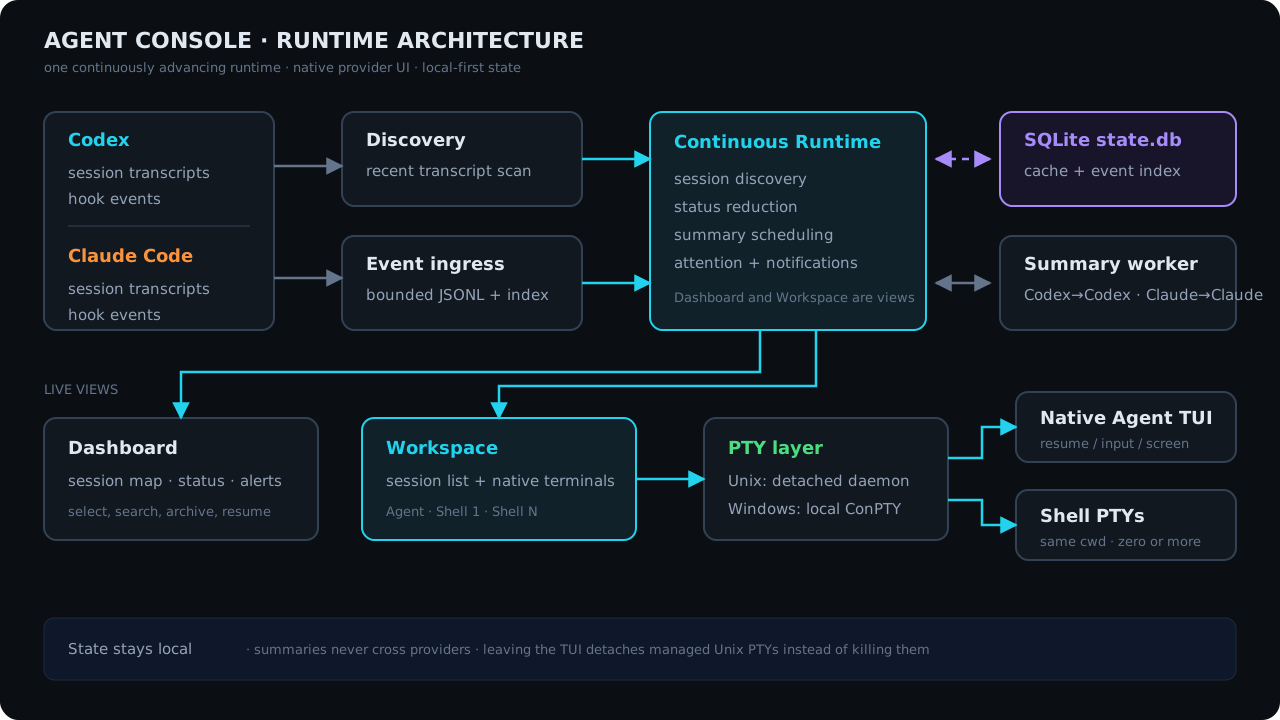
Requirements
- macOS, Linux, or Windows 10+
codexand/orclaudeavailable onPATH- A terminal with ANSI and mouse support
Install
Download the package for your platform from
GitHub Releases:
- macOS Intel:
agent-console-v<version>-x86_64-apple-darwin.tar.gz - macOS Apple Silicon:
agent-console-v<version>-aarch64-apple-darwin.tar.gz - Linux Intel:
agent-console-v<version>-x86_64-unknown-linux-gnu.tar.gz - Linux ARM64:
agent-console-v<version>-aarch64-unknown-linux-gnu.tar.gz - Windows Intel:
agent-console-v<version>-x86_64-pc-windows-msvc.zip
Extract the archive and place agent-console (agent-console.exe on Windows)
in a directory on PATH. On macOS, install and upgrade it with an atomic
rename so the kernel never reuses a cached signature from the old inode:
sudo install -m 755 ./agent-console /usr/local/bin/agent-console.new
sudo mv -f /usr/local/bin/agent-console.new /usr/local/bin/agent-console
Do not copy directly over a running or previously launched signed binary on
macOS. Agent Console is a terminal program; launch it from your terminal rather
than Finder.
Published macOS binaries are signed with Developer ID, use the hardened
runtime, and are accepted by Apple's notarization service. Because Apple cannot
staple a ticket to a standalone executable or tar.gz, macOS may perform an
online notarization lookup on first launch.
Start
agent-console
agent-console --version and agent-console --help print metadata without
opening the dashboard.
Check provider and terminal prerequisites without opening the dashboard:
agent-console doctor
Provider commands
Use ~/.config/agent-console/config.toml when a provider needs a wrapper,
proxy, environment variables, or fixed arguments:
[providers]
codex = ["proxychains4", "codex"]
claude = ["env", "HTTPS_PROXY=http://127.0.0.1:7890", "claude"]
Missing entries use codex or claude directly. The configured command is
also used by that provider's isolated summarizer. SetAGENT_CONSOLE_CONFIG=/path/to/config.toml to use another file.
Limit Agent Console to a subset of providers with a comma-separatedAGENT_CONSOLE_PROVIDERS:
AGENT_CONSOLE_PROVIDERS=codex agent-console
Omitted providers are not scanned and are left out of doctor. An unset or
unrecognized value keeps every provider enabled.
Controls
Dashboard:
| Key | Action |
|---|---|
↑ / ↓, j / k |
Select a session |
Enter |
Open the selected agent |
s |
Open a shell |
n |
Create a session |
/ |
Search sessions as you type |
x |
Archive or restore |
a |
Jump to the next alert |
r |
Retry the selected session's summary now |
? |
Show all active controls |
q, Esc |
Quit |
When another Agent Console owns the selected live session, the message shown
on screen offers t for an intentional force takeover.
Inside a session workspace:
| Key | Action |
|---|---|
Ctrl-\ |
Cycle Agent → Shell → Sessions focus |
Ctrl-^ |
Create and focus a shell |
Ctrl-N |
Focus the next shell while Shell has focus |
Ctrl-X |
Close the focused shell |
Ctrl-Q |
Return to the dashboard |
With the Sessions list focused:
| Key | Action |
|---|---|
↑ / ↓, j / k |
Select a session |
Enter, Ctrl-\ |
Open/resume and focus its agent |
/ |
Search sessions as you type |
a |
Jump to the next unread alert |
? |
Show the Workspace key bindings |
n |
Create a session in the selected workspace |
s |
Create and focus a shell |
x |
Archive or restore the session |
h |
Maximize and focus the agent |
m |
Maximize and focus the last selected shell |
+ / _ |
Grow or shrink the shell area |
y |
Copy the latest shell command output |
1 … 9 |
Focus a numbered shell |
After h or m, use Ctrl-\ until focus returns to Sessions; the normal split
layout is restored automatically.
Agent and shell viewport controls:
| Input | Action |
|---|---|
Shift-PageUp / Shift-PageDown |
Scroll one viewport |
| Any key sent to the child | Return to live output |
| Mouse wheel | Scroll the pane under the pointer |
| Drag | Select and copy immediately; do not press Cmd-C afterward |
| Terminal bypass modifier + drag | Use native selection, then copy normally (Option-drag in iTerm2; commonly Shift-drag elsewhere) |
The new-session dialog uses Shift-Tab to switch between provider and
workspace, arrows (or h / l) to choose a provider, normal cursor movement
and editing in the workspace path, Up/Down to choose a directory completion,Tab to accept it, Enter to start, and Esc to cancel. Search filters live
on both Dashboard and the focused Sessions list; Enter keeps the filter andEsc restores it. It matches aliases, provider session names and generated
titles, first/latest prompts, conversation summaries, Claude tags and PR/MR
metadata, workspace names and paths, branches, provider session IDs, providers,
statuses, and active/archived state.
The three globally reserved chords — Ctrl-\, Ctrl-^, and Ctrl-Q — are the
only Ctrl combinations Codex and Claude Code leave free, so everything those
tools bind reaches them untouched: Ctrl-O (Claude's transcript toggle, Codex's
copy-response), Ctrl-], Shift-End, Ctrl-T, Ctrl-Enter, Esc, function
keys, and every other Ctrl or Alt combination. Ctrl-N and Ctrl-X are
reserved only while a shell has focus and are forwarded in Agent focus. Press? for the authoritative context-sensitive key list, including any bindings
overridden in the configuration file.
Notes
- A session is titled by its first user prompt and keeps that title for life.
Later prompts and summaries never rename it. Bind thealiasaction in[keys.dashboard]to set your own title instead. - Summaries use the session's own provider and run outside the coding
conversation, and appear in the session preview beside the first prompt rather
than in the title. Disable them withAGENT_CONSOLE_SUMMARIZER=off. - The summary command reuses your configured provider command, prompt included
as an argument, so a wrapper that gives the provider a terminal still works. - Agent Console can reconnect only to processes it launched and owns. Existing
sessions from other terminal tabs are resumed from their saved transcript. - Managed Codex sessions run with
--no-alt-screen, allowing the Workspace
pane to retain and scroll the transcript in every Codex state. - Running Codex fork subagents are identified from transcript metadata and
disappear from Sessions when their final task completes or aborts. - Each managed pane retains up to 2,000 scrollback rows. The separate 128 KiB
daemon replay tail is a reconnect transport bound; crossing it does not stop
the process or discard Codex's retained viewport rows. - Local state is stored under
~/.local/state/agent-consoleby default. - Detailed behavior and constraints are documented in SPECS.md.
Build and test
cargo build --locked
cargo test --locked --all-targets
cargo clippy --locked --all-targets -- -D warnings
Provider compatibility details are in
docs/compatibility.md.
License
Licensed under either of Apache License, Version 2.0 or
MIT license at your option.
Unless you explicitly state otherwise, any contribution intentionally submitted
for inclusion in this crate by you, as defined in the Apache-2.0 license, shall
be dual licensed as above, without any additional terms or conditions.
Reviews (0)
Sign in to leave a review.
Leave a reviewNo results found