ai-usage-menubar
Health Warn
- License — License: MIT
- Description — Repository has a description
- Active repo — Last push 0 days ago
- Low visibility — Only 5 GitHub stars
Code Fail
- rm -rf — Recursive force deletion command in scripts/package_release.sh
Permissions Pass
- Permissions — No dangerous permissions requested
No AI report is available for this listing yet.
A tiny native macOS menu bar app for Claude Code and Codex usage limits.

AI Usage
Claude Code and Codex limits, one click away.
A tiny, native macOS menu bar app with Liquid Glass.


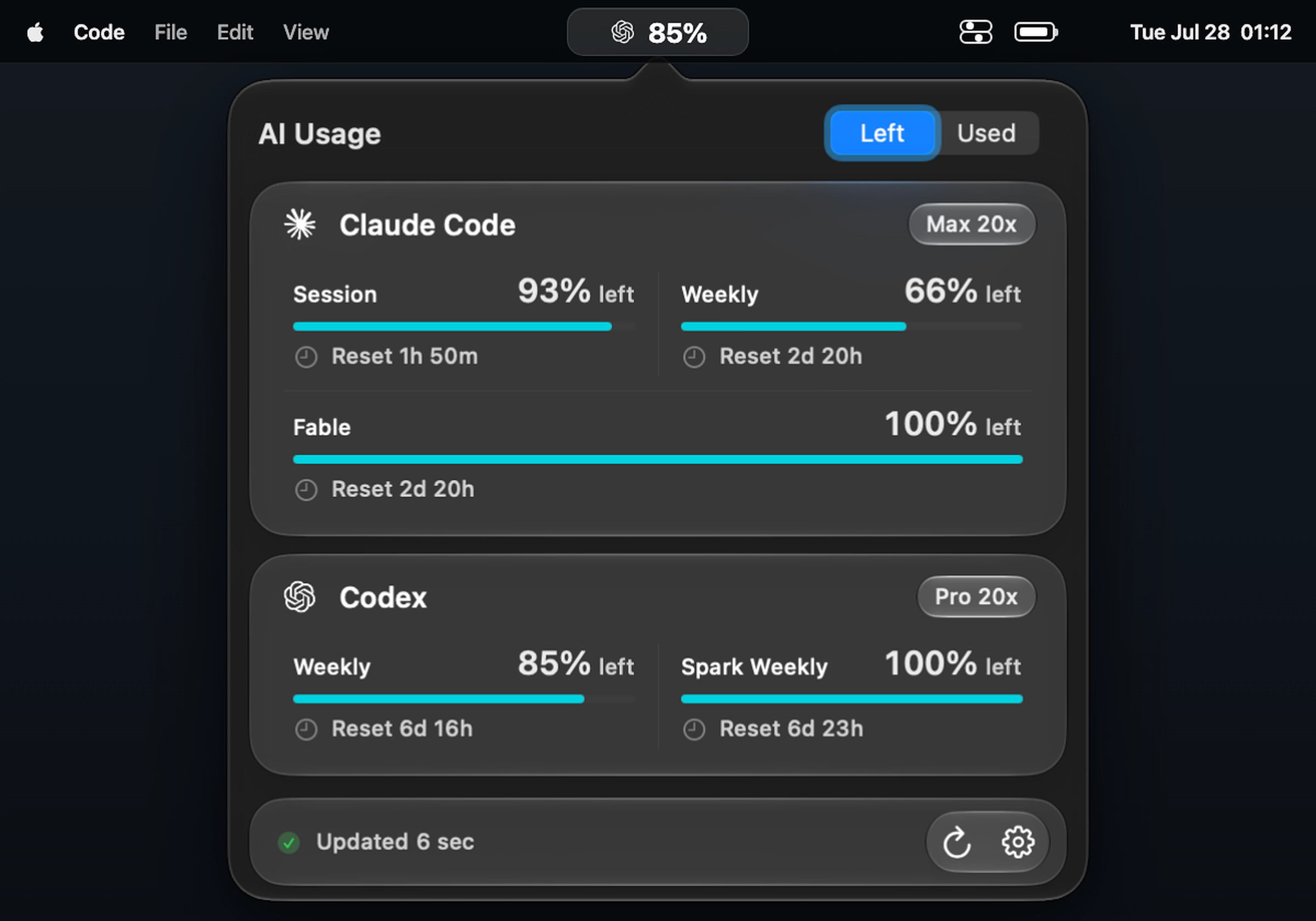
Lives in the menu bar — no Dock icon, no account setup, no extra window.
AI Usage shows the limits that matter and stays out of the way. No extra
account, API key, local server, telemetry, usage history, or background log
scanning.
Download

Open the DMG, drag AI Usage to Applications, and launch it. It appears in
the menu bar rather than the Dock. macOS 26 or newer is required.
[!NOTE]
Current public builds are ad-hoc signed because a Developer ID certificate
is not available yet. If macOS blocks the first launch, right-click
AI Usage in Applications and choose Open. Future updates are still
protected by Sparkle's EdDSA signature.
What you get
- Claude Code session, weekly, Sonnet, and Fable limits
- Codex session, weekly, Spark, and Spark weekly limits
- Remaining or used percentages, switchable directly in the panel
- A selectable provider and session/weekly value directly in the menu bar
- Configurable 1, 5, 15, 30, or 60-minute refresh and one-click manual refresh
- Daily signed update checks and a manual Check for Updates… command
- A direct Update button in the panel when a new version is available
- Provider cards only for installed tools, with signed-out status kept visible
- Native light and dark appearances with Liquid Glass
- Launch at Login enabled by default and still user-controllable
Build from source
You need:
- macOS 26 or newer
- Xcode 27 or newer
- Claude Code and/or Codex already signed in locally
Then:
git clone https://github.com/burakgon/ai-usage-menubar.git
cd ai-usage-menubar
./scripts/install.sh
The script builds a local Release version, installs it to~/Applications/AI Usage.app, and opens it. AI Usage appears in the menu bar,
not the Dock.
To run without the installer, open AIUsage.xcodeproj in Xcode and run theAIUsage scheme.
How it works
AI Usage reads the same local OAuth credentials already created by theclaude and codex CLIs, then requests quota data directly from the
providers' first-party endpoints.
- Credentials stay on your Mac.
- Tokens are never printed, logged, or sent anywhere else.
- Temporary failures keep the last successful values in memory and mark them
stale. - Nothing is cached across launches.
API-key-only Codex authentication can't read ChatGPT subscription usage.CLAUDE_CODE_OAUTH_TOKEN is intentionally ignored because setup tokens don't
include the profile scope required by Claude's usage endpoint.
The exact researched contracts are documented in
docs/provider-contracts.md.
Menu bar behavior
The default Auto mode shows the provider with the highest used percentage
for the selected period. You can independently choose Claude Code, Codex, or
Auto; Session or Weekly; and whether numbers mean Used or Left.
Left is the default number mode. The menu bar stays compact and shows only
the selected percentage; its meaning remains visible in the panel.
Raw percentages are shown exactly as reported by the provider. Only progress
bar drawing is clamped to 0...100. Remaining usage is bounded to 0...100
because a negative remaining percentage is not meaningful.
Development
Run the complete test suite:
xcodebuild test \
  -project AIUsage.xcodeproj \
  -scheme AIUsage \
  -destination 'platform=macOS'
The app is SwiftUI and AppKit, with a small provider layer and an in-memory
store. Its only runtime package dependency is
Sparkle, used for signed
over-the-air updates.
Contributions are welcome. Please read CONTRIBUTING.md
before opening a pull request.
Release packaging and OTA feed maintenance are documented in
docs/releasing.md.
Upstream research
Provider contracts and parts of the system-boundary implementation were
adapted from OpenUsage, pinned to
tag v0.7.6 / commit 5a2864f19a1c664f6a140ba06abad5596000af10.
See NOTICE for attribution.
License
AI Usage is available under the MIT License.
If AI Usage saves you a few clicks, please
star the repository. It helps
other Claude Code and Codex users find it.
Reviews (0)
Sign in to leave a review.
Leave a reviewNo results found