pi-gpui
Health Warn
- License — License: MIT
- Description — Repository has a description
- Active repo — Last push 0 days ago
- Low visibility — Only 6 GitHub stars
Code Pass
- Code scan — Scanned 12 files during light audit, no dangerous patterns found
Permissions Pass
- Permissions — No dangerous permissions requested
No AI report is available for this listing yet.
Native Mac app for the pi coding agent, written in Rust with GPUI (Zed's UI framework)
Pi GPUI
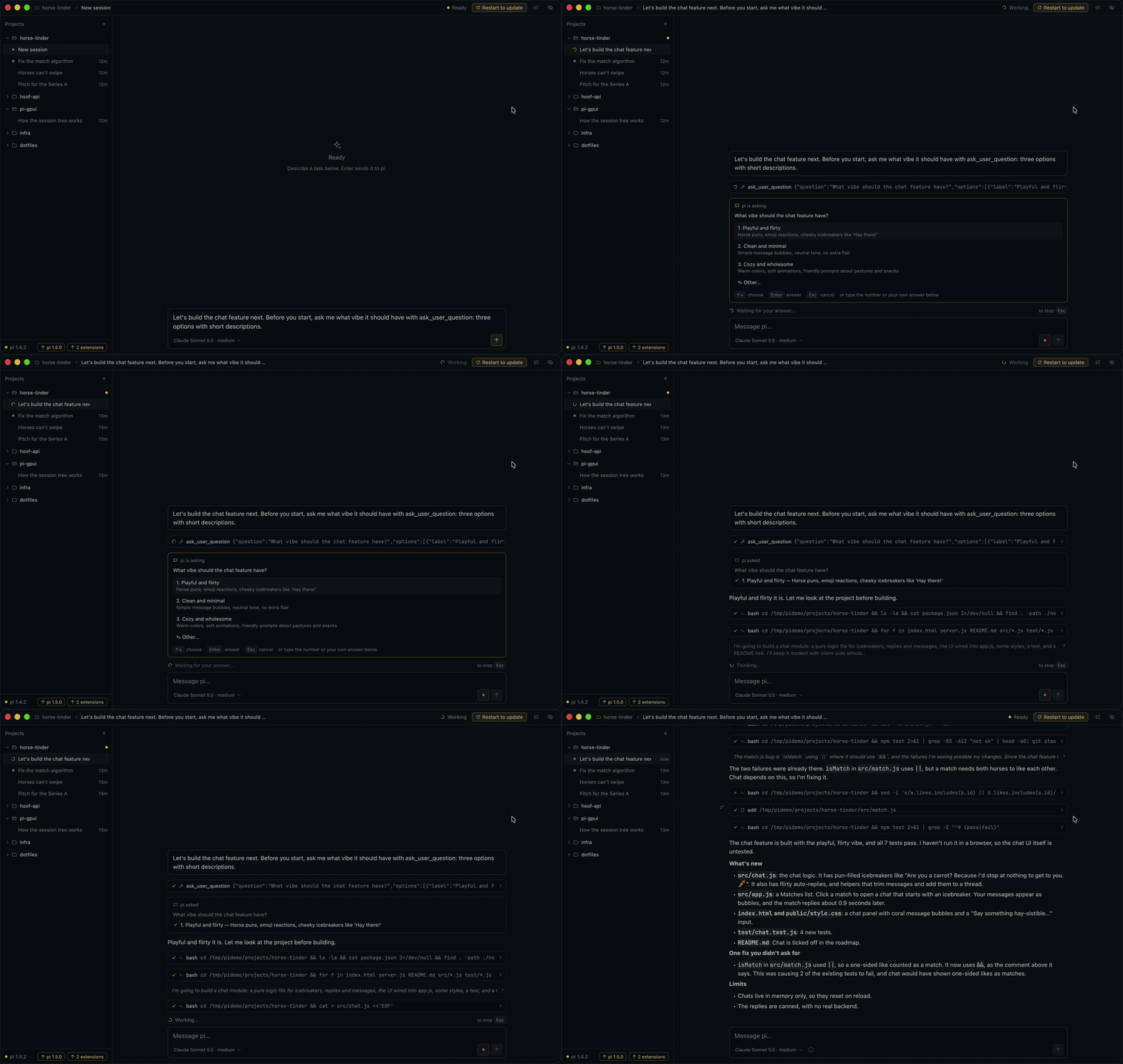
A native Mac app for the pi coding agent, written in Rust with GPUI, the UI framework behind Zed. No Electron, no webview. It runs the pi you already have over RPC, so your models, extensions, skills and sessions work as they do in the terminal.
Website · Download · Plugins · 中文
Install
brew install --cask bytesbay/tap/pi-gpui
Or download Pi-GPUI-*.zip from Releases and move the app to Applications. Releases are signed and notarized by Apple. The app updates itself: when a new version is downloaded, "Restart to update" appears in the title bar. Apple Silicon, macOS 13 or newer.
Needs pi 1.4 or newer within pi 1.x. The app finds pi in PI_EXECUTABLE, PATH or your login shell (so nvm installs work).
To move a session you started in the terminal into the app, add the /gpui command to pi:
pi install npm:pi-gpui
/gpui closes that pi and opens the same session in Pi GPUI. Other tools can do the same with a link: open "pi-gpui://open?workspace=/path/to/project&session=/path/to/session.jsonl" (the session is optional).
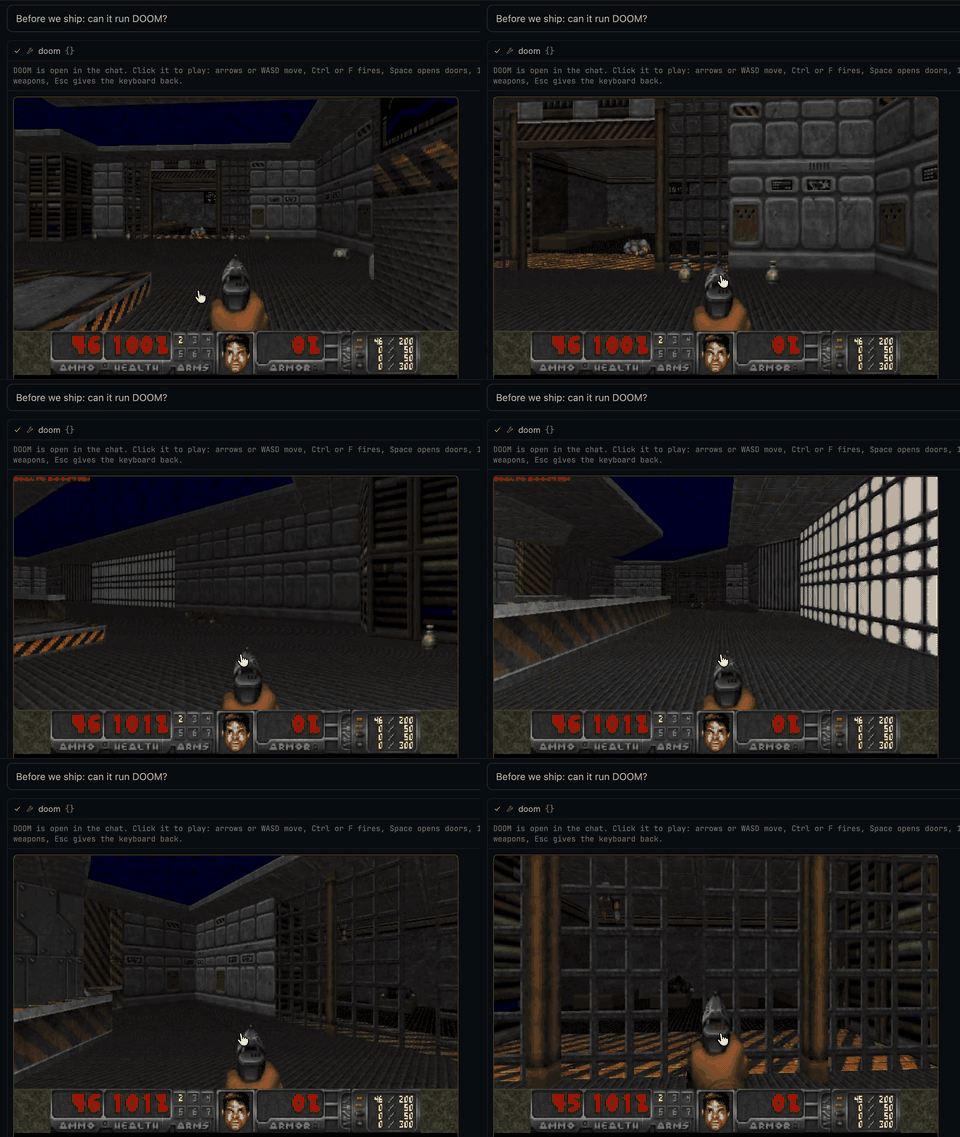
It runs DOOM
Plugins can draw live views inside tool calls, in any language. This one gives pi a doom tool:
Features
- Projects and their pi sessions in a sidebar. Every open session runs its own pi, so switching never stops work.
- Slash commands: pi's extension commands, prompt templates and skills, plus
/compact,/tree,/fork,/clone,/model,/new,/name,/session,/copy,/export. - Session tree with keyboard navigation and branch summaries.
- Paste or drop files and images into the message field. They show up as chips in the text (hover an image to preview it) and are sent as paths, like in pi's terminal: a pasted image is saved to
$TMPDIR/pi-clipboard-*.png, a file gets a temporary link. Images in messages and tool results are shown in the transcript. - Fork from any message.
- Extension questions (
select,confirm,input,editor) are asked inline in the transcript: pick with a click, digits or arrows, or type your own answer. - Plugins in any language: buttons, keybindings and status, tools for pi, and live views inside tool calls. It runs DOOM. See docs/PLUGINS.md.
- Per-session model and thinking level, without touching pi's defaults.
- Markdown answers styled after Zed's agent panel, with syntax-highlighted code; all transcript text is selectable.
- A context ring next to the model: context used and when pi compacts, prompt cache hit rate and expiry, subscription plan limits, and token totals for the session.
- Compaction shown in the transcript with token counts and the summary.
- Ayu Dark and Ayu Light themes, following macOS by default.
- Sessions can be renamed, hidden, closed (⌘W stops their pi, the session stays) or deleted (to the Trash).
- Updates for pi and its extensions next to the pi version, with versions and whether this app supports the new pi. Applied with pi's own
pi update, only when you click.
Keys
| Keys | Action |
|---|---|
⌘N |
New session |
⌘, |
Settings |
⌘O |
Add project |
⌘1 … ⌘9 |
Open the n-th session (hold ⌘ to see numbers) |
⌘⇧T |
Session tree |
⌘⇧M |
Model and thinking level |
⌘⇧E |
Expand or collapse step details |
↩ / ⇧↩ |
Send / new line (sending while pi works steers it) |
Esc |
Stop the run |
/ |
Command menu |
In the tree: ↑↓ move, ←→ jump between branches, ↩ go there, ⌥↩ go there and summarize the branch you leave, ⌘↩ fork from your message.
Settings
~/Library/Application Support/pi-gpui/settings.json is the source of truth. The app applies it as soon as it is saved, so you or a pi agent can edit it directly; the Settings page (⌘,) writes the same file and keeps its comments.
{
  "theme": "system",              // or "Ayu Dark", "Ayu Light"
  "ui_font_family": ".SystemUIFont",
  "agent_font_size": 14,          // messages and answers
  "buffer_font_family": "JetBrains Mono NL",  // code; bundled with the app
  "buffer_font_size": 12,
}
Compatibility
The app has its own version and supports a range of pi versions (MIN_PI and TESTED_PI in src/pi.rs). pi minors newer than the tested one still run, marked "not tested yet". Each release publishes pi-compat.json, and the updater only offers releases that support your pi. The app never updates pi.
Tree navigation needs something pi's RPC lacks, so the app passes a small extension of its own (extensions/pi-gpui-bridge.ts) to the pi processes it starts. Nothing is installed.
Known limits
- A pi running in a terminal on the same session is not detected.
Development
cargo run [-- /path/to/project]
cargo test && cargo clippy --all-targets
script/bundle.sh        # target/release/Pi GPUI.app
script/release.sh       # tag the Cargo.toml version; CI builds and publishes the release
Rust 1.90 (pinned) and Xcode. Shaders compile at startup, so the Metal Toolchain is not needed. Set PI_GPUI_PRETEND_VERSION=<older> to try the update flow against a real release.
Signing
Releases are signed with a Developer ID certificate and notarized, so Gatekeeper opens them without a warning. The release workflow needs these repository secrets:
| Secret | What |
|---|---|
MACOS_CERTIFICATE_P12 |
Developer ID Application certificate with its private key, exported as .p12, base64 (base64 -i cert.p12 | pbcopy) |
MACOS_CERTIFICATE_PASSWORD |
the password set when exporting the .p12 |
APPLE_API_KEY_P8 |
App Store Connect API key (.p8 file contents), role Developer |
APPLE_API_KEY_ID |
that key's ID |
APPLE_API_ISSUER_ID |
the Issuer ID shown above the keys list |
To sign and notarize locally:
xcrun notarytool store-credentials pi-gpui   # once; asks for the API key or an app-specific password
SIGN_IDENTITY="Developer ID Application: Your Name (TEAMID)" script/bundle.sh
NOTARY_PROFILE=pi-gpui script/notarize.sh
Docs: principles, GPUI practices, plugins.
The app bundles JetBrains Mono (SIL Open Font License 1.1, assets/fonts/OFL.txt).
License
MIT, see LICENSE.
Reviews (0)
Sign in to leave a review.
Leave a reviewNo results found