dev.botdock.net
Health Warn
- License — License: Apache-2.0
- Description — Repository has a description
- Active repo — Last push 0 days ago
- Low visibility — Only 6 GitHub stars
Code Fail
- process.env — Environment variable access in src/cli.ts
- spawnSync — Synchronous process spawning in src/commands/machine.ts
- process.env — Environment variable access in src/commands/machine.ts
Permissions Pass
- Permissions — No dangerous permissions requested
This tool is a local server and web dashboard that lets you track and interact with Claude Code and Codex agent sessions across multiple remote machines via SSH. It centralizes your live terminals, transcripts, and workspace files into a single interface.
Security Assessment
Risk: High. The tool inherently handles highly sensitive data, including plaintext keys and secrets stored locally in a `private/` directory. It reads environment variables to function and actively executes synchronous shell commands using `spawnSync` to manage remote `tmux` sessions and system processes. The project explicitly warns that it is an early-stage prototype with no real authentication and agent-generated code. Furthermore, the installation method relies on piping a remote script directly into bash, which can be dangerous without prior code review. No hardcoded secrets were found.
Quality Assessment
The project is actively maintained with a repository push made today, but it has very low community visibility with only 6 stars. It uses a standard Apache-2.0 open-source license. The maintainers are transparent about the project's limitations and explicitly advise users to restrict its use to personal research and avoid exposing it on public networks.
Verdict
Use with caution — while useful for research, it lacks authentication, stores plaintext secrets, and should only be run in trusted, isolated local environments.
Your Multi-Machine Agent Workspace: Track and interact with all your claude-code / codex agent sessions in one page.

BotDock
Your Multi-Machine Agent Workspace.
Track and interact with all your claude-code / codex agent sessions in one page.
Website · Demo · Changelog · Feature requests
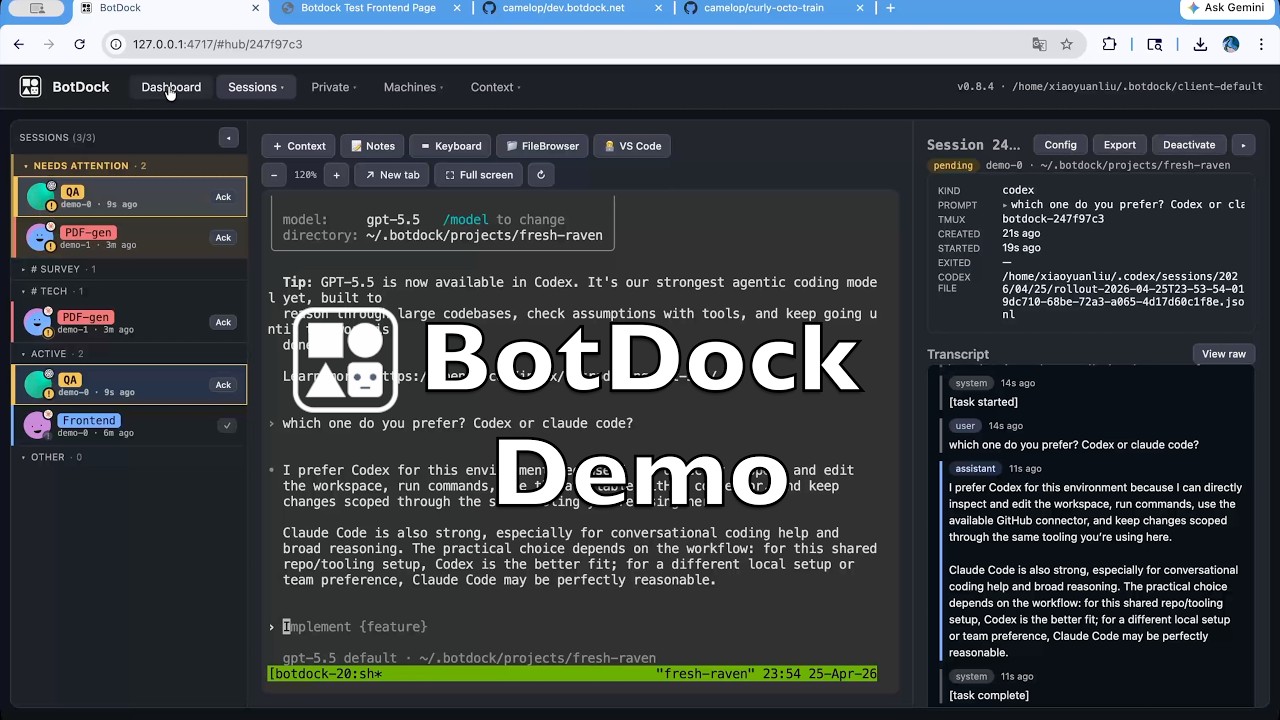
BotDock is a single-binary local server that pulls every Claude Code / codex session you run on every SSH-reachable machine into one web page — sidebar, embedded terminal (via ttyd), live transcript, and per-session VS Code / file browser scoped to the workdir. Sessions live in remote tmuxes; the daemon mirrors event + raw + transcript JSONL back over SSH so a daemon restart doesn't lose history. Embedded React UI ships inside the binary; no external database, everything persists as TOML/NDJSON under the data dir.
⚠️ BotDock is an early-stage research prototype, single-user with no real auth, and a significant chunk of the code is itself agent-generated. Use it for personal / research work; don't expose it on a public network or run production loads on it.
Install
curl -fsSL https://raw.githubusercontent.com/camelop/dev.botdock.net/main/install.sh | bash
Re-run the same command to upgrade. Supported platforms: linux-x64, linux-arm64, darwin-x64, darwin-arm64.
Runtime prereqs on the machine running the daemon: ssh, ssh-keygen, tmux, rsync (the last is used for +Context push; BotDock will auto-install it on target machines if missing).
Quick start
Three steps, about a minute:
# 1. One command — inits ~/.botdock/client-default if missing, spawns a
#    background server, and opens the dashboard in your browser.
botdock start

# 2. In the UI: create an SSH key, register a machine (with optional
#    jump-host chain), and run the connection test until it goes green.

# 3. Spawn Claude Code or codex sessions on any registered machine and
#    drive them all from the workspace.
botdock stop cleanly shuts the daemon down (drains SSH forwards before exit).
Prefer to keep state in a specific directory? Use botdock serve from inside it — same server, foreground, tied to your terminal:
mkdir -p ~/botdock && cd ~/botdock
botdock init .
botdock serve
Everything BotDock knows is under the data dir. Back it up or keep it in git (but remember private/ holds plaintext keys and secrets in v1 — don't commit those). Per-session Export ships a portable .zip another BotDock can import to attach to the same remote tmux.
What it does
- Manage Claude Code / codex sessions across machines, in one workspace. Spin up agents on any registered machine and watch them all from a single three-column workspace — sidebar, terminal, transcript — without juggling tmux panes or SSH terminals.
- Status tracking and tagging. Every session carries a status pill (running / pending / syncing / exited), an optional alias and accent color, and free-form tags. The dashboard surfaces what needs your attention first.
- One-click access to your working directory. Spawn a per-session
filebrowseror VS Code (code-server) instance, scoped to the session's workdir, with one click. Both run on the remote and reverse-proxy through BotDock so you stay in one tab. - Prepare context once, reuse it everywhere. Curate reusable context centrally — markdown snippets, git repos with optional deploy keys, arbitrary file bundles — and push it into any session's workdir on demand.
Full demo with timestamps: youtu.be/JdU34YknC2A.
CLI
All commands take an optional --home <dir> (defaults to $BOTDOCK_HOME or cwd; start / stop default to ~/.botdock/client-default).
botdock start                         init (if needed) + spawn a background
                                      server + open browser
botdock stop                          stop the daemon started by `start`
                                      (drains SSH forwards before exit)
botdock init [dir]                    scaffold a data directory
botdock serve [--dev]                 run the web server in the foreground
botdock key create <nickname>         generate ed25519
botdock key import <nick> <path>      import an existing OpenSSH private key
botdock key list / show / delete
botdock machine add <name> --host H --user U --key K [--port N] [--tag T]
botdock machine list / show / edit / remove
botdock machine test <name>           dial through the full jump chain
botdock secret set <name>             reads value from stdin
botdock secret list / show / remove
botdock --version
What's in the UI
- Dashboard — counts + recent-session list, "+ New session" launcher.
- Sessions → Workspace / Card / List — three views on the same sessions: three-column workspace (grouped sidebar · terminal · transcript + events), boring-avatar card grid, or flat table with a detail modal. Each session carries a brand-mark icon (Anthropic / OpenAI /
>_) so kinds are distinguishable at a glance. - Context → Git Repos / Markdown / File Bundles — curate reusable inputs you can push into any session's workdir with one click; optional deploy keys for private clones, markdown notes edited in Monaco, arbitrary directory trees imported as folders or tar/zip.
- Machines → Machines / Forwards / Terminals — SSH targets with jump-host chains and a reserved
localloopback entry, user-managed port forwards (with an optional web proxy for-Lforwards), and lazy-connected per-machine terminals. - Private → Keys / Secrets — ed25519 key management + secret storage.
Development
bun install
bun test
bun run typecheck
bun run web:dev               # Vite on :5173, proxies /api → :4717
bun src/cli.ts serve --dev    # API only, frontend comes from Vite
bun run build                 # compile ./dist-bin/botdock for the host
bun run build:all             # cross-compile all four platforms
User-visible changes: CHANGELOG.md.
License
Apache License 2.0. © 2026 BotDock. All rights reserved.
Reviews (0)
Sign in to leave a review.
Leave a reviewNo results found