memoir
Health Warn
- License — License: MIT
- Description — Repository has a description
- Active repo — Last push 0 days ago
- Low visibility — Only 5 GitHub stars
Code Fail
- execSync — Synchronous shell command execution in bin/memoir.js
- network request — Outbound network request in bin/memoir.js
- rm -rf — Recursive force deletion command in demo.sh
- os.homedir — User home directory access in src/adapters/index.js
- process.env — Environment variable access in src/adapters/index.js
- os.homedir — User home directory access in src/adapters/restore.js
- os.homedir — User home directory access in src/cloud/auth.js
- process.env — Environment variable access in src/cloud/auth.js
- network request — Outbound network request in src/cloud/auth.js
- process.env — Environment variable access in src/cloud/constants.js
- network request — Outbound network request in src/cloud/storage.js
- execSync — Synchronous shell command execution in src/commands/diff.js
- os.homedir — User home directory access in src/commands/diff.js
Permissions Pass
- Permissions — No dangerous permissions requested
No AI report is available for this listing yet.
Persistent memory for AI coding tools. Sync Claude, Cursor, Gemini, Copilot, Windsurf + 6 more across machines via MCP. E2E encrypted. Open source.
memoir
Persistent memory for AI coding tools.




Your AI forgets everything between sessions. memoir gives it long-term memory via MCP.
11 tools supported • E2E encrypted • Cross-platform • Open source
Works with Claude Code, Cursor, Windsurf, Gemini, Copilot, Codex, ChatGPT, Aider, Zed, Cline, and Continue.dev.
Website • npm • Blog • Contributing
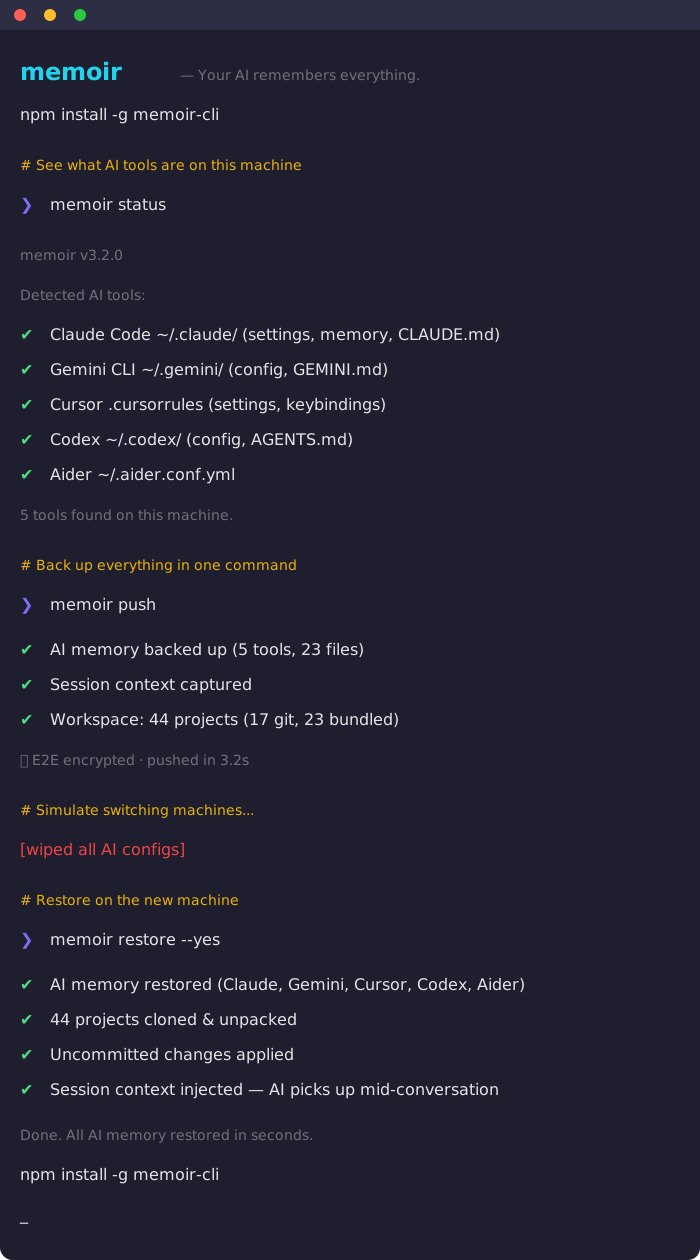
The Problem
You told Claude your project uses Zustand, not Redux. You explained your auth middleware to Cursor. You spent weeks building up context across your AI tools.
Next session? Gone. New machine? Gone. Switch tools? Gone.
How memoir fixes it
memoir is a persistent memory layer that runs via MCP inside your AI tools. Your AI can search, read, and save memories automatically — across sessions, tools, and machines.
you: how does auth work in this project?

  memoir_recall("auth setup architecture")
  Found 3 memories matching "auth"

claude: Based on your previous sessions: this project uses JWT auth
  with refresh tokens, the middleware is in src/middleware/auth.ts,
  and you chose Zustand over Redux for auth state (decided March 12).
No re-explaining. memoir remembered.
Architecture
graph LR
    A[Claude Code] --> M[memoir MCP]
    B[Cursor] --> M
    C[Gemini CLI] --> M
    D[Windsurf] --> M
    E[+ 7 more] --> M

    M --> R[recall / remember / list / read]
    R --> S[(Local Memory Store)]

    S --> P[memoir push]
    P --> G[GitHub / Cloud]
    G --> Q[memoir restore]
    Q --> S2[(New Machine)]
memoir runs as a local MCP server inside your AI tools. Your AI can search, save, and recall memories automatically. Push to sync across machines.
Quick Start
# Install
npm install -g memoir-cli

# Setup
memoir init
Add MCP to your AI tools
Claude Code — add to ~/.mcp.json:
{
  "mcpServers": {
    "memoir": { "command": "memoir-mcp" }
  }
}
Cursor — add to .cursor/mcp.json:
{
  "mcpServers": {
    "memoir": { "command": "memoir-mcp" }
  }
}
That's it. Your AI tools now have 6 memory abilities:
| MCP Tool | What it does |
|---|---|
memoir_recall |
Search across all your AI memories |
memoir_remember |
Save context for future sessions |
memoir_list |
Browse all memory files by tool |
memoir_read |
Read a specific memory in full |
memoir_status |
See which AI tools are detected |
memoir_profiles |
Switch between work/personal |
What Gets Synced
memoir syncs three layers that no other tool connects:
Layer 1: AI Memory (via MCP + CLI)
Configs, instructions, and project knowledge across 11 tools — searchable and writable from inside any AI conversation.
| Tool | What gets synced |
|---|---|
| Claude Code | ~/.claude/ settings, memory, CLAUDE.md files |
| Gemini CLI | ~/.gemini/ config, GEMINI.md files |
| ChatGPT | CHATGPT.md custom instructions |
| OpenAI Codex | ~/.codex/ config, AGENTS.md |
| Cursor | Settings, keybindings, .cursorrules |
| GitHub Copilot | Config, copilot-instructions.md |
| Windsurf | Settings, keybindings, .windsurfrules |
| Zed | Settings, keymap, tasks |
| Cline | Settings, .clinerules |
| Continue.dev | Config, .continuerules |
| Aider | .aider.conf.yml, system prompt |
Layer 2: Session State
What you were doing — not just what your AI knows, but the active context.
- Last coding session captured automatically
- What files you changed, what errors you hit, what decisions you made
- Injected into your AI on restore so it picks up mid-conversation
- Secrets auto-redacted (API keys, tokens, passwords stripped before sync)
Layer 3: Workspace
Your actual projects — code, files, everything.
- Git projects: Remote URLs saved, auto-cloned on restore
- Non-git projects: Bundled as compressed archives, unpacked on restore
- Uncommitted work: Saved as patches, applied after clone
- Zero git commands needed — memoir handles it all
Key Features
Cross-tool memory
Tell Claude something once. Cursor knows it too. memoir is the shared memory layer between all your AI tools.
Translate between AI tools
memoir migrate --from chatgpt --to claude
# AI-powered — rewrites conventions, not copy-paste

memoir migrate --from chatgpt --to all
# Translate to every tool at once
Cross-machine sync
# On your main machine
memoir push

# On any other machine
memoir restore -y
# ✔ AI memory restored (Claude, Gemini, Cursor, 11 tools)
# ✔ 44 projects cloned & unpacked
# ✔ Uncommitted changes applied
# ✔ Session context injected — AI picks up mid-conversation
E2E Encryption
memoir encrypt    # toggle encryption on/off
memoir push       # prompted for passphrase, AES-256-GCM encrypted
Your backup is encrypted before it leaves your machine. Secret scanning auto-redacts API keys, tokens, and passwords.
Profiles (personal / work)
memoir profile create work
memoir push --profile work
memoir profile switch personal
Cloud sync
memoir login
memoir cloud push      # encrypted cloud backup
memoir cloud restore   # restore from any version
Cross-platform (Mac / Windows / Linux)
Paths remap automatically between platforms. Push from Mac, restore on Windows. It just works.
All Commands
| Command | What it does |
|---|---|
memoir init |
Setup wizard — GitHub or local storage |
memoir push |
Back up AI memory + workspace + session |
memoir restore |
Restore everything on a new machine |
memoir mcp |
Start MCP server for editor integration |
memoir status |
Show detected AI tools |
memoir doctor |
Diagnose issues, scan for secrets |
memoir view |
Preview what's in your backup |
memoir diff |
Show changes since last backup |
memoir migrate |
Translate memory between tools via AI |
memoir snapshot |
Capture current coding session |
memoir resume |
Pick up where you left off |
memoir encrypt |
Toggle E2E encryption |
memoir profile |
Manage profiles (personal/work) |
memoir cloud push |
Back up to memoir cloud |
memoir cloud restore |
Restore from memoir cloud |
memoir history |
View cloud backup versions |
memoir login |
Sign in to memoir cloud |
memoir share |
Create encrypted shareable link |
memoir upgrade |
View plans and upgrade |
memoir update |
Self-update to latest version |
How memoir compares
| Feature | memoir | dotfiles managers | ai-rulez | memories.sh |
|---|---|---|---|---|
| MCP memory layer | 6 tools | No | No | No |
| AI memory sync | 11 tools | No | 18 tools | 3 tools |
| Cross-tool recall | Yes | No | No | No |
| Workspace sync | Yes | No | No | No |
| Session handoff | Yes | No | No | No |
| AI-powered migration | Yes | No | No | No |
| E2E encryption | Yes | No | No | No |
| Secret scanning | Yes | Some | No | No |
| Cross-platform remap | Yes | Some | No | No |
| Cloud backup | Yes | No | No | Yes ($15/mo) |
| Profiles | Yes | No | No | No |
| Free & open source | Yes | Yes | Yes | No |
Common Workflows
Your AI remembers across sessions
# Monday — you explain your auth setup to Claude
# ...Claude calls memoir_remember to save the decision

# Thursday — new conversation
you: "add a protected route"
# Claude calls memoir_recall, finds your auth architecture
# No re-explaining needed
New machine setup
npm install -g memoir-cli && memoir init && memoir restore -y
# Done. Everything's back.
Switching AI tools
memoir migrate --from chatgpt --to claude
# Your custom instructions become a proper CLAUDE.md
Team onboarding
# Senior dev pushes team config
memoir push --profile team

# New hire runs one command
memoir restore --profile team
# Every project cloned. Every AI tool configured. Day one productive.
Security
- E2E encryption — AES-256-GCM with scrypt key derivation
- Secret scanning — 20+ patterns detect API keys, tokens, passwords, connection strings
- Auto-redaction — secrets stripped from session handoffs before sync
- No credentials synced — .env files, auth tokens, and API keys are never included
- Passphrase verified — wrong passphrase caught before decrypt attempt
- Local MCP server — runs on your machine, no data sent to external services
Requirements
- Node.js >= 18
- Git (for workspace sync)
- Works on macOS, Windows, Linux
Contributing
Contributions welcome — especially new tool adapters and MCP improvements.
- Fork the repo
- Create your branch (
git checkout -b feature/my-feature) - Commit and push
- Open a PR
Links
- Website: memoir.sh
- npm: memoir-cli
- Blog: memoir.sh/blog
- Issues: GitHub Issues
License
MIT
Reviews (0)
Sign in to leave a review.
Leave a reviewNo results found