GDD
Health Warn
- License — License: NOASSERTION
- Description — Repository has a description
- Active repo — Last push 0 days ago
- Low visibility — Only 5 GitHub stars
Code Fail
- rm -rf — Recursive force deletion command in .github/workflows/build.yml
Permissions Pass
- Permissions — No dangerous permissions requested
No AI report is available for this listing yet.
AI-controlled browser farm on your machine. 36 MCP tools for Claude Code & Cursor — run N Chromium instances with device emulation, screenshots, network/geolocation simulation. Cross-platform: Windows GUI, headed & headless on Linux/macOS.

GDD — Giggly-Dazzling-Duckling
AI-controlled browser farm on your machine
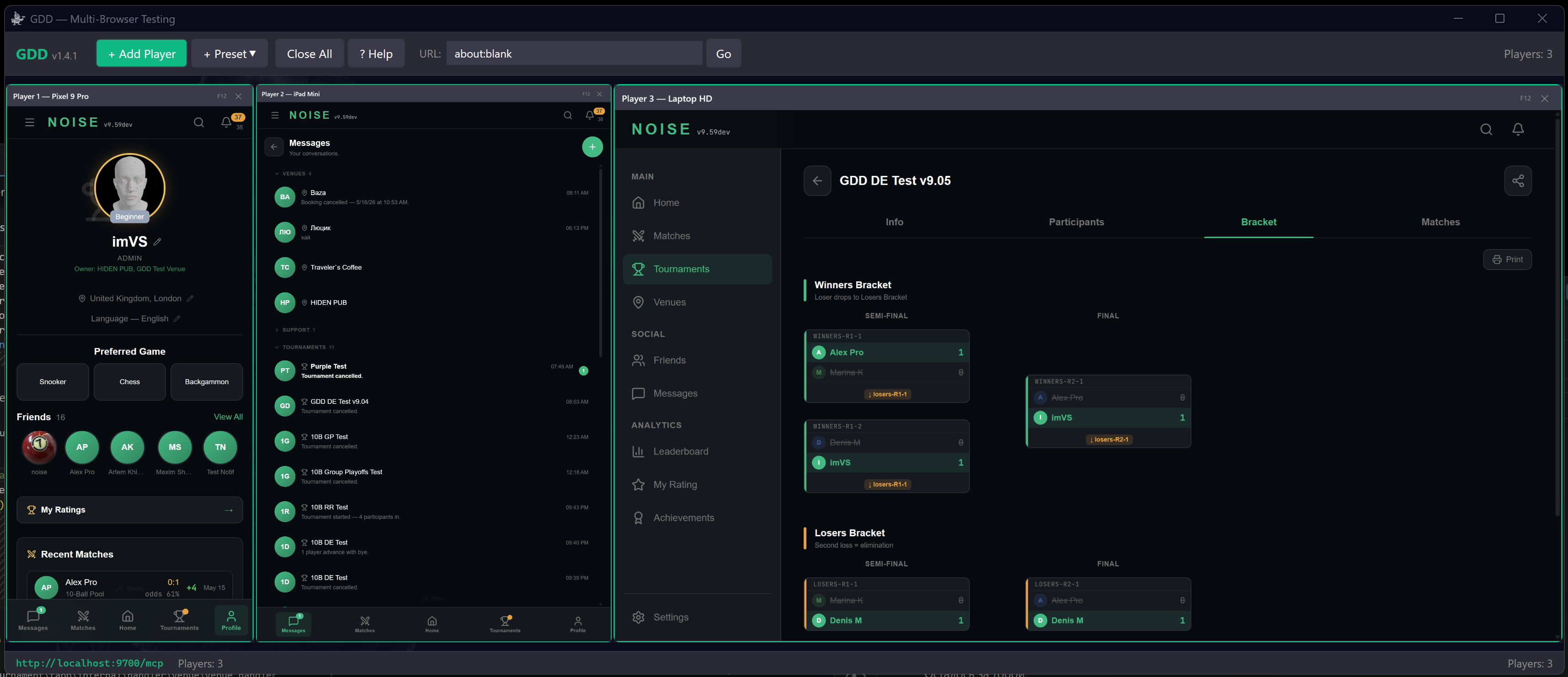
Simulate multiple real users across 22 device types — test your site like it's launch day.






How It Works
You: Open 3 iPhones and a desktop, navigate to myapp.com, test the signup form on all devices
Claude Code creates 4 browsers with device emulation, navigates each to your app, fills in the form, takes screenshots, checks console for errors — all in parallel.
gdd_add_players(3, device="iPhone 15 Pro")    → players [1, 2, 3]
gdd_add_players(1, device="Desktop 1080p")    → player  [4]
gdd_navigate(1, "https://myapp.com")          → all 4 browsers open your app
gdd_tap(1, "#signup-btn")                     → taps signup on iPhone
gdd_screenshot(1)                             → captures the result
gdd_get_console(1, level="error")             → checks for JS errors
GDD runs N isolated Chromium instances, each with its own profile, cookies, device emulation, geolocation, and network conditions. It exposes 36 MCP tools via HTTP on localhost:9700.
Install
| Platform | Download | Run |
|---|---|---|
| Linux | gdd-linux-x64.tar.gz | chmod +x GDD.Headless && ./GDD.Headless |
| macOS ARM | gdd-macos-arm64.tar.gz | bash Scripts/setup-macos.sh && ./GDD.Headless |
| macOS Intel | gdd-macos-x64.tar.gz | bash Scripts/setup-macos.sh && ./GDD.Headless |
| Windows | gdd-win-x64.tar.gz | .\GDD.Headless.exe |
| Windows GUI | gdd-windows-gui.tar.gz | Extract, run GDD.exe (WebView2 required) |
Self-contained binary, ~70 MB. No .NET installation needed. Chromium downloads automatically on first launch.
One-liner (Linux):
curl -sL https://github.com/Cap-of-tea/GDD/releases/latest/download/gdd-linux-x64.tar.gz | tar xz && chmod +x GDD.Headless && ./GDD.Headless
By default, browsers launch in headed mode (visible windows). Add --headless for CI/CD.
Connect to Your AI Client
Add to .mcp.json and restart your AI client:
{
  "mcpServers": {
    "gdd": {
      "url": "http://localhost:9700/mcp"
    }
  }
}
That's it. Start GDD, tell Claude or Cursor to test your app.
Config file locations| Client | Project config | Global config |
|---|---|---|
| Claude Code | <project>/.mcp.json |
~/.claude/.mcp.json |
| Cursor | <project>/.cursor/mcp.json |
~/.cursor/mcp.json |
| VS Code / Windsurf / Antigravity | <project>/.vscode/mcp.json |
IDE settings.json |
Global and project configs are merged — servers from both are available simultaneously. Changes are picked up only when restarting the AI client session.
VS Code-based IDEs (Windsurf, Antigravity, Copilot)VS Code-based IDEs use a different config format than Claude Code / Cursor.
Project config — .vscode/mcp.json:
{
  "servers": {
    "gdd": {
      "type": "http",
      "url": "http://localhost:9700/mcp"
    }
  }
}
Global config — open via Cmd+Shift+P → "Open User Settings (JSON)":
{
  "mcp": {
    "servers": {
      "gdd": {
        "type": "http",
        "url": "http://localhost:9700/mcp"
      }
    }
  }
}
Global settings.json location: macOS — ~/Library/Application Support/<IDE>/User/settings.json, Linux — ~/.config/<IDE>/User/settings.json, Windows — %APPDATA%/<IDE>/User/settings.json. Replace <IDE> with your editor name (Code, Windsurf, Antigravity, etc.).
stdio-proxy alternative (.vscode/mcp.json):
{
  "servers": {
    "gdd": {
      "type": "stdio",
      "command": "bash",
      "args": ["/absolute/path/to/Scripts/mcp-proxy.sh"]
    }
  }
}
By default, Claude Code asks for confirmation on every MCP tool call. To allow GDD tools without prompts, add to ~/.claude/settings.json:
{
  "permissions": {
    "allow": [
      "mcp__gdd__*"
    ]
  }
}
This single wildcard covers all 36 GDD tools. Restart Claude Code after editing.
Auto-launch via stdio proxy (alternative)Proxy scripts start GDD automatically when your AI client connects:
Windows:
{
  "mcpServers": {
    "gdd": {
      "command": "powershell",
      "args": ["-ExecutionPolicy", "Bypass", "-File", "C:/path/to/Scripts/mcp-proxy.ps1"]
    }
  }
}
Linux / macOS:
{
  "mcpServers": {
    "gdd": {
      "command": "bash",
      "args": ["/path/to/Scripts/mcp-proxy.sh"]
    }
  }
}
Add "--headless" to the args array for CI/CD.
Autostart as service (macOS / Linux)Tip: On first launch, GDD downloads Chromium (~80 MB). If your AI client times out, run GDD manually first, then reconnect.
macOS (launchd):
bash Scripts/install-launchd.sh            # headed (default)
bash Scripts/install-launchd.sh --headless  # for CI/CD
Manage: launchctl list | grep gdd / bash Scripts/install-launchd.sh --uninstall
Linux (systemd):
mkdir -p ~/.config/systemd/user
cat > ~/.config/systemd/user/gdd.service << 'EOF'
[Unit]
Description=GDD Multi-Browser Testing Server
[Service]
ExecStart=/path/to/GDD.Headless
WorkingDirectory=/path/to/gdd-directory
Restart=on-failure
[Install]
WantedBy=default.target
EOF

systemctl --user daemon-reload
systemctl --user enable --now gdd
curl -X POST http://localhost:9700/mcp -H "Content-Type: application/json" \
  -d '{"jsonrpc":"2.0","id":1,"method":"tools/call","params":{"name":"gdd_add_players","arguments":{"count":1}}}'
GDD uses standard JSON-RPC 2.0 — works with curl, Python, Node.js, or any HTTP client.
Features
- Multi-device — Run N isolated Chromium instances with 22 device presets (phones, tablets, desktops)
- AI-native — 36 MCP tools for Claude Code, Cursor, or any MCP-compatible client
- Cross-platform — Windows GUI with live video wall + headed/headless on Linux & macOS
- Full interaction — Navigate, tap, type, swipe, scroll, hover, handle dialogs, take screenshots
- Device emulation — Screen size, DPR, touch, user agent, geolocation, timezone, language
- Network control — Simulate 4G, Fast 3G, Slow 3G, or offline per browser
- Diagnostics — Console errors, network traffic, performance metrics, push notifications
- Error beacon — Every tool response warns about JS errors across all browsers automatically
- Self-updating — Built-in version check and one-command update
MCP Tools (36)
Player Management
| Tool | Description |
|---|---|
gdd_add_players |
Add N browser instances with optional device preset |
gdd_remove_player |
Remove a browser instance by player ID |
gdd_list_windows |
List all active browsers with current state |
Navigation
| Tool | Description |
|---|---|
gdd_navigate |
Navigate to a URL |
gdd_wait |
Wait for a CSS selector to appear (with timeout) |
gdd_reload |
Reload page (hard=true bypasses cache) |
gdd_back |
Navigate back |
gdd_forward |
Navigate forward |
Interaction
| Tool | Description |
|---|---|
gdd_tap |
Tap element by CSS selector or coordinates |
gdd_swipe |
Swipe gesture (up/down/left/right) |
gdd_scroll |
Scroll page or element |
gdd_type |
Type text into input fields |
gdd_hover |
Hover over element |
gdd_select |
Select option from <select> dropdown |
gdd_dialog |
Handle JS alert/confirm/prompt dialogs |
Reading & Screenshots
| Tool | Description |
|---|---|
gdd_read |
Read text content of an element |
gdd_read_all |
Read text from all matching elements |
gdd_screenshot |
Capture JPEG screenshot at CSS pixel resolution |
Emulation
| Tool | Description |
|---|---|
gdd_set_device |
Set device preset (22 devices: phones, tablets, desktops) |
gdd_set_viewport |
Set custom viewport dimensions |
gdd_set_location |
Set geolocation, timezone, and locale |
gdd_set_network |
Set network conditions (4G, 3G, offline) |
gdd_set_language |
Set browser language |
State & Diagnostics
| Tool | Description |
|---|---|
gdd_get_state |
Browser state: URL, title, device, auth status |
gdd_get_console |
Console output and uncaught exceptions |
gdd_get_network |
Network requests with timing and status |
gdd_get_notifications |
Received push notifications |
gdd_get_performance |
Performance metrics (JS heap, DOM nodes, FPS) |
gdd_clear_logs |
Clear console and/or network logs |
Auth & Execution
| Tool | Description |
|---|---|
gdd_quick_auth |
Auto-register and login with generated credentials |
gdd_execute_js |
Execute JavaScript and return result |
Browser Storage
| Tool | Description |
|---|---|
gdd_storage |
Read/write/clear localStorage/sessionStorage |
gdd_cookies |
Read or clear browser cookies |
Help & Updates
| Tool | Description |
|---|---|
gdd_get_manual |
Full GDD manual for AI self-learning |
gdd_check_update |
Check for newer versions |
gdd_update |
Download and install update (restarts GDD) |
Device Presets (22)
Phones (11)
| Device | Resolution | Scale | Touch |
|---|---|---|---|
| iPhone SE | 375 x 667 | 2.0x | Yes |
| iPhone 14 | 390 x 844 | 3.0x | Yes |
| iPhone 15 Pro | 393 x 852 | 3.0x | Yes |
| iPhone 15 Pro Max | 430 x 932 | 3.0x | Yes |
| iPhone 16 Pro | 402 x 874 | 3.0x | Yes |
| iPhone 16 Pro Max | 440 x 956 | 3.0x | Yes |
| Pixel 9 | 412 x 915 | 2.625x | Yes |
| Pixel 9 Pro | 412 x 915 | 2.625x | Yes |
| Galaxy S24 | 360 x 780 | 3.0x | Yes |
| Galaxy S24 Ultra | 412 x 915 | 3.0x | Yes |
| OnePlus 12 | 412 x 915 | 3.5x | Yes |
Tablets (6)
| Device | Resolution | Scale |
|---|---|---|
| iPad Mini | 744 x 1133 | 2.0x |
| iPad Air | 820 x 1180 | 2.0x |
| iPad Pro 11" | 834 x 1194 | 2.0x |
| iPad Pro 13" | 1024 x 1366 | 2.0x |
| Galaxy Tab S9 | 800 x 1280 | 2.0x |
| Pixel Tablet | 800 x 1280 | 2.0x |
Desktops (5)
| Device | Resolution | Scale |
|---|---|---|
| Laptop HD | 1366 x 768 | 1.0x |
| Laptop HiDPI | 1440 x 900 | 2.0x |
| Desktop 1080p | 1920 x 1080 | 1.0x |
| Desktop 1440p | 2560 x 1440 | 1.0x |
| Desktop 4K | 3840 x 2160 | 2.0x |
Architecture
Client (AI agent / curl / script)
         │ POST /mcp (JSON-RPC 2.0)
         ▼
    McpServer (:9700)
    Streamable HTTP + SSE
         │
         ▼
    McpToolRegistry (36 tools)
    Player · Navigation · Interaction · Read
    Emulation · Auth · State · Diagnostics
         │
         ▼
    IPlayerManager
    MainViewModel (WPF) / HeadlessPlayerManager
         │
         ▼
    IBrowserEngine Instances
    WebView2 (Win GUI)  |  Playwright (Headless/Headed)
    Each: own profile, CDP session, emulation
Three Modes
| Windows GUI | Headed (default) | Headless | |
|---|---|---|---|
| Binary | GDD.exe |
GDD.Headless |
GDD.Headless --headless |
| Engine | WebView2 | Playwright | Playwright |
| UI | WPF video wall | Visible Chromium windows | HTTP API only |
| Platforms | Windows | Windows, Linux, macOS | Windows, Linux, macOS |
Tech Stack
| Layer | Technology |
|---|---|
| Runtime | .NET 8.0 (self-contained) |
| UI (Windows) | WPF + CommunityToolkit.Mvvm |
| Browser (GUI) | Microsoft WebView2 |
| Browser (Headless) | Microsoft Playwright |
| Protocol | MCP (Model Context Protocol) |
| Browser Control | Chrome DevTools Protocol (CDP) |
| Logging | Serilog |
BrowserXn.sln
├── src/
│   ├── GDD.Core/              ← Shared library (net8.0)
│   │   ├── Abstractions/      ← IBrowserEngine, IPlayerManager, ...
│   │   ├── Mcp/               ← MCP server, tools, protocol
│   │   ├── Models/            ← Device, Location, Network presets
│   │   ├── Services/          ← CDP, Emulation, Monitoring services
│   │   └── Collections/       ← RingBuffer
│   ├── BrowserXn/             ← Windows GUI (WPF + WebView2)
│   │   ├── Engines/           ← WebView2ControlAdapter
│   │   ├── ViewModels/        ← MVVM (MainViewModel : IPlayerManager)
│   │   ├── Views/             ← XAML + VideoWallPanel
│   │   └── ...
│   └── GDD.Headless/          ← Cross-platform CLI (Playwright)
│       ├── Engines/           ← PlaywrightEngine
│       ├── Platform/          ← HeadlessPlayerManager
│       └── Scripts/           ← mcp-proxy.sh, mcp-proxy.ps1
└── .github/workflows/         ← CI/CD (5 platform targets + auto-release)
Configuration
appsettings.json next to the executable:
{
  "GDD": {
    "FrontendUrl": "about:blank",
    "BackendUrl": "http://localhost:8080/api/v1",
    "BotToken": "",
    "McpPort": 9700,
    "DataFolderRoot": ""
  }
}
| Key | Description | Default |
|---|---|---|
FrontendUrl |
Default URL for new browsers | about:blank |
BackendUrl |
Backend API for auth service | http://localhost:8080/api/v1 |
BotToken |
Telegram bot token (for TG testing) | — |
McpPort |
MCP server port (auto-fallback +1..+9) | 9700 |
DataFolderRoot |
Browser profile storage root | %LOCALAPPDATA%\GDD\Profiles (Win), ~/.local/share/GDD/Profiles (Linux/macOS) |
Headed |
Visible browser windows | true (override with --headless) |
Requires .NET 8 SDK.
# Windows GUI (requires Windows 10/11 + WebView2)
dotnet publish src/BrowserXn/BrowserXn.csproj -c Release -p:PublishSingleFile=true -o ./publish/win-gui

# Cross-platform headless
dotnet publish src/GDD.Headless/GDD.Headless.csproj -c Release -r linux-x64 --self-contained -o ./publish/linux-x64
dotnet publish src/GDD.Headless/GDD.Headless.csproj -c Release -r osx-arm64 --self-contained -o ./publish/osx-arm64
dotnet publish src/GDD.Headless/GDD.Headless.csproj -c Release -r win-x64 --self-contained -o ./publish/win-x64
Chromium installs automatically on first run.
Documentation
- GDD-MANUAL.md — Full usage manual with workflow examples
- GDD-ARCHITECTURE.md — Architecture deep-dive
- GDD-PROMPT.md — Claude agent instructions for MCP integration
- CONTRIBUTING.md — Contribution guidelines
License
imVS©, free for personal use.
Source Available — Non-Commercial. Free for personal use, education, and research. Commercial use requires a paid license. See LICENSE for full terms.
Commercial licensing: [email protected]
Reviews (0)
Sign in to leave a review.
Leave a reviewNo results found