ios-workflow-claude
Health Warn
- License — License: Apache-2.0
- Description — Repository has a description
- Active repo — Last push 0 days ago
- Low visibility — Only 5 GitHub stars
Code Fail
- rm -rf — Recursive force deletion command in bootstrap.sh
Permissions Pass
- Permissions — No dangerous permissions requested
No AI report is available for this listing yet.
iOS-opinionated Claude Code workflow automation: Swift 6 migration, Apollo->native SDK removal, stacked PRs, Jira integration, Xcode build optimization.
ios-workflow-claude
English · Português brasileiro
Reusable Claude Code slash-commands, skills, and workflows extracted from real iOS / backend projects. Drop into any repo's .claude/ folder, or wire to a global ~/.claude/.
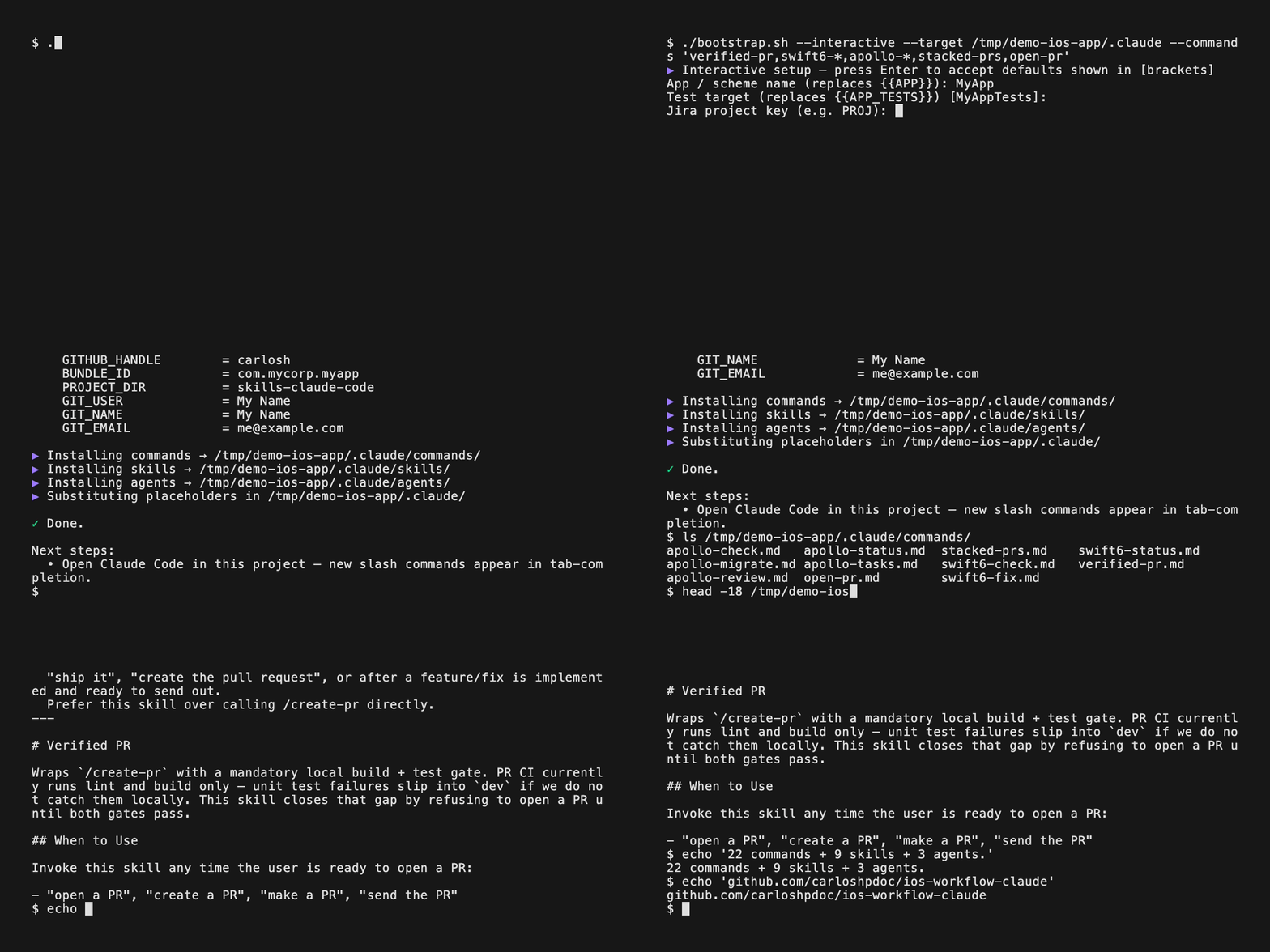
The .md files in commands/ and skills/ are templates - they reference your project via {{PLACEHOLDERS}} (see below) that you replace once per project.
The GIF above is reproducible - see
docs/assets/demo.tape. Install VHS (brew install vhs) and runvhs docs/assets/demo.tape.
Why this exists
There are good Claude Code kits for iOS, and good kits for workflow automation. There aren't any that do both.
| Kit | What it covers | What it doesn't |
|---|---|---|
| keskinonur/claude-code-ios-dev-guide (705⭐) | iOS architect agent, SwiftUI specialist, Swift reviewer | Jira, PRs via gh, stacked PRs, Apollo→native, feature-flag cleanup, perf playbook, SwiftLint fixer |
| schovi/claude-schovi (MIT) | Jira auto-detect, /review, /publish |
Anything iOS |
| kylehughes/apple-platform-build-tools (57⭐) | xcodebuild / simctl / devicectl wrapper, builder subagent |
Workflow automation |
ios-workflow-claude (this repo) |
The intersection. Swift 6 migration pipeline, Apollo→native SDK removal, stacked PRs ≤600 lines, Jira-driven PR opener, Xcode build orchestrator, perf playbook with concrete pattern matches, SwiftLint fixer | - |
Two things in here I couldn't find anywhere else public:
- A complete Swift 6 migration pipeline (
/swift6-check→/swift6-fixone category at a time →/swift6-status). Most kits give you a Swift reviewer that flags issues; this one runs the loop until you're done. - A generalizable SDK-removal pattern (
/apollo-*). Five commands built for Apollo iOS removal, but the pattern - investigate one repo → migrate to a protocol-based replacement with mandatory tests → self-review → stacked PRs - maps to any SDK swap: Realm → SwiftData, Combine → async/await, custom networking → URLSession.
The {{PLACEHOLDER}} template system + bootstrap.sh --interactive is also rare - most kits either hardcode paths or expect you to fork and edit by hand.
Not for you if: you're not on iOS, you don't use Jira, or your team doesn't ship through GitHub PRs reviewed via gh. The xcode-build-suite plugin is the most stack-portable piece - install just that one if Xcode optimization is all you want.
What's in here
commands/ - slash commands
| Command | What it does | Triggers on |
|---|---|---|
swift6-check / swift6-fix / swift6-status |
Swift 6 concurrency migration: scan → fix one category at a time → track progress. | Swift codebases moving 5 → 6 |
apollo-check / apollo-migrate / apollo-review / apollo-status / apollo-tasks |
Apollo iOS SDK removal pipeline: investigate one repo → migrate to native GraphQLClientProtocol with mandatory tests → self-review → PR. The pattern generalizes to any SDK removal (Realm → SwiftData, Combine → async/await, etc.). |
iOS projects on Apollo |
feature-flag-check / feature-flag-remove / feature-flag-completed / feature-flag-status |
Feature-flag cleanup: trace the dependency chain → remove dead code → tests → Slack/Notion post. | Any codebase with flags |
code-review |
Apply DRY / SOLID / naming / formatting standards to changed files. | After implementation, before PR |
stacked-prs |
Split a branch into semantic commits and stacked upstream PRs ≤600 lines each. | Large multi-concern branches |
verified-pr |
Gate: full local build + test pass before opening a PR. Use when CI doesn't run tests on PRs. | iOS projects |
create-pr-from-staged-changes |
Open a PR directly from staged changes (skips build/test gates). | Quick PRs |
request-review |
Re-request review on an existing PR. | Existing PRs |
update-jira |
Update a Jira task with PR link / status. | Jira-driven workflows |
perf-investigate |
Performance / leak investigation playbook (Time Profiler + memgraph). | "App is slow", "leak suspected" |
bump |
Bump app version / build number across all Xcode targets. | Pre-release iOS |
open-pr |
Opinionated PR opener: detects Jira ticket from branch, attaches evidence screenshots, transitions the Jira status. | Jira-driven workflows |
review-pr |
Friendly PR review on a branch or PR number - posts inline comments via gh. |
Reviewing teammates' PRs |
skills/ - model-invoked skills
| Skill | What it does |
|---|---|
create-tasks |
Turn meeting notes / specs / feature descriptions into Jira tasks with sequencing, dependencies, and acceptance criteria. |
xcode-build-orchestrator + xcode-build-benchmark + xcode-compilation-analyzer + xcode-project-analyzer + xcode-build-fixer |
End-to-end Xcode build-time optimization: benchmark → analyze (compile / project / SPM) → recommend → apply with approval → re-benchmark. |
spm-build-analysis |
Audit SwiftPM dependencies, plugins, module variants, CI overhead. |
content |
Turn recent technical work (bug fix / release / case study) into LinkedIn / Twitter / Instagram drafts. Saves to /content/drafts/. Acts both reactively (/content linkedin <topic>) and proactively (suggests at end of content-worthy sessions). |
knowledge |
Federated search + lifecycle for .md docs across ~/Desktop/knowledge/, the current repo, and Claude's memory dir. Subcommands: stale, drafts, related, suggest, new, index. |
local-fast / local-smart |
Delegate low-risk / heavier-reasoning tasks to a local LLM via ollama. Requires: bin/qwen-task.sh + bin/dots-task.sh placed at the project's .claude/bin/, plus ollama with the referenced models pulled. See bin/ for the wrapper scripts. |
agents/ - specialized subagents
Drop into .claude/agents/ (or ~/.claude/agents/) and they become available via the Agent tool.
| Agent | Use for |
|---|---|
ios-code-reviewer |
Swift / iOS code review - proactively after features, refactors, or before PRs. Returns prioritized findings with rationale. |
ios-test-writer |
XCTest suite generation with proper mocking. Triggers on "write tests", "add coverage", or after new features. |
swiftlint-fixer |
Check + fix SwiftLint violations against the project's .swiftlint.yml. |
Third-party plugins (recommended - install via marketplace)
These ship as Claude Code plugins. Don't copy them here - install them so you get upstream updates. See docs/PLUGINS.md for one-command install steps.
ios-swift-skills(Patrick Serrano, MIT) - SwiftUI performance audit, native app profiling viaxctrace, Swift concurrency expert, SwiftUI view refactor, SwiftUI patterns, Liquid Glass (iOS 26+), iOS debugger agent, App Store release changelog, macOS SPM packagingmemorydetective(Apache 2.0) - Disciplined iOS perf + leak investigation playbooks via MCPcodex(OpenAI, Apache 2.0) - Delegate stuck/second-opinion tasks to Codex CLI (/codex:setup,/codex:rescue)code-review(official) - Generic code review commandsecurity-guidance(official) -/security-reviewfor pending changespr-review-toolkit(official) -/reviewPR + subagents (simplifier, comment-analyzer, type-design)
Built into Claude Code (no install needed)
Available out of the box - just invoke them. See docs/BUILTINS.md for short descriptions.
/init- bootstrapCLAUDE.mdfrom the current codebase/loop- run a prompt / slash command on an interval or self-paced/schedule- cron-style scheduled remote agentsclaude-api- build/debug Anthropic SDK apps (caching, model migration)- Skills:
update-config(hooks/permissions/env),keybindings-help,fewer-permission-prompts,simplify,init
Quickstart
# One-time per machine: clone the repo somewhere stable
git clone [email protected]:carloshpdoc/ios-workflow-claude.git ~/Development/ios-workflow-claude

# Per project: run the bootstrap with the project's identifiers
cd /path/to/new-project
~/Development/ios-workflow-claude/bootstrap.sh \
  --app MyApp \
  --ticket PROJ \
  --owner mycorp \
  --handle myhandle \
  --jira mycorp.atlassian.net \
  --bundle-id com.mycorp.myapp
That copies commands + skills + agents into ./.claude/ and substitutes every {{PLACEHOLDER}} with the values you passed. New slash commands appear in Claude Code tab-completion immediately.
Installation
Option A - bootstrap.sh (recommended)
The repo ships a self-locating bootstrap.sh that handles copy + placeholder substitution. Pick the variant that fits the situation:
| # | Scenario | Command |
|---|---|---|
| a | Standard project install - copy all commands/skills/agents and substitute placeholders | bootstrap.sh --app MyApp --ticket PROJ --owner mycorp --handle myhandle --jira mycorp.atlassian.net --bundle-id com.mycorp.myapp |
| b | Interactive - prompts for every missing placeholder, accepts defaults from git config |
bootstrap.sh --interactive |
| c | PR workflow only - no skills/agents, just the PR commands | bootstrap.sh --app MyApp --ticket PROJ --owner o --handle h --commands "verified-pr,code-review,stacked-prs,create-pr-*,request-review,update-jira" --no-skills --no-agents |
| d | Global install - symlinks everything into ~/.claude/ (placeholders stay literal, updates propagate from the repo) |
bootstrap.sh --global |
| e | Dry-run preview - print every action without writing | bootstrap.sh --interactive --dry-run |
Add --bin to any of the above to also install the bin/ wrapper scripts (needed for local-fast / local-smart).
Add --force to overwrite existing files in the target.
Run bootstrap.sh --help for the full flag list.
What the script does
- Self-locates the repo via
BASH_SOURCE- no hardcoded paths, works through symlinks (ln -sf ~/Development/ios-workflow-claude/bootstrap.sh ~/bin/ios-workflow-claudeand you can runios-workflow-claudefrom anywhere). - Sources defaults from
git config---git-user/--git-emailcome fromgit config user.name/user.emailunless you override. - Substitutes only the placeholders you provide - empty values are left as
{{PLACEHOLDER}}so you can re-run the script later to fill them in. Same logic applies to--interactive: skip a field and it stays literal. - Detects
sedflavor - macOS BSD sed and GNU sed both work for the in-place substitution. - Idempotent - existing files are skipped with a warning unless
--forceis passed; symlinks are refreshed safely in--globalmode. - Filter by glob -
--commands "verified-pr,swift6-*"and--skills "xcode-build-*"accept comma-separated globs to cherry-pick. - Granular opt-out -
--no-commands,--no-skills,--no-agentsskip whole categories.--binopts in to the ollama wrapper scripts (off by default since most projects don't use them).
Option B - Manual copy
If you'd rather control the files by hand:
# Pick and choose
mkdir -p .claude/commands .claude/skills
cp ~/Development/ios-workflow-claude/commands/verified-pr.md .claude/commands/
cp -R ~/Development/ios-workflow-claude/skills/xcode-build-orchestrator .claude/skills/
Then either do the sed pass (see "Quick replace" below) or accept {{PLACEHOLDERS}} in the output.
Option C - Globally for all projects (manual symlink)
# Symlink (so updates here propagate everywhere)
ln -sf ~/Development/ios-workflow-claude/commands/verified-pr.md ~/.claude/commands/verified-pr.md
ln -sf ~/Development/ios-workflow-claude/skills/xcode-build-orchestrator ~/.claude/skills/xcode-build-orchestrator
(Same as bootstrap.sh --global, just without the script.)
Option D - As a Claude Code plugin
This repo ships a .claude-plugin/marketplace.json with three plugins. Users install via:
/plugin marketplace add carloshpdoc/ios-workflow-claude
/plugin install xcode-build-suite@carloshpdoc-plugins      # standalone Xcode optimizer (no placeholders)
/plugin install ios-workflow@carloshpdoc-plugins           # iOS commands + agents (placeholder-heavy - bootstrap.sh recommended for adoption)
/plugin install claude-utilities@carloshpdoc-plugins       # cross-stack: content, knowledge, create-tasks
The marketplace install path is best for preview / quick try. For per-project placeholder substitution, use bootstrap.sh (Option A above).
Placeholders to replace per project
These templates use {{...}} placeholders. After copying into a project, do a one-time global replace:
| Placeholder | Means | Example value |
|---|---|---|
{{APP}} |
App / scheme name | MyApp |
{{APP_TESTS}} |
Unit-test target name | MyAppTests |
{{PROJECT_DIR}} |
Repo directory name | myapp-ios |
{{TICKET_PREFIX}} |
Jira project key | PROJ |
{{JIRA_HOST}} |
Jira hostname | mycompany.atlassian.net |
{{GITHUB_OWNER}} |
GitHub org/user | mycompany |
{{GITHUB_HANDLE}} |
Your GitHub handle | myhandle |
{{BUNDLE_ID}} |
iOS bundle ID | com.mycompany.myapp |
{{BUNDLE_ID_PREFIX}} |
Bundle ID prefix | com.mycompany |
{{GIT_USER}} |
Local git username | myname |
{{GIT_EMAIL}} |
Git commit email | [email protected] |
{{GIT_NAME}} |
Display name on commits | My Name |
{{FONT_SCALE_TYPE}} |
Design-system font scale type | MyAppFontScale |
{{FONT_SIZE_TYPE}} |
Design-system font size type | MyAppFontSize |
{{JIRA_BOARD_ID}} |
Jira board ID (used by create-tasks skill) |
42 |
{{FLAG_KEY_ENUM}} |
Feature-flag key enum name | FeatureFlagKey |
{{FLAG_KEY_FILE}} |
Feature-flag key file (with .swift) |
FeatureFlagKey.swift |
{{FLAG_DEFAULTS_FILE}} |
Feature-flag defaults file/class | FeatureFlagDefaults |
Quick replace (macOS/Linux)
# Inside your target project's .claude/ folder
APP=MyApp
TESTS=MyAppTests
TICKET=PROJ
JIRA=mycompany.atlassian.net
OWNER=mycompany
HANDLE=myhandle
BOARD=42
FLAG_ENUM=FeatureFlagKey
FLAG_FILE=FeatureFlagKey.swift
FLAG_DEFAULTS=FeatureFlagDefaults

find .claude -name "*.md" -type f -exec sed -i '' \
  -e "s|{{APP}}|$APP|g" \
  -e "s|{{APP_TESTS}}|$TESTS|g" \
  -e "s|{{TICKET_PREFIX}}|$TICKET|g" \
  -e "s|{{JIRA_HOST}}|$JIRA|g" \
  -e "s|{{JIRA_BOARD_ID}}|$BOARD|g" \
  -e "s|{{GITHUB_OWNER}}|$OWNER|g" \
  -e "s|{{GITHUB_HANDLE}}|$HANDLE|g" \
  -e "s|{{FLAG_KEY_ENUM}}|$FLAG_ENUM|g" \
  -e "s|{{FLAG_KEY_FILE}}|$FLAG_FILE|g" \
  -e "s|{{FLAG_DEFAULTS_FILE}}|$FLAG_DEFAULTS|g" \
  {} +
Layout
ios-workflow-claude/
├── commands/                # slash commands (.md per command)
├── skills/                  # model-invoked skills (one folder each, with SKILL.md)
│   └── <skill>/
│       ├── SKILL.md
│       └── references/      # support docs the skill reads as needed
├── agents/                  # specialized subagents (.md, invoked via the Agent tool)
├── bin/                     # helper scripts referenced by some skills (e.g. local-fast/smart)
├── docs/
│   ├── PLUGINS.md           # third-party plugin install steps
│   └── BUILTINS.md          # Claude Code built-in commands cheat sheet
└── README.md
Setup for local-fast / local-smart (optional)
These two skills delegate to local LLMs via ollama. If you don't use them, skip this section.
# 1. Install ollama and pull the models referenced by the wrapper scripts
brew install ollama
ollama pull qwen3.5:35b-a3b-coding-nvfp4   # used by local-fast
ollama pull dots.llm1                       # used by local-smart

# 2. Drop the wrapper scripts into your project's .claude/bin/
mkdir -p .claude/bin
cp ~/Development/ios-workflow-claude/bin/*.sh .claude/bin/
chmod +x .claude/bin/*.sh
If you prefer different local models, edit the scripts in bin/ - they're 3-line wrappers around ollama run <model>.
License
The templates in commands/ and skills/ are released under Apache 2.0 - see LICENSE.
Third-party plugins documented in docs/PLUGINS.md keep their own licenses (MIT for ios-swift-skills, Apache 2.0 for codex and memorydetective, Anthropic license for the official claude-plugins-official set).
Reviews (0)
Sign in to leave a review.
Leave a reviewNo results found